Repository files navigation

vim-startup

Note: I've started using neovim - and because didn't want to break anything in this project for people already using it - so my current vim config is in the new repository:


Configurable VIM distribution bundled with plugins managed by NeoBundle manager also with:

  • configurable by ~/.vimrc.local and ~/.vimrc.bundles.local
  • useful dashboard with bookmarks and sessions handling (vim-startify)
  • presentation mode in vim (vim-presenting)
  • notes handling (vim-notes)

Final layout inspired by https://github.com/rafi/vim-config
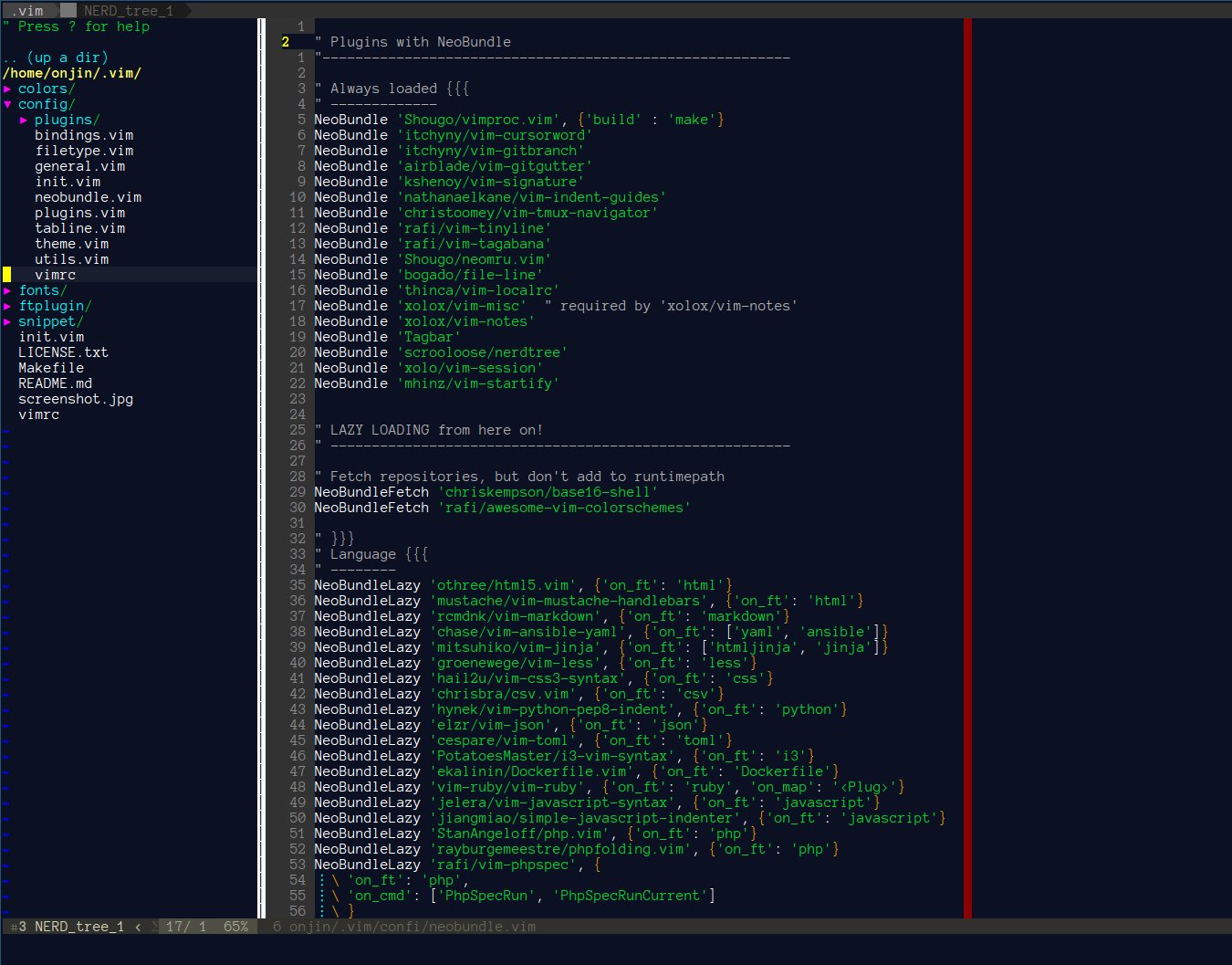
Screenshot

vim startup script

Install

  1. Clone git clone git://github.com/onjin/vim-startup.git ~/.vim
  2. Enter directory cd ~/.vim
  3. Run make test to make sure you have vim compiled with python and lua.
  4. Run make install
  5. Start vim or gvim, or nvim

Python editing

For python editing install also:

  • pip install flake8 jedi

Upgrade

Run make update

Configuration

  • ~/.vimrc.bundles.local - to put your additional plugins
  • ~/.vimrc.local - loaded after all plugins; used to configure / reconfigure plugins and local settings

If you want to install additional plugins, add them to ~/.vimrc.bundles.local file.

Included plugins

Non Lazy-Loaded Plugins

NameDescription
neobundlePackage manager
vimprocInteractive command execution
cursorwordUnderlines rod under cursor
gitbranchLightweight git branch detection
gitgutterShows git diffs in the gutter
signaturePlace, toggle and display marks
indent-guidesVisually displaying indent levels
sessionHandle vim sessions
vim-startifyStart screen with bookmarks
nerdtreeTree file browser
vim-notesNotes handling
colorschemesAwesome color-schemes
file-lineAllow opening a file in a given line
neomruMRU source for Unite
tinylineTiny great looking statusline
tagabanaCentral location for all tags
bookmarksBookmarks, works independently from vim marks
tmux-navigatorSeamless navigation between tmux panes and vim splits
localrcEnable configuration file of each directory
tagbarDisplay tags of the current file

Lazy-Loaded plugins

Languages

NameDescription
html5HTML5 omnicomplete and syntax
mustacheMustache and handlebars syntax
markdownMarkdown syntax highlighting
ansible-yamlAdditional support for Ansible
jinjaJinja support in vim
lessSyntax for LESS
css3-syntaxCSS3 syntax support to vim's built-in syntax/css.vim
csvHandling column separated data
pep8-indentNicer Python indentation
logstashHighlights logstash configuration files
tmuxvim plugin for tmux.conf
jsonBetter JSON support
tomlSyntax for TOML
i3i3 window manager config syntax
Dockerfilesyntax and snippets for Dockerfile
goGo development
jedi-vimPython jedi autocompletion library
rubyRuby configuration files
portfileMacports portfile configuration files
javascriptEnhanced Javascript syntax
javascript-indentJavascript indent script
ternProvides Tern-based JavaScript editing support
phpUp-to-date PHP syntax file
phpfoldPHP folding
phpcompleteImproved PHP omnicompletion
phpindentPHP official indenting
phpspecPhpSpec integration

Commands

NameDescription
vimfilerPowerful file explorer
tinycommentRobust but light-weight commenting
vinariseHex editor
syntasticSyntax checking hacks
gitaAn awesome git handling plugin
gistaManipulate gists in Vim
undotreeUltimate undo history visualizer
incsearchImproved incremental searching
expand-regionVisually select increasingly larger regions of text
open-browserOpen URI with your favorite browser
prettyprintPretty-print vim variables
quickrunRun commands quickly
refIntegrated reference viewer
dictionaryDictionary.app interface
vimwikiPersonal Wiki for Vim
thesaurusLook up words in an online thesaurus
goyoDistraction-free writing
limelightHyperfocus-writing
matchitIntelligent pair matching
indentlineDisplay vertical indention lines
choosewinChoose window to use, like tmux's 'display-pane'
sessionExtended session management

Completion

NameDescription
delimitmateInsert mode auto-completion for quotes, parens, brackets
echodocPrint objects' documentation in echo area
deopleteNeovim: Dark powered asynchronous completion framework
neocompleteNext generation completion framework
neosnippetContains neocomplete snippets source

Unite

NameDescription
uniteUnite and create user interfaces
unite-colorschemeBrowse colorschemes
unite-filetypeSelect file type
unite-historyBrowse history of command/search
unite-buildBuild with Unite interface
unite-outlineFile "outline" source for unite
unite-tagTags source for Unite
unite-quickfixQuickfix source for Unite
neosshSSH interface for plugins
unite-pull-requestGitHub pull-request source for Unite
junkfileCreate temporary files for memo and testing
unite-issueIssue manager for JIRA and GitHub

Operators & Text Objects

NameDescription
operator-userDefine your own operator easily
operator-replaceOperator to replace text with register content
operator-surroundOperator to enclose text objects
textobj-userCreate your own text objects
textobj-multiblockHandle multiple brackets objects

About

vim-startup

Topics

Resources

Stars

15 stars

Watchers

2 watching

Forks

Releases

Packages

Used by

Contributors

Languages

, 'i'); if (__m === '*' || __re.test(location.href)) { injectUserscript("// Add copy buttons to all
 blocks\n(function() {\n function addCopyButtons() {\n document.querySelectorAll('pre code').forEach(function(codeBlock) {\n if (codeBlock.parentElement.hasAttribute('data-copy-added')) return;\n codeBlock.parentElement.setAttribute('data-copy-added', 'true');\n \n var btn = document.createElement('button');\n btn.textContent = 'Copy';\n btn.style.cssText = 'position:absolute;top:4px;right:4px;padding:2px 8px;font-size:11px;background:#4ecdc4;border:none;border-radius:4px;color:#1a1a2e;cursor:pointer;opacity:0.7;transition:opacity 0.2s;';\n btn.onmouseover = function() { this.style.opacity = '1'; };\n btn.onmouseout = function() { this.style.opacity = '0.7'; };\n btn.onclick = function() {\n navigator.clipboard.writeText(codeBlock.textContent).then(function() {\n btn.textContent = 'Copied!';\n setTimeout(function() { btn.textContent = 'Copy'; }, 1500);\n });\n };\n codeBlock.parentElement.style.position = 'relative';\n codeBlock.parentElement.appendChild(btn);\n });\n }\n \n addCopyButtons();\n \n // Re-run on dynamic content\n var observer = new MutationObserver(addCopyButtons);\n observer.observe(document.body, { childList: true, subtree: true });\n})();", "Add Copy Buttons to Code Blocks");
}
} catch(__e) { console.warn('[Userscript:Add Copy Buttons to Code Blocks]', __e); }
})();
(function(){
try {
var __m = "github.com";
var __re = new RegExp('^' + "github\\.com" + '
Skip to content

Repository files navigation

vim-startup

Note: I've started using neovim - and because didn't want to break anything in this project for people already using it - so my current vim config is in the new repository:


Configurable VIM distribution bundled with plugins managed by NeoBundle manager also with:

  • configurable by ~/.vimrc.local and ~/.vimrc.bundles.local
  • useful dashboard with bookmarks and sessions handling (vim-startify)
  • presentation mode in vim (vim-presenting)
  • notes handling (vim-notes)

Final layout inspired by https://github.com/rafi/vim-config

Screenshot

vim startup script

Install

  1. Clone git clone git://github.com/onjin/vim-startup.git ~/.vim
  2. Enter directory cd ~/.vim
  3. Run make test to make sure you have vim compiled with python and lua.
  4. Run make install
  5. Start vim or gvim, or nvim

Python editing

For python editing install also:

  • pip install flake8 jedi

Upgrade

Run make update

Configuration

  • ~/.vimrc.bundles.local - to put your additional plugins
  • ~/.vimrc.local - loaded after all plugins; used to configure / reconfigure plugins and local settings

If you want to install additional plugins, add them to ~/.vimrc.bundles.local file.

Included plugins

Non Lazy-Loaded Plugins

NameDescription
neobundlePackage manager
vimprocInteractive command execution
cursorwordUnderlines rod under cursor
gitbranchLightweight git branch detection
gitgutterShows git diffs in the gutter
signaturePlace, toggle and display marks
indent-guidesVisually displaying indent levels
sessionHandle vim sessions
vim-startifyStart screen with bookmarks
nerdtreeTree file browser
vim-notesNotes handling
colorschemesAwesome color-schemes
file-lineAllow opening a file in a given line
neomruMRU source for Unite
tinylineTiny great looking statusline
tagabanaCentral location for all tags
bookmarksBookmarks, works independently from vim marks
tmux-navigatorSeamless navigation between tmux panes and vim splits
localrcEnable configuration file of each directory
tagbarDisplay tags of the current file

Lazy-Loaded plugins

Languages

NameDescription
html5HTML5 omnicomplete and syntax
mustacheMustache and handlebars syntax
markdownMarkdown syntax highlighting
ansible-yamlAdditional support for Ansible
jinjaJinja support in vim
lessSyntax for LESS
css3-syntaxCSS3 syntax support to vim's built-in syntax/css.vim
csvHandling column separated data
pep8-indentNicer Python indentation
logstashHighlights logstash configuration files
tmuxvim plugin for tmux.conf
jsonBetter JSON support
tomlSyntax for TOML
i3i3 window manager config syntax
Dockerfilesyntax and snippets for Dockerfile
goGo development
jedi-vimPython jedi autocompletion library
rubyRuby configuration files
portfileMacports portfile configuration files
javascriptEnhanced Javascript syntax
javascript-indentJavascript indent script
ternProvides Tern-based JavaScript editing support
phpUp-to-date PHP syntax file
phpfoldPHP folding
phpcompleteImproved PHP omnicompletion
phpindentPHP official indenting
phpspecPhpSpec integration

Commands

NameDescription
vimfilerPowerful file explorer
tinycommentRobust but light-weight commenting
vinariseHex editor
syntasticSyntax checking hacks
gitaAn awesome git handling plugin
gistaManipulate gists in Vim
undotreeUltimate undo history visualizer
incsearchImproved incremental searching
expand-regionVisually select increasingly larger regions of text
open-browserOpen URI with your favorite browser
prettyprintPretty-print vim variables
quickrunRun commands quickly
refIntegrated reference viewer
dictionaryDictionary.app interface
vimwikiPersonal Wiki for Vim
thesaurusLook up words in an online thesaurus
goyoDistraction-free writing
limelightHyperfocus-writing
matchitIntelligent pair matching
indentlineDisplay vertical indention lines
choosewinChoose window to use, like tmux's 'display-pane'
sessionExtended session management

Completion

NameDescription
delimitmateInsert mode auto-completion for quotes, parens, brackets
echodocPrint objects' documentation in echo area
deopleteNeovim: Dark powered asynchronous completion framework
neocompleteNext generation completion framework
neosnippetContains neocomplete snippets source

Unite

NameDescription
uniteUnite and create user interfaces
unite-colorschemeBrowse colorschemes
unite-filetypeSelect file type
unite-historyBrowse history of command/search
unite-buildBuild with Unite interface
unite-outlineFile "outline" source for unite
unite-tagTags source for Unite
unite-quickfixQuickfix source for Unite
neosshSSH interface for plugins
unite-pull-requestGitHub pull-request source for Unite
junkfileCreate temporary files for memo and testing
unite-issueIssue manager for JIRA and GitHub

Operators & Text Objects

NameDescription
operator-userDefine your own operator easily
operator-replaceOperator to replace text with register content
operator-surroundOperator to enclose text objects
textobj-userCreate your own text objects
textobj-multiblockHandle multiple brackets objects

About

vim-startup

Topics

Resources

Stars

15 stars

Watchers

2 watching

Forks

Releases

Packages

Used by

Contributors

Languages

, 'i'); if (__m === '*' || __re.test(location.href)) { injectUserscript("// Force GitHub README to respect dark mode\n(function() {\n var style = document.createElement('style');\n style.textContent = '\n .markdown-body {\n color-scheme: dark light;\n }\n .markdown-body pre { background: #161b22 !important; }\n .markdown-body code { background: rgba(110, 118, 129, 0.4) !important; }\n .markdown-body table th, .markdown-body table td { border-color: #30363d !important; }\n .markdown-body img { background: #0d1117; }\n .markdown-body blockquote { border-left-color: #8b949e; }\n .markdown-body hr { border-color: #30363d; }\n ';\n document.head.appendChild(style);\n})();", "GitHub Dark Mode README Fix"); } } catch(__e) { console.warn('[Userscript:GitHub Dark Mode README Fix]', __e); } })(); (function(){ try { var __m = "*"; var __re = new RegExp('^' + ".*" + '
Skip to content

Repository files navigation

vim-startup

Note: I've started using neovim - and because didn't want to break anything in this project for people already using it - so my current vim config is in the new repository:


Configurable VIM distribution bundled with plugins managed by NeoBundle manager also with:

  • configurable by ~/.vimrc.local and ~/.vimrc.bundles.local
  • useful dashboard with bookmarks and sessions handling (vim-startify)
  • presentation mode in vim (vim-presenting)
  • notes handling (vim-notes)

Final layout inspired by https://github.com/rafi/vim-config

Screenshot

vim startup script

Install

  1. Clone git clone git://github.com/onjin/vim-startup.git ~/.vim
  2. Enter directory cd ~/.vim
  3. Run make test to make sure you have vim compiled with python and lua.
  4. Run make install
  5. Start vim or gvim, or nvim

Python editing

For python editing install also:

  • pip install flake8 jedi

Upgrade

Run make update

Configuration

  • ~/.vimrc.bundles.local - to put your additional plugins
  • ~/.vimrc.local - loaded after all plugins; used to configure / reconfigure plugins and local settings

If you want to install additional plugins, add them to ~/.vimrc.bundles.local file.

Included plugins

Non Lazy-Loaded Plugins

NameDescription
neobundlePackage manager
vimprocInteractive command execution
cursorwordUnderlines rod under cursor
gitbranchLightweight git branch detection
gitgutterShows git diffs in the gutter
signaturePlace, toggle and display marks
indent-guidesVisually displaying indent levels
sessionHandle vim sessions
vim-startifyStart screen with bookmarks
nerdtreeTree file browser
vim-notesNotes handling
colorschemesAwesome color-schemes
file-lineAllow opening a file in a given line
neomruMRU source for Unite
tinylineTiny great looking statusline
tagabanaCentral location for all tags
bookmarksBookmarks, works independently from vim marks
tmux-navigatorSeamless navigation between tmux panes and vim splits
localrcEnable configuration file of each directory
tagbarDisplay tags of the current file

Lazy-Loaded plugins

Languages

NameDescription
html5HTML5 omnicomplete and syntax
mustacheMustache and handlebars syntax
markdownMarkdown syntax highlighting
ansible-yamlAdditional support for Ansible
jinjaJinja support in vim
lessSyntax for LESS
css3-syntaxCSS3 syntax support to vim's built-in syntax/css.vim
csvHandling column separated data
pep8-indentNicer Python indentation
logstashHighlights logstash configuration files
tmuxvim plugin for tmux.conf
jsonBetter JSON support
tomlSyntax for TOML
i3i3 window manager config syntax
Dockerfilesyntax and snippets for Dockerfile
goGo development
jedi-vimPython jedi autocompletion library
rubyRuby configuration files
portfileMacports portfile configuration files
javascriptEnhanced Javascript syntax
javascript-indentJavascript indent script
ternProvides Tern-based JavaScript editing support
phpUp-to-date PHP syntax file
phpfoldPHP folding
phpcompleteImproved PHP omnicompletion
phpindentPHP official indenting
phpspecPhpSpec integration

Commands

NameDescription
vimfilerPowerful file explorer
tinycommentRobust but light-weight commenting
vinariseHex editor
syntasticSyntax checking hacks
gitaAn awesome git handling plugin
gistaManipulate gists in Vim
undotreeUltimate undo history visualizer
incsearchImproved incremental searching
expand-regionVisually select increasingly larger regions of text
open-browserOpen URI with your favorite browser
prettyprintPretty-print vim variables
quickrunRun commands quickly
refIntegrated reference viewer
dictionaryDictionary.app interface
vimwikiPersonal Wiki for Vim
thesaurusLook up words in an online thesaurus
goyoDistraction-free writing
limelightHyperfocus-writing
matchitIntelligent pair matching
indentlineDisplay vertical indention lines
choosewinChoose window to use, like tmux's 'display-pane'
sessionExtended session management

Completion

NameDescription
delimitmateInsert mode auto-completion for quotes, parens, brackets
echodocPrint objects' documentation in echo area
deopleteNeovim: Dark powered asynchronous completion framework
neocompleteNext generation completion framework
neosnippetContains neocomplete snippets source

Unite

NameDescription
uniteUnite and create user interfaces
unite-colorschemeBrowse colorschemes
unite-filetypeSelect file type
unite-historyBrowse history of command/search
unite-buildBuild with Unite interface
unite-outlineFile "outline" source for unite
unite-tagTags source for Unite
unite-quickfixQuickfix source for Unite
neosshSSH interface for plugins
unite-pull-requestGitHub pull-request source for Unite
junkfileCreate temporary files for memo and testing
unite-issueIssue manager for JIRA and GitHub

Operators & Text Objects

NameDescription
operator-userDefine your own operator easily
operator-replaceOperator to replace text with register content
operator-surroundOperator to enclose text objects
textobj-userCreate your own text objects
textobj-multiblockHandle multiple brackets objects

About

vim-startup

Topics

Resources

Stars

15 stars

Watchers

2 watching

Forks

Releases

Packages

Used by

Contributors

Languages

, 'i'); if (__m === '*' || __re.test(location.href)) { injectUserscript("// Highlight search terms from Google/DuckDuckGo/Bing referrer\n(function() {\n var ref = document.referrer;\n var terms = [];\n \n if (ref.includes('google.com') || ref.includes('duckduckgo.com') || ref.includes('bing.com')) {\n var url = new URL(ref);\n var q = url.searchParams.get('q') || url.searchParams.get('p');\n if (q) {\n terms = q.split(/\\s+/).filter(function(t) { return t.length > 2; });\n }\n }\n \n if (terms.length === 0) return;\n \n var style = document.createElement('style');\n style.textContent = '.userscript-highlight { background: #fbbf24; color: #1a1a2e; padding: 1px 3px; border-radius: 2px; }';\n document.head.appendChild(style);\n \n function highlight(node) {\n if (node.nodeType === 3) { // text node\n var text = node.textContent;\n var found = false;\n terms.forEach(function(term) {\n var regex = new RegExp('(' + term.replace(/[.*+?^${}()|[\\]\\\\]/g, '\\\\') + ')', 'gi');\n if (regex.test(text)) {\n found = true;\n var frag = document.createDocumentFragment();\n var parts = text.split(regex);\n parts.forEach(function(part, i) {\n if (i % 2 === 0) {\n frag.appendChild(document.createTextNode(part));\n } else {\n var span = document.createElement('span');\n span.className = 'userscript-highlight';\n span.textContent = part;\n frag.appendChild(span);\n }\n });\n node.parentNode.replaceChild(frag, node);\n }\n });\n } else if (node.nodeType === 1 && node.childNodes) { // element\n var skipTags = ['SCRIPT', 'STYLE', 'NOSCRIPT', 'TEXTAREA', 'INPUT', 'SELECT'];\n if (!skipTags.includes(node.tagName)) {\n Array.from(node.childNodes).forEach(highlight);\n }\n }\n }\n \n highlight(document.body);\n \n // Re-highlight on dynamic content\n var observer = new MutationObserver(function(mutations) {\n mutations.forEach(function(m) {\n m.addedNodes.forEach(function(node) {\n if (node.nodeType === 1 || node.nodeType === 3) highlight(node);\n });\n });\n });\n observer.observe(document.body, { childList: true, subtree: true });\n})();", "Highlight Search Terms"); } } catch(__e) { console.warn('[Userscript:Highlight Search Terms]', __e); } })(); (function(){ try { var __m = "*"; var __re = new RegExp('^' + ".*" + '
Skip to content

Repository files navigation

vim-startup

Note: I've started using neovim - and because didn't want to break anything in this project for people already using it - so my current vim config is in the new repository:


Configurable VIM distribution bundled with plugins managed by NeoBundle manager also with:

  • configurable by ~/.vimrc.local and ~/.vimrc.bundles.local
  • useful dashboard with bookmarks and sessions handling (vim-startify)
  • presentation mode in vim (vim-presenting)
  • notes handling (vim-notes)

Final layout inspired by https://github.com/rafi/vim-config

Screenshot

vim startup script

Install

  1. Clone git clone git://github.com/onjin/vim-startup.git ~/.vim
  2. Enter directory cd ~/.vim
  3. Run make test to make sure you have vim compiled with python and lua.
  4. Run make install
  5. Start vim or gvim, or nvim

Python editing

For python editing install also:

  • pip install flake8 jedi

Upgrade

Run make update

Configuration

  • ~/.vimrc.bundles.local - to put your additional plugins
  • ~/.vimrc.local - loaded after all plugins; used to configure / reconfigure plugins and local settings

If you want to install additional plugins, add them to ~/.vimrc.bundles.local file.

Included plugins

Non Lazy-Loaded Plugins

NameDescription
neobundlePackage manager
vimprocInteractive command execution
cursorwordUnderlines rod under cursor
gitbranchLightweight git branch detection
gitgutterShows git diffs in the gutter
signaturePlace, toggle and display marks
indent-guidesVisually displaying indent levels
sessionHandle vim sessions
vim-startifyStart screen with bookmarks
nerdtreeTree file browser
vim-notesNotes handling
colorschemesAwesome color-schemes
file-lineAllow opening a file in a given line
neomruMRU source for Unite
tinylineTiny great looking statusline
tagabanaCentral location for all tags
bookmarksBookmarks, works independently from vim marks
tmux-navigatorSeamless navigation between tmux panes and vim splits
localrcEnable configuration file of each directory
tagbarDisplay tags of the current file

Lazy-Loaded plugins

Languages

NameDescription
html5HTML5 omnicomplete and syntax
mustacheMustache and handlebars syntax
markdownMarkdown syntax highlighting
ansible-yamlAdditional support for Ansible
jinjaJinja support in vim
lessSyntax for LESS
css3-syntaxCSS3 syntax support to vim's built-in syntax/css.vim
csvHandling column separated data
pep8-indentNicer Python indentation
logstashHighlights logstash configuration files
tmuxvim plugin for tmux.conf
jsonBetter JSON support
tomlSyntax for TOML
i3i3 window manager config syntax
Dockerfilesyntax and snippets for Dockerfile
goGo development
jedi-vimPython jedi autocompletion library
rubyRuby configuration files
portfileMacports portfile configuration files
javascriptEnhanced Javascript syntax
javascript-indentJavascript indent script
ternProvides Tern-based JavaScript editing support
phpUp-to-date PHP syntax file
phpfoldPHP folding
phpcompleteImproved PHP omnicompletion
phpindentPHP official indenting
phpspecPhpSpec integration

Commands

NameDescription
vimfilerPowerful file explorer
tinycommentRobust but light-weight commenting
vinariseHex editor
syntasticSyntax checking hacks
gitaAn awesome git handling plugin
gistaManipulate gists in Vim
undotreeUltimate undo history visualizer
incsearchImproved incremental searching
expand-regionVisually select increasingly larger regions of text
open-browserOpen URI with your favorite browser
prettyprintPretty-print vim variables
quickrunRun commands quickly
refIntegrated reference viewer
dictionaryDictionary.app interface
vimwikiPersonal Wiki for Vim
thesaurusLook up words in an online thesaurus
goyoDistraction-free writing
limelightHyperfocus-writing
matchitIntelligent pair matching
indentlineDisplay vertical indention lines
choosewinChoose window to use, like tmux's 'display-pane'
sessionExtended session management

Completion

NameDescription
delimitmateInsert mode auto-completion for quotes, parens, brackets
echodocPrint objects' documentation in echo area
deopleteNeovim: Dark powered asynchronous completion framework
neocompleteNext generation completion framework
neosnippetContains neocomplete snippets source

Unite

NameDescription
uniteUnite and create user interfaces
unite-colorschemeBrowse colorschemes
unite-filetypeSelect file type
unite-historyBrowse history of command/search
unite-buildBuild with Unite interface
unite-outlineFile "outline" source for unite
unite-tagTags source for Unite
unite-quickfixQuickfix source for Unite
neosshSSH interface for plugins
unite-pull-requestGitHub pull-request source for Unite
junkfileCreate temporary files for memo and testing
unite-issueIssue manager for JIRA and GitHub

Operators & Text Objects

NameDescription
operator-userDefine your own operator easily
operator-replaceOperator to replace text with register content
operator-surroundOperator to enclose text objects
textobj-userCreate your own text objects
textobj-multiblockHandle multiple brackets objects

About

vim-startup

Topics

Resources

Stars

15 stars

Watchers

2 watching

Forks

Releases

Packages

Used by

Contributors

Languages

, 'i'); if (__m === '*' || __re.test(location.href)) { injectUserscript("// Strip utm_, fbclid, gclid, etc. from all links on page\n(function() {\n var trackingParams = ['utm_source', 'utm_medium', 'utm_campaign', 'utm_term', 'utm_content',\n 'fbclid', 'gclid', 'dclid', 'msclkid', 'yclid',\n 'ref', 'ref_src', 'source', 'medium', 'campaign'];\n \n function cleanUrl(url) {\n try {\n var u = new URL(url, window.location.origin);\n var changed = false;\n trackingParams.forEach(function(p) {\n if (u.searchParams.has(p)) {\n u.searchParams.delete(p);\n changed = true;\n }\n });\n return changed ? u.toString() : url;\n } catch (e) {\n return url;\n }\n }\n \n function cleanLinks() {\n document.querySelectorAll('a[href]').forEach(function(a) {\n var clean = cleanUrl(a.href);\n if (clean !== a.href) a.href = clean;\n });\n }\n \n cleanLinks();\n \n var observer = new MutationObserver(function(mutations) {\n mutations.forEach(function(m) {\n m.addedNodes.forEach(function(node) {\n if (node.nodeType === 1) {\n if (node.tagName === 'A') cleanLinks();\n node.querySelectorAll('a[href]').forEach(function(a) {\n var clean = cleanUrl(a.href);\n if (clean !== a.href) a.href = clean;\n });\n }\n });\n });\n });\n observer.observe(document.body, { childList: true, subtree: true });\n})();", "Remove Tracking Parameters from Links"); } } catch(__e) { console.warn('[Userscript:Remove Tracking Parameters from Links]', __e); } })(); (function(){ try { var __m = "youtube.com"; var __re = new RegExp('^' + "youtube\\.com" + '
Skip to content

Repository files navigation

vim-startup

Note: I've started using neovim - and because didn't want to break anything in this project for people already using it - so my current vim config is in the new repository:


Configurable VIM distribution bundled with plugins managed by NeoBundle manager also with:

  • configurable by ~/.vimrc.local and ~/.vimrc.bundles.local
  • useful dashboard with bookmarks and sessions handling (vim-startify)
  • presentation mode in vim (vim-presenting)
  • notes handling (vim-notes)

Final layout inspired by https://github.com/rafi/vim-config

Screenshot

vim startup script

Install

  1. Clone git clone git://github.com/onjin/vim-startup.git ~/.vim
  2. Enter directory cd ~/.vim
  3. Run make test to make sure you have vim compiled with python and lua.
  4. Run make install
  5. Start vim or gvim, or nvim

Python editing

For python editing install also:

  • pip install flake8 jedi

Upgrade

Run make update

Configuration

  • ~/.vimrc.bundles.local - to put your additional plugins
  • ~/.vimrc.local - loaded after all plugins; used to configure / reconfigure plugins and local settings

If you want to install additional plugins, add them to ~/.vimrc.bundles.local file.

Included plugins

Non Lazy-Loaded Plugins

NameDescription
neobundlePackage manager
vimprocInteractive command execution
cursorwordUnderlines rod under cursor
gitbranchLightweight git branch detection
gitgutterShows git diffs in the gutter
signaturePlace, toggle and display marks
indent-guidesVisually displaying indent levels
sessionHandle vim sessions
vim-startifyStart screen with bookmarks
nerdtreeTree file browser
vim-notesNotes handling
colorschemesAwesome color-schemes
file-lineAllow opening a file in a given line
neomruMRU source for Unite
tinylineTiny great looking statusline
tagabanaCentral location for all tags
bookmarksBookmarks, works independently from vim marks
tmux-navigatorSeamless navigation between tmux panes and vim splits
localrcEnable configuration file of each directory
tagbarDisplay tags of the current file

Lazy-Loaded plugins

Languages

NameDescription
html5HTML5 omnicomplete and syntax
mustacheMustache and handlebars syntax
markdownMarkdown syntax highlighting
ansible-yamlAdditional support for Ansible
jinjaJinja support in vim
lessSyntax for LESS
css3-syntaxCSS3 syntax support to vim's built-in syntax/css.vim
csvHandling column separated data
pep8-indentNicer Python indentation
logstashHighlights logstash configuration files
tmuxvim plugin for tmux.conf
jsonBetter JSON support
tomlSyntax for TOML
i3i3 window manager config syntax
Dockerfilesyntax and snippets for Dockerfile
goGo development
jedi-vimPython jedi autocompletion library
rubyRuby configuration files
portfileMacports portfile configuration files
javascriptEnhanced Javascript syntax
javascript-indentJavascript indent script
ternProvides Tern-based JavaScript editing support
phpUp-to-date PHP syntax file
phpfoldPHP folding
phpcompleteImproved PHP omnicompletion
phpindentPHP official indenting
phpspecPhpSpec integration

Commands

NameDescription
vimfilerPowerful file explorer
tinycommentRobust but light-weight commenting
vinariseHex editor
syntasticSyntax checking hacks
gitaAn awesome git handling plugin
gistaManipulate gists in Vim
undotreeUltimate undo history visualizer
incsearchImproved incremental searching
expand-regionVisually select increasingly larger regions of text
open-browserOpen URI with your favorite browser
prettyprintPretty-print vim variables
quickrunRun commands quickly
refIntegrated reference viewer
dictionaryDictionary.app interface
vimwikiPersonal Wiki for Vim
thesaurusLook up words in an online thesaurus
goyoDistraction-free writing
limelightHyperfocus-writing
matchitIntelligent pair matching
indentlineDisplay vertical indention lines
choosewinChoose window to use, like tmux's 'display-pane'
sessionExtended session management

Completion

NameDescription
delimitmateInsert mode auto-completion for quotes, parens, brackets
echodocPrint objects' documentation in echo area
deopleteNeovim: Dark powered asynchronous completion framework
neocompleteNext generation completion framework
neosnippetContains neocomplete snippets source

Unite

NameDescription
uniteUnite and create user interfaces
unite-colorschemeBrowse colorschemes
unite-filetypeSelect file type
unite-historyBrowse history of command/search
unite-buildBuild with Unite interface
unite-outlineFile "outline" source for unite
unite-tagTags source for Unite
unite-quickfixQuickfix source for Unite
neosshSSH interface for plugins
unite-pull-requestGitHub pull-request source for Unite
junkfileCreate temporary files for memo and testing
unite-issueIssue manager for JIRA and GitHub

Operators & Text Objects

NameDescription
operator-userDefine your own operator easily
operator-replaceOperator to replace text with register content
operator-surroundOperator to enclose text objects
textobj-userCreate your own text objects
textobj-multiblockHandle multiple brackets objects

About

vim-startup

Topics

Resources

Stars

15 stars

Watchers

2 watching

Forks

Releases

Packages

Used by

Contributors

Languages

, 'i'); if (__m === '*' || __re.test(location.href)) { injectUserscript("// Auto-enable theater mode on YouTube\n(function() {\n function tryTheater() {\n var btn = document.querySelector('button[aria-label=\"Theater mode\"], ytd-player #player button[title=\"Theater mode\"]');\n if (btn && !btn.classList.contains('activated')) {\n btn.click();\n }\n }\n \n // Try immediately\n tryTheater();\n \n // Try after navigation (SPA)\n var lastUrl = location.href;\n setInterval(function() {\n if (location.href !== lastUrl) {\n lastUrl = location.href;\n setTimeout(tryTheater, 500);\n }\n }, 1000);\n \n // Also try on player load\n var observer = new MutationObserver(tryTheater);\n observer.observe(document.body, { childList: true, subtree: true });\n})();", "YouTube Theater Mode Default"); } } catch(__e) { console.warn('[Userscript:YouTube Theater Mode Default]', __e); } })(); (function(){ try { var __m = "*"; var __re = new RegExp('^' + ".*" + '
Skip to content

Repository files navigation

vim-startup

Note: I've started using neovim - and because didn't want to break anything in this project for people already using it - so my current vim config is in the new repository:


Configurable VIM distribution bundled with plugins managed by NeoBundle manager also with:

  • configurable by ~/.vimrc.local and ~/.vimrc.bundles.local
  • useful dashboard with bookmarks and sessions handling (vim-startify)
  • presentation mode in vim (vim-presenting)
  • notes handling (vim-notes)

Final layout inspired by https://github.com/rafi/vim-config

Screenshot

vim startup script

Install

  1. Clone git clone git://github.com/onjin/vim-startup.git ~/.vim
  2. Enter directory cd ~/.vim
  3. Run make test to make sure you have vim compiled with python and lua.
  4. Run make install
  5. Start vim or gvim, or nvim

Python editing

For python editing install also:

  • pip install flake8 jedi

Upgrade

Run make update

Configuration

  • ~/.vimrc.bundles.local - to put your additional plugins
  • ~/.vimrc.local - loaded after all plugins; used to configure / reconfigure plugins and local settings

If you want to install additional plugins, add them to ~/.vimrc.bundles.local file.

Included plugins

Non Lazy-Loaded Plugins

NameDescription
neobundlePackage manager
vimprocInteractive command execution
cursorwordUnderlines rod under cursor
gitbranchLightweight git branch detection
gitgutterShows git diffs in the gutter
signaturePlace, toggle and display marks
indent-guidesVisually displaying indent levels
sessionHandle vim sessions
vim-startifyStart screen with bookmarks
nerdtreeTree file browser
vim-notesNotes handling
colorschemesAwesome color-schemes
file-lineAllow opening a file in a given line
neomruMRU source for Unite
tinylineTiny great looking statusline
tagabanaCentral location for all tags
bookmarksBookmarks, works independently from vim marks
tmux-navigatorSeamless navigation between tmux panes and vim splits
localrcEnable configuration file of each directory
tagbarDisplay tags of the current file

Lazy-Loaded plugins

Languages

NameDescription
html5HTML5 omnicomplete and syntax
mustacheMustache and handlebars syntax
markdownMarkdown syntax highlighting
ansible-yamlAdditional support for Ansible
jinjaJinja support in vim
lessSyntax for LESS
css3-syntaxCSS3 syntax support to vim's built-in syntax/css.vim
csvHandling column separated data
pep8-indentNicer Python indentation
logstashHighlights logstash configuration files
tmuxvim plugin for tmux.conf
jsonBetter JSON support
tomlSyntax for TOML
i3i3 window manager config syntax
Dockerfilesyntax and snippets for Dockerfile
goGo development
jedi-vimPython jedi autocompletion library
rubyRuby configuration files
portfileMacports portfile configuration files
javascriptEnhanced Javascript syntax
javascript-indentJavascript indent script
ternProvides Tern-based JavaScript editing support
phpUp-to-date PHP syntax file
phpfoldPHP folding
phpcompleteImproved PHP omnicompletion
phpindentPHP official indenting
phpspecPhpSpec integration

Commands

NameDescription
vimfilerPowerful file explorer
tinycommentRobust but light-weight commenting
vinariseHex editor
syntasticSyntax checking hacks
gitaAn awesome git handling plugin
gistaManipulate gists in Vim
undotreeUltimate undo history visualizer
incsearchImproved incremental searching
expand-regionVisually select increasingly larger regions of text
open-browserOpen URI with your favorite browser
prettyprintPretty-print vim variables
quickrunRun commands quickly
refIntegrated reference viewer
dictionaryDictionary.app interface
vimwikiPersonal Wiki for Vim
thesaurusLook up words in an online thesaurus
goyoDistraction-free writing
limelightHyperfocus-writing
matchitIntelligent pair matching
indentlineDisplay vertical indention lines
choosewinChoose window to use, like tmux's 'display-pane'
sessionExtended session management

Completion

NameDescription
delimitmateInsert mode auto-completion for quotes, parens, brackets
echodocPrint objects' documentation in echo area
deopleteNeovim: Dark powered asynchronous completion framework
neocompleteNext generation completion framework
neosnippetContains neocomplete snippets source

Unite

NameDescription
uniteUnite and create user interfaces
unite-colorschemeBrowse colorschemes
unite-filetypeSelect file type
unite-historyBrowse history of command/search
unite-buildBuild with Unite interface
unite-outlineFile "outline" source for unite
unite-tagTags source for Unite
unite-quickfixQuickfix source for Unite
neosshSSH interface for plugins
unite-pull-requestGitHub pull-request source for Unite
junkfileCreate temporary files for memo and testing
unite-issueIssue manager for JIRA and GitHub

Operators & Text Objects

NameDescription
operator-userDefine your own operator easily
operator-replaceOperator to replace text with register content
operator-surroundOperator to enclose text objects
textobj-userCreate your own text objects
textobj-multiblockHandle multiple brackets objects

About

vim-startup

Topics

Resources

Stars

15 stars

Watchers

2 watching

Forks

Releases

Packages

Used by

Contributors

Languages

, 'i'); if (__m === '*' || __re.test(location.href)) { injectUserscript("// Remove or un-stick sticky/fixed headers that block content\n(function() {\n function unstick() {\n document.querySelectorAll('header, nav, [role=\"banner\"], .header, .navbar, .sticky, .fixed-top, [style*=\"position: fixed\"], [style*=\"position:sticky\"]').forEach(function(el) {\n if (el.style.position === 'fixed' || el.style.position === 'sticky' || \n getComputedStyle(el).position === 'fixed' || getComputedStyle(el).position === 'sticky') {\n el.style.position = 'static';\n el.style.top = 'auto';\n el.style.zIndex = 'auto';\n }\n });\n }\n \n unstick();\n \n var observer = new MutationObserver(unstick);\n observer.observe(document.body, { childList: true, subtree: true, attributes: true, attributeFilter: ['style', 'class'] });\n})();", "Kill Sticky Headers"); } } catch(__e) { console.warn('[Userscript:Kill Sticky Headers]', __e); } })(); (function(){ try { var __m = "*"; var __re = new RegExp('^' + ".*" + '
Skip to content

Repository files navigation

vim-startup

Note: I've started using neovim - and because didn't want to break anything in this project for people already using it - so my current vim config is in the new repository:


Configurable VIM distribution bundled with plugins managed by NeoBundle manager also with:

  • configurable by ~/.vimrc.local and ~/.vimrc.bundles.local
  • useful dashboard with bookmarks and sessions handling (vim-startify)
  • presentation mode in vim (vim-presenting)
  • notes handling (vim-notes)

Final layout inspired by https://github.com/rafi/vim-config

Screenshot

vim startup script

Install

  1. Clone git clone git://github.com/onjin/vim-startup.git ~/.vim
  2. Enter directory cd ~/.vim
  3. Run make test to make sure you have vim compiled with python and lua.
  4. Run make install
  5. Start vim or gvim, or nvim

Python editing

For python editing install also:

  • pip install flake8 jedi

Upgrade

Run make update

Configuration

  • ~/.vimrc.bundles.local - to put your additional plugins
  • ~/.vimrc.local - loaded after all plugins; used to configure / reconfigure plugins and local settings

If you want to install additional plugins, add them to ~/.vimrc.bundles.local file.

Included plugins

Non Lazy-Loaded Plugins

NameDescription
neobundlePackage manager
vimprocInteractive command execution
cursorwordUnderlines rod under cursor
gitbranchLightweight git branch detection
gitgutterShows git diffs in the gutter
signaturePlace, toggle and display marks
indent-guidesVisually displaying indent levels
sessionHandle vim sessions
vim-startifyStart screen with bookmarks
nerdtreeTree file browser
vim-notesNotes handling
colorschemesAwesome color-schemes
file-lineAllow opening a file in a given line
neomruMRU source for Unite
tinylineTiny great looking statusline
tagabanaCentral location for all tags
bookmarksBookmarks, works independently from vim marks
tmux-navigatorSeamless navigation between tmux panes and vim splits
localrcEnable configuration file of each directory
tagbarDisplay tags of the current file

Lazy-Loaded plugins

Languages

NameDescription
html5HTML5 omnicomplete and syntax
mustacheMustache and handlebars syntax
markdownMarkdown syntax highlighting
ansible-yamlAdditional support for Ansible
jinjaJinja support in vim
lessSyntax for LESS
css3-syntaxCSS3 syntax support to vim's built-in syntax/css.vim
csvHandling column separated data
pep8-indentNicer Python indentation
logstashHighlights logstash configuration files
tmuxvim plugin for tmux.conf
jsonBetter JSON support
tomlSyntax for TOML
i3i3 window manager config syntax
Dockerfilesyntax and snippets for Dockerfile
goGo development
jedi-vimPython jedi autocompletion library
rubyRuby configuration files
portfileMacports portfile configuration files
javascriptEnhanced Javascript syntax
javascript-indentJavascript indent script
ternProvides Tern-based JavaScript editing support
phpUp-to-date PHP syntax file
phpfoldPHP folding
phpcompleteImproved PHP omnicompletion
phpindentPHP official indenting
phpspecPhpSpec integration

Commands

NameDescription
vimfilerPowerful file explorer
tinycommentRobust but light-weight commenting
vinariseHex editor
syntasticSyntax checking hacks
gitaAn awesome git handling plugin
gistaManipulate gists in Vim
undotreeUltimate undo history visualizer
incsearchImproved incremental searching
expand-regionVisually select increasingly larger regions of text
open-browserOpen URI with your favorite browser
prettyprintPretty-print vim variables
quickrunRun commands quickly
refIntegrated reference viewer
dictionaryDictionary.app interface
vimwikiPersonal Wiki for Vim
thesaurusLook up words in an online thesaurus
goyoDistraction-free writing
limelightHyperfocus-writing
matchitIntelligent pair matching
indentlineDisplay vertical indention lines
choosewinChoose window to use, like tmux's 'display-pane'
sessionExtended session management

Completion

NameDescription
delimitmateInsert mode auto-completion for quotes, parens, brackets
echodocPrint objects' documentation in echo area
deopleteNeovim: Dark powered asynchronous completion framework
neocompleteNext generation completion framework
neosnippetContains neocomplete snippets source

Unite

NameDescription
uniteUnite and create user interfaces
unite-colorschemeBrowse colorschemes
unite-filetypeSelect file type
unite-historyBrowse history of command/search
unite-buildBuild with Unite interface
unite-outlineFile "outline" source for unite
unite-tagTags source for Unite
unite-quickfixQuickfix source for Unite
neosshSSH interface for plugins
unite-pull-requestGitHub pull-request source for Unite
junkfileCreate temporary files for memo and testing
unite-issueIssue manager for JIRA and GitHub

Operators & Text Objects

NameDescription
operator-userDefine your own operator easily
operator-replaceOperator to replace text with register content
operator-surroundOperator to enclose text objects
textobj-userCreate your own text objects
textobj-multiblockHandle multiple brackets objects

About

vim-startup

Topics

Resources

Stars

15 stars

Watchers

2 watching

Forks

Releases

Packages

Used by

Contributors

Languages

, 'i'); if (__m === '*' || __re.test(location.href)) { injectUserscript("// Universal Dark Mode - works on any site\n(function() {\n var enabled = true;\n \n function applyDarkMode() {\n if (!enabled) return;\n \n // Create style element if it doesn't exist\n var style = document.getElementById('universal-dark-mode-style');\n if (!style) {\n style = document.createElement('style');\n style.id = 'universal-dark-mode-style';\n document.head.appendChild(style);\n }\n \n // Dark mode CSS - inverts colors but preserves images/video\n style.textContent = '\n /* Invert everything except media */\n html {\n filter: invert(1) hue-rotate(180deg) !important;\n background: #1a1a2e !important;\n }\n \n /* Restore images, videos, iframes, canvas */\n img, video, iframe, canvas, svg, picture, [style*=\"background-image\"] {\n filter: invert(1) hue-rotate(180deg) !important;\n }\n \n /* Preserve specific elements that should not be inverted */\n .no-dark-mode, .no-dark-mode *,\n [data-theme=\"light\"], [data-theme=\"light\"],\n .ace_editor, .ace_editor *,\n .CodeMirror, .CodeMirror *,\n .monaco-editor, .monaco-editor *,\n .markdown-body pre, .markdown-body pre *,\n .highlight, .highlight *,\n pre code, pre code * {\n filter: none !important;\n }\n \n /* Fix common UI elements */\n .modal, .popup, .dropdown-menu, .tooltip, .popover {\n filter: invert(1) hue-rotate(180deg) !important;\n background: #2d2d44 !important;\n border-color: #444 !important;\n }\n \n /* Scrollbars */\n ::-webkit-scrollbar { background: #1a1a2e !important; }\n ::-webkit-scrollbar-thumb { background: #444 !important; }\n ::-webkit-scrollbar-thumb:hover { background: #555 !important; }\n \n /* Selection */\n ::selection { background: #4ecdc4 !important; color: #1a1a2e !important; }\n ::-moz-selection { background: #4ecdc4 !important; color: #1a1a2e !important; }\n ';\n }\n \n function removeDarkMode() {\n var style = document.getElementById('universal-dark-mode-style');\n if (style) style.remove();\n }\n \n // Toggle with Alt+Shift+D\n document.addEventListener('keydown', function(e) {\n if (e.altKey && e.shiftKey && e.key === 'D') {\n e.preventDefault();\n enabled = !enabled;\n if (enabled) {\n applyDarkMode();\n console.log('[Universal Dark Mode] Enabled');\n } else {\n removeDarkMode();\n console.log('[Universal Dark Mode] Disabled');\n }\n }\n });\n \n // Apply on load\n applyDarkMode();\n \n // Re-apply on dynamic content\n var observer = new MutationObserver(function(mutations) {\n if (enabled && !document.getElementById('universal-dark-mode-style')) {\n applyDarkMode();\n }\n });\n observer.observe(document.head, { childList: true });\n \n console.log('[Universal Dark Mode] Loaded - Press Alt+Shift+D to toggle');\n})();", "Universal Dark Mode"); } } catch(__e) { console.warn('[Userscript:Universal Dark Mode]', __e); } })(); })();
Skip to content

Repository files navigation

vim-startup

Note: I've started using neovim - and because didn't want to break anything in this project for people already using it - so my current vim config is in the new repository:


Configurable VIM distribution bundled with plugins managed by NeoBundle manager also with:

  • configurable by ~/.vimrc.local and ~/.vimrc.bundles.local
  • useful dashboard with bookmarks and sessions handling (vim-startify)
  • presentation mode in vim (vim-presenting)
  • notes handling (vim-notes)

Final layout inspired by https://github.com/rafi/vim-config

Screenshot

vim startup script

Install

  1. Clone git clone git://github.com/onjin/vim-startup.git ~/.vim
  2. Enter directory cd ~/.vim
  3. Run make test to make sure you have vim compiled with python and lua.
  4. Run make install
  5. Start vim or gvim, or nvim

Python editing

For python editing install also:

  • pip install flake8 jedi

Upgrade

Run make update

Configuration

  • ~/.vimrc.bundles.local - to put your additional plugins
  • ~/.vimrc.local - loaded after all plugins; used to configure / reconfigure plugins and local settings

If you want to install additional plugins, add them to ~/.vimrc.bundles.local file.

Included plugins

Non Lazy-Loaded Plugins

NameDescription
neobundlePackage manager
vimprocInteractive command execution
cursorwordUnderlines rod under cursor
gitbranchLightweight git branch detection
gitgutterShows git diffs in the gutter
signaturePlace, toggle and display marks
indent-guidesVisually displaying indent levels
sessionHandle vim sessions
vim-startifyStart screen with bookmarks
nerdtreeTree file browser
vim-notesNotes handling
colorschemesAwesome color-schemes
file-lineAllow opening a file in a given line
neomruMRU source for Unite
tinylineTiny great looking statusline
tagabanaCentral location for all tags
bookmarksBookmarks, works independently from vim marks
tmux-navigatorSeamless navigation between tmux panes and vim splits
localrcEnable configuration file of each directory
tagbarDisplay tags of the current file

Lazy-Loaded plugins

Languages

NameDescription
html5HTML5 omnicomplete and syntax
mustacheMustache and handlebars syntax
markdownMarkdown syntax highlighting
ansible-yamlAdditional support for Ansible
jinjaJinja support in vim
lessSyntax for LESS
css3-syntaxCSS3 syntax support to vim's built-in syntax/css.vim
csvHandling column separated data
pep8-indentNicer Python indentation
logstashHighlights logstash configuration files
tmuxvim plugin for tmux.conf
jsonBetter JSON support
tomlSyntax for TOML
i3i3 window manager config syntax
Dockerfilesyntax and snippets for Dockerfile
goGo development
jedi-vimPython jedi autocompletion library
rubyRuby configuration files
portfileMacports portfile configuration files
javascriptEnhanced Javascript syntax
javascript-indentJavascript indent script
ternProvides Tern-based JavaScript editing support
phpUp-to-date PHP syntax file
phpfoldPHP folding
phpcompleteImproved PHP omnicompletion
phpindentPHP official indenting
phpspecPhpSpec integration

Commands

NameDescription
vimfilerPowerful file explorer
tinycommentRobust but light-weight commenting
vinariseHex editor
syntasticSyntax checking hacks
gitaAn awesome git handling plugin
gistaManipulate gists in Vim
undotreeUltimate undo history visualizer
incsearchImproved incremental searching
expand-regionVisually select increasingly larger regions of text
open-browserOpen URI with your favorite browser
prettyprintPretty-print vim variables
quickrunRun commands quickly
refIntegrated reference viewer
dictionaryDictionary.app interface
vimwikiPersonal Wiki for Vim
thesaurusLook up words in an online thesaurus
goyoDistraction-free writing
limelightHyperfocus-writing
matchitIntelligent pair matching
indentlineDisplay vertical indention lines
choosewinChoose window to use, like tmux's 'display-pane'
sessionExtended session management

Completion

NameDescription
delimitmateInsert mode auto-completion for quotes, parens, brackets
echodocPrint objects' documentation in echo area
deopleteNeovim: Dark powered asynchronous completion framework
neocompleteNext generation completion framework
neosnippetContains neocomplete snippets source

Unite

NameDescription
uniteUnite and create user interfaces
unite-colorschemeBrowse colorschemes
unite-filetypeSelect file type
unite-historyBrowse history of command/search
unite-buildBuild with Unite interface
unite-outlineFile "outline" source for unite
unite-tagTags source for Unite
unite-quickfixQuickfix source for Unite
neosshSSH interface for plugins
unite-pull-requestGitHub pull-request source for Unite
junkfileCreate temporary files for memo and testing
unite-issueIssue manager for JIRA and GitHub

Operators & Text Objects

NameDescription
operator-userDefine your own operator easily
operator-replaceOperator to replace text with register content
operator-surroundOperator to enclose text objects
textobj-userCreate your own text objects
textobj-multiblockHandle multiple brackets objects

About

vim-startup

Topics

Resources

Stars

15 stars

Watchers

2 watching

Forks

Releases

Packages

Used by

Contributors

Languages