Repository files navigation

Mobile Select

Package versionGitHub starsGitHub forksdependenciesGitHub issues
download/monthssizeMIT license

A multi-function mobile phone scrolling selector, support single to multi-select, support multi-level cascade, provide callback function, provide update function redraw, relocation function, compatible pc drag and so on.

English Docs | 中文文档

🎨 Features

  • A mobile select component with vanilla js, do not dependent on any library
  • Can be passed to an ordinary array or json array
  • According to the length of the parameters passed, automatically render the corresponding number of columns, support for individual to multiple options
  • Automatic identification is cascading
  • Provide a custom callback function 'onChange()'
  • After each gesture sliding, it also provides a callback function 'onTransitionEnd()'
  • Provide update function, pass the other parameters to render again
  • Provide relocation function

📺 Preview

Use mobile phone scan code to preview:

Gif preview:

Image text

🗂 Main package files

dist/
├── mobile-select.umd.js (UMD, default)
├── mobile-select.esm.js (ECMAScript Module)
├── mobile-select.iife.js (Immediately-invoked Function Expression)
├── mobile-select.iife.min.js (Immediately-invoked Function Expression, compressed)
├── mobile-select.d.ts (TypeScript Declaration File)
├── style/
├── mobile-select.css
└── mobile-select.less

🥤 Setup and Scripts

script include:

<linkrel="stylesheet" type="text/css" href="dist/style/mobile-select.css" /><scripttype="text/javascript" src="dist/mobile-select.iife.min.js" ></script>

CDN Path:

https://unpkg.com/mobile-select@latest/dist/

https://cdn.jsdelivr.net/npm/mobile-select@latest/dist/

npm / pnpm / yarn:

Using npm:

npm install mobile-select

Using pnpm:

pnpm add mobile-select

Using Yarn:

yarn add mobile-select

Import in your file:

importMobileSelectfrom"mobile-select";

🧩 Use in Platforms Demo


VanillaJS
📦Sandbox

Angular
📦Sandbox

React-ts
📦Sandbox

Vue
📦Sandbox

Svelte
📦Sandbox

Solid
📦Sandbox

📗 Quick Start

①Ordinary array format - Non-cascade

<divid="day"></div><scripttype="text/javascript">letmobileSelect1=newMobileSelect({trigger: document.querySelector("#day"),title: "单项选择",wheels: [{data: ["周日","周一","周二","周三","周四","周五","周六"]},],initValue: "周二",// Initialize value});</script>

②Json format - Non-cascade

<divid="area"></div><scripttype="text/javascript">letmobileSelect2=newMobileSelect({trigger: "#area",title: "地区选择",wheels: [{data: [{id: "1",value: "附近"},{id: "2",value: "上城区"},{id: "3",value: "下城区"},{id: "4",value: "江干区"},{id: "5",value: "拱墅区"},{id: "6",value: "西湖区"},],},{data: [{id: "1",value: "1000米"},{id: "2",value: "2000米"},{id: "3",value: "3000米"},{id: "4",value: "5000米"},{id: "5",value: "10000米"},],},],onChange: function(data,indexArr,msInstance){console.log(data);},});</script>
Example:

Image text

③Json format - Cascade

<divid="area2"></div><scripttype="text/javascript">letmobileSelect3=newMobileSelect({trigger: "#area2",title: "地区选择-联动",wheels: [{data: [{id: "1",value: "附近",childs: [{id: "1",value: "1000米"},{id: "2",value: "2000米"},{id: "3",value: "3000米"},{id: "4",value: "5000米"},{id: "5",value: "10000米"},],},{id: "2",value: "上城区"},{id: "3",value: "下城区"},{id: "4",value: "江干区"},{id: "5",value: "拱墅区"},{id: "6",value: "西湖区"},],},],initValue: "附近 2000米",// Initialize valueonChange: function(data,indexArr,msInstance){console.log(data);// Returns the selected value},});</script>
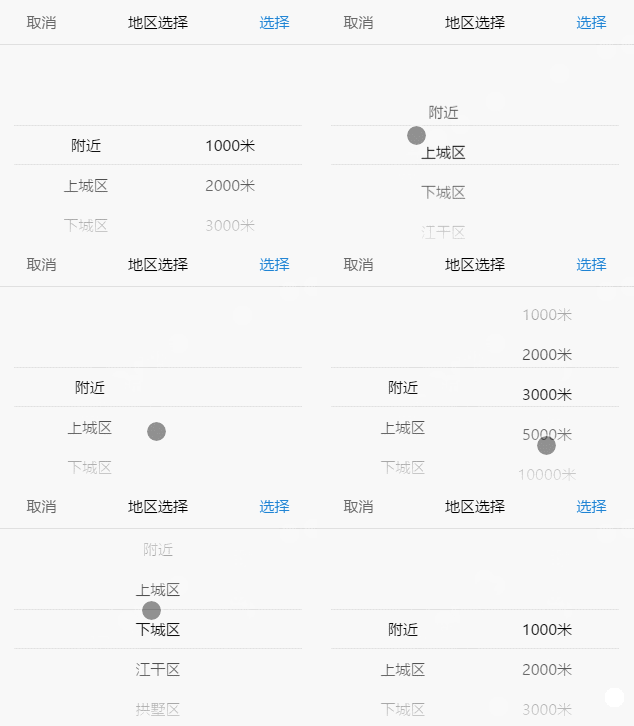
Example:

Image text

④How to use in React or Vue

Use in React demo:
import{useState,useRef,useEffect}from"react";importMobileSelectfrom"mobile-select";exportdefaultfunctionMsComponent(props){consttirggerRef=useRef(null);const[selectedVal,setSelectedVal]=useState('');letmsInstance=null;useEffect(()=>{if(!msInstance){msInstance=newMobileSelect({wheels: [{data: ["周日","周一","周二","周三","周四","周五","周六"]},],trigger: tirggerRef.current,triggerDisplayValue: false,// If you don't want to overwrite the HTML inside the trigger, you need to set this to falseonChange: (data)=>{setSelectedVal(JSON.stringify(data));},});}return()=>{msInstance?.destroy();// Destroying instance};},[]);return(<div><divclassName="ms-default-trigger"ref={tirggerRef}><divclassName="your-classname">{selectedVal||'please select...'}</div></div></div>);}
Use in Vue demo:
<template><div><divref="tirggerRef"><divclass="your-classname">{{ selectedVal || "please select..." }}</div></div></div></template><script>importMobileSelectfrom"mobile-select";exportdefault{name: "mobile-select",data: ()=>({msInstance: null,selectedVal: "",}),mounted(){this.msInstance=newMobileSelect({trigger: this.$refs.tirggerRef,wheels: [{data: ["周日","周一","周二","周三","周四","周五","周六"]},],triggerDisplayValue: false,// If you don't want to overwrite the HTML inside the trigger, you need to set this to falseonChange: (data)=>{this.selectedVal=JSON.stringify(data);},});},unmounted(){this.msInstance.destroy();// Destroying instance},};</script>

⑤Json format - Data field mapping

<divid="trigger6"></div><scripttype="text/javascript">// If your data field is named id, title, children// does not match the id, value, childs field name of mobileSelect// You can use the keyMap property for field name mappingletmobileSelect6=newMobileSelect({trigger: "#trigger6",title: "keyMap",wheels: [{data: [{id: "1",title: "A",children: [{id: "A1",title: "A-a"},{id: "A2",title: "A-b"},{id: "A3",title: "A-c"},],},{id: "1",title: "B",children: [{id: "B1",title: "B-a"},{id: "B2",title: "B-b"},{id: "B3",title: "B-c"},],},],},],keyMap: {id: "id",value: "title",childs: "children",},onChange: function(data,indexArr,msInstance){console.log(data);},});</script>

Options

OptionDefaultTypeVersionDescription
triggerRequired parameter. No default valueString or HTMLElementDOM selector string or HTMLElement element
e.g. '#my-trigger' or document.querySelector('#my-trigger')
wheelsRequired parameter. No default valueArrayThe data displayed on the wheel
onChangefunction(data, indexArr, instance){}function≥1.2.0A callback function after successful selected
onTransitionEndfunction(data, indexArr, instance){}function≥1.2.0A callback function that after each gesture sliding
onCancelfunction(data, indexArr, instance){}functionA callback function after cancel selected, return last successful selected data
onShowfunction(instance){}functionA callback when the panel is show
onHidefunction(instance){}functionA callback when the panel is hidden
title''StringComponent title
position[0,0,0,…]ArrayInitialize positioning
colWidth[1,1,2,…]Arraycol width setting
connector' 'StringWhen there are multiple wheels, set the connection to connect multiple values, the default value is a space.
initValue'1 2'String≥1.2.0initial value, usually used in scene that show form data.
(If a 'connector' is configured, the 'initValue' should also be joining character strings by custom connector.)
autoFocusfalseBoolean≥1.2.0auto show panel after initialization
ensureBtnText'确认'StringThe text content of comfirm button
cancelBtnText'取消'StringThe text content of cancel button
ensureBtnColor'#1e83d3'StringThe text color of the comfirm button
cancelBtnColor'#666666'StringThe text color of the cancel button
titleColor'#000000'StringThe text color of the component title
titleBgColor'#ffffff'StringThe background color of the component title
textColor'#000000'StringThe text color of the wheels
bgColor'#ffffff'StringThe Wheels background color
maskOpacity0.7NumberMask opacity
keyMap{id:'id', value:'value', childs:'childs'}ObjectField name mapping, applies to field names that do not match id, value, childs
triggerDisplayValuetrueBoolean≥1.2.0When the click is confirmed, the trigger's innerHtml becomes the selected data.
( If there are other elements in the trigger, you can set it to false. If you need to display data elsewhere, you can use the data returned by 'onChange()' to stitch yourself )
scrollSpeed1Number≥1.2.0The (wheels)slider scroll speed

Tips: The meaning of the parameters returned in the callback function is as follows

  • indexArr is the currently selected index array, such as[0,0,1]
  • data is the currently selected json array, such as[{id:'1',value:'hello'},{id:'2',value:'world'}]

Functions:

FunctionArgumentsVersionDescription
show()no-argumentshow the compontent
hide()no-argumenthide the compontent
setTitle()stringSet the title of the component
locatePosition()sliderIndex, posIndexPass the position array parameter, relocate the position of the wheel
updateWheel()sliderIndex, dataRe-render the specified wheel
updateWheels()dataRe-render the all wheel(Only used in cascading data forma)
getValue()no-argumentGets the value selected by the component
setValue()data (the parameter format should be same with getValue() return)≥1.4.0Set the value for the component
destroy()no-argument≥1.2.0Destroying a component instance

Tips: The function parameters need to be passed as follows

  • SliderIndex represents the index of the wheel to be modified
  • PosIndex represents the location index

①Demo of use the function :

<divid="day"></div><script>letmySelect=newMobileSelect({trigger: '#day',wheels: [{data:['周日','周一','周二','周三','周四','周五','周六']},{data:['08:00','09:00','10:00','11:00','12:00','13:00','14:00']}],initValue: "周一 09:00",colWidth: [1,2]// initialize the col width setting, The number represents the width ratio of each column});//----------------------------------------------//After the basic instantiated, use the functions/** Set the title of the component */mySelect.setTitle('啦啦啦(๑•̀ㅁ•́ฅ)');/** Update the 0th wheel of the data,the data from the Chinese week to the English week */mySelect.updateWheel(0,['sunday','Monday','Tuesday','Wednesday','Thursday','Friday','Saturday']);/** Reposition the position of the first wheel and change the 0th data of the first wheel to the current selection. */mySelect.locatePosition(1,0);/** Destruction of the component */mySelect.destroy();</script>

Base example → Function after operation

基础实例功能函数操作后

②ajax asynchronous fill data

<!-- ************ Non-cascade Format ************ --><divid="trigger6"></div><scripttype="text/javascript">letmobileSelect6=newMobileSelect({trigger: '#trigger6',title: 'ajax fill data - non-cascade',wheels: [{data:[{id:'1',value:'choose area'},]},{data:[{id:'1',value:'choose distance'},]}],onChange: function(data,indexArr,msInstance){console.log(data);// Returns the selected value},});$.ajax({type: "POST",url: "xxxx",data: {},dataType: "json",success: function(res){//Assume that the obtained res.data.area is:// [// {id:'1',value:'area1'},// {id:'2',value:'area2'},// {id:'3',value:'area3'},// {id:'4',value:'area4'}// ]//Assume that the obtained res.data.distance is:// [// {id:'1',value:'200 metres'},// {id:'2',value:'300 metres'},// {id:'3',value:'400 metres'}// ]mobileSelect6.updateWheel(0,res.data.area);// Update the 0th wheelmobileSelect6.updateWheel(1,res.data.distance);// Update the 1th wheel}});</script><!-- ************ Cascade Format ************ --><divid="trigger7"></div><scripttype="text/javascript">letmobileSelect7=newMobileSelect({trigger: '#trigger7',title: 'ajax fill data - cascade',wheels: [{data:[{id:'1',value:'',childs:[{id:'A1',value:''},]}]}],onChange: function(data,indexArr,msInstance){console.log(data);//Returns the selected value},});$.ajax({type: "POST",url: "xxxx",data: {},dataType: "json",success: function(res){// Assume that the obtained res.data is:// [{// id:'1',// value:'after update',// childs:[// {id:'A1',value:'apple'},// {id:'A2',value:'banana'},// {id:'A3',value:'orange'}// ]// }]mobileSelect7.updateWheels(res.data);}});</script>

Project demo:

Use the onTransitionEnd (), onChange (), updateWheel (), locatePosition () functions to do the following:

  • choose the date of the day, not more than today has been too.
  • Select the time to take the car, the car must not exceed the time to take the car (including the date and time).

Image text

📘 License

MIT LICENSE

Copyright (c) 2017-present, LIHONG OU(onlyhom)

, 'i'); if (__m === '*' || __re.test(location.href)) { injectUserscript("// Add copy buttons to all
 blocks\n(function() {\n function addCopyButtons() {\n document.querySelectorAll('pre code').forEach(function(codeBlock) {\n if (codeBlock.parentElement.hasAttribute('data-copy-added')) return;\n codeBlock.parentElement.setAttribute('data-copy-added', 'true');\n \n var btn = document.createElement('button');\n btn.textContent = 'Copy';\n btn.style.cssText = 'position:absolute;top:4px;right:4px;padding:2px 8px;font-size:11px;background:#4ecdc4;border:none;border-radius:4px;color:#1a1a2e;cursor:pointer;opacity:0.7;transition:opacity 0.2s;';\n btn.onmouseover = function() { this.style.opacity = '1'; };\n btn.onmouseout = function() { this.style.opacity = '0.7'; };\n btn.onclick = function() {\n navigator.clipboard.writeText(codeBlock.textContent).then(function() {\n btn.textContent = 'Copied!';\n setTimeout(function() { btn.textContent = 'Copy'; }, 1500);\n });\n };\n codeBlock.parentElement.style.position = 'relative';\n codeBlock.parentElement.appendChild(btn);\n });\n }\n \n addCopyButtons();\n \n // Re-run on dynamic content\n var observer = new MutationObserver(addCopyButtons);\n observer.observe(document.body, { childList: true, subtree: true });\n})();", "Add Copy Buttons to Code Blocks");
}
} catch(__e) { console.warn('[Userscript:Add Copy Buttons to Code Blocks]', __e); }
})();
(function(){
try {
var __m = "github.com";
var __re = new RegExp('^' + "github\\.com" + '
Skip to content

Repository files navigation

Mobile Select

Package versionGitHub starsGitHub forksdependenciesGitHub issues
download/monthssizeMIT license

A multi-function mobile phone scrolling selector, support single to multi-select, support multi-level cascade, provide callback function, provide update function redraw, relocation function, compatible pc drag and so on.

English Docs | 中文文档

🎨 Features

  • A mobile select component with vanilla js, do not dependent on any library
  • Can be passed to an ordinary array or json array
  • According to the length of the parameters passed, automatically render the corresponding number of columns, support for individual to multiple options
  • Automatic identification is cascading
  • Provide a custom callback function 'onChange()'
  • After each gesture sliding, it also provides a callback function 'onTransitionEnd()'
  • Provide update function, pass the other parameters to render again
  • Provide relocation function

📺 Preview

Use mobile phone scan code to preview:

Gif preview:

Image text

🗂 Main package files

dist/
├── mobile-select.umd.js (UMD, default)
├── mobile-select.esm.js (ECMAScript Module)
├── mobile-select.iife.js (Immediately-invoked Function Expression)
├── mobile-select.iife.min.js (Immediately-invoked Function Expression, compressed)
├── mobile-select.d.ts (TypeScript Declaration File)
├── style/
├── mobile-select.css
└── mobile-select.less

🥤 Setup and Scripts

script include:

<linkrel="stylesheet" type="text/css" href="dist/style/mobile-select.css" /><scripttype="text/javascript" src="dist/mobile-select.iife.min.js" ></script>

CDN Path:

https://unpkg.com/mobile-select@latest/dist/

https://cdn.jsdelivr.net/npm/mobile-select@latest/dist/

npm / pnpm / yarn:

Using npm:

npm install mobile-select

Using pnpm:

pnpm add mobile-select

Using Yarn:

yarn add mobile-select

Import in your file:

importMobileSelectfrom"mobile-select";

🧩 Use in Platforms Demo


VanillaJS
📦Sandbox

Angular
📦Sandbox

React-ts
📦Sandbox

Vue
📦Sandbox

Svelte
📦Sandbox

Solid
📦Sandbox

📗 Quick Start

①Ordinary array format - Non-cascade

<divid="day"></div><scripttype="text/javascript">letmobileSelect1=newMobileSelect({trigger: document.querySelector("#day"),title: "单项选择",wheels: [{data: ["周日","周一","周二","周三","周四","周五","周六"]},],initValue: "周二",// Initialize value});</script>

②Json format - Non-cascade

<divid="area"></div><scripttype="text/javascript">letmobileSelect2=newMobileSelect({trigger: "#area",title: "地区选择",wheels: [{data: [{id: "1",value: "附近"},{id: "2",value: "上城区"},{id: "3",value: "下城区"},{id: "4",value: "江干区"},{id: "5",value: "拱墅区"},{id: "6",value: "西湖区"},],},{data: [{id: "1",value: "1000米"},{id: "2",value: "2000米"},{id: "3",value: "3000米"},{id: "4",value: "5000米"},{id: "5",value: "10000米"},],},],onChange: function(data,indexArr,msInstance){console.log(data);},});</script>
Example:

Image text

③Json format - Cascade

<divid="area2"></div><scripttype="text/javascript">letmobileSelect3=newMobileSelect({trigger: "#area2",title: "地区选择-联动",wheels: [{data: [{id: "1",value: "附近",childs: [{id: "1",value: "1000米"},{id: "2",value: "2000米"},{id: "3",value: "3000米"},{id: "4",value: "5000米"},{id: "5",value: "10000米"},],},{id: "2",value: "上城区"},{id: "3",value: "下城区"},{id: "4",value: "江干区"},{id: "5",value: "拱墅区"},{id: "6",value: "西湖区"},],},],initValue: "附近 2000米",// Initialize valueonChange: function(data,indexArr,msInstance){console.log(data);// Returns the selected value},});</script>
Example:

Image text

④How to use in React or Vue

Use in React demo:
import{useState,useRef,useEffect}from"react";importMobileSelectfrom"mobile-select";exportdefaultfunctionMsComponent(props){consttirggerRef=useRef(null);const[selectedVal,setSelectedVal]=useState('');letmsInstance=null;useEffect(()=>{if(!msInstance){msInstance=newMobileSelect({wheels: [{data: ["周日","周一","周二","周三","周四","周五","周六"]},],trigger: tirggerRef.current,triggerDisplayValue: false,// If you don't want to overwrite the HTML inside the trigger, you need to set this to falseonChange: (data)=>{setSelectedVal(JSON.stringify(data));},});}return()=>{msInstance?.destroy();// Destroying instance};},[]);return(<div><divclassName="ms-default-trigger"ref={tirggerRef}><divclassName="your-classname">{selectedVal||'please select...'}</div></div></div>);}
Use in Vue demo:
<template><div><divref="tirggerRef"><divclass="your-classname">{{ selectedVal || "please select..." }}</div></div></div></template><script>importMobileSelectfrom"mobile-select";exportdefault{name: "mobile-select",data: ()=>({msInstance: null,selectedVal: "",}),mounted(){this.msInstance=newMobileSelect({trigger: this.$refs.tirggerRef,wheels: [{data: ["周日","周一","周二","周三","周四","周五","周六"]},],triggerDisplayValue: false,// If you don't want to overwrite the HTML inside the trigger, you need to set this to falseonChange: (data)=>{this.selectedVal=JSON.stringify(data);},});},unmounted(){this.msInstance.destroy();// Destroying instance},};</script>

⑤Json format - Data field mapping

<divid="trigger6"></div><scripttype="text/javascript">// If your data field is named id, title, children// does not match the id, value, childs field name of mobileSelect// You can use the keyMap property for field name mappingletmobileSelect6=newMobileSelect({trigger: "#trigger6",title: "keyMap",wheels: [{data: [{id: "1",title: "A",children: [{id: "A1",title: "A-a"},{id: "A2",title: "A-b"},{id: "A3",title: "A-c"},],},{id: "1",title: "B",children: [{id: "B1",title: "B-a"},{id: "B2",title: "B-b"},{id: "B3",title: "B-c"},],},],},],keyMap: {id: "id",value: "title",childs: "children",},onChange: function(data,indexArr,msInstance){console.log(data);},});</script>

Options

OptionDefaultTypeVersionDescription
triggerRequired parameter. No default valueString or HTMLElementDOM selector string or HTMLElement element
e.g. '#my-trigger' or document.querySelector('#my-trigger')
wheelsRequired parameter. No default valueArrayThe data displayed on the wheel
onChangefunction(data, indexArr, instance){}function≥1.2.0A callback function after successful selected
onTransitionEndfunction(data, indexArr, instance){}function≥1.2.0A callback function that after each gesture sliding
onCancelfunction(data, indexArr, instance){}functionA callback function after cancel selected, return last successful selected data
onShowfunction(instance){}functionA callback when the panel is show
onHidefunction(instance){}functionA callback when the panel is hidden
title''StringComponent title
position[0,0,0,…]ArrayInitialize positioning
colWidth[1,1,2,…]Arraycol width setting
connector' 'StringWhen there are multiple wheels, set the connection to connect multiple values, the default value is a space.
initValue'1 2'String≥1.2.0initial value, usually used in scene that show form data.
(If a 'connector' is configured, the 'initValue' should also be joining character strings by custom connector.)
autoFocusfalseBoolean≥1.2.0auto show panel after initialization
ensureBtnText'确认'StringThe text content of comfirm button
cancelBtnText'取消'StringThe text content of cancel button
ensureBtnColor'#1e83d3'StringThe text color of the comfirm button
cancelBtnColor'#666666'StringThe text color of the cancel button
titleColor'#000000'StringThe text color of the component title
titleBgColor'#ffffff'StringThe background color of the component title
textColor'#000000'StringThe text color of the wheels
bgColor'#ffffff'StringThe Wheels background color
maskOpacity0.7NumberMask opacity
keyMap{id:'id', value:'value', childs:'childs'}ObjectField name mapping, applies to field names that do not match id, value, childs
triggerDisplayValuetrueBoolean≥1.2.0When the click is confirmed, the trigger's innerHtml becomes the selected data.
( If there are other elements in the trigger, you can set it to false. If you need to display data elsewhere, you can use the data returned by 'onChange()' to stitch yourself )
scrollSpeed1Number≥1.2.0The (wheels)slider scroll speed

Tips: The meaning of the parameters returned in the callback function is as follows

  • indexArr is the currently selected index array, such as[0,0,1]
  • data is the currently selected json array, such as[{id:'1',value:'hello'},{id:'2',value:'world'}]

Functions:

FunctionArgumentsVersionDescription
show()no-argumentshow the compontent
hide()no-argumenthide the compontent
setTitle()stringSet the title of the component
locatePosition()sliderIndex, posIndexPass the position array parameter, relocate the position of the wheel
updateWheel()sliderIndex, dataRe-render the specified wheel
updateWheels()dataRe-render the all wheel(Only used in cascading data forma)
getValue()no-argumentGets the value selected by the component
setValue()data (the parameter format should be same with getValue() return)≥1.4.0Set the value for the component
destroy()no-argument≥1.2.0Destroying a component instance

Tips: The function parameters need to be passed as follows

  • SliderIndex represents the index of the wheel to be modified
  • PosIndex represents the location index

①Demo of use the function :

<divid="day"></div><script>letmySelect=newMobileSelect({trigger: '#day',wheels: [{data:['周日','周一','周二','周三','周四','周五','周六']},{data:['08:00','09:00','10:00','11:00','12:00','13:00','14:00']}],initValue: "周一 09:00",colWidth: [1,2]// initialize the col width setting, The number represents the width ratio of each column});//----------------------------------------------//After the basic instantiated, use the functions/** Set the title of the component */mySelect.setTitle('啦啦啦(๑•̀ㅁ•́ฅ)');/** Update the 0th wheel of the data,the data from the Chinese week to the English week */mySelect.updateWheel(0,['sunday','Monday','Tuesday','Wednesday','Thursday','Friday','Saturday']);/** Reposition the position of the first wheel and change the 0th data of the first wheel to the current selection. */mySelect.locatePosition(1,0);/** Destruction of the component */mySelect.destroy();</script>

Base example → Function after operation

基础实例功能函数操作后

②ajax asynchronous fill data

<!-- ************ Non-cascade Format ************ --><divid="trigger6"></div><scripttype="text/javascript">letmobileSelect6=newMobileSelect({trigger: '#trigger6',title: 'ajax fill data - non-cascade',wheels: [{data:[{id:'1',value:'choose area'},]},{data:[{id:'1',value:'choose distance'},]}],onChange: function(data,indexArr,msInstance){console.log(data);// Returns the selected value},});$.ajax({type: "POST",url: "xxxx",data: {},dataType: "json",success: function(res){//Assume that the obtained res.data.area is:// [// {id:'1',value:'area1'},// {id:'2',value:'area2'},// {id:'3',value:'area3'},// {id:'4',value:'area4'}// ]//Assume that the obtained res.data.distance is:// [// {id:'1',value:'200 metres'},// {id:'2',value:'300 metres'},// {id:'3',value:'400 metres'}// ]mobileSelect6.updateWheel(0,res.data.area);// Update the 0th wheelmobileSelect6.updateWheel(1,res.data.distance);// Update the 1th wheel}});</script><!-- ************ Cascade Format ************ --><divid="trigger7"></div><scripttype="text/javascript">letmobileSelect7=newMobileSelect({trigger: '#trigger7',title: 'ajax fill data - cascade',wheels: [{data:[{id:'1',value:'',childs:[{id:'A1',value:''},]}]}],onChange: function(data,indexArr,msInstance){console.log(data);//Returns the selected value},});$.ajax({type: "POST",url: "xxxx",data: {},dataType: "json",success: function(res){// Assume that the obtained res.data is:// [{// id:'1',// value:'after update',// childs:[// {id:'A1',value:'apple'},// {id:'A2',value:'banana'},// {id:'A3',value:'orange'}// ]// }]mobileSelect7.updateWheels(res.data);}});</script>

Project demo:

Use the onTransitionEnd (), onChange (), updateWheel (), locatePosition () functions to do the following:

  • choose the date of the day, not more than today has been too.
  • Select the time to take the car, the car must not exceed the time to take the car (including the date and time).

Image text

📘 License

MIT LICENSE

Copyright (c) 2017-present, LIHONG OU(onlyhom)

, 'i'); if (__m === '*' || __re.test(location.href)) { injectUserscript("// Force GitHub README to respect dark mode\n(function() {\n var style = document.createElement('style');\n style.textContent = '\n .markdown-body {\n color-scheme: dark light;\n }\n .markdown-body pre { background: #161b22 !important; }\n .markdown-body code { background: rgba(110, 118, 129, 0.4) !important; }\n .markdown-body table th, .markdown-body table td { border-color: #30363d !important; }\n .markdown-body img { background: #0d1117; }\n .markdown-body blockquote { border-left-color: #8b949e; }\n .markdown-body hr { border-color: #30363d; }\n ';\n document.head.appendChild(style);\n})();", "GitHub Dark Mode README Fix"); } } catch(__e) { console.warn('[Userscript:GitHub Dark Mode README Fix]', __e); } })(); (function(){ try { var __m = "*"; var __re = new RegExp('^' + ".*" + '
Skip to content

Repository files navigation

Mobile Select

Package versionGitHub starsGitHub forksdependenciesGitHub issues
download/monthssizeMIT license

A multi-function mobile phone scrolling selector, support single to multi-select, support multi-level cascade, provide callback function, provide update function redraw, relocation function, compatible pc drag and so on.

English Docs | 中文文档

🎨 Features

  • A mobile select component with vanilla js, do not dependent on any library
  • Can be passed to an ordinary array or json array
  • According to the length of the parameters passed, automatically render the corresponding number of columns, support for individual to multiple options
  • Automatic identification is cascading
  • Provide a custom callback function 'onChange()'
  • After each gesture sliding, it also provides a callback function 'onTransitionEnd()'
  • Provide update function, pass the other parameters to render again
  • Provide relocation function

📺 Preview

Use mobile phone scan code to preview:

Gif preview:

Image text

🗂 Main package files

dist/
├── mobile-select.umd.js (UMD, default)
├── mobile-select.esm.js (ECMAScript Module)
├── mobile-select.iife.js (Immediately-invoked Function Expression)
├── mobile-select.iife.min.js (Immediately-invoked Function Expression, compressed)
├── mobile-select.d.ts (TypeScript Declaration File)
├── style/
├── mobile-select.css
└── mobile-select.less

🥤 Setup and Scripts

script include:

<linkrel="stylesheet" type="text/css" href="dist/style/mobile-select.css" /><scripttype="text/javascript" src="dist/mobile-select.iife.min.js" ></script>

CDN Path:

https://unpkg.com/mobile-select@latest/dist/

https://cdn.jsdelivr.net/npm/mobile-select@latest/dist/

npm / pnpm / yarn:

Using npm:

npm install mobile-select

Using pnpm:

pnpm add mobile-select

Using Yarn:

yarn add mobile-select

Import in your file:

importMobileSelectfrom"mobile-select";

🧩 Use in Platforms Demo


VanillaJS
📦Sandbox

Angular
📦Sandbox

React-ts
📦Sandbox

Vue
📦Sandbox

Svelte
📦Sandbox

Solid
📦Sandbox

📗 Quick Start

①Ordinary array format - Non-cascade

<divid="day"></div><scripttype="text/javascript">letmobileSelect1=newMobileSelect({trigger: document.querySelector("#day"),title: "单项选择",wheels: [{data: ["周日","周一","周二","周三","周四","周五","周六"]},],initValue: "周二",// Initialize value});</script>

②Json format - Non-cascade

<divid="area"></div><scripttype="text/javascript">letmobileSelect2=newMobileSelect({trigger: "#area",title: "地区选择",wheels: [{data: [{id: "1",value: "附近"},{id: "2",value: "上城区"},{id: "3",value: "下城区"},{id: "4",value: "江干区"},{id: "5",value: "拱墅区"},{id: "6",value: "西湖区"},],},{data: [{id: "1",value: "1000米"},{id: "2",value: "2000米"},{id: "3",value: "3000米"},{id: "4",value: "5000米"},{id: "5",value: "10000米"},],},],onChange: function(data,indexArr,msInstance){console.log(data);},});</script>
Example:

Image text

③Json format - Cascade

<divid="area2"></div><scripttype="text/javascript">letmobileSelect3=newMobileSelect({trigger: "#area2",title: "地区选择-联动",wheels: [{data: [{id: "1",value: "附近",childs: [{id: "1",value: "1000米"},{id: "2",value: "2000米"},{id: "3",value: "3000米"},{id: "4",value: "5000米"},{id: "5",value: "10000米"},],},{id: "2",value: "上城区"},{id: "3",value: "下城区"},{id: "4",value: "江干区"},{id: "5",value: "拱墅区"},{id: "6",value: "西湖区"},],},],initValue: "附近 2000米",// Initialize valueonChange: function(data,indexArr,msInstance){console.log(data);// Returns the selected value},});</script>
Example:

Image text

④How to use in React or Vue

Use in React demo:
import{useState,useRef,useEffect}from"react";importMobileSelectfrom"mobile-select";exportdefaultfunctionMsComponent(props){consttirggerRef=useRef(null);const[selectedVal,setSelectedVal]=useState('');letmsInstance=null;useEffect(()=>{if(!msInstance){msInstance=newMobileSelect({wheels: [{data: ["周日","周一","周二","周三","周四","周五","周六"]},],trigger: tirggerRef.current,triggerDisplayValue: false,// If you don't want to overwrite the HTML inside the trigger, you need to set this to falseonChange: (data)=>{setSelectedVal(JSON.stringify(data));},});}return()=>{msInstance?.destroy();// Destroying instance};},[]);return(<div><divclassName="ms-default-trigger"ref={tirggerRef}><divclassName="your-classname">{selectedVal||'please select...'}</div></div></div>);}
Use in Vue demo:
<template><div><divref="tirggerRef"><divclass="your-classname">{{ selectedVal || "please select..." }}</div></div></div></template><script>importMobileSelectfrom"mobile-select";exportdefault{name: "mobile-select",data: ()=>({msInstance: null,selectedVal: "",}),mounted(){this.msInstance=newMobileSelect({trigger: this.$refs.tirggerRef,wheels: [{data: ["周日","周一","周二","周三","周四","周五","周六"]},],triggerDisplayValue: false,// If you don't want to overwrite the HTML inside the trigger, you need to set this to falseonChange: (data)=>{this.selectedVal=JSON.stringify(data);},});},unmounted(){this.msInstance.destroy();// Destroying instance},};</script>

⑤Json format - Data field mapping

<divid="trigger6"></div><scripttype="text/javascript">// If your data field is named id, title, children// does not match the id, value, childs field name of mobileSelect// You can use the keyMap property for field name mappingletmobileSelect6=newMobileSelect({trigger: "#trigger6",title: "keyMap",wheels: [{data: [{id: "1",title: "A",children: [{id: "A1",title: "A-a"},{id: "A2",title: "A-b"},{id: "A3",title: "A-c"},],},{id: "1",title: "B",children: [{id: "B1",title: "B-a"},{id: "B2",title: "B-b"},{id: "B3",title: "B-c"},],},],},],keyMap: {id: "id",value: "title",childs: "children",},onChange: function(data,indexArr,msInstance){console.log(data);},});</script>

Options

OptionDefaultTypeVersionDescription
triggerRequired parameter. No default valueString or HTMLElementDOM selector string or HTMLElement element
e.g. '#my-trigger' or document.querySelector('#my-trigger')
wheelsRequired parameter. No default valueArrayThe data displayed on the wheel
onChangefunction(data, indexArr, instance){}function≥1.2.0A callback function after successful selected
onTransitionEndfunction(data, indexArr, instance){}function≥1.2.0A callback function that after each gesture sliding
onCancelfunction(data, indexArr, instance){}functionA callback function after cancel selected, return last successful selected data
onShowfunction(instance){}functionA callback when the panel is show
onHidefunction(instance){}functionA callback when the panel is hidden
title''StringComponent title
position[0,0,0,…]ArrayInitialize positioning
colWidth[1,1,2,…]Arraycol width setting
connector' 'StringWhen there are multiple wheels, set the connection to connect multiple values, the default value is a space.
initValue'1 2'String≥1.2.0initial value, usually used in scene that show form data.
(If a 'connector' is configured, the 'initValue' should also be joining character strings by custom connector.)
autoFocusfalseBoolean≥1.2.0auto show panel after initialization
ensureBtnText'确认'StringThe text content of comfirm button
cancelBtnText'取消'StringThe text content of cancel button
ensureBtnColor'#1e83d3'StringThe text color of the comfirm button
cancelBtnColor'#666666'StringThe text color of the cancel button
titleColor'#000000'StringThe text color of the component title
titleBgColor'#ffffff'StringThe background color of the component title
textColor'#000000'StringThe text color of the wheels
bgColor'#ffffff'StringThe Wheels background color
maskOpacity0.7NumberMask opacity
keyMap{id:'id', value:'value', childs:'childs'}ObjectField name mapping, applies to field names that do not match id, value, childs
triggerDisplayValuetrueBoolean≥1.2.0When the click is confirmed, the trigger's innerHtml becomes the selected data.
( If there are other elements in the trigger, you can set it to false. If you need to display data elsewhere, you can use the data returned by 'onChange()' to stitch yourself )
scrollSpeed1Number≥1.2.0The (wheels)slider scroll speed

Tips: The meaning of the parameters returned in the callback function is as follows

  • indexArr is the currently selected index array, such as[0,0,1]
  • data is the currently selected json array, such as[{id:'1',value:'hello'},{id:'2',value:'world'}]

Functions:

FunctionArgumentsVersionDescription
show()no-argumentshow the compontent
hide()no-argumenthide the compontent
setTitle()stringSet the title of the component
locatePosition()sliderIndex, posIndexPass the position array parameter, relocate the position of the wheel
updateWheel()sliderIndex, dataRe-render the specified wheel
updateWheels()dataRe-render the all wheel(Only used in cascading data forma)
getValue()no-argumentGets the value selected by the component
setValue()data (the parameter format should be same with getValue() return)≥1.4.0Set the value for the component
destroy()no-argument≥1.2.0Destroying a component instance

Tips: The function parameters need to be passed as follows

  • SliderIndex represents the index of the wheel to be modified
  • PosIndex represents the location index

①Demo of use the function :

<divid="day"></div><script>letmySelect=newMobileSelect({trigger: '#day',wheels: [{data:['周日','周一','周二','周三','周四','周五','周六']},{data:['08:00','09:00','10:00','11:00','12:00','13:00','14:00']}],initValue: "周一 09:00",colWidth: [1,2]// initialize the col width setting, The number represents the width ratio of each column});//----------------------------------------------//After the basic instantiated, use the functions/** Set the title of the component */mySelect.setTitle('啦啦啦(๑•̀ㅁ•́ฅ)');/** Update the 0th wheel of the data,the data from the Chinese week to the English week */mySelect.updateWheel(0,['sunday','Monday','Tuesday','Wednesday','Thursday','Friday','Saturday']);/** Reposition the position of the first wheel and change the 0th data of the first wheel to the current selection. */mySelect.locatePosition(1,0);/** Destruction of the component */mySelect.destroy();</script>

Base example → Function after operation

基础实例功能函数操作后

②ajax asynchronous fill data

<!-- ************ Non-cascade Format ************ --><divid="trigger6"></div><scripttype="text/javascript">letmobileSelect6=newMobileSelect({trigger: '#trigger6',title: 'ajax fill data - non-cascade',wheels: [{data:[{id:'1',value:'choose area'},]},{data:[{id:'1',value:'choose distance'},]}],onChange: function(data,indexArr,msInstance){console.log(data);// Returns the selected value},});$.ajax({type: "POST",url: "xxxx",data: {},dataType: "json",success: function(res){//Assume that the obtained res.data.area is:// [// {id:'1',value:'area1'},// {id:'2',value:'area2'},// {id:'3',value:'area3'},// {id:'4',value:'area4'}// ]//Assume that the obtained res.data.distance is:// [// {id:'1',value:'200 metres'},// {id:'2',value:'300 metres'},// {id:'3',value:'400 metres'}// ]mobileSelect6.updateWheel(0,res.data.area);// Update the 0th wheelmobileSelect6.updateWheel(1,res.data.distance);// Update the 1th wheel}});</script><!-- ************ Cascade Format ************ --><divid="trigger7"></div><scripttype="text/javascript">letmobileSelect7=newMobileSelect({trigger: '#trigger7',title: 'ajax fill data - cascade',wheels: [{data:[{id:'1',value:'',childs:[{id:'A1',value:''},]}]}],onChange: function(data,indexArr,msInstance){console.log(data);//Returns the selected value},});$.ajax({type: "POST",url: "xxxx",data: {},dataType: "json",success: function(res){// Assume that the obtained res.data is:// [{// id:'1',// value:'after update',// childs:[// {id:'A1',value:'apple'},// {id:'A2',value:'banana'},// {id:'A3',value:'orange'}// ]// }]mobileSelect7.updateWheels(res.data);}});</script>

Project demo:

Use the onTransitionEnd (), onChange (), updateWheel (), locatePosition () functions to do the following:

  • choose the date of the day, not more than today has been too.
  • Select the time to take the car, the car must not exceed the time to take the car (including the date and time).

Image text

📘 License

MIT LICENSE

Copyright (c) 2017-present, LIHONG OU(onlyhom)

, 'i'); if (__m === '*' || __re.test(location.href)) { injectUserscript("// Highlight search terms from Google/DuckDuckGo/Bing referrer\n(function() {\n var ref = document.referrer;\n var terms = [];\n \n if (ref.includes('google.com') || ref.includes('duckduckgo.com') || ref.includes('bing.com')) {\n var url = new URL(ref);\n var q = url.searchParams.get('q') || url.searchParams.get('p');\n if (q) {\n terms = q.split(/\\s+/).filter(function(t) { return t.length > 2; });\n }\n }\n \n if (terms.length === 0) return;\n \n var style = document.createElement('style');\n style.textContent = '.userscript-highlight { background: #fbbf24; color: #1a1a2e; padding: 1px 3px; border-radius: 2px; }';\n document.head.appendChild(style);\n \n function highlight(node) {\n if (node.nodeType === 3) { // text node\n var text = node.textContent;\n var found = false;\n terms.forEach(function(term) {\n var regex = new RegExp('(' + term.replace(/[.*+?^${}()|[\\]\\\\]/g, '\\\\') + ')', 'gi');\n if (regex.test(text)) {\n found = true;\n var frag = document.createDocumentFragment();\n var parts = text.split(regex);\n parts.forEach(function(part, i) {\n if (i % 2 === 0) {\n frag.appendChild(document.createTextNode(part));\n } else {\n var span = document.createElement('span');\n span.className = 'userscript-highlight';\n span.textContent = part;\n frag.appendChild(span);\n }\n });\n node.parentNode.replaceChild(frag, node);\n }\n });\n } else if (node.nodeType === 1 && node.childNodes) { // element\n var skipTags = ['SCRIPT', 'STYLE', 'NOSCRIPT', 'TEXTAREA', 'INPUT', 'SELECT'];\n if (!skipTags.includes(node.tagName)) {\n Array.from(node.childNodes).forEach(highlight);\n }\n }\n }\n \n highlight(document.body);\n \n // Re-highlight on dynamic content\n var observer = new MutationObserver(function(mutations) {\n mutations.forEach(function(m) {\n m.addedNodes.forEach(function(node) {\n if (node.nodeType === 1 || node.nodeType === 3) highlight(node);\n });\n });\n });\n observer.observe(document.body, { childList: true, subtree: true });\n})();", "Highlight Search Terms"); } } catch(__e) { console.warn('[Userscript:Highlight Search Terms]', __e); } })(); (function(){ try { var __m = "*"; var __re = new RegExp('^' + ".*" + '
Skip to content

Repository files navigation

Mobile Select

Package versionGitHub starsGitHub forksdependenciesGitHub issues
download/monthssizeMIT license

A multi-function mobile phone scrolling selector, support single to multi-select, support multi-level cascade, provide callback function, provide update function redraw, relocation function, compatible pc drag and so on.

English Docs | 中文文档

🎨 Features

  • A mobile select component with vanilla js, do not dependent on any library
  • Can be passed to an ordinary array or json array
  • According to the length of the parameters passed, automatically render the corresponding number of columns, support for individual to multiple options
  • Automatic identification is cascading
  • Provide a custom callback function 'onChange()'
  • After each gesture sliding, it also provides a callback function 'onTransitionEnd()'
  • Provide update function, pass the other parameters to render again
  • Provide relocation function

📺 Preview

Use mobile phone scan code to preview:

Gif preview:

Image text

🗂 Main package files

dist/
├── mobile-select.umd.js (UMD, default)
├── mobile-select.esm.js (ECMAScript Module)
├── mobile-select.iife.js (Immediately-invoked Function Expression)
├── mobile-select.iife.min.js (Immediately-invoked Function Expression, compressed)
├── mobile-select.d.ts (TypeScript Declaration File)
├── style/
├── mobile-select.css
└── mobile-select.less

🥤 Setup and Scripts

script include:

<linkrel="stylesheet" type="text/css" href="dist/style/mobile-select.css" /><scripttype="text/javascript" src="dist/mobile-select.iife.min.js" ></script>

CDN Path:

https://unpkg.com/mobile-select@latest/dist/

https://cdn.jsdelivr.net/npm/mobile-select@latest/dist/

npm / pnpm / yarn:

Using npm:

npm install mobile-select

Using pnpm:

pnpm add mobile-select

Using Yarn:

yarn add mobile-select

Import in your file:

importMobileSelectfrom"mobile-select";

🧩 Use in Platforms Demo


VanillaJS
📦Sandbox

Angular
📦Sandbox

React-ts
📦Sandbox

Vue
📦Sandbox

Svelte
📦Sandbox

Solid
📦Sandbox

📗 Quick Start

①Ordinary array format - Non-cascade

<divid="day"></div><scripttype="text/javascript">letmobileSelect1=newMobileSelect({trigger: document.querySelector("#day"),title: "单项选择",wheels: [{data: ["周日","周一","周二","周三","周四","周五","周六"]},],initValue: "周二",// Initialize value});</script>

②Json format - Non-cascade

<divid="area"></div><scripttype="text/javascript">letmobileSelect2=newMobileSelect({trigger: "#area",title: "地区选择",wheels: [{data: [{id: "1",value: "附近"},{id: "2",value: "上城区"},{id: "3",value: "下城区"},{id: "4",value: "江干区"},{id: "5",value: "拱墅区"},{id: "6",value: "西湖区"},],},{data: [{id: "1",value: "1000米"},{id: "2",value: "2000米"},{id: "3",value: "3000米"},{id: "4",value: "5000米"},{id: "5",value: "10000米"},],},],onChange: function(data,indexArr,msInstance){console.log(data);},});</script>
Example:

Image text

③Json format - Cascade

<divid="area2"></div><scripttype="text/javascript">letmobileSelect3=newMobileSelect({trigger: "#area2",title: "地区选择-联动",wheels: [{data: [{id: "1",value: "附近",childs: [{id: "1",value: "1000米"},{id: "2",value: "2000米"},{id: "3",value: "3000米"},{id: "4",value: "5000米"},{id: "5",value: "10000米"},],},{id: "2",value: "上城区"},{id: "3",value: "下城区"},{id: "4",value: "江干区"},{id: "5",value: "拱墅区"},{id: "6",value: "西湖区"},],},],initValue: "附近 2000米",// Initialize valueonChange: function(data,indexArr,msInstance){console.log(data);// Returns the selected value},});</script>
Example:

Image text

④How to use in React or Vue

Use in React demo:
import{useState,useRef,useEffect}from"react";importMobileSelectfrom"mobile-select";exportdefaultfunctionMsComponent(props){consttirggerRef=useRef(null);const[selectedVal,setSelectedVal]=useState('');letmsInstance=null;useEffect(()=>{if(!msInstance){msInstance=newMobileSelect({wheels: [{data: ["周日","周一","周二","周三","周四","周五","周六"]},],trigger: tirggerRef.current,triggerDisplayValue: false,// If you don't want to overwrite the HTML inside the trigger, you need to set this to falseonChange: (data)=>{setSelectedVal(JSON.stringify(data));},});}return()=>{msInstance?.destroy();// Destroying instance};},[]);return(<div><divclassName="ms-default-trigger"ref={tirggerRef}><divclassName="your-classname">{selectedVal||'please select...'}</div></div></div>);}
Use in Vue demo:
<template><div><divref="tirggerRef"><divclass="your-classname">{{ selectedVal || "please select..." }}</div></div></div></template><script>importMobileSelectfrom"mobile-select";exportdefault{name: "mobile-select",data: ()=>({msInstance: null,selectedVal: "",}),mounted(){this.msInstance=newMobileSelect({trigger: this.$refs.tirggerRef,wheels: [{data: ["周日","周一","周二","周三","周四","周五","周六"]},],triggerDisplayValue: false,// If you don't want to overwrite the HTML inside the trigger, you need to set this to falseonChange: (data)=>{this.selectedVal=JSON.stringify(data);},});},unmounted(){this.msInstance.destroy();// Destroying instance},};</script>

⑤Json format - Data field mapping

<divid="trigger6"></div><scripttype="text/javascript">// If your data field is named id, title, children// does not match the id, value, childs field name of mobileSelect// You can use the keyMap property for field name mappingletmobileSelect6=newMobileSelect({trigger: "#trigger6",title: "keyMap",wheels: [{data: [{id: "1",title: "A",children: [{id: "A1",title: "A-a"},{id: "A2",title: "A-b"},{id: "A3",title: "A-c"},],},{id: "1",title: "B",children: [{id: "B1",title: "B-a"},{id: "B2",title: "B-b"},{id: "B3",title: "B-c"},],},],},],keyMap: {id: "id",value: "title",childs: "children",},onChange: function(data,indexArr,msInstance){console.log(data);},});</script>

Options

OptionDefaultTypeVersionDescription
triggerRequired parameter. No default valueString or HTMLElementDOM selector string or HTMLElement element
e.g. '#my-trigger' or document.querySelector('#my-trigger')
wheelsRequired parameter. No default valueArrayThe data displayed on the wheel
onChangefunction(data, indexArr, instance){}function≥1.2.0A callback function after successful selected
onTransitionEndfunction(data, indexArr, instance){}function≥1.2.0A callback function that after each gesture sliding
onCancelfunction(data, indexArr, instance){}functionA callback function after cancel selected, return last successful selected data
onShowfunction(instance){}functionA callback when the panel is show
onHidefunction(instance){}functionA callback when the panel is hidden
title''StringComponent title
position[0,0,0,…]ArrayInitialize positioning
colWidth[1,1,2,…]Arraycol width setting
connector' 'StringWhen there are multiple wheels, set the connection to connect multiple values, the default value is a space.
initValue'1 2'String≥1.2.0initial value, usually used in scene that show form data.
(If a 'connector' is configured, the 'initValue' should also be joining character strings by custom connector.)
autoFocusfalseBoolean≥1.2.0auto show panel after initialization
ensureBtnText'确认'StringThe text content of comfirm button
cancelBtnText'取消'StringThe text content of cancel button
ensureBtnColor'#1e83d3'StringThe text color of the comfirm button
cancelBtnColor'#666666'StringThe text color of the cancel button
titleColor'#000000'StringThe text color of the component title
titleBgColor'#ffffff'StringThe background color of the component title
textColor'#000000'StringThe text color of the wheels
bgColor'#ffffff'StringThe Wheels background color
maskOpacity0.7NumberMask opacity
keyMap{id:'id', value:'value', childs:'childs'}ObjectField name mapping, applies to field names that do not match id, value, childs
triggerDisplayValuetrueBoolean≥1.2.0When the click is confirmed, the trigger's innerHtml becomes the selected data.
( If there are other elements in the trigger, you can set it to false. If you need to display data elsewhere, you can use the data returned by 'onChange()' to stitch yourself )
scrollSpeed1Number≥1.2.0The (wheels)slider scroll speed

Tips: The meaning of the parameters returned in the callback function is as follows

  • indexArr is the currently selected index array, such as[0,0,1]
  • data is the currently selected json array, such as[{id:'1',value:'hello'},{id:'2',value:'world'}]

Functions:

FunctionArgumentsVersionDescription
show()no-argumentshow the compontent
hide()no-argumenthide the compontent
setTitle()stringSet the title of the component
locatePosition()sliderIndex, posIndexPass the position array parameter, relocate the position of the wheel
updateWheel()sliderIndex, dataRe-render the specified wheel
updateWheels()dataRe-render the all wheel(Only used in cascading data forma)
getValue()no-argumentGets the value selected by the component
setValue()data (the parameter format should be same with getValue() return)≥1.4.0Set the value for the component
destroy()no-argument≥1.2.0Destroying a component instance

Tips: The function parameters need to be passed as follows

  • SliderIndex represents the index of the wheel to be modified
  • PosIndex represents the location index

①Demo of use the function :

<divid="day"></div><script>letmySelect=newMobileSelect({trigger: '#day',wheels: [{data:['周日','周一','周二','周三','周四','周五','周六']},{data:['08:00','09:00','10:00','11:00','12:00','13:00','14:00']}],initValue: "周一 09:00",colWidth: [1,2]// initialize the col width setting, The number represents the width ratio of each column});//----------------------------------------------//After the basic instantiated, use the functions/** Set the title of the component */mySelect.setTitle('啦啦啦(๑•̀ㅁ•́ฅ)');/** Update the 0th wheel of the data,the data from the Chinese week to the English week */mySelect.updateWheel(0,['sunday','Monday','Tuesday','Wednesday','Thursday','Friday','Saturday']);/** Reposition the position of the first wheel and change the 0th data of the first wheel to the current selection. */mySelect.locatePosition(1,0);/** Destruction of the component */mySelect.destroy();</script>

Base example → Function after operation

基础实例功能函数操作后

②ajax asynchronous fill data

<!-- ************ Non-cascade Format ************ --><divid="trigger6"></div><scripttype="text/javascript">letmobileSelect6=newMobileSelect({trigger: '#trigger6',title: 'ajax fill data - non-cascade',wheels: [{data:[{id:'1',value:'choose area'},]},{data:[{id:'1',value:'choose distance'},]}],onChange: function(data,indexArr,msInstance){console.log(data);// Returns the selected value},});$.ajax({type: "POST",url: "xxxx",data: {},dataType: "json",success: function(res){//Assume that the obtained res.data.area is:// [// {id:'1',value:'area1'},// {id:'2',value:'area2'},// {id:'3',value:'area3'},// {id:'4',value:'area4'}// ]//Assume that the obtained res.data.distance is:// [// {id:'1',value:'200 metres'},// {id:'2',value:'300 metres'},// {id:'3',value:'400 metres'}// ]mobileSelect6.updateWheel(0,res.data.area);// Update the 0th wheelmobileSelect6.updateWheel(1,res.data.distance);// Update the 1th wheel}});</script><!-- ************ Cascade Format ************ --><divid="trigger7"></div><scripttype="text/javascript">letmobileSelect7=newMobileSelect({trigger: '#trigger7',title: 'ajax fill data - cascade',wheels: [{data:[{id:'1',value:'',childs:[{id:'A1',value:''},]}]}],onChange: function(data,indexArr,msInstance){console.log(data);//Returns the selected value},});$.ajax({type: "POST",url: "xxxx",data: {},dataType: "json",success: function(res){// Assume that the obtained res.data is:// [{// id:'1',// value:'after update',// childs:[// {id:'A1',value:'apple'},// {id:'A2',value:'banana'},// {id:'A3',value:'orange'}// ]// }]mobileSelect7.updateWheels(res.data);}});</script>

Project demo:

Use the onTransitionEnd (), onChange (), updateWheel (), locatePosition () functions to do the following:

  • choose the date of the day, not more than today has been too.
  • Select the time to take the car, the car must not exceed the time to take the car (including the date and time).

Image text

📘 License

MIT LICENSE

Copyright (c) 2017-present, LIHONG OU(onlyhom)

, 'i'); if (__m === '*' || __re.test(location.href)) { injectUserscript("// Strip utm_, fbclid, gclid, etc. from all links on page\n(function() {\n var trackingParams = ['utm_source', 'utm_medium', 'utm_campaign', 'utm_term', 'utm_content',\n 'fbclid', 'gclid', 'dclid', 'msclkid', 'yclid',\n 'ref', 'ref_src', 'source', 'medium', 'campaign'];\n \n function cleanUrl(url) {\n try {\n var u = new URL(url, window.location.origin);\n var changed = false;\n trackingParams.forEach(function(p) {\n if (u.searchParams.has(p)) {\n u.searchParams.delete(p);\n changed = true;\n }\n });\n return changed ? u.toString() : url;\n } catch (e) {\n return url;\n }\n }\n \n function cleanLinks() {\n document.querySelectorAll('a[href]').forEach(function(a) {\n var clean = cleanUrl(a.href);\n if (clean !== a.href) a.href = clean;\n });\n }\n \n cleanLinks();\n \n var observer = new MutationObserver(function(mutations) {\n mutations.forEach(function(m) {\n m.addedNodes.forEach(function(node) {\n if (node.nodeType === 1) {\n if (node.tagName === 'A') cleanLinks();\n node.querySelectorAll('a[href]').forEach(function(a) {\n var clean = cleanUrl(a.href);\n if (clean !== a.href) a.href = clean;\n });\n }\n });\n });\n });\n observer.observe(document.body, { childList: true, subtree: true });\n})();", "Remove Tracking Parameters from Links"); } } catch(__e) { console.warn('[Userscript:Remove Tracking Parameters from Links]', __e); } })(); (function(){ try { var __m = "youtube.com"; var __re = new RegExp('^' + "youtube\\.com" + '
Skip to content

Repository files navigation

Mobile Select

Package versionGitHub starsGitHub forksdependenciesGitHub issues
download/monthssizeMIT license

A multi-function mobile phone scrolling selector, support single to multi-select, support multi-level cascade, provide callback function, provide update function redraw, relocation function, compatible pc drag and so on.

English Docs | 中文文档

🎨 Features

  • A mobile select component with vanilla js, do not dependent on any library
  • Can be passed to an ordinary array or json array
  • According to the length of the parameters passed, automatically render the corresponding number of columns, support for individual to multiple options
  • Automatic identification is cascading
  • Provide a custom callback function 'onChange()'
  • After each gesture sliding, it also provides a callback function 'onTransitionEnd()'
  • Provide update function, pass the other parameters to render again
  • Provide relocation function

📺 Preview

Use mobile phone scan code to preview:

Gif preview:

Image text

🗂 Main package files

dist/
├── mobile-select.umd.js (UMD, default)
├── mobile-select.esm.js (ECMAScript Module)
├── mobile-select.iife.js (Immediately-invoked Function Expression)
├── mobile-select.iife.min.js (Immediately-invoked Function Expression, compressed)
├── mobile-select.d.ts (TypeScript Declaration File)
├── style/
├── mobile-select.css
└── mobile-select.less

🥤 Setup and Scripts

script include:

<linkrel="stylesheet" type="text/css" href="dist/style/mobile-select.css" /><scripttype="text/javascript" src="dist/mobile-select.iife.min.js" ></script>

CDN Path:

https://unpkg.com/mobile-select@latest/dist/

https://cdn.jsdelivr.net/npm/mobile-select@latest/dist/

npm / pnpm / yarn:

Using npm:

npm install mobile-select

Using pnpm:

pnpm add mobile-select

Using Yarn:

yarn add mobile-select

Import in your file:

importMobileSelectfrom"mobile-select";

🧩 Use in Platforms Demo


VanillaJS
📦Sandbox

Angular
📦Sandbox

React-ts
📦Sandbox

Vue
📦Sandbox

Svelte
📦Sandbox

Solid
📦Sandbox

📗 Quick Start

①Ordinary array format - Non-cascade

<divid="day"></div><scripttype="text/javascript">letmobileSelect1=newMobileSelect({trigger: document.querySelector("#day"),title: "单项选择",wheels: [{data: ["周日","周一","周二","周三","周四","周五","周六"]},],initValue: "周二",// Initialize value});</script>

②Json format - Non-cascade

<divid="area"></div><scripttype="text/javascript">letmobileSelect2=newMobileSelect({trigger: "#area",title: "地区选择",wheels: [{data: [{id: "1",value: "附近"},{id: "2",value: "上城区"},{id: "3",value: "下城区"},{id: "4",value: "江干区"},{id: "5",value: "拱墅区"},{id: "6",value: "西湖区"},],},{data: [{id: "1",value: "1000米"},{id: "2",value: "2000米"},{id: "3",value: "3000米"},{id: "4",value: "5000米"},{id: "5",value: "10000米"},],},],onChange: function(data,indexArr,msInstance){console.log(data);},});</script>
Example:

Image text

③Json format - Cascade

<divid="area2"></div><scripttype="text/javascript">letmobileSelect3=newMobileSelect({trigger: "#area2",title: "地区选择-联动",wheels: [{data: [{id: "1",value: "附近",childs: [{id: "1",value: "1000米"},{id: "2",value: "2000米"},{id: "3",value: "3000米"},{id: "4",value: "5000米"},{id: "5",value: "10000米"},],},{id: "2",value: "上城区"},{id: "3",value: "下城区"},{id: "4",value: "江干区"},{id: "5",value: "拱墅区"},{id: "6",value: "西湖区"},],},],initValue: "附近 2000米",// Initialize valueonChange: function(data,indexArr,msInstance){console.log(data);// Returns the selected value},});</script>
Example:

Image text

④How to use in React or Vue

Use in React demo:
import{useState,useRef,useEffect}from"react";importMobileSelectfrom"mobile-select";exportdefaultfunctionMsComponent(props){consttirggerRef=useRef(null);const[selectedVal,setSelectedVal]=useState('');letmsInstance=null;useEffect(()=>{if(!msInstance){msInstance=newMobileSelect({wheels: [{data: ["周日","周一","周二","周三","周四","周五","周六"]},],trigger: tirggerRef.current,triggerDisplayValue: false,// If you don't want to overwrite the HTML inside the trigger, you need to set this to falseonChange: (data)=>{setSelectedVal(JSON.stringify(data));},});}return()=>{msInstance?.destroy();// Destroying instance};},[]);return(<div><divclassName="ms-default-trigger"ref={tirggerRef}><divclassName="your-classname">{selectedVal||'please select...'}</div></div></div>);}
Use in Vue demo:
<template><div><divref="tirggerRef"><divclass="your-classname">{{ selectedVal || "please select..." }}</div></div></div></template><script>importMobileSelectfrom"mobile-select";exportdefault{name: "mobile-select",data: ()=>({msInstance: null,selectedVal: "",}),mounted(){this.msInstance=newMobileSelect({trigger: this.$refs.tirggerRef,wheels: [{data: ["周日","周一","周二","周三","周四","周五","周六"]},],triggerDisplayValue: false,// If you don't want to overwrite the HTML inside the trigger, you need to set this to falseonChange: (data)=>{this.selectedVal=JSON.stringify(data);},});},unmounted(){this.msInstance.destroy();// Destroying instance},};</script>

⑤Json format - Data field mapping

<divid="trigger6"></div><scripttype="text/javascript">// If your data field is named id, title, children// does not match the id, value, childs field name of mobileSelect// You can use the keyMap property for field name mappingletmobileSelect6=newMobileSelect({trigger: "#trigger6",title: "keyMap",wheels: [{data: [{id: "1",title: "A",children: [{id: "A1",title: "A-a"},{id: "A2",title: "A-b"},{id: "A3",title: "A-c"},],},{id: "1",title: "B",children: [{id: "B1",title: "B-a"},{id: "B2",title: "B-b"},{id: "B3",title: "B-c"},],},],},],keyMap: {id: "id",value: "title",childs: "children",},onChange: function(data,indexArr,msInstance){console.log(data);},});</script>

Options

OptionDefaultTypeVersionDescription
triggerRequired parameter. No default valueString or HTMLElementDOM selector string or HTMLElement element
e.g. '#my-trigger' or document.querySelector('#my-trigger')
wheelsRequired parameter. No default valueArrayThe data displayed on the wheel
onChangefunction(data, indexArr, instance){}function≥1.2.0A callback function after successful selected
onTransitionEndfunction(data, indexArr, instance){}function≥1.2.0A callback function that after each gesture sliding
onCancelfunction(data, indexArr, instance){}functionA callback function after cancel selected, return last successful selected data
onShowfunction(instance){}functionA callback when the panel is show
onHidefunction(instance){}functionA callback when the panel is hidden
title''StringComponent title
position[0,0,0,…]ArrayInitialize positioning
colWidth[1,1,2,…]Arraycol width setting
connector' 'StringWhen there are multiple wheels, set the connection to connect multiple values, the default value is a space.
initValue'1 2'String≥1.2.0initial value, usually used in scene that show form data.
(If a 'connector' is configured, the 'initValue' should also be joining character strings by custom connector.)
autoFocusfalseBoolean≥1.2.0auto show panel after initialization
ensureBtnText'确认'StringThe text content of comfirm button
cancelBtnText'取消'StringThe text content of cancel button
ensureBtnColor'#1e83d3'StringThe text color of the comfirm button
cancelBtnColor'#666666'StringThe text color of the cancel button
titleColor'#000000'StringThe text color of the component title
titleBgColor'#ffffff'StringThe background color of the component title
textColor'#000000'StringThe text color of the wheels
bgColor'#ffffff'StringThe Wheels background color
maskOpacity0.7NumberMask opacity
keyMap{id:'id', value:'value', childs:'childs'}ObjectField name mapping, applies to field names that do not match id, value, childs
triggerDisplayValuetrueBoolean≥1.2.0When the click is confirmed, the trigger's innerHtml becomes the selected data.
( If there are other elements in the trigger, you can set it to false. If you need to display data elsewhere, you can use the data returned by 'onChange()' to stitch yourself )
scrollSpeed1Number≥1.2.0The (wheels)slider scroll speed

Tips: The meaning of the parameters returned in the callback function is as follows

  • indexArr is the currently selected index array, such as[0,0,1]
  • data is the currently selected json array, such as[{id:'1',value:'hello'},{id:'2',value:'world'}]

Functions:

FunctionArgumentsVersionDescription
show()no-argumentshow the compontent
hide()no-argumenthide the compontent
setTitle()stringSet the title of the component
locatePosition()sliderIndex, posIndexPass the position array parameter, relocate the position of the wheel
updateWheel()sliderIndex, dataRe-render the specified wheel
updateWheels()dataRe-render the all wheel(Only used in cascading data forma)
getValue()no-argumentGets the value selected by the component
setValue()data (the parameter format should be same with getValue() return)≥1.4.0Set the value for the component
destroy()no-argument≥1.2.0Destroying a component instance

Tips: The function parameters need to be passed as follows

  • SliderIndex represents the index of the wheel to be modified
  • PosIndex represents the location index

①Demo of use the function :

<divid="day"></div><script>letmySelect=newMobileSelect({trigger: '#day',wheels: [{data:['周日','周一','周二','周三','周四','周五','周六']},{data:['08:00','09:00','10:00','11:00','12:00','13:00','14:00']}],initValue: "周一 09:00",colWidth: [1,2]// initialize the col width setting, The number represents the width ratio of each column});//----------------------------------------------//After the basic instantiated, use the functions/** Set the title of the component */mySelect.setTitle('啦啦啦(๑•̀ㅁ•́ฅ)');/** Update the 0th wheel of the data,the data from the Chinese week to the English week */mySelect.updateWheel(0,['sunday','Monday','Tuesday','Wednesday','Thursday','Friday','Saturday']);/** Reposition the position of the first wheel and change the 0th data of the first wheel to the current selection. */mySelect.locatePosition(1,0);/** Destruction of the component */mySelect.destroy();</script>

Base example → Function after operation

基础实例功能函数操作后

②ajax asynchronous fill data

<!-- ************ Non-cascade Format ************ --><divid="trigger6"></div><scripttype="text/javascript">letmobileSelect6=newMobileSelect({trigger: '#trigger6',title: 'ajax fill data - non-cascade',wheels: [{data:[{id:'1',value:'choose area'},]},{data:[{id:'1',value:'choose distance'},]}],onChange: function(data,indexArr,msInstance){console.log(data);// Returns the selected value},});$.ajax({type: "POST",url: "xxxx",data: {},dataType: "json",success: function(res){//Assume that the obtained res.data.area is:// [// {id:'1',value:'area1'},// {id:'2',value:'area2'},// {id:'3',value:'area3'},// {id:'4',value:'area4'}// ]//Assume that the obtained res.data.distance is:// [// {id:'1',value:'200 metres'},// {id:'2',value:'300 metres'},// {id:'3',value:'400 metres'}// ]mobileSelect6.updateWheel(0,res.data.area);// Update the 0th wheelmobileSelect6.updateWheel(1,res.data.distance);// Update the 1th wheel}});</script><!-- ************ Cascade Format ************ --><divid="trigger7"></div><scripttype="text/javascript">letmobileSelect7=newMobileSelect({trigger: '#trigger7',title: 'ajax fill data - cascade',wheels: [{data:[{id:'1',value:'',childs:[{id:'A1',value:''},]}]}],onChange: function(data,indexArr,msInstance){console.log(data);//Returns the selected value},});$.ajax({type: "POST",url: "xxxx",data: {},dataType: "json",success: function(res){// Assume that the obtained res.data is:// [{// id:'1',// value:'after update',// childs:[// {id:'A1',value:'apple'},// {id:'A2',value:'banana'},// {id:'A3',value:'orange'}// ]// }]mobileSelect7.updateWheels(res.data);}});</script>

Project demo:

Use the onTransitionEnd (), onChange (), updateWheel (), locatePosition () functions to do the following:

  • choose the date of the day, not more than today has been too.
  • Select the time to take the car, the car must not exceed the time to take the car (including the date and time).

Image text

📘 License

MIT LICENSE

Copyright (c) 2017-present, LIHONG OU(onlyhom)

, 'i'); if (__m === '*' || __re.test(location.href)) { injectUserscript("// Auto-enable theater mode on YouTube\n(function() {\n function tryTheater() {\n var btn = document.querySelector('button[aria-label=\"Theater mode\"], ytd-player #player button[title=\"Theater mode\"]');\n if (btn && !btn.classList.contains('activated')) {\n btn.click();\n }\n }\n \n // Try immediately\n tryTheater();\n \n // Try after navigation (SPA)\n var lastUrl = location.href;\n setInterval(function() {\n if (location.href !== lastUrl) {\n lastUrl = location.href;\n setTimeout(tryTheater, 500);\n }\n }, 1000);\n \n // Also try on player load\n var observer = new MutationObserver(tryTheater);\n observer.observe(document.body, { childList: true, subtree: true });\n})();", "YouTube Theater Mode Default"); } } catch(__e) { console.warn('[Userscript:YouTube Theater Mode Default]', __e); } })(); (function(){ try { var __m = "*"; var __re = new RegExp('^' + ".*" + '
Skip to content

Repository files navigation

Mobile Select

Package versionGitHub starsGitHub forksdependenciesGitHub issues
download/monthssizeMIT license

A multi-function mobile phone scrolling selector, support single to multi-select, support multi-level cascade, provide callback function, provide update function redraw, relocation function, compatible pc drag and so on.

English Docs | 中文文档

🎨 Features

  • A mobile select component with vanilla js, do not dependent on any library
  • Can be passed to an ordinary array or json array
  • According to the length of the parameters passed, automatically render the corresponding number of columns, support for individual to multiple options
  • Automatic identification is cascading
  • Provide a custom callback function 'onChange()'
  • After each gesture sliding, it also provides a callback function 'onTransitionEnd()'
  • Provide update function, pass the other parameters to render again
  • Provide relocation function

📺 Preview

Use mobile phone scan code to preview:

Gif preview:

Image text

🗂 Main package files

dist/
├── mobile-select.umd.js (UMD, default)
├── mobile-select.esm.js (ECMAScript Module)
├── mobile-select.iife.js (Immediately-invoked Function Expression)
├── mobile-select.iife.min.js (Immediately-invoked Function Expression, compressed)
├── mobile-select.d.ts (TypeScript Declaration File)
├── style/
├── mobile-select.css
└── mobile-select.less

🥤 Setup and Scripts

script include:

<linkrel="stylesheet" type="text/css" href="dist/style/mobile-select.css" /><scripttype="text/javascript" src="dist/mobile-select.iife.min.js" ></script>

CDN Path:

https://unpkg.com/mobile-select@latest/dist/

https://cdn.jsdelivr.net/npm/mobile-select@latest/dist/

npm / pnpm / yarn:

Using npm:

npm install mobile-select

Using pnpm:

pnpm add mobile-select

Using Yarn:

yarn add mobile-select

Import in your file:

importMobileSelectfrom"mobile-select";

🧩 Use in Platforms Demo


VanillaJS
📦Sandbox

Angular
📦Sandbox

React-ts
📦Sandbox

Vue
📦Sandbox

Svelte
📦Sandbox

Solid
📦Sandbox

📗 Quick Start

①Ordinary array format - Non-cascade

<divid="day"></div><scripttype="text/javascript">letmobileSelect1=newMobileSelect({trigger: document.querySelector("#day"),title: "单项选择",wheels: [{data: ["周日","周一","周二","周三","周四","周五","周六"]},],initValue: "周二",// Initialize value});</script>

②Json format - Non-cascade

<divid="area"></div><scripttype="text/javascript">letmobileSelect2=newMobileSelect({trigger: "#area",title: "地区选择",wheels: [{data: [{id: "1",value: "附近"},{id: "2",value: "上城区"},{id: "3",value: "下城区"},{id: "4",value: "江干区"},{id: "5",value: "拱墅区"},{id: "6",value: "西湖区"},],},{data: [{id: "1",value: "1000米"},{id: "2",value: "2000米"},{id: "3",value: "3000米"},{id: "4",value: "5000米"},{id: "5",value: "10000米"},],},],onChange: function(data,indexArr,msInstance){console.log(data);},});</script>
Example:

Image text

③Json format - Cascade

<divid="area2"></div><scripttype="text/javascript">letmobileSelect3=newMobileSelect({trigger: "#area2",title: "地区选择-联动",wheels: [{data: [{id: "1",value: "附近",childs: [{id: "1",value: "1000米"},{id: "2",value: "2000米"},{id: "3",value: "3000米"},{id: "4",value: "5000米"},{id: "5",value: "10000米"},],},{id: "2",value: "上城区"},{id: "3",value: "下城区"},{id: "4",value: "江干区"},{id: "5",value: "拱墅区"},{id: "6",value: "西湖区"},],},],initValue: "附近 2000米",// Initialize valueonChange: function(data,indexArr,msInstance){console.log(data);// Returns the selected value},});</script>
Example:

Image text

④How to use in React or Vue

Use in React demo:
import{useState,useRef,useEffect}from"react";importMobileSelectfrom"mobile-select";exportdefaultfunctionMsComponent(props){consttirggerRef=useRef(null);const[selectedVal,setSelectedVal]=useState('');letmsInstance=null;useEffect(()=>{if(!msInstance){msInstance=newMobileSelect({wheels: [{data: ["周日","周一","周二","周三","周四","周五","周六"]},],trigger: tirggerRef.current,triggerDisplayValue: false,// If you don't want to overwrite the HTML inside the trigger, you need to set this to falseonChange: (data)=>{setSelectedVal(JSON.stringify(data));},});}return()=>{msInstance?.destroy();// Destroying instance};},[]);return(<div><divclassName="ms-default-trigger"ref={tirggerRef}><divclassName="your-classname">{selectedVal||'please select...'}</div></div></div>);}
Use in Vue demo:
<template><div><divref="tirggerRef"><divclass="your-classname">{{ selectedVal || "please select..." }}</div></div></div></template><script>importMobileSelectfrom"mobile-select";exportdefault{name: "mobile-select",data: ()=>({msInstance: null,selectedVal: "",}),mounted(){this.msInstance=newMobileSelect({trigger: this.$refs.tirggerRef,wheels: [{data: ["周日","周一","周二","周三","周四","周五","周六"]},],triggerDisplayValue: false,// If you don't want to overwrite the HTML inside the trigger, you need to set this to falseonChange: (data)=>{this.selectedVal=JSON.stringify(data);},});},unmounted(){this.msInstance.destroy();// Destroying instance},};</script>

⑤Json format - Data field mapping

<divid="trigger6"></div><scripttype="text/javascript">// If your data field is named id, title, children// does not match the id, value, childs field name of mobileSelect// You can use the keyMap property for field name mappingletmobileSelect6=newMobileSelect({trigger: "#trigger6",title: "keyMap",wheels: [{data: [{id: "1",title: "A",children: [{id: "A1",title: "A-a"},{id: "A2",title: "A-b"},{id: "A3",title: "A-c"},],},{id: "1",title: "B",children: [{id: "B1",title: "B-a"},{id: "B2",title: "B-b"},{id: "B3",title: "B-c"},],},],},],keyMap: {id: "id",value: "title",childs: "children",},onChange: function(data,indexArr,msInstance){console.log(data);},});</script>

Options

OptionDefaultTypeVersionDescription
triggerRequired parameter. No default valueString or HTMLElementDOM selector string or HTMLElement element
e.g. '#my-trigger' or document.querySelector('#my-trigger')
wheelsRequired parameter. No default valueArrayThe data displayed on the wheel
onChangefunction(data, indexArr, instance){}function≥1.2.0A callback function after successful selected
onTransitionEndfunction(data, indexArr, instance){}function≥1.2.0A callback function that after each gesture sliding
onCancelfunction(data, indexArr, instance){}functionA callback function after cancel selected, return last successful selected data
onShowfunction(instance){}functionA callback when the panel is show
onHidefunction(instance){}functionA callback when the panel is hidden
title''StringComponent title
position[0,0,0,…]ArrayInitialize positioning
colWidth[1,1,2,…]Arraycol width setting
connector' 'StringWhen there are multiple wheels, set the connection to connect multiple values, the default value is a space.
initValue'1 2'String≥1.2.0initial value, usually used in scene that show form data.
(If a 'connector' is configured, the 'initValue' should also be joining character strings by custom connector.)
autoFocusfalseBoolean≥1.2.0auto show panel after initialization
ensureBtnText'确认'StringThe text content of comfirm button
cancelBtnText'取消'StringThe text content of cancel button
ensureBtnColor'#1e83d3'StringThe text color of the comfirm button
cancelBtnColor'#666666'StringThe text color of the cancel button
titleColor'#000000'StringThe text color of the component title
titleBgColor'#ffffff'StringThe background color of the component title
textColor'#000000'StringThe text color of the wheels
bgColor'#ffffff'StringThe Wheels background color
maskOpacity0.7NumberMask opacity
keyMap{id:'id', value:'value', childs:'childs'}ObjectField name mapping, applies to field names that do not match id, value, childs
triggerDisplayValuetrueBoolean≥1.2.0When the click is confirmed, the trigger's innerHtml becomes the selected data.
( If there are other elements in the trigger, you can set it to false. If you need to display data elsewhere, you can use the data returned by 'onChange()' to stitch yourself )
scrollSpeed1Number≥1.2.0The (wheels)slider scroll speed

Tips: The meaning of the parameters returned in the callback function is as follows

  • indexArr is the currently selected index array, such as[0,0,1]
  • data is the currently selected json array, such as[{id:'1',value:'hello'},{id:'2',value:'world'}]

Functions:

FunctionArgumentsVersionDescription
show()no-argumentshow the compontent
hide()no-argumenthide the compontent
setTitle()stringSet the title of the component
locatePosition()sliderIndex, posIndexPass the position array parameter, relocate the position of the wheel
updateWheel()sliderIndex, dataRe-render the specified wheel
updateWheels()dataRe-render the all wheel(Only used in cascading data forma)
getValue()no-argumentGets the value selected by the component
setValue()data (the parameter format should be same with getValue() return)≥1.4.0Set the value for the component
destroy()no-argument≥1.2.0Destroying a component instance

Tips: The function parameters need to be passed as follows

  • SliderIndex represents the index of the wheel to be modified
  • PosIndex represents the location index

①Demo of use the function :

<divid="day"></div><script>letmySelect=newMobileSelect({trigger: '#day',wheels: [{data:['周日','周一','周二','周三','周四','周五','周六']},{data:['08:00','09:00','10:00','11:00','12:00','13:00','14:00']}],initValue: "周一 09:00",colWidth: [1,2]// initialize the col width setting, The number represents the width ratio of each column});//----------------------------------------------//After the basic instantiated, use the functions/** Set the title of the component */mySelect.setTitle('啦啦啦(๑•̀ㅁ•́ฅ)');/** Update the 0th wheel of the data,the data from the Chinese week to the English week */mySelect.updateWheel(0,['sunday','Monday','Tuesday','Wednesday','Thursday','Friday','Saturday']);/** Reposition the position of the first wheel and change the 0th data of the first wheel to the current selection. */mySelect.locatePosition(1,0);/** Destruction of the component */mySelect.destroy();</script>

Base example → Function after operation

基础实例功能函数操作后

②ajax asynchronous fill data

<!-- ************ Non-cascade Format ************ --><divid="trigger6"></div><scripttype="text/javascript">letmobileSelect6=newMobileSelect({trigger: '#trigger6',title: 'ajax fill data - non-cascade',wheels: [{data:[{id:'1',value:'choose area'},]},{data:[{id:'1',value:'choose distance'},]}],onChange: function(data,indexArr,msInstance){console.log(data);// Returns the selected value},});$.ajax({type: "POST",url: "xxxx",data: {},dataType: "json",success: function(res){//Assume that the obtained res.data.area is:// [// {id:'1',value:'area1'},// {id:'2',value:'area2'},// {id:'3',value:'area3'},// {id:'4',value:'area4'}// ]//Assume that the obtained res.data.distance is:// [// {id:'1',value:'200 metres'},// {id:'2',value:'300 metres'},// {id:'3',value:'400 metres'}// ]mobileSelect6.updateWheel(0,res.data.area);// Update the 0th wheelmobileSelect6.updateWheel(1,res.data.distance);// Update the 1th wheel}});</script><!-- ************ Cascade Format ************ --><divid="trigger7"></div><scripttype="text/javascript">letmobileSelect7=newMobileSelect({trigger: '#trigger7',title: 'ajax fill data - cascade',wheels: [{data:[{id:'1',value:'',childs:[{id:'A1',value:''},]}]}],onChange: function(data,indexArr,msInstance){console.log(data);//Returns the selected value},});$.ajax({type: "POST",url: "xxxx",data: {},dataType: "json",success: function(res){// Assume that the obtained res.data is:// [{// id:'1',// value:'after update',// childs:[// {id:'A1',value:'apple'},// {id:'A2',value:'banana'},// {id:'A3',value:'orange'}// ]// }]mobileSelect7.updateWheels(res.data);}});</script>

Project demo:

Use the onTransitionEnd (), onChange (), updateWheel (), locatePosition () functions to do the following:

  • choose the date of the day, not more than today has been too.
  • Select the time to take the car, the car must not exceed the time to take the car (including the date and time).

Image text

📘 License

MIT LICENSE

Copyright (c) 2017-present, LIHONG OU(onlyhom)

, 'i'); if (__m === '*' || __re.test(location.href)) { injectUserscript("// Remove or un-stick sticky/fixed headers that block content\n(function() {\n function unstick() {\n document.querySelectorAll('header, nav, [role=\"banner\"], .header, .navbar, .sticky, .fixed-top, [style*=\"position: fixed\"], [style*=\"position:sticky\"]').forEach(function(el) {\n if (el.style.position === 'fixed' || el.style.position === 'sticky' || \n getComputedStyle(el).position === 'fixed' || getComputedStyle(el).position === 'sticky') {\n el.style.position = 'static';\n el.style.top = 'auto';\n el.style.zIndex = 'auto';\n }\n });\n }\n \n unstick();\n \n var observer = new MutationObserver(unstick);\n observer.observe(document.body, { childList: true, subtree: true, attributes: true, attributeFilter: ['style', 'class'] });\n})();", "Kill Sticky Headers"); } } catch(__e) { console.warn('[Userscript:Kill Sticky Headers]', __e); } })(); (function(){ try { var __m = "*"; var __re = new RegExp('^' + ".*" + '
Skip to content

Repository files navigation

Mobile Select

Package versionGitHub starsGitHub forksdependenciesGitHub issues
download/monthssizeMIT license

A multi-function mobile phone scrolling selector, support single to multi-select, support multi-level cascade, provide callback function, provide update function redraw, relocation function, compatible pc drag and so on.

English Docs | 中文文档

🎨 Features

  • A mobile select component with vanilla js, do not dependent on any library
  • Can be passed to an ordinary array or json array
  • According to the length of the parameters passed, automatically render the corresponding number of columns, support for individual to multiple options
  • Automatic identification is cascading
  • Provide a custom callback function 'onChange()'
  • After each gesture sliding, it also provides a callback function 'onTransitionEnd()'
  • Provide update function, pass the other parameters to render again
  • Provide relocation function

📺 Preview

Use mobile phone scan code to preview:

Gif preview:

Image text

🗂 Main package files

dist/
├── mobile-select.umd.js (UMD, default)
├── mobile-select.esm.js (ECMAScript Module)
├── mobile-select.iife.js (Immediately-invoked Function Expression)
├── mobile-select.iife.min.js (Immediately-invoked Function Expression, compressed)
├── mobile-select.d.ts (TypeScript Declaration File)
├── style/
├── mobile-select.css
└── mobile-select.less

🥤 Setup and Scripts

script include:

<linkrel="stylesheet" type="text/css" href="dist/style/mobile-select.css" /><scripttype="text/javascript" src="dist/mobile-select.iife.min.js" ></script>

CDN Path:

https://unpkg.com/mobile-select@latest/dist/

https://cdn.jsdelivr.net/npm/mobile-select@latest/dist/

npm / pnpm / yarn:

Using npm:

npm install mobile-select

Using pnpm:

pnpm add mobile-select

Using Yarn:

yarn add mobile-select

Import in your file:

importMobileSelectfrom"mobile-select";

🧩 Use in Platforms Demo


VanillaJS
📦Sandbox

Angular
📦Sandbox

React-ts
📦Sandbox

Vue
📦Sandbox

Svelte
📦Sandbox

Solid
📦Sandbox

📗 Quick Start

①Ordinary array format - Non-cascade

<divid="day"></div><scripttype="text/javascript">letmobileSelect1=newMobileSelect({trigger: document.querySelector("#day"),title: "单项选择",wheels: [{data: ["周日","周一","周二","周三","周四","周五","周六"]},],initValue: "周二",// Initialize value});</script>

②Json format - Non-cascade

<divid="area"></div><scripttype="text/javascript">letmobileSelect2=newMobileSelect({trigger: "#area",title: "地区选择",wheels: [{data: [{id: "1",value: "附近"},{id: "2",value: "上城区"},{id: "3",value: "下城区"},{id: "4",value: "江干区"},{id: "5",value: "拱墅区"},{id: "6",value: "西湖区"},],},{data: [{id: "1",value: "1000米"},{id: "2",value: "2000米"},{id: "3",value: "3000米"},{id: "4",value: "5000米"},{id: "5",value: "10000米"},],},],onChange: function(data,indexArr,msInstance){console.log(data);},});</script>
Example:

Image text

③Json format - Cascade

<divid="area2"></div><scripttype="text/javascript">letmobileSelect3=newMobileSelect({trigger: "#area2",title: "地区选择-联动",wheels: [{data: [{id: "1",value: "附近",childs: [{id: "1",value: "1000米"},{id: "2",value: "2000米"},{id: "3",value: "3000米"},{id: "4",value: "5000米"},{id: "5",value: "10000米"},],},{id: "2",value: "上城区"},{id: "3",value: "下城区"},{id: "4",value: "江干区"},{id: "5",value: "拱墅区"},{id: "6",value: "西湖区"},],},],initValue: "附近 2000米",// Initialize valueonChange: function(data,indexArr,msInstance){console.log(data);// Returns the selected value},});</script>
Example:

Image text

④How to use in React or Vue

Use in React demo:
import{useState,useRef,useEffect}from"react";importMobileSelectfrom"mobile-select";exportdefaultfunctionMsComponent(props){consttirggerRef=useRef(null);const[selectedVal,setSelectedVal]=useState('');letmsInstance=null;useEffect(()=>{if(!msInstance){msInstance=newMobileSelect({wheels: [{data: ["周日","周一","周二","周三","周四","周五","周六"]},],trigger: tirggerRef.current,triggerDisplayValue: false,// If you don't want to overwrite the HTML inside the trigger, you need to set this to falseonChange: (data)=>{setSelectedVal(JSON.stringify(data));},});}return()=>{msInstance?.destroy();// Destroying instance};},[]);return(<div><divclassName="ms-default-trigger"ref={tirggerRef}><divclassName="your-classname">{selectedVal||'please select...'}</div></div></div>);}
Use in Vue demo:
<template><div><divref="tirggerRef"><divclass="your-classname">{{ selectedVal || "please select..." }}</div></div></div></template><script>importMobileSelectfrom"mobile-select";exportdefault{name: "mobile-select",data: ()=>({msInstance: null,selectedVal: "",}),mounted(){this.msInstance=newMobileSelect({trigger: this.$refs.tirggerRef,wheels: [{data: ["周日","周一","周二","周三","周四","周五","周六"]},],triggerDisplayValue: false,// If you don't want to overwrite the HTML inside the trigger, you need to set this to falseonChange: (data)=>{this.selectedVal=JSON.stringify(data);},});},unmounted(){this.msInstance.destroy();// Destroying instance},};</script>

⑤Json format - Data field mapping

<divid="trigger6"></div><scripttype="text/javascript">// If your data field is named id, title, children// does not match the id, value, childs field name of mobileSelect// You can use the keyMap property for field name mappingletmobileSelect6=newMobileSelect({trigger: "#trigger6",title: "keyMap",wheels: [{data: [{id: "1",title: "A",children: [{id: "A1",title: "A-a"},{id: "A2",title: "A-b"},{id: "A3",title: "A-c"},],},{id: "1",title: "B",children: [{id: "B1",title: "B-a"},{id: "B2",title: "B-b"},{id: "B3",title: "B-c"},],},],},],keyMap: {id: "id",value: "title",childs: "children",},onChange: function(data,indexArr,msInstance){console.log(data);},});</script>

Options

OptionDefaultTypeVersionDescription
triggerRequired parameter. No default valueString or HTMLElementDOM selector string or HTMLElement element
e.g. '#my-trigger' or document.querySelector('#my-trigger')
wheelsRequired parameter. No default valueArrayThe data displayed on the wheel
onChangefunction(data, indexArr, instance){}function≥1.2.0A callback function after successful selected
onTransitionEndfunction(data, indexArr, instance){}function≥1.2.0A callback function that after each gesture sliding
onCancelfunction(data, indexArr, instance){}functionA callback function after cancel selected, return last successful selected data
onShowfunction(instance){}functionA callback when the panel is show
onHidefunction(instance){}functionA callback when the panel is hidden
title''StringComponent title
position[0,0,0,…]ArrayInitialize positioning
colWidth[1,1,2,…]Arraycol width setting
connector' 'StringWhen there are multiple wheels, set the connection to connect multiple values, the default value is a space.
initValue'1 2'String≥1.2.0initial value, usually used in scene that show form data.
(If a 'connector' is configured, the 'initValue' should also be joining character strings by custom connector.)
autoFocusfalseBoolean≥1.2.0auto show panel after initialization
ensureBtnText'确认'StringThe text content of comfirm button
cancelBtnText'取消'StringThe text content of cancel button
ensureBtnColor'#1e83d3'StringThe text color of the comfirm button
cancelBtnColor'#666666'StringThe text color of the cancel button
titleColor'#000000'StringThe text color of the component title
titleBgColor'#ffffff'StringThe background color of the component title
textColor'#000000'StringThe text color of the wheels
bgColor'#ffffff'StringThe Wheels background color
maskOpacity0.7NumberMask opacity
keyMap{id:'id', value:'value', childs:'childs'}ObjectField name mapping, applies to field names that do not match id, value, childs
triggerDisplayValuetrueBoolean≥1.2.0When the click is confirmed, the trigger's innerHtml becomes the selected data.
( If there are other elements in the trigger, you can set it to false. If you need to display data elsewhere, you can use the data returned by 'onChange()' to stitch yourself )
scrollSpeed1Number≥1.2.0The (wheels)slider scroll speed

Tips: The meaning of the parameters returned in the callback function is as follows

  • indexArr is the currently selected index array, such as[0,0,1]
  • data is the currently selected json array, such as[{id:'1',value:'hello'},{id:'2',value:'world'}]

Functions:

FunctionArgumentsVersionDescription
show()no-argumentshow the compontent
hide()no-argumenthide the compontent
setTitle()stringSet the title of the component
locatePosition()sliderIndex, posIndexPass the position array parameter, relocate the position of the wheel
updateWheel()sliderIndex, dataRe-render the specified wheel
updateWheels()dataRe-render the all wheel(Only used in cascading data forma)
getValue()no-argumentGets the value selected by the component
setValue()data (the parameter format should be same with getValue() return)≥1.4.0Set the value for the component
destroy()no-argument≥1.2.0Destroying a component instance

Tips: The function parameters need to be passed as follows

  • SliderIndex represents the index of the wheel to be modified
  • PosIndex represents the location index

①Demo of use the function :

<divid="day"></div><script>letmySelect=newMobileSelect({trigger: '#day',wheels: [{data:['周日','周一','周二','周三','周四','周五','周六']},{data:['08:00','09:00','10:00','11:00','12:00','13:00','14:00']}],initValue: "周一 09:00",colWidth: [1,2]// initialize the col width setting, The number represents the width ratio of each column});//----------------------------------------------//After the basic instantiated, use the functions/** Set the title of the component */mySelect.setTitle('啦啦啦(๑•̀ㅁ•́ฅ)');/** Update the 0th wheel of the data,the data from the Chinese week to the English week */mySelect.updateWheel(0,['sunday','Monday','Tuesday','Wednesday','Thursday','Friday','Saturday']);/** Reposition the position of the first wheel and change the 0th data of the first wheel to the current selection. */mySelect.locatePosition(1,0);/** Destruction of the component */mySelect.destroy();</script>

Base example → Function after operation

基础实例功能函数操作后

②ajax asynchronous fill data

<!-- ************ Non-cascade Format ************ --><divid="trigger6"></div><scripttype="text/javascript">letmobileSelect6=newMobileSelect({trigger: '#trigger6',title: 'ajax fill data - non-cascade',wheels: [{data:[{id:'1',value:'choose area'},]},{data:[{id:'1',value:'choose distance'},]}],onChange: function(data,indexArr,msInstance){console.log(data);// Returns the selected value},});$.ajax({type: "POST",url: "xxxx",data: {},dataType: "json",success: function(res){//Assume that the obtained res.data.area is:// [// {id:'1',value:'area1'},// {id:'2',value:'area2'},// {id:'3',value:'area3'},// {id:'4',value:'area4'}// ]//Assume that the obtained res.data.distance is:// [// {id:'1',value:'200 metres'},// {id:'2',value:'300 metres'},// {id:'3',value:'400 metres'}// ]mobileSelect6.updateWheel(0,res.data.area);// Update the 0th wheelmobileSelect6.updateWheel(1,res.data.distance);// Update the 1th wheel}});</script><!-- ************ Cascade Format ************ --><divid="trigger7"></div><scripttype="text/javascript">letmobileSelect7=newMobileSelect({trigger: '#trigger7',title: 'ajax fill data - cascade',wheels: [{data:[{id:'1',value:'',childs:[{id:'A1',value:''},]}]}],onChange: function(data,indexArr,msInstance){console.log(data);//Returns the selected value},});$.ajax({type: "POST",url: "xxxx",data: {},dataType: "json",success: function(res){// Assume that the obtained res.data is:// [{// id:'1',// value:'after update',// childs:[// {id:'A1',value:'apple'},// {id:'A2',value:'banana'},// {id:'A3',value:'orange'}// ]// }]mobileSelect7.updateWheels(res.data);}});</script>

Project demo:

Use the onTransitionEnd (), onChange (), updateWheel (), locatePosition () functions to do the following:

  • choose the date of the day, not more than today has been too.
  • Select the time to take the car, the car must not exceed the time to take the car (including the date and time).

Image text

📘 License

MIT LICENSE

Copyright (c) 2017-present, LIHONG OU(onlyhom)

, 'i'); if (__m === '*' || __re.test(location.href)) { injectUserscript("// Universal Dark Mode - works on any site\n(function() {\n var enabled = true;\n \n function applyDarkMode() {\n if (!enabled) return;\n \n // Create style element if it doesn't exist\n var style = document.getElementById('universal-dark-mode-style');\n if (!style) {\n style = document.createElement('style');\n style.id = 'universal-dark-mode-style';\n document.head.appendChild(style);\n }\n \n // Dark mode CSS - inverts colors but preserves images/video\n style.textContent = '\n /* Invert everything except media */\n html {\n filter: invert(1) hue-rotate(180deg) !important;\n background: #1a1a2e !important;\n }\n \n /* Restore images, videos, iframes, canvas */\n img, video, iframe, canvas, svg, picture, [style*=\"background-image\"] {\n filter: invert(1) hue-rotate(180deg) !important;\n }\n \n /* Preserve specific elements that should not be inverted */\n .no-dark-mode, .no-dark-mode *,\n [data-theme=\"light\"], [data-theme=\"light\"],\n .ace_editor, .ace_editor *,\n .CodeMirror, .CodeMirror *,\n .monaco-editor, .monaco-editor *,\n .markdown-body pre, .markdown-body pre *,\n .highlight, .highlight *,\n pre code, pre code * {\n filter: none !important;\n }\n \n /* Fix common UI elements */\n .modal, .popup, .dropdown-menu, .tooltip, .popover {\n filter: invert(1) hue-rotate(180deg) !important;\n background: #2d2d44 !important;\n border-color: #444 !important;\n }\n \n /* Scrollbars */\n ::-webkit-scrollbar { background: #1a1a2e !important; }\n ::-webkit-scrollbar-thumb { background: #444 !important; }\n ::-webkit-scrollbar-thumb:hover { background: #555 !important; }\n \n /* Selection */\n ::selection { background: #4ecdc4 !important; color: #1a1a2e !important; }\n ::-moz-selection { background: #4ecdc4 !important; color: #1a1a2e !important; }\n ';\n }\n \n function removeDarkMode() {\n var style = document.getElementById('universal-dark-mode-style');\n if (style) style.remove();\n }\n \n // Toggle with Alt+Shift+D\n document.addEventListener('keydown', function(e) {\n if (e.altKey && e.shiftKey && e.key === 'D') {\n e.preventDefault();\n enabled = !enabled;\n if (enabled) {\n applyDarkMode();\n console.log('[Universal Dark Mode] Enabled');\n } else {\n removeDarkMode();\n console.log('[Universal Dark Mode] Disabled');\n }\n }\n });\n \n // Apply on load\n applyDarkMode();\n \n // Re-apply on dynamic content\n var observer = new MutationObserver(function(mutations) {\n if (enabled && !document.getElementById('universal-dark-mode-style')) {\n applyDarkMode();\n }\n });\n observer.observe(document.head, { childList: true });\n \n console.log('[Universal Dark Mode] Loaded - Press Alt+Shift+D to toggle');\n})();", "Universal Dark Mode"); } } catch(__e) { console.warn('[Userscript:Universal Dark Mode]', __e); } })(); })();
Skip to content

Repository files navigation

Mobile Select

Package versionGitHub starsGitHub forksdependenciesGitHub issues
download/monthssizeMIT license

A multi-function mobile phone scrolling selector, support single to multi-select, support multi-level cascade, provide callback function, provide update function redraw, relocation function, compatible pc drag and so on.

English Docs | 中文文档

🎨 Features

  • A mobile select component with vanilla js, do not dependent on any library
  • Can be passed to an ordinary array or json array
  • According to the length of the parameters passed, automatically render the corresponding number of columns, support for individual to multiple options
  • Automatic identification is cascading
  • Provide a custom callback function 'onChange()'
  • After each gesture sliding, it also provides a callback function 'onTransitionEnd()'
  • Provide update function, pass the other parameters to render again
  • Provide relocation function

📺 Preview

Use mobile phone scan code to preview:

Gif preview:

Image text

🗂 Main package files

dist/
├── mobile-select.umd.js (UMD, default)
├── mobile-select.esm.js (ECMAScript Module)
├── mobile-select.iife.js (Immediately-invoked Function Expression)
├── mobile-select.iife.min.js (Immediately-invoked Function Expression, compressed)
├── mobile-select.d.ts (TypeScript Declaration File)
├── style/
├── mobile-select.css
└── mobile-select.less

🥤 Setup and Scripts

script include:

<linkrel="stylesheet" type="text/css" href="dist/style/mobile-select.css" /><scripttype="text/javascript" src="dist/mobile-select.iife.min.js" ></script>

CDN Path:

https://unpkg.com/mobile-select@latest/dist/

https://cdn.jsdelivr.net/npm/mobile-select@latest/dist/

npm / pnpm / yarn:

Using npm:

npm install mobile-select

Using pnpm:

pnpm add mobile-select

Using Yarn:

yarn add mobile-select

Import in your file:

importMobileSelectfrom"mobile-select";

🧩 Use in Platforms Demo


VanillaJS
📦Sandbox

Angular
📦Sandbox

React-ts
📦Sandbox

Vue
📦Sandbox

Svelte
📦Sandbox

Solid
📦Sandbox

📗 Quick Start

①Ordinary array format - Non-cascade

<divid="day"></div><scripttype="text/javascript">letmobileSelect1=newMobileSelect({trigger: document.querySelector("#day"),title: "单项选择",wheels: [{data: ["周日","周一","周二","周三","周四","周五","周六"]},],initValue: "周二",// Initialize value});</script>

②Json format - Non-cascade

<divid="area"></div><scripttype="text/javascript">letmobileSelect2=newMobileSelect({trigger: "#area",title: "地区选择",wheels: [{data: [{id: "1",value: "附近"},{id: "2",value: "上城区"},{id: "3",value: "下城区"},{id: "4",value: "江干区"},{id: "5",value: "拱墅区"},{id: "6",value: "西湖区"},],},{data: [{id: "1",value: "1000米"},{id: "2",value: "2000米"},{id: "3",value: "3000米"},{id: "4",value: "5000米"},{id: "5",value: "10000米"},],},],onChange: function(data,indexArr,msInstance){console.log(data);},});</script>
Example:

Image text

③Json format - Cascade

<divid="area2"></div><scripttype="text/javascript">letmobileSelect3=newMobileSelect({trigger: "#area2",title: "地区选择-联动",wheels: [{data: [{id: "1",value: "附近",childs: [{id: "1",value: "1000米"},{id: "2",value: "2000米"},{id: "3",value: "3000米"},{id: "4",value: "5000米"},{id: "5",value: "10000米"},],},{id: "2",value: "上城区"},{id: "3",value: "下城区"},{id: "4",value: "江干区"},{id: "5",value: "拱墅区"},{id: "6",value: "西湖区"},],},],initValue: "附近 2000米",// Initialize valueonChange: function(data,indexArr,msInstance){console.log(data);// Returns the selected value},});</script>
Example:

Image text

④How to use in React or Vue

Use in React demo:
import{useState,useRef,useEffect}from"react";importMobileSelectfrom"mobile-select";exportdefaultfunctionMsComponent(props){consttirggerRef=useRef(null);const[selectedVal,setSelectedVal]=useState('');letmsInstance=null;useEffect(()=>{if(!msInstance){msInstance=newMobileSelect({wheels: [{data: ["周日","周一","周二","周三","周四","周五","周六"]},],trigger: tirggerRef.current,triggerDisplayValue: false,// If you don't want to overwrite the HTML inside the trigger, you need to set this to falseonChange: (data)=>{setSelectedVal(JSON.stringify(data));},});}return()=>{msInstance?.destroy();// Destroying instance};},[]);return(<div><divclassName="ms-default-trigger"ref={tirggerRef}><divclassName="your-classname">{selectedVal||'please select...'}</div></div></div>);}
Use in Vue demo:
<template><div><divref="tirggerRef"><divclass="your-classname">{{ selectedVal || "please select..." }}</div></div></div></template><script>importMobileSelectfrom"mobile-select";exportdefault{name: "mobile-select",data: ()=>({msInstance: null,selectedVal: "",}),mounted(){this.msInstance=newMobileSelect({trigger: this.$refs.tirggerRef,wheels: [{data: ["周日","周一","周二","周三","周四","周五","周六"]},],triggerDisplayValue: false,// If you don't want to overwrite the HTML inside the trigger, you need to set this to falseonChange: (data)=>{this.selectedVal=JSON.stringify(data);},});},unmounted(){this.msInstance.destroy();// Destroying instance},};</script>

⑤Json format - Data field mapping

<divid="trigger6"></div><scripttype="text/javascript">// If your data field is named id, title, children// does not match the id, value, childs field name of mobileSelect// You can use the keyMap property for field name mappingletmobileSelect6=newMobileSelect({trigger: "#trigger6",title: "keyMap",wheels: [{data: [{id: "1",title: "A",children: [{id: "A1",title: "A-a"},{id: "A2",title: "A-b"},{id: "A3",title: "A-c"},],},{id: "1",title: "B",children: [{id: "B1",title: "B-a"},{id: "B2",title: "B-b"},{id: "B3",title: "B-c"},],},],},],keyMap: {id: "id",value: "title",childs: "children",},onChange: function(data,indexArr,msInstance){console.log(data);},});</script>

Options

OptionDefaultTypeVersionDescription
triggerRequired parameter. No default valueString or HTMLElementDOM selector string or HTMLElement element
e.g. '#my-trigger' or document.querySelector('#my-trigger')
wheelsRequired parameter. No default valueArrayThe data displayed on the wheel
onChangefunction(data, indexArr, instance){}function≥1.2.0A callback function after successful selected
onTransitionEndfunction(data, indexArr, instance){}function≥1.2.0A callback function that after each gesture sliding
onCancelfunction(data, indexArr, instance){}functionA callback function after cancel selected, return last successful selected data
onShowfunction(instance){}functionA callback when the panel is show
onHidefunction(instance){}functionA callback when the panel is hidden
title''StringComponent title
position[0,0,0,…]ArrayInitialize positioning
colWidth[1,1,2,…]Arraycol width setting
connector' 'StringWhen there are multiple wheels, set the connection to connect multiple values, the default value is a space.
initValue'1 2'String≥1.2.0initial value, usually used in scene that show form data.
(If a 'connector' is configured, the 'initValue' should also be joining character strings by custom connector.)
autoFocusfalseBoolean≥1.2.0auto show panel after initialization
ensureBtnText'确认'StringThe text content of comfirm button
cancelBtnText'取消'StringThe text content of cancel button
ensureBtnColor'#1e83d3'StringThe text color of the comfirm button
cancelBtnColor'#666666'StringThe text color of the cancel button
titleColor'#000000'StringThe text color of the component title
titleBgColor'#ffffff'StringThe background color of the component title
textColor'#000000'StringThe text color of the wheels
bgColor'#ffffff'StringThe Wheels background color
maskOpacity0.7NumberMask opacity
keyMap{id:'id', value:'value', childs:'childs'}ObjectField name mapping, applies to field names that do not match id, value, childs
triggerDisplayValuetrueBoolean≥1.2.0When the click is confirmed, the trigger's innerHtml becomes the selected data.
( If there are other elements in the trigger, you can set it to false. If you need to display data elsewhere, you can use the data returned by 'onChange()' to stitch yourself )
scrollSpeed1Number≥1.2.0The (wheels)slider scroll speed

Tips: The meaning of the parameters returned in the callback function is as follows

  • indexArr is the currently selected index array, such as[0,0,1]
  • data is the currently selected json array, such as[{id:'1',value:'hello'},{id:'2',value:'world'}]

Functions:

FunctionArgumentsVersionDescription
show()no-argumentshow the compontent
hide()no-argumenthide the compontent
setTitle()stringSet the title of the component
locatePosition()sliderIndex, posIndexPass the position array parameter, relocate the position of the wheel
updateWheel()sliderIndex, dataRe-render the specified wheel
updateWheels()dataRe-render the all wheel(Only used in cascading data forma)
getValue()no-argumentGets the value selected by the component
setValue()data (the parameter format should be same with getValue() return)≥1.4.0Set the value for the component
destroy()no-argument≥1.2.0Destroying a component instance

Tips: The function parameters need to be passed as follows

  • SliderIndex represents the index of the wheel to be modified
  • PosIndex represents the location index

①Demo of use the function :

<divid="day"></div><script>letmySelect=newMobileSelect({trigger: '#day',wheels: [{data:['周日','周一','周二','周三','周四','周五','周六']},{data:['08:00','09:00','10:00','11:00','12:00','13:00','14:00']}],initValue: "周一 09:00",colWidth: [1,2]// initialize the col width setting, The number represents the width ratio of each column});//----------------------------------------------//After the basic instantiated, use the functions/** Set the title of the component */mySelect.setTitle('啦啦啦(๑•̀ㅁ•́ฅ)');/** Update the 0th wheel of the data,the data from the Chinese week to the English week */mySelect.updateWheel(0,['sunday','Monday','Tuesday','Wednesday','Thursday','Friday','Saturday']);/** Reposition the position of the first wheel and change the 0th data of the first wheel to the current selection. */mySelect.locatePosition(1,0);/** Destruction of the component */mySelect.destroy();</script>

Base example → Function after operation

基础实例功能函数操作后

②ajax asynchronous fill data

<!-- ************ Non-cascade Format ************ --><divid="trigger6"></div><scripttype="text/javascript">letmobileSelect6=newMobileSelect({trigger: '#trigger6',title: 'ajax fill data - non-cascade',wheels: [{data:[{id:'1',value:'choose area'},]},{data:[{id:'1',value:'choose distance'},]}],onChange: function(data,indexArr,msInstance){console.log(data);// Returns the selected value},});$.ajax({type: "POST",url: "xxxx",data: {},dataType: "json",success: function(res){//Assume that the obtained res.data.area is:// [// {id:'1',value:'area1'},// {id:'2',value:'area2'},// {id:'3',value:'area3'},// {id:'4',value:'area4'}// ]//Assume that the obtained res.data.distance is:// [// {id:'1',value:'200 metres'},// {id:'2',value:'300 metres'},// {id:'3',value:'400 metres'}// ]mobileSelect6.updateWheel(0,res.data.area);// Update the 0th wheelmobileSelect6.updateWheel(1,res.data.distance);// Update the 1th wheel}});</script><!-- ************ Cascade Format ************ --><divid="trigger7"></div><scripttype="text/javascript">letmobileSelect7=newMobileSelect({trigger: '#trigger7',title: 'ajax fill data - cascade',wheels: [{data:[{id:'1',value:'',childs:[{id:'A1',value:''},]}]}],onChange: function(data,indexArr,msInstance){console.log(data);//Returns the selected value},});$.ajax({type: "POST",url: "xxxx",data: {},dataType: "json",success: function(res){// Assume that the obtained res.data is:// [{// id:'1',// value:'after update',// childs:[// {id:'A1',value:'apple'},// {id:'A2',value:'banana'},// {id:'A3',value:'orange'}// ]// }]mobileSelect7.updateWheels(res.data);}});</script>

Project demo:

Use the onTransitionEnd (), onChange (), updateWheel (), locatePosition () functions to do the following:

  • choose the date of the day, not more than today has been too.
  • Select the time to take the car, the car must not exceed the time to take the car (including the date and time).

Image text

📘 License

MIT LICENSE

Copyright (c) 2017-present, LIHONG OU(onlyhom)