Reports errors from a WordPress site to a self-hosted ovos console error-monitoring instance:
- PHP errors — warnings, notices and fatals (uncaught exceptions included), batched into a single POST from the shutdown handler after the response went out. Fire-and-forget: every failure is swallowed, the HTTP call has a hard 1 s timeout — reporting can never break or noticeably slow the site.
- JavaScript errors — the bundled browser client captures window errors, unhandled rejections and failed fetch/XHR calls, with breadcrumbs and an optional masked DOM snapshot (replay-lite).
- Context — request variables (redacted before sending), logged-in user id, WordPress version, active theme, and source attribution: each error is tagged with the plugin or theme its file lives in.
- Traffic rollups (opt-in) — anonymous per-minute request counters, so the console can read error and scanner-probe counts as rates against real traffic instead of raw numbers. Never URLs, IPs or visitor data — see Traffic rollups below. Requires the APCu PHP extension.
- Security events (opt-in) — what WordPress refused, beside what broke: failed logins, rejected nonce checks, forbidden REST calls, and sensitive admin changes. Usernames masked, rate-limited — see Security events below.
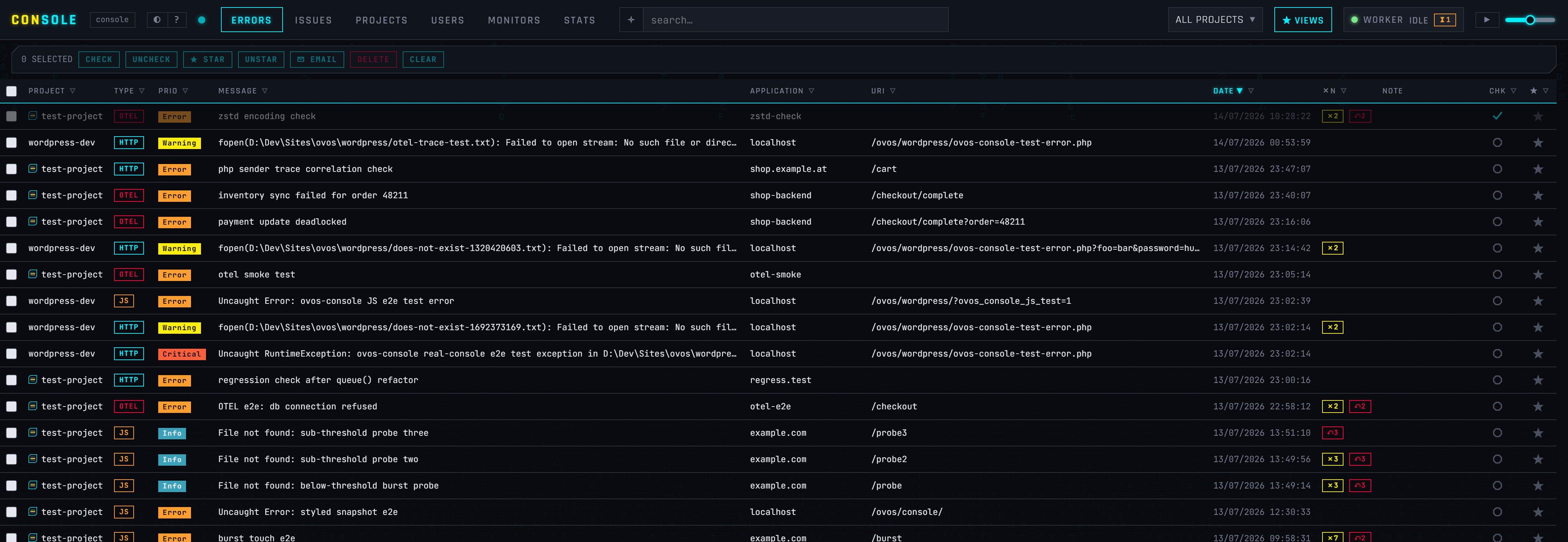
Try the live demo → — a public instance filled with synthetic errors. No login, no sign-up: browse the grid, expand a row for the full backtrace and request context, filter the issues, look at the monitors. Changes are disabled, triage (check, star, resolve) is not — press ? for the keyboard map.
One console for everything you run, on infrastructure you control:
- Live — errors from PHP, browser JavaScript, WordPress, Node.js and OpenTelemetry services land the moment they happen; an error storm is ingested through Redis Streams without slowing the app that reported it.
- Issues, not noise — the same error a thousand times is one row with a count, fingerprinted into an issue with an open → resolved → regressed lifecycle.
- Trace correlation — a failed browser request and the PHP error behind it share one trace id, so a broken request lines up across services in a click.
- Uptime — dead-man's-switch heartbeats for cron jobs and health-URL probes, so you hear about the job that stopped running before your users do.
- Alerting — priority-gated, throttled email and chat notifications, per project.
- Ask your AI — point Claude or any MCP client at the console and ask about your errors, or hit
◇ AI EXPLAINon any row for a plain-English root-cause read.
Self-hosted, so stack traces and user data never leave your infrastructure — and no per-event bill that grows with your traffic. More on the product page; if you would rather not run it yourself, we host it for you from Vienna.
- WordPress 6.0+
- PHP 8.1+ (the
Requires PHPheader prevents activation on older hosts) - an ovos console instance reachable from this site
The plugin is not on wordpress.org — it installs from the release zip on this repository and then keeps itself up to date (see Automatic updates below).
- Download
ovos-console.zip— that link always resolves to the newest release; the releases page has the older ones and the changelog. - Go to Plugins → Add New Plugin → Upload Plugin, choose the zip, install and activate.
wp plugin install https://github.com/ovos/console-client-wordpress/releases/latest/download/ovos-console.zip --activateThe zip carries an ovos-console/ prefix, so it installs under that directory
name and later updates swap it cleanly. Configure it in the same breath —
wp config set writes the constants into wp-config.php, which take
precedence over the settings page and lock the corresponding fields:
wp config set OVOS_CONSOLE_ENABLED true --raw
wp config set OVOS_CONSOLE_URL https://console.example
wp config set OVOS_CONSOLE_API_KEY 'the project api_key'
wp config set OVOS_CONSOLE_JS_KEY 'the project js_key'
Updating, and turning on unattended updates:
wp plugin update ovos-console
wp plugin auto-updates enable ovos-console
To install one specific version — a rollback, or pinning a fleet:
wp plugin install https://github.com/ovos/console-client-wordpress/releases/download/v0.4.7/ovos-console.zip --forceClone into wp-content/plugins — the directory name must be ovos-console:
cd wp-content/plugins
git clone git@github.com:ovos/console-client-wordpress.git ovos-console
Activate the plugin in wp-admin. Update it with git pull, and leave
auto-updates off for this copy: applying an update from wp-admin replaces the
whole directory with the release zip, .git included.
From 0.4.5 on the plugin keeps itself current, with no updater plugin, license
key or update server involved. Its header declares this repository as its
Update URI, so WordPress core's own update flow (5.8+) asks the plugin for
its latest GitHub release: new versions appear under Dashboard → Updates
and install like any directory plugin, straight from the release zip.
- One-click, from Dashboard → Updates or the Plugins screen, or
wp plugin update ovos-console. - Unattended — flip Enable auto-updates in the Plugins list (
wp plugin auto-updates enable ovos-console) and core's twice-daily cron installs new versions on its own. - The check is fire-and-forget: an offline host, a rate-limited GitHub API or a missing asset just means "no update visible right now", never an error on your dashboard.
- A successful answer is cached for twelve hours. Check again on the updates screen bypasses core's own cache; to also drop the plugin's,
wp transient delete ovos_console_latest_release.
Sites still on 0.4.4 or older need one last manual install of a newer version; everything after that arrives through the updater.
- In your console instance, create a project (PROJECTS tab) and note its secret api_key and public js_key.
- For browser errors, enable JS errors on the project and allowlist this site's exact origin (
scheme://host[:port], e.g.https://www.example.com) in the project's JS origins. - In wp-admin go to Settings → ovos console, enter the console URL and both keys, tick Enabled, and save.
- Click Send test error — the settings page reports the console's response, and the error appears in the console grid within a second.
Every value lives under Settings → ovos console and can alternatively be set as a constant in wp-config.php — a defined constant wins and locks the corresponding field in the UI (handy for deploy-time configuration):
| Setting | Constant | Default | |
|---|---|---|---|
| Enabled | OVOS_CONSOLE_ENABLED | false | master switch for both PHP and browser reporting |
| Console URL | OVOS_CONSOLE_URL | — | instance base URL, e.g. https://console.example |
| API key | OVOS_CONSOLE_API_KEY | — | the project's secret api_key (PHP errors) |
| Log level | OVOS_CONSOLE_LOG_LEVEL | 4 | send errors with syslog priority ≤ this (0 emergency … 7 debug) |
| Report 404s | OVOS_CONSOLE_REPORT_404 | false | front-end not-found requests as access events — rate-limited, static assets ignored, never turned into issues |
| Traffic rollups | OVOS_CONSOLE_ROLLUPS | false | anonymous per-minute request counters (status / method / resolved page type / logged-in splits, no URLs or visitor data) so the console reads probe counts as rates — requires the APCu extension (silently inert without it) and the project's rollups switch |
| Security events | OVOS_CONSOLE_SECURITY_EVENTS | false | refused actions as informational security events — failed logins (username masked), rejected nonce checks, REST 401/403s, sensitive admin changes; rate-limited to 60/min |
| Release label | OVOS_CONSOLE_RELEASE | — | optional deploy label (git sha, version), max 64 chars |
| Report JS errors | OVOS_CONSOLE_JS_ENABLED | true | loads the bundled browser client on the front end |
| JS key | OVOS_CONSOLE_JS_KEY | — | the project's public js_key (browser errors) |
| Trace correlation | OVOS_CONSOLE_JS_TRACE | true | W3C traceparent header on the page's same-origin fetch/XHR calls |
| DOM snapshot | OVOS_CONSOLE_SNAPSHOT | false | masked DOM snapshot with the first error per page load |
| Inline snapshot styles | OVOS_CONSOLE_SNAPSHOT_STYLES | false | embed the page's CSS so snapshots render styled |
| Load in wp-admin | OVOS_CONSOLE_JS_ADMIN | false | also report browser errors from wp-admin and the login page |
Example wp-config.php block:
define('OVOS_CONSOLE_ENABLED', true);
define('OVOS_CONSOLE_URL', 'https://console.example');
define('OVOS_CONSOLE_API_KEY', '...');
define('OVOS_CONSOLE_JS_KEY', '...');
define('OVOS_CONSOLE_RELEASE', '2026.07.13');Error reports alone have no denominator: "37 requests for pages this site
does not serve" reads very differently on 50 000 requests a minute than on
200. With rollups enabled, the plugin counts every request WordPress handles
into per-minute counters — request total, split by response status, HTTP
method, the page type WordPress resolved (front page, singular/{post_type},
archive/{taxonomy}, search, login, admin, REST, …) and logged-in state —
and ships each completed minute as one small POST to the console. A
request answered 404 counts only as "matched nothing", which is exactly the
scanner-probe signal the console's attack detection reads as a rate.
What deliberately never travels: URLs, query strings, IP addresses, user agents, cookies, or anything else request-derived — the counter names come from a closed vocabulary WordPress itself defines, so the payload is structurally incapable of carrying visitor data.
Enabling it takes two switches (either one off keeps the feature inert):
In WordPress: Settings → ovos console → Traffic rollups, or lock it in
wp-config.php:define('OVOS_CONSOLE_ROLLUPS', true);
In the console: tick Traffic rollups (
rollups_enabled) on the project — a sender posting to a project without it is refused and stays inert, so enabling the two sides in either order is safe.
Requirements and caveats:
- APCu is required (the
apcuPHP extension, enabled for the web SAPI). Counters accumulate in APCu shared memory and one request per minute ships them; without APCu the feature is a silent no-op — no counting, no sends, no errors — because a WordPress host without shared memory could only produce undercounted numbers, and a wrong denominator is worse than none. - Requests served entirely by a page-cache plugin (or a CDN) before WordPress boots are not counted — cached traffic never reaches PHP. Probe traffic is never a cache hit, so the attack signal is unaffected.
- Overhead is one APCu increment set per request (sub-microsecond, no I/O) plus a single sub-second POST per minute of traffic, sent after the response went out.
Errors say what broke; security events say what was refused — and refusals are where an attack is visible before anything breaks. With the switch on, the plugin reports:
- Failed logins (
auth_failure) — every door funnels through the same hook: the wp-login form, XML-RPC, REST basic auth, and rejected application passwords. The username is masked to its first character (m***); the reason travels as WordPress' error codes (invalid_username,incorrect_password), never as core's HTML error messages. - Rejected nonce checks (
csrf_reject) — a failedcheck_admin_referer/check_ajax_refereris the CSRF signal (or an expired-session replay); the nonce action name says which form was targeted. - Forbidden REST calls (
permission_denied) — REST requests answered 401/403, the shape of user enumeration and capability probing; reported with the error code and route. - Sensitive admin changes (
privileged_action) — the moves an attacker makes after getting in, routine for an admin but an audit trail during an incident: user role changes, plugin activations, plugin/theme/core installs and updates, and changes to theusers_can_register,default_role,admin_email,siteurlandhomeoptions (the option name only — values are deliberately not reported).
They arrive in the console as informational security events (priority 6),
grouped apart from errors: accepted independently of the project's severity
threshold, never turned into issues or alerts by default, feeding the
console's attack detection. Reports are capped at 60 per minute — a
credential-stuffing run cannot turn the reporter into the flood it surfaces.
Enable it under Settings → ovos console → Security events, or lock it in
wp-config.php:
define('OVOS_CONSOLE_SECURITY_EVENTS', true);The console side is on by default for every project (the per-project Security events switch under the project's Data tab is the off switch).
TLS verification of the ingest call is on by default. For a console behind a self-signed certificate (intranet instances), disable it from an mu-plugin or your theme:
add_filter('ovos_console_sslverify', '__return_false');ovos_console()->captureException($e, ['orderId' => 7]);
ovos_console()->captureMessage('checkout step skipped', 4); // priority 4 = warningBoth are safe to call unconditionally — when the plugin is disabled or unconfigured the calls are no-ops.
- The repository root is the plugin directory — for local development, symlink/junction it into
wp-content/plugins/ovos-console. assets/console-client.jsis a bundled copy of the console's browser client (intentionally ES5 — do not modernize); it is synced from the console repository on client releases, never edited here.readme.txtis the wordpress.org-format readme; this file is for GitHub.- Releasing: push a
v*tag whose version matches the plugin header and readme.txt stable tag (e.g.git tag v0.1.0 && git push origin v0.1.0) — the release workflow verifies the versions, builds the zip viagit archiveand publishes a GitHub release withovos-console.zipattached.