






Cluster is an easy map annotation clustering library. This repository uses an efficient method (QuadTree) to aggregate pins into a cluster.
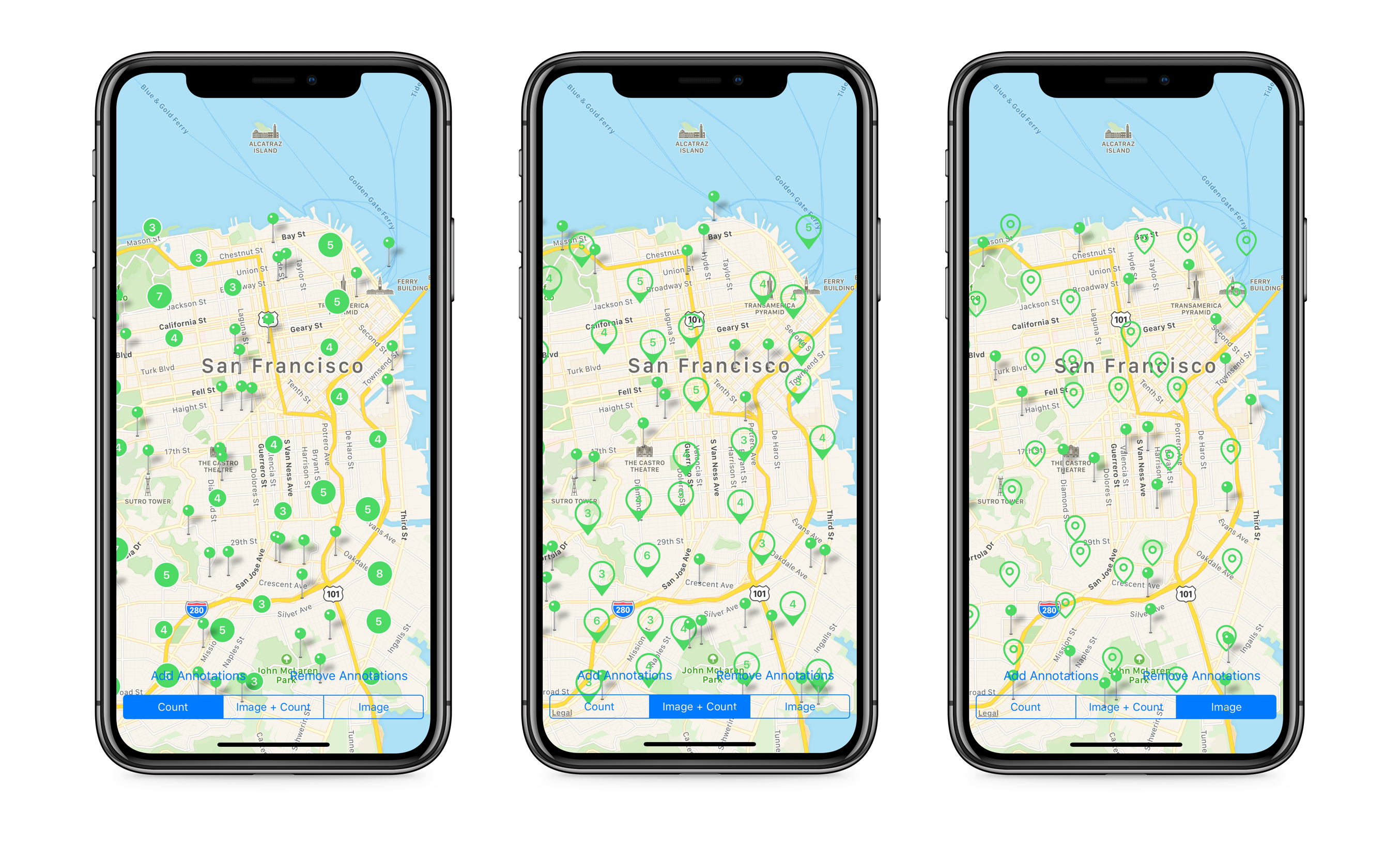
- Adding/Removing Annotations
- Clustering Annotations
- Multiple Managers
- Dynamic Cluster Disabling
- Custom Cell Size
- Custom Annotation Views
- Animation Support
- Documentation
- iOS 12.0+
- Swift 5 (Cluster 3.x), Swift 4 (Cluster 2.x), Swift 3 (Cluster 1.x)
The Example is a great place to get started. It demonstrates how to:
- integrate the library
- add/remove annotations
- reload annotations
- configure the annotation view
- configure the manager

$ pod try Cluster
Cluster is available via CocoaPods and Carthage.
To install Cluster with CocoaPods, add this to your Podfile:
pod "Cluster"
To install Cluster with Carthage, add this to your Cartfile:
github "efremidze/Cluster"
The ClusterManager class generates, manages and displays annotation clusters.
letclusterManager=ClusterManager()Create an object that conforms to the MKAnnotation protocol, or extend an existing one. Next, add the annotation object to an instance of ClusterManager with add(annotation:).
letannotation=Annotation(coordinate:CLLocationCoordinate2D(latitude:21.283921, longitude:-157.831661))
manager.add(annotation)Implement the map view’s mapView(_:viewFor:) delegate method to configure the annotation view. Return an instance of MKAnnotationView to display as a visual representation of the annotations.
To display clusters, return an instance of ClusterAnnotationView.
extensionViewController:MKMapViewDelegate{func mapView(_ mapView:MKMapView, viewFor annotation:MKAnnotation)->MKAnnotationView?{iflet annotation = annotation as?ClusterAnnotation{returnCountClusterAnnotationView(annotation: annotation, reuseIdentifier:"cluster")}else{returnMKPinAnnotationView(annotation: annotation, reuseIdentifier:"pin")}}}For performance reasons, you should generally reuse MKAnnotationView objects in your map views. See the Example to learn more.
The ClusterAnnotationView class exposes a countLabel property. You can subclass ClusterAnnotationView to provide custom behavior as needed. Here's an example of subclassing the ClusterAnnotationView and customizing the layer borderColor.
classCountClusterAnnotationView:ClusterAnnotationView{overridefunc configure(){
super.configure()self.layer.cornerRadius =self.frame.width /2self.layer.masksToBounds =trueself.layer.borderColor =UIColor.white.cgColor
self.layer.borderWidth =1.5}}
See the AnnotationView to learn more.
You can customize the appearance of the StyledClusterAnnotationView by setting the style property of the annotation.
letannotation=Annotation(coordinate:CLLocationCoordinate2D(latitude:21.283921, longitude:-157.831661))
annotation.style =.color(color, radius:25)
manager.add(annotation)
Several styles are available in the ClusterAnnotationStyle enum:
color(UIColor, radius: CGFloat)- Displays the annotations as a circle.image(UIImage?)- Displays the annotation as an image.
Once you have added the annotation, you need to return an instance of the StyledClusterAnnotationView to display the styled annotation.
func mapView(_ mapView:MKMapView, viewFor annotation:MKAnnotation)->MKAnnotationView?{iflet annotation = annotation as?ClusterAnnotation{returnStyledClusterAnnotationView(annotation: annotation, reuseIdentifier: identifier, style: style)}}To remove annotations, you can call remove(annotation:). However the annotations will still display until you call reload().
manager.remove(annotation)In the case that shouldRemoveInvisibleAnnotations is set to false, annotations that have been removed may still appear on map until calling reload() on visible region.
Implement the map view’s mapView(_:regionDidChangeAnimated:) delegate method to reload the ClusterManager when the region changes.
func mapView(_ mapView:MKMapView, regionDidChangeAnimated animated:Bool){
clusterManager.reload(mapView: mapView){ finished in
// handle completion
}}
You should call reload() anytime you add or remove annotations.
The ClusterManager class exposes several properties to configure clustering:
varzoomLevel:Double // The current zoom level of the visible map region.
varmaxZoomLevel:Double // The maximum zoom level before disabling clustering.
varminCountForClustering:Int // The minimum number of annotations for a cluster. The default is `2`.
varshouldRemoveInvisibleAnnotations:Bool // Whether to remove invisible annotations. The default is `true`.
varshouldDistributeAnnotationsOnSameCoordinate:Bool // Whether to arrange annotations in a circle if they have the same coordinate. The default is `true`.
vardistanceFromContestedLocation:Double // The distance in meters from contested location when the annotations have the same coordinate. The default is `3`.
varclusterPosition:ClusterPosition // The position of the cluster annotation. The default is `.nearCenter`.The ClusterManagerDelegate protocol provides a number of functions to manage clustering and configure cells.
// The size of each cell on the grid at a given zoom level.
func cellSize(for zoomLevel:Double)->Double?{...}
// Whether to cluster the given annotation.
func shouldClusterAnnotation(_ annotation:MKAnnotation)->Bool{...}- If you found a bug, open an issue.
- If you have a feature request, open an issue.
- If you want to contribute, submit a pull request.
- https://github.com/ribl/FBAnnotationClusteringSwift
- https://github.com/choefele/CCHMapClusterController
- https://github.com/googlemaps/google-maps-ios-utils
- https://github.com/hulab/ClusterKit
Cluster is available under the MIT license. See the LICENSE file for more info.