Padawan.vim is a vim plugin for padawan.php server , a smart PHP code completion server for Composer projects.
This plugin includes:
- Omnifunc
- Commands for index generation and index saving
- Commands for starting, stopping and restarting the server
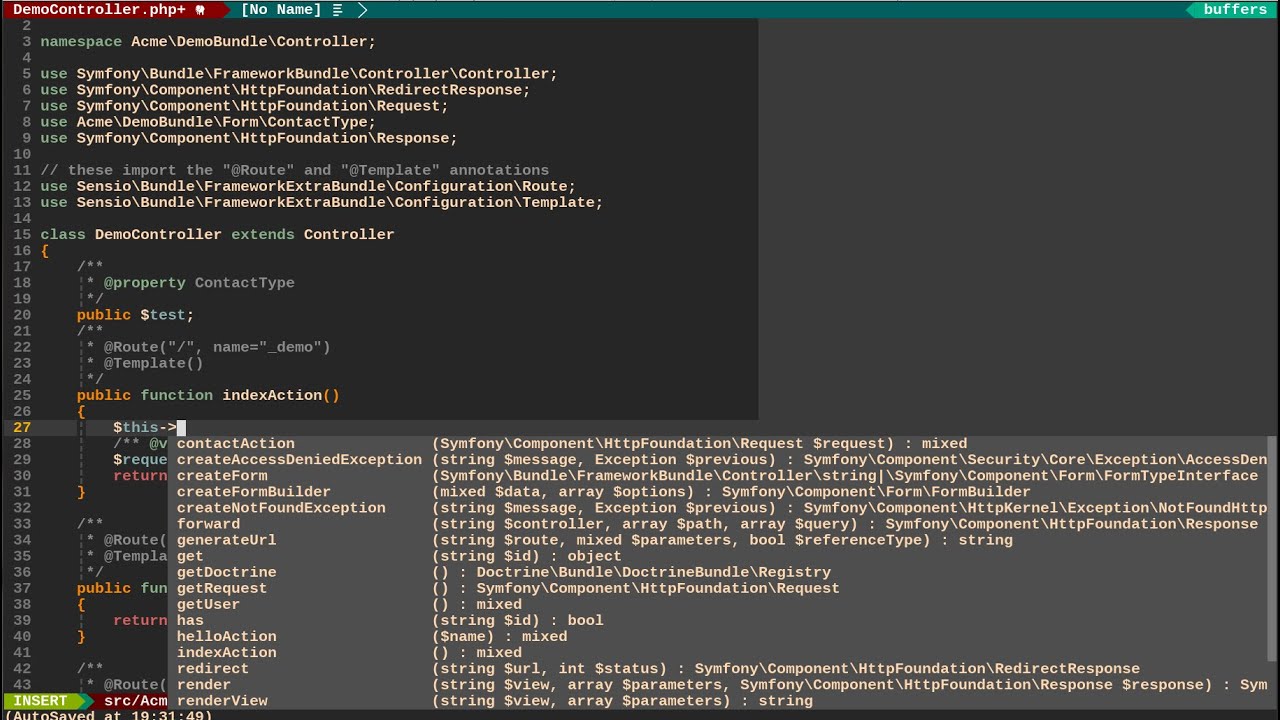
Currently Padawan.vim offers basic completion for methods and classes based on doc comments and method signatures.
Click the image below to watch a short video on what Padawan.vim can already do.
Padawan.vim requires:
- PHP 5.5+
- Composer
- Vim with +python
You can install Padawan.vim using any of the popular plugin managers like Pathogen, Vundle, Neobundle or Plug.
- Make sure you have installed padawan.php package:
$ composer global require mkusher/padawan- Configure $PATH variable. You may add $PATH to your vimrc:
let$PATH=$PATH . ':' . expand('~/.composer/vendor/bin')- Configure composer command:
letg:padawan#composer_command ="php /path/to/composer.phar"To install Padawan.vim with Pathogen do the following steps:
$ cd~/.vim/bundle
$ git clone https://github.com/mkusher/padawan.vim.gitAdd this to your vimrc
Plug 'mkusher/padawan.vim'Add this to your vimrc
Plugin'mkusher/padawan.vim'Add this to your vimrc
NeoBundle 'mkusher/padawan.vim'- In your php composer project folder, run the following vim command to generate an index:
:PadawanGenerateIndex- Start Padawan.php server with:
:PadawanStartServer- Enjoy smart completion
Index generation can take a while, but needs to be performed only once per project.
You should set semantic triggers like
letg:ycm_semantic_triggers= {}
letg:ycm_semantic_triggers.php =\ ['->', '::', '(', 'use ', 'namespace ', '\']You should set omni input patterns like
letg:neocomplete#force_omni_input_patterns = {}
letg:neocomplete#force_omni_input_patterns.php =\ '\h\w*\|[^- \t]->\w*'You can extend Padawan.php by installing different plugins. See Plugins List for more info.
To install a plugin, run :PadawanAddPlugin PLUGIN_NAME, for example:
:PadawanAddPlugin mkusher/padawan-symfonyTo remove a plugin, run :PadawanRemovePlugin PLUGIN_NAME, for example:
:PadawanRemovePlugin mkusher/padawan-symfonyYou may want to change Composer to the one already installed on your system. You can do so by with the following line:
letg:padawan#composer_command ='php /usr/bin/composer.phar'Another configurable option is http request timeout. The following example sets it to 100 ms:
letg:padawan#timeout=0.1If you don't want to use composer global for installing padawan, then you
should configure commands for running padawan:
letg:padawan#cli ='/path/to/padawan.php/bin/padawan'letg:padawan#server_command ='/path/to/padawan.php/bin/padawan-server'For quick access to the functions below, map them to keys of your choice.
Use padawan#GenerateIndex() function:
:callpadawan#GenerateIndex()Use padawan#SaveIndex() function:
:callpadawan#SaveIndex()Use padawan#StartServer() function:
:callpadawan#StartServer()Use padawan#StopServer() function:
:callpadawan#StopServer()Use padawan#RestartServer() function:
:callpadawan#RestartServer()