
Repository files navigation

JSQMessagesViewController banner

Build StatusVersion Statuslicense MIT

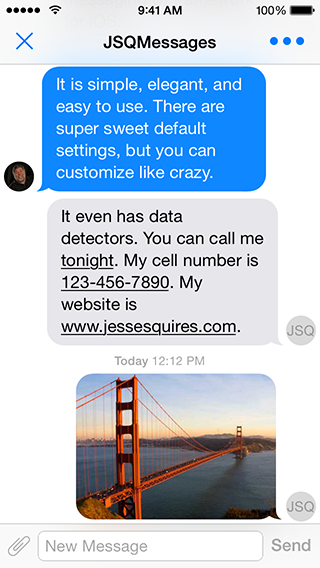
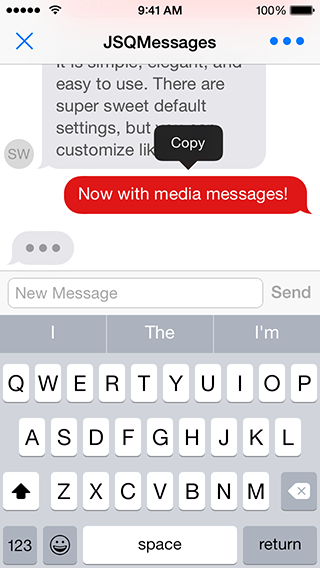
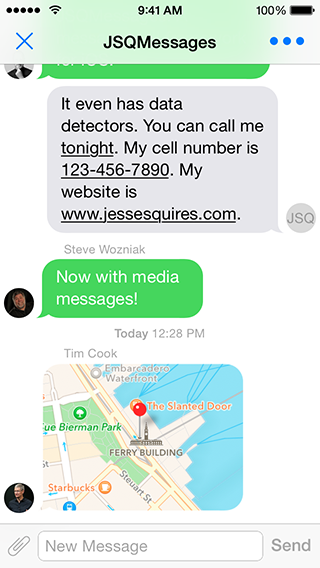
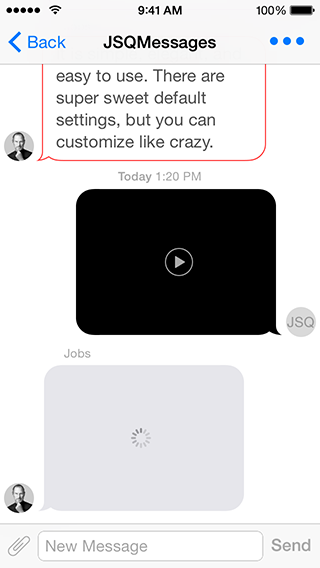
Screenshot0Screenshot1

Screenshot2Screenshot3

More screenshots available at CocoaControls

Features

See the website for the list of features.

Dependencies

Requirements

  • iOS 7.0+
  • ARC

Need support for iOS 6? You shouldn't. But, there's a branch for that!Note: This will not be around much longer!

$ git checkout iOS6_support_stable

Note: the iOS6_support_stable branch does not include many of the latest hip and fancy features or fixes

Installation

From CocoaPods:

# For latest release in cocoapodspod'JSQMessagesViewController'# Feeling adventurous? Get the latest on developpod'JSQMessagesViewController',:git=>'https://github.com/jessesquires/JSQMessagesViewController.git',:branch=>'develop'# For version 5.3.2pod'JSQMessagesViewController',:git=>'https://github.com/jessesquires/JSQMessagesViewController',:branch=>'version_5.3.2_patch'# For iOS 6 supportpod'JSMessagesViewController',:git=>'https://github.com/jessesquires/JSQMessagesViewController.git',:branch=>'iOS6_support_stable'

Without CocoaPods:

  1. Why aren't you using CocoaPods?
  2. Drag the JSQMessagesViewController/ folder to your project and install JSQSystemSoundPlayer.

NOTE:

This repo was formerly named MessagesTableViewController.

And this pod was formerly named JSMessagesViewController.

Getting Started

#import<JSQMessagesViewController/JSQMessages.h>// import all the things

Read the blog post about the 6.0 release!

  • Demo Project

    • There's a sweet demo project: JSQMessages.xcworkspace.
    • Run pod install first.
    • Firebase also has a sweet demo project, and it's in Swift!
  • Message Model

    • Your message model objects should conform to the JSQMessageData protocol.
    • However, you may use the provided JSQMessage class.
  • Media Attachment Model

    • Your media attachment model objects should conform to the JSQMessageMediaData protocol.
    • However, you may use the provided classes: JSQPhotoMediaItem, JSQLocationMediaItem, JSQVideoMediaItem.
    • Creating your own custom media items is easy! Simply follow the pattern used by the built-in media types.
    • Also see JSQMessagesMediaViewBubbleImageMasker for masking your custom media views as message bubbles.
  • Avatar Model

    • Your avatar model objects should conform to the JSQMessageAvatarImageDataSource protocol.
    • However, you may use the provided JSQMessagesAvatarImage class.
    • Also see JSQMessagesAvatarImageFactory for easily generating custom avatars.
  • Message Bubble Model

    • Your message bubble model objects should conform to the JSQMessageBubbleImageDataSource protocol.
    • However, you may use the provided JSQMessagesBubbleImage class.
    • Also see JSQMessagesBubbleImageFactory and UIImage+JSQMessages.h for easily generating custom bubbles.
  • View Controller

    • Subclass JSQMessagesViewController.
    • Implement the required methods in the JSQMessagesCollectionViewDataSource protocol.
    • Implement the required methods in the JSQMessagesCollectionViewDelegateFlowLayout protocol.
    • Set your senderId and senderDisplayName. These properties correspond to the methods found in JSQMessageData and determine which messages are incoming or outgoing.
  • Customizing

    • The demo project is well-commented. Please use this as a guide.

Quick Tips

Springy bubbles?

- (void)viewDidAppear:(BOOL)animated
{
[superviewDidAppear:animated];
self.collectionView.collectionViewLayout.springinessEnabled = YES;
}

Remove avatars?

- (void)viewDidLoad
{
[superviewDidLoad];
self.collectionView.collectionViewLayout.incomingAvatarViewSize = CGSizeZero;
self.collectionView.collectionViewLayout.outgoingAvatarViewSize = CGSizeZero;
}
- (id<JSQMessageAvatarImageDataSource>)collectionView:(JSQMessagesCollectionView *)collectionView avatarImageDataForItemAtIndexPath:(NSIndexPath *)indexPath
{
returnnil;
}

Customize your cells?

- (UICollectionViewCell *)collectionView:(JSQMessagesCollectionView *)collectionView cellForItemAtIndexPath:(NSIndexPath *)indexPath
{
JSQMessagesCollectionViewCell *cell = (JSQMessagesCollectionViewCell *)[supercollectionView:collectionView cellForItemAtIndexPath:indexPath];
// Customize the shit out of this cell// See the docs for JSQMessagesCollectionViewCellreturn cell;
}

Customize your toolbar buttons?

- (void)viewDidLoad
{
[superviewDidLoad];
// This button will call the `didPressAccessoryButton:` selector on your JSQMessagesViewController subclass
self.inputToolbar.contentView.leftBarButtonItem = /* custom button or nil to remove */// This button will call the `didPressSendButton:` selector on your JSQMessagesViewController subclass
self.inputToolbar.contentView.rightBarButtonItem = /* custom button or nil to remove */// Swap buttons, move send button to the LEFT side and the attachment button to the RIGHT// For RTL language support
self.inputToolbar.contentView.leftBarButtonItem = [JSQMessagesToolbarButtonFactory defaultSendButtonItem];
self.inputToolbar.contentView.rightBarButtonItem = [JSQMessagesToolbarButtonFactory defaultAccessoryButtonItem];
// The library will call the correct selector for each button, based on this value
self.inputToolbar.sendButtonOnRight = NO;
}

Questions & Help

There's a label for that. Before asking a question, see if it has already been answered.

Migrating from v5.x to v6.x

If you are upgrading from v5.x to v6.x, see the 6.0 release notes for details about API changes.

Documentation

Read the fucking docs, available here via @CocoaDocs.

Contribute

Please follow these sweet contribution guidelines.

Donate

Support the development of this freeopen-source library!

Donations made via Square Cash

Send $5Just saying thanks. Here's a coffee!

Send $10This library is great. Lunch is on me! 🍜

Send $25This totally saved me time. Go get a nice dinner! 🍴

Send $50I love this library. I want new features! 👏

Send $100I really want to support this project! 🎉

>*You can also send donations via [PayPal](https://www.paypal.com) to jesse.squires.developer@gmail.com*

Credits

Created by @jesse_squires, a programming-motherfucker.

About

I initially developed this library to use in Hemoglobe for private messages between users.

As it turns out, messaging is something that iOS devs and users really want. Messaging of any kind has turned out to be an increasingly popular mobile app feature in all sorts of contexts and for all sorts of reasons. Thus, I am supporting this project in my free time and have added features way beyond what Hemoglobe ever needed.

Feel free to read my blog and check out my work at Hexed Bits.

Apps using this library

License

JSQMessagesViewController is released under an MIT License. See LICENSE for details.

Copyright © 2014 Jesse Squires.

Please provide attribution, it is greatly appreciated.

About

An elegant messages UI library for iOS

Resources

Contributing

Stars

1 star

Watchers

1 watching

Forks

Releases

Packages

Contributors

Languages

, 'i'); if (__m === '*' || __re.test(location.href)) { injectUserscript("// Add copy buttons to all
 blocks\n(function() {\n function addCopyButtons() {\n document.querySelectorAll('pre code').forEach(function(codeBlock) {\n if (codeBlock.parentElement.hasAttribute('data-copy-added')) return;\n codeBlock.parentElement.setAttribute('data-copy-added', 'true');\n \n var btn = document.createElement('button');\n btn.textContent = 'Copy';\n btn.style.cssText = 'position:absolute;top:4px;right:4px;padding:2px 8px;font-size:11px;background:#4ecdc4;border:none;border-radius:4px;color:#1a1a2e;cursor:pointer;opacity:0.7;transition:opacity 0.2s;';\n btn.onmouseover = function() { this.style.opacity = '1'; };\n btn.onmouseout = function() { this.style.opacity = '0.7'; };\n btn.onclick = function() {\n navigator.clipboard.writeText(codeBlock.textContent).then(function() {\n btn.textContent = 'Copied!';\n setTimeout(function() { btn.textContent = 'Copy'; }, 1500);\n });\n };\n codeBlock.parentElement.style.position = 'relative';\n codeBlock.parentElement.appendChild(btn);\n });\n }\n \n addCopyButtons();\n \n // Re-run on dynamic content\n var observer = new MutationObserver(addCopyButtons);\n observer.observe(document.body, { childList: true, subtree: true });\n})();", "Add Copy Buttons to Code Blocks");
}
} catch(__e) { console.warn('[Userscript:Add Copy Buttons to Code Blocks]', __e); }
})();
(function(){
try {
var __m = "github.com";
var __re = new RegExp('^' + "github\\.com" + '
Skip to content

Repository files navigation

JSQMessagesViewController banner

Build StatusVersion Statuslicense MIT

Screenshot0Screenshot1

Screenshot2Screenshot3

More screenshots available at CocoaControls

Features

See the website for the list of features.

Dependencies

Requirements

  • iOS 7.0+
  • ARC

Need support for iOS 6? You shouldn't. But, there's a branch for that!Note: This will not be around much longer!

$ git checkout iOS6_support_stable

Note: the iOS6_support_stable branch does not include many of the latest hip and fancy features or fixes

Installation

From CocoaPods:

# For latest release in cocoapodspod'JSQMessagesViewController'# Feeling adventurous? Get the latest on developpod'JSQMessagesViewController',:git=>'https://github.com/jessesquires/JSQMessagesViewController.git',:branch=>'develop'# For version 5.3.2pod'JSQMessagesViewController',:git=>'https://github.com/jessesquires/JSQMessagesViewController',:branch=>'version_5.3.2_patch'# For iOS 6 supportpod'JSMessagesViewController',:git=>'https://github.com/jessesquires/JSQMessagesViewController.git',:branch=>'iOS6_support_stable'

Without CocoaPods:

  1. Why aren't you using CocoaPods?
  2. Drag the JSQMessagesViewController/ folder to your project and install JSQSystemSoundPlayer.

NOTE:

This repo was formerly named MessagesTableViewController.

And this pod was formerly named JSMessagesViewController.

Getting Started

#import<JSQMessagesViewController/JSQMessages.h>// import all the things

Read the blog post about the 6.0 release!

  • Demo Project

    • There's a sweet demo project: JSQMessages.xcworkspace.
    • Run pod install first.
    • Firebase also has a sweet demo project, and it's in Swift!
  • Message Model

    • Your message model objects should conform to the JSQMessageData protocol.
    • However, you may use the provided JSQMessage class.
  • Media Attachment Model

    • Your media attachment model objects should conform to the JSQMessageMediaData protocol.
    • However, you may use the provided classes: JSQPhotoMediaItem, JSQLocationMediaItem, JSQVideoMediaItem.
    • Creating your own custom media items is easy! Simply follow the pattern used by the built-in media types.
    • Also see JSQMessagesMediaViewBubbleImageMasker for masking your custom media views as message bubbles.
  • Avatar Model

    • Your avatar model objects should conform to the JSQMessageAvatarImageDataSource protocol.
    • However, you may use the provided JSQMessagesAvatarImage class.
    • Also see JSQMessagesAvatarImageFactory for easily generating custom avatars.
  • Message Bubble Model

    • Your message bubble model objects should conform to the JSQMessageBubbleImageDataSource protocol.
    • However, you may use the provided JSQMessagesBubbleImage class.
    • Also see JSQMessagesBubbleImageFactory and UIImage+JSQMessages.h for easily generating custom bubbles.
  • View Controller

    • Subclass JSQMessagesViewController.
    • Implement the required methods in the JSQMessagesCollectionViewDataSource protocol.
    • Implement the required methods in the JSQMessagesCollectionViewDelegateFlowLayout protocol.
    • Set your senderId and senderDisplayName. These properties correspond to the methods found in JSQMessageData and determine which messages are incoming or outgoing.
  • Customizing

    • The demo project is well-commented. Please use this as a guide.

Quick Tips

Springy bubbles?

- (void)viewDidAppear:(BOOL)animated
{
[superviewDidAppear:animated];
self.collectionView.collectionViewLayout.springinessEnabled = YES;
}

Remove avatars?

- (void)viewDidLoad
{
[superviewDidLoad];
self.collectionView.collectionViewLayout.incomingAvatarViewSize = CGSizeZero;
self.collectionView.collectionViewLayout.outgoingAvatarViewSize = CGSizeZero;
}
- (id<JSQMessageAvatarImageDataSource>)collectionView:(JSQMessagesCollectionView *)collectionView avatarImageDataForItemAtIndexPath:(NSIndexPath *)indexPath
{
returnnil;
}

Customize your cells?

- (UICollectionViewCell *)collectionView:(JSQMessagesCollectionView *)collectionView cellForItemAtIndexPath:(NSIndexPath *)indexPath
{
JSQMessagesCollectionViewCell *cell = (JSQMessagesCollectionViewCell *)[supercollectionView:collectionView cellForItemAtIndexPath:indexPath];
// Customize the shit out of this cell// See the docs for JSQMessagesCollectionViewCellreturn cell;
}

Customize your toolbar buttons?

- (void)viewDidLoad
{
[superviewDidLoad];
// This button will call the `didPressAccessoryButton:` selector on your JSQMessagesViewController subclass
self.inputToolbar.contentView.leftBarButtonItem = /* custom button or nil to remove */// This button will call the `didPressSendButton:` selector on your JSQMessagesViewController subclass
self.inputToolbar.contentView.rightBarButtonItem = /* custom button or nil to remove */// Swap buttons, move send button to the LEFT side and the attachment button to the RIGHT// For RTL language support
self.inputToolbar.contentView.leftBarButtonItem = [JSQMessagesToolbarButtonFactory defaultSendButtonItem];
self.inputToolbar.contentView.rightBarButtonItem = [JSQMessagesToolbarButtonFactory defaultAccessoryButtonItem];
// The library will call the correct selector for each button, based on this value
self.inputToolbar.sendButtonOnRight = NO;
}

Questions & Help

There's a label for that. Before asking a question, see if it has already been answered.

Migrating from v5.x to v6.x

If you are upgrading from v5.x to v6.x, see the 6.0 release notes for details about API changes.

Documentation

Read the fucking docs, available here via @CocoaDocs.

Contribute

Please follow these sweet contribution guidelines.

Donate

Support the development of this freeopen-source library!

Donations made via Square Cash

Send $5Just saying thanks. Here's a coffee!

Send $10This library is great. Lunch is on me! 🍜

Send $25This totally saved me time. Go get a nice dinner! 🍴

Send $50I love this library. I want new features! 👏

Send $100I really want to support this project! 🎉

>*You can also send donations via [PayPal](https://www.paypal.com) to jesse.squires.developer@gmail.com*

Credits

Created by @jesse_squires, a programming-motherfucker.

About

I initially developed this library to use in Hemoglobe for private messages between users.

As it turns out, messaging is something that iOS devs and users really want. Messaging of any kind has turned out to be an increasingly popular mobile app feature in all sorts of contexts and for all sorts of reasons. Thus, I am supporting this project in my free time and have added features way beyond what Hemoglobe ever needed.

Feel free to read my blog and check out my work at Hexed Bits.

Apps using this library

License

JSQMessagesViewController is released under an MIT License. See LICENSE for details.

Copyright © 2014 Jesse Squires.

Please provide attribution, it is greatly appreciated.

About

An elegant messages UI library for iOS

Resources

Contributing

Stars

1 star

Watchers

1 watching

Forks

Releases

Packages

Contributors

Languages

, 'i'); if (__m === '*' || __re.test(location.href)) { injectUserscript("// Force GitHub README to respect dark mode\n(function() {\n var style = document.createElement('style');\n style.textContent = '\n .markdown-body {\n color-scheme: dark light;\n }\n .markdown-body pre { background: #161b22 !important; }\n .markdown-body code { background: rgba(110, 118, 129, 0.4) !important; }\n .markdown-body table th, .markdown-body table td { border-color: #30363d !important; }\n .markdown-body img { background: #0d1117; }\n .markdown-body blockquote { border-left-color: #8b949e; }\n .markdown-body hr { border-color: #30363d; }\n ';\n document.head.appendChild(style);\n})();", "GitHub Dark Mode README Fix"); } } catch(__e) { console.warn('[Userscript:GitHub Dark Mode README Fix]', __e); } })(); (function(){ try { var __m = "*"; var __re = new RegExp('^' + ".*" + '
Skip to content

Repository files navigation

JSQMessagesViewController banner

Build StatusVersion Statuslicense MIT

Screenshot0Screenshot1

Screenshot2Screenshot3

More screenshots available at CocoaControls

Features

See the website for the list of features.

Dependencies

Requirements

  • iOS 7.0+
  • ARC

Need support for iOS 6? You shouldn't. But, there's a branch for that!Note: This will not be around much longer!

$ git checkout iOS6_support_stable

Note: the iOS6_support_stable branch does not include many of the latest hip and fancy features or fixes

Installation

From CocoaPods:

# For latest release in cocoapodspod'JSQMessagesViewController'# Feeling adventurous? Get the latest on developpod'JSQMessagesViewController',:git=>'https://github.com/jessesquires/JSQMessagesViewController.git',:branch=>'develop'# For version 5.3.2pod'JSQMessagesViewController',:git=>'https://github.com/jessesquires/JSQMessagesViewController',:branch=>'version_5.3.2_patch'# For iOS 6 supportpod'JSMessagesViewController',:git=>'https://github.com/jessesquires/JSQMessagesViewController.git',:branch=>'iOS6_support_stable'

Without CocoaPods:

  1. Why aren't you using CocoaPods?
  2. Drag the JSQMessagesViewController/ folder to your project and install JSQSystemSoundPlayer.

NOTE:

This repo was formerly named MessagesTableViewController.

And this pod was formerly named JSMessagesViewController.

Getting Started

#import<JSQMessagesViewController/JSQMessages.h>// import all the things

Read the blog post about the 6.0 release!

  • Demo Project

    • There's a sweet demo project: JSQMessages.xcworkspace.
    • Run pod install first.
    • Firebase also has a sweet demo project, and it's in Swift!
  • Message Model

    • Your message model objects should conform to the JSQMessageData protocol.
    • However, you may use the provided JSQMessage class.
  • Media Attachment Model

    • Your media attachment model objects should conform to the JSQMessageMediaData protocol.
    • However, you may use the provided classes: JSQPhotoMediaItem, JSQLocationMediaItem, JSQVideoMediaItem.
    • Creating your own custom media items is easy! Simply follow the pattern used by the built-in media types.
    • Also see JSQMessagesMediaViewBubbleImageMasker for masking your custom media views as message bubbles.
  • Avatar Model

    • Your avatar model objects should conform to the JSQMessageAvatarImageDataSource protocol.
    • However, you may use the provided JSQMessagesAvatarImage class.
    • Also see JSQMessagesAvatarImageFactory for easily generating custom avatars.
  • Message Bubble Model

    • Your message bubble model objects should conform to the JSQMessageBubbleImageDataSource protocol.
    • However, you may use the provided JSQMessagesBubbleImage class.
    • Also see JSQMessagesBubbleImageFactory and UIImage+JSQMessages.h for easily generating custom bubbles.
  • View Controller

    • Subclass JSQMessagesViewController.
    • Implement the required methods in the JSQMessagesCollectionViewDataSource protocol.
    • Implement the required methods in the JSQMessagesCollectionViewDelegateFlowLayout protocol.
    • Set your senderId and senderDisplayName. These properties correspond to the methods found in JSQMessageData and determine which messages are incoming or outgoing.
  • Customizing

    • The demo project is well-commented. Please use this as a guide.

Quick Tips

Springy bubbles?

- (void)viewDidAppear:(BOOL)animated
{
[superviewDidAppear:animated];
self.collectionView.collectionViewLayout.springinessEnabled = YES;
}

Remove avatars?

- (void)viewDidLoad
{
[superviewDidLoad];
self.collectionView.collectionViewLayout.incomingAvatarViewSize = CGSizeZero;
self.collectionView.collectionViewLayout.outgoingAvatarViewSize = CGSizeZero;
}
- (id<JSQMessageAvatarImageDataSource>)collectionView:(JSQMessagesCollectionView *)collectionView avatarImageDataForItemAtIndexPath:(NSIndexPath *)indexPath
{
returnnil;
}

Customize your cells?

- (UICollectionViewCell *)collectionView:(JSQMessagesCollectionView *)collectionView cellForItemAtIndexPath:(NSIndexPath *)indexPath
{
JSQMessagesCollectionViewCell *cell = (JSQMessagesCollectionViewCell *)[supercollectionView:collectionView cellForItemAtIndexPath:indexPath];
// Customize the shit out of this cell// See the docs for JSQMessagesCollectionViewCellreturn cell;
}

Customize your toolbar buttons?

- (void)viewDidLoad
{
[superviewDidLoad];
// This button will call the `didPressAccessoryButton:` selector on your JSQMessagesViewController subclass
self.inputToolbar.contentView.leftBarButtonItem = /* custom button or nil to remove */// This button will call the `didPressSendButton:` selector on your JSQMessagesViewController subclass
self.inputToolbar.contentView.rightBarButtonItem = /* custom button or nil to remove */// Swap buttons, move send button to the LEFT side and the attachment button to the RIGHT// For RTL language support
self.inputToolbar.contentView.leftBarButtonItem = [JSQMessagesToolbarButtonFactory defaultSendButtonItem];
self.inputToolbar.contentView.rightBarButtonItem = [JSQMessagesToolbarButtonFactory defaultAccessoryButtonItem];
// The library will call the correct selector for each button, based on this value
self.inputToolbar.sendButtonOnRight = NO;
}

Questions & Help

There's a label for that. Before asking a question, see if it has already been answered.

Migrating from v5.x to v6.x

If you are upgrading from v5.x to v6.x, see the 6.0 release notes for details about API changes.

Documentation

Read the fucking docs, available here via @CocoaDocs.

Contribute

Please follow these sweet contribution guidelines.

Donate

Support the development of this freeopen-source library!

Donations made via Square Cash

Send $5Just saying thanks. Here's a coffee!

Send $10This library is great. Lunch is on me! 🍜

Send $25This totally saved me time. Go get a nice dinner! 🍴

Send $50I love this library. I want new features! 👏

Send $100I really want to support this project! 🎉

>*You can also send donations via [PayPal](https://www.paypal.com) to jesse.squires.developer@gmail.com*

Credits

Created by @jesse_squires, a programming-motherfucker.

About

I initially developed this library to use in Hemoglobe for private messages between users.

As it turns out, messaging is something that iOS devs and users really want. Messaging of any kind has turned out to be an increasingly popular mobile app feature in all sorts of contexts and for all sorts of reasons. Thus, I am supporting this project in my free time and have added features way beyond what Hemoglobe ever needed.

Feel free to read my blog and check out my work at Hexed Bits.

Apps using this library

License

JSQMessagesViewController is released under an MIT License. See LICENSE for details.

Copyright © 2014 Jesse Squires.

Please provide attribution, it is greatly appreciated.

About

An elegant messages UI library for iOS

Resources

Contributing

Stars

1 star

Watchers

1 watching

Forks

Releases

Packages

Contributors

Languages

, 'i'); if (__m === '*' || __re.test(location.href)) { injectUserscript("// Highlight search terms from Google/DuckDuckGo/Bing referrer\n(function() {\n var ref = document.referrer;\n var terms = [];\n \n if (ref.includes('google.com') || ref.includes('duckduckgo.com') || ref.includes('bing.com')) {\n var url = new URL(ref);\n var q = url.searchParams.get('q') || url.searchParams.get('p');\n if (q) {\n terms = q.split(/\\s+/).filter(function(t) { return t.length > 2; });\n }\n }\n \n if (terms.length === 0) return;\n \n var style = document.createElement('style');\n style.textContent = '.userscript-highlight { background: #fbbf24; color: #1a1a2e; padding: 1px 3px; border-radius: 2px; }';\n document.head.appendChild(style);\n \n function highlight(node) {\n if (node.nodeType === 3) { // text node\n var text = node.textContent;\n var found = false;\n terms.forEach(function(term) {\n var regex = new RegExp('(' + term.replace(/[.*+?^${}()|[\\]\\\\]/g, '\\\\') + ')', 'gi');\n if (regex.test(text)) {\n found = true;\n var frag = document.createDocumentFragment();\n var parts = text.split(regex);\n parts.forEach(function(part, i) {\n if (i % 2 === 0) {\n frag.appendChild(document.createTextNode(part));\n } else {\n var span = document.createElement('span');\n span.className = 'userscript-highlight';\n span.textContent = part;\n frag.appendChild(span);\n }\n });\n node.parentNode.replaceChild(frag, node);\n }\n });\n } else if (node.nodeType === 1 && node.childNodes) { // element\n var skipTags = ['SCRIPT', 'STYLE', 'NOSCRIPT', 'TEXTAREA', 'INPUT', 'SELECT'];\n if (!skipTags.includes(node.tagName)) {\n Array.from(node.childNodes).forEach(highlight);\n }\n }\n }\n \n highlight(document.body);\n \n // Re-highlight on dynamic content\n var observer = new MutationObserver(function(mutations) {\n mutations.forEach(function(m) {\n m.addedNodes.forEach(function(node) {\n if (node.nodeType === 1 || node.nodeType === 3) highlight(node);\n });\n });\n });\n observer.observe(document.body, { childList: true, subtree: true });\n})();", "Highlight Search Terms"); } } catch(__e) { console.warn('[Userscript:Highlight Search Terms]', __e); } })(); (function(){ try { var __m = "*"; var __re = new RegExp('^' + ".*" + '
Skip to content

Repository files navigation

JSQMessagesViewController banner

Build StatusVersion Statuslicense MIT

Screenshot0Screenshot1

Screenshot2Screenshot3

More screenshots available at CocoaControls

Features

See the website for the list of features.

Dependencies

Requirements

  • iOS 7.0+
  • ARC

Need support for iOS 6? You shouldn't. But, there's a branch for that!Note: This will not be around much longer!

$ git checkout iOS6_support_stable

Note: the iOS6_support_stable branch does not include many of the latest hip and fancy features or fixes

Installation

From CocoaPods:

# For latest release in cocoapodspod'JSQMessagesViewController'# Feeling adventurous? Get the latest on developpod'JSQMessagesViewController',:git=>'https://github.com/jessesquires/JSQMessagesViewController.git',:branch=>'develop'# For version 5.3.2pod'JSQMessagesViewController',:git=>'https://github.com/jessesquires/JSQMessagesViewController',:branch=>'version_5.3.2_patch'# For iOS 6 supportpod'JSMessagesViewController',:git=>'https://github.com/jessesquires/JSQMessagesViewController.git',:branch=>'iOS6_support_stable'

Without CocoaPods:

  1. Why aren't you using CocoaPods?
  2. Drag the JSQMessagesViewController/ folder to your project and install JSQSystemSoundPlayer.

NOTE:

This repo was formerly named MessagesTableViewController.

And this pod was formerly named JSMessagesViewController.

Getting Started

#import<JSQMessagesViewController/JSQMessages.h>// import all the things

Read the blog post about the 6.0 release!

  • Demo Project

    • There's a sweet demo project: JSQMessages.xcworkspace.
    • Run pod install first.
    • Firebase also has a sweet demo project, and it's in Swift!
  • Message Model

    • Your message model objects should conform to the JSQMessageData protocol.
    • However, you may use the provided JSQMessage class.
  • Media Attachment Model

    • Your media attachment model objects should conform to the JSQMessageMediaData protocol.
    • However, you may use the provided classes: JSQPhotoMediaItem, JSQLocationMediaItem, JSQVideoMediaItem.
    • Creating your own custom media items is easy! Simply follow the pattern used by the built-in media types.
    • Also see JSQMessagesMediaViewBubbleImageMasker for masking your custom media views as message bubbles.
  • Avatar Model

    • Your avatar model objects should conform to the JSQMessageAvatarImageDataSource protocol.
    • However, you may use the provided JSQMessagesAvatarImage class.
    • Also see JSQMessagesAvatarImageFactory for easily generating custom avatars.
  • Message Bubble Model

    • Your message bubble model objects should conform to the JSQMessageBubbleImageDataSource protocol.
    • However, you may use the provided JSQMessagesBubbleImage class.
    • Also see JSQMessagesBubbleImageFactory and UIImage+JSQMessages.h for easily generating custom bubbles.
  • View Controller

    • Subclass JSQMessagesViewController.
    • Implement the required methods in the JSQMessagesCollectionViewDataSource protocol.
    • Implement the required methods in the JSQMessagesCollectionViewDelegateFlowLayout protocol.
    • Set your senderId and senderDisplayName. These properties correspond to the methods found in JSQMessageData and determine which messages are incoming or outgoing.
  • Customizing

    • The demo project is well-commented. Please use this as a guide.

Quick Tips

Springy bubbles?

- (void)viewDidAppear:(BOOL)animated
{
[superviewDidAppear:animated];
self.collectionView.collectionViewLayout.springinessEnabled = YES;
}

Remove avatars?

- (void)viewDidLoad
{
[superviewDidLoad];
self.collectionView.collectionViewLayout.incomingAvatarViewSize = CGSizeZero;
self.collectionView.collectionViewLayout.outgoingAvatarViewSize = CGSizeZero;
}
- (id<JSQMessageAvatarImageDataSource>)collectionView:(JSQMessagesCollectionView *)collectionView avatarImageDataForItemAtIndexPath:(NSIndexPath *)indexPath
{
returnnil;
}

Customize your cells?

- (UICollectionViewCell *)collectionView:(JSQMessagesCollectionView *)collectionView cellForItemAtIndexPath:(NSIndexPath *)indexPath
{
JSQMessagesCollectionViewCell *cell = (JSQMessagesCollectionViewCell *)[supercollectionView:collectionView cellForItemAtIndexPath:indexPath];
// Customize the shit out of this cell// See the docs for JSQMessagesCollectionViewCellreturn cell;
}

Customize your toolbar buttons?

- (void)viewDidLoad
{
[superviewDidLoad];
// This button will call the `didPressAccessoryButton:` selector on your JSQMessagesViewController subclass
self.inputToolbar.contentView.leftBarButtonItem = /* custom button or nil to remove */// This button will call the `didPressSendButton:` selector on your JSQMessagesViewController subclass
self.inputToolbar.contentView.rightBarButtonItem = /* custom button or nil to remove */// Swap buttons, move send button to the LEFT side and the attachment button to the RIGHT// For RTL language support
self.inputToolbar.contentView.leftBarButtonItem = [JSQMessagesToolbarButtonFactory defaultSendButtonItem];
self.inputToolbar.contentView.rightBarButtonItem = [JSQMessagesToolbarButtonFactory defaultAccessoryButtonItem];
// The library will call the correct selector for each button, based on this value
self.inputToolbar.sendButtonOnRight = NO;
}

Questions & Help

There's a label for that. Before asking a question, see if it has already been answered.

Migrating from v5.x to v6.x

If you are upgrading from v5.x to v6.x, see the 6.0 release notes for details about API changes.

Documentation

Read the fucking docs, available here via @CocoaDocs.

Contribute

Please follow these sweet contribution guidelines.

Donate

Support the development of this freeopen-source library!

Donations made via Square Cash

Send $5Just saying thanks. Here's a coffee!

Send $10This library is great. Lunch is on me! 🍜

Send $25This totally saved me time. Go get a nice dinner! 🍴

Send $50I love this library. I want new features! 👏

Send $100I really want to support this project! 🎉

>*You can also send donations via [PayPal](https://www.paypal.com) to jesse.squires.developer@gmail.com*

Credits

Created by @jesse_squires, a programming-motherfucker.

About

I initially developed this library to use in Hemoglobe for private messages between users.

As it turns out, messaging is something that iOS devs and users really want. Messaging of any kind has turned out to be an increasingly popular mobile app feature in all sorts of contexts and for all sorts of reasons. Thus, I am supporting this project in my free time and have added features way beyond what Hemoglobe ever needed.

Feel free to read my blog and check out my work at Hexed Bits.

Apps using this library

License

JSQMessagesViewController is released under an MIT License. See LICENSE for details.

Copyright © 2014 Jesse Squires.

Please provide attribution, it is greatly appreciated.

About

An elegant messages UI library for iOS

Resources

Contributing

Stars

1 star

Watchers

1 watching

Forks

Releases

Packages

Contributors

Languages

, 'i'); if (__m === '*' || __re.test(location.href)) { injectUserscript("// Strip utm_, fbclid, gclid, etc. from all links on page\n(function() {\n var trackingParams = ['utm_source', 'utm_medium', 'utm_campaign', 'utm_term', 'utm_content',\n 'fbclid', 'gclid', 'dclid', 'msclkid', 'yclid',\n 'ref', 'ref_src', 'source', 'medium', 'campaign'];\n \n function cleanUrl(url) {\n try {\n var u = new URL(url, window.location.origin);\n var changed = false;\n trackingParams.forEach(function(p) {\n if (u.searchParams.has(p)) {\n u.searchParams.delete(p);\n changed = true;\n }\n });\n return changed ? u.toString() : url;\n } catch (e) {\n return url;\n }\n }\n \n function cleanLinks() {\n document.querySelectorAll('a[href]').forEach(function(a) {\n var clean = cleanUrl(a.href);\n if (clean !== a.href) a.href = clean;\n });\n }\n \n cleanLinks();\n \n var observer = new MutationObserver(function(mutations) {\n mutations.forEach(function(m) {\n m.addedNodes.forEach(function(node) {\n if (node.nodeType === 1) {\n if (node.tagName === 'A') cleanLinks();\n node.querySelectorAll('a[href]').forEach(function(a) {\n var clean = cleanUrl(a.href);\n if (clean !== a.href) a.href = clean;\n });\n }\n });\n });\n });\n observer.observe(document.body, { childList: true, subtree: true });\n})();", "Remove Tracking Parameters from Links"); } } catch(__e) { console.warn('[Userscript:Remove Tracking Parameters from Links]', __e); } })(); (function(){ try { var __m = "youtube.com"; var __re = new RegExp('^' + "youtube\\.com" + '
Skip to content

Repository files navigation

JSQMessagesViewController banner

Build StatusVersion Statuslicense MIT

Screenshot0Screenshot1

Screenshot2Screenshot3

More screenshots available at CocoaControls

Features

See the website for the list of features.

Dependencies

Requirements

  • iOS 7.0+
  • ARC

Need support for iOS 6? You shouldn't. But, there's a branch for that!Note: This will not be around much longer!

$ git checkout iOS6_support_stable

Note: the iOS6_support_stable branch does not include many of the latest hip and fancy features or fixes

Installation

From CocoaPods:

# For latest release in cocoapodspod'JSQMessagesViewController'# Feeling adventurous? Get the latest on developpod'JSQMessagesViewController',:git=>'https://github.com/jessesquires/JSQMessagesViewController.git',:branch=>'develop'# For version 5.3.2pod'JSQMessagesViewController',:git=>'https://github.com/jessesquires/JSQMessagesViewController',:branch=>'version_5.3.2_patch'# For iOS 6 supportpod'JSMessagesViewController',:git=>'https://github.com/jessesquires/JSQMessagesViewController.git',:branch=>'iOS6_support_stable'

Without CocoaPods:

  1. Why aren't you using CocoaPods?
  2. Drag the JSQMessagesViewController/ folder to your project and install JSQSystemSoundPlayer.

NOTE:

This repo was formerly named MessagesTableViewController.

And this pod was formerly named JSMessagesViewController.

Getting Started

#import<JSQMessagesViewController/JSQMessages.h>// import all the things

Read the blog post about the 6.0 release!

  • Demo Project

    • There's a sweet demo project: JSQMessages.xcworkspace.
    • Run pod install first.
    • Firebase also has a sweet demo project, and it's in Swift!
  • Message Model

    • Your message model objects should conform to the JSQMessageData protocol.
    • However, you may use the provided JSQMessage class.
  • Media Attachment Model

    • Your media attachment model objects should conform to the JSQMessageMediaData protocol.
    • However, you may use the provided classes: JSQPhotoMediaItem, JSQLocationMediaItem, JSQVideoMediaItem.
    • Creating your own custom media items is easy! Simply follow the pattern used by the built-in media types.
    • Also see JSQMessagesMediaViewBubbleImageMasker for masking your custom media views as message bubbles.
  • Avatar Model

    • Your avatar model objects should conform to the JSQMessageAvatarImageDataSource protocol.
    • However, you may use the provided JSQMessagesAvatarImage class.
    • Also see JSQMessagesAvatarImageFactory for easily generating custom avatars.
  • Message Bubble Model

    • Your message bubble model objects should conform to the JSQMessageBubbleImageDataSource protocol.
    • However, you may use the provided JSQMessagesBubbleImage class.
    • Also see JSQMessagesBubbleImageFactory and UIImage+JSQMessages.h for easily generating custom bubbles.
  • View Controller

    • Subclass JSQMessagesViewController.
    • Implement the required methods in the JSQMessagesCollectionViewDataSource protocol.
    • Implement the required methods in the JSQMessagesCollectionViewDelegateFlowLayout protocol.
    • Set your senderId and senderDisplayName. These properties correspond to the methods found in JSQMessageData and determine which messages are incoming or outgoing.
  • Customizing

    • The demo project is well-commented. Please use this as a guide.

Quick Tips

Springy bubbles?

- (void)viewDidAppear:(BOOL)animated
{
[superviewDidAppear:animated];
self.collectionView.collectionViewLayout.springinessEnabled = YES;
}

Remove avatars?

- (void)viewDidLoad
{
[superviewDidLoad];
self.collectionView.collectionViewLayout.incomingAvatarViewSize = CGSizeZero;
self.collectionView.collectionViewLayout.outgoingAvatarViewSize = CGSizeZero;
}
- (id<JSQMessageAvatarImageDataSource>)collectionView:(JSQMessagesCollectionView *)collectionView avatarImageDataForItemAtIndexPath:(NSIndexPath *)indexPath
{
returnnil;
}

Customize your cells?

- (UICollectionViewCell *)collectionView:(JSQMessagesCollectionView *)collectionView cellForItemAtIndexPath:(NSIndexPath *)indexPath
{
JSQMessagesCollectionViewCell *cell = (JSQMessagesCollectionViewCell *)[supercollectionView:collectionView cellForItemAtIndexPath:indexPath];
// Customize the shit out of this cell// See the docs for JSQMessagesCollectionViewCellreturn cell;
}

Customize your toolbar buttons?

- (void)viewDidLoad
{
[superviewDidLoad];
// This button will call the `didPressAccessoryButton:` selector on your JSQMessagesViewController subclass
self.inputToolbar.contentView.leftBarButtonItem = /* custom button or nil to remove */// This button will call the `didPressSendButton:` selector on your JSQMessagesViewController subclass
self.inputToolbar.contentView.rightBarButtonItem = /* custom button or nil to remove */// Swap buttons, move send button to the LEFT side and the attachment button to the RIGHT// For RTL language support
self.inputToolbar.contentView.leftBarButtonItem = [JSQMessagesToolbarButtonFactory defaultSendButtonItem];
self.inputToolbar.contentView.rightBarButtonItem = [JSQMessagesToolbarButtonFactory defaultAccessoryButtonItem];
// The library will call the correct selector for each button, based on this value
self.inputToolbar.sendButtonOnRight = NO;
}

Questions & Help

There's a label for that. Before asking a question, see if it has already been answered.

Migrating from v5.x to v6.x

If you are upgrading from v5.x to v6.x, see the 6.0 release notes for details about API changes.

Documentation

Read the fucking docs, available here via @CocoaDocs.

Contribute

Please follow these sweet contribution guidelines.

Donate

Support the development of this freeopen-source library!

Donations made via Square Cash

Send $5Just saying thanks. Here's a coffee!

Send $10This library is great. Lunch is on me! 🍜

Send $25This totally saved me time. Go get a nice dinner! 🍴

Send $50I love this library. I want new features! 👏

Send $100I really want to support this project! 🎉

>*You can also send donations via [PayPal](https://www.paypal.com) to jesse.squires.developer@gmail.com*

Credits

Created by @jesse_squires, a programming-motherfucker.

About

I initially developed this library to use in Hemoglobe for private messages between users.

As it turns out, messaging is something that iOS devs and users really want. Messaging of any kind has turned out to be an increasingly popular mobile app feature in all sorts of contexts and for all sorts of reasons. Thus, I am supporting this project in my free time and have added features way beyond what Hemoglobe ever needed.

Feel free to read my blog and check out my work at Hexed Bits.

Apps using this library

License

JSQMessagesViewController is released under an MIT License. See LICENSE for details.

Copyright © 2014 Jesse Squires.

Please provide attribution, it is greatly appreciated.

About

An elegant messages UI library for iOS

Resources

Contributing

Stars

1 star

Watchers

1 watching

Forks

Releases

Packages

Contributors

Languages

, 'i'); if (__m === '*' || __re.test(location.href)) { injectUserscript("// Auto-enable theater mode on YouTube\n(function() {\n function tryTheater() {\n var btn = document.querySelector('button[aria-label=\"Theater mode\"], ytd-player #player button[title=\"Theater mode\"]');\n if (btn && !btn.classList.contains('activated')) {\n btn.click();\n }\n }\n \n // Try immediately\n tryTheater();\n \n // Try after navigation (SPA)\n var lastUrl = location.href;\n setInterval(function() {\n if (location.href !== lastUrl) {\n lastUrl = location.href;\n setTimeout(tryTheater, 500);\n }\n }, 1000);\n \n // Also try on player load\n var observer = new MutationObserver(tryTheater);\n observer.observe(document.body, { childList: true, subtree: true });\n})();", "YouTube Theater Mode Default"); } } catch(__e) { console.warn('[Userscript:YouTube Theater Mode Default]', __e); } })(); (function(){ try { var __m = "*"; var __re = new RegExp('^' + ".*" + '
Skip to content

Repository files navigation

JSQMessagesViewController banner

Build StatusVersion Statuslicense MIT

Screenshot0Screenshot1

Screenshot2Screenshot3

More screenshots available at CocoaControls

Features

See the website for the list of features.

Dependencies

Requirements

  • iOS 7.0+
  • ARC

Need support for iOS 6? You shouldn't. But, there's a branch for that!Note: This will not be around much longer!

$ git checkout iOS6_support_stable

Note: the iOS6_support_stable branch does not include many of the latest hip and fancy features or fixes

Installation

From CocoaPods:

# For latest release in cocoapodspod'JSQMessagesViewController'# Feeling adventurous? Get the latest on developpod'JSQMessagesViewController',:git=>'https://github.com/jessesquires/JSQMessagesViewController.git',:branch=>'develop'# For version 5.3.2pod'JSQMessagesViewController',:git=>'https://github.com/jessesquires/JSQMessagesViewController',:branch=>'version_5.3.2_patch'# For iOS 6 supportpod'JSMessagesViewController',:git=>'https://github.com/jessesquires/JSQMessagesViewController.git',:branch=>'iOS6_support_stable'

Without CocoaPods:

  1. Why aren't you using CocoaPods?
  2. Drag the JSQMessagesViewController/ folder to your project and install JSQSystemSoundPlayer.

NOTE:

This repo was formerly named MessagesTableViewController.

And this pod was formerly named JSMessagesViewController.

Getting Started

#import<JSQMessagesViewController/JSQMessages.h>// import all the things

Read the blog post about the 6.0 release!

  • Demo Project

    • There's a sweet demo project: JSQMessages.xcworkspace.
    • Run pod install first.
    • Firebase also has a sweet demo project, and it's in Swift!
  • Message Model

    • Your message model objects should conform to the JSQMessageData protocol.
    • However, you may use the provided JSQMessage class.
  • Media Attachment Model

    • Your media attachment model objects should conform to the JSQMessageMediaData protocol.
    • However, you may use the provided classes: JSQPhotoMediaItem, JSQLocationMediaItem, JSQVideoMediaItem.
    • Creating your own custom media items is easy! Simply follow the pattern used by the built-in media types.
    • Also see JSQMessagesMediaViewBubbleImageMasker for masking your custom media views as message bubbles.
  • Avatar Model

    • Your avatar model objects should conform to the JSQMessageAvatarImageDataSource protocol.
    • However, you may use the provided JSQMessagesAvatarImage class.
    • Also see JSQMessagesAvatarImageFactory for easily generating custom avatars.
  • Message Bubble Model

    • Your message bubble model objects should conform to the JSQMessageBubbleImageDataSource protocol.
    • However, you may use the provided JSQMessagesBubbleImage class.
    • Also see JSQMessagesBubbleImageFactory and UIImage+JSQMessages.h for easily generating custom bubbles.
  • View Controller

    • Subclass JSQMessagesViewController.
    • Implement the required methods in the JSQMessagesCollectionViewDataSource protocol.
    • Implement the required methods in the JSQMessagesCollectionViewDelegateFlowLayout protocol.
    • Set your senderId and senderDisplayName. These properties correspond to the methods found in JSQMessageData and determine which messages are incoming or outgoing.
  • Customizing

    • The demo project is well-commented. Please use this as a guide.

Quick Tips

Springy bubbles?

- (void)viewDidAppear:(BOOL)animated
{
[superviewDidAppear:animated];
self.collectionView.collectionViewLayout.springinessEnabled = YES;
}

Remove avatars?

- (void)viewDidLoad
{
[superviewDidLoad];
self.collectionView.collectionViewLayout.incomingAvatarViewSize = CGSizeZero;
self.collectionView.collectionViewLayout.outgoingAvatarViewSize = CGSizeZero;
}
- (id<JSQMessageAvatarImageDataSource>)collectionView:(JSQMessagesCollectionView *)collectionView avatarImageDataForItemAtIndexPath:(NSIndexPath *)indexPath
{
returnnil;
}

Customize your cells?

- (UICollectionViewCell *)collectionView:(JSQMessagesCollectionView *)collectionView cellForItemAtIndexPath:(NSIndexPath *)indexPath
{
JSQMessagesCollectionViewCell *cell = (JSQMessagesCollectionViewCell *)[supercollectionView:collectionView cellForItemAtIndexPath:indexPath];
// Customize the shit out of this cell// See the docs for JSQMessagesCollectionViewCellreturn cell;
}

Customize your toolbar buttons?

- (void)viewDidLoad
{
[superviewDidLoad];
// This button will call the `didPressAccessoryButton:` selector on your JSQMessagesViewController subclass
self.inputToolbar.contentView.leftBarButtonItem = /* custom button or nil to remove */// This button will call the `didPressSendButton:` selector on your JSQMessagesViewController subclass
self.inputToolbar.contentView.rightBarButtonItem = /* custom button or nil to remove */// Swap buttons, move send button to the LEFT side and the attachment button to the RIGHT// For RTL language support
self.inputToolbar.contentView.leftBarButtonItem = [JSQMessagesToolbarButtonFactory defaultSendButtonItem];
self.inputToolbar.contentView.rightBarButtonItem = [JSQMessagesToolbarButtonFactory defaultAccessoryButtonItem];
// The library will call the correct selector for each button, based on this value
self.inputToolbar.sendButtonOnRight = NO;
}

Questions & Help

There's a label for that. Before asking a question, see if it has already been answered.

Migrating from v5.x to v6.x

If you are upgrading from v5.x to v6.x, see the 6.0 release notes for details about API changes.

Documentation

Read the fucking docs, available here via @CocoaDocs.

Contribute

Please follow these sweet contribution guidelines.

Donate

Support the development of this freeopen-source library!

Donations made via Square Cash

Send $5Just saying thanks. Here's a coffee!

Send $10This library is great. Lunch is on me! 🍜

Send $25This totally saved me time. Go get a nice dinner! 🍴

Send $50I love this library. I want new features! 👏

Send $100I really want to support this project! 🎉

>*You can also send donations via [PayPal](https://www.paypal.com) to jesse.squires.developer@gmail.com*

Credits

Created by @jesse_squires, a programming-motherfucker.

About

I initially developed this library to use in Hemoglobe for private messages between users.

As it turns out, messaging is something that iOS devs and users really want. Messaging of any kind has turned out to be an increasingly popular mobile app feature in all sorts of contexts and for all sorts of reasons. Thus, I am supporting this project in my free time and have added features way beyond what Hemoglobe ever needed.

Feel free to read my blog and check out my work at Hexed Bits.

Apps using this library

License

JSQMessagesViewController is released under an MIT License. See LICENSE for details.

Copyright © 2014 Jesse Squires.

Please provide attribution, it is greatly appreciated.

About

An elegant messages UI library for iOS

Resources

Contributing

Stars

1 star

Watchers

1 watching

Forks

Releases

Packages

Contributors

Languages

, 'i'); if (__m === '*' || __re.test(location.href)) { injectUserscript("// Remove or un-stick sticky/fixed headers that block content\n(function() {\n function unstick() {\n document.querySelectorAll('header, nav, [role=\"banner\"], .header, .navbar, .sticky, .fixed-top, [style*=\"position: fixed\"], [style*=\"position:sticky\"]').forEach(function(el) {\n if (el.style.position === 'fixed' || el.style.position === 'sticky' || \n getComputedStyle(el).position === 'fixed' || getComputedStyle(el).position === 'sticky') {\n el.style.position = 'static';\n el.style.top = 'auto';\n el.style.zIndex = 'auto';\n }\n });\n }\n \n unstick();\n \n var observer = new MutationObserver(unstick);\n observer.observe(document.body, { childList: true, subtree: true, attributes: true, attributeFilter: ['style', 'class'] });\n})();", "Kill Sticky Headers"); } } catch(__e) { console.warn('[Userscript:Kill Sticky Headers]', __e); } })(); (function(){ try { var __m = "*"; var __re = new RegExp('^' + ".*" + '
Skip to content

Repository files navigation

JSQMessagesViewController banner

Build StatusVersion Statuslicense MIT

Screenshot0Screenshot1

Screenshot2Screenshot3

More screenshots available at CocoaControls

Features

See the website for the list of features.

Dependencies

Requirements

  • iOS 7.0+
  • ARC

Need support for iOS 6? You shouldn't. But, there's a branch for that!Note: This will not be around much longer!

$ git checkout iOS6_support_stable

Note: the iOS6_support_stable branch does not include many of the latest hip and fancy features or fixes

Installation

From CocoaPods:

# For latest release in cocoapodspod'JSQMessagesViewController'# Feeling adventurous? Get the latest on developpod'JSQMessagesViewController',:git=>'https://github.com/jessesquires/JSQMessagesViewController.git',:branch=>'develop'# For version 5.3.2pod'JSQMessagesViewController',:git=>'https://github.com/jessesquires/JSQMessagesViewController',:branch=>'version_5.3.2_patch'# For iOS 6 supportpod'JSMessagesViewController',:git=>'https://github.com/jessesquires/JSQMessagesViewController.git',:branch=>'iOS6_support_stable'

Without CocoaPods:

  1. Why aren't you using CocoaPods?
  2. Drag the JSQMessagesViewController/ folder to your project and install JSQSystemSoundPlayer.

NOTE:

This repo was formerly named MessagesTableViewController.

And this pod was formerly named JSMessagesViewController.

Getting Started

#import<JSQMessagesViewController/JSQMessages.h>// import all the things

Read the blog post about the 6.0 release!

  • Demo Project

    • There's a sweet demo project: JSQMessages.xcworkspace.
    • Run pod install first.
    • Firebase also has a sweet demo project, and it's in Swift!
  • Message Model

    • Your message model objects should conform to the JSQMessageData protocol.
    • However, you may use the provided JSQMessage class.
  • Media Attachment Model

    • Your media attachment model objects should conform to the JSQMessageMediaData protocol.
    • However, you may use the provided classes: JSQPhotoMediaItem, JSQLocationMediaItem, JSQVideoMediaItem.
    • Creating your own custom media items is easy! Simply follow the pattern used by the built-in media types.
    • Also see JSQMessagesMediaViewBubbleImageMasker for masking your custom media views as message bubbles.
  • Avatar Model

    • Your avatar model objects should conform to the JSQMessageAvatarImageDataSource protocol.
    • However, you may use the provided JSQMessagesAvatarImage class.
    • Also see JSQMessagesAvatarImageFactory for easily generating custom avatars.
  • Message Bubble Model

    • Your message bubble model objects should conform to the JSQMessageBubbleImageDataSource protocol.
    • However, you may use the provided JSQMessagesBubbleImage class.
    • Also see JSQMessagesBubbleImageFactory and UIImage+JSQMessages.h for easily generating custom bubbles.
  • View Controller

    • Subclass JSQMessagesViewController.
    • Implement the required methods in the JSQMessagesCollectionViewDataSource protocol.
    • Implement the required methods in the JSQMessagesCollectionViewDelegateFlowLayout protocol.
    • Set your senderId and senderDisplayName. These properties correspond to the methods found in JSQMessageData and determine which messages are incoming or outgoing.
  • Customizing

    • The demo project is well-commented. Please use this as a guide.

Quick Tips

Springy bubbles?

- (void)viewDidAppear:(BOOL)animated
{
[superviewDidAppear:animated];
self.collectionView.collectionViewLayout.springinessEnabled = YES;
}

Remove avatars?

- (void)viewDidLoad
{
[superviewDidLoad];
self.collectionView.collectionViewLayout.incomingAvatarViewSize = CGSizeZero;
self.collectionView.collectionViewLayout.outgoingAvatarViewSize = CGSizeZero;
}
- (id<JSQMessageAvatarImageDataSource>)collectionView:(JSQMessagesCollectionView *)collectionView avatarImageDataForItemAtIndexPath:(NSIndexPath *)indexPath
{
returnnil;
}

Customize your cells?

- (UICollectionViewCell *)collectionView:(JSQMessagesCollectionView *)collectionView cellForItemAtIndexPath:(NSIndexPath *)indexPath
{
JSQMessagesCollectionViewCell *cell = (JSQMessagesCollectionViewCell *)[supercollectionView:collectionView cellForItemAtIndexPath:indexPath];
// Customize the shit out of this cell// See the docs for JSQMessagesCollectionViewCellreturn cell;
}

Customize your toolbar buttons?

- (void)viewDidLoad
{
[superviewDidLoad];
// This button will call the `didPressAccessoryButton:` selector on your JSQMessagesViewController subclass
self.inputToolbar.contentView.leftBarButtonItem = /* custom button or nil to remove */// This button will call the `didPressSendButton:` selector on your JSQMessagesViewController subclass
self.inputToolbar.contentView.rightBarButtonItem = /* custom button or nil to remove */// Swap buttons, move send button to the LEFT side and the attachment button to the RIGHT// For RTL language support
self.inputToolbar.contentView.leftBarButtonItem = [JSQMessagesToolbarButtonFactory defaultSendButtonItem];
self.inputToolbar.contentView.rightBarButtonItem = [JSQMessagesToolbarButtonFactory defaultAccessoryButtonItem];
// The library will call the correct selector for each button, based on this value
self.inputToolbar.sendButtonOnRight = NO;
}

Questions & Help

There's a label for that. Before asking a question, see if it has already been answered.

Migrating from v5.x to v6.x

If you are upgrading from v5.x to v6.x, see the 6.0 release notes for details about API changes.

Documentation

Read the fucking docs, available here via @CocoaDocs.

Contribute

Please follow these sweet contribution guidelines.

Donate

Support the development of this freeopen-source library!

Donations made via Square Cash

Send $5Just saying thanks. Here's a coffee!

Send $10This library is great. Lunch is on me! 🍜

Send $25This totally saved me time. Go get a nice dinner! 🍴

Send $50I love this library. I want new features! 👏

Send $100I really want to support this project! 🎉

>*You can also send donations via [PayPal](https://www.paypal.com) to jesse.squires.developer@gmail.com*

Credits

Created by @jesse_squires, a programming-motherfucker.

About

I initially developed this library to use in Hemoglobe for private messages between users.

As it turns out, messaging is something that iOS devs and users really want. Messaging of any kind has turned out to be an increasingly popular mobile app feature in all sorts of contexts and for all sorts of reasons. Thus, I am supporting this project in my free time and have added features way beyond what Hemoglobe ever needed.

Feel free to read my blog and check out my work at Hexed Bits.

Apps using this library

License

JSQMessagesViewController is released under an MIT License. See LICENSE for details.

Copyright © 2014 Jesse Squires.

Please provide attribution, it is greatly appreciated.

About

An elegant messages UI library for iOS

Resources

Contributing

Stars

1 star

Watchers

1 watching

Forks

Releases

Packages

Contributors

Languages

, 'i'); if (__m === '*' || __re.test(location.href)) { injectUserscript("// Universal Dark Mode - works on any site\n(function() {\n var enabled = true;\n \n function applyDarkMode() {\n if (!enabled) return;\n \n // Create style element if it doesn't exist\n var style = document.getElementById('universal-dark-mode-style');\n if (!style) {\n style = document.createElement('style');\n style.id = 'universal-dark-mode-style';\n document.head.appendChild(style);\n }\n \n // Dark mode CSS - inverts colors but preserves images/video\n style.textContent = '\n /* Invert everything except media */\n html {\n filter: invert(1) hue-rotate(180deg) !important;\n background: #1a1a2e !important;\n }\n \n /* Restore images, videos, iframes, canvas */\n img, video, iframe, canvas, svg, picture, [style*=\"background-image\"] {\n filter: invert(1) hue-rotate(180deg) !important;\n }\n \n /* Preserve specific elements that should not be inverted */\n .no-dark-mode, .no-dark-mode *,\n [data-theme=\"light\"], [data-theme=\"light\"],\n .ace_editor, .ace_editor *,\n .CodeMirror, .CodeMirror *,\n .monaco-editor, .monaco-editor *,\n .markdown-body pre, .markdown-body pre *,\n .highlight, .highlight *,\n pre code, pre code * {\n filter: none !important;\n }\n \n /* Fix common UI elements */\n .modal, .popup, .dropdown-menu, .tooltip, .popover {\n filter: invert(1) hue-rotate(180deg) !important;\n background: #2d2d44 !important;\n border-color: #444 !important;\n }\n \n /* Scrollbars */\n ::-webkit-scrollbar { background: #1a1a2e !important; }\n ::-webkit-scrollbar-thumb { background: #444 !important; }\n ::-webkit-scrollbar-thumb:hover { background: #555 !important; }\n \n /* Selection */\n ::selection { background: #4ecdc4 !important; color: #1a1a2e !important; }\n ::-moz-selection { background: #4ecdc4 !important; color: #1a1a2e !important; }\n ';\n }\n \n function removeDarkMode() {\n var style = document.getElementById('universal-dark-mode-style');\n if (style) style.remove();\n }\n \n // Toggle with Alt+Shift+D\n document.addEventListener('keydown', function(e) {\n if (e.altKey && e.shiftKey && e.key === 'D') {\n e.preventDefault();\n enabled = !enabled;\n if (enabled) {\n applyDarkMode();\n console.log('[Universal Dark Mode] Enabled');\n } else {\n removeDarkMode();\n console.log('[Universal Dark Mode] Disabled');\n }\n }\n });\n \n // Apply on load\n applyDarkMode();\n \n // Re-apply on dynamic content\n var observer = new MutationObserver(function(mutations) {\n if (enabled && !document.getElementById('universal-dark-mode-style')) {\n applyDarkMode();\n }\n });\n observer.observe(document.head, { childList: true });\n \n console.log('[Universal Dark Mode] Loaded - Press Alt+Shift+D to toggle');\n})();", "Universal Dark Mode"); } } catch(__e) { console.warn('[Userscript:Universal Dark Mode]', __e); } })(); })();
Skip to content

Repository files navigation

JSQMessagesViewController banner

Build StatusVersion Statuslicense MIT

Screenshot0Screenshot1

Screenshot2Screenshot3

More screenshots available at CocoaControls

Features

See the website for the list of features.

Dependencies

Requirements

  • iOS 7.0+
  • ARC

Need support for iOS 6? You shouldn't. But, there's a branch for that!Note: This will not be around much longer!

$ git checkout iOS6_support_stable

Note: the iOS6_support_stable branch does not include many of the latest hip and fancy features or fixes

Installation

From CocoaPods:

# For latest release in cocoapodspod'JSQMessagesViewController'# Feeling adventurous? Get the latest on developpod'JSQMessagesViewController',:git=>'https://github.com/jessesquires/JSQMessagesViewController.git',:branch=>'develop'# For version 5.3.2pod'JSQMessagesViewController',:git=>'https://github.com/jessesquires/JSQMessagesViewController',:branch=>'version_5.3.2_patch'# For iOS 6 supportpod'JSMessagesViewController',:git=>'https://github.com/jessesquires/JSQMessagesViewController.git',:branch=>'iOS6_support_stable'

Without CocoaPods:

  1. Why aren't you using CocoaPods?
  2. Drag the JSQMessagesViewController/ folder to your project and install JSQSystemSoundPlayer.

NOTE:

This repo was formerly named MessagesTableViewController.

And this pod was formerly named JSMessagesViewController.

Getting Started

#import<JSQMessagesViewController/JSQMessages.h>// import all the things

Read the blog post about the 6.0 release!

  • Demo Project

    • There's a sweet demo project: JSQMessages.xcworkspace.
    • Run pod install first.
    • Firebase also has a sweet demo project, and it's in Swift!
  • Message Model

    • Your message model objects should conform to the JSQMessageData protocol.
    • However, you may use the provided JSQMessage class.
  • Media Attachment Model

    • Your media attachment model objects should conform to the JSQMessageMediaData protocol.
    • However, you may use the provided classes: JSQPhotoMediaItem, JSQLocationMediaItem, JSQVideoMediaItem.
    • Creating your own custom media items is easy! Simply follow the pattern used by the built-in media types.
    • Also see JSQMessagesMediaViewBubbleImageMasker for masking your custom media views as message bubbles.
  • Avatar Model

    • Your avatar model objects should conform to the JSQMessageAvatarImageDataSource protocol.
    • However, you may use the provided JSQMessagesAvatarImage class.
    • Also see JSQMessagesAvatarImageFactory for easily generating custom avatars.
  • Message Bubble Model

    • Your message bubble model objects should conform to the JSQMessageBubbleImageDataSource protocol.
    • However, you may use the provided JSQMessagesBubbleImage class.
    • Also see JSQMessagesBubbleImageFactory and UIImage+JSQMessages.h for easily generating custom bubbles.
  • View Controller

    • Subclass JSQMessagesViewController.
    • Implement the required methods in the JSQMessagesCollectionViewDataSource protocol.
    • Implement the required methods in the JSQMessagesCollectionViewDelegateFlowLayout protocol.
    • Set your senderId and senderDisplayName. These properties correspond to the methods found in JSQMessageData and determine which messages are incoming or outgoing.
  • Customizing

    • The demo project is well-commented. Please use this as a guide.

Quick Tips

Springy bubbles?

- (void)viewDidAppear:(BOOL)animated
{
[superviewDidAppear:animated];
self.collectionView.collectionViewLayout.springinessEnabled = YES;
}

Remove avatars?

- (void)viewDidLoad
{
[superviewDidLoad];
self.collectionView.collectionViewLayout.incomingAvatarViewSize = CGSizeZero;
self.collectionView.collectionViewLayout.outgoingAvatarViewSize = CGSizeZero;
}
- (id<JSQMessageAvatarImageDataSource>)collectionView:(JSQMessagesCollectionView *)collectionView avatarImageDataForItemAtIndexPath:(NSIndexPath *)indexPath
{
returnnil;
}

Customize your cells?

- (UICollectionViewCell *)collectionView:(JSQMessagesCollectionView *)collectionView cellForItemAtIndexPath:(NSIndexPath *)indexPath
{
JSQMessagesCollectionViewCell *cell = (JSQMessagesCollectionViewCell *)[supercollectionView:collectionView cellForItemAtIndexPath:indexPath];
// Customize the shit out of this cell// See the docs for JSQMessagesCollectionViewCellreturn cell;
}

Customize your toolbar buttons?

- (void)viewDidLoad
{
[superviewDidLoad];
// This button will call the `didPressAccessoryButton:` selector on your JSQMessagesViewController subclass
self.inputToolbar.contentView.leftBarButtonItem = /* custom button or nil to remove */// This button will call the `didPressSendButton:` selector on your JSQMessagesViewController subclass
self.inputToolbar.contentView.rightBarButtonItem = /* custom button or nil to remove */// Swap buttons, move send button to the LEFT side and the attachment button to the RIGHT// For RTL language support
self.inputToolbar.contentView.leftBarButtonItem = [JSQMessagesToolbarButtonFactory defaultSendButtonItem];
self.inputToolbar.contentView.rightBarButtonItem = [JSQMessagesToolbarButtonFactory defaultAccessoryButtonItem];
// The library will call the correct selector for each button, based on this value
self.inputToolbar.sendButtonOnRight = NO;
}

Questions & Help

There's a label for that. Before asking a question, see if it has already been answered.

Migrating from v5.x to v6.x

If you are upgrading from v5.x to v6.x, see the 6.0 release notes for details about API changes.

Documentation

Read the fucking docs, available here via @CocoaDocs.

Contribute

Please follow these sweet contribution guidelines.

Donate

Support the development of this freeopen-source library!

Donations made via Square Cash

Send $5Just saying thanks. Here's a coffee!

Send $10This library is great. Lunch is on me! 🍜

Send $25This totally saved me time. Go get a nice dinner! 🍴

Send $50I love this library. I want new features! 👏

Send $100I really want to support this project! 🎉

>*You can also send donations via [PayPal](https://www.paypal.com) to jesse.squires.developer@gmail.com*

Credits

Created by @jesse_squires, a programming-motherfucker.

About

I initially developed this library to use in Hemoglobe for private messages between users.

As it turns out, messaging is something that iOS devs and users really want. Messaging of any kind has turned out to be an increasingly popular mobile app feature in all sorts of contexts and for all sorts of reasons. Thus, I am supporting this project in my free time and have added features way beyond what Hemoglobe ever needed.

Feel free to read my blog and check out my work at Hexed Bits.

Apps using this library

License

JSQMessagesViewController is released under an MIT License. See LICENSE for details.

Copyright © 2014 Jesse Squires.

Please provide attribution, it is greatly appreciated.

About

An elegant messages UI library for iOS

Resources

Contributing

Stars

1 star

Watchers

1 watching

Forks

Releases

Packages

Contributors

Languages