



A library that uses @dynamicMemberLookup and @dynamicCallable to access Objective-C API the Swifty way.
Assume we have the following private Objective-C class that we want to access in Swift:
@interfaceToolbar : NSObject
- (NSString *)titleForItem:(NSString *)itemwithTag:(NSString *)tag;
@end
There are three ways to dynamically call the method in this class:
1. Using performSelector()
letselector=NSSelectorFromString("titleForItem:withTag:")letunmanaged= toolbar.perform(selector, with:"foo", with:"bar")letresult= unmanaged?.takeRetainedValue()as?String2. Using methodForSelector() with @convention(c)
typealiastitleForItemMethod=@convention(c)(NSObject,Selector,NSString,NSString)->NSStringletselector=NSSelectorFromString("titleForItem:withTag:")letmethodIMP= toolbar.method(for: selector)letmethod=unsafeBitCast(methodIMP, to: titleForItemMethod.self)letresult=method(toolbar, selector,"foo","bar")3. Using NSInvocation
It's only available in Objective-C.
SEL selector = @selector(titleForItem:withTag:);
NSMethodSignature *signature = [toolbar methodSignatureForSelector:selector];
NSInvocation *invocation = [NSInvocationinvocationWithMethodSignature:signature];
invocation.target = toolbar;
invocation.selector = selector;
NSString *argument1 = @"foo";
NSString *argument2 = @"bar";
[invocation setArgument:&argument1 atIndex:2];
[invocation setArgument:&argument2 atIndex:3];
[invocation invoke];
NSString *result;
[invocation getReturnValue:&result];
Or, we can use Dynamic 🎉
letresult=Dynamic(toolbar) // Wrap the object with Dynamic
.titleForItem("foo", withTag:"bar") // Call the method directly!
More details on how the library is designed and how it works here.
You can use Swift Package Manager to install Dynamic by adding it in your Package.swift :
letpackage=Package(
dependencies:[.package(url:"https://github.com/mhdhejazi/Dynamic.git", branch:"master")])The following diagram shows how we use Dynamic to access private properties and methods from the Objective-C object obj:
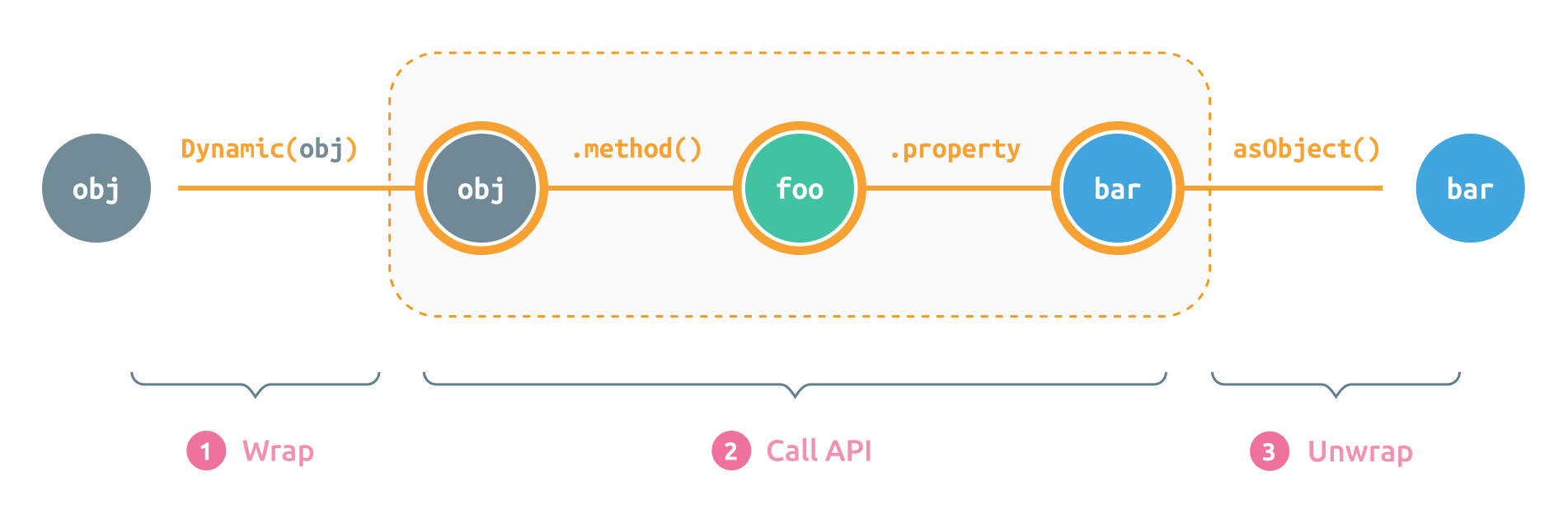
To work with Objective-C classes and instances, we need to wrap them with Dynamic first
If we have a reference for an existing Objective-C object, we can simply wrap it with Dynamic:
letdynamicObject=Dynamic(objcObject)To create a new instance from a hidden class, we prepend its name with Dynamic (or ObjC):
// Objective-C:
[[NSDateFormatter alloc] init];
// Swift:
letformatter=Dynamic.NSDateFormatter()
// Or maybe:
letformatter=ObjC.NSDateFormatter()
// Or the longer form:
letformatter=ObjC.NSDateFormatter.`init`()
Note 1: The
formatteris an instance ofDynamicthat wraps the new instance ofNSDateFormatter
Note 2:
ObjCis just a typealias forDynamic. Whatever you choose to use, stay consistent.
If the initializer takes parameters, we can pass them directly:
// Objective-C:
[[NSProgress alloc] initWithParent:foo userInfo:bar];
// Swift:
letprogress=Dynamic.NSProgress(parent: foo, userInfo: bar)
// Or the longer form:
letprogress=Dynamic.NSProgress.initWithParent(foo, userInfo: bar)
Both forms are equivalent because the library adds the prefix
initWithto the method selector in the first case. If you choose to use the shorter form, remember that you can only drop the prefixinitWithfrom the original initializer name. Whatever comes afterinitWithshould be the label of the first parameter.
Accessing singletons is also straightforward:
// Objective-C:
[NSApplication sharedApplication];
// Swift:
letapp=Dynamic.NSApplication.sharedApplication()
// Or we can drop the parenthesizes, as if `sharedApplication` was a static property:
letapp=Dynamic.NSApplication.sharedApplication
Important Note: Although the syntax looks very similar to the Swift API, it's not always identical to the Swift version of the used API. For instance, the name of the above singleton in Swift is
sharednotsharedApplication, but we can only usesharedApplicatonhere as we're internally taking with the Objective-C classes. Always refer to the Objective-C documentation of the method you're trying to call to make sure you're using the right name.
After wrapping the Objective-C object, we can now access its properties and methods directly from the Dynamic object.
// Objective-C:
@interface NSDateFormatter {@property(copy) NSString *dateFormat;
}
// Swift:
letformatter=Dynamic.NSDateFormatter()
// Getting the property value:
letformat= formatter.dateFormat // `format` is now a Dynamic object
// Setting the property value:
formatter.dateFormat ="yyyy-MM-dd"
// Or the longer version:
formatter.dateFormat =NSString("yyyy-MM-dd")
Note 1: The variable
formatabove is now aDynamicobject that wraps the actual property value. The reason for returning aDynamicobject and not the actual value is to allow call chaining. We'll see later how we can unwrap the actual value from aDynamicobject.
Note 2: Although the property
NSDateFormatter.dataFormatis of the typeNSString, we can set it to a SwiftStringand the library will convert it toNSStringautomatically.
letformatter=Dynamic.NSDateFormatter()letdate= formatter.dateFromString("2020 Mar 30") // `date` is now a Dynamic object// Objective-C:
[view resizeSubviewsWithOldSize:size];
[view beginPageInRect:rect atPlacement:point];
// Swift:
view.resizeSubviewsWithOldSize(size) // OR ⤸
view.resizeSubviews(withOldSize: size)
view.beginPageInRect(rect, atPlacement: point) // OR ⤸
view.beginPage(inRect: rect, atPlacement: point)Calling the same method in different forms is possible because the library combines the method name (e.g.
resizeSubviews) with the first parameter label (e.g.withOldSize) to form the method selector (e.g.resizeSubviewsWithOldSize:). This means you can also call:view.re(sizeSubviewsWithOldSize: size), but please don't.
To pass a Swift closure for a block argument, we need to add @convention(block) to the closure type, and then cast the passed closure to this type.
// Objective-C:
-(void)beginSheetModalForWindow:(NSWindow *)sheetWindow completionHandler:(void(^)(NSModalResponse returnCode))handler;
// Swift:
letpanel=Dynamic.NSOpenPanel.openPanel()
panel.beginSheetModal(forWindow: window, completionHandler:{ result inprint("result: ", result)}asResultBlock)typealiasResultBlock=@convention(block)(_ result:Int)->VoidMethods and properties return Dynamic objects by default to make it possible to chain calls. When the actual value is needed it can be unwrapped in multiple ways:
A value can be implicitly unwrapped by simply specifying the type of the variable we're assigning the result to.
letformatter=Dynamic.NSDateFormatter()letdate:Date?= formatter.dateFromString("2020 Mar 30") // Implicitly unwrapped as Date?
letformat:String?= formatter.dateFormat // Implicitly unwrapped as String?
letprogress=Dynamic.NSProgress()lettotal:Int?= progress.totalUnitCount // Implicitly unwrapped as Int?
Note that we should always use a nullable type (Optional) for the variable type or we may see a compiler error:
lettotal= progress.totalUnitCount // No unwrapping. `total` is a Dynamic object
lettotal:Int?= progress.totalUnitCount // Implicit unwrapping as Int?
lettotal:Int= progress.totalUnitCount // Compiler error
lettotal:Int= progress.totalUnitCount! // Okay, but dangerous
Assigning to a variable of an optional type isn't the only way for implicitly unwrapping a value. Other ways include returning the result of a method call or comparing it with a variable of an optional type.
Note that the implicit unwrapping only works with properties and method calls since the compiler can choose the proper overloading method based on the expected type. This isn't the case when we simply return a Dynamic variable or assign it to another variable:
// This is okay:
letformat:Date?= formatter.dateFromString("2020 Mar 30")
// But this is not:
letdynamicObj= formatter.dateFromString("2020 Mar 30")letformat:Date?= dynamicObj // Compiler errorWe can also explicitly unwrap values by calling one of the as<Type> properties:
Dynamic.NSDateFormatter().asObject // Returns the wrapped value as NSObject?
formatter.dateFormat.asString // Returns the wrapped value as String?
progress.totalUnitCount.asInt // Returns the wrapped value as Int?
And there are many properties for different kinds of values:
varasAnyObject:AnyObject?{get}varasValue:NSValue?{get}varasObject:NSObject?{get}varasArray:NSArray?{get}varasDictionary:NSDictionary?{get}varasString:String?{get}varasFloat:Float?{get}varasDouble:Double?{get}varasBool:Bool?{get}varasInt:Int?{get}varasSelector:Selector?{get}varasCGPoint:CGPoint?{get}varasCGVector:CGVector?{get}varasCGSize:CGSize?{get}varasCGRect:CGRect?{get}varasCGAffineTransform:CGAffineTransform?{get}varasUIEdgeInsets:UIEdgeInsets?{get}varasUIOffset:UIOffset?{get}varasCATransform3D:CATransform3D?{get}If you try to access undefined properties or methods the app won't crash, but you'll get InvocationError.unrecognizedSelector wrapped with a Dynamic object. You can use Dynamic.isError to check for such an error.
letresult=Dynamic.NSDateFormatter().undefinedMethod()
result.isError // -> true
And you'll also see a warning in the console:
WARNING: Trying to access an unrecognized member: NSDateFormatter.undefinedMethodNote that a crash may expectedly happen if you pass random parameters of unexpected types to a method that doesn't expect them.
You can use one the following ways to set a property to nil:
formatter.dateFormat =.nil // The custom Dynamic.nil constant
formatter.dateFormat =nilasString? // A "typed" nil
formatter.dateFormat =String?.none // The Optional.none caseIt's always good to understand what's happening under the hood - be it to debug a problem or just out of curiosity.
To enable extensive logging, simply change the loggingEnabled property to true:
Dynamic.loggingEnabled =trueThe main use cases for Dynamic is accessing private/hidden iOS and macOS API in Swift. And with the introduction of Mac Catalyst, the need to access hidden API arose as Apple only made a very small portion of the macOS AppKit API visible to Catalyst apps.
What follows are examples of how easy it is to access AppKit API in a Mac Catalyst with the help of Dynamic.
// macOS App
NSApplication.shared
.windows.first?.toggleFullScreen(nil)
// Mac Catalyst (with Dynamic)
Dynamic.NSApplication.sharedApplication
.windows.firstObject
.toggleFullScreen(nil)
Note the missing optional chaining operator
?in the second code snippet. The reason is that Dynamic always returns a value when a property is accessed or a method is called. This eliminates the need for dealing withnils as they will always be wrapped with aDynamicobject.
extensionUIWindow{varnsWindow:NSObject?{Dynamic.NSApplication.sharedApplication.delegate.hostWindowForUIWindow(self)}}// macOS App
letpanel=NSOpenPanel()
panel.beginSheetModal(for: view.window!, completionHandler:{ response iniflet url:URL= panel.urls.first {print("url: ", url)}})
// Mac Catalyst (with Dynamic)
letpanel=Dynamic.NSOpenPanel()
panel.beginSheetModalForWindow(self.view.window!.nsWindow, completionHandler:{ response iniflet url:URL= panel.URLs.firstObject {print("url: ", url)}}asResponseBlock)typealiasResponseBlock=@convention(block)(_ response:Int)->VoidiOS views in Mac Catalyst apps are automatically scaled down to 77%. To change the scale factor we need to access a hidden property:
overridefunc viewDidAppear(_ animated:Bool){
view.window?.scaleFactor =1.0 // Default value is 0.77
}extensionUIWindow{varscaleFactor:CGFloat{get{Dynamic.NSApplication.sharedApplication
.windows.firstObject.contentView
.subviews.firstObject.scaleFactor ??1.0}set{Dynamic.NSApplication.sharedApplication
.windows.firstObject.contentView
.subviews.firstObject.scaleFactor = newValue
}}}Dynamic uses the @dynamicCallable attribute which was introduced in Swift 5.
Please feel free to contribute pull requests, or create issues for bugs and feature requests.
Mhd Hejazi
