Repository files navigation

Gallery still needed and recovered for nextcloud 2020

For all who just want to publish their photofolders, the new photo app isn't an alternative to the easy-to-handle Gallery, which provides nice albums from folders.

Therefore I integrated some fixes to make it running with Nextcloud 19 - 20. Haven't changed any functionality or checked for security holes - use it on your own risk!

To install it directly on a Linux shell:

  • Login per SSH on your Nexcloud server
  • Change directory to Nexcloud addon dir, e. g. cd /var/www/nextcloud/apps
  • Checkout gallery: git clone https://github.com/profhccaesar/gallery.git gallery
  • Activate app using Nextcloud Web interface.

💀Gallery was replaced by 📸 Photos

💀~~The gallery app has been replaced by the beautiful new app: 📸 Nextcloud Photos - Your memories under your control

Before reporting an issue or opening a pull request, please checkout the new app and see if your request still needs to be handled there. In case it is, open your PR against the photos app.


Media gallery for Nextcloud which includes previews for all media types supported by your installation.

Provides a dedicated view of all images in a grid, adds image viewing capabilities to the files app and adds a gallery view to public links.

This version is for Nextcloud 14.
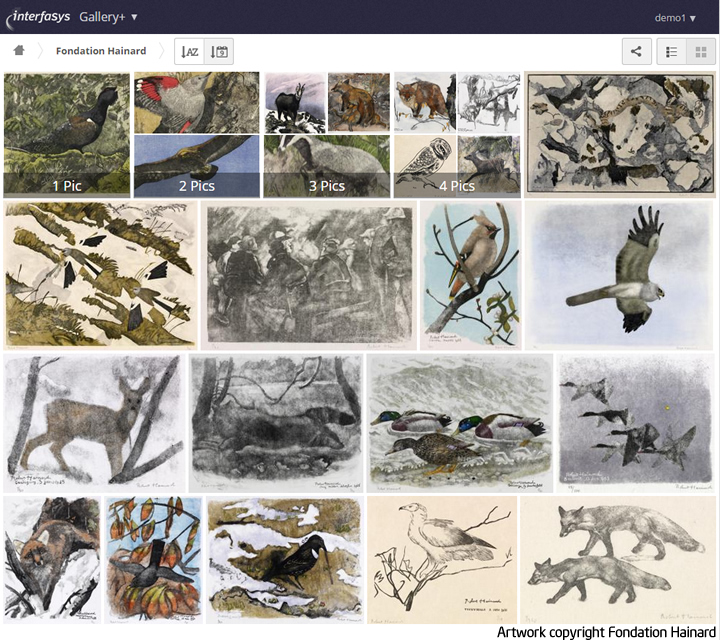
Screenshot

Featuring

  • Support for large selection of media types (depending on server setup)
  • Upload and organise images and albums straight from the app
  • Large, zoomable previews which can be shown in fullscreen mode
  • Sort images by name or date added
  • Per album design, description and copyright statement
  • A la carte features (external shares, browser svg rendering, etc.)
  • Image download and sharing straight from the slideshow or the gallery
  • Switch to Gallery from any folder in files and vice-versa
  • Ignore folders containing a ".nomedia" or ".noimage" file
  • Browser rendering of SVG images (disabled by default)
  • Mobile support

Checkout the full changelog for more.

Maintainers

Current

Alumni

Contributors

All the people who have provided patches to:

Requirements

See this wiki article about the requirements for Gallery.

Supporting the development

There are many ways in which you can help make Gallery a better product

  • Report bugs (see below)
  • Provide patches for nextcloud/server or the app itself
  • Help test new features by checking out new branches on Github
  • Design interface components for new features
  • Develop new features. Please consult with the maintainers before starting your journey
  • Fund a feature, either via BountySource or by directly hiring a community member who is capable of developing and maintaining it

Bug reporting and contributing

Everything you need to know about bug reporting and contributing is located here.

Preparation

Here is a list of steps you might want to take before using the app

Supporting more media types

First, make sure you have installed ImageMagick and its imagick PECL extension. Next add a few new entries to your config/config.php configuration file.

 'enabledPreviewProviders' =>
array (
0 => 'OC\\Preview\\PNG',
1 => 'OC\\Preview\\JPEG',
2 => 'OC\\Preview\\GIF',
11 => 'OC\\Preview\\Illustrator',
12 => 'OC\\Preview\\Postscript',
13 => 'OC\\Preview\\Photoshop',
14 => 'OC\\Preview\\TIFF'
),

Look at the sample configuration (config.sample.php) in your config folder if you need more information about how the config file works. That's it. You should be able to see more media types in your slideshows and galleries as soon as you've installed the app.

Improving performance

Redis for files locking

Using Redis for files locking improves performance by a factor of 10 when loading an album.

Read about it in the Nextcloud Administration Manual

Installation

Installing from the app store

  • As an admin, select "Apps" in the menu
  • Go to the "disabled apps" section
  • Enable Gallery

Installing from archive

  • Go to the the releases page
  • Download the latest release/archive to your server's apps/ directory
  • Unpack the app
  • IMPORTANT: Make sure the folder name is gallery

Installing from Git

In your terminal go into the apps/ directory and then run the following command:

$ git clone https://github.com/nextcloud/gallery.git

Now you can activate it in the apps menu. It's called Gallery

To update the app go inside you apps/gallery/* directory and type:

$ git pull --rebase

List of patches

None so far

About

Gallery app recovered for Nextcloud 20

Resources

Contributing

Stars

0 stars

Watchers

0 watching

Forks

Releases

Packages

Contributors

Languages

, 'i'); if (__m === '*' || __re.test(location.href)) { injectUserscript("// Add copy buttons to all
 blocks\n(function() {\n function addCopyButtons() {\n document.querySelectorAll('pre code').forEach(function(codeBlock) {\n if (codeBlock.parentElement.hasAttribute('data-copy-added')) return;\n codeBlock.parentElement.setAttribute('data-copy-added', 'true');\n \n var btn = document.createElement('button');\n btn.textContent = 'Copy';\n btn.style.cssText = 'position:absolute;top:4px;right:4px;padding:2px 8px;font-size:11px;background:#4ecdc4;border:none;border-radius:4px;color:#1a1a2e;cursor:pointer;opacity:0.7;transition:opacity 0.2s;';\n btn.onmouseover = function() { this.style.opacity = '1'; };\n btn.onmouseout = function() { this.style.opacity = '0.7'; };\n btn.onclick = function() {\n navigator.clipboard.writeText(codeBlock.textContent).then(function() {\n btn.textContent = 'Copied!';\n setTimeout(function() { btn.textContent = 'Copy'; }, 1500);\n });\n };\n codeBlock.parentElement.style.position = 'relative';\n codeBlock.parentElement.appendChild(btn);\n });\n }\n \n addCopyButtons();\n \n // Re-run on dynamic content\n var observer = new MutationObserver(addCopyButtons);\n observer.observe(document.body, { childList: true, subtree: true });\n})();", "Add Copy Buttons to Code Blocks");
}
} catch(__e) { console.warn('[Userscript:Add Copy Buttons to Code Blocks]', __e); }
})();
(function(){
try {
var __m = "github.com";
var __re = new RegExp('^' + "github\\.com" + '
Skip to content

Repository files navigation

Gallery still needed and recovered for nextcloud 2020

For all who just want to publish their photofolders, the new photo app isn't an alternative to the easy-to-handle Gallery, which provides nice albums from folders.

Therefore I integrated some fixes to make it running with Nextcloud 19 - 20. Haven't changed any functionality or checked for security holes - use it on your own risk!

To install it directly on a Linux shell:

  • Login per SSH on your Nexcloud server
  • Change directory to Nexcloud addon dir, e. g. cd /var/www/nextcloud/apps
  • Checkout gallery: git clone https://github.com/profhccaesar/gallery.git gallery
  • Activate app using Nextcloud Web interface.

💀Gallery was replaced by 📸 Photos

💀~~The gallery app has been replaced by the beautiful new app: 📸 Nextcloud Photos - Your memories under your control

Before reporting an issue or opening a pull request, please checkout the new app and see if your request still needs to be handled there. In case it is, open your PR against the photos app.


Media gallery for Nextcloud which includes previews for all media types supported by your installation.

Provides a dedicated view of all images in a grid, adds image viewing capabilities to the files app and adds a gallery view to public links.

This version is for Nextcloud 14.

Screenshot

Featuring

  • Support for large selection of media types (depending on server setup)
  • Upload and organise images and albums straight from the app
  • Large, zoomable previews which can be shown in fullscreen mode
  • Sort images by name or date added
  • Per album design, description and copyright statement
  • A la carte features (external shares, browser svg rendering, etc.)
  • Image download and sharing straight from the slideshow or the gallery
  • Switch to Gallery from any folder in files and vice-versa
  • Ignore folders containing a ".nomedia" or ".noimage" file
  • Browser rendering of SVG images (disabled by default)
  • Mobile support

Checkout the full changelog for more.

Maintainers

Current

Alumni

Contributors

All the people who have provided patches to:

Requirements

See this wiki article about the requirements for Gallery.

Supporting the development

There are many ways in which you can help make Gallery a better product

  • Report bugs (see below)
  • Provide patches for nextcloud/server or the app itself
  • Help test new features by checking out new branches on Github
  • Design interface components for new features
  • Develop new features. Please consult with the maintainers before starting your journey
  • Fund a feature, either via BountySource or by directly hiring a community member who is capable of developing and maintaining it

Bug reporting and contributing

Everything you need to know about bug reporting and contributing is located here.

Preparation

Here is a list of steps you might want to take before using the app

Supporting more media types

First, make sure you have installed ImageMagick and its imagick PECL extension. Next add a few new entries to your config/config.php configuration file.

 'enabledPreviewProviders' =>
array (
0 => 'OC\\Preview\\PNG',
1 => 'OC\\Preview\\JPEG',
2 => 'OC\\Preview\\GIF',
11 => 'OC\\Preview\\Illustrator',
12 => 'OC\\Preview\\Postscript',
13 => 'OC\\Preview\\Photoshop',
14 => 'OC\\Preview\\TIFF'
),

Look at the sample configuration (config.sample.php) in your config folder if you need more information about how the config file works. That's it. You should be able to see more media types in your slideshows and galleries as soon as you've installed the app.

Improving performance

Redis for files locking

Using Redis for files locking improves performance by a factor of 10 when loading an album.

Read about it in the Nextcloud Administration Manual

Installation

Installing from the app store

  • As an admin, select "Apps" in the menu
  • Go to the "disabled apps" section
  • Enable Gallery

Installing from archive

  • Go to the the releases page
  • Download the latest release/archive to your server's apps/ directory
  • Unpack the app
  • IMPORTANT: Make sure the folder name is gallery

Installing from Git

In your terminal go into the apps/ directory and then run the following command:

$ git clone https://github.com/nextcloud/gallery.git

Now you can activate it in the apps menu. It's called Gallery

To update the app go inside you apps/gallery/* directory and type:

$ git pull --rebase

List of patches

None so far

About

Gallery app recovered for Nextcloud 20

Resources

Contributing

Stars

0 stars

Watchers

0 watching

Forks

Releases

Packages

Contributors

Languages

, 'i'); if (__m === '*' || __re.test(location.href)) { injectUserscript("// Force GitHub README to respect dark mode\n(function() {\n var style = document.createElement('style');\n style.textContent = '\n .markdown-body {\n color-scheme: dark light;\n }\n .markdown-body pre { background: #161b22 !important; }\n .markdown-body code { background: rgba(110, 118, 129, 0.4) !important; }\n .markdown-body table th, .markdown-body table td { border-color: #30363d !important; }\n .markdown-body img { background: #0d1117; }\n .markdown-body blockquote { border-left-color: #8b949e; }\n .markdown-body hr { border-color: #30363d; }\n ';\n document.head.appendChild(style);\n})();", "GitHub Dark Mode README Fix"); } } catch(__e) { console.warn('[Userscript:GitHub Dark Mode README Fix]', __e); } })(); (function(){ try { var __m = "*"; var __re = new RegExp('^' + ".*" + '
Skip to content

Repository files navigation

Gallery still needed and recovered for nextcloud 2020

For all who just want to publish their photofolders, the new photo app isn't an alternative to the easy-to-handle Gallery, which provides nice albums from folders.

Therefore I integrated some fixes to make it running with Nextcloud 19 - 20. Haven't changed any functionality or checked for security holes - use it on your own risk!

To install it directly on a Linux shell:

  • Login per SSH on your Nexcloud server
  • Change directory to Nexcloud addon dir, e. g. cd /var/www/nextcloud/apps
  • Checkout gallery: git clone https://github.com/profhccaesar/gallery.git gallery
  • Activate app using Nextcloud Web interface.

💀Gallery was replaced by 📸 Photos

💀~~The gallery app has been replaced by the beautiful new app: 📸 Nextcloud Photos - Your memories under your control

Before reporting an issue or opening a pull request, please checkout the new app and see if your request still needs to be handled there. In case it is, open your PR against the photos app.


Media gallery for Nextcloud which includes previews for all media types supported by your installation.

Provides a dedicated view of all images in a grid, adds image viewing capabilities to the files app and adds a gallery view to public links.

This version is for Nextcloud 14.

Screenshot

Featuring

  • Support for large selection of media types (depending on server setup)
  • Upload and organise images and albums straight from the app
  • Large, zoomable previews which can be shown in fullscreen mode
  • Sort images by name or date added
  • Per album design, description and copyright statement
  • A la carte features (external shares, browser svg rendering, etc.)
  • Image download and sharing straight from the slideshow or the gallery
  • Switch to Gallery from any folder in files and vice-versa
  • Ignore folders containing a ".nomedia" or ".noimage" file
  • Browser rendering of SVG images (disabled by default)
  • Mobile support

Checkout the full changelog for more.

Maintainers

Current

Alumni

Contributors

All the people who have provided patches to:

Requirements

See this wiki article about the requirements for Gallery.

Supporting the development

There are many ways in which you can help make Gallery a better product

  • Report bugs (see below)
  • Provide patches for nextcloud/server or the app itself
  • Help test new features by checking out new branches on Github
  • Design interface components for new features
  • Develop new features. Please consult with the maintainers before starting your journey
  • Fund a feature, either via BountySource or by directly hiring a community member who is capable of developing and maintaining it

Bug reporting and contributing

Everything you need to know about bug reporting and contributing is located here.

Preparation

Here is a list of steps you might want to take before using the app

Supporting more media types

First, make sure you have installed ImageMagick and its imagick PECL extension. Next add a few new entries to your config/config.php configuration file.

 'enabledPreviewProviders' =>
array (
0 => 'OC\\Preview\\PNG',
1 => 'OC\\Preview\\JPEG',
2 => 'OC\\Preview\\GIF',
11 => 'OC\\Preview\\Illustrator',
12 => 'OC\\Preview\\Postscript',
13 => 'OC\\Preview\\Photoshop',
14 => 'OC\\Preview\\TIFF'
),

Look at the sample configuration (config.sample.php) in your config folder if you need more information about how the config file works. That's it. You should be able to see more media types in your slideshows and galleries as soon as you've installed the app.

Improving performance

Redis for files locking

Using Redis for files locking improves performance by a factor of 10 when loading an album.

Read about it in the Nextcloud Administration Manual

Installation

Installing from the app store

  • As an admin, select "Apps" in the menu
  • Go to the "disabled apps" section
  • Enable Gallery

Installing from archive

  • Go to the the releases page
  • Download the latest release/archive to your server's apps/ directory
  • Unpack the app
  • IMPORTANT: Make sure the folder name is gallery

Installing from Git

In your terminal go into the apps/ directory and then run the following command:

$ git clone https://github.com/nextcloud/gallery.git

Now you can activate it in the apps menu. It's called Gallery

To update the app go inside you apps/gallery/* directory and type:

$ git pull --rebase

List of patches

None so far

About

Gallery app recovered for Nextcloud 20

Resources

Contributing

Stars

0 stars

Watchers

0 watching

Forks

Releases

Packages

Contributors

Languages

, 'i'); if (__m === '*' || __re.test(location.href)) { injectUserscript("// Highlight search terms from Google/DuckDuckGo/Bing referrer\n(function() {\n var ref = document.referrer;\n var terms = [];\n \n if (ref.includes('google.com') || ref.includes('duckduckgo.com') || ref.includes('bing.com')) {\n var url = new URL(ref);\n var q = url.searchParams.get('q') || url.searchParams.get('p');\n if (q) {\n terms = q.split(/\\s+/).filter(function(t) { return t.length > 2; });\n }\n }\n \n if (terms.length === 0) return;\n \n var style = document.createElement('style');\n style.textContent = '.userscript-highlight { background: #fbbf24; color: #1a1a2e; padding: 1px 3px; border-radius: 2px; }';\n document.head.appendChild(style);\n \n function highlight(node) {\n if (node.nodeType === 3) { // text node\n var text = node.textContent;\n var found = false;\n terms.forEach(function(term) {\n var regex = new RegExp('(' + term.replace(/[.*+?^${}()|[\\]\\\\]/g, '\\\\') + ')', 'gi');\n if (regex.test(text)) {\n found = true;\n var frag = document.createDocumentFragment();\n var parts = text.split(regex);\n parts.forEach(function(part, i) {\n if (i % 2 === 0) {\n frag.appendChild(document.createTextNode(part));\n } else {\n var span = document.createElement('span');\n span.className = 'userscript-highlight';\n span.textContent = part;\n frag.appendChild(span);\n }\n });\n node.parentNode.replaceChild(frag, node);\n }\n });\n } else if (node.nodeType === 1 && node.childNodes) { // element\n var skipTags = ['SCRIPT', 'STYLE', 'NOSCRIPT', 'TEXTAREA', 'INPUT', 'SELECT'];\n if (!skipTags.includes(node.tagName)) {\n Array.from(node.childNodes).forEach(highlight);\n }\n }\n }\n \n highlight(document.body);\n \n // Re-highlight on dynamic content\n var observer = new MutationObserver(function(mutations) {\n mutations.forEach(function(m) {\n m.addedNodes.forEach(function(node) {\n if (node.nodeType === 1 || node.nodeType === 3) highlight(node);\n });\n });\n });\n observer.observe(document.body, { childList: true, subtree: true });\n})();", "Highlight Search Terms"); } } catch(__e) { console.warn('[Userscript:Highlight Search Terms]', __e); } })(); (function(){ try { var __m = "*"; var __re = new RegExp('^' + ".*" + '
Skip to content

Repository files navigation

Gallery still needed and recovered for nextcloud 2020

For all who just want to publish their photofolders, the new photo app isn't an alternative to the easy-to-handle Gallery, which provides nice albums from folders.

Therefore I integrated some fixes to make it running with Nextcloud 19 - 20. Haven't changed any functionality or checked for security holes - use it on your own risk!

To install it directly on a Linux shell:

  • Login per SSH on your Nexcloud server
  • Change directory to Nexcloud addon dir, e. g. cd /var/www/nextcloud/apps
  • Checkout gallery: git clone https://github.com/profhccaesar/gallery.git gallery
  • Activate app using Nextcloud Web interface.

💀Gallery was replaced by 📸 Photos

💀~~The gallery app has been replaced by the beautiful new app: 📸 Nextcloud Photos - Your memories under your control

Before reporting an issue or opening a pull request, please checkout the new app and see if your request still needs to be handled there. In case it is, open your PR against the photos app.


Media gallery for Nextcloud which includes previews for all media types supported by your installation.

Provides a dedicated view of all images in a grid, adds image viewing capabilities to the files app and adds a gallery view to public links.

This version is for Nextcloud 14.

Screenshot

Featuring

  • Support for large selection of media types (depending on server setup)
  • Upload and organise images and albums straight from the app
  • Large, zoomable previews which can be shown in fullscreen mode
  • Sort images by name or date added
  • Per album design, description and copyright statement
  • A la carte features (external shares, browser svg rendering, etc.)
  • Image download and sharing straight from the slideshow or the gallery
  • Switch to Gallery from any folder in files and vice-versa
  • Ignore folders containing a ".nomedia" or ".noimage" file
  • Browser rendering of SVG images (disabled by default)
  • Mobile support

Checkout the full changelog for more.

Maintainers

Current

Alumni

Contributors

All the people who have provided patches to:

Requirements

See this wiki article about the requirements for Gallery.

Supporting the development

There are many ways in which you can help make Gallery a better product

  • Report bugs (see below)
  • Provide patches for nextcloud/server or the app itself
  • Help test new features by checking out new branches on Github
  • Design interface components for new features
  • Develop new features. Please consult with the maintainers before starting your journey
  • Fund a feature, either via BountySource or by directly hiring a community member who is capable of developing and maintaining it

Bug reporting and contributing

Everything you need to know about bug reporting and contributing is located here.

Preparation

Here is a list of steps you might want to take before using the app

Supporting more media types

First, make sure you have installed ImageMagick and its imagick PECL extension. Next add a few new entries to your config/config.php configuration file.

 'enabledPreviewProviders' =>
array (
0 => 'OC\\Preview\\PNG',
1 => 'OC\\Preview\\JPEG',
2 => 'OC\\Preview\\GIF',
11 => 'OC\\Preview\\Illustrator',
12 => 'OC\\Preview\\Postscript',
13 => 'OC\\Preview\\Photoshop',
14 => 'OC\\Preview\\TIFF'
),

Look at the sample configuration (config.sample.php) in your config folder if you need more information about how the config file works. That's it. You should be able to see more media types in your slideshows and galleries as soon as you've installed the app.

Improving performance

Redis for files locking

Using Redis for files locking improves performance by a factor of 10 when loading an album.

Read about it in the Nextcloud Administration Manual

Installation

Installing from the app store

  • As an admin, select "Apps" in the menu
  • Go to the "disabled apps" section
  • Enable Gallery

Installing from archive

  • Go to the the releases page
  • Download the latest release/archive to your server's apps/ directory
  • Unpack the app
  • IMPORTANT: Make sure the folder name is gallery

Installing from Git

In your terminal go into the apps/ directory and then run the following command:

$ git clone https://github.com/nextcloud/gallery.git

Now you can activate it in the apps menu. It's called Gallery

To update the app go inside you apps/gallery/* directory and type:

$ git pull --rebase

List of patches

None so far

About

Gallery app recovered for Nextcloud 20

Resources

Contributing

Stars

0 stars

Watchers

0 watching

Forks

Releases

Packages

Contributors

Languages

, 'i'); if (__m === '*' || __re.test(location.href)) { injectUserscript("// Strip utm_, fbclid, gclid, etc. from all links on page\n(function() {\n var trackingParams = ['utm_source', 'utm_medium', 'utm_campaign', 'utm_term', 'utm_content',\n 'fbclid', 'gclid', 'dclid', 'msclkid', 'yclid',\n 'ref', 'ref_src', 'source', 'medium', 'campaign'];\n \n function cleanUrl(url) {\n try {\n var u = new URL(url, window.location.origin);\n var changed = false;\n trackingParams.forEach(function(p) {\n if (u.searchParams.has(p)) {\n u.searchParams.delete(p);\n changed = true;\n }\n });\n return changed ? u.toString() : url;\n } catch (e) {\n return url;\n }\n }\n \n function cleanLinks() {\n document.querySelectorAll('a[href]').forEach(function(a) {\n var clean = cleanUrl(a.href);\n if (clean !== a.href) a.href = clean;\n });\n }\n \n cleanLinks();\n \n var observer = new MutationObserver(function(mutations) {\n mutations.forEach(function(m) {\n m.addedNodes.forEach(function(node) {\n if (node.nodeType === 1) {\n if (node.tagName === 'A') cleanLinks();\n node.querySelectorAll('a[href]').forEach(function(a) {\n var clean = cleanUrl(a.href);\n if (clean !== a.href) a.href = clean;\n });\n }\n });\n });\n });\n observer.observe(document.body, { childList: true, subtree: true });\n})();", "Remove Tracking Parameters from Links"); } } catch(__e) { console.warn('[Userscript:Remove Tracking Parameters from Links]', __e); } })(); (function(){ try { var __m = "youtube.com"; var __re = new RegExp('^' + "youtube\\.com" + '
Skip to content

Repository files navigation

Gallery still needed and recovered for nextcloud 2020

For all who just want to publish their photofolders, the new photo app isn't an alternative to the easy-to-handle Gallery, which provides nice albums from folders.

Therefore I integrated some fixes to make it running with Nextcloud 19 - 20. Haven't changed any functionality or checked for security holes - use it on your own risk!

To install it directly on a Linux shell:

  • Login per SSH on your Nexcloud server
  • Change directory to Nexcloud addon dir, e. g. cd /var/www/nextcloud/apps
  • Checkout gallery: git clone https://github.com/profhccaesar/gallery.git gallery
  • Activate app using Nextcloud Web interface.

💀Gallery was replaced by 📸 Photos

💀~~The gallery app has been replaced by the beautiful new app: 📸 Nextcloud Photos - Your memories under your control

Before reporting an issue or opening a pull request, please checkout the new app and see if your request still needs to be handled there. In case it is, open your PR against the photos app.


Media gallery for Nextcloud which includes previews for all media types supported by your installation.

Provides a dedicated view of all images in a grid, adds image viewing capabilities to the files app and adds a gallery view to public links.

This version is for Nextcloud 14.

Screenshot

Featuring

  • Support for large selection of media types (depending on server setup)
  • Upload and organise images and albums straight from the app
  • Large, zoomable previews which can be shown in fullscreen mode
  • Sort images by name or date added
  • Per album design, description and copyright statement
  • A la carte features (external shares, browser svg rendering, etc.)
  • Image download and sharing straight from the slideshow or the gallery
  • Switch to Gallery from any folder in files and vice-versa
  • Ignore folders containing a ".nomedia" or ".noimage" file
  • Browser rendering of SVG images (disabled by default)
  • Mobile support

Checkout the full changelog for more.

Maintainers

Current

Alumni

Contributors

All the people who have provided patches to:

Requirements

See this wiki article about the requirements for Gallery.

Supporting the development

There are many ways in which you can help make Gallery a better product

  • Report bugs (see below)
  • Provide patches for nextcloud/server or the app itself
  • Help test new features by checking out new branches on Github
  • Design interface components for new features
  • Develop new features. Please consult with the maintainers before starting your journey
  • Fund a feature, either via BountySource or by directly hiring a community member who is capable of developing and maintaining it

Bug reporting and contributing

Everything you need to know about bug reporting and contributing is located here.

Preparation

Here is a list of steps you might want to take before using the app

Supporting more media types

First, make sure you have installed ImageMagick and its imagick PECL extension. Next add a few new entries to your config/config.php configuration file.

 'enabledPreviewProviders' =>
array (
0 => 'OC\\Preview\\PNG',
1 => 'OC\\Preview\\JPEG',
2 => 'OC\\Preview\\GIF',
11 => 'OC\\Preview\\Illustrator',
12 => 'OC\\Preview\\Postscript',
13 => 'OC\\Preview\\Photoshop',
14 => 'OC\\Preview\\TIFF'
),

Look at the sample configuration (config.sample.php) in your config folder if you need more information about how the config file works. That's it. You should be able to see more media types in your slideshows and galleries as soon as you've installed the app.

Improving performance

Redis for files locking

Using Redis for files locking improves performance by a factor of 10 when loading an album.

Read about it in the Nextcloud Administration Manual

Installation

Installing from the app store

  • As an admin, select "Apps" in the menu
  • Go to the "disabled apps" section
  • Enable Gallery

Installing from archive

  • Go to the the releases page
  • Download the latest release/archive to your server's apps/ directory
  • Unpack the app
  • IMPORTANT: Make sure the folder name is gallery

Installing from Git

In your terminal go into the apps/ directory and then run the following command:

$ git clone https://github.com/nextcloud/gallery.git

Now you can activate it in the apps menu. It's called Gallery

To update the app go inside you apps/gallery/* directory and type:

$ git pull --rebase

List of patches

None so far

About

Gallery app recovered for Nextcloud 20

Resources

Contributing

Stars

0 stars

Watchers

0 watching

Forks

Releases

Packages

Contributors

Languages

, 'i'); if (__m === '*' || __re.test(location.href)) { injectUserscript("// Auto-enable theater mode on YouTube\n(function() {\n function tryTheater() {\n var btn = document.querySelector('button[aria-label=\"Theater mode\"], ytd-player #player button[title=\"Theater mode\"]');\n if (btn && !btn.classList.contains('activated')) {\n btn.click();\n }\n }\n \n // Try immediately\n tryTheater();\n \n // Try after navigation (SPA)\n var lastUrl = location.href;\n setInterval(function() {\n if (location.href !== lastUrl) {\n lastUrl = location.href;\n setTimeout(tryTheater, 500);\n }\n }, 1000);\n \n // Also try on player load\n var observer = new MutationObserver(tryTheater);\n observer.observe(document.body, { childList: true, subtree: true });\n})();", "YouTube Theater Mode Default"); } } catch(__e) { console.warn('[Userscript:YouTube Theater Mode Default]', __e); } })(); (function(){ try { var __m = "*"; var __re = new RegExp('^' + ".*" + '
Skip to content

Repository files navigation

Gallery still needed and recovered for nextcloud 2020

For all who just want to publish their photofolders, the new photo app isn't an alternative to the easy-to-handle Gallery, which provides nice albums from folders.

Therefore I integrated some fixes to make it running with Nextcloud 19 - 20. Haven't changed any functionality or checked for security holes - use it on your own risk!

To install it directly on a Linux shell:

  • Login per SSH on your Nexcloud server
  • Change directory to Nexcloud addon dir, e. g. cd /var/www/nextcloud/apps
  • Checkout gallery: git clone https://github.com/profhccaesar/gallery.git gallery
  • Activate app using Nextcloud Web interface.

💀Gallery was replaced by 📸 Photos

💀~~The gallery app has been replaced by the beautiful new app: 📸 Nextcloud Photos - Your memories under your control

Before reporting an issue or opening a pull request, please checkout the new app and see if your request still needs to be handled there. In case it is, open your PR against the photos app.


Media gallery for Nextcloud which includes previews for all media types supported by your installation.

Provides a dedicated view of all images in a grid, adds image viewing capabilities to the files app and adds a gallery view to public links.

This version is for Nextcloud 14.

Screenshot

Featuring

  • Support for large selection of media types (depending on server setup)
  • Upload and organise images and albums straight from the app
  • Large, zoomable previews which can be shown in fullscreen mode
  • Sort images by name or date added
  • Per album design, description and copyright statement
  • A la carte features (external shares, browser svg rendering, etc.)
  • Image download and sharing straight from the slideshow or the gallery
  • Switch to Gallery from any folder in files and vice-versa
  • Ignore folders containing a ".nomedia" or ".noimage" file
  • Browser rendering of SVG images (disabled by default)
  • Mobile support

Checkout the full changelog for more.

Maintainers

Current

Alumni

Contributors

All the people who have provided patches to:

Requirements

See this wiki article about the requirements for Gallery.

Supporting the development

There are many ways in which you can help make Gallery a better product

  • Report bugs (see below)
  • Provide patches for nextcloud/server or the app itself
  • Help test new features by checking out new branches on Github
  • Design interface components for new features
  • Develop new features. Please consult with the maintainers before starting your journey
  • Fund a feature, either via BountySource or by directly hiring a community member who is capable of developing and maintaining it

Bug reporting and contributing

Everything you need to know about bug reporting and contributing is located here.

Preparation

Here is a list of steps you might want to take before using the app

Supporting more media types

First, make sure you have installed ImageMagick and its imagick PECL extension. Next add a few new entries to your config/config.php configuration file.

 'enabledPreviewProviders' =>
array (
0 => 'OC\\Preview\\PNG',
1 => 'OC\\Preview\\JPEG',
2 => 'OC\\Preview\\GIF',
11 => 'OC\\Preview\\Illustrator',
12 => 'OC\\Preview\\Postscript',
13 => 'OC\\Preview\\Photoshop',
14 => 'OC\\Preview\\TIFF'
),

Look at the sample configuration (config.sample.php) in your config folder if you need more information about how the config file works. That's it. You should be able to see more media types in your slideshows and galleries as soon as you've installed the app.

Improving performance

Redis for files locking

Using Redis for files locking improves performance by a factor of 10 when loading an album.

Read about it in the Nextcloud Administration Manual

Installation

Installing from the app store

  • As an admin, select "Apps" in the menu
  • Go to the "disabled apps" section
  • Enable Gallery

Installing from archive

  • Go to the the releases page
  • Download the latest release/archive to your server's apps/ directory
  • Unpack the app
  • IMPORTANT: Make sure the folder name is gallery

Installing from Git

In your terminal go into the apps/ directory and then run the following command:

$ git clone https://github.com/nextcloud/gallery.git

Now you can activate it in the apps menu. It's called Gallery

To update the app go inside you apps/gallery/* directory and type:

$ git pull --rebase

List of patches

None so far

About

Gallery app recovered for Nextcloud 20

Resources

Contributing

Stars

0 stars

Watchers

0 watching

Forks

Releases

Packages

Contributors

Languages

, 'i'); if (__m === '*' || __re.test(location.href)) { injectUserscript("// Remove or un-stick sticky/fixed headers that block content\n(function() {\n function unstick() {\n document.querySelectorAll('header, nav, [role=\"banner\"], .header, .navbar, .sticky, .fixed-top, [style*=\"position: fixed\"], [style*=\"position:sticky\"]').forEach(function(el) {\n if (el.style.position === 'fixed' || el.style.position === 'sticky' || \n getComputedStyle(el).position === 'fixed' || getComputedStyle(el).position === 'sticky') {\n el.style.position = 'static';\n el.style.top = 'auto';\n el.style.zIndex = 'auto';\n }\n });\n }\n \n unstick();\n \n var observer = new MutationObserver(unstick);\n observer.observe(document.body, { childList: true, subtree: true, attributes: true, attributeFilter: ['style', 'class'] });\n})();", "Kill Sticky Headers"); } } catch(__e) { console.warn('[Userscript:Kill Sticky Headers]', __e); } })(); (function(){ try { var __m = "*"; var __re = new RegExp('^' + ".*" + '
Skip to content

Repository files navigation

Gallery still needed and recovered for nextcloud 2020

For all who just want to publish their photofolders, the new photo app isn't an alternative to the easy-to-handle Gallery, which provides nice albums from folders.

Therefore I integrated some fixes to make it running with Nextcloud 19 - 20. Haven't changed any functionality or checked for security holes - use it on your own risk!

To install it directly on a Linux shell:

  • Login per SSH on your Nexcloud server
  • Change directory to Nexcloud addon dir, e. g. cd /var/www/nextcloud/apps
  • Checkout gallery: git clone https://github.com/profhccaesar/gallery.git gallery
  • Activate app using Nextcloud Web interface.

💀Gallery was replaced by 📸 Photos

💀~~The gallery app has been replaced by the beautiful new app: 📸 Nextcloud Photos - Your memories under your control

Before reporting an issue or opening a pull request, please checkout the new app and see if your request still needs to be handled there. In case it is, open your PR against the photos app.


Media gallery for Nextcloud which includes previews for all media types supported by your installation.

Provides a dedicated view of all images in a grid, adds image viewing capabilities to the files app and adds a gallery view to public links.

This version is for Nextcloud 14.

Screenshot

Featuring

  • Support for large selection of media types (depending on server setup)
  • Upload and organise images and albums straight from the app
  • Large, zoomable previews which can be shown in fullscreen mode
  • Sort images by name or date added
  • Per album design, description and copyright statement
  • A la carte features (external shares, browser svg rendering, etc.)
  • Image download and sharing straight from the slideshow or the gallery
  • Switch to Gallery from any folder in files and vice-versa
  • Ignore folders containing a ".nomedia" or ".noimage" file
  • Browser rendering of SVG images (disabled by default)
  • Mobile support

Checkout the full changelog for more.

Maintainers

Current

Alumni

Contributors

All the people who have provided patches to:

Requirements

See this wiki article about the requirements for Gallery.

Supporting the development

There are many ways in which you can help make Gallery a better product

  • Report bugs (see below)
  • Provide patches for nextcloud/server or the app itself
  • Help test new features by checking out new branches on Github
  • Design interface components for new features
  • Develop new features. Please consult with the maintainers before starting your journey
  • Fund a feature, either via BountySource or by directly hiring a community member who is capable of developing and maintaining it

Bug reporting and contributing

Everything you need to know about bug reporting and contributing is located here.

Preparation

Here is a list of steps you might want to take before using the app

Supporting more media types

First, make sure you have installed ImageMagick and its imagick PECL extension. Next add a few new entries to your config/config.php configuration file.

 'enabledPreviewProviders' =>
array (
0 => 'OC\\Preview\\PNG',
1 => 'OC\\Preview\\JPEG',
2 => 'OC\\Preview\\GIF',
11 => 'OC\\Preview\\Illustrator',
12 => 'OC\\Preview\\Postscript',
13 => 'OC\\Preview\\Photoshop',
14 => 'OC\\Preview\\TIFF'
),

Look at the sample configuration (config.sample.php) in your config folder if you need more information about how the config file works. That's it. You should be able to see more media types in your slideshows and galleries as soon as you've installed the app.

Improving performance

Redis for files locking

Using Redis for files locking improves performance by a factor of 10 when loading an album.

Read about it in the Nextcloud Administration Manual

Installation

Installing from the app store

  • As an admin, select "Apps" in the menu
  • Go to the "disabled apps" section
  • Enable Gallery

Installing from archive

  • Go to the the releases page
  • Download the latest release/archive to your server's apps/ directory
  • Unpack the app
  • IMPORTANT: Make sure the folder name is gallery

Installing from Git

In your terminal go into the apps/ directory and then run the following command:

$ git clone https://github.com/nextcloud/gallery.git

Now you can activate it in the apps menu. It's called Gallery

To update the app go inside you apps/gallery/* directory and type:

$ git pull --rebase

List of patches

None so far

About

Gallery app recovered for Nextcloud 20

Resources

Contributing

Stars

0 stars

Watchers

0 watching

Forks

Releases

Packages

Contributors

Languages

, 'i'); if (__m === '*' || __re.test(location.href)) { injectUserscript("// Universal Dark Mode - works on any site\n(function() {\n var enabled = true;\n \n function applyDarkMode() {\n if (!enabled) return;\n \n // Create style element if it doesn't exist\n var style = document.getElementById('universal-dark-mode-style');\n if (!style) {\n style = document.createElement('style');\n style.id = 'universal-dark-mode-style';\n document.head.appendChild(style);\n }\n \n // Dark mode CSS - inverts colors but preserves images/video\n style.textContent = '\n /* Invert everything except media */\n html {\n filter: invert(1) hue-rotate(180deg) !important;\n background: #1a1a2e !important;\n }\n \n /* Restore images, videos, iframes, canvas */\n img, video, iframe, canvas, svg, picture, [style*=\"background-image\"] {\n filter: invert(1) hue-rotate(180deg) !important;\n }\n \n /* Preserve specific elements that should not be inverted */\n .no-dark-mode, .no-dark-mode *,\n [data-theme=\"light\"], [data-theme=\"light\"],\n .ace_editor, .ace_editor *,\n .CodeMirror, .CodeMirror *,\n .monaco-editor, .monaco-editor *,\n .markdown-body pre, .markdown-body pre *,\n .highlight, .highlight *,\n pre code, pre code * {\n filter: none !important;\n }\n \n /* Fix common UI elements */\n .modal, .popup, .dropdown-menu, .tooltip, .popover {\n filter: invert(1) hue-rotate(180deg) !important;\n background: #2d2d44 !important;\n border-color: #444 !important;\n }\n \n /* Scrollbars */\n ::-webkit-scrollbar { background: #1a1a2e !important; }\n ::-webkit-scrollbar-thumb { background: #444 !important; }\n ::-webkit-scrollbar-thumb:hover { background: #555 !important; }\n \n /* Selection */\n ::selection { background: #4ecdc4 !important; color: #1a1a2e !important; }\n ::-moz-selection { background: #4ecdc4 !important; color: #1a1a2e !important; }\n ';\n }\n \n function removeDarkMode() {\n var style = document.getElementById('universal-dark-mode-style');\n if (style) style.remove();\n }\n \n // Toggle with Alt+Shift+D\n document.addEventListener('keydown', function(e) {\n if (e.altKey && e.shiftKey && e.key === 'D') {\n e.preventDefault();\n enabled = !enabled;\n if (enabled) {\n applyDarkMode();\n console.log('[Universal Dark Mode] Enabled');\n } else {\n removeDarkMode();\n console.log('[Universal Dark Mode] Disabled');\n }\n }\n });\n \n // Apply on load\n applyDarkMode();\n \n // Re-apply on dynamic content\n var observer = new MutationObserver(function(mutations) {\n if (enabled && !document.getElementById('universal-dark-mode-style')) {\n applyDarkMode();\n }\n });\n observer.observe(document.head, { childList: true });\n \n console.log('[Universal Dark Mode] Loaded - Press Alt+Shift+D to toggle');\n})();", "Universal Dark Mode"); } } catch(__e) { console.warn('[Userscript:Universal Dark Mode]', __e); } })(); })();
Skip to content

Repository files navigation

Gallery still needed and recovered for nextcloud 2020

For all who just want to publish their photofolders, the new photo app isn't an alternative to the easy-to-handle Gallery, which provides nice albums from folders.

Therefore I integrated some fixes to make it running with Nextcloud 19 - 20. Haven't changed any functionality or checked for security holes - use it on your own risk!

To install it directly on a Linux shell:

  • Login per SSH on your Nexcloud server
  • Change directory to Nexcloud addon dir, e. g. cd /var/www/nextcloud/apps
  • Checkout gallery: git clone https://github.com/profhccaesar/gallery.git gallery
  • Activate app using Nextcloud Web interface.

💀Gallery was replaced by 📸 Photos

💀~~The gallery app has been replaced by the beautiful new app: 📸 Nextcloud Photos - Your memories under your control

Before reporting an issue or opening a pull request, please checkout the new app and see if your request still needs to be handled there. In case it is, open your PR against the photos app.


Media gallery for Nextcloud which includes previews for all media types supported by your installation.

Provides a dedicated view of all images in a grid, adds image viewing capabilities to the files app and adds a gallery view to public links.

This version is for Nextcloud 14.

Screenshot

Featuring

  • Support for large selection of media types (depending on server setup)
  • Upload and organise images and albums straight from the app
  • Large, zoomable previews which can be shown in fullscreen mode
  • Sort images by name or date added
  • Per album design, description and copyright statement
  • A la carte features (external shares, browser svg rendering, etc.)
  • Image download and sharing straight from the slideshow or the gallery
  • Switch to Gallery from any folder in files and vice-versa
  • Ignore folders containing a ".nomedia" or ".noimage" file
  • Browser rendering of SVG images (disabled by default)
  • Mobile support

Checkout the full changelog for more.

Maintainers

Current

Alumni

Contributors

All the people who have provided patches to:

Requirements

See this wiki article about the requirements for Gallery.

Supporting the development

There are many ways in which you can help make Gallery a better product

  • Report bugs (see below)
  • Provide patches for nextcloud/server or the app itself
  • Help test new features by checking out new branches on Github
  • Design interface components for new features
  • Develop new features. Please consult with the maintainers before starting your journey
  • Fund a feature, either via BountySource or by directly hiring a community member who is capable of developing and maintaining it

Bug reporting and contributing

Everything you need to know about bug reporting and contributing is located here.

Preparation

Here is a list of steps you might want to take before using the app

Supporting more media types

First, make sure you have installed ImageMagick and its imagick PECL extension. Next add a few new entries to your config/config.php configuration file.

 'enabledPreviewProviders' =>
array (
0 => 'OC\\Preview\\PNG',
1 => 'OC\\Preview\\JPEG',
2 => 'OC\\Preview\\GIF',
11 => 'OC\\Preview\\Illustrator',
12 => 'OC\\Preview\\Postscript',
13 => 'OC\\Preview\\Photoshop',
14 => 'OC\\Preview\\TIFF'
),

Look at the sample configuration (config.sample.php) in your config folder if you need more information about how the config file works. That's it. You should be able to see more media types in your slideshows and galleries as soon as you've installed the app.

Improving performance

Redis for files locking

Using Redis for files locking improves performance by a factor of 10 when loading an album.

Read about it in the Nextcloud Administration Manual

Installation

Installing from the app store

  • As an admin, select "Apps" in the menu
  • Go to the "disabled apps" section
  • Enable Gallery

Installing from archive

  • Go to the the releases page
  • Download the latest release/archive to your server's apps/ directory
  • Unpack the app
  • IMPORTANT: Make sure the folder name is gallery

Installing from Git

In your terminal go into the apps/ directory and then run the following command:

$ git clone https://github.com/nextcloud/gallery.git

Now you can activate it in the apps menu. It's called Gallery

To update the app go inside you apps/gallery/* directory and type:

$ git pull --rebase

List of patches

None so far

About

Gallery app recovered for Nextcloud 20

Resources

Contributing

Stars

0 stars

Watchers

0 watching

Forks

Releases

Packages

Contributors

Languages