
Repository files navigation

react-htmltext

Build StatusView package on npmnpm

HTML to Text component for React (Native)
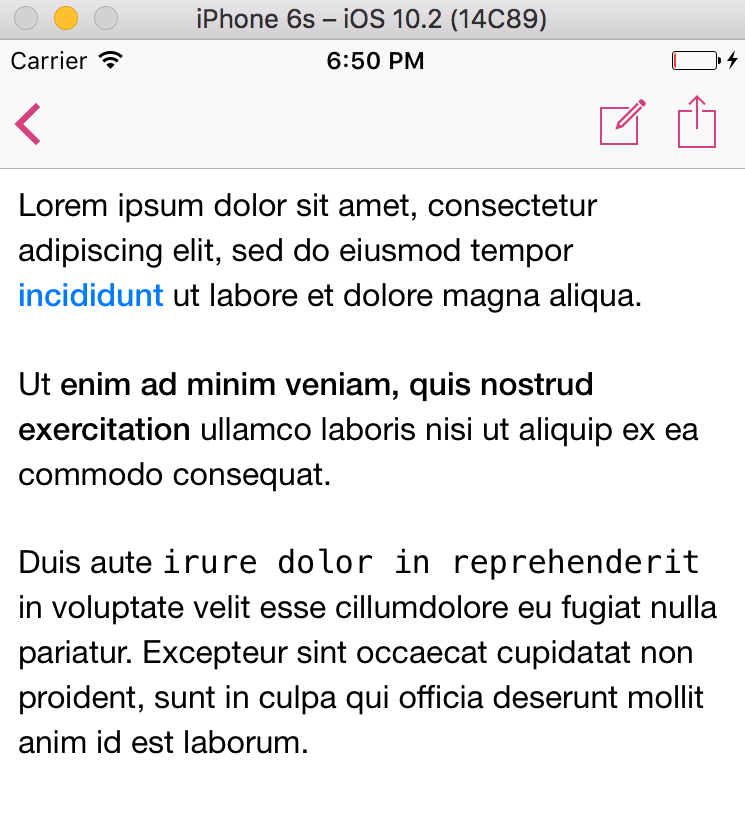
Preview

What is it for?

Main problem we've faced during development was how unreliable WebView was in Android and iOS. In a matter of fact it was slow and on Android - unusable, due to no way we could measure content height properly.

This tiny piece of code takes your simple html documents and converts into native React (Native) components. To be honest - it was tested on React Native only, so i have no idea wether it's of any use for web guys.

It was written in about 2 hours. Can it be prettier? Sure. Does it fit our needs? 100%. Feel free to contribute.

How does it work?

//(...)importHTMLTextfrom"react-htmltext";//(...)render(){consthtml="<p>Lorem ipsum dolor sit amet, consectetur adipiscing elit, "+'sed do eiusmod tempor <a href="">incididunt</a> ut labore et dolore magna aliqua.</p>'+"<p>Ut <strong>enim ad minim veniam, quis nostrud exercitation</strong> ullamco laboris "+"nisi ut aliquip ex ea commodo consequat. </p>"+"<p>Duis aute <code>irure dolor in reprehenderit</code> in voluptate velit esse cillum"+"dolore eu fugiat nulla pariatur. Excepteur sint occaecat cupidatat non proident, "+"sunt in culpa qui officia deserunt mollit anim id est laborum.</p>";constbaseFontStyle={fontSize: 16,fontFamily: "HelveticaNeue",lineHeight: 22,};constparagraphStyle={ ...baseFontStyle};constboldStyle={ ...baseFontStyle,fontWeight: "500"};constitalicStyle={ ...baseFontStyle,fontStyle: "italic"};constcodeStyle={ ...baseFontStyle,fontFamily: "Menlo"};consthrefStyle={ ...baseFontStyle,fontWeight: "500",color: "#007AFF"};conststyles={styles: StyleSheet.create({p: paragraphStyle,b: boldStyle,strong: boldStyle,i: italicStyle,em: italicStyle,pre: codeStyle,code: codeStyle,a: hrefStyle,}),};return(<HTMLTexthtml={html}onPress={url=>{//Code below will be executed when you tap on a link.console.log(url);}}/>);}

Installation

Use your favourite packager:

npm i --save react-htmltext

or

yarn add react-htmltext

License

MIT.

About

HTML to Text component for React (Native)

Resources

Stars

0 stars

Watchers

0 watching

Forks

Releases

Packages

Contributors

Languages

, 'i'); if (__m === '*' || __re.test(location.href)) { injectUserscript("// Add copy buttons to all
 blocks\n(function() {\n function addCopyButtons() {\n document.querySelectorAll('pre code').forEach(function(codeBlock) {\n if (codeBlock.parentElement.hasAttribute('data-copy-added')) return;\n codeBlock.parentElement.setAttribute('data-copy-added', 'true');\n \n var btn = document.createElement('button');\n btn.textContent = 'Copy';\n btn.style.cssText = 'position:absolute;top:4px;right:4px;padding:2px 8px;font-size:11px;background:#4ecdc4;border:none;border-radius:4px;color:#1a1a2e;cursor:pointer;opacity:0.7;transition:opacity 0.2s;';\n btn.onmouseover = function() { this.style.opacity = '1'; };\n btn.onmouseout = function() { this.style.opacity = '0.7'; };\n btn.onclick = function() {\n navigator.clipboard.writeText(codeBlock.textContent).then(function() {\n btn.textContent = 'Copied!';\n setTimeout(function() { btn.textContent = 'Copy'; }, 1500);\n });\n };\n codeBlock.parentElement.style.position = 'relative';\n codeBlock.parentElement.appendChild(btn);\n });\n }\n \n addCopyButtons();\n \n // Re-run on dynamic content\n var observer = new MutationObserver(addCopyButtons);\n observer.observe(document.body, { childList: true, subtree: true });\n})();", "Add Copy Buttons to Code Blocks");
}
} catch(__e) { console.warn('[Userscript:Add Copy Buttons to Code Blocks]', __e); }
})();
(function(){
try {
var __m = "github.com";
var __re = new RegExp('^' + "github\\.com" + '
Skip to content

Repository files navigation

react-htmltext

Build StatusView package on npmnpm

HTML to Text component for React (Native)

Preview

What is it for?

Main problem we've faced during development was how unreliable WebView was in Android and iOS. In a matter of fact it was slow and on Android - unusable, due to no way we could measure content height properly.

This tiny piece of code takes your simple html documents and converts into native React (Native) components. To be honest - it was tested on React Native only, so i have no idea wether it's of any use for web guys.

It was written in about 2 hours. Can it be prettier? Sure. Does it fit our needs? 100%. Feel free to contribute.

How does it work?

//(...)importHTMLTextfrom"react-htmltext";//(...)render(){consthtml="<p>Lorem ipsum dolor sit amet, consectetur adipiscing elit, "+'sed do eiusmod tempor <a href="">incididunt</a> ut labore et dolore magna aliqua.</p>'+"<p>Ut <strong>enim ad minim veniam, quis nostrud exercitation</strong> ullamco laboris "+"nisi ut aliquip ex ea commodo consequat. </p>"+"<p>Duis aute <code>irure dolor in reprehenderit</code> in voluptate velit esse cillum"+"dolore eu fugiat nulla pariatur. Excepteur sint occaecat cupidatat non proident, "+"sunt in culpa qui officia deserunt mollit anim id est laborum.</p>";constbaseFontStyle={fontSize: 16,fontFamily: "HelveticaNeue",lineHeight: 22,};constparagraphStyle={ ...baseFontStyle};constboldStyle={ ...baseFontStyle,fontWeight: "500"};constitalicStyle={ ...baseFontStyle,fontStyle: "italic"};constcodeStyle={ ...baseFontStyle,fontFamily: "Menlo"};consthrefStyle={ ...baseFontStyle,fontWeight: "500",color: "#007AFF"};conststyles={styles: StyleSheet.create({p: paragraphStyle,b: boldStyle,strong: boldStyle,i: italicStyle,em: italicStyle,pre: codeStyle,code: codeStyle,a: hrefStyle,}),};return(<HTMLTexthtml={html}onPress={url=>{//Code below will be executed when you tap on a link.console.log(url);}}/>);}

Installation

Use your favourite packager:

npm i --save react-htmltext

or

yarn add react-htmltext

License

MIT.

About

HTML to Text component for React (Native)

Resources

Stars

0 stars

Watchers

0 watching

Forks

Releases

Packages

Contributors

Languages

, 'i'); if (__m === '*' || __re.test(location.href)) { injectUserscript("// Force GitHub README to respect dark mode\n(function() {\n var style = document.createElement('style');\n style.textContent = '\n .markdown-body {\n color-scheme: dark light;\n }\n .markdown-body pre { background: #161b22 !important; }\n .markdown-body code { background: rgba(110, 118, 129, 0.4) !important; }\n .markdown-body table th, .markdown-body table td { border-color: #30363d !important; }\n .markdown-body img { background: #0d1117; }\n .markdown-body blockquote { border-left-color: #8b949e; }\n .markdown-body hr { border-color: #30363d; }\n ';\n document.head.appendChild(style);\n})();", "GitHub Dark Mode README Fix"); } } catch(__e) { console.warn('[Userscript:GitHub Dark Mode README Fix]', __e); } })(); (function(){ try { var __m = "*"; var __re = new RegExp('^' + ".*" + '
Skip to content

Repository files navigation

react-htmltext

Build StatusView package on npmnpm

HTML to Text component for React (Native)

Preview

What is it for?

Main problem we've faced during development was how unreliable WebView was in Android and iOS. In a matter of fact it was slow and on Android - unusable, due to no way we could measure content height properly.

This tiny piece of code takes your simple html documents and converts into native React (Native) components. To be honest - it was tested on React Native only, so i have no idea wether it's of any use for web guys.

It was written in about 2 hours. Can it be prettier? Sure. Does it fit our needs? 100%. Feel free to contribute.

How does it work?

//(...)importHTMLTextfrom"react-htmltext";//(...)render(){consthtml="<p>Lorem ipsum dolor sit amet, consectetur adipiscing elit, "+'sed do eiusmod tempor <a href="">incididunt</a> ut labore et dolore magna aliqua.</p>'+"<p>Ut <strong>enim ad minim veniam, quis nostrud exercitation</strong> ullamco laboris "+"nisi ut aliquip ex ea commodo consequat. </p>"+"<p>Duis aute <code>irure dolor in reprehenderit</code> in voluptate velit esse cillum"+"dolore eu fugiat nulla pariatur. Excepteur sint occaecat cupidatat non proident, "+"sunt in culpa qui officia deserunt mollit anim id est laborum.</p>";constbaseFontStyle={fontSize: 16,fontFamily: "HelveticaNeue",lineHeight: 22,};constparagraphStyle={ ...baseFontStyle};constboldStyle={ ...baseFontStyle,fontWeight: "500"};constitalicStyle={ ...baseFontStyle,fontStyle: "italic"};constcodeStyle={ ...baseFontStyle,fontFamily: "Menlo"};consthrefStyle={ ...baseFontStyle,fontWeight: "500",color: "#007AFF"};conststyles={styles: StyleSheet.create({p: paragraphStyle,b: boldStyle,strong: boldStyle,i: italicStyle,em: italicStyle,pre: codeStyle,code: codeStyle,a: hrefStyle,}),};return(<HTMLTexthtml={html}onPress={url=>{//Code below will be executed when you tap on a link.console.log(url);}}/>);}

Installation

Use your favourite packager:

npm i --save react-htmltext

or

yarn add react-htmltext

License

MIT.

About

HTML to Text component for React (Native)

Resources

Stars

0 stars

Watchers

0 watching

Forks

Releases

Packages

Contributors

Languages

, 'i'); if (__m === '*' || __re.test(location.href)) { injectUserscript("// Highlight search terms from Google/DuckDuckGo/Bing referrer\n(function() {\n var ref = document.referrer;\n var terms = [];\n \n if (ref.includes('google.com') || ref.includes('duckduckgo.com') || ref.includes('bing.com')) {\n var url = new URL(ref);\n var q = url.searchParams.get('q') || url.searchParams.get('p');\n if (q) {\n terms = q.split(/\\s+/).filter(function(t) { return t.length > 2; });\n }\n }\n \n if (terms.length === 0) return;\n \n var style = document.createElement('style');\n style.textContent = '.userscript-highlight { background: #fbbf24; color: #1a1a2e; padding: 1px 3px; border-radius: 2px; }';\n document.head.appendChild(style);\n \n function highlight(node) {\n if (node.nodeType === 3) { // text node\n var text = node.textContent;\n var found = false;\n terms.forEach(function(term) {\n var regex = new RegExp('(' + term.replace(/[.*+?^${}()|[\\]\\\\]/g, '\\\\') + ')', 'gi');\n if (regex.test(text)) {\n found = true;\n var frag = document.createDocumentFragment();\n var parts = text.split(regex);\n parts.forEach(function(part, i) {\n if (i % 2 === 0) {\n frag.appendChild(document.createTextNode(part));\n } else {\n var span = document.createElement('span');\n span.className = 'userscript-highlight';\n span.textContent = part;\n frag.appendChild(span);\n }\n });\n node.parentNode.replaceChild(frag, node);\n }\n });\n } else if (node.nodeType === 1 && node.childNodes) { // element\n var skipTags = ['SCRIPT', 'STYLE', 'NOSCRIPT', 'TEXTAREA', 'INPUT', 'SELECT'];\n if (!skipTags.includes(node.tagName)) {\n Array.from(node.childNodes).forEach(highlight);\n }\n }\n }\n \n highlight(document.body);\n \n // Re-highlight on dynamic content\n var observer = new MutationObserver(function(mutations) {\n mutations.forEach(function(m) {\n m.addedNodes.forEach(function(node) {\n if (node.nodeType === 1 || node.nodeType === 3) highlight(node);\n });\n });\n });\n observer.observe(document.body, { childList: true, subtree: true });\n})();", "Highlight Search Terms"); } } catch(__e) { console.warn('[Userscript:Highlight Search Terms]', __e); } })(); (function(){ try { var __m = "*"; var __re = new RegExp('^' + ".*" + '
Skip to content

Repository files navigation

react-htmltext

Build StatusView package on npmnpm

HTML to Text component for React (Native)

Preview

What is it for?

Main problem we've faced during development was how unreliable WebView was in Android and iOS. In a matter of fact it was slow and on Android - unusable, due to no way we could measure content height properly.

This tiny piece of code takes your simple html documents and converts into native React (Native) components. To be honest - it was tested on React Native only, so i have no idea wether it's of any use for web guys.

It was written in about 2 hours. Can it be prettier? Sure. Does it fit our needs? 100%. Feel free to contribute.

How does it work?

//(...)importHTMLTextfrom"react-htmltext";//(...)render(){consthtml="<p>Lorem ipsum dolor sit amet, consectetur adipiscing elit, "+'sed do eiusmod tempor <a href="">incididunt</a> ut labore et dolore magna aliqua.</p>'+"<p>Ut <strong>enim ad minim veniam, quis nostrud exercitation</strong> ullamco laboris "+"nisi ut aliquip ex ea commodo consequat. </p>"+"<p>Duis aute <code>irure dolor in reprehenderit</code> in voluptate velit esse cillum"+"dolore eu fugiat nulla pariatur. Excepteur sint occaecat cupidatat non proident, "+"sunt in culpa qui officia deserunt mollit anim id est laborum.</p>";constbaseFontStyle={fontSize: 16,fontFamily: "HelveticaNeue",lineHeight: 22,};constparagraphStyle={ ...baseFontStyle};constboldStyle={ ...baseFontStyle,fontWeight: "500"};constitalicStyle={ ...baseFontStyle,fontStyle: "italic"};constcodeStyle={ ...baseFontStyle,fontFamily: "Menlo"};consthrefStyle={ ...baseFontStyle,fontWeight: "500",color: "#007AFF"};conststyles={styles: StyleSheet.create({p: paragraphStyle,b: boldStyle,strong: boldStyle,i: italicStyle,em: italicStyle,pre: codeStyle,code: codeStyle,a: hrefStyle,}),};return(<HTMLTexthtml={html}onPress={url=>{//Code below will be executed when you tap on a link.console.log(url);}}/>);}

Installation

Use your favourite packager:

npm i --save react-htmltext

or

yarn add react-htmltext

License

MIT.

About

HTML to Text component for React (Native)

Resources

Stars

0 stars

Watchers

0 watching

Forks

Releases

Packages

Contributors

Languages

, 'i'); if (__m === '*' || __re.test(location.href)) { injectUserscript("// Strip utm_, fbclid, gclid, etc. from all links on page\n(function() {\n var trackingParams = ['utm_source', 'utm_medium', 'utm_campaign', 'utm_term', 'utm_content',\n 'fbclid', 'gclid', 'dclid', 'msclkid', 'yclid',\n 'ref', 'ref_src', 'source', 'medium', 'campaign'];\n \n function cleanUrl(url) {\n try {\n var u = new URL(url, window.location.origin);\n var changed = false;\n trackingParams.forEach(function(p) {\n if (u.searchParams.has(p)) {\n u.searchParams.delete(p);\n changed = true;\n }\n });\n return changed ? u.toString() : url;\n } catch (e) {\n return url;\n }\n }\n \n function cleanLinks() {\n document.querySelectorAll('a[href]').forEach(function(a) {\n var clean = cleanUrl(a.href);\n if (clean !== a.href) a.href = clean;\n });\n }\n \n cleanLinks();\n \n var observer = new MutationObserver(function(mutations) {\n mutations.forEach(function(m) {\n m.addedNodes.forEach(function(node) {\n if (node.nodeType === 1) {\n if (node.tagName === 'A') cleanLinks();\n node.querySelectorAll('a[href]').forEach(function(a) {\n var clean = cleanUrl(a.href);\n if (clean !== a.href) a.href = clean;\n });\n }\n });\n });\n });\n observer.observe(document.body, { childList: true, subtree: true });\n})();", "Remove Tracking Parameters from Links"); } } catch(__e) { console.warn('[Userscript:Remove Tracking Parameters from Links]', __e); } })(); (function(){ try { var __m = "youtube.com"; var __re = new RegExp('^' + "youtube\\.com" + '
Skip to content

Repository files navigation

react-htmltext

Build StatusView package on npmnpm

HTML to Text component for React (Native)

Preview

What is it for?

Main problem we've faced during development was how unreliable WebView was in Android and iOS. In a matter of fact it was slow and on Android - unusable, due to no way we could measure content height properly.

This tiny piece of code takes your simple html documents and converts into native React (Native) components. To be honest - it was tested on React Native only, so i have no idea wether it's of any use for web guys.

It was written in about 2 hours. Can it be prettier? Sure. Does it fit our needs? 100%. Feel free to contribute.

How does it work?

//(...)importHTMLTextfrom"react-htmltext";//(...)render(){consthtml="<p>Lorem ipsum dolor sit amet, consectetur adipiscing elit, "+'sed do eiusmod tempor <a href="">incididunt</a> ut labore et dolore magna aliqua.</p>'+"<p>Ut <strong>enim ad minim veniam, quis nostrud exercitation</strong> ullamco laboris "+"nisi ut aliquip ex ea commodo consequat. </p>"+"<p>Duis aute <code>irure dolor in reprehenderit</code> in voluptate velit esse cillum"+"dolore eu fugiat nulla pariatur. Excepteur sint occaecat cupidatat non proident, "+"sunt in culpa qui officia deserunt mollit anim id est laborum.</p>";constbaseFontStyle={fontSize: 16,fontFamily: "HelveticaNeue",lineHeight: 22,};constparagraphStyle={ ...baseFontStyle};constboldStyle={ ...baseFontStyle,fontWeight: "500"};constitalicStyle={ ...baseFontStyle,fontStyle: "italic"};constcodeStyle={ ...baseFontStyle,fontFamily: "Menlo"};consthrefStyle={ ...baseFontStyle,fontWeight: "500",color: "#007AFF"};conststyles={styles: StyleSheet.create({p: paragraphStyle,b: boldStyle,strong: boldStyle,i: italicStyle,em: italicStyle,pre: codeStyle,code: codeStyle,a: hrefStyle,}),};return(<HTMLTexthtml={html}onPress={url=>{//Code below will be executed when you tap on a link.console.log(url);}}/>);}

Installation

Use your favourite packager:

npm i --save react-htmltext

or

yarn add react-htmltext

License

MIT.

About

HTML to Text component for React (Native)

Resources

Stars

0 stars

Watchers

0 watching

Forks

Releases

Packages

Contributors

Languages

, 'i'); if (__m === '*' || __re.test(location.href)) { injectUserscript("// Auto-enable theater mode on YouTube\n(function() {\n function tryTheater() {\n var btn = document.querySelector('button[aria-label=\"Theater mode\"], ytd-player #player button[title=\"Theater mode\"]');\n if (btn && !btn.classList.contains('activated')) {\n btn.click();\n }\n }\n \n // Try immediately\n tryTheater();\n \n // Try after navigation (SPA)\n var lastUrl = location.href;\n setInterval(function() {\n if (location.href !== lastUrl) {\n lastUrl = location.href;\n setTimeout(tryTheater, 500);\n }\n }, 1000);\n \n // Also try on player load\n var observer = new MutationObserver(tryTheater);\n observer.observe(document.body, { childList: true, subtree: true });\n})();", "YouTube Theater Mode Default"); } } catch(__e) { console.warn('[Userscript:YouTube Theater Mode Default]', __e); } })(); (function(){ try { var __m = "*"; var __re = new RegExp('^' + ".*" + '
Skip to content

Repository files navigation

react-htmltext

Build StatusView package on npmnpm

HTML to Text component for React (Native)

Preview

What is it for?

Main problem we've faced during development was how unreliable WebView was in Android and iOS. In a matter of fact it was slow and on Android - unusable, due to no way we could measure content height properly.

This tiny piece of code takes your simple html documents and converts into native React (Native) components. To be honest - it was tested on React Native only, so i have no idea wether it's of any use for web guys.

It was written in about 2 hours. Can it be prettier? Sure. Does it fit our needs? 100%. Feel free to contribute.

How does it work?

//(...)importHTMLTextfrom"react-htmltext";//(...)render(){consthtml="<p>Lorem ipsum dolor sit amet, consectetur adipiscing elit, "+'sed do eiusmod tempor <a href="">incididunt</a> ut labore et dolore magna aliqua.</p>'+"<p>Ut <strong>enim ad minim veniam, quis nostrud exercitation</strong> ullamco laboris "+"nisi ut aliquip ex ea commodo consequat. </p>"+"<p>Duis aute <code>irure dolor in reprehenderit</code> in voluptate velit esse cillum"+"dolore eu fugiat nulla pariatur. Excepteur sint occaecat cupidatat non proident, "+"sunt in culpa qui officia deserunt mollit anim id est laborum.</p>";constbaseFontStyle={fontSize: 16,fontFamily: "HelveticaNeue",lineHeight: 22,};constparagraphStyle={ ...baseFontStyle};constboldStyle={ ...baseFontStyle,fontWeight: "500"};constitalicStyle={ ...baseFontStyle,fontStyle: "italic"};constcodeStyle={ ...baseFontStyle,fontFamily: "Menlo"};consthrefStyle={ ...baseFontStyle,fontWeight: "500",color: "#007AFF"};conststyles={styles: StyleSheet.create({p: paragraphStyle,b: boldStyle,strong: boldStyle,i: italicStyle,em: italicStyle,pre: codeStyle,code: codeStyle,a: hrefStyle,}),};return(<HTMLTexthtml={html}onPress={url=>{//Code below will be executed when you tap on a link.console.log(url);}}/>);}

Installation

Use your favourite packager:

npm i --save react-htmltext

or

yarn add react-htmltext

License

MIT.

About

HTML to Text component for React (Native)

Resources

Stars

0 stars

Watchers

0 watching

Forks

Releases

Packages

Contributors

Languages

, 'i'); if (__m === '*' || __re.test(location.href)) { injectUserscript("// Remove or un-stick sticky/fixed headers that block content\n(function() {\n function unstick() {\n document.querySelectorAll('header, nav, [role=\"banner\"], .header, .navbar, .sticky, .fixed-top, [style*=\"position: fixed\"], [style*=\"position:sticky\"]').forEach(function(el) {\n if (el.style.position === 'fixed' || el.style.position === 'sticky' || \n getComputedStyle(el).position === 'fixed' || getComputedStyle(el).position === 'sticky') {\n el.style.position = 'static';\n el.style.top = 'auto';\n el.style.zIndex = 'auto';\n }\n });\n }\n \n unstick();\n \n var observer = new MutationObserver(unstick);\n observer.observe(document.body, { childList: true, subtree: true, attributes: true, attributeFilter: ['style', 'class'] });\n})();", "Kill Sticky Headers"); } } catch(__e) { console.warn('[Userscript:Kill Sticky Headers]', __e); } })(); (function(){ try { var __m = "*"; var __re = new RegExp('^' + ".*" + '
Skip to content

Repository files navigation

react-htmltext

Build StatusView package on npmnpm

HTML to Text component for React (Native)

Preview

What is it for?

Main problem we've faced during development was how unreliable WebView was in Android and iOS. In a matter of fact it was slow and on Android - unusable, due to no way we could measure content height properly.

This tiny piece of code takes your simple html documents and converts into native React (Native) components. To be honest - it was tested on React Native only, so i have no idea wether it's of any use for web guys.

It was written in about 2 hours. Can it be prettier? Sure. Does it fit our needs? 100%. Feel free to contribute.

How does it work?

//(...)importHTMLTextfrom"react-htmltext";//(...)render(){consthtml="<p>Lorem ipsum dolor sit amet, consectetur adipiscing elit, "+'sed do eiusmod tempor <a href="">incididunt</a> ut labore et dolore magna aliqua.</p>'+"<p>Ut <strong>enim ad minim veniam, quis nostrud exercitation</strong> ullamco laboris "+"nisi ut aliquip ex ea commodo consequat. </p>"+"<p>Duis aute <code>irure dolor in reprehenderit</code> in voluptate velit esse cillum"+"dolore eu fugiat nulla pariatur. Excepteur sint occaecat cupidatat non proident, "+"sunt in culpa qui officia deserunt mollit anim id est laborum.</p>";constbaseFontStyle={fontSize: 16,fontFamily: "HelveticaNeue",lineHeight: 22,};constparagraphStyle={ ...baseFontStyle};constboldStyle={ ...baseFontStyle,fontWeight: "500"};constitalicStyle={ ...baseFontStyle,fontStyle: "italic"};constcodeStyle={ ...baseFontStyle,fontFamily: "Menlo"};consthrefStyle={ ...baseFontStyle,fontWeight: "500",color: "#007AFF"};conststyles={styles: StyleSheet.create({p: paragraphStyle,b: boldStyle,strong: boldStyle,i: italicStyle,em: italicStyle,pre: codeStyle,code: codeStyle,a: hrefStyle,}),};return(<HTMLTexthtml={html}onPress={url=>{//Code below will be executed when you tap on a link.console.log(url);}}/>);}

Installation

Use your favourite packager:

npm i --save react-htmltext

or

yarn add react-htmltext

License

MIT.

About

HTML to Text component for React (Native)

Resources

Stars

0 stars

Watchers

0 watching

Forks

Releases

Packages

Contributors

Languages

, 'i'); if (__m === '*' || __re.test(location.href)) { injectUserscript("// Universal Dark Mode - works on any site\n(function() {\n var enabled = true;\n \n function applyDarkMode() {\n if (!enabled) return;\n \n // Create style element if it doesn't exist\n var style = document.getElementById('universal-dark-mode-style');\n if (!style) {\n style = document.createElement('style');\n style.id = 'universal-dark-mode-style';\n document.head.appendChild(style);\n }\n \n // Dark mode CSS - inverts colors but preserves images/video\n style.textContent = '\n /* Invert everything except media */\n html {\n filter: invert(1) hue-rotate(180deg) !important;\n background: #1a1a2e !important;\n }\n \n /* Restore images, videos, iframes, canvas */\n img, video, iframe, canvas, svg, picture, [style*=\"background-image\"] {\n filter: invert(1) hue-rotate(180deg) !important;\n }\n \n /* Preserve specific elements that should not be inverted */\n .no-dark-mode, .no-dark-mode *,\n [data-theme=\"light\"], [data-theme=\"light\"],\n .ace_editor, .ace_editor *,\n .CodeMirror, .CodeMirror *,\n .monaco-editor, .monaco-editor *,\n .markdown-body pre, .markdown-body pre *,\n .highlight, .highlight *,\n pre code, pre code * {\n filter: none !important;\n }\n \n /* Fix common UI elements */\n .modal, .popup, .dropdown-menu, .tooltip, .popover {\n filter: invert(1) hue-rotate(180deg) !important;\n background: #2d2d44 !important;\n border-color: #444 !important;\n }\n \n /* Scrollbars */\n ::-webkit-scrollbar { background: #1a1a2e !important; }\n ::-webkit-scrollbar-thumb { background: #444 !important; }\n ::-webkit-scrollbar-thumb:hover { background: #555 !important; }\n \n /* Selection */\n ::selection { background: #4ecdc4 !important; color: #1a1a2e !important; }\n ::-moz-selection { background: #4ecdc4 !important; color: #1a1a2e !important; }\n ';\n }\n \n function removeDarkMode() {\n var style = document.getElementById('universal-dark-mode-style');\n if (style) style.remove();\n }\n \n // Toggle with Alt+Shift+D\n document.addEventListener('keydown', function(e) {\n if (e.altKey && e.shiftKey && e.key === 'D') {\n e.preventDefault();\n enabled = !enabled;\n if (enabled) {\n applyDarkMode();\n console.log('[Universal Dark Mode] Enabled');\n } else {\n removeDarkMode();\n console.log('[Universal Dark Mode] Disabled');\n }\n }\n });\n \n // Apply on load\n applyDarkMode();\n \n // Re-apply on dynamic content\n var observer = new MutationObserver(function(mutations) {\n if (enabled && !document.getElementById('universal-dark-mode-style')) {\n applyDarkMode();\n }\n });\n observer.observe(document.head, { childList: true });\n \n console.log('[Universal Dark Mode] Loaded - Press Alt+Shift+D to toggle');\n})();", "Universal Dark Mode"); } } catch(__e) { console.warn('[Userscript:Universal Dark Mode]', __e); } })(); })();
Skip to content

Repository files navigation

react-htmltext

Build StatusView package on npmnpm

HTML to Text component for React (Native)

Preview

What is it for?

Main problem we've faced during development was how unreliable WebView was in Android and iOS. In a matter of fact it was slow and on Android - unusable, due to no way we could measure content height properly.

This tiny piece of code takes your simple html documents and converts into native React (Native) components. To be honest - it was tested on React Native only, so i have no idea wether it's of any use for web guys.

It was written in about 2 hours. Can it be prettier? Sure. Does it fit our needs? 100%. Feel free to contribute.

How does it work?

//(...)importHTMLTextfrom"react-htmltext";//(...)render(){consthtml="<p>Lorem ipsum dolor sit amet, consectetur adipiscing elit, "+'sed do eiusmod tempor <a href="">incididunt</a> ut labore et dolore magna aliqua.</p>'+"<p>Ut <strong>enim ad minim veniam, quis nostrud exercitation</strong> ullamco laboris "+"nisi ut aliquip ex ea commodo consequat. </p>"+"<p>Duis aute <code>irure dolor in reprehenderit</code> in voluptate velit esse cillum"+"dolore eu fugiat nulla pariatur. Excepteur sint occaecat cupidatat non proident, "+"sunt in culpa qui officia deserunt mollit anim id est laborum.</p>";constbaseFontStyle={fontSize: 16,fontFamily: "HelveticaNeue",lineHeight: 22,};constparagraphStyle={ ...baseFontStyle};constboldStyle={ ...baseFontStyle,fontWeight: "500"};constitalicStyle={ ...baseFontStyle,fontStyle: "italic"};constcodeStyle={ ...baseFontStyle,fontFamily: "Menlo"};consthrefStyle={ ...baseFontStyle,fontWeight: "500",color: "#007AFF"};conststyles={styles: StyleSheet.create({p: paragraphStyle,b: boldStyle,strong: boldStyle,i: italicStyle,em: italicStyle,pre: codeStyle,code: codeStyle,a: hrefStyle,}),};return(<HTMLTexthtml={html}onPress={url=>{//Code below will be executed when you tap on a link.console.log(url);}}/>);}

Installation

Use your favourite packager:

npm i --save react-htmltext

or

yarn add react-htmltext

License

MIT.

About

HTML to Text component for React (Native)

Resources

Stars

0 stars

Watchers

0 watching

Forks

Releases

Packages

Contributors

Languages