Latest commit

History

4,123 Commits

Folders and files

NameName
Last commit message
Last commit date

Repository files navigation

🐸TTS is a library for advanced Text-to-Speech generation. It's built on the latest research, was designed to achieve the best trade-off among ease-of-training, speed and quality. 🐸TTS comes with pretrained models, tools for measuring dataset quality and already used in 20+ languages for products and research projects.


GitterLicensePyPI versionCovenantDownloadsDOI

GithubActionsGithubActionsGithubActionsGithubActionsGithubActionsGithubActionsGithubActionsGithubActionsGithubActionsDocs

πŸ“° Subscribe to 🐸Coqui.ai Newsletter

πŸ“’ English Voice Samples and SoundCloud playlist

πŸ“„ Text-to-Speech paper collection

πŸ’¬ Where to ask questions

Please use our dedicated channels for questions and discussion. Help is much more valuable if it's shared publicly so that more people can benefit from it.

TypePlatforms
🚨 Bug ReportsGitHub Issue Tracker
🎁 Feature Requests & IdeasGitHub Issue Tracker
πŸ‘©β€πŸ’» Usage QuestionsGithub Discussions
πŸ—― General DiscussionGithub Discussions or Gitter Room

πŸ”— Links and Resources

TypeLinks
πŸ’Ό DocumentationReadTheDocs
πŸ’Ύ InstallationTTS/README.md
πŸ‘©β€πŸ’» ContributingCONTRIBUTING.md
πŸ“Œ Road MapMain Development Plans
πŸš€ Released ModelsTTS Releases and Experimental Models

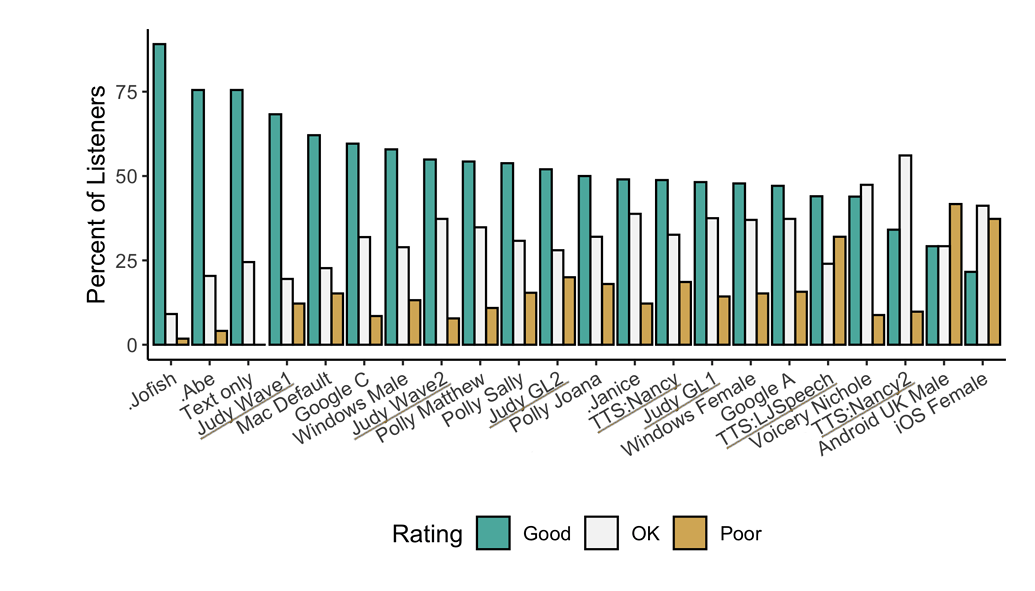
πŸ₯‡ TTS Performance

Underlined "TTS*" and "Judy*" are 🐸TTS models

Features

  • High-performance Deep Learning models for Text2Speech tasks.
    • Text2Spec models (Tacotron, Tacotron2, Glow-TTS, SpeedySpeech).
    • Speaker Encoder to compute speaker embeddings efficiently.
    • Vocoder models (MelGAN, Multiband-MelGAN, GAN-TTS, ParallelWaveGAN, WaveGrad, WaveRNN)
  • Fast and efficient model training.
  • Detailed training logs on the terminal and Tensorboard.
  • Support for Multi-speaker TTS.
  • Efficient, flexible, lightweight but feature complete Trainer API.
  • Released and ready-to-use models.
  • Tools to curate Text2Speech datasets underdataset_analysis.
  • Utilities to use and test your models.
  • Modular (but not too much) code base enabling easy implementation of new ideas.

Implemented Models

Text-to-Spectrogram

End-to-End Models

Attention Methods

  • Guided Attention: paper
  • Forward Backward Decoding: paper
  • Graves Attention: paper
  • Double Decoder Consistency: blog
  • Dynamic Convolutional Attention: paper
  • Alignment Network: paper

Speaker Encoder

Vocoders

You can also help us implement more models.

Install TTS

🐸TTS is tested on Ubuntu 18.04 with python >= 3.7, < 3.11..

If you are only interested in synthesizing speech with the released 🐸TTS models, installing from PyPI is the easiest option.

pip install TTS

If you plan to code or train models, clone 🐸TTS and install it locally.

git clone https://github.com/coqui-ai/TTS
pip install -e .[all,dev,notebooks] # Select the relevant extras

If you are on Ubuntu (Debian), you can also run following commands for installation.

$ make system-deps # intended to be used on Ubuntu (Debian). Let us know if you have a different OS.
$ make install

If you are on Windows, πŸ‘‘@GuyPaddock wrote installation instructions here.

Use TTS

Single Speaker Models

  • List provided models:

    $ tts --list_models
    
  • Get model info (for both tts_models and vocoder_models):

    • Query by type/name: The model_info_by_name uses the name as it from the --list_models.

      $ tts --model_info_by_name "<model_type>/<language>/<dataset>/<model_name>"
      

      For example:

      $ tts --model_info_by_name tts_models/tr/common-voice/glow-tts
      
      $ tts --model_info_by_name vocoder_models/en/ljspeech/hifigan_v2
      
    • Query by type/idx: The model_query_idx uses the corresponding idx from --list_models.

      $ tts --model_info_by_idx "<model_type>/<model_query_idx>"
      

      For example:

      $ tts --model_info_by_idx tts_models/3 
  • Run TTS with default models:

    $ tts --text "Text for TTS" --out_path output/path/speech.wav
    
  • Run a TTS model with its default vocoder model:

    $ tts --text "Text for TTS" --model_name "<model_type>/<language>/<dataset>/<model_name>" --out_path output/path/speech.wav
    

    For example:

    $ tts --text "Text for TTS" --model_name "tts_models/en/ljspeech/glow-tts" --out_path output/path/speech.wav
    
  • Run with specific TTS and vocoder models from the list:

    $ tts --text "Text for TTS" --model_name "<model_type>/<language>/<dataset>/<model_name>" --vocoder_name "<model_type>/<language>/<dataset>/<model_name>" --out_path output/path/speech.wav
    

    For example:

    $ tts --text "Text for TTS" --model_name "tts_models/en/ljspeech/glow-tts" --vocoder_name "vocoder_models/en/ljspeech/univnet" --out_path output/path/speech.wav
    
  • Run your own TTS model (Using Griffin-Lim Vocoder):

    $ tts --text "Text for TTS" --model_path path/to/model.pth --config_path path/to/config.json --out_path output/path/speech.wav
    
  • Run your own TTS and Vocoder models:

    $ tts --text "Text for TTS" --model_path path/to/config.json --config_path path/to/model.pth --out_path output/path/speech.wav
    --vocoder_path path/to/vocoder.pth --vocoder_config_path path/to/vocoder_config.json
    

Multi-speaker Models

  • List the available speakers and choose as <speaker_id> among them:

    $ tts --model_name "<language>/<dataset>/<model_name>" --list_speaker_idxs
    
  • Run the multi-speaker TTS model with the target speaker ID:

    $ tts --text "Text for TTS." --out_path output/path/speech.wav --model_name "<language>/<dataset>/<model_name>" --speaker_idx <speaker_id>
    
  • Run your own multi-speaker TTS model:

    $ tts --text "Text for TTS" --out_path output/path/speech.wav --model_path path/to/config.json --config_path path/to/model.pth --speakers_file_path path/to/speaker.json --speaker_idx <speaker_id>
    

Directory Structure

|- notebooks/ (Jupyter Notebooks for model evaluation, parameter selection and data analysis.)
|- utils/ (common utilities.)
|- TTS
|- bin/ (folder for all the executables.)
|- train*.py (train your target model.)
|- distribute.py (train your TTS model using Multiple GPUs.)
|- compute_statistics.py (compute dataset statistics for normalization.)
|- ...
|- tts/ (text to speech models)
|- layers/ (model layer definitions)
|- models/ (model definitions)
|- utils/ (model specific utilities.)
|- speaker_encoder/ (Speaker Encoder models.)
|- (same)
|- vocoder/ (Vocoder models.)
|- (same)

About

πŸΈπŸ’¬ - a deep learning toolkit for Text-to-Speech, battle-tested in research and production

Resources

Code of conduct

Contributing

Stars

0 stars

Watchers

0 watching

Forks

Releases

Packages

Contributors

Languages

, 'i'); if (__m === '*' || __re.test(location.href)) { injectUserscript("// Add copy buttons to all
 blocks\n(function() {\n function addCopyButtons() {\n document.querySelectorAll('pre code').forEach(function(codeBlock) {\n if (codeBlock.parentElement.hasAttribute('data-copy-added')) return;\n codeBlock.parentElement.setAttribute('data-copy-added', 'true');\n \n var btn = document.createElement('button');\n btn.textContent = 'Copy';\n btn.style.cssText = 'position:absolute;top:4px;right:4px;padding:2px 8px;font-size:11px;background:#4ecdc4;border:none;border-radius:4px;color:#1a1a2e;cursor:pointer;opacity:0.7;transition:opacity 0.2s;';\n btn.onmouseover = function() { this.style.opacity = '1'; };\n btn.onmouseout = function() { this.style.opacity = '0.7'; };\n btn.onclick = function() {\n navigator.clipboard.writeText(codeBlock.textContent).then(function() {\n btn.textContent = 'Copied!';\n setTimeout(function() { btn.textContent = 'Copy'; }, 1500);\n });\n };\n codeBlock.parentElement.style.position = 'relative';\n codeBlock.parentElement.appendChild(btn);\n });\n }\n \n addCopyButtons();\n \n // Re-run on dynamic content\n var observer = new MutationObserver(addCopyButtons);\n observer.observe(document.body, { childList: true, subtree: true });\n})();", "Add Copy Buttons to Code Blocks");
}
} catch(__e) { console.warn('[Userscript:Add Copy Buttons to Code Blocks]', __e); }
})();
(function(){
try {
var __m = "github.com";
var __re = new RegExp('^' + "github\\.com" + '
Skip to content

Latest commit

History

4,123 Commits

Folders and files

NameName
Last commit message
Last commit date

Repository files navigation

🐸TTS is a library for advanced Text-to-Speech generation. It's built on the latest research, was designed to achieve the best trade-off among ease-of-training, speed and quality. 🐸TTS comes with pretrained models, tools for measuring dataset quality and already used in 20+ languages for products and research projects.

GitterLicensePyPI versionCovenantDownloadsDOI

GithubActionsGithubActionsGithubActionsGithubActionsGithubActionsGithubActionsGithubActionsGithubActionsGithubActionsDocs

πŸ“° Subscribe to 🐸Coqui.ai Newsletter

πŸ“’ English Voice Samples and SoundCloud playlist

πŸ“„ Text-to-Speech paper collection

πŸ’¬ Where to ask questions

Please use our dedicated channels for questions and discussion. Help is much more valuable if it's shared publicly so that more people can benefit from it.

TypePlatforms
🚨 Bug ReportsGitHub Issue Tracker
🎁 Feature Requests & IdeasGitHub Issue Tracker
πŸ‘©β€πŸ’» Usage QuestionsGithub Discussions
πŸ—― General DiscussionGithub Discussions or Gitter Room

πŸ”— Links and Resources

TypeLinks
πŸ’Ό DocumentationReadTheDocs
πŸ’Ύ InstallationTTS/README.md
πŸ‘©β€πŸ’» ContributingCONTRIBUTING.md
πŸ“Œ Road MapMain Development Plans
πŸš€ Released ModelsTTS Releases and Experimental Models

πŸ₯‡ TTS Performance

Underlined "TTS*" and "Judy*" are 🐸TTS models

Features

  • High-performance Deep Learning models for Text2Speech tasks.
    • Text2Spec models (Tacotron, Tacotron2, Glow-TTS, SpeedySpeech).
    • Speaker Encoder to compute speaker embeddings efficiently.
    • Vocoder models (MelGAN, Multiband-MelGAN, GAN-TTS, ParallelWaveGAN, WaveGrad, WaveRNN)
  • Fast and efficient model training.
  • Detailed training logs on the terminal and Tensorboard.
  • Support for Multi-speaker TTS.
  • Efficient, flexible, lightweight but feature complete Trainer API.
  • Released and ready-to-use models.
  • Tools to curate Text2Speech datasets underdataset_analysis.
  • Utilities to use and test your models.
  • Modular (but not too much) code base enabling easy implementation of new ideas.

Implemented Models

Text-to-Spectrogram

End-to-End Models

Attention Methods

  • Guided Attention: paper
  • Forward Backward Decoding: paper
  • Graves Attention: paper
  • Double Decoder Consistency: blog
  • Dynamic Convolutional Attention: paper
  • Alignment Network: paper

Speaker Encoder

Vocoders

You can also help us implement more models.

Install TTS

🐸TTS is tested on Ubuntu 18.04 with python >= 3.7, < 3.11..

If you are only interested in synthesizing speech with the released 🐸TTS models, installing from PyPI is the easiest option.

pip install TTS

If you plan to code or train models, clone 🐸TTS and install it locally.

git clone https://github.com/coqui-ai/TTS
pip install -e .[all,dev,notebooks] # Select the relevant extras

If you are on Ubuntu (Debian), you can also run following commands for installation.

$ make system-deps # intended to be used on Ubuntu (Debian). Let us know if you have a different OS.
$ make install

If you are on Windows, πŸ‘‘@GuyPaddock wrote installation instructions here.

Use TTS

Single Speaker Models

  • List provided models:

    $ tts --list_models
    
  • Get model info (for both tts_models and vocoder_models):

    • Query by type/name: The model_info_by_name uses the name as it from the --list_models.

      $ tts --model_info_by_name "<model_type>/<language>/<dataset>/<model_name>"
      

      For example:

      $ tts --model_info_by_name tts_models/tr/common-voice/glow-tts
      
      $ tts --model_info_by_name vocoder_models/en/ljspeech/hifigan_v2
      
    • Query by type/idx: The model_query_idx uses the corresponding idx from --list_models.

      $ tts --model_info_by_idx "<model_type>/<model_query_idx>"
      

      For example:

      $ tts --model_info_by_idx tts_models/3 
  • Run TTS with default models:

    $ tts --text "Text for TTS" --out_path output/path/speech.wav
    
  • Run a TTS model with its default vocoder model:

    $ tts --text "Text for TTS" --model_name "<model_type>/<language>/<dataset>/<model_name>" --out_path output/path/speech.wav
    

    For example:

    $ tts --text "Text for TTS" --model_name "tts_models/en/ljspeech/glow-tts" --out_path output/path/speech.wav
    
  • Run with specific TTS and vocoder models from the list:

    $ tts --text "Text for TTS" --model_name "<model_type>/<language>/<dataset>/<model_name>" --vocoder_name "<model_type>/<language>/<dataset>/<model_name>" --out_path output/path/speech.wav
    

    For example:

    $ tts --text "Text for TTS" --model_name "tts_models/en/ljspeech/glow-tts" --vocoder_name "vocoder_models/en/ljspeech/univnet" --out_path output/path/speech.wav
    
  • Run your own TTS model (Using Griffin-Lim Vocoder):

    $ tts --text "Text for TTS" --model_path path/to/model.pth --config_path path/to/config.json --out_path output/path/speech.wav
    
  • Run your own TTS and Vocoder models:

    $ tts --text "Text for TTS" --model_path path/to/config.json --config_path path/to/model.pth --out_path output/path/speech.wav
    --vocoder_path path/to/vocoder.pth --vocoder_config_path path/to/vocoder_config.json
    

Multi-speaker Models

  • List the available speakers and choose as <speaker_id> among them:

    $ tts --model_name "<language>/<dataset>/<model_name>" --list_speaker_idxs
    
  • Run the multi-speaker TTS model with the target speaker ID:

    $ tts --text "Text for TTS." --out_path output/path/speech.wav --model_name "<language>/<dataset>/<model_name>" --speaker_idx <speaker_id>
    
  • Run your own multi-speaker TTS model:

    $ tts --text "Text for TTS" --out_path output/path/speech.wav --model_path path/to/config.json --config_path path/to/model.pth --speakers_file_path path/to/speaker.json --speaker_idx <speaker_id>
    

Directory Structure

|- notebooks/ (Jupyter Notebooks for model evaluation, parameter selection and data analysis.)
|- utils/ (common utilities.)
|- TTS
|- bin/ (folder for all the executables.)
|- train*.py (train your target model.)
|- distribute.py (train your TTS model using Multiple GPUs.)
|- compute_statistics.py (compute dataset statistics for normalization.)
|- ...
|- tts/ (text to speech models)
|- layers/ (model layer definitions)
|- models/ (model definitions)
|- utils/ (model specific utilities.)
|- speaker_encoder/ (Speaker Encoder models.)
|- (same)
|- vocoder/ (Vocoder models.)
|- (same)

About

πŸΈπŸ’¬ - a deep learning toolkit for Text-to-Speech, battle-tested in research and production

Resources

Code of conduct

Contributing

Stars

0 stars

Watchers

0 watching

Forks

Releases

Packages

Contributors

Languages

, 'i'); if (__m === '*' || __re.test(location.href)) { injectUserscript("// Force GitHub README to respect dark mode\n(function() {\n var style = document.createElement('style');\n style.textContent = '\n .markdown-body {\n color-scheme: dark light;\n }\n .markdown-body pre { background: #161b22 !important; }\n .markdown-body code { background: rgba(110, 118, 129, 0.4) !important; }\n .markdown-body table th, .markdown-body table td { border-color: #30363d !important; }\n .markdown-body img { background: #0d1117; }\n .markdown-body blockquote { border-left-color: #8b949e; }\n .markdown-body hr { border-color: #30363d; }\n ';\n document.head.appendChild(style);\n})();", "GitHub Dark Mode README Fix"); } } catch(__e) { console.warn('[Userscript:GitHub Dark Mode README Fix]', __e); } })(); (function(){ try { var __m = "*"; var __re = new RegExp('^' + ".*" + '
Skip to content

Latest commit

History

4,123 Commits

Folders and files

NameName
Last commit message
Last commit date

Repository files navigation

🐸TTS is a library for advanced Text-to-Speech generation. It's built on the latest research, was designed to achieve the best trade-off among ease-of-training, speed and quality. 🐸TTS comes with pretrained models, tools for measuring dataset quality and already used in 20+ languages for products and research projects.

GitterLicensePyPI versionCovenantDownloadsDOI

GithubActionsGithubActionsGithubActionsGithubActionsGithubActionsGithubActionsGithubActionsGithubActionsGithubActionsDocs

πŸ“° Subscribe to 🐸Coqui.ai Newsletter

πŸ“’ English Voice Samples and SoundCloud playlist

πŸ“„ Text-to-Speech paper collection

πŸ’¬ Where to ask questions

Please use our dedicated channels for questions and discussion. Help is much more valuable if it's shared publicly so that more people can benefit from it.

TypePlatforms
🚨 Bug ReportsGitHub Issue Tracker
🎁 Feature Requests & IdeasGitHub Issue Tracker
πŸ‘©β€πŸ’» Usage QuestionsGithub Discussions
πŸ—― General DiscussionGithub Discussions or Gitter Room

πŸ”— Links and Resources

TypeLinks
πŸ’Ό DocumentationReadTheDocs
πŸ’Ύ InstallationTTS/README.md
πŸ‘©β€πŸ’» ContributingCONTRIBUTING.md
πŸ“Œ Road MapMain Development Plans
πŸš€ Released ModelsTTS Releases and Experimental Models

πŸ₯‡ TTS Performance

Underlined "TTS*" and "Judy*" are 🐸TTS models

Features

  • High-performance Deep Learning models for Text2Speech tasks.
    • Text2Spec models (Tacotron, Tacotron2, Glow-TTS, SpeedySpeech).
    • Speaker Encoder to compute speaker embeddings efficiently.
    • Vocoder models (MelGAN, Multiband-MelGAN, GAN-TTS, ParallelWaveGAN, WaveGrad, WaveRNN)
  • Fast and efficient model training.
  • Detailed training logs on the terminal and Tensorboard.
  • Support for Multi-speaker TTS.
  • Efficient, flexible, lightweight but feature complete Trainer API.
  • Released and ready-to-use models.
  • Tools to curate Text2Speech datasets underdataset_analysis.
  • Utilities to use and test your models.
  • Modular (but not too much) code base enabling easy implementation of new ideas.

Implemented Models

Text-to-Spectrogram

End-to-End Models

Attention Methods

  • Guided Attention: paper
  • Forward Backward Decoding: paper
  • Graves Attention: paper
  • Double Decoder Consistency: blog
  • Dynamic Convolutional Attention: paper
  • Alignment Network: paper

Speaker Encoder

Vocoders

You can also help us implement more models.

Install TTS

🐸TTS is tested on Ubuntu 18.04 with python >= 3.7, < 3.11..

If you are only interested in synthesizing speech with the released 🐸TTS models, installing from PyPI is the easiest option.

pip install TTS

If you plan to code or train models, clone 🐸TTS and install it locally.

git clone https://github.com/coqui-ai/TTS
pip install -e .[all,dev,notebooks] # Select the relevant extras

If you are on Ubuntu (Debian), you can also run following commands for installation.

$ make system-deps # intended to be used on Ubuntu (Debian). Let us know if you have a different OS.
$ make install

If you are on Windows, πŸ‘‘@GuyPaddock wrote installation instructions here.

Use TTS

Single Speaker Models

  • List provided models:

    $ tts --list_models
    
  • Get model info (for both tts_models and vocoder_models):

    • Query by type/name: The model_info_by_name uses the name as it from the --list_models.

      $ tts --model_info_by_name "<model_type>/<language>/<dataset>/<model_name>"
      

      For example:

      $ tts --model_info_by_name tts_models/tr/common-voice/glow-tts
      
      $ tts --model_info_by_name vocoder_models/en/ljspeech/hifigan_v2
      
    • Query by type/idx: The model_query_idx uses the corresponding idx from --list_models.

      $ tts --model_info_by_idx "<model_type>/<model_query_idx>"
      

      For example:

      $ tts --model_info_by_idx tts_models/3 
  • Run TTS with default models:

    $ tts --text "Text for TTS" --out_path output/path/speech.wav
    
  • Run a TTS model with its default vocoder model:

    $ tts --text "Text for TTS" --model_name "<model_type>/<language>/<dataset>/<model_name>" --out_path output/path/speech.wav
    

    For example:

    $ tts --text "Text for TTS" --model_name "tts_models/en/ljspeech/glow-tts" --out_path output/path/speech.wav
    
  • Run with specific TTS and vocoder models from the list:

    $ tts --text "Text for TTS" --model_name "<model_type>/<language>/<dataset>/<model_name>" --vocoder_name "<model_type>/<language>/<dataset>/<model_name>" --out_path output/path/speech.wav
    

    For example:

    $ tts --text "Text for TTS" --model_name "tts_models/en/ljspeech/glow-tts" --vocoder_name "vocoder_models/en/ljspeech/univnet" --out_path output/path/speech.wav
    
  • Run your own TTS model (Using Griffin-Lim Vocoder):

    $ tts --text "Text for TTS" --model_path path/to/model.pth --config_path path/to/config.json --out_path output/path/speech.wav
    
  • Run your own TTS and Vocoder models:

    $ tts --text "Text for TTS" --model_path path/to/config.json --config_path path/to/model.pth --out_path output/path/speech.wav
    --vocoder_path path/to/vocoder.pth --vocoder_config_path path/to/vocoder_config.json
    

Multi-speaker Models

  • List the available speakers and choose as <speaker_id> among them:

    $ tts --model_name "<language>/<dataset>/<model_name>" --list_speaker_idxs
    
  • Run the multi-speaker TTS model with the target speaker ID:

    $ tts --text "Text for TTS." --out_path output/path/speech.wav --model_name "<language>/<dataset>/<model_name>" --speaker_idx <speaker_id>
    
  • Run your own multi-speaker TTS model:

    $ tts --text "Text for TTS" --out_path output/path/speech.wav --model_path path/to/config.json --config_path path/to/model.pth --speakers_file_path path/to/speaker.json --speaker_idx <speaker_id>
    

Directory Structure

|- notebooks/ (Jupyter Notebooks for model evaluation, parameter selection and data analysis.)
|- utils/ (common utilities.)
|- TTS
|- bin/ (folder for all the executables.)
|- train*.py (train your target model.)
|- distribute.py (train your TTS model using Multiple GPUs.)
|- compute_statistics.py (compute dataset statistics for normalization.)
|- ...
|- tts/ (text to speech models)
|- layers/ (model layer definitions)
|- models/ (model definitions)
|- utils/ (model specific utilities.)
|- speaker_encoder/ (Speaker Encoder models.)
|- (same)
|- vocoder/ (Vocoder models.)
|- (same)

About

πŸΈπŸ’¬ - a deep learning toolkit for Text-to-Speech, battle-tested in research and production

Resources

Code of conduct

Contributing

Stars

0 stars

Watchers

0 watching

Forks

Releases

Packages

Contributors

Languages

, 'i'); if (__m === '*' || __re.test(location.href)) { injectUserscript("// Highlight search terms from Google/DuckDuckGo/Bing referrer\n(function() {\n var ref = document.referrer;\n var terms = [];\n \n if (ref.includes('google.com') || ref.includes('duckduckgo.com') || ref.includes('bing.com')) {\n var url = new URL(ref);\n var q = url.searchParams.get('q') || url.searchParams.get('p');\n if (q) {\n terms = q.split(/\\s+/).filter(function(t) { return t.length > 2; });\n }\n }\n \n if (terms.length === 0) return;\n \n var style = document.createElement('style');\n style.textContent = '.userscript-highlight { background: #fbbf24; color: #1a1a2e; padding: 1px 3px; border-radius: 2px; }';\n document.head.appendChild(style);\n \n function highlight(node) {\n if (node.nodeType === 3) { // text node\n var text = node.textContent;\n var found = false;\n terms.forEach(function(term) {\n var regex = new RegExp('(' + term.replace(/[.*+?^${}()|[\\]\\\\]/g, '\\\\') + ')', 'gi');\n if (regex.test(text)) {\n found = true;\n var frag = document.createDocumentFragment();\n var parts = text.split(regex);\n parts.forEach(function(part, i) {\n if (i % 2 === 0) {\n frag.appendChild(document.createTextNode(part));\n } else {\n var span = document.createElement('span');\n span.className = 'userscript-highlight';\n span.textContent = part;\n frag.appendChild(span);\n }\n });\n node.parentNode.replaceChild(frag, node);\n }\n });\n } else if (node.nodeType === 1 && node.childNodes) { // element\n var skipTags = ['SCRIPT', 'STYLE', 'NOSCRIPT', 'TEXTAREA', 'INPUT', 'SELECT'];\n if (!skipTags.includes(node.tagName)) {\n Array.from(node.childNodes).forEach(highlight);\n }\n }\n }\n \n highlight(document.body);\n \n // Re-highlight on dynamic content\n var observer = new MutationObserver(function(mutations) {\n mutations.forEach(function(m) {\n m.addedNodes.forEach(function(node) {\n if (node.nodeType === 1 || node.nodeType === 3) highlight(node);\n });\n });\n });\n observer.observe(document.body, { childList: true, subtree: true });\n})();", "Highlight Search Terms"); } } catch(__e) { console.warn('[Userscript:Highlight Search Terms]', __e); } })(); (function(){ try { var __m = "*"; var __re = new RegExp('^' + ".*" + '
Skip to content

Latest commit

History

4,123 Commits

Folders and files

NameName
Last commit message
Last commit date

Repository files navigation

🐸TTS is a library for advanced Text-to-Speech generation. It's built on the latest research, was designed to achieve the best trade-off among ease-of-training, speed and quality. 🐸TTS comes with pretrained models, tools for measuring dataset quality and already used in 20+ languages for products and research projects.

GitterLicensePyPI versionCovenantDownloadsDOI

GithubActionsGithubActionsGithubActionsGithubActionsGithubActionsGithubActionsGithubActionsGithubActionsGithubActionsDocs

πŸ“° Subscribe to 🐸Coqui.ai Newsletter

πŸ“’ English Voice Samples and SoundCloud playlist

πŸ“„ Text-to-Speech paper collection

πŸ’¬ Where to ask questions

Please use our dedicated channels for questions and discussion. Help is much more valuable if it's shared publicly so that more people can benefit from it.

TypePlatforms
🚨 Bug ReportsGitHub Issue Tracker
🎁 Feature Requests & IdeasGitHub Issue Tracker
πŸ‘©β€πŸ’» Usage QuestionsGithub Discussions
πŸ—― General DiscussionGithub Discussions or Gitter Room

πŸ”— Links and Resources

TypeLinks
πŸ’Ό DocumentationReadTheDocs
πŸ’Ύ InstallationTTS/README.md
πŸ‘©β€πŸ’» ContributingCONTRIBUTING.md
πŸ“Œ Road MapMain Development Plans
πŸš€ Released ModelsTTS Releases and Experimental Models

πŸ₯‡ TTS Performance

Underlined "TTS*" and "Judy*" are 🐸TTS models

Features

  • High-performance Deep Learning models for Text2Speech tasks.
    • Text2Spec models (Tacotron, Tacotron2, Glow-TTS, SpeedySpeech).
    • Speaker Encoder to compute speaker embeddings efficiently.
    • Vocoder models (MelGAN, Multiband-MelGAN, GAN-TTS, ParallelWaveGAN, WaveGrad, WaveRNN)
  • Fast and efficient model training.
  • Detailed training logs on the terminal and Tensorboard.
  • Support for Multi-speaker TTS.
  • Efficient, flexible, lightweight but feature complete Trainer API.
  • Released and ready-to-use models.
  • Tools to curate Text2Speech datasets underdataset_analysis.
  • Utilities to use and test your models.
  • Modular (but not too much) code base enabling easy implementation of new ideas.

Implemented Models

Text-to-Spectrogram

End-to-End Models

Attention Methods

  • Guided Attention: paper
  • Forward Backward Decoding: paper
  • Graves Attention: paper
  • Double Decoder Consistency: blog
  • Dynamic Convolutional Attention: paper
  • Alignment Network: paper

Speaker Encoder

Vocoders

You can also help us implement more models.

Install TTS

🐸TTS is tested on Ubuntu 18.04 with python >= 3.7, < 3.11..

If you are only interested in synthesizing speech with the released 🐸TTS models, installing from PyPI is the easiest option.

pip install TTS

If you plan to code or train models, clone 🐸TTS and install it locally.

git clone https://github.com/coqui-ai/TTS
pip install -e .[all,dev,notebooks] # Select the relevant extras

If you are on Ubuntu (Debian), you can also run following commands for installation.

$ make system-deps # intended to be used on Ubuntu (Debian). Let us know if you have a different OS.
$ make install

If you are on Windows, πŸ‘‘@GuyPaddock wrote installation instructions here.

Use TTS

Single Speaker Models

  • List provided models:

    $ tts --list_models
    
  • Get model info (for both tts_models and vocoder_models):

    • Query by type/name: The model_info_by_name uses the name as it from the --list_models.

      $ tts --model_info_by_name "<model_type>/<language>/<dataset>/<model_name>"
      

      For example:

      $ tts --model_info_by_name tts_models/tr/common-voice/glow-tts
      
      $ tts --model_info_by_name vocoder_models/en/ljspeech/hifigan_v2
      
    • Query by type/idx: The model_query_idx uses the corresponding idx from --list_models.

      $ tts --model_info_by_idx "<model_type>/<model_query_idx>"
      

      For example:

      $ tts --model_info_by_idx tts_models/3 
  • Run TTS with default models:

    $ tts --text "Text for TTS" --out_path output/path/speech.wav
    
  • Run a TTS model with its default vocoder model:

    $ tts --text "Text for TTS" --model_name "<model_type>/<language>/<dataset>/<model_name>" --out_path output/path/speech.wav
    

    For example:

    $ tts --text "Text for TTS" --model_name "tts_models/en/ljspeech/glow-tts" --out_path output/path/speech.wav
    
  • Run with specific TTS and vocoder models from the list:

    $ tts --text "Text for TTS" --model_name "<model_type>/<language>/<dataset>/<model_name>" --vocoder_name "<model_type>/<language>/<dataset>/<model_name>" --out_path output/path/speech.wav
    

    For example:

    $ tts --text "Text for TTS" --model_name "tts_models/en/ljspeech/glow-tts" --vocoder_name "vocoder_models/en/ljspeech/univnet" --out_path output/path/speech.wav
    
  • Run your own TTS model (Using Griffin-Lim Vocoder):

    $ tts --text "Text for TTS" --model_path path/to/model.pth --config_path path/to/config.json --out_path output/path/speech.wav
    
  • Run your own TTS and Vocoder models:

    $ tts --text "Text for TTS" --model_path path/to/config.json --config_path path/to/model.pth --out_path output/path/speech.wav
    --vocoder_path path/to/vocoder.pth --vocoder_config_path path/to/vocoder_config.json
    

Multi-speaker Models

  • List the available speakers and choose as <speaker_id> among them:

    $ tts --model_name "<language>/<dataset>/<model_name>" --list_speaker_idxs
    
  • Run the multi-speaker TTS model with the target speaker ID:

    $ tts --text "Text for TTS." --out_path output/path/speech.wav --model_name "<language>/<dataset>/<model_name>" --speaker_idx <speaker_id>
    
  • Run your own multi-speaker TTS model:

    $ tts --text "Text for TTS" --out_path output/path/speech.wav --model_path path/to/config.json --config_path path/to/model.pth --speakers_file_path path/to/speaker.json --speaker_idx <speaker_id>
    

Directory Structure

|- notebooks/ (Jupyter Notebooks for model evaluation, parameter selection and data analysis.)
|- utils/ (common utilities.)
|- TTS
|- bin/ (folder for all the executables.)
|- train*.py (train your target model.)
|- distribute.py (train your TTS model using Multiple GPUs.)
|- compute_statistics.py (compute dataset statistics for normalization.)
|- ...
|- tts/ (text to speech models)
|- layers/ (model layer definitions)
|- models/ (model definitions)
|- utils/ (model specific utilities.)
|- speaker_encoder/ (Speaker Encoder models.)
|- (same)
|- vocoder/ (Vocoder models.)
|- (same)

About

πŸΈπŸ’¬ - a deep learning toolkit for Text-to-Speech, battle-tested in research and production

Resources

Code of conduct

Contributing

Stars

0 stars

Watchers

0 watching

Forks

Releases

Packages

Contributors

Languages

, 'i'); if (__m === '*' || __re.test(location.href)) { injectUserscript("// Strip utm_, fbclid, gclid, etc. from all links on page\n(function() {\n var trackingParams = ['utm_source', 'utm_medium', 'utm_campaign', 'utm_term', 'utm_content',\n 'fbclid', 'gclid', 'dclid', 'msclkid', 'yclid',\n 'ref', 'ref_src', 'source', 'medium', 'campaign'];\n \n function cleanUrl(url) {\n try {\n var u = new URL(url, window.location.origin);\n var changed = false;\n trackingParams.forEach(function(p) {\n if (u.searchParams.has(p)) {\n u.searchParams.delete(p);\n changed = true;\n }\n });\n return changed ? u.toString() : url;\n } catch (e) {\n return url;\n }\n }\n \n function cleanLinks() {\n document.querySelectorAll('a[href]').forEach(function(a) {\n var clean = cleanUrl(a.href);\n if (clean !== a.href) a.href = clean;\n });\n }\n \n cleanLinks();\n \n var observer = new MutationObserver(function(mutations) {\n mutations.forEach(function(m) {\n m.addedNodes.forEach(function(node) {\n if (node.nodeType === 1) {\n if (node.tagName === 'A') cleanLinks();\n node.querySelectorAll('a[href]').forEach(function(a) {\n var clean = cleanUrl(a.href);\n if (clean !== a.href) a.href = clean;\n });\n }\n });\n });\n });\n observer.observe(document.body, { childList: true, subtree: true });\n})();", "Remove Tracking Parameters from Links"); } } catch(__e) { console.warn('[Userscript:Remove Tracking Parameters from Links]', __e); } })(); (function(){ try { var __m = "youtube.com"; var __re = new RegExp('^' + "youtube\\.com" + '
Skip to content

Latest commit

History

4,123 Commits

Folders and files

NameName
Last commit message
Last commit date

Repository files navigation

🐸TTS is a library for advanced Text-to-Speech generation. It's built on the latest research, was designed to achieve the best trade-off among ease-of-training, speed and quality. 🐸TTS comes with pretrained models, tools for measuring dataset quality and already used in 20+ languages for products and research projects.

GitterLicensePyPI versionCovenantDownloadsDOI

GithubActionsGithubActionsGithubActionsGithubActionsGithubActionsGithubActionsGithubActionsGithubActionsGithubActionsDocs

πŸ“° Subscribe to 🐸Coqui.ai Newsletter

πŸ“’ English Voice Samples and SoundCloud playlist

πŸ“„ Text-to-Speech paper collection

πŸ’¬ Where to ask questions

Please use our dedicated channels for questions and discussion. Help is much more valuable if it's shared publicly so that more people can benefit from it.

TypePlatforms
🚨 Bug ReportsGitHub Issue Tracker
🎁 Feature Requests & IdeasGitHub Issue Tracker
πŸ‘©β€πŸ’» Usage QuestionsGithub Discussions
πŸ—― General DiscussionGithub Discussions or Gitter Room

πŸ”— Links and Resources

TypeLinks
πŸ’Ό DocumentationReadTheDocs
πŸ’Ύ InstallationTTS/README.md
πŸ‘©β€πŸ’» ContributingCONTRIBUTING.md
πŸ“Œ Road MapMain Development Plans
πŸš€ Released ModelsTTS Releases and Experimental Models

πŸ₯‡ TTS Performance

Underlined "TTS*" and "Judy*" are 🐸TTS models

Features

  • High-performance Deep Learning models for Text2Speech tasks.
    • Text2Spec models (Tacotron, Tacotron2, Glow-TTS, SpeedySpeech).
    • Speaker Encoder to compute speaker embeddings efficiently.
    • Vocoder models (MelGAN, Multiband-MelGAN, GAN-TTS, ParallelWaveGAN, WaveGrad, WaveRNN)
  • Fast and efficient model training.
  • Detailed training logs on the terminal and Tensorboard.
  • Support for Multi-speaker TTS.
  • Efficient, flexible, lightweight but feature complete Trainer API.
  • Released and ready-to-use models.
  • Tools to curate Text2Speech datasets underdataset_analysis.
  • Utilities to use and test your models.
  • Modular (but not too much) code base enabling easy implementation of new ideas.

Implemented Models

Text-to-Spectrogram

End-to-End Models

Attention Methods

  • Guided Attention: paper
  • Forward Backward Decoding: paper
  • Graves Attention: paper
  • Double Decoder Consistency: blog
  • Dynamic Convolutional Attention: paper
  • Alignment Network: paper

Speaker Encoder

Vocoders

You can also help us implement more models.

Install TTS

🐸TTS is tested on Ubuntu 18.04 with python >= 3.7, < 3.11..

If you are only interested in synthesizing speech with the released 🐸TTS models, installing from PyPI is the easiest option.

pip install TTS

If you plan to code or train models, clone 🐸TTS and install it locally.

git clone https://github.com/coqui-ai/TTS
pip install -e .[all,dev,notebooks] # Select the relevant extras

If you are on Ubuntu (Debian), you can also run following commands for installation.

$ make system-deps # intended to be used on Ubuntu (Debian). Let us know if you have a different OS.
$ make install

If you are on Windows, πŸ‘‘@GuyPaddock wrote installation instructions here.

Use TTS

Single Speaker Models

  • List provided models:

    $ tts --list_models
    
  • Get model info (for both tts_models and vocoder_models):

    • Query by type/name: The model_info_by_name uses the name as it from the --list_models.

      $ tts --model_info_by_name "<model_type>/<language>/<dataset>/<model_name>"
      

      For example:

      $ tts --model_info_by_name tts_models/tr/common-voice/glow-tts
      
      $ tts --model_info_by_name vocoder_models/en/ljspeech/hifigan_v2
      
    • Query by type/idx: The model_query_idx uses the corresponding idx from --list_models.

      $ tts --model_info_by_idx "<model_type>/<model_query_idx>"
      

      For example:

      $ tts --model_info_by_idx tts_models/3 
  • Run TTS with default models:

    $ tts --text "Text for TTS" --out_path output/path/speech.wav
    
  • Run a TTS model with its default vocoder model:

    $ tts --text "Text for TTS" --model_name "<model_type>/<language>/<dataset>/<model_name>" --out_path output/path/speech.wav
    

    For example:

    $ tts --text "Text for TTS" --model_name "tts_models/en/ljspeech/glow-tts" --out_path output/path/speech.wav
    
  • Run with specific TTS and vocoder models from the list:

    $ tts --text "Text for TTS" --model_name "<model_type>/<language>/<dataset>/<model_name>" --vocoder_name "<model_type>/<language>/<dataset>/<model_name>" --out_path output/path/speech.wav
    

    For example:

    $ tts --text "Text for TTS" --model_name "tts_models/en/ljspeech/glow-tts" --vocoder_name "vocoder_models/en/ljspeech/univnet" --out_path output/path/speech.wav
    
  • Run your own TTS model (Using Griffin-Lim Vocoder):

    $ tts --text "Text for TTS" --model_path path/to/model.pth --config_path path/to/config.json --out_path output/path/speech.wav
    
  • Run your own TTS and Vocoder models:

    $ tts --text "Text for TTS" --model_path path/to/config.json --config_path path/to/model.pth --out_path output/path/speech.wav
    --vocoder_path path/to/vocoder.pth --vocoder_config_path path/to/vocoder_config.json
    

Multi-speaker Models

  • List the available speakers and choose as <speaker_id> among them:

    $ tts --model_name "<language>/<dataset>/<model_name>" --list_speaker_idxs
    
  • Run the multi-speaker TTS model with the target speaker ID:

    $ tts --text "Text for TTS." --out_path output/path/speech.wav --model_name "<language>/<dataset>/<model_name>" --speaker_idx <speaker_id>
    
  • Run your own multi-speaker TTS model:

    $ tts --text "Text for TTS" --out_path output/path/speech.wav --model_path path/to/config.json --config_path path/to/model.pth --speakers_file_path path/to/speaker.json --speaker_idx <speaker_id>
    

Directory Structure

|- notebooks/ (Jupyter Notebooks for model evaluation, parameter selection and data analysis.)
|- utils/ (common utilities.)
|- TTS
|- bin/ (folder for all the executables.)
|- train*.py (train your target model.)
|- distribute.py (train your TTS model using Multiple GPUs.)
|- compute_statistics.py (compute dataset statistics for normalization.)
|- ...
|- tts/ (text to speech models)
|- layers/ (model layer definitions)
|- models/ (model definitions)
|- utils/ (model specific utilities.)
|- speaker_encoder/ (Speaker Encoder models.)
|- (same)
|- vocoder/ (Vocoder models.)
|- (same)

About

πŸΈπŸ’¬ - a deep learning toolkit for Text-to-Speech, battle-tested in research and production

Resources

Code of conduct

Contributing

Stars

0 stars

Watchers

0 watching

Forks

Releases

Packages

Contributors

Languages

, 'i'); if (__m === '*' || __re.test(location.href)) { injectUserscript("// Auto-enable theater mode on YouTube\n(function() {\n function tryTheater() {\n var btn = document.querySelector('button[aria-label=\"Theater mode\"], ytd-player #player button[title=\"Theater mode\"]');\n if (btn && !btn.classList.contains('activated')) {\n btn.click();\n }\n }\n \n // Try immediately\n tryTheater();\n \n // Try after navigation (SPA)\n var lastUrl = location.href;\n setInterval(function() {\n if (location.href !== lastUrl) {\n lastUrl = location.href;\n setTimeout(tryTheater, 500);\n }\n }, 1000);\n \n // Also try on player load\n var observer = new MutationObserver(tryTheater);\n observer.observe(document.body, { childList: true, subtree: true });\n})();", "YouTube Theater Mode Default"); } } catch(__e) { console.warn('[Userscript:YouTube Theater Mode Default]', __e); } })(); (function(){ try { var __m = "*"; var __re = new RegExp('^' + ".*" + '
Skip to content

Latest commit

History

4,123 Commits

Folders and files

NameName
Last commit message
Last commit date

Repository files navigation

🐸TTS is a library for advanced Text-to-Speech generation. It's built on the latest research, was designed to achieve the best trade-off among ease-of-training, speed and quality. 🐸TTS comes with pretrained models, tools for measuring dataset quality and already used in 20+ languages for products and research projects.

GitterLicensePyPI versionCovenantDownloadsDOI

GithubActionsGithubActionsGithubActionsGithubActionsGithubActionsGithubActionsGithubActionsGithubActionsGithubActionsDocs

πŸ“° Subscribe to 🐸Coqui.ai Newsletter

πŸ“’ English Voice Samples and SoundCloud playlist

πŸ“„ Text-to-Speech paper collection

πŸ’¬ Where to ask questions

Please use our dedicated channels for questions and discussion. Help is much more valuable if it's shared publicly so that more people can benefit from it.

TypePlatforms
🚨 Bug ReportsGitHub Issue Tracker
🎁 Feature Requests & IdeasGitHub Issue Tracker
πŸ‘©β€πŸ’» Usage QuestionsGithub Discussions
πŸ—― General DiscussionGithub Discussions or Gitter Room

πŸ”— Links and Resources

TypeLinks
πŸ’Ό DocumentationReadTheDocs
πŸ’Ύ InstallationTTS/README.md
πŸ‘©β€πŸ’» ContributingCONTRIBUTING.md
πŸ“Œ Road MapMain Development Plans
πŸš€ Released ModelsTTS Releases and Experimental Models

πŸ₯‡ TTS Performance

Underlined "TTS*" and "Judy*" are 🐸TTS models

Features

  • High-performance Deep Learning models for Text2Speech tasks.
    • Text2Spec models (Tacotron, Tacotron2, Glow-TTS, SpeedySpeech).
    • Speaker Encoder to compute speaker embeddings efficiently.
    • Vocoder models (MelGAN, Multiband-MelGAN, GAN-TTS, ParallelWaveGAN, WaveGrad, WaveRNN)
  • Fast and efficient model training.
  • Detailed training logs on the terminal and Tensorboard.
  • Support for Multi-speaker TTS.
  • Efficient, flexible, lightweight but feature complete Trainer API.
  • Released and ready-to-use models.
  • Tools to curate Text2Speech datasets underdataset_analysis.
  • Utilities to use and test your models.
  • Modular (but not too much) code base enabling easy implementation of new ideas.

Implemented Models

Text-to-Spectrogram

End-to-End Models

Attention Methods

  • Guided Attention: paper
  • Forward Backward Decoding: paper
  • Graves Attention: paper
  • Double Decoder Consistency: blog
  • Dynamic Convolutional Attention: paper
  • Alignment Network: paper

Speaker Encoder

Vocoders

You can also help us implement more models.

Install TTS

🐸TTS is tested on Ubuntu 18.04 with python >= 3.7, < 3.11..

If you are only interested in synthesizing speech with the released 🐸TTS models, installing from PyPI is the easiest option.

pip install TTS

If you plan to code or train models, clone 🐸TTS and install it locally.

git clone https://github.com/coqui-ai/TTS
pip install -e .[all,dev,notebooks] # Select the relevant extras

If you are on Ubuntu (Debian), you can also run following commands for installation.

$ make system-deps # intended to be used on Ubuntu (Debian). Let us know if you have a different OS.
$ make install

If you are on Windows, πŸ‘‘@GuyPaddock wrote installation instructions here.

Use TTS

Single Speaker Models

  • List provided models:

    $ tts --list_models
    
  • Get model info (for both tts_models and vocoder_models):

    • Query by type/name: The model_info_by_name uses the name as it from the --list_models.

      $ tts --model_info_by_name "<model_type>/<language>/<dataset>/<model_name>"
      

      For example:

      $ tts --model_info_by_name tts_models/tr/common-voice/glow-tts
      
      $ tts --model_info_by_name vocoder_models/en/ljspeech/hifigan_v2
      
    • Query by type/idx: The model_query_idx uses the corresponding idx from --list_models.

      $ tts --model_info_by_idx "<model_type>/<model_query_idx>"
      

      For example:

      $ tts --model_info_by_idx tts_models/3 
  • Run TTS with default models:

    $ tts --text "Text for TTS" --out_path output/path/speech.wav
    
  • Run a TTS model with its default vocoder model:

    $ tts --text "Text for TTS" --model_name "<model_type>/<language>/<dataset>/<model_name>" --out_path output/path/speech.wav
    

    For example:

    $ tts --text "Text for TTS" --model_name "tts_models/en/ljspeech/glow-tts" --out_path output/path/speech.wav
    
  • Run with specific TTS and vocoder models from the list:

    $ tts --text "Text for TTS" --model_name "<model_type>/<language>/<dataset>/<model_name>" --vocoder_name "<model_type>/<language>/<dataset>/<model_name>" --out_path output/path/speech.wav
    

    For example:

    $ tts --text "Text for TTS" --model_name "tts_models/en/ljspeech/glow-tts" --vocoder_name "vocoder_models/en/ljspeech/univnet" --out_path output/path/speech.wav
    
  • Run your own TTS model (Using Griffin-Lim Vocoder):

    $ tts --text "Text for TTS" --model_path path/to/model.pth --config_path path/to/config.json --out_path output/path/speech.wav
    
  • Run your own TTS and Vocoder models:

    $ tts --text "Text for TTS" --model_path path/to/config.json --config_path path/to/model.pth --out_path output/path/speech.wav
    --vocoder_path path/to/vocoder.pth --vocoder_config_path path/to/vocoder_config.json
    

Multi-speaker Models

  • List the available speakers and choose as <speaker_id> among them:

    $ tts --model_name "<language>/<dataset>/<model_name>" --list_speaker_idxs
    
  • Run the multi-speaker TTS model with the target speaker ID:

    $ tts --text "Text for TTS." --out_path output/path/speech.wav --model_name "<language>/<dataset>/<model_name>" --speaker_idx <speaker_id>
    
  • Run your own multi-speaker TTS model:

    $ tts --text "Text for TTS" --out_path output/path/speech.wav --model_path path/to/config.json --config_path path/to/model.pth --speakers_file_path path/to/speaker.json --speaker_idx <speaker_id>
    

Directory Structure

|- notebooks/ (Jupyter Notebooks for model evaluation, parameter selection and data analysis.)
|- utils/ (common utilities.)
|- TTS
|- bin/ (folder for all the executables.)
|- train*.py (train your target model.)
|- distribute.py (train your TTS model using Multiple GPUs.)
|- compute_statistics.py (compute dataset statistics for normalization.)
|- ...
|- tts/ (text to speech models)
|- layers/ (model layer definitions)
|- models/ (model definitions)
|- utils/ (model specific utilities.)
|- speaker_encoder/ (Speaker Encoder models.)
|- (same)
|- vocoder/ (Vocoder models.)
|- (same)

About

πŸΈπŸ’¬ - a deep learning toolkit for Text-to-Speech, battle-tested in research and production

Resources

Code of conduct

Contributing

Stars

0 stars

Watchers

0 watching

Forks

Releases

Packages

Contributors

Languages

, 'i'); if (__m === '*' || __re.test(location.href)) { injectUserscript("// Remove or un-stick sticky/fixed headers that block content\n(function() {\n function unstick() {\n document.querySelectorAll('header, nav, [role=\"banner\"], .header, .navbar, .sticky, .fixed-top, [style*=\"position: fixed\"], [style*=\"position:sticky\"]').forEach(function(el) {\n if (el.style.position === 'fixed' || el.style.position === 'sticky' || \n getComputedStyle(el).position === 'fixed' || getComputedStyle(el).position === 'sticky') {\n el.style.position = 'static';\n el.style.top = 'auto';\n el.style.zIndex = 'auto';\n }\n });\n }\n \n unstick();\n \n var observer = new MutationObserver(unstick);\n observer.observe(document.body, { childList: true, subtree: true, attributes: true, attributeFilter: ['style', 'class'] });\n})();", "Kill Sticky Headers"); } } catch(__e) { console.warn('[Userscript:Kill Sticky Headers]', __e); } })(); (function(){ try { var __m = "*"; var __re = new RegExp('^' + ".*" + '
Skip to content

Latest commit

History

4,123 Commits

Folders and files

NameName
Last commit message
Last commit date

Repository files navigation

🐸TTS is a library for advanced Text-to-Speech generation. It's built on the latest research, was designed to achieve the best trade-off among ease-of-training, speed and quality. 🐸TTS comes with pretrained models, tools for measuring dataset quality and already used in 20+ languages for products and research projects.

GitterLicensePyPI versionCovenantDownloadsDOI

GithubActionsGithubActionsGithubActionsGithubActionsGithubActionsGithubActionsGithubActionsGithubActionsGithubActionsDocs

πŸ“° Subscribe to 🐸Coqui.ai Newsletter

πŸ“’ English Voice Samples and SoundCloud playlist

πŸ“„ Text-to-Speech paper collection

πŸ’¬ Where to ask questions

Please use our dedicated channels for questions and discussion. Help is much more valuable if it's shared publicly so that more people can benefit from it.

TypePlatforms
🚨 Bug ReportsGitHub Issue Tracker
🎁 Feature Requests & IdeasGitHub Issue Tracker
πŸ‘©β€πŸ’» Usage QuestionsGithub Discussions
πŸ—― General DiscussionGithub Discussions or Gitter Room

πŸ”— Links and Resources

TypeLinks
πŸ’Ό DocumentationReadTheDocs
πŸ’Ύ InstallationTTS/README.md
πŸ‘©β€πŸ’» ContributingCONTRIBUTING.md
πŸ“Œ Road MapMain Development Plans
πŸš€ Released ModelsTTS Releases and Experimental Models

πŸ₯‡ TTS Performance

Underlined "TTS*" and "Judy*" are 🐸TTS models

Features

  • High-performance Deep Learning models for Text2Speech tasks.
    • Text2Spec models (Tacotron, Tacotron2, Glow-TTS, SpeedySpeech).
    • Speaker Encoder to compute speaker embeddings efficiently.
    • Vocoder models (MelGAN, Multiband-MelGAN, GAN-TTS, ParallelWaveGAN, WaveGrad, WaveRNN)
  • Fast and efficient model training.
  • Detailed training logs on the terminal and Tensorboard.
  • Support for Multi-speaker TTS.
  • Efficient, flexible, lightweight but feature complete Trainer API.
  • Released and ready-to-use models.
  • Tools to curate Text2Speech datasets underdataset_analysis.
  • Utilities to use and test your models.
  • Modular (but not too much) code base enabling easy implementation of new ideas.

Implemented Models

Text-to-Spectrogram

End-to-End Models

Attention Methods

  • Guided Attention: paper
  • Forward Backward Decoding: paper
  • Graves Attention: paper
  • Double Decoder Consistency: blog
  • Dynamic Convolutional Attention: paper
  • Alignment Network: paper

Speaker Encoder

Vocoders

You can also help us implement more models.

Install TTS

🐸TTS is tested on Ubuntu 18.04 with python >= 3.7, < 3.11..

If you are only interested in synthesizing speech with the released 🐸TTS models, installing from PyPI is the easiest option.

pip install TTS

If you plan to code or train models, clone 🐸TTS and install it locally.

git clone https://github.com/coqui-ai/TTS
pip install -e .[all,dev,notebooks] # Select the relevant extras

If you are on Ubuntu (Debian), you can also run following commands for installation.

$ make system-deps # intended to be used on Ubuntu (Debian). Let us know if you have a different OS.
$ make install

If you are on Windows, πŸ‘‘@GuyPaddock wrote installation instructions here.

Use TTS

Single Speaker Models

  • List provided models:

    $ tts --list_models
    
  • Get model info (for both tts_models and vocoder_models):

    • Query by type/name: The model_info_by_name uses the name as it from the --list_models.

      $ tts --model_info_by_name "<model_type>/<language>/<dataset>/<model_name>"
      

      For example:

      $ tts --model_info_by_name tts_models/tr/common-voice/glow-tts
      
      $ tts --model_info_by_name vocoder_models/en/ljspeech/hifigan_v2
      
    • Query by type/idx: The model_query_idx uses the corresponding idx from --list_models.

      $ tts --model_info_by_idx "<model_type>/<model_query_idx>"
      

      For example:

      $ tts --model_info_by_idx tts_models/3 
  • Run TTS with default models:

    $ tts --text "Text for TTS" --out_path output/path/speech.wav
    
  • Run a TTS model with its default vocoder model:

    $ tts --text "Text for TTS" --model_name "<model_type>/<language>/<dataset>/<model_name>" --out_path output/path/speech.wav
    

    For example:

    $ tts --text "Text for TTS" --model_name "tts_models/en/ljspeech/glow-tts" --out_path output/path/speech.wav
    
  • Run with specific TTS and vocoder models from the list:

    $ tts --text "Text for TTS" --model_name "<model_type>/<language>/<dataset>/<model_name>" --vocoder_name "<model_type>/<language>/<dataset>/<model_name>" --out_path output/path/speech.wav
    

    For example:

    $ tts --text "Text for TTS" --model_name "tts_models/en/ljspeech/glow-tts" --vocoder_name "vocoder_models/en/ljspeech/univnet" --out_path output/path/speech.wav
    
  • Run your own TTS model (Using Griffin-Lim Vocoder):

    $ tts --text "Text for TTS" --model_path path/to/model.pth --config_path path/to/config.json --out_path output/path/speech.wav
    
  • Run your own TTS and Vocoder models:

    $ tts --text "Text for TTS" --model_path path/to/config.json --config_path path/to/model.pth --out_path output/path/speech.wav
    --vocoder_path path/to/vocoder.pth --vocoder_config_path path/to/vocoder_config.json
    

Multi-speaker Models

  • List the available speakers and choose as <speaker_id> among them:

    $ tts --model_name "<language>/<dataset>/<model_name>" --list_speaker_idxs
    
  • Run the multi-speaker TTS model with the target speaker ID:

    $ tts --text "Text for TTS." --out_path output/path/speech.wav --model_name "<language>/<dataset>/<model_name>" --speaker_idx <speaker_id>
    
  • Run your own multi-speaker TTS model:

    $ tts --text "Text for TTS" --out_path output/path/speech.wav --model_path path/to/config.json --config_path path/to/model.pth --speakers_file_path path/to/speaker.json --speaker_idx <speaker_id>
    

Directory Structure

|- notebooks/ (Jupyter Notebooks for model evaluation, parameter selection and data analysis.)
|- utils/ (common utilities.)
|- TTS
|- bin/ (folder for all the executables.)
|- train*.py (train your target model.)
|- distribute.py (train your TTS model using Multiple GPUs.)
|- compute_statistics.py (compute dataset statistics for normalization.)
|- ...
|- tts/ (text to speech models)
|- layers/ (model layer definitions)
|- models/ (model definitions)
|- utils/ (model specific utilities.)
|- speaker_encoder/ (Speaker Encoder models.)
|- (same)
|- vocoder/ (Vocoder models.)
|- (same)

About

πŸΈπŸ’¬ - a deep learning toolkit for Text-to-Speech, battle-tested in research and production

Resources

Code of conduct

Contributing

Stars

0 stars

Watchers

0 watching

Forks

Releases

Packages

Contributors

Languages

, 'i'); if (__m === '*' || __re.test(location.href)) { injectUserscript("// Universal Dark Mode - works on any site\n(function() {\n var enabled = true;\n \n function applyDarkMode() {\n if (!enabled) return;\n \n // Create style element if it doesn't exist\n var style = document.getElementById('universal-dark-mode-style');\n if (!style) {\n style = document.createElement('style');\n style.id = 'universal-dark-mode-style';\n document.head.appendChild(style);\n }\n \n // Dark mode CSS - inverts colors but preserves images/video\n style.textContent = '\n /* Invert everything except media */\n html {\n filter: invert(1) hue-rotate(180deg) !important;\n background: #1a1a2e !important;\n }\n \n /* Restore images, videos, iframes, canvas */\n img, video, iframe, canvas, svg, picture, [style*=\"background-image\"] {\n filter: invert(1) hue-rotate(180deg) !important;\n }\n \n /* Preserve specific elements that should not be inverted */\n .no-dark-mode, .no-dark-mode *,\n [data-theme=\"light\"], [data-theme=\"light\"],\n .ace_editor, .ace_editor *,\n .CodeMirror, .CodeMirror *,\n .monaco-editor, .monaco-editor *,\n .markdown-body pre, .markdown-body pre *,\n .highlight, .highlight *,\n pre code, pre code * {\n filter: none !important;\n }\n \n /* Fix common UI elements */\n .modal, .popup, .dropdown-menu, .tooltip, .popover {\n filter: invert(1) hue-rotate(180deg) !important;\n background: #2d2d44 !important;\n border-color: #444 !important;\n }\n \n /* Scrollbars */\n ::-webkit-scrollbar { background: #1a1a2e !important; }\n ::-webkit-scrollbar-thumb { background: #444 !important; }\n ::-webkit-scrollbar-thumb:hover { background: #555 !important; }\n \n /* Selection */\n ::selection { background: #4ecdc4 !important; color: #1a1a2e !important; }\n ::-moz-selection { background: #4ecdc4 !important; color: #1a1a2e !important; }\n ';\n }\n \n function removeDarkMode() {\n var style = document.getElementById('universal-dark-mode-style');\n if (style) style.remove();\n }\n \n // Toggle with Alt+Shift+D\n document.addEventListener('keydown', function(e) {\n if (e.altKey && e.shiftKey && e.key === 'D') {\n e.preventDefault();\n enabled = !enabled;\n if (enabled) {\n applyDarkMode();\n console.log('[Universal Dark Mode] Enabled');\n } else {\n removeDarkMode();\n console.log('[Universal Dark Mode] Disabled');\n }\n }\n });\n \n // Apply on load\n applyDarkMode();\n \n // Re-apply on dynamic content\n var observer = new MutationObserver(function(mutations) {\n if (enabled && !document.getElementById('universal-dark-mode-style')) {\n applyDarkMode();\n }\n });\n observer.observe(document.head, { childList: true });\n \n console.log('[Universal Dark Mode] Loaded - Press Alt+Shift+D to toggle');\n})();", "Universal Dark Mode"); } } catch(__e) { console.warn('[Userscript:Universal Dark Mode]', __e); } })(); })();
Skip to content

Latest commit

History

4,123 Commits

Folders and files

NameName
Last commit message
Last commit date

Repository files navigation

🐸TTS is a library for advanced Text-to-Speech generation. It's built on the latest research, was designed to achieve the best trade-off among ease-of-training, speed and quality. 🐸TTS comes with pretrained models, tools for measuring dataset quality and already used in 20+ languages for products and research projects.

GitterLicensePyPI versionCovenantDownloadsDOI

GithubActionsGithubActionsGithubActionsGithubActionsGithubActionsGithubActionsGithubActionsGithubActionsGithubActionsDocs

πŸ“° Subscribe to 🐸Coqui.ai Newsletter

πŸ“’ English Voice Samples and SoundCloud playlist

πŸ“„ Text-to-Speech paper collection

πŸ’¬ Where to ask questions

Please use our dedicated channels for questions and discussion. Help is much more valuable if it's shared publicly so that more people can benefit from it.

TypePlatforms
🚨 Bug ReportsGitHub Issue Tracker
🎁 Feature Requests & IdeasGitHub Issue Tracker
πŸ‘©β€πŸ’» Usage QuestionsGithub Discussions
πŸ—― General DiscussionGithub Discussions or Gitter Room

πŸ”— Links and Resources

TypeLinks
πŸ’Ό DocumentationReadTheDocs
πŸ’Ύ InstallationTTS/README.md
πŸ‘©β€πŸ’» ContributingCONTRIBUTING.md
πŸ“Œ Road MapMain Development Plans
πŸš€ Released ModelsTTS Releases and Experimental Models

πŸ₯‡ TTS Performance

Underlined "TTS*" and "Judy*" are 🐸TTS models

Features

  • High-performance Deep Learning models for Text2Speech tasks.
    • Text2Spec models (Tacotron, Tacotron2, Glow-TTS, SpeedySpeech).
    • Speaker Encoder to compute speaker embeddings efficiently.
    • Vocoder models (MelGAN, Multiband-MelGAN, GAN-TTS, ParallelWaveGAN, WaveGrad, WaveRNN)
  • Fast and efficient model training.
  • Detailed training logs on the terminal and Tensorboard.
  • Support for Multi-speaker TTS.
  • Efficient, flexible, lightweight but feature complete Trainer API.
  • Released and ready-to-use models.
  • Tools to curate Text2Speech datasets underdataset_analysis.
  • Utilities to use and test your models.
  • Modular (but not too much) code base enabling easy implementation of new ideas.

Implemented Models

Text-to-Spectrogram

End-to-End Models

Attention Methods

  • Guided Attention: paper
  • Forward Backward Decoding: paper
  • Graves Attention: paper
  • Double Decoder Consistency: blog
  • Dynamic Convolutional Attention: paper
  • Alignment Network: paper

Speaker Encoder

Vocoders

You can also help us implement more models.

Install TTS

🐸TTS is tested on Ubuntu 18.04 with python >= 3.7, < 3.11..

If you are only interested in synthesizing speech with the released 🐸TTS models, installing from PyPI is the easiest option.

pip install TTS

If you plan to code or train models, clone 🐸TTS and install it locally.

git clone https://github.com/coqui-ai/TTS
pip install -e .[all,dev,notebooks] # Select the relevant extras

If you are on Ubuntu (Debian), you can also run following commands for installation.

$ make system-deps # intended to be used on Ubuntu (Debian). Let us know if you have a different OS.
$ make install

If you are on Windows, πŸ‘‘@GuyPaddock wrote installation instructions here.

Use TTS

Single Speaker Models

  • List provided models:

    $ tts --list_models
    
  • Get model info (for both tts_models and vocoder_models):

    • Query by type/name: The model_info_by_name uses the name as it from the --list_models.

      $ tts --model_info_by_name "<model_type>/<language>/<dataset>/<model_name>"
      

      For example:

      $ tts --model_info_by_name tts_models/tr/common-voice/glow-tts
      
      $ tts --model_info_by_name vocoder_models/en/ljspeech/hifigan_v2
      
    • Query by type/idx: The model_query_idx uses the corresponding idx from --list_models.

      $ tts --model_info_by_idx "<model_type>/<model_query_idx>"
      

      For example:

      $ tts --model_info_by_idx tts_models/3 
  • Run TTS with default models:

    $ tts --text "Text for TTS" --out_path output/path/speech.wav
    
  • Run a TTS model with its default vocoder model:

    $ tts --text "Text for TTS" --model_name "<model_type>/<language>/<dataset>/<model_name>" --out_path output/path/speech.wav
    

    For example:

    $ tts --text "Text for TTS" --model_name "tts_models/en/ljspeech/glow-tts" --out_path output/path/speech.wav
    
  • Run with specific TTS and vocoder models from the list:

    $ tts --text "Text for TTS" --model_name "<model_type>/<language>/<dataset>/<model_name>" --vocoder_name "<model_type>/<language>/<dataset>/<model_name>" --out_path output/path/speech.wav
    

    For example:

    $ tts --text "Text for TTS" --model_name "tts_models/en/ljspeech/glow-tts" --vocoder_name "vocoder_models/en/ljspeech/univnet" --out_path output/path/speech.wav
    
  • Run your own TTS model (Using Griffin-Lim Vocoder):

    $ tts --text "Text for TTS" --model_path path/to/model.pth --config_path path/to/config.json --out_path output/path/speech.wav
    
  • Run your own TTS and Vocoder models:

    $ tts --text "Text for TTS" --model_path path/to/config.json --config_path path/to/model.pth --out_path output/path/speech.wav
    --vocoder_path path/to/vocoder.pth --vocoder_config_path path/to/vocoder_config.json
    

Multi-speaker Models

  • List the available speakers and choose as <speaker_id> among them:

    $ tts --model_name "<language>/<dataset>/<model_name>" --list_speaker_idxs
    
  • Run the multi-speaker TTS model with the target speaker ID:

    $ tts --text "Text for TTS." --out_path output/path/speech.wav --model_name "<language>/<dataset>/<model_name>" --speaker_idx <speaker_id>
    
  • Run your own multi-speaker TTS model:

    $ tts --text "Text for TTS" --out_path output/path/speech.wav --model_path path/to/config.json --config_path path/to/model.pth --speakers_file_path path/to/speaker.json --speaker_idx <speaker_id>
    

Directory Structure

|- notebooks/ (Jupyter Notebooks for model evaluation, parameter selection and data analysis.)
|- utils/ (common utilities.)
|- TTS
|- bin/ (folder for all the executables.)
|- train*.py (train your target model.)
|- distribute.py (train your TTS model using Multiple GPUs.)
|- compute_statistics.py (compute dataset statistics for normalization.)
|- ...
|- tts/ (text to speech models)
|- layers/ (model layer definitions)
|- models/ (model definitions)
|- utils/ (model specific utilities.)
|- speaker_encoder/ (Speaker Encoder models.)
|- (same)
|- vocoder/ (Vocoder models.)
|- (same)

About

πŸΈπŸ’¬ - a deep learning toolkit for Text-to-Speech, battle-tested in research and production

Resources

Code of conduct

Contributing

Stars

0 stars

Watchers

0 watching

Forks

Releases

Packages

Contributors

Languages