Repository files navigation

PyWebIO

Write interactive web app in script way.

Percy visual testCode coverageJsdelivr hit countDocumentation StatusPackage versionPython Version
License
[Document] | [Demos] | [Playground] | [Why PyWebIO?]

English | 中文

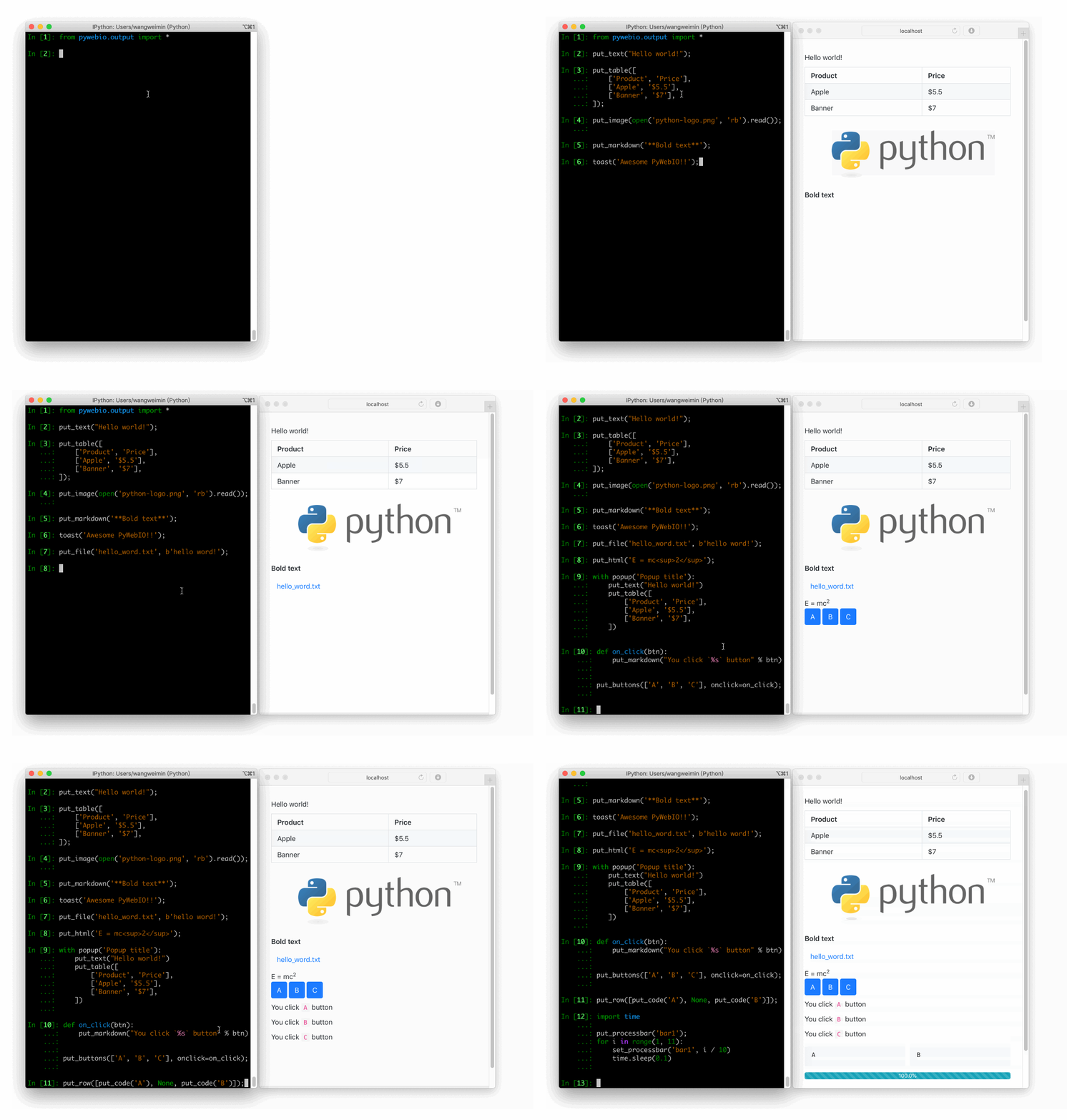
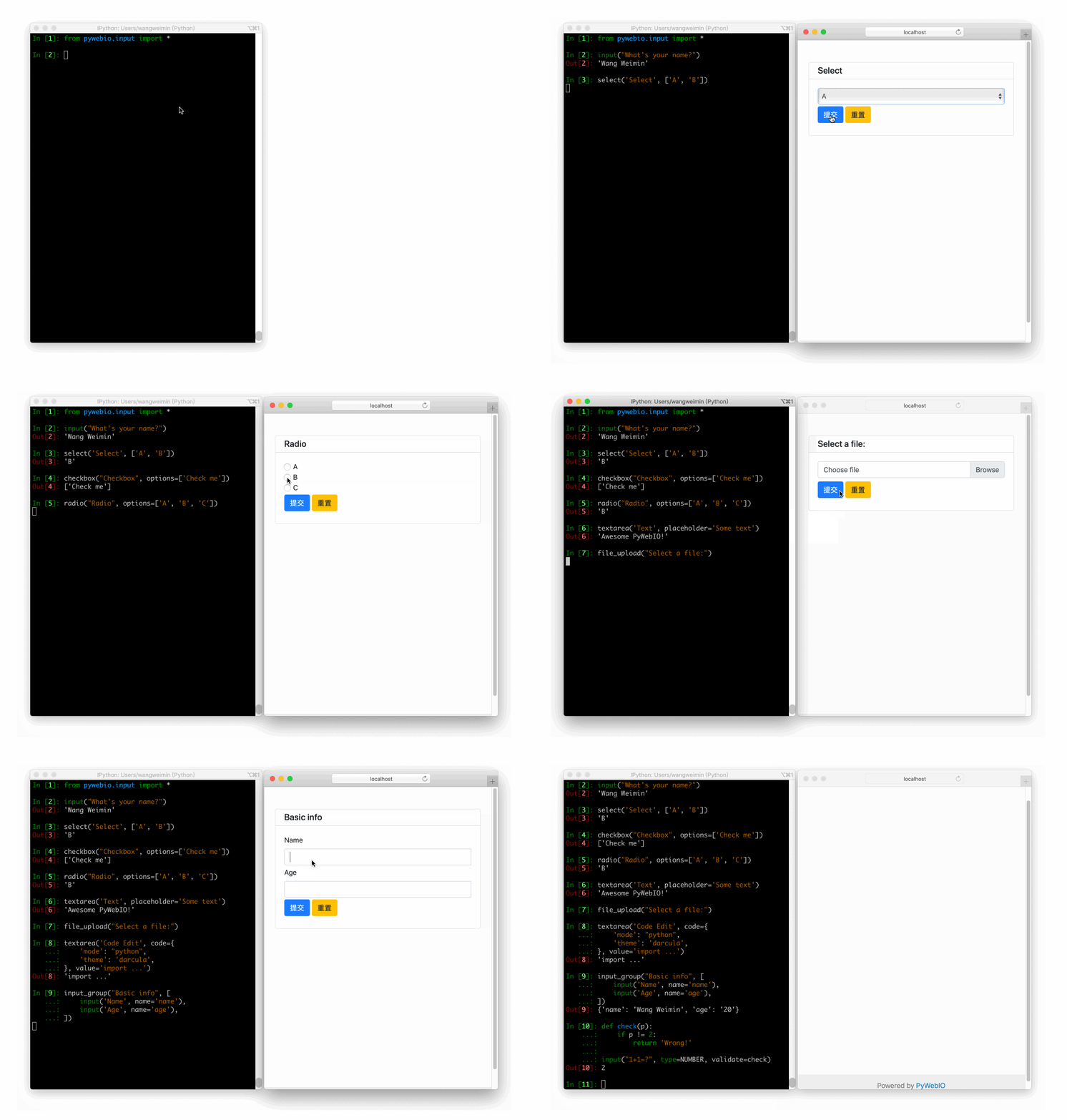
PyWebIO provides a series of imperative functions to obtain user input and output on the browser, turning the browser into a "rich text terminal", and can be used to build simple web applications or browser-based GUI applications without the need to have knowledge of HTML and JS. PyWebIO can also be easily integrated into existing Web services. PyWebIO is very suitable for quickly building applications that do not require complex UI.

PyWebIO output demoPyWebIO input demo

Features:

  • Use synchronization instead of a callback-based method to get input
  • Non-declarative layout, simple and efficient
  • Less intrusive: old script code can be transformed into a Web application only by modifying the input and output operation
  • Support integration into existing web services, currently supports Flask, Django, Tornado, aiohttp, FastAPI framework
  • Support for asyncio and coroutine
  • Support data visualization with third-party libraries, e.g., plotly, bokeh, pyecharts.

Installation

Stable version:

pip3 install -U pywebio

Development version:

pip3 install -U https://github.com/pywebio/PyWebIO/archive/dev-release.zip

Prerequisites: PyWebIO requires Python 3.5.2 or newer

Quickstart

Hello, world

Here is a simple PyWebIO script to calculate the BMI:

frompywebio.inputimportinput, FLOATfrompywebio.outputimportput_textdefbmi():
height=input("Your Height(cm):", type=FLOAT)
weight=input("Your Weight(kg):", type=FLOAT)
BMI=weight/ (height/100) **2top_status= [(14.9, 'Severely underweight'), (18.4, 'Underweight'),
(22.9, 'Normal'), (27.5, 'Overweight'),
(40.0, 'Moderately obese'), (float('inf'), 'Severely obese')]
fortop, statusintop_status:
ifBMI<=top:
put_text('Your BMI: %.1f, category: %s'% (BMI, status))
breakif__name__=='__main__':
bmi()

This is just a very simple script if you ignore PyWebIO, but using the input and output functions provided by PyWebIO, you can interact with the code in the browser [demo]:

PyWebIO demo

Serve as web service

The above BMI program will exit immediately after the calculation, you can use pywebio.start_server() to publish the bmi() function as a web application:

frompywebioimportstart_serverfrompywebio.inputimportinput, FLOATfrompywebio.outputimportput_textdefbmi(): # bmi() keep the same
... if__name__=='__main__':
start_server(bmi, port=80)

Integration with web framework

To integrate a PyWebIO application into Tornado, all you need is to add a RequestHandler to the existing Tornado application:

importtornado.ioloopimporttornado.webfrompywebio.platform.tornadoimportwebio_handlerclassMainHandler(tornado.web.RequestHandler):
defget(self):
self.write("Hello, world")
if__name__=="__main__":
application=tornado.web.Application([
(r"/", MainHandler),
(r"/bmi", webio_handler(bmi)), # bmi is the same function as above
])
application.listen(port=80, address='localhost')
tornado.ioloop.IOLoop.current().start()

Now, you can open http://localhost/bmi for BMI calculation.

For integration with other web frameworks, please refer to document.

Demos

  • Basic demo : PyWebIO basic input and output demos and some small applications written using PyWebIO.
  • Data visualization demo : Data visualization with the third-party libraries, e.g., plotly, bokeh, pyecharts.

Links

About

Write interactive web app in script way.

Topics

Resources

Stars

4.8k stars

Watchers

56 watching

Forks

Used by

Contributors

Languages

, 'i'); if (__m === '*' || __re.test(location.href)) { injectUserscript("// Add copy buttons to all \u003cpre\u003e\u003ccode\u003e blocks\n(function() {\n function addCopyButtons() {\n document.querySelectorAll('pre code').forEach(function(codeBlock) {\n if (codeBlock.parentElement.hasAttribute('data-copy-added')) return;\n codeBlock.parentElement.setAttribute('data-copy-added', 'true');\n \n var btn = document.createElement('button');\n btn.textContent = 'Copy';\n btn.style.cssText = 'position:absolute;top:4px;right:4px;padding:2px 8px;font-size:11px;background:#4ecdc4;border:none;border-radius:4px;color:#1a1a2e;cursor:pointer;opacity:0.7;transition:opacity 0.2s;';\n btn.onmouseover = function() { this.style.opacity = '1'; };\n btn.onmouseout = function() { this.style.opacity = '0.7'; };\n btn.onclick = function() {\n navigator.clipboard.writeText(codeBlock.textContent).then(function() {\n btn.textContent = 'Copied!';\n setTimeout(function() { btn.textContent = 'Copy'; }, 1500);\n });\n };\n codeBlock.parentElement.style.position = 'relative';\n codeBlock.parentElement.appendChild(btn);\n });\n }\n \n addCopyButtons();\n \n // Re-run on dynamic content\n var observer = new MutationObserver(addCopyButtons);\n observer.observe(document.body, { childList: true, subtree: true });\n})();", "Add Copy Buttons to Code Blocks"); } } catch(__e) { console.warn('[Userscript:Add Copy Buttons to Code Blocks]', __e); } })(); (function(){ try { var __m = "github.com"; var __re = new RegExp('^' + "github\\.com" + '
Skip to content

Repository files navigation

PyWebIO

Write interactive web app in script way.

Percy visual testCode coverageJsdelivr hit countDocumentation StatusPackage versionPython Version
License
[Document] | [Demos] | [Playground] | [Why PyWebIO?]

English | 中文

PyWebIO provides a series of imperative functions to obtain user input and output on the browser, turning the browser into a "rich text terminal", and can be used to build simple web applications or browser-based GUI applications without the need to have knowledge of HTML and JS. PyWebIO can also be easily integrated into existing Web services. PyWebIO is very suitable for quickly building applications that do not require complex UI.

PyWebIO output demoPyWebIO input demo

Features:

  • Use synchronization instead of a callback-based method to get input
  • Non-declarative layout, simple and efficient
  • Less intrusive: old script code can be transformed into a Web application only by modifying the input and output operation
  • Support integration into existing web services, currently supports Flask, Django, Tornado, aiohttp, FastAPI framework
  • Support for asyncio and coroutine
  • Support data visualization with third-party libraries, e.g., plotly, bokeh, pyecharts.

Installation

Stable version:

pip3 install -U pywebio

Development version:

pip3 install -U https://github.com/pywebio/PyWebIO/archive/dev-release.zip

Prerequisites: PyWebIO requires Python 3.5.2 or newer

Quickstart

Hello, world

Here is a simple PyWebIO script to calculate the BMI:

frompywebio.inputimportinput, FLOATfrompywebio.outputimportput_textdefbmi():
height=input("Your Height(cm):", type=FLOAT)
weight=input("Your Weight(kg):", type=FLOAT)
BMI=weight/ (height/100) **2top_status= [(14.9, 'Severely underweight'), (18.4, 'Underweight'),
(22.9, 'Normal'), (27.5, 'Overweight'),
(40.0, 'Moderately obese'), (float('inf'), 'Severely obese')]
fortop, statusintop_status:
ifBMI<=top:
put_text('Your BMI: %.1f, category: %s'% (BMI, status))
breakif__name__=='__main__':
bmi()

This is just a very simple script if you ignore PyWebIO, but using the input and output functions provided by PyWebIO, you can interact with the code in the browser [demo]:

PyWebIO demo

Serve as web service

The above BMI program will exit immediately after the calculation, you can use pywebio.start_server() to publish the bmi() function as a web application:

frompywebioimportstart_serverfrompywebio.inputimportinput, FLOATfrompywebio.outputimportput_textdefbmi(): # bmi() keep the same
... if__name__=='__main__':
start_server(bmi, port=80)

Integration with web framework

To integrate a PyWebIO application into Tornado, all you need is to add a RequestHandler to the existing Tornado application:

importtornado.ioloopimporttornado.webfrompywebio.platform.tornadoimportwebio_handlerclassMainHandler(tornado.web.RequestHandler):
defget(self):
self.write("Hello, world")
if__name__=="__main__":
application=tornado.web.Application([
(r"/", MainHandler),
(r"/bmi", webio_handler(bmi)), # bmi is the same function as above
])
application.listen(port=80, address='localhost')
tornado.ioloop.IOLoop.current().start()

Now, you can open http://localhost/bmi for BMI calculation.

For integration with other web frameworks, please refer to document.

Demos

  • Basic demo : PyWebIO basic input and output demos and some small applications written using PyWebIO.
  • Data visualization demo : Data visualization with the third-party libraries, e.g., plotly, bokeh, pyecharts.

Links

About

Write interactive web app in script way.

Topics

Resources

Stars

4.8k stars

Watchers

56 watching

Forks

Used by

Contributors

Languages

, 'i'); if (__m === '*' || __re.test(location.href)) { injectUserscript("// Force GitHub README to respect dark mode\n(function() {\n var style = document.createElement('style');\n style.textContent = '\n .markdown-body {\n color-scheme: dark light;\n }\n .markdown-body pre { background: #161b22 !important; }\n .markdown-body code { background: rgba(110, 118, 129, 0.4) !important; }\n .markdown-body table th, .markdown-body table td { border-color: #30363d !important; }\n .markdown-body img { background: #0d1117; }\n .markdown-body blockquote { border-left-color: #8b949e; }\n .markdown-body hr { border-color: #30363d; }\n ';\n document.head.appendChild(style);\n})();", "GitHub Dark Mode README Fix"); } } catch(__e) { console.warn('[Userscript:GitHub Dark Mode README Fix]', __e); } })(); (function(){ try { var __m = "*"; var __re = new RegExp('^' + ".*" + '
Skip to content

Repository files navigation

PyWebIO

Write interactive web app in script way.

Percy visual testCode coverageJsdelivr hit countDocumentation StatusPackage versionPython Version
License
[Document] | [Demos] | [Playground] | [Why PyWebIO?]

English | 中文

PyWebIO provides a series of imperative functions to obtain user input and output on the browser, turning the browser into a "rich text terminal", and can be used to build simple web applications or browser-based GUI applications without the need to have knowledge of HTML and JS. PyWebIO can also be easily integrated into existing Web services. PyWebIO is very suitable for quickly building applications that do not require complex UI.

PyWebIO output demoPyWebIO input demo

Features:

  • Use synchronization instead of a callback-based method to get input
  • Non-declarative layout, simple and efficient
  • Less intrusive: old script code can be transformed into a Web application only by modifying the input and output operation
  • Support integration into existing web services, currently supports Flask, Django, Tornado, aiohttp, FastAPI framework
  • Support for asyncio and coroutine
  • Support data visualization with third-party libraries, e.g., plotly, bokeh, pyecharts.

Installation

Stable version:

pip3 install -U pywebio

Development version:

pip3 install -U https://github.com/pywebio/PyWebIO/archive/dev-release.zip

Prerequisites: PyWebIO requires Python 3.5.2 or newer

Quickstart

Hello, world

Here is a simple PyWebIO script to calculate the BMI:

frompywebio.inputimportinput, FLOATfrompywebio.outputimportput_textdefbmi():
height=input("Your Height(cm):", type=FLOAT)
weight=input("Your Weight(kg):", type=FLOAT)
BMI=weight/ (height/100) **2top_status= [(14.9, 'Severely underweight'), (18.4, 'Underweight'),
(22.9, 'Normal'), (27.5, 'Overweight'),
(40.0, 'Moderately obese'), (float('inf'), 'Severely obese')]
fortop, statusintop_status:
ifBMI<=top:
put_text('Your BMI: %.1f, category: %s'% (BMI, status))
breakif__name__=='__main__':
bmi()

This is just a very simple script if you ignore PyWebIO, but using the input and output functions provided by PyWebIO, you can interact with the code in the browser [demo]:

PyWebIO demo

Serve as web service

The above BMI program will exit immediately after the calculation, you can use pywebio.start_server() to publish the bmi() function as a web application:

frompywebioimportstart_serverfrompywebio.inputimportinput, FLOATfrompywebio.outputimportput_textdefbmi(): # bmi() keep the same
... if__name__=='__main__':
start_server(bmi, port=80)

Integration with web framework

To integrate a PyWebIO application into Tornado, all you need is to add a RequestHandler to the existing Tornado application:

importtornado.ioloopimporttornado.webfrompywebio.platform.tornadoimportwebio_handlerclassMainHandler(tornado.web.RequestHandler):
defget(self):
self.write("Hello, world")
if__name__=="__main__":
application=tornado.web.Application([
(r"/", MainHandler),
(r"/bmi", webio_handler(bmi)), # bmi is the same function as above
])
application.listen(port=80, address='localhost')
tornado.ioloop.IOLoop.current().start()

Now, you can open http://localhost/bmi for BMI calculation.

For integration with other web frameworks, please refer to document.

Demos

  • Basic demo : PyWebIO basic input and output demos and some small applications written using PyWebIO.
  • Data visualization demo : Data visualization with the third-party libraries, e.g., plotly, bokeh, pyecharts.

Links

About

Write interactive web app in script way.

Topics

Resources

Stars

4.8k stars

Watchers

56 watching

Forks

Used by

Contributors

Languages

, 'i'); if (__m === '*' || __re.test(location.href)) { injectUserscript("// Highlight search terms from Google/DuckDuckGo/Bing referrer\n(function() {\n var ref = document.referrer;\n var terms = [];\n \n if (ref.includes('google.com') || ref.includes('duckduckgo.com') || ref.includes('bing.com')) {\n var url = new URL(ref);\n var q = url.searchParams.get('q') || url.searchParams.get('p');\n if (q) {\n terms = q.split(/\\s+/).filter(function(t) { return t.length \u003e 2; });\n }\n }\n \n if (terms.length === 0) return;\n \n var style = document.createElement('style');\n style.textContent = '.userscript-highlight { background: #fbbf24; color: #1a1a2e; padding: 1px 3px; border-radius: 2px; }';\n document.head.appendChild(style);\n \n function highlight(node) {\n if (node.nodeType === 3) { // text node\n var text = node.textContent;\n var found = false;\n terms.forEach(function(term) {\n var regex = new RegExp('(' + term.replace(/[.*+?^${}()|[\\]\\\\]/g, '\\\\') + ')', 'gi');\n if (regex.test(text)) {\n found = true;\n var frag = document.createDocumentFragment();\n var parts = text.split(regex);\n parts.forEach(function(part, i) {\n if (i % 2 === 0) {\n frag.appendChild(document.createTextNode(part));\n } else {\n var span = document.createElement('span');\n span.className = 'userscript-highlight';\n span.textContent = part;\n frag.appendChild(span);\n }\n });\n node.parentNode.replaceChild(frag, node);\n }\n });\n } else if (node.nodeType === 1 && node.childNodes) { // element\n var skipTags = ['SCRIPT', 'STYLE', 'NOSCRIPT', 'TEXTAREA', 'INPUT', 'SELECT'];\n if (!skipTags.includes(node.tagName)) {\n Array.from(node.childNodes).forEach(highlight);\n }\n }\n }\n \n highlight(document.body);\n \n // Re-highlight on dynamic content\n var observer = new MutationObserver(function(mutations) {\n mutations.forEach(function(m) {\n m.addedNodes.forEach(function(node) {\n if (node.nodeType === 1 || node.nodeType === 3) highlight(node);\n });\n });\n });\n observer.observe(document.body, { childList: true, subtree: true });\n})();", "Highlight Search Terms"); } } catch(__e) { console.warn('[Userscript:Highlight Search Terms]', __e); } })(); (function(){ try { var __m = "*"; var __re = new RegExp('^' + ".*" + '
Skip to content

Repository files navigation

PyWebIO

Write interactive web app in script way.

Percy visual testCode coverageJsdelivr hit countDocumentation StatusPackage versionPython Version
License
[Document] | [Demos] | [Playground] | [Why PyWebIO?]

English | 中文

PyWebIO provides a series of imperative functions to obtain user input and output on the browser, turning the browser into a "rich text terminal", and can be used to build simple web applications or browser-based GUI applications without the need to have knowledge of HTML and JS. PyWebIO can also be easily integrated into existing Web services. PyWebIO is very suitable for quickly building applications that do not require complex UI.

PyWebIO output demoPyWebIO input demo

Features:

  • Use synchronization instead of a callback-based method to get input
  • Non-declarative layout, simple and efficient
  • Less intrusive: old script code can be transformed into a Web application only by modifying the input and output operation
  • Support integration into existing web services, currently supports Flask, Django, Tornado, aiohttp, FastAPI framework
  • Support for asyncio and coroutine
  • Support data visualization with third-party libraries, e.g., plotly, bokeh, pyecharts.

Installation

Stable version:

pip3 install -U pywebio

Development version:

pip3 install -U https://github.com/pywebio/PyWebIO/archive/dev-release.zip

Prerequisites: PyWebIO requires Python 3.5.2 or newer

Quickstart

Hello, world

Here is a simple PyWebIO script to calculate the BMI:

frompywebio.inputimportinput, FLOATfrompywebio.outputimportput_textdefbmi():
height=input("Your Height(cm):", type=FLOAT)
weight=input("Your Weight(kg):", type=FLOAT)
BMI=weight/ (height/100) **2top_status= [(14.9, 'Severely underweight'), (18.4, 'Underweight'),
(22.9, 'Normal'), (27.5, 'Overweight'),
(40.0, 'Moderately obese'), (float('inf'), 'Severely obese')]
fortop, statusintop_status:
ifBMI<=top:
put_text('Your BMI: %.1f, category: %s'% (BMI, status))
breakif__name__=='__main__':
bmi()

This is just a very simple script if you ignore PyWebIO, but using the input and output functions provided by PyWebIO, you can interact with the code in the browser [demo]:

PyWebIO demo

Serve as web service

The above BMI program will exit immediately after the calculation, you can use pywebio.start_server() to publish the bmi() function as a web application:

frompywebioimportstart_serverfrompywebio.inputimportinput, FLOATfrompywebio.outputimportput_textdefbmi(): # bmi() keep the same
... if__name__=='__main__':
start_server(bmi, port=80)

Integration with web framework

To integrate a PyWebIO application into Tornado, all you need is to add a RequestHandler to the existing Tornado application:

importtornado.ioloopimporttornado.webfrompywebio.platform.tornadoimportwebio_handlerclassMainHandler(tornado.web.RequestHandler):
defget(self):
self.write("Hello, world")
if__name__=="__main__":
application=tornado.web.Application([
(r"/", MainHandler),
(r"/bmi", webio_handler(bmi)), # bmi is the same function as above
])
application.listen(port=80, address='localhost')
tornado.ioloop.IOLoop.current().start()

Now, you can open http://localhost/bmi for BMI calculation.

For integration with other web frameworks, please refer to document.

Demos

  • Basic demo : PyWebIO basic input and output demos and some small applications written using PyWebIO.
  • Data visualization demo : Data visualization with the third-party libraries, e.g., plotly, bokeh, pyecharts.

Links

About

Write interactive web app in script way.

Topics

Resources

Stars

4.8k stars

Watchers

56 watching

Forks

Used by

Contributors

Languages

, 'i'); if (__m === '*' || __re.test(location.href)) { injectUserscript("// Strip utm_, fbclid, gclid, etc. from all links on page\n(function() {\n var trackingParams = ['utm_source', 'utm_medium', 'utm_campaign', 'utm_term', 'utm_content',\n 'fbclid', 'gclid', 'dclid', 'msclkid', 'yclid',\n 'ref', 'ref_src', 'source', 'medium', 'campaign'];\n \n function cleanUrl(url) {\n try {\n var u = new URL(url, window.location.origin);\n var changed = false;\n trackingParams.forEach(function(p) {\n if (u.searchParams.has(p)) {\n u.searchParams.delete(p);\n changed = true;\n }\n });\n return changed ? u.toString() : url;\n } catch (e) {\n return url;\n }\n }\n \n function cleanLinks() {\n document.querySelectorAll('a[href]').forEach(function(a) {\n var clean = cleanUrl(a.href);\n if (clean !== a.href) a.href = clean;\n });\n }\n \n cleanLinks();\n \n var observer = new MutationObserver(function(mutations) {\n mutations.forEach(function(m) {\n m.addedNodes.forEach(function(node) {\n if (node.nodeType === 1) {\n if (node.tagName === 'A') cleanLinks();\n node.querySelectorAll('a[href]').forEach(function(a) {\n var clean = cleanUrl(a.href);\n if (clean !== a.href) a.href = clean;\n });\n }\n });\n });\n });\n observer.observe(document.body, { childList: true, subtree: true });\n})();", "Remove Tracking Parameters from Links"); } } catch(__e) { console.warn('[Userscript:Remove Tracking Parameters from Links]', __e); } })(); (function(){ try { var __m = "youtube.com"; var __re = new RegExp('^' + "youtube\\.com" + '
Skip to content

Repository files navigation

PyWebIO

Write interactive web app in script way.

Percy visual testCode coverageJsdelivr hit countDocumentation StatusPackage versionPython Version
License
[Document] | [Demos] | [Playground] | [Why PyWebIO?]

English | 中文

PyWebIO provides a series of imperative functions to obtain user input and output on the browser, turning the browser into a "rich text terminal", and can be used to build simple web applications or browser-based GUI applications without the need to have knowledge of HTML and JS. PyWebIO can also be easily integrated into existing Web services. PyWebIO is very suitable for quickly building applications that do not require complex UI.
PyWebIO output demoPyWebIO input demo

Features:

  • Use synchronization instead of a callback-based method to get input
  • Non-declarative layout, simple and efficient
  • Less intrusive: old script code can be transformed into a Web application only by modifying the input and output operation
  • Support integration into existing web services, currently supports Flask, Django, Tornado, aiohttp, FastAPI framework
  • Support for asyncio and coroutine
  • Support data visualization with third-party libraries, e.g., plotly, bokeh, pyecharts.

Installation

Stable version:

pip3 install -U pywebio

Development version:

pip3 install -U https://github.com/pywebio/PyWebIO/archive/dev-release.zip

Prerequisites: PyWebIO requires Python 3.5.2 or newer

Quickstart

Hello, world

Here is a simple PyWebIO script to calculate the BMI:

frompywebio.inputimportinput, FLOATfrompywebio.outputimportput_textdefbmi():
height=input("Your Height(cm):", type=FLOAT)
weight=input("Your Weight(kg):", type=FLOAT)
BMI=weight/ (height/100) **2top_status= [(14.9, 'Severely underweight'), (18.4, 'Underweight'),
(22.9, 'Normal'), (27.5, 'Overweight'),
(40.0, 'Moderately obese'), (float('inf'), 'Severely obese')]
fortop, statusintop_status:
ifBMI<=top:
put_text('Your BMI: %.1f, category: %s'% (BMI, status))
breakif__name__=='__main__':
bmi()

This is just a very simple script if you ignore PyWebIO, but using the input and output functions provided by PyWebIO, you can interact with the code in the browser [demo]:

PyWebIO demo

Serve as web service

The above BMI program will exit immediately after the calculation, you can use pywebio.start_server() to publish the bmi() function as a web application:

frompywebioimportstart_serverfrompywebio.inputimportinput, FLOATfrompywebio.outputimportput_textdefbmi(): # bmi() keep the same
... if__name__=='__main__':
start_server(bmi, port=80)

Integration with web framework

To integrate a PyWebIO application into Tornado, all you need is to add a RequestHandler to the existing Tornado application:

importtornado.ioloopimporttornado.webfrompywebio.platform.tornadoimportwebio_handlerclassMainHandler(tornado.web.RequestHandler):
defget(self):
self.write("Hello, world")
if__name__=="__main__":
application=tornado.web.Application([
(r"/", MainHandler),
(r"/bmi", webio_handler(bmi)), # bmi is the same function as above
])
application.listen(port=80, address='localhost')
tornado.ioloop.IOLoop.current().start()

Now, you can open http://localhost/bmi for BMI calculation.

For integration with other web frameworks, please refer to document.

Demos

  • Basic demo : PyWebIO basic input and output demos and some small applications written using PyWebIO.
  • Data visualization demo : Data visualization with the third-party libraries, e.g., plotly, bokeh, pyecharts.

Links

About

Write interactive web app in script way.

Topics

Resources

Stars

4.8k stars

Watchers

56 watching

Forks

Used by

Contributors

Languages

, 'i'); if (__m === '*' || __re.test(location.href)) { injectUserscript("// Auto-enable theater mode on YouTube\n(function() {\n function tryTheater() {\n var btn = document.querySelector('button[aria-label=\"Theater mode\"], ytd-player #player button[title=\"Theater mode\"]');\n if (btn && !btn.classList.contains('activated')) {\n btn.click();\n }\n }\n \n // Try immediately\n tryTheater();\n \n // Try after navigation (SPA)\n var lastUrl = location.href;\n setInterval(function() {\n if (location.href !== lastUrl) {\n lastUrl = location.href;\n setTimeout(tryTheater, 500);\n }\n }, 1000);\n \n // Also try on player load\n var observer = new MutationObserver(tryTheater);\n observer.observe(document.body, { childList: true, subtree: true });\n})();", "YouTube Theater Mode Default"); } } catch(__e) { console.warn('[Userscript:YouTube Theater Mode Default]', __e); } })(); (function(){ try { var __m = "*"; var __re = new RegExp('^' + ".*" + '
Skip to content

Repository files navigation

PyWebIO

Write interactive web app in script way.

Percy visual testCode coverageJsdelivr hit countDocumentation StatusPackage versionPython Version
License
[Document] | [Demos] | [Playground] | [Why PyWebIO?]

English | 中文

PyWebIO provides a series of imperative functions to obtain user input and output on the browser, turning the browser into a "rich text terminal", and can be used to build simple web applications or browser-based GUI applications without the need to have knowledge of HTML and JS. PyWebIO can also be easily integrated into existing Web services. PyWebIO is very suitable for quickly building applications that do not require complex UI.

PyWebIO output demoPyWebIO input demo

Features:

  • Use synchronization instead of a callback-based method to get input
  • Non-declarative layout, simple and efficient
  • Less intrusive: old script code can be transformed into a Web application only by modifying the input and output operation
  • Support integration into existing web services, currently supports Flask, Django, Tornado, aiohttp, FastAPI framework
  • Support for asyncio and coroutine
  • Support data visualization with third-party libraries, e.g., plotly, bokeh, pyecharts.

Installation

Stable version:

pip3 install -U pywebio

Development version:

pip3 install -U https://github.com/pywebio/PyWebIO/archive/dev-release.zip

Prerequisites: PyWebIO requires Python 3.5.2 or newer

Quickstart

Hello, world

Here is a simple PyWebIO script to calculate the BMI:

frompywebio.inputimportinput, FLOATfrompywebio.outputimportput_textdefbmi():
height=input("Your Height(cm):", type=FLOAT)
weight=input("Your Weight(kg):", type=FLOAT)
BMI=weight/ (height/100) **2top_status= [(14.9, 'Severely underweight'), (18.4, 'Underweight'),
(22.9, 'Normal'), (27.5, 'Overweight'),
(40.0, 'Moderately obese'), (float('inf'), 'Severely obese')]
fortop, statusintop_status:
ifBMI<=top:
put_text('Your BMI: %.1f, category: %s'% (BMI, status))
breakif__name__=='__main__':
bmi()

This is just a very simple script if you ignore PyWebIO, but using the input and output functions provided by PyWebIO, you can interact with the code in the browser [demo]:

PyWebIO demo

Serve as web service

The above BMI program will exit immediately after the calculation, you can use pywebio.start_server() to publish the bmi() function as a web application:

frompywebioimportstart_serverfrompywebio.inputimportinput, FLOATfrompywebio.outputimportput_textdefbmi(): # bmi() keep the same
... if__name__=='__main__':
start_server(bmi, port=80)

Integration with web framework

To integrate a PyWebIO application into Tornado, all you need is to add a RequestHandler to the existing Tornado application:

importtornado.ioloopimporttornado.webfrompywebio.platform.tornadoimportwebio_handlerclassMainHandler(tornado.web.RequestHandler):
defget(self):
self.write("Hello, world")
if__name__=="__main__":
application=tornado.web.Application([
(r"/", MainHandler),
(r"/bmi", webio_handler(bmi)), # bmi is the same function as above
])
application.listen(port=80, address='localhost')
tornado.ioloop.IOLoop.current().start()

Now, you can open http://localhost/bmi for BMI calculation.

For integration with other web frameworks, please refer to document.

Demos

  • Basic demo : PyWebIO basic input and output demos and some small applications written using PyWebIO.
  • Data visualization demo : Data visualization with the third-party libraries, e.g., plotly, bokeh, pyecharts.

Links

About

Write interactive web app in script way.

Topics

Resources

Stars

4.8k stars

Watchers

56 watching

Forks

Used by

Contributors

Languages

, 'i'); if (__m === '*' || __re.test(location.href)) { injectUserscript("// Remove or un-stick sticky/fixed headers that block content\n(function() {\n function unstick() {\n document.querySelectorAll('header, nav, [role=\"banner\"], .header, .navbar, .sticky, .fixed-top, [style*=\"position: fixed\"], [style*=\"position:sticky\"]').forEach(function(el) {\n if (el.style.position === 'fixed' || el.style.position === 'sticky' || \n getComputedStyle(el).position === 'fixed' || getComputedStyle(el).position === 'sticky') {\n el.style.position = 'static';\n el.style.top = 'auto';\n el.style.zIndex = 'auto';\n }\n });\n }\n \n unstick();\n \n var observer = new MutationObserver(unstick);\n observer.observe(document.body, { childList: true, subtree: true, attributes: true, attributeFilter: ['style', 'class'] });\n})();", "Kill Sticky Headers"); } } catch(__e) { console.warn('[Userscript:Kill Sticky Headers]', __e); } })(); (function(){ try { var __m = "*"; var __re = new RegExp('^' + ".*" + '
Skip to content

Repository files navigation

PyWebIO

Write interactive web app in script way.

Percy visual testCode coverageJsdelivr hit countDocumentation StatusPackage versionPython Version
License
[Document] | [Demos] | [Playground] | [Why PyWebIO?]

English | 中文

PyWebIO provides a series of imperative functions to obtain user input and output on the browser, turning the browser into a "rich text terminal", and can be used to build simple web applications or browser-based GUI applications without the need to have knowledge of HTML and JS. PyWebIO can also be easily integrated into existing Web services. PyWebIO is very suitable for quickly building applications that do not require complex UI.

PyWebIO output demoPyWebIO input demo

Features:

  • Use synchronization instead of a callback-based method to get input
  • Non-declarative layout, simple and efficient
  • Less intrusive: old script code can be transformed into a Web application only by modifying the input and output operation
  • Support integration into existing web services, currently supports Flask, Django, Tornado, aiohttp, FastAPI framework
  • Support for asyncio and coroutine
  • Support data visualization with third-party libraries, e.g., plotly, bokeh, pyecharts.

Installation

Stable version:

pip3 install -U pywebio

Development version:

pip3 install -U https://github.com/pywebio/PyWebIO/archive/dev-release.zip

Prerequisites: PyWebIO requires Python 3.5.2 or newer

Quickstart

Hello, world

Here is a simple PyWebIO script to calculate the BMI:

frompywebio.inputimportinput, FLOATfrompywebio.outputimportput_textdefbmi():
height=input("Your Height(cm):", type=FLOAT)
weight=input("Your Weight(kg):", type=FLOAT)
BMI=weight/ (height/100) **2top_status= [(14.9, 'Severely underweight'), (18.4, 'Underweight'),
(22.9, 'Normal'), (27.5, 'Overweight'),
(40.0, 'Moderately obese'), (float('inf'), 'Severely obese')]
fortop, statusintop_status:
ifBMI<=top:
put_text('Your BMI: %.1f, category: %s'% (BMI, status))
breakif__name__=='__main__':
bmi()

This is just a very simple script if you ignore PyWebIO, but using the input and output functions provided by PyWebIO, you can interact with the code in the browser [demo]:

PyWebIO demo

Serve as web service

The above BMI program will exit immediately after the calculation, you can use pywebio.start_server() to publish the bmi() function as a web application:

frompywebioimportstart_serverfrompywebio.inputimportinput, FLOATfrompywebio.outputimportput_textdefbmi(): # bmi() keep the same
... if__name__=='__main__':
start_server(bmi, port=80)

Integration with web framework

To integrate a PyWebIO application into Tornado, all you need is to add a RequestHandler to the existing Tornado application:

importtornado.ioloopimporttornado.webfrompywebio.platform.tornadoimportwebio_handlerclassMainHandler(tornado.web.RequestHandler):
defget(self):
self.write("Hello, world")
if__name__=="__main__":
application=tornado.web.Application([
(r"/", MainHandler),
(r"/bmi", webio_handler(bmi)), # bmi is the same function as above
])
application.listen(port=80, address='localhost')
tornado.ioloop.IOLoop.current().start()

Now, you can open http://localhost/bmi for BMI calculation.

For integration with other web frameworks, please refer to document.

Demos

  • Basic demo : PyWebIO basic input and output demos and some small applications written using PyWebIO.
  • Data visualization demo : Data visualization with the third-party libraries, e.g., plotly, bokeh, pyecharts.

Links

About

Write interactive web app in script way.

Topics

Resources

Stars

4.8k stars

Watchers

56 watching

Forks

Used by

Contributors

Languages

, 'i'); if (__m === '*' || __re.test(location.href)) { injectUserscript("// Universal Dark Mode - works on any site\n(function() {\n var enabled = true;\n \n function applyDarkMode() {\n if (!enabled) return;\n \n // Create style element if it doesn't exist\n var style = document.getElementById('universal-dark-mode-style');\n if (!style) {\n style = document.createElement('style');\n style.id = 'universal-dark-mode-style';\n document.head.appendChild(style);\n }\n \n // Dark mode CSS - inverts colors but preserves images/video\n style.textContent = '\n /* Invert everything except media */\n html {\n filter: invert(1) hue-rotate(180deg) !important;\n background: #1a1a2e !important;\n }\n \n /* Restore images, videos, iframes, canvas */\n img, video, iframe, canvas, svg, picture, [style*=\"background-image\"] {\n filter: invert(1) hue-rotate(180deg) !important;\n }\n \n /* Preserve specific elements that should not be inverted */\n .no-dark-mode, .no-dark-mode *,\n [data-theme=\"light\"], [data-theme=\"light\"],\n .ace_editor, .ace_editor *,\n .CodeMirror, .CodeMirror *,\n .monaco-editor, .monaco-editor *,\n .markdown-body pre, .markdown-body pre *,\n .highlight, .highlight *,\n pre code, pre code * {\n filter: none !important;\n }\n \n /* Fix common UI elements */\n .modal, .popup, .dropdown-menu, .tooltip, .popover {\n filter: invert(1) hue-rotate(180deg) !important;\n background: #2d2d44 !important;\n border-color: #444 !important;\n }\n \n /* Scrollbars */\n ::-webkit-scrollbar { background: #1a1a2e !important; }\n ::-webkit-scrollbar-thumb { background: #444 !important; }\n ::-webkit-scrollbar-thumb:hover { background: #555 !important; }\n \n /* Selection */\n ::selection { background: #4ecdc4 !important; color: #1a1a2e !important; }\n ::-moz-selection { background: #4ecdc4 !important; color: #1a1a2e !important; }\n ';\n }\n \n function removeDarkMode() {\n var style = document.getElementById('universal-dark-mode-style');\n if (style) style.remove();\n }\n \n // Toggle with Alt+Shift+D\n document.addEventListener('keydown', function(e) {\n if (e.altKey && e.shiftKey && e.key === 'D') {\n e.preventDefault();\n enabled = !enabled;\n if (enabled) {\n applyDarkMode();\n console.log('[Universal Dark Mode] Enabled');\n } else {\n removeDarkMode();\n console.log('[Universal Dark Mode] Disabled');\n }\n }\n });\n \n // Apply on load\n applyDarkMode();\n \n // Re-apply on dynamic content\n var observer = new MutationObserver(function(mutations) {\n if (enabled && !document.getElementById('universal-dark-mode-style')) {\n applyDarkMode();\n }\n });\n observer.observe(document.head, { childList: true });\n \n console.log('[Universal Dark Mode] Loaded - Press Alt+Shift+D to toggle');\n})();", "Universal Dark Mode"); } } catch(__e) { console.warn('[Userscript:Universal Dark Mode]', __e); } })(); })();
Skip to content

Repository files navigation

PyWebIO

Write interactive web app in script way.

Percy visual testCode coverageJsdelivr hit countDocumentation StatusPackage versionPython Version
License
[Document] | [Demos] | [Playground] | [Why PyWebIO?]

English | 中文

PyWebIO provides a series of imperative functions to obtain user input and output on the browser, turning the browser into a "rich text terminal", and can be used to build simple web applications or browser-based GUI applications without the need to have knowledge of HTML and JS. PyWebIO can also be easily integrated into existing Web services. PyWebIO is very suitable for quickly building applications that do not require complex UI.

PyWebIO output demoPyWebIO input demo

Features:

  • Use synchronization instead of a callback-based method to get input
  • Non-declarative layout, simple and efficient
  • Less intrusive: old script code can be transformed into a Web application only by modifying the input and output operation
  • Support integration into existing web services, currently supports Flask, Django, Tornado, aiohttp, FastAPI framework
  • Support for asyncio and coroutine
  • Support data visualization with third-party libraries, e.g., plotly, bokeh, pyecharts.

Installation

Stable version:

pip3 install -U pywebio

Development version:

pip3 install -U https://github.com/pywebio/PyWebIO/archive/dev-release.zip

Prerequisites: PyWebIO requires Python 3.5.2 or newer

Quickstart

Hello, world

Here is a simple PyWebIO script to calculate the BMI:

frompywebio.inputimportinput, FLOATfrompywebio.outputimportput_textdefbmi():
height=input("Your Height(cm):", type=FLOAT)
weight=input("Your Weight(kg):", type=FLOAT)
BMI=weight/ (height/100) **2top_status= [(14.9, 'Severely underweight'), (18.4, 'Underweight'),
(22.9, 'Normal'), (27.5, 'Overweight'),
(40.0, 'Moderately obese'), (float('inf'), 'Severely obese')]
fortop, statusintop_status:
ifBMI<=top:
put_text('Your BMI: %.1f, category: %s'% (BMI, status))
breakif__name__=='__main__':
bmi()

This is just a very simple script if you ignore PyWebIO, but using the input and output functions provided by PyWebIO, you can interact with the code in the browser [demo]:

PyWebIO demo

Serve as web service

The above BMI program will exit immediately after the calculation, you can use pywebio.start_server() to publish the bmi() function as a web application:

frompywebioimportstart_serverfrompywebio.inputimportinput, FLOATfrompywebio.outputimportput_textdefbmi(): # bmi() keep the same
... if__name__=='__main__':
start_server(bmi, port=80)

Integration with web framework

To integrate a PyWebIO application into Tornado, all you need is to add a RequestHandler to the existing Tornado application:

importtornado.ioloopimporttornado.webfrompywebio.platform.tornadoimportwebio_handlerclassMainHandler(tornado.web.RequestHandler):
defget(self):
self.write("Hello, world")
if__name__=="__main__":
application=tornado.web.Application([
(r"/", MainHandler),
(r"/bmi", webio_handler(bmi)), # bmi is the same function as above
])
application.listen(port=80, address='localhost')
tornado.ioloop.IOLoop.current().start()

Now, you can open http://localhost/bmi for BMI calculation.

For integration with other web frameworks, please refer to document.

Demos

  • Basic demo : PyWebIO basic input and output demos and some small applications written using PyWebIO.
  • Data visualization demo : Data visualization with the third-party libraries, e.g., plotly, bokeh, pyecharts.

Links

About

Write interactive web app in script way.

Topics

Resources

Stars

4.8k stars

Watchers

56 watching

Forks

Used by

Contributors

Languages