

An Android view for displaying repeated continuous side scrolling images. This can be used to create a parallax animation effect.

##Installation Step 1. Add the JitPack repository to your build file
repositories {
// ...
maven { url "https://jitpack.io" }
}
Step 2. Add the dependency in the form
dependencies {
compile 'com.github.Q42:AndroidScrollingImageView:1.2'
}Please see the sample app for some examples
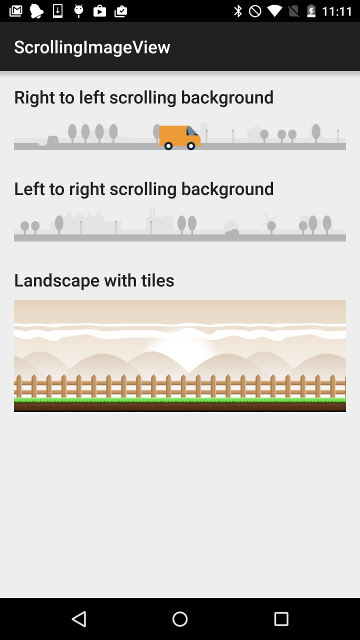
In your Android layout file add:
<com.q42.android.scrollingimageview.ScrollingImageView
android:id="@+id/scrolling_background"android:layout_width="match_parent"android:layout_height="wrap_content"scrolling_image_view:speed="1dp"scrolling_image_view:src="@drawable/scrolling_background" />
There are two attributes for the ScrollingImageView namely speed and src.
speedis the number ofdp's to move the bitmap on each animation frame (may be a negative number)srcis the drawable to paint (must be a bitmap!)
Don't forget to add the namespace to your root XLM element
xmlns:scrolling_image_view="http://schemas.android.com/apk/res-auto"In your Java code, you can start and stop the animation like this:
ScrollingImageViewscrollingBackground = (ScrollingImageView) loader.findViewById(R.id.scrolling_background);
scrollingBackground.stop();
scrollingBackground.start();In order to achieve a parallax effect, you can stack multiple ScrollingImageView's in a FrameLayout with different speeds. For example:
<FrameLayoutandroid:layout_width="match_parent"android:layout_height="wrap_content">
<com.q42.android.scrollingimageview.ScrollingImageView
android:id="@+id/scrolling_background"android:layout_width="match_parent"android:layout_height="wrap_content"scrolling_image_view:speed="1dp"scrolling_image_view:src="@drawable/scrolling_background" />
<com.q42.android.scrollingimageview.ScrollingImageView
android:id="@+id/scrolling_foreground"android:layout_width="match_parent"android:layout_height="wrap_content"scrolling_image_view:speed="2.5dp"scrolling_image_view:src="@drawable/scrolling_foreground" />
</FrameLayout>