Deck is a library for clients to make scalable presentations, using a standard markup language. Clients read deck files into the Deck structure, and traverse the structure for display, publication, etc. Clients may be interactive or produce standard formats such as SVG or PDF.
Also included is a REST API for listing content, uploading, stopping, starting and removing decks, generating tables, and playing video.
The deck on Deck
- deck: enclosing element
- canvas: describe the dimensions of the drawing canvas, one per deck
- metadata elements: title, creator, publisher, subject, description, date
- slide: within a deck, any number of slides, specify the slide duration, background and text colors.
within slides any number of:
- text: plain, textblock, or code
- list: plain, bullet, number
- image: JPEG or PNG images
- line: straight line
- rect: rectangle
- ellipse: ellipse
- curve: quadraticd Bezier curve
- arc: elliptical arc
- polygon: filled polygon
Here is a sample deck in XML:
<deck><title>Sample Deck</title><canvaswidth="1024" height="768"/><slidebg="maroon" fg="white" duration="1s"><imagexp="20" yp="30" width="256" height="256" name="picture.png"/><textxp="20" yp="80" sp="3" link="http://example.com/">Deck uses these elements</text><linexp1="20" yp1="75" xp2="90" yp2="75" sp="0.3" color="rgb(127,127,127)"/><listxp="20" yp="70" sp="1.5"><li>canvas</li><li>slide</li><li>text</li><li>list</li><li>image</li><li>line</li><li>rect</li><li>ellipse</li><li>curve</li><li>arc</li></list><linexp1="20" yp1="10" xp2="30" yp2="10"/><rectxp="35" yp="10" wp="4" hp="3" color="rgb(127,0,0)"/><ellipsexp="45" yp="10" wp="4" hp="3" color="rgb(0,127,0)"/><curvexp1="60" yp1="10" xp2="75" yp2="20" xp3="70" yp3="10" /><arcxp="55" yp="10" wp="4" hp="3" a1="0" a2="180" color="rgb(0,0,127)"/><polygonxc="75 75 80" yc="8 12 10" color="rgb(0,0,127)"/></slide></deck>The list and text elements have common attributes:
xp: horizontal percentage
yp: vertical percentage
sp: font size percentage
lp: line spacing percentage
type: "bullet", "number" (list), "block", "code" (text)
align: "left", "middle", "end"
color: SVG names ("maroon"), or RGB "rgb(127,0,0)"
font: "sans", "serif", "mono"
link: url
See the example directory for example decks.
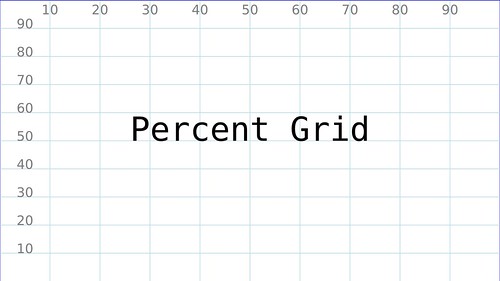
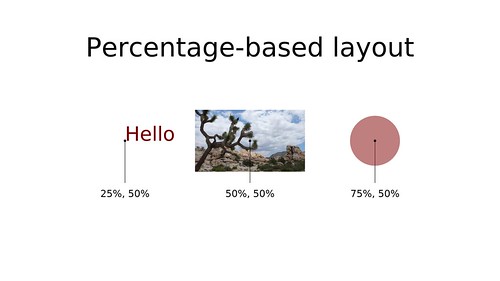
All layout in done in terms of percentages, using a coordinate system with the origin (0%, 0%) at the lower left. The x (horizontal) direction increases to the right, with the y (vertical) direction increasing to upwards. For example, to place an element in the middle of the canvas, specify xp="50" yp="50". To place an element one-third from the top, and one-third from the bottom: xp="66.6" yp="33.3".
The size of text is also scaled to the width of the canvas. For example sp="3" is a typical size for slide headings. The dimensions of graphical elements (width, height, stroke width) are also scaled to the canvas width.
The content of the slides are automatically scaled based on the specified canvas size (sane defaults are should be set the clients, if dimensions not specified)
package main
import (
"fmt""log""github.com/ajstarks/deck"
)
funcdotext(x, y, sizefloat64, text deck.Text) {
fmt.Println("\tText:", x, y, size, text.Tdata)
}
funcdolist(x, y, sizefloat64, list deck.List) {
fmt.Println("\tList:", x, y, size)
fori, l:=rangelist.Li {
fmt.Println("\t\titem", i, l)
}
}
funcmain() {
presentation, err:=deck.Read("deck.xml", 1024, 768) // open the deckiferr!=nil {
log.Fatal(err)
}
forslidenumber, slide:=rangepresentation.Slide { // for every slide...fmt.Println("Processing slide", slidenumber)
for_, t:=rangeslide.Text { // process the text elementsx, y, size:=deck.Dimen(presentation.Canvas, t.Xp, t.Yp, t.Sp)
dotext(x, y, size, t)
}
for_, l:=rangeslide.List { // process the list elementsx, y, size:=deck.Dimen(presentation.Canvas, l.Xp, l.Yp, l.Sp)
dolist(x, y, size, l)
}
}
}
Currently there are three clients: vgdeck, pdfdeck and svgdeck.
vgdeck is a program for showing presentations on the Raspberry Pi, using the openvg library. To install:
go get github.com/ajstarks/deck/cmd/vgdeckTo run vgdeck, specify one or more files (marked up in deck XML) on the command line, and each will be shown in turn.
vgdeck sales.xml program.xml architecture.xmlHere are the vgdeck commands:
- Next slide: +, Ctrl-N, [Return]
- Previous slide, -, Ctrl-P, [Backspace]
- First slide: ^, Ctrl-A
- Last slide: $, Ctrl-E
- Reload: r, Ctrl-R
- X-Ray: x, Ctrl-X
- Search: /, Ctrl-F
- Save: s, Ctrl-S
- Quit: q
All commands are a single keystroke, acted on immediately (only the search command waits until you hit [Return] after entering your search text) To cycle through the deck, repeatedly tap [Return] key
For PDF decks, install pdfdeck:
go get github.com/ajstarks/deck/cmd/pdfdeckpdfdeck produces decks in PDF corresponding to the input file:
pdfdeck deck.xmlproduces deck.pdf
For SVG decks, install svgdeck:
go get github.com/ajstarks/deck/cmd/svgdeckThis command:
pdfdeck deck.xmlproduces one slide per SVG file, with each slide linked to the next.
The shell script, mktbl creates a tabular layout from tab-separated text
The command sex is a server program that provides an API for slide decks.
The API supports deck start, stop, listing, upload, and remove. Responses are encoded in JSON.
To install:
go get github.com/ajstarks/deck/cmd/sexCommand line options control the working directory and address:port
-port Address:port (default: localhost:1958)
-dir [name] working directory (default: ".")
-maxupload [bytes] upload limit
GET / lists the API
GET /deck lists information on content, (filename, metadata (number of slides or image dimensions), modification time) in JSON
GET /deck?filter=[type] filter content list by type (std, deck, image, video)
POST /deck/file.xml?cmd=[duration] starts up a deck; the deck, duration, and process id are returned in JSON
POST /deck/file.xml?slide=[number] start at the specified slide
POST /deck?cmd=stop stops the running deck
DELETE /deck/file.xml removes a deck
PUT or POST to /upload uploads the contents of the Deck: header to the server
POST /table with the content of a tab-separated list, creates a slide with a formatted table, the Deck: header specifies the resulting deck file
POST /table/?textsize=[size] -- specify the text size of the generated table
POST /media plays the media file specified in the Media: header
The command deck is a command line interface to the deck Web API. Install it like this:
go get github.com/ajstarks/deck/cmd/deck
$ deck
Usage:
List: deck list [image|deck|video]
Play: deck play file [duration] [start-slide]
Stop: deck stop
Upload: deck upload files...
Remove: deck remove files...
Video: deck video file
Table: deck table file [textsize]
The shell script version of the command is in deck.sh. This version uses gttp (go get github.com/dgryski/gttp) to make HTTP requests.