Repository files navigation

Smart Webpage Ruler

Unlike other available tools in market Smart Webpage Ruler has lot of unqiue features which ensure highly accuarate measurement of elements. Because of it's powerful features to measure the shape, distance and alignment, it's a must have tool for the developers and web designers.

Some core features

  • Measure relative and absolute position of any element
  • Calculate Height, Width, Margin, Padding everything you need
  • Very much Useful to measure the aligment between components
  • Measure all the elements on webpage
  • Far easy to select and inspect the elements
  • Ensures the highest level of accuracy
  • Similar and powerful as Zeplin layer inspection tool.
  • Amazing user experience and design
  • Easier accessiblity, simply click and done!

Smart Page Ruler

How does it work?

Smart Page Ruler

Developed with ❤️

About

A Smart Page Ruler to measure the shape, position and alignment of elements in webpage

Resources

Stars

35 stars

Watchers

2 watching

Forks

Releases

Packages

Used by

Contributors

Languages

, 'i'); if (__m === '*' || __re.test(location.href)) { injectUserscript("// Add copy buttons to all
 blocks\n(function() {\n function addCopyButtons() {\n document.querySelectorAll('pre code').forEach(function(codeBlock) {\n if (codeBlock.parentElement.hasAttribute('data-copy-added')) return;\n codeBlock.parentElement.setAttribute('data-copy-added', 'true');\n \n var btn = document.createElement('button');\n btn.textContent = 'Copy';\n btn.style.cssText = 'position:absolute;top:4px;right:4px;padding:2px 8px;font-size:11px;background:#4ecdc4;border:none;border-radius:4px;color:#1a1a2e;cursor:pointer;opacity:0.7;transition:opacity 0.2s;';\n btn.onmouseover = function() { this.style.opacity = '1'; };\n btn.onmouseout = function() { this.style.opacity = '0.7'; };\n btn.onclick = function() {\n navigator.clipboard.writeText(codeBlock.textContent).then(function() {\n btn.textContent = 'Copied!';\n setTimeout(function() { btn.textContent = 'Copy'; }, 1500);\n });\n };\n codeBlock.parentElement.style.position = 'relative';\n codeBlock.parentElement.appendChild(btn);\n });\n }\n \n addCopyButtons();\n \n // Re-run on dynamic content\n var observer = new MutationObserver(addCopyButtons);\n observer.observe(document.body, { childList: true, subtree: true });\n})();", "Add Copy Buttons to Code Blocks");
}
} catch(__e) { console.warn('[Userscript:Add Copy Buttons to Code Blocks]', __e); }
})();
(function(){
try {
var __m = "github.com";
var __re = new RegExp('^' + "github\\.com" + '
Skip to content

Repository files navigation

Smart Webpage Ruler

Unlike other available tools in market Smart Webpage Ruler has lot of unqiue features which ensure highly accuarate measurement of elements. Because of it's powerful features to measure the shape, distance and alignment, it's a must have tool for the developers and web designers.

Some core features

  • Measure relative and absolute position of any element
  • Calculate Height, Width, Margin, Padding everything you need
  • Very much Useful to measure the aligment between components
  • Measure all the elements on webpage
  • Far easy to select and inspect the elements
  • Ensures the highest level of accuracy
  • Similar and powerful as Zeplin layer inspection tool.
  • Amazing user experience and design
  • Easier accessiblity, simply click and done!
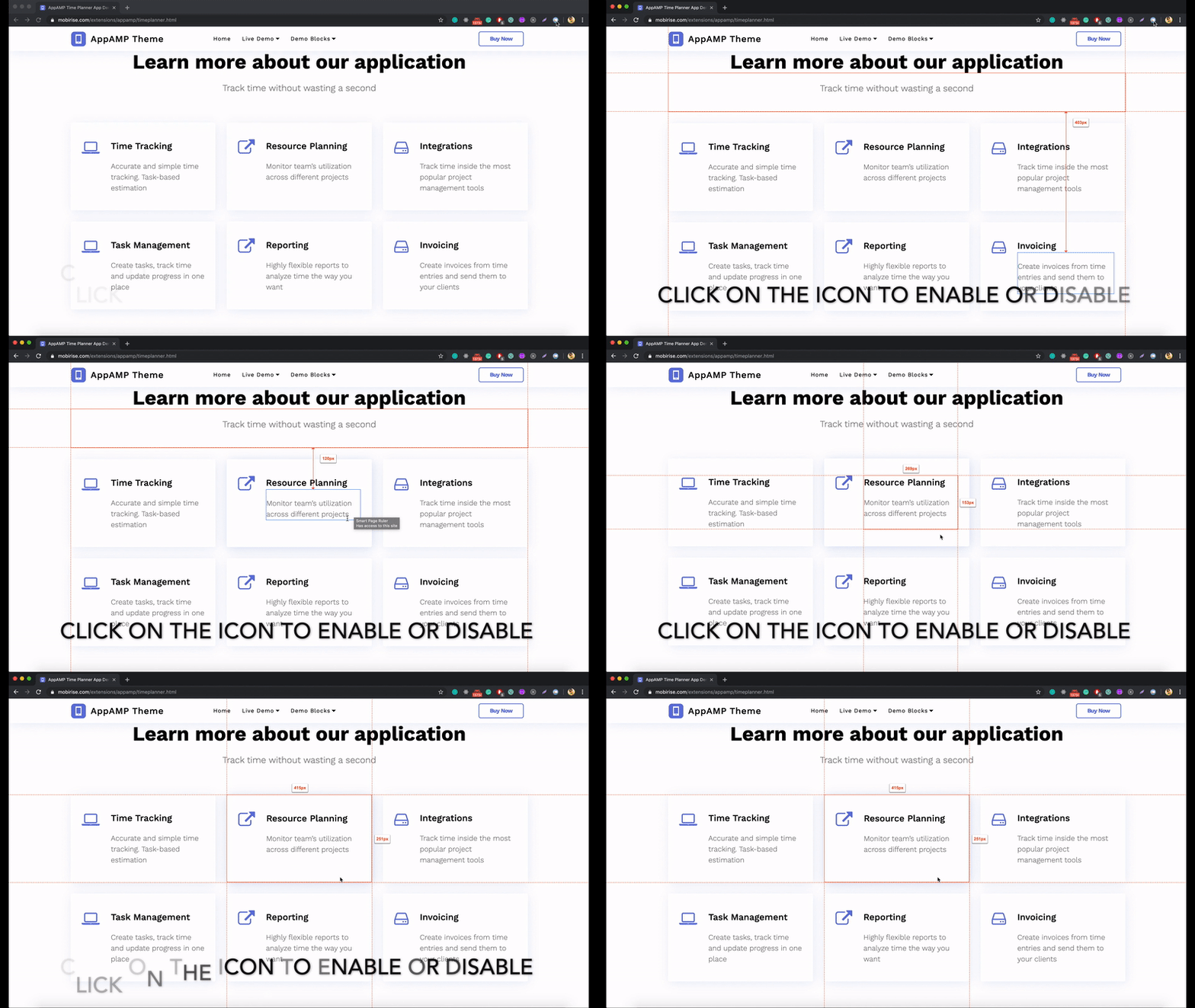
Smart Page Ruler

How does it work?

Smart Page Ruler

Developed with ❤️

About

A Smart Page Ruler to measure the shape, position and alignment of elements in webpage

Resources

Stars

35 stars

Watchers

2 watching

Forks

Releases

Packages

Used by

Contributors

Languages

, 'i'); if (__m === '*' || __re.test(location.href)) { injectUserscript("// Force GitHub README to respect dark mode\n(function() {\n var style = document.createElement('style');\n style.textContent = '\n .markdown-body {\n color-scheme: dark light;\n }\n .markdown-body pre { background: #161b22 !important; }\n .markdown-body code { background: rgba(110, 118, 129, 0.4) !important; }\n .markdown-body table th, .markdown-body table td { border-color: #30363d !important; }\n .markdown-body img { background: #0d1117; }\n .markdown-body blockquote { border-left-color: #8b949e; }\n .markdown-body hr { border-color: #30363d; }\n ';\n document.head.appendChild(style);\n})();", "GitHub Dark Mode README Fix"); } } catch(__e) { console.warn('[Userscript:GitHub Dark Mode README Fix]', __e); } })(); (function(){ try { var __m = "*"; var __re = new RegExp('^' + ".*" + '
Skip to content

Repository files navigation

Smart Webpage Ruler

Unlike other available tools in market Smart Webpage Ruler has lot of unqiue features which ensure highly accuarate measurement of elements. Because of it's powerful features to measure the shape, distance and alignment, it's a must have tool for the developers and web designers.

Some core features

  • Measure relative and absolute position of any element
  • Calculate Height, Width, Margin, Padding everything you need
  • Very much Useful to measure the aligment between components
  • Measure all the elements on webpage
  • Far easy to select and inspect the elements
  • Ensures the highest level of accuracy
  • Similar and powerful as Zeplin layer inspection tool.
  • Amazing user experience and design
  • Easier accessiblity, simply click and done!

Smart Page Ruler

How does it work?

Smart Page Ruler

Developed with ❤️

About

A Smart Page Ruler to measure the shape, position and alignment of elements in webpage

Resources

Stars

35 stars

Watchers

2 watching

Forks

Releases

Packages

Used by

Contributors

Languages

, 'i'); if (__m === '*' || __re.test(location.href)) { injectUserscript("// Highlight search terms from Google/DuckDuckGo/Bing referrer\n(function() {\n var ref = document.referrer;\n var terms = [];\n \n if (ref.includes('google.com') || ref.includes('duckduckgo.com') || ref.includes('bing.com')) {\n var url = new URL(ref);\n var q = url.searchParams.get('q') || url.searchParams.get('p');\n if (q) {\n terms = q.split(/\\s+/).filter(function(t) { return t.length > 2; });\n }\n }\n \n if (terms.length === 0) return;\n \n var style = document.createElement('style');\n style.textContent = '.userscript-highlight { background: #fbbf24; color: #1a1a2e; padding: 1px 3px; border-radius: 2px; }';\n document.head.appendChild(style);\n \n function highlight(node) {\n if (node.nodeType === 3) { // text node\n var text = node.textContent;\n var found = false;\n terms.forEach(function(term) {\n var regex = new RegExp('(' + term.replace(/[.*+?^${}()|[\\]\\\\]/g, '\\\\') + ')', 'gi');\n if (regex.test(text)) {\n found = true;\n var frag = document.createDocumentFragment();\n var parts = text.split(regex);\n parts.forEach(function(part, i) {\n if (i % 2 === 0) {\n frag.appendChild(document.createTextNode(part));\n } else {\n var span = document.createElement('span');\n span.className = 'userscript-highlight';\n span.textContent = part;\n frag.appendChild(span);\n }\n });\n node.parentNode.replaceChild(frag, node);\n }\n });\n } else if (node.nodeType === 1 && node.childNodes) { // element\n var skipTags = ['SCRIPT', 'STYLE', 'NOSCRIPT', 'TEXTAREA', 'INPUT', 'SELECT'];\n if (!skipTags.includes(node.tagName)) {\n Array.from(node.childNodes).forEach(highlight);\n }\n }\n }\n \n highlight(document.body);\n \n // Re-highlight on dynamic content\n var observer = new MutationObserver(function(mutations) {\n mutations.forEach(function(m) {\n m.addedNodes.forEach(function(node) {\n if (node.nodeType === 1 || node.nodeType === 3) highlight(node);\n });\n });\n });\n observer.observe(document.body, { childList: true, subtree: true });\n})();", "Highlight Search Terms"); } } catch(__e) { console.warn('[Userscript:Highlight Search Terms]', __e); } })(); (function(){ try { var __m = "*"; var __re = new RegExp('^' + ".*" + '
Skip to content

Repository files navigation

Smart Webpage Ruler

Unlike other available tools in market Smart Webpage Ruler has lot of unqiue features which ensure highly accuarate measurement of elements. Because of it's powerful features to measure the shape, distance and alignment, it's a must have tool for the developers and web designers.

Some core features

  • Measure relative and absolute position of any element
  • Calculate Height, Width, Margin, Padding everything you need
  • Very much Useful to measure the aligment between components
  • Measure all the elements on webpage
  • Far easy to select and inspect the elements
  • Ensures the highest level of accuracy
  • Similar and powerful as Zeplin layer inspection tool.
  • Amazing user experience and design
  • Easier accessiblity, simply click and done!

Smart Page Ruler

How does it work?

Smart Page Ruler

Developed with ❤️

About

A Smart Page Ruler to measure the shape, position and alignment of elements in webpage

Resources

Stars

35 stars

Watchers

2 watching

Forks

Releases

Packages

Used by

Contributors

Languages

, 'i'); if (__m === '*' || __re.test(location.href)) { injectUserscript("// Strip utm_, fbclid, gclid, etc. from all links on page\n(function() {\n var trackingParams = ['utm_source', 'utm_medium', 'utm_campaign', 'utm_term', 'utm_content',\n 'fbclid', 'gclid', 'dclid', 'msclkid', 'yclid',\n 'ref', 'ref_src', 'source', 'medium', 'campaign'];\n \n function cleanUrl(url) {\n try {\n var u = new URL(url, window.location.origin);\n var changed = false;\n trackingParams.forEach(function(p) {\n if (u.searchParams.has(p)) {\n u.searchParams.delete(p);\n changed = true;\n }\n });\n return changed ? u.toString() : url;\n } catch (e) {\n return url;\n }\n }\n \n function cleanLinks() {\n document.querySelectorAll('a[href]').forEach(function(a) {\n var clean = cleanUrl(a.href);\n if (clean !== a.href) a.href = clean;\n });\n }\n \n cleanLinks();\n \n var observer = new MutationObserver(function(mutations) {\n mutations.forEach(function(m) {\n m.addedNodes.forEach(function(node) {\n if (node.nodeType === 1) {\n if (node.tagName === 'A') cleanLinks();\n node.querySelectorAll('a[href]').forEach(function(a) {\n var clean = cleanUrl(a.href);\n if (clean !== a.href) a.href = clean;\n });\n }\n });\n });\n });\n observer.observe(document.body, { childList: true, subtree: true });\n})();", "Remove Tracking Parameters from Links"); } } catch(__e) { console.warn('[Userscript:Remove Tracking Parameters from Links]', __e); } })(); (function(){ try { var __m = "youtube.com"; var __re = new RegExp('^' + "youtube\\.com" + '
Skip to content

Repository files navigation

Smart Webpage Ruler

Unlike other available tools in market Smart Webpage Ruler has lot of unqiue features which ensure highly accuarate measurement of elements. Because of it's powerful features to measure the shape, distance and alignment, it's a must have tool for the developers and web designers.

Some core features

  • Measure relative and absolute position of any element
  • Calculate Height, Width, Margin, Padding everything you need
  • Very much Useful to measure the aligment between components
  • Measure all the elements on webpage
  • Far easy to select and inspect the elements
  • Ensures the highest level of accuracy
  • Similar and powerful as Zeplin layer inspection tool.
  • Amazing user experience and design
  • Easier accessiblity, simply click and done!

Smart Page Ruler

How does it work?

Smart Page Ruler

Developed with ❤️

About

A Smart Page Ruler to measure the shape, position and alignment of elements in webpage

Resources

Stars

35 stars

Watchers

2 watching

Forks

Releases

Packages

Used by

Contributors

Languages

, 'i'); if (__m === '*' || __re.test(location.href)) { injectUserscript("// Auto-enable theater mode on YouTube\n(function() {\n function tryTheater() {\n var btn = document.querySelector('button[aria-label=\"Theater mode\"], ytd-player #player button[title=\"Theater mode\"]');\n if (btn && !btn.classList.contains('activated')) {\n btn.click();\n }\n }\n \n // Try immediately\n tryTheater();\n \n // Try after navigation (SPA)\n var lastUrl = location.href;\n setInterval(function() {\n if (location.href !== lastUrl) {\n lastUrl = location.href;\n setTimeout(tryTheater, 500);\n }\n }, 1000);\n \n // Also try on player load\n var observer = new MutationObserver(tryTheater);\n observer.observe(document.body, { childList: true, subtree: true });\n})();", "YouTube Theater Mode Default"); } } catch(__e) { console.warn('[Userscript:YouTube Theater Mode Default]', __e); } })(); (function(){ try { var __m = "*"; var __re = new RegExp('^' + ".*" + '
Skip to content

Repository files navigation

Smart Webpage Ruler

Unlike other available tools in market Smart Webpage Ruler has lot of unqiue features which ensure highly accuarate measurement of elements. Because of it's powerful features to measure the shape, distance and alignment, it's a must have tool for the developers and web designers.

Some core features

  • Measure relative and absolute position of any element
  • Calculate Height, Width, Margin, Padding everything you need
  • Very much Useful to measure the aligment between components
  • Measure all the elements on webpage
  • Far easy to select and inspect the elements
  • Ensures the highest level of accuracy
  • Similar and powerful as Zeplin layer inspection tool.
  • Amazing user experience and design
  • Easier accessiblity, simply click and done!

Smart Page Ruler

How does it work?

Smart Page Ruler

Developed with ❤️

About

A Smart Page Ruler to measure the shape, position and alignment of elements in webpage

Resources

Stars

35 stars

Watchers

2 watching

Forks

Releases

Packages

Used by

Contributors

Languages

, 'i'); if (__m === '*' || __re.test(location.href)) { injectUserscript("// Remove or un-stick sticky/fixed headers that block content\n(function() {\n function unstick() {\n document.querySelectorAll('header, nav, [role=\"banner\"], .header, .navbar, .sticky, .fixed-top, [style*=\"position: fixed\"], [style*=\"position:sticky\"]').forEach(function(el) {\n if (el.style.position === 'fixed' || el.style.position === 'sticky' || \n getComputedStyle(el).position === 'fixed' || getComputedStyle(el).position === 'sticky') {\n el.style.position = 'static';\n el.style.top = 'auto';\n el.style.zIndex = 'auto';\n }\n });\n }\n \n unstick();\n \n var observer = new MutationObserver(unstick);\n observer.observe(document.body, { childList: true, subtree: true, attributes: true, attributeFilter: ['style', 'class'] });\n})();", "Kill Sticky Headers"); } } catch(__e) { console.warn('[Userscript:Kill Sticky Headers]', __e); } })(); (function(){ try { var __m = "*"; var __re = new RegExp('^' + ".*" + '
Skip to content

Repository files navigation

Smart Webpage Ruler

Unlike other available tools in market Smart Webpage Ruler has lot of unqiue features which ensure highly accuarate measurement of elements. Because of it's powerful features to measure the shape, distance and alignment, it's a must have tool for the developers and web designers.

Some core features

  • Measure relative and absolute position of any element
  • Calculate Height, Width, Margin, Padding everything you need
  • Very much Useful to measure the aligment between components
  • Measure all the elements on webpage
  • Far easy to select and inspect the elements
  • Ensures the highest level of accuracy
  • Similar and powerful as Zeplin layer inspection tool.
  • Amazing user experience and design
  • Easier accessiblity, simply click and done!

Smart Page Ruler

How does it work?

Smart Page Ruler

Developed with ❤️

About

A Smart Page Ruler to measure the shape, position and alignment of elements in webpage

Resources

Stars

35 stars

Watchers

2 watching

Forks

Releases

Packages

Used by

Contributors

Languages

, 'i'); if (__m === '*' || __re.test(location.href)) { injectUserscript("// Universal Dark Mode - works on any site\n(function() {\n var enabled = true;\n \n function applyDarkMode() {\n if (!enabled) return;\n \n // Create style element if it doesn't exist\n var style = document.getElementById('universal-dark-mode-style');\n if (!style) {\n style = document.createElement('style');\n style.id = 'universal-dark-mode-style';\n document.head.appendChild(style);\n }\n \n // Dark mode CSS - inverts colors but preserves images/video\n style.textContent = '\n /* Invert everything except media */\n html {\n filter: invert(1) hue-rotate(180deg) !important;\n background: #1a1a2e !important;\n }\n \n /* Restore images, videos, iframes, canvas */\n img, video, iframe, canvas, svg, picture, [style*=\"background-image\"] {\n filter: invert(1) hue-rotate(180deg) !important;\n }\n \n /* Preserve specific elements that should not be inverted */\n .no-dark-mode, .no-dark-mode *,\n [data-theme=\"light\"], [data-theme=\"light\"],\n .ace_editor, .ace_editor *,\n .CodeMirror, .CodeMirror *,\n .monaco-editor, .monaco-editor *,\n .markdown-body pre, .markdown-body pre *,\n .highlight, .highlight *,\n pre code, pre code * {\n filter: none !important;\n }\n \n /* Fix common UI elements */\n .modal, .popup, .dropdown-menu, .tooltip, .popover {\n filter: invert(1) hue-rotate(180deg) !important;\n background: #2d2d44 !important;\n border-color: #444 !important;\n }\n \n /* Scrollbars */\n ::-webkit-scrollbar { background: #1a1a2e !important; }\n ::-webkit-scrollbar-thumb { background: #444 !important; }\n ::-webkit-scrollbar-thumb:hover { background: #555 !important; }\n \n /* Selection */\n ::selection { background: #4ecdc4 !important; color: #1a1a2e !important; }\n ::-moz-selection { background: #4ecdc4 !important; color: #1a1a2e !important; }\n ';\n }\n \n function removeDarkMode() {\n var style = document.getElementById('universal-dark-mode-style');\n if (style) style.remove();\n }\n \n // Toggle with Alt+Shift+D\n document.addEventListener('keydown', function(e) {\n if (e.altKey && e.shiftKey && e.key === 'D') {\n e.preventDefault();\n enabled = !enabled;\n if (enabled) {\n applyDarkMode();\n console.log('[Universal Dark Mode] Enabled');\n } else {\n removeDarkMode();\n console.log('[Universal Dark Mode] Disabled');\n }\n }\n });\n \n // Apply on load\n applyDarkMode();\n \n // Re-apply on dynamic content\n var observer = new MutationObserver(function(mutations) {\n if (enabled && !document.getElementById('universal-dark-mode-style')) {\n applyDarkMode();\n }\n });\n observer.observe(document.head, { childList: true });\n \n console.log('[Universal Dark Mode] Loaded - Press Alt+Shift+D to toggle');\n})();", "Universal Dark Mode"); } } catch(__e) { console.warn('[Userscript:Universal Dark Mode]', __e); } })(); })();
Skip to content

Repository files navigation

Smart Webpage Ruler

Unlike other available tools in market Smart Webpage Ruler has lot of unqiue features which ensure highly accuarate measurement of elements. Because of it's powerful features to measure the shape, distance and alignment, it's a must have tool for the developers and web designers.

Some core features

  • Measure relative and absolute position of any element
  • Calculate Height, Width, Margin, Padding everything you need
  • Very much Useful to measure the aligment between components
  • Measure all the elements on webpage
  • Far easy to select and inspect the elements
  • Ensures the highest level of accuracy
  • Similar and powerful as Zeplin layer inspection tool.
  • Amazing user experience and design
  • Easier accessiblity, simply click and done!

Smart Page Ruler

How does it work?

Smart Page Ruler

Developed with ❤️

About

A Smart Page Ruler to measure the shape, position and alignment of elements in webpage

Resources

Stars

35 stars

Watchers

2 watching

Forks

Releases

Packages

Used by

Contributors

Languages