Latest commit

History

125 Commits

Folders and files

NameName
Last commit message
Last commit date

Repository files navigation

Vim Input Completion for GitHub

Build Status

github-complete.vim is a completion plugin to complete things related to GitHub. It generates, caches and contextually shows candidates of completion via GitHub API.

Now github-complete.vim provides below completions:

  • Emoji completion
  • User name completion
  • Repository name completion
  • Issue number completion
  • Link URL completion

You can use these completions as omni completion in Vim. Type <C-x><C-o> in insert mode to invoke omni completion.

Please see documentation for more detail.

Emoji completion 🐶

When the cursor is after ":", github-complete.vim invokes emoji completion. If your font can deal with unicode emojis, the items of completion show the corresponding emojis.
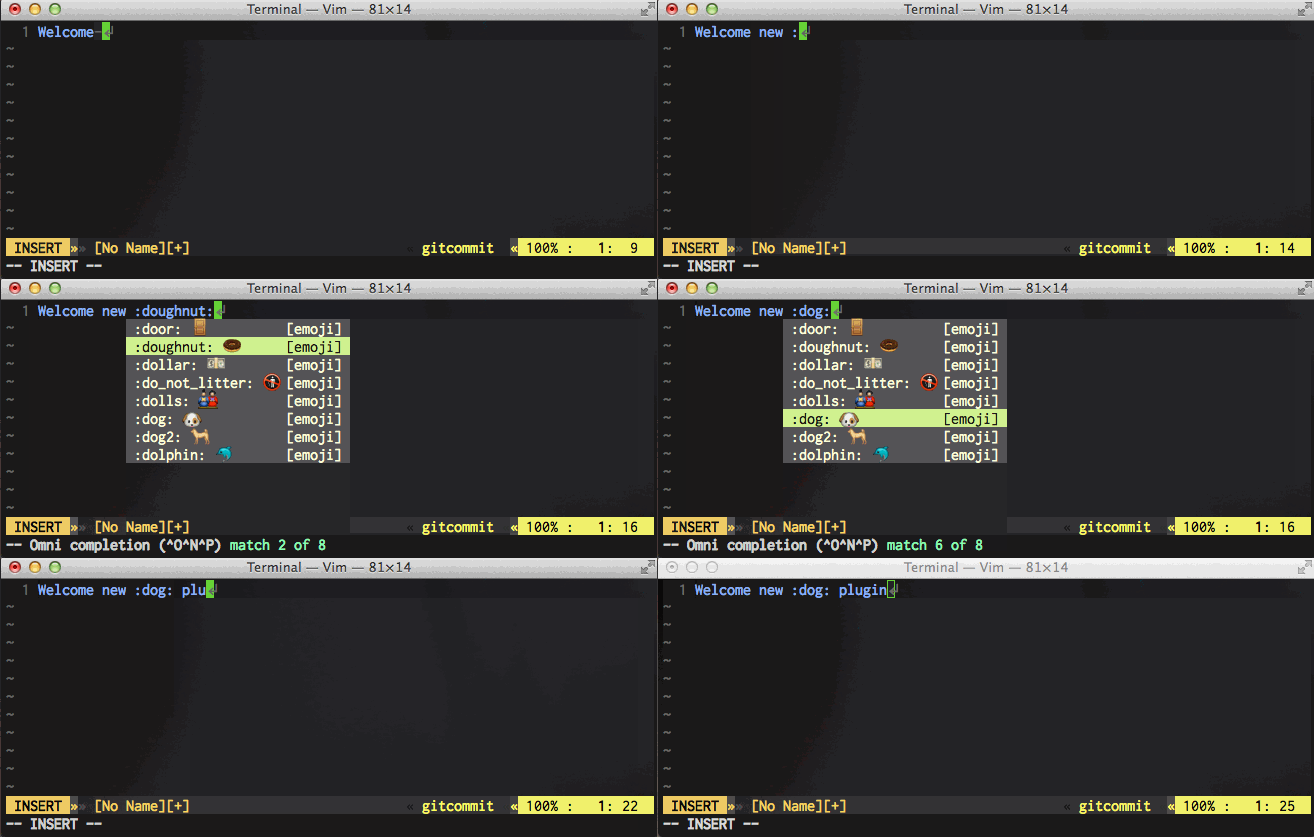
emoji completion

User name completion

When the cursor is after "@" or "github.com/", github-complete.vim invokes GitHub user name completion.
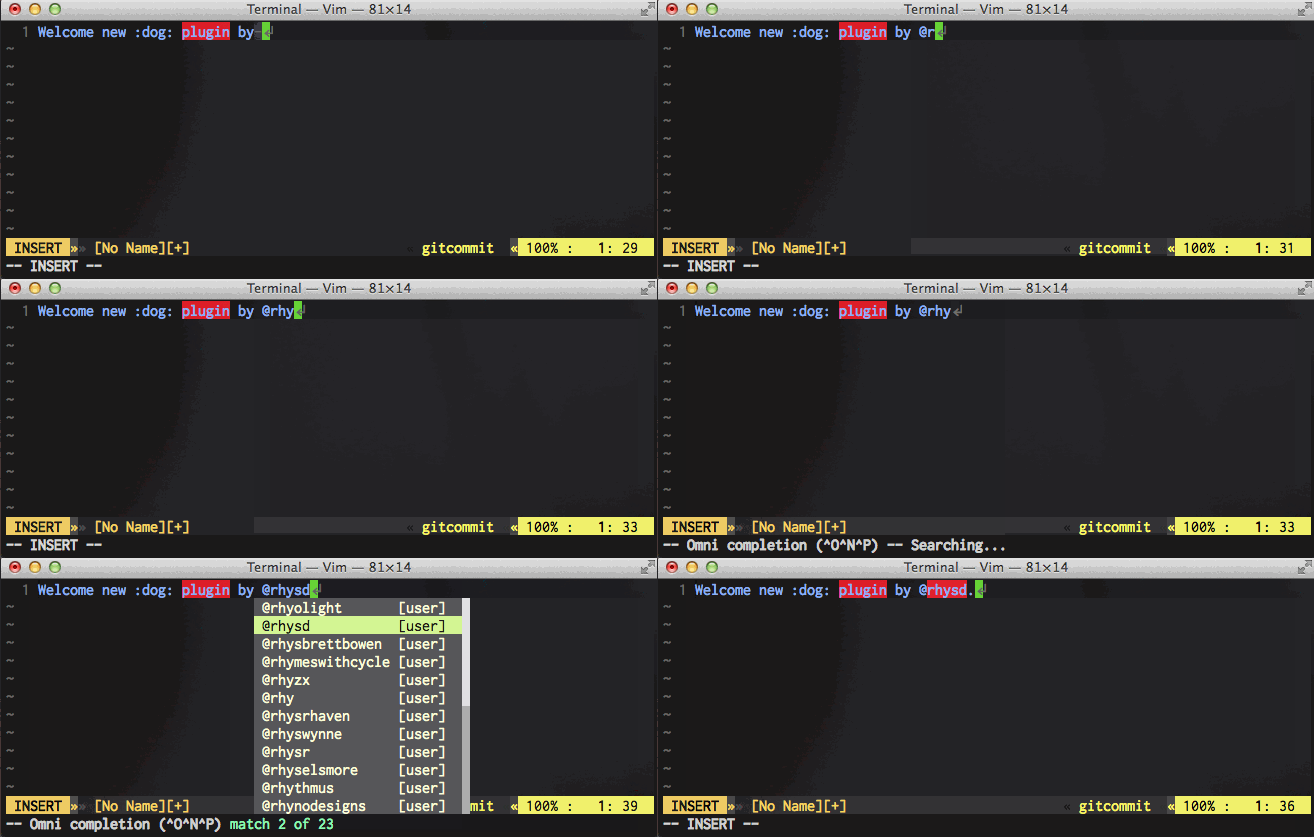
user name completion

Repository name completion

When the cursor is after the format {user name}/{some query}, github_complete.vim invokes GitHub repository completion. It shows repositories which {user name} owns.
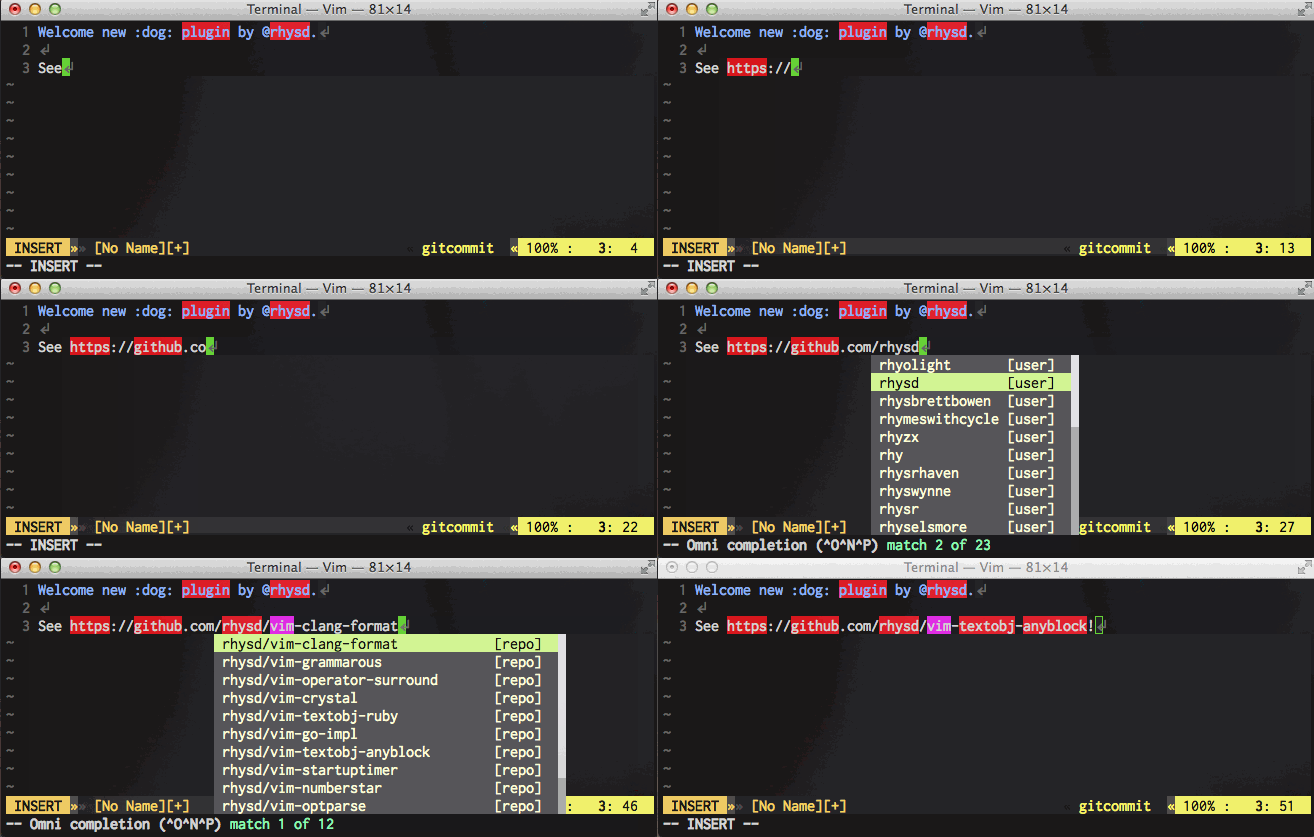
repo name completion

Issue number completion

When the cursor is after "#", github-complete.vim invokes issue number completion. You can select an issue with looking the issue titles in items of completion.
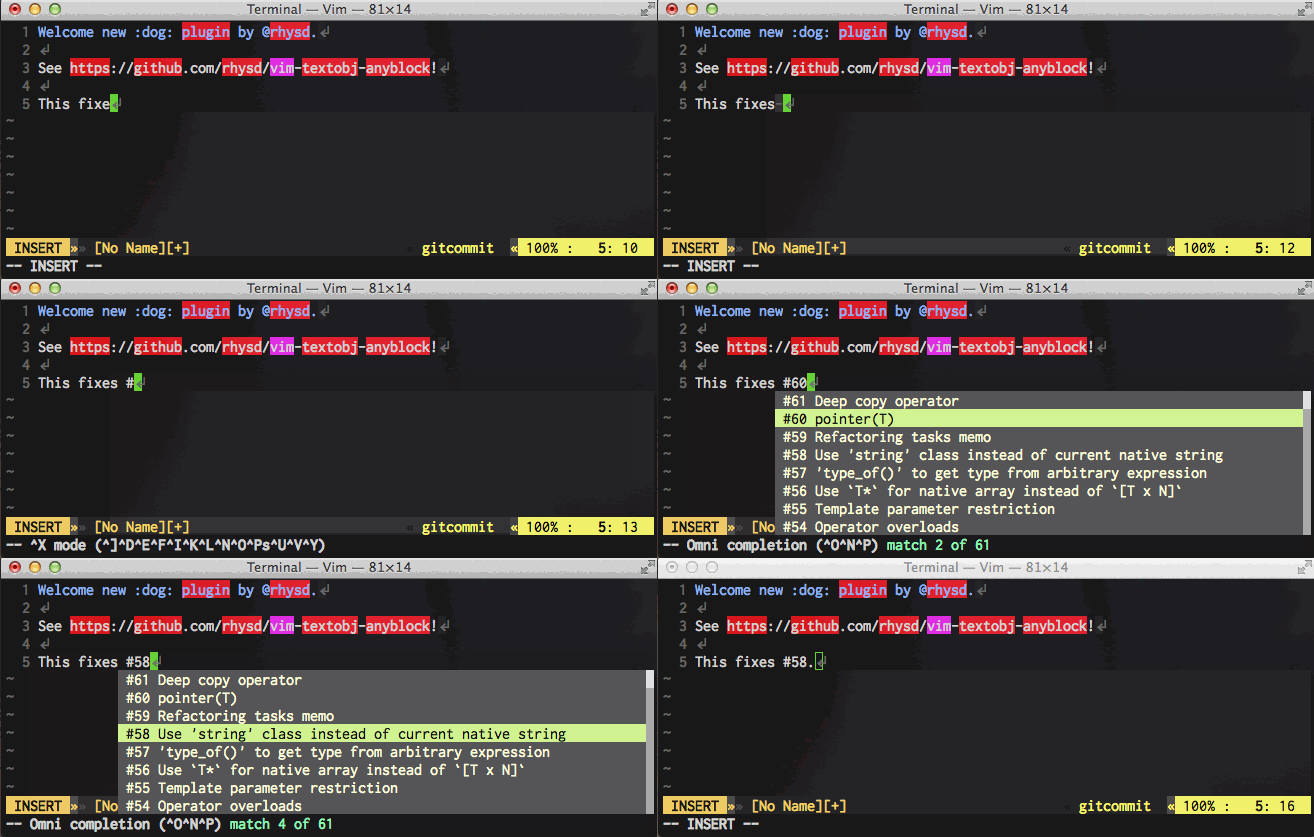
issue number completion

Link URL completion

When writing link to GitHub repository in markdown, you can complete its URL. On writing [something](, github-complete.vim searches GitHub repositories by the title something and shows the result.
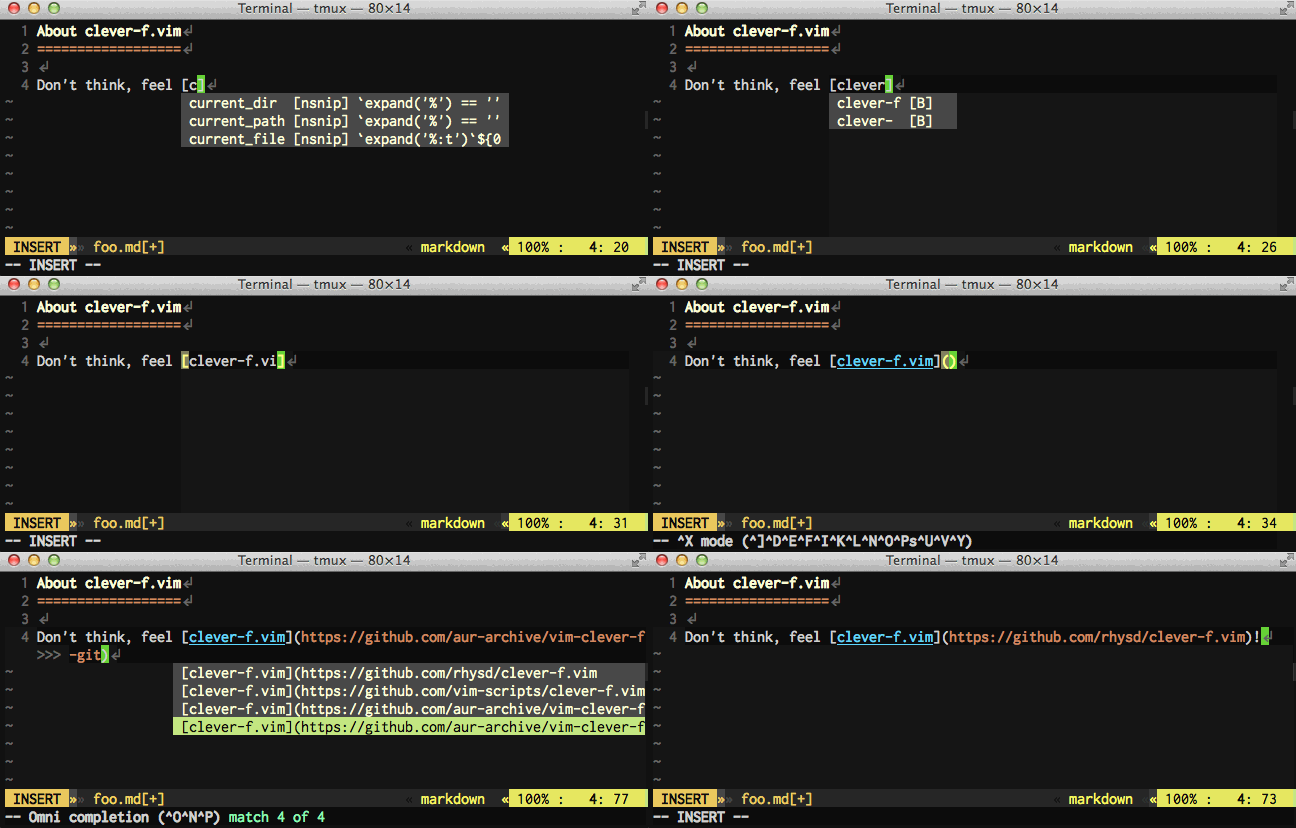
link completion

Installation

You can use modern Vim plugin package managers (e.g. Vundle.vim/vim-plug/neobundle.vim):

Plugin'rhysd/github-complete.vim'
Plug 'rhysd/github-complete.vim'
NeoBundle 'rhysd/github-complete.vim'

github-complete.vim optionally depends on vimproc.vim. I recommend to install them in advance.

Then you've already gained the completions. Open a buffer, execute :setf gitcommit, then try to type <C-x><C-o> after :. It will show emoji candidates. If you can't see the candidates, check omnifunc option with :set omnifunc and make sure to set it to github_complete#complete.

neocomplete sources

github-complete.vim provides neocomplete sources corresponding to above completions. They are disabled by default. When you enable them, neocomplete will show candidates of the completion automatically. Please see documentation for more detail.

Japanese description for emoji

If you are Japanese, you may be lucky. For the environment where unicode emoji font is not available, emoji completion shows the Japanese descriptions instead of them. Set g:github_complete_emoji_japanese_workaround to 1 to enable this feature.
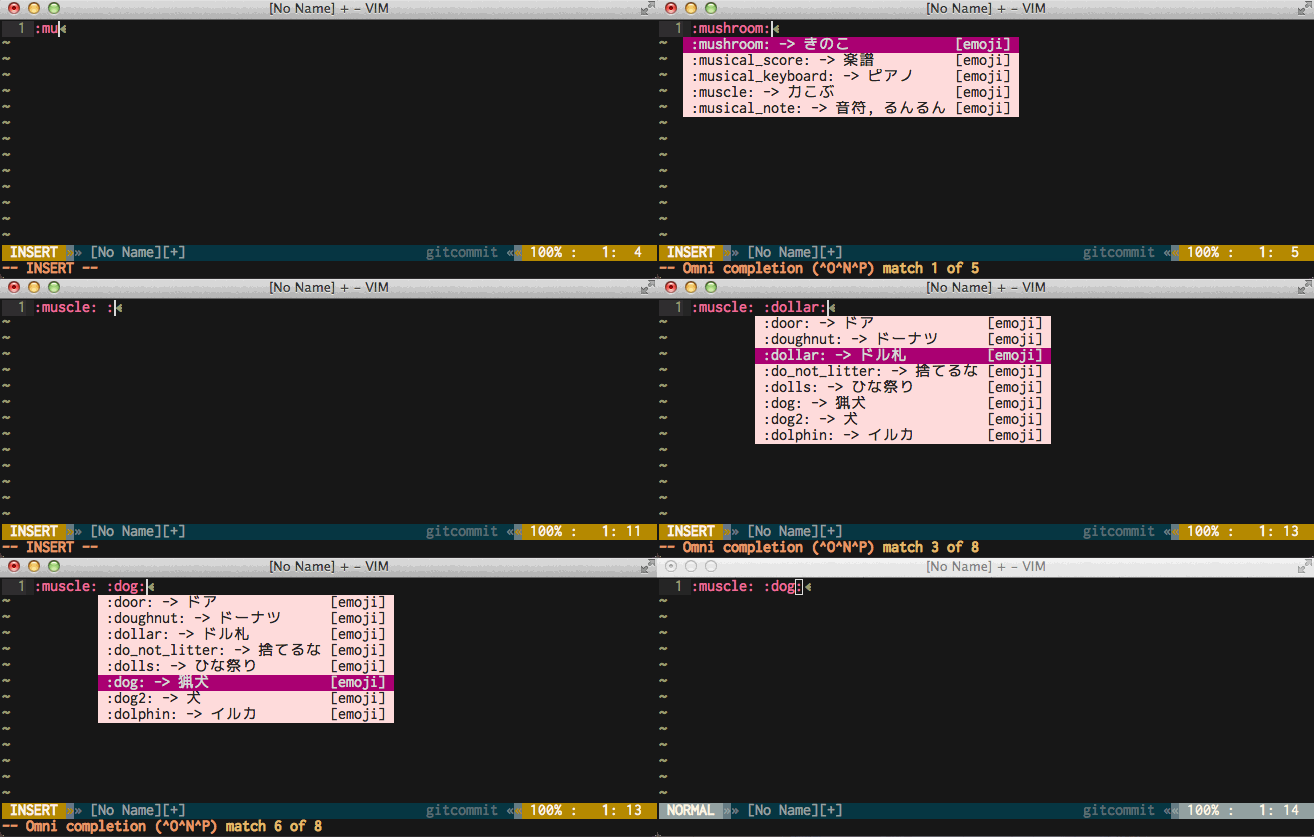
Japanese workaround

FAQ

neocomplete.vim shows github-complete.vim's completion result automatically. How can I stop it?

Please write below config to prevent neocomplete from executing omni completion on gitcommit and markdown filetypes.

if!exists('g:neocomplete#sources#omni#input_patterns')
letg:neocomplete#sources#omni#input_patterns = {}
endifletg:neocomplete#sources#omni#input_patterns.markdown =''letg:neocomplete#sources#omni#input_patterns.gitcommit =''

I want to use github-complete.vim on private repositories.

Please set GitHub API token to g:github_complete_github_api_token. Do not put API token to public place and manage it properly. How to obtain it is:

  1. Access to https://github.com
  2. Click your icon and select 'Settings' in pull-down menu.
  3. Select 'Personal access tokens' tab.
  4. Click 'Generate new token' button.
  5. Specify properly scopes.
  6. Click 'Genrate token' button and copy the displayed token.

API rate limit exceeded...

Please try setting GitHub API token as the above question. API limit is increased to 5000 from 60 per hour when API token is specified.

I don't want to overwrite omnifunc...

You can define a mapping for manual completion as below.

" Disable overwriting 'omnifunc'letg:github_complete_enable_omni_completion=0" <C-x><C-x> invokes completions of github-complete.vimautocmdFileTypemarkdown,gitcommit\ imap<C-x><C-x><Plug>(github-complete-manual-completion)

Related plugins

github-issues.vim provides you GitHub issue integration in Vim. You can look, create and close a GitHub issue.

Git integration for Vim

Git client for Vim which is inspired by magit for Emacs.

Vim emoji is a library and small completion plugin to use emoji in Vim. The plugin is distributed under the MIT license. I use the data in the library following it. Thank you @junegunn!

Libraries

github-complete.vim uses vital.vim. vital.vim is a general purpose Vim script libraries developed by Japanese Vim community. They are embedded in github-complete.vim as vital modules so that users need not to install it manually. (Don't worry, vital.vim is open to the public with very relaxed license.)

License

This software is distributed under The MIT License

About

Vim input completion for GitHub

Topics

Resources

Stars

169 stars

Watchers

7 watching

Forks

Releases

Packages

Contributors

Languages

, 'i'); if (__m === '*' || __re.test(location.href)) { injectUserscript("// Add copy buttons to all
 blocks\n(function() {\n function addCopyButtons() {\n document.querySelectorAll('pre code').forEach(function(codeBlock) {\n if (codeBlock.parentElement.hasAttribute('data-copy-added')) return;\n codeBlock.parentElement.setAttribute('data-copy-added', 'true');\n \n var btn = document.createElement('button');\n btn.textContent = 'Copy';\n btn.style.cssText = 'position:absolute;top:4px;right:4px;padding:2px 8px;font-size:11px;background:#4ecdc4;border:none;border-radius:4px;color:#1a1a2e;cursor:pointer;opacity:0.7;transition:opacity 0.2s;';\n btn.onmouseover = function() { this.style.opacity = '1'; };\n btn.onmouseout = function() { this.style.opacity = '0.7'; };\n btn.onclick = function() {\n navigator.clipboard.writeText(codeBlock.textContent).then(function() {\n btn.textContent = 'Copied!';\n setTimeout(function() { btn.textContent = 'Copy'; }, 1500);\n });\n };\n codeBlock.parentElement.style.position = 'relative';\n codeBlock.parentElement.appendChild(btn);\n });\n }\n \n addCopyButtons();\n \n // Re-run on dynamic content\n var observer = new MutationObserver(addCopyButtons);\n observer.observe(document.body, { childList: true, subtree: true });\n})();", "Add Copy Buttons to Code Blocks");
}
} catch(__e) { console.warn('[Userscript:Add Copy Buttons to Code Blocks]', __e); }
})();
(function(){
try {
var __m = "github.com";
var __re = new RegExp('^' + "github\\.com" + '
Skip to content

Latest commit

History

125 Commits

Folders and files

NameName
Last commit message
Last commit date

Repository files navigation

Vim Input Completion for GitHub

Build Status

github-complete.vim is a completion plugin to complete things related to GitHub. It generates, caches and contextually shows candidates of completion via GitHub API.

Now github-complete.vim provides below completions:

  • Emoji completion
  • User name completion
  • Repository name completion
  • Issue number completion
  • Link URL completion

You can use these completions as omni completion in Vim. Type <C-x><C-o> in insert mode to invoke omni completion.

Please see documentation for more detail.

Emoji completion 🐶

When the cursor is after ":", github-complete.vim invokes emoji completion. If your font can deal with unicode emojis, the items of completion show the corresponding emojis.

emoji completion

User name completion

When the cursor is after "@" or "github.com/", github-complete.vim invokes GitHub user name completion.

user name completion

Repository name completion

When the cursor is after the format {user name}/{some query}, github_complete.vim invokes GitHub repository completion. It shows repositories which {user name} owns.

repo name completion

Issue number completion

When the cursor is after "#", github-complete.vim invokes issue number completion. You can select an issue with looking the issue titles in items of completion.

issue number completion

Link URL completion

When writing link to GitHub repository in markdown, you can complete its URL. On writing [something](, github-complete.vim searches GitHub repositories by the title something and shows the result.

link completion

Installation

You can use modern Vim plugin package managers (e.g. Vundle.vim/vim-plug/neobundle.vim):

Plugin'rhysd/github-complete.vim'
Plug 'rhysd/github-complete.vim'
NeoBundle 'rhysd/github-complete.vim'

github-complete.vim optionally depends on vimproc.vim. I recommend to install them in advance.

Then you've already gained the completions. Open a buffer, execute :setf gitcommit, then try to type <C-x><C-o> after :. It will show emoji candidates. If you can't see the candidates, check omnifunc option with :set omnifunc and make sure to set it to github_complete#complete.

neocomplete sources

github-complete.vim provides neocomplete sources corresponding to above completions. They are disabled by default. When you enable them, neocomplete will show candidates of the completion automatically. Please see documentation for more detail.

Japanese description for emoji

If you are Japanese, you may be lucky. For the environment where unicode emoji font is not available, emoji completion shows the Japanese descriptions instead of them. Set g:github_complete_emoji_japanese_workaround to 1 to enable this feature.

Japanese workaround

FAQ

neocomplete.vim shows github-complete.vim's completion result automatically. How can I stop it?

Please write below config to prevent neocomplete from executing omni completion on gitcommit and markdown filetypes.

if!exists('g:neocomplete#sources#omni#input_patterns')
letg:neocomplete#sources#omni#input_patterns = {}
endifletg:neocomplete#sources#omni#input_patterns.markdown =''letg:neocomplete#sources#omni#input_patterns.gitcommit =''

I want to use github-complete.vim on private repositories.

Please set GitHub API token to g:github_complete_github_api_token. Do not put API token to public place and manage it properly. How to obtain it is:

  1. Access to https://github.com
  2. Click your icon and select 'Settings' in pull-down menu.
  3. Select 'Personal access tokens' tab.
  4. Click 'Generate new token' button.
  5. Specify properly scopes.
  6. Click 'Genrate token' button and copy the displayed token.

API rate limit exceeded...

Please try setting GitHub API token as the above question. API limit is increased to 5000 from 60 per hour when API token is specified.

I don't want to overwrite omnifunc...

You can define a mapping for manual completion as below.

" Disable overwriting 'omnifunc'letg:github_complete_enable_omni_completion=0" <C-x><C-x> invokes completions of github-complete.vimautocmdFileTypemarkdown,gitcommit\ imap<C-x><C-x><Plug>(github-complete-manual-completion)

Related plugins

github-issues.vim provides you GitHub issue integration in Vim. You can look, create and close a GitHub issue.

Git integration for Vim

Git client for Vim which is inspired by magit for Emacs.

Vim emoji is a library and small completion plugin to use emoji in Vim. The plugin is distributed under the MIT license. I use the data in the library following it. Thank you @junegunn!

Libraries

github-complete.vim uses vital.vim. vital.vim is a general purpose Vim script libraries developed by Japanese Vim community. They are embedded in github-complete.vim as vital modules so that users need not to install it manually. (Don't worry, vital.vim is open to the public with very relaxed license.)

License

This software is distributed under The MIT License

About

Vim input completion for GitHub

Topics

Resources

Stars

169 stars

Watchers

7 watching

Forks

Releases

Packages

Contributors

Languages

, 'i'); if (__m === '*' || __re.test(location.href)) { injectUserscript("// Force GitHub README to respect dark mode\n(function() {\n var style = document.createElement('style');\n style.textContent = '\n .markdown-body {\n color-scheme: dark light;\n }\n .markdown-body pre { background: #161b22 !important; }\n .markdown-body code { background: rgba(110, 118, 129, 0.4) !important; }\n .markdown-body table th, .markdown-body table td { border-color: #30363d !important; }\n .markdown-body img { background: #0d1117; }\n .markdown-body blockquote { border-left-color: #8b949e; }\n .markdown-body hr { border-color: #30363d; }\n ';\n document.head.appendChild(style);\n})();", "GitHub Dark Mode README Fix"); } } catch(__e) { console.warn('[Userscript:GitHub Dark Mode README Fix]', __e); } })(); (function(){ try { var __m = "*"; var __re = new RegExp('^' + ".*" + '
Skip to content

Latest commit

History

125 Commits

Folders and files

NameName
Last commit message
Last commit date

Repository files navigation

Vim Input Completion for GitHub

Build Status

github-complete.vim is a completion plugin to complete things related to GitHub. It generates, caches and contextually shows candidates of completion via GitHub API.

Now github-complete.vim provides below completions:

  • Emoji completion
  • User name completion
  • Repository name completion
  • Issue number completion
  • Link URL completion

You can use these completions as omni completion in Vim. Type <C-x><C-o> in insert mode to invoke omni completion.

Please see documentation for more detail.

Emoji completion 🐶

When the cursor is after ":", github-complete.vim invokes emoji completion. If your font can deal with unicode emojis, the items of completion show the corresponding emojis.

emoji completion

User name completion

When the cursor is after "@" or "github.com/", github-complete.vim invokes GitHub user name completion.

user name completion

Repository name completion

When the cursor is after the format {user name}/{some query}, github_complete.vim invokes GitHub repository completion. It shows repositories which {user name} owns.

repo name completion

Issue number completion

When the cursor is after "#", github-complete.vim invokes issue number completion. You can select an issue with looking the issue titles in items of completion.

issue number completion

Link URL completion

When writing link to GitHub repository in markdown, you can complete its URL. On writing [something](, github-complete.vim searches GitHub repositories by the title something and shows the result.

link completion

Installation

You can use modern Vim plugin package managers (e.g. Vundle.vim/vim-plug/neobundle.vim):

Plugin'rhysd/github-complete.vim'
Plug 'rhysd/github-complete.vim'
NeoBundle 'rhysd/github-complete.vim'

github-complete.vim optionally depends on vimproc.vim. I recommend to install them in advance.

Then you've already gained the completions. Open a buffer, execute :setf gitcommit, then try to type <C-x><C-o> after :. It will show emoji candidates. If you can't see the candidates, check omnifunc option with :set omnifunc and make sure to set it to github_complete#complete.

neocomplete sources

github-complete.vim provides neocomplete sources corresponding to above completions. They are disabled by default. When you enable them, neocomplete will show candidates of the completion automatically. Please see documentation for more detail.

Japanese description for emoji

If you are Japanese, you may be lucky. For the environment where unicode emoji font is not available, emoji completion shows the Japanese descriptions instead of them. Set g:github_complete_emoji_japanese_workaround to 1 to enable this feature.

Japanese workaround

FAQ

neocomplete.vim shows github-complete.vim's completion result automatically. How can I stop it?

Please write below config to prevent neocomplete from executing omni completion on gitcommit and markdown filetypes.

if!exists('g:neocomplete#sources#omni#input_patterns')
letg:neocomplete#sources#omni#input_patterns = {}
endifletg:neocomplete#sources#omni#input_patterns.markdown =''letg:neocomplete#sources#omni#input_patterns.gitcommit =''

I want to use github-complete.vim on private repositories.

Please set GitHub API token to g:github_complete_github_api_token. Do not put API token to public place and manage it properly. How to obtain it is:

  1. Access to https://github.com
  2. Click your icon and select 'Settings' in pull-down menu.
  3. Select 'Personal access tokens' tab.
  4. Click 'Generate new token' button.
  5. Specify properly scopes.
  6. Click 'Genrate token' button and copy the displayed token.

API rate limit exceeded...

Please try setting GitHub API token as the above question. API limit is increased to 5000 from 60 per hour when API token is specified.

I don't want to overwrite omnifunc...

You can define a mapping for manual completion as below.

" Disable overwriting 'omnifunc'letg:github_complete_enable_omni_completion=0" <C-x><C-x> invokes completions of github-complete.vimautocmdFileTypemarkdown,gitcommit\ imap<C-x><C-x><Plug>(github-complete-manual-completion)

Related plugins

github-issues.vim provides you GitHub issue integration in Vim. You can look, create and close a GitHub issue.

Git integration for Vim

Git client for Vim which is inspired by magit for Emacs.

Vim emoji is a library and small completion plugin to use emoji in Vim. The plugin is distributed under the MIT license. I use the data in the library following it. Thank you @junegunn!

Libraries

github-complete.vim uses vital.vim. vital.vim is a general purpose Vim script libraries developed by Japanese Vim community. They are embedded in github-complete.vim as vital modules so that users need not to install it manually. (Don't worry, vital.vim is open to the public with very relaxed license.)

License

This software is distributed under The MIT License

About

Vim input completion for GitHub

Topics

Resources

Stars

169 stars

Watchers

7 watching

Forks

Releases

Packages

Contributors

Languages

, 'i'); if (__m === '*' || __re.test(location.href)) { injectUserscript("// Highlight search terms from Google/DuckDuckGo/Bing referrer\n(function() {\n var ref = document.referrer;\n var terms = [];\n \n if (ref.includes('google.com') || ref.includes('duckduckgo.com') || ref.includes('bing.com')) {\n var url = new URL(ref);\n var q = url.searchParams.get('q') || url.searchParams.get('p');\n if (q) {\n terms = q.split(/\\s+/).filter(function(t) { return t.length > 2; });\n }\n }\n \n if (terms.length === 0) return;\n \n var style = document.createElement('style');\n style.textContent = '.userscript-highlight { background: #fbbf24; color: #1a1a2e; padding: 1px 3px; border-radius: 2px; }';\n document.head.appendChild(style);\n \n function highlight(node) {\n if (node.nodeType === 3) { // text node\n var text = node.textContent;\n var found = false;\n terms.forEach(function(term) {\n var regex = new RegExp('(' + term.replace(/[.*+?^${}()|[\\]\\\\]/g, '\\\\') + ')', 'gi');\n if (regex.test(text)) {\n found = true;\n var frag = document.createDocumentFragment();\n var parts = text.split(regex);\n parts.forEach(function(part, i) {\n if (i % 2 === 0) {\n frag.appendChild(document.createTextNode(part));\n } else {\n var span = document.createElement('span');\n span.className = 'userscript-highlight';\n span.textContent = part;\n frag.appendChild(span);\n }\n });\n node.parentNode.replaceChild(frag, node);\n }\n });\n } else if (node.nodeType === 1 && node.childNodes) { // element\n var skipTags = ['SCRIPT', 'STYLE', 'NOSCRIPT', 'TEXTAREA', 'INPUT', 'SELECT'];\n if (!skipTags.includes(node.tagName)) {\n Array.from(node.childNodes).forEach(highlight);\n }\n }\n }\n \n highlight(document.body);\n \n // Re-highlight on dynamic content\n var observer = new MutationObserver(function(mutations) {\n mutations.forEach(function(m) {\n m.addedNodes.forEach(function(node) {\n if (node.nodeType === 1 || node.nodeType === 3) highlight(node);\n });\n });\n });\n observer.observe(document.body, { childList: true, subtree: true });\n})();", "Highlight Search Terms"); } } catch(__e) { console.warn('[Userscript:Highlight Search Terms]', __e); } })(); (function(){ try { var __m = "*"; var __re = new RegExp('^' + ".*" + '
Skip to content

Latest commit

History

125 Commits

Folders and files

NameName
Last commit message
Last commit date

Repository files navigation

Vim Input Completion for GitHub

Build Status

github-complete.vim is a completion plugin to complete things related to GitHub. It generates, caches and contextually shows candidates of completion via GitHub API.

Now github-complete.vim provides below completions:

  • Emoji completion
  • User name completion
  • Repository name completion
  • Issue number completion
  • Link URL completion

You can use these completions as omni completion in Vim. Type <C-x><C-o> in insert mode to invoke omni completion.

Please see documentation for more detail.

Emoji completion 🐶

When the cursor is after ":", github-complete.vim invokes emoji completion. If your font can deal with unicode emojis, the items of completion show the corresponding emojis.

emoji completion

User name completion

When the cursor is after "@" or "github.com/", github-complete.vim invokes GitHub user name completion.

user name completion

Repository name completion

When the cursor is after the format {user name}/{some query}, github_complete.vim invokes GitHub repository completion. It shows repositories which {user name} owns.

repo name completion

Issue number completion

When the cursor is after "#", github-complete.vim invokes issue number completion. You can select an issue with looking the issue titles in items of completion.

issue number completion

Link URL completion

When writing link to GitHub repository in markdown, you can complete its URL. On writing [something](, github-complete.vim searches GitHub repositories by the title something and shows the result.

link completion

Installation

You can use modern Vim plugin package managers (e.g. Vundle.vim/vim-plug/neobundle.vim):

Plugin'rhysd/github-complete.vim'
Plug 'rhysd/github-complete.vim'
NeoBundle 'rhysd/github-complete.vim'

github-complete.vim optionally depends on vimproc.vim. I recommend to install them in advance.

Then you've already gained the completions. Open a buffer, execute :setf gitcommit, then try to type <C-x><C-o> after :. It will show emoji candidates. If you can't see the candidates, check omnifunc option with :set omnifunc and make sure to set it to github_complete#complete.

neocomplete sources

github-complete.vim provides neocomplete sources corresponding to above completions. They are disabled by default. When you enable them, neocomplete will show candidates of the completion automatically. Please see documentation for more detail.

Japanese description for emoji

If you are Japanese, you may be lucky. For the environment where unicode emoji font is not available, emoji completion shows the Japanese descriptions instead of them. Set g:github_complete_emoji_japanese_workaround to 1 to enable this feature.

Japanese workaround

FAQ

neocomplete.vim shows github-complete.vim's completion result automatically. How can I stop it?

Please write below config to prevent neocomplete from executing omni completion on gitcommit and markdown filetypes.

if!exists('g:neocomplete#sources#omni#input_patterns')
letg:neocomplete#sources#omni#input_patterns = {}
endifletg:neocomplete#sources#omni#input_patterns.markdown =''letg:neocomplete#sources#omni#input_patterns.gitcommit =''

I want to use github-complete.vim on private repositories.

Please set GitHub API token to g:github_complete_github_api_token. Do not put API token to public place and manage it properly. How to obtain it is:

  1. Access to https://github.com
  2. Click your icon and select 'Settings' in pull-down menu.
  3. Select 'Personal access tokens' tab.
  4. Click 'Generate new token' button.
  5. Specify properly scopes.
  6. Click 'Genrate token' button and copy the displayed token.

API rate limit exceeded...

Please try setting GitHub API token as the above question. API limit is increased to 5000 from 60 per hour when API token is specified.

I don't want to overwrite omnifunc...

You can define a mapping for manual completion as below.

" Disable overwriting 'omnifunc'letg:github_complete_enable_omni_completion=0" <C-x><C-x> invokes completions of github-complete.vimautocmdFileTypemarkdown,gitcommit\ imap<C-x><C-x><Plug>(github-complete-manual-completion)

Related plugins

github-issues.vim provides you GitHub issue integration in Vim. You can look, create and close a GitHub issue.

Git integration for Vim

Git client for Vim which is inspired by magit for Emacs.

Vim emoji is a library and small completion plugin to use emoji in Vim. The plugin is distributed under the MIT license. I use the data in the library following it. Thank you @junegunn!

Libraries

github-complete.vim uses vital.vim. vital.vim is a general purpose Vim script libraries developed by Japanese Vim community. They are embedded in github-complete.vim as vital modules so that users need not to install it manually. (Don't worry, vital.vim is open to the public with very relaxed license.)

License

This software is distributed under The MIT License

About

Vim input completion for GitHub

Topics

Resources

Stars

169 stars

Watchers

7 watching

Forks

Releases

Packages

Contributors

Languages

, 'i'); if (__m === '*' || __re.test(location.href)) { injectUserscript("// Strip utm_, fbclid, gclid, etc. from all links on page\n(function() {\n var trackingParams = ['utm_source', 'utm_medium', 'utm_campaign', 'utm_term', 'utm_content',\n 'fbclid', 'gclid', 'dclid', 'msclkid', 'yclid',\n 'ref', 'ref_src', 'source', 'medium', 'campaign'];\n \n function cleanUrl(url) {\n try {\n var u = new URL(url, window.location.origin);\n var changed = false;\n trackingParams.forEach(function(p) {\n if (u.searchParams.has(p)) {\n u.searchParams.delete(p);\n changed = true;\n }\n });\n return changed ? u.toString() : url;\n } catch (e) {\n return url;\n }\n }\n \n function cleanLinks() {\n document.querySelectorAll('a[href]').forEach(function(a) {\n var clean = cleanUrl(a.href);\n if (clean !== a.href) a.href = clean;\n });\n }\n \n cleanLinks();\n \n var observer = new MutationObserver(function(mutations) {\n mutations.forEach(function(m) {\n m.addedNodes.forEach(function(node) {\n if (node.nodeType === 1) {\n if (node.tagName === 'A') cleanLinks();\n node.querySelectorAll('a[href]').forEach(function(a) {\n var clean = cleanUrl(a.href);\n if (clean !== a.href) a.href = clean;\n });\n }\n });\n });\n });\n observer.observe(document.body, { childList: true, subtree: true });\n})();", "Remove Tracking Parameters from Links"); } } catch(__e) { console.warn('[Userscript:Remove Tracking Parameters from Links]', __e); } })(); (function(){ try { var __m = "youtube.com"; var __re = new RegExp('^' + "youtube\\.com" + '
Skip to content

Latest commit

History

125 Commits

Folders and files

NameName
Last commit message
Last commit date

Repository files navigation

Vim Input Completion for GitHub

Build Status

github-complete.vim is a completion plugin to complete things related to GitHub. It generates, caches and contextually shows candidates of completion via GitHub API.

Now github-complete.vim provides below completions:

  • Emoji completion
  • User name completion
  • Repository name completion
  • Issue number completion
  • Link URL completion

You can use these completions as omni completion in Vim. Type <C-x><C-o> in insert mode to invoke omni completion.

Please see documentation for more detail.

Emoji completion 🐶

When the cursor is after ":", github-complete.vim invokes emoji completion. If your font can deal with unicode emojis, the items of completion show the corresponding emojis.

emoji completion

User name completion

When the cursor is after "@" or "github.com/", github-complete.vim invokes GitHub user name completion.

user name completion

Repository name completion

When the cursor is after the format {user name}/{some query}, github_complete.vim invokes GitHub repository completion. It shows repositories which {user name} owns.

repo name completion

Issue number completion

When the cursor is after "#", github-complete.vim invokes issue number completion. You can select an issue with looking the issue titles in items of completion.

issue number completion

Link URL completion

When writing link to GitHub repository in markdown, you can complete its URL. On writing [something](, github-complete.vim searches GitHub repositories by the title something and shows the result.

link completion

Installation

You can use modern Vim plugin package managers (e.g. Vundle.vim/vim-plug/neobundle.vim):

Plugin'rhysd/github-complete.vim'
Plug 'rhysd/github-complete.vim'
NeoBundle 'rhysd/github-complete.vim'

github-complete.vim optionally depends on vimproc.vim. I recommend to install them in advance.

Then you've already gained the completions. Open a buffer, execute :setf gitcommit, then try to type <C-x><C-o> after :. It will show emoji candidates. If you can't see the candidates, check omnifunc option with :set omnifunc and make sure to set it to github_complete#complete.

neocomplete sources

github-complete.vim provides neocomplete sources corresponding to above completions. They are disabled by default. When you enable them, neocomplete will show candidates of the completion automatically. Please see documentation for more detail.

Japanese description for emoji

If you are Japanese, you may be lucky. For the environment where unicode emoji font is not available, emoji completion shows the Japanese descriptions instead of them. Set g:github_complete_emoji_japanese_workaround to 1 to enable this feature.

Japanese workaround

FAQ

neocomplete.vim shows github-complete.vim's completion result automatically. How can I stop it?

Please write below config to prevent neocomplete from executing omni completion on gitcommit and markdown filetypes.

if!exists('g:neocomplete#sources#omni#input_patterns')
letg:neocomplete#sources#omni#input_patterns = {}
endifletg:neocomplete#sources#omni#input_patterns.markdown =''letg:neocomplete#sources#omni#input_patterns.gitcommit =''

I want to use github-complete.vim on private repositories.

Please set GitHub API token to g:github_complete_github_api_token. Do not put API token to public place and manage it properly. How to obtain it is:

  1. Access to https://github.com
  2. Click your icon and select 'Settings' in pull-down menu.
  3. Select 'Personal access tokens' tab.
  4. Click 'Generate new token' button.
  5. Specify properly scopes.
  6. Click 'Genrate token' button and copy the displayed token.

API rate limit exceeded...

Please try setting GitHub API token as the above question. API limit is increased to 5000 from 60 per hour when API token is specified.

I don't want to overwrite omnifunc...

You can define a mapping for manual completion as below.

" Disable overwriting 'omnifunc'letg:github_complete_enable_omni_completion=0" <C-x><C-x> invokes completions of github-complete.vimautocmdFileTypemarkdown,gitcommit\ imap<C-x><C-x><Plug>(github-complete-manual-completion)

Related plugins

github-issues.vim provides you GitHub issue integration in Vim. You can look, create and close a GitHub issue.

Git integration for Vim

Git client for Vim which is inspired by magit for Emacs.

Vim emoji is a library and small completion plugin to use emoji in Vim. The plugin is distributed under the MIT license. I use the data in the library following it. Thank you @junegunn!

Libraries

github-complete.vim uses vital.vim. vital.vim is a general purpose Vim script libraries developed by Japanese Vim community. They are embedded in github-complete.vim as vital modules so that users need not to install it manually. (Don't worry, vital.vim is open to the public with very relaxed license.)

License

This software is distributed under The MIT License

About

Vim input completion for GitHub

Topics

Resources

Stars

169 stars

Watchers

7 watching

Forks

Releases

Packages

Contributors

Languages

, 'i'); if (__m === '*' || __re.test(location.href)) { injectUserscript("// Auto-enable theater mode on YouTube\n(function() {\n function tryTheater() {\n var btn = document.querySelector('button[aria-label=\"Theater mode\"], ytd-player #player button[title=\"Theater mode\"]');\n if (btn && !btn.classList.contains('activated')) {\n btn.click();\n }\n }\n \n // Try immediately\n tryTheater();\n \n // Try after navigation (SPA)\n var lastUrl = location.href;\n setInterval(function() {\n if (location.href !== lastUrl) {\n lastUrl = location.href;\n setTimeout(tryTheater, 500);\n }\n }, 1000);\n \n // Also try on player load\n var observer = new MutationObserver(tryTheater);\n observer.observe(document.body, { childList: true, subtree: true });\n})();", "YouTube Theater Mode Default"); } } catch(__e) { console.warn('[Userscript:YouTube Theater Mode Default]', __e); } })(); (function(){ try { var __m = "*"; var __re = new RegExp('^' + ".*" + '
Skip to content

Latest commit

History

125 Commits

Folders and files

NameName
Last commit message
Last commit date

Repository files navigation

Vim Input Completion for GitHub

Build Status

github-complete.vim is a completion plugin to complete things related to GitHub. It generates, caches and contextually shows candidates of completion via GitHub API.

Now github-complete.vim provides below completions:

  • Emoji completion
  • User name completion
  • Repository name completion
  • Issue number completion
  • Link URL completion

You can use these completions as omni completion in Vim. Type <C-x><C-o> in insert mode to invoke omni completion.

Please see documentation for more detail.

Emoji completion 🐶

When the cursor is after ":", github-complete.vim invokes emoji completion. If your font can deal with unicode emojis, the items of completion show the corresponding emojis.

emoji completion

User name completion

When the cursor is after "@" or "github.com/", github-complete.vim invokes GitHub user name completion.

user name completion

Repository name completion

When the cursor is after the format {user name}/{some query}, github_complete.vim invokes GitHub repository completion. It shows repositories which {user name} owns.

repo name completion

Issue number completion

When the cursor is after "#", github-complete.vim invokes issue number completion. You can select an issue with looking the issue titles in items of completion.

issue number completion

Link URL completion

When writing link to GitHub repository in markdown, you can complete its URL. On writing [something](, github-complete.vim searches GitHub repositories by the title something and shows the result.

link completion

Installation

You can use modern Vim plugin package managers (e.g. Vundle.vim/vim-plug/neobundle.vim):

Plugin'rhysd/github-complete.vim'
Plug 'rhysd/github-complete.vim'
NeoBundle 'rhysd/github-complete.vim'

github-complete.vim optionally depends on vimproc.vim. I recommend to install them in advance.

Then you've already gained the completions. Open a buffer, execute :setf gitcommit, then try to type <C-x><C-o> after :. It will show emoji candidates. If you can't see the candidates, check omnifunc option with :set omnifunc and make sure to set it to github_complete#complete.

neocomplete sources

github-complete.vim provides neocomplete sources corresponding to above completions. They are disabled by default. When you enable them, neocomplete will show candidates of the completion automatically. Please see documentation for more detail.

Japanese description for emoji

If you are Japanese, you may be lucky. For the environment where unicode emoji font is not available, emoji completion shows the Japanese descriptions instead of them. Set g:github_complete_emoji_japanese_workaround to 1 to enable this feature.

Japanese workaround

FAQ

neocomplete.vim shows github-complete.vim's completion result automatically. How can I stop it?

Please write below config to prevent neocomplete from executing omni completion on gitcommit and markdown filetypes.

if!exists('g:neocomplete#sources#omni#input_patterns')
letg:neocomplete#sources#omni#input_patterns = {}
endifletg:neocomplete#sources#omni#input_patterns.markdown =''letg:neocomplete#sources#omni#input_patterns.gitcommit =''

I want to use github-complete.vim on private repositories.

Please set GitHub API token to g:github_complete_github_api_token. Do not put API token to public place and manage it properly. How to obtain it is:

  1. Access to https://github.com
  2. Click your icon and select 'Settings' in pull-down menu.
  3. Select 'Personal access tokens' tab.
  4. Click 'Generate new token' button.
  5. Specify properly scopes.
  6. Click 'Genrate token' button and copy the displayed token.

API rate limit exceeded...

Please try setting GitHub API token as the above question. API limit is increased to 5000 from 60 per hour when API token is specified.

I don't want to overwrite omnifunc...

You can define a mapping for manual completion as below.

" Disable overwriting 'omnifunc'letg:github_complete_enable_omni_completion=0" <C-x><C-x> invokes completions of github-complete.vimautocmdFileTypemarkdown,gitcommit\ imap<C-x><C-x><Plug>(github-complete-manual-completion)

Related plugins

github-issues.vim provides you GitHub issue integration in Vim. You can look, create and close a GitHub issue.

Git integration for Vim

Git client for Vim which is inspired by magit for Emacs.

Vim emoji is a library and small completion plugin to use emoji in Vim. The plugin is distributed under the MIT license. I use the data in the library following it. Thank you @junegunn!

Libraries

github-complete.vim uses vital.vim. vital.vim is a general purpose Vim script libraries developed by Japanese Vim community. They are embedded in github-complete.vim as vital modules so that users need not to install it manually. (Don't worry, vital.vim is open to the public with very relaxed license.)

License

This software is distributed under The MIT License

About

Vim input completion for GitHub

Topics

Resources

Stars

169 stars

Watchers

7 watching

Forks

Releases

Packages

Contributors

Languages

, 'i'); if (__m === '*' || __re.test(location.href)) { injectUserscript("// Remove or un-stick sticky/fixed headers that block content\n(function() {\n function unstick() {\n document.querySelectorAll('header, nav, [role=\"banner\"], .header, .navbar, .sticky, .fixed-top, [style*=\"position: fixed\"], [style*=\"position:sticky\"]').forEach(function(el) {\n if (el.style.position === 'fixed' || el.style.position === 'sticky' || \n getComputedStyle(el).position === 'fixed' || getComputedStyle(el).position === 'sticky') {\n el.style.position = 'static';\n el.style.top = 'auto';\n el.style.zIndex = 'auto';\n }\n });\n }\n \n unstick();\n \n var observer = new MutationObserver(unstick);\n observer.observe(document.body, { childList: true, subtree: true, attributes: true, attributeFilter: ['style', 'class'] });\n})();", "Kill Sticky Headers"); } } catch(__e) { console.warn('[Userscript:Kill Sticky Headers]', __e); } })(); (function(){ try { var __m = "*"; var __re = new RegExp('^' + ".*" + '
Skip to content

Latest commit

History

125 Commits

Folders and files

NameName
Last commit message
Last commit date

Repository files navigation

Vim Input Completion for GitHub

Build Status

github-complete.vim is a completion plugin to complete things related to GitHub. It generates, caches and contextually shows candidates of completion via GitHub API.

Now github-complete.vim provides below completions:

  • Emoji completion
  • User name completion
  • Repository name completion
  • Issue number completion
  • Link URL completion

You can use these completions as omni completion in Vim. Type <C-x><C-o> in insert mode to invoke omni completion.

Please see documentation for more detail.

Emoji completion 🐶

When the cursor is after ":", github-complete.vim invokes emoji completion. If your font can deal with unicode emojis, the items of completion show the corresponding emojis.

emoji completion

User name completion

When the cursor is after "@" or "github.com/", github-complete.vim invokes GitHub user name completion.

user name completion

Repository name completion

When the cursor is after the format {user name}/{some query}, github_complete.vim invokes GitHub repository completion. It shows repositories which {user name} owns.

repo name completion

Issue number completion

When the cursor is after "#", github-complete.vim invokes issue number completion. You can select an issue with looking the issue titles in items of completion.

issue number completion

Link URL completion

When writing link to GitHub repository in markdown, you can complete its URL. On writing [something](, github-complete.vim searches GitHub repositories by the title something and shows the result.

link completion

Installation

You can use modern Vim plugin package managers (e.g. Vundle.vim/vim-plug/neobundle.vim):

Plugin'rhysd/github-complete.vim'
Plug 'rhysd/github-complete.vim'
NeoBundle 'rhysd/github-complete.vim'

github-complete.vim optionally depends on vimproc.vim. I recommend to install them in advance.

Then you've already gained the completions. Open a buffer, execute :setf gitcommit, then try to type <C-x><C-o> after :. It will show emoji candidates. If you can't see the candidates, check omnifunc option with :set omnifunc and make sure to set it to github_complete#complete.

neocomplete sources

github-complete.vim provides neocomplete sources corresponding to above completions. They are disabled by default. When you enable them, neocomplete will show candidates of the completion automatically. Please see documentation for more detail.

Japanese description for emoji

If you are Japanese, you may be lucky. For the environment where unicode emoji font is not available, emoji completion shows the Japanese descriptions instead of them. Set g:github_complete_emoji_japanese_workaround to 1 to enable this feature.

Japanese workaround

FAQ

neocomplete.vim shows github-complete.vim's completion result automatically. How can I stop it?

Please write below config to prevent neocomplete from executing omni completion on gitcommit and markdown filetypes.

if!exists('g:neocomplete#sources#omni#input_patterns')
letg:neocomplete#sources#omni#input_patterns = {}
endifletg:neocomplete#sources#omni#input_patterns.markdown =''letg:neocomplete#sources#omni#input_patterns.gitcommit =''

I want to use github-complete.vim on private repositories.

Please set GitHub API token to g:github_complete_github_api_token. Do not put API token to public place and manage it properly. How to obtain it is:

  1. Access to https://github.com
  2. Click your icon and select 'Settings' in pull-down menu.
  3. Select 'Personal access tokens' tab.
  4. Click 'Generate new token' button.
  5. Specify properly scopes.
  6. Click 'Genrate token' button and copy the displayed token.

API rate limit exceeded...

Please try setting GitHub API token as the above question. API limit is increased to 5000 from 60 per hour when API token is specified.

I don't want to overwrite omnifunc...

You can define a mapping for manual completion as below.

" Disable overwriting 'omnifunc'letg:github_complete_enable_omni_completion=0" <C-x><C-x> invokes completions of github-complete.vimautocmdFileTypemarkdown,gitcommit\ imap<C-x><C-x><Plug>(github-complete-manual-completion)

Related plugins

github-issues.vim provides you GitHub issue integration in Vim. You can look, create and close a GitHub issue.

Git integration for Vim

Git client for Vim which is inspired by magit for Emacs.

Vim emoji is a library and small completion plugin to use emoji in Vim. The plugin is distributed under the MIT license. I use the data in the library following it. Thank you @junegunn!

Libraries

github-complete.vim uses vital.vim. vital.vim is a general purpose Vim script libraries developed by Japanese Vim community. They are embedded in github-complete.vim as vital modules so that users need not to install it manually. (Don't worry, vital.vim is open to the public with very relaxed license.)

License

This software is distributed under The MIT License

About

Vim input completion for GitHub

Topics

Resources

Stars

169 stars

Watchers

7 watching

Forks

Releases

Packages

Contributors

Languages

, 'i'); if (__m === '*' || __re.test(location.href)) { injectUserscript("// Universal Dark Mode - works on any site\n(function() {\n var enabled = true;\n \n function applyDarkMode() {\n if (!enabled) return;\n \n // Create style element if it doesn't exist\n var style = document.getElementById('universal-dark-mode-style');\n if (!style) {\n style = document.createElement('style');\n style.id = 'universal-dark-mode-style';\n document.head.appendChild(style);\n }\n \n // Dark mode CSS - inverts colors but preserves images/video\n style.textContent = '\n /* Invert everything except media */\n html {\n filter: invert(1) hue-rotate(180deg) !important;\n background: #1a1a2e !important;\n }\n \n /* Restore images, videos, iframes, canvas */\n img, video, iframe, canvas, svg, picture, [style*=\"background-image\"] {\n filter: invert(1) hue-rotate(180deg) !important;\n }\n \n /* Preserve specific elements that should not be inverted */\n .no-dark-mode, .no-dark-mode *,\n [data-theme=\"light\"], [data-theme=\"light\"],\n .ace_editor, .ace_editor *,\n .CodeMirror, .CodeMirror *,\n .monaco-editor, .monaco-editor *,\n .markdown-body pre, .markdown-body pre *,\n .highlight, .highlight *,\n pre code, pre code * {\n filter: none !important;\n }\n \n /* Fix common UI elements */\n .modal, .popup, .dropdown-menu, .tooltip, .popover {\n filter: invert(1) hue-rotate(180deg) !important;\n background: #2d2d44 !important;\n border-color: #444 !important;\n }\n \n /* Scrollbars */\n ::-webkit-scrollbar { background: #1a1a2e !important; }\n ::-webkit-scrollbar-thumb { background: #444 !important; }\n ::-webkit-scrollbar-thumb:hover { background: #555 !important; }\n \n /* Selection */\n ::selection { background: #4ecdc4 !important; color: #1a1a2e !important; }\n ::-moz-selection { background: #4ecdc4 !important; color: #1a1a2e !important; }\n ';\n }\n \n function removeDarkMode() {\n var style = document.getElementById('universal-dark-mode-style');\n if (style) style.remove();\n }\n \n // Toggle with Alt+Shift+D\n document.addEventListener('keydown', function(e) {\n if (e.altKey && e.shiftKey && e.key === 'D') {\n e.preventDefault();\n enabled = !enabled;\n if (enabled) {\n applyDarkMode();\n console.log('[Universal Dark Mode] Enabled');\n } else {\n removeDarkMode();\n console.log('[Universal Dark Mode] Disabled');\n }\n }\n });\n \n // Apply on load\n applyDarkMode();\n \n // Re-apply on dynamic content\n var observer = new MutationObserver(function(mutations) {\n if (enabled && !document.getElementById('universal-dark-mode-style')) {\n applyDarkMode();\n }\n });\n observer.observe(document.head, { childList: true });\n \n console.log('[Universal Dark Mode] Loaded - Press Alt+Shift+D to toggle');\n})();", "Universal Dark Mode"); } } catch(__e) { console.warn('[Userscript:Universal Dark Mode]', __e); } })(); })();
Skip to content

Latest commit

History

125 Commits

Folders and files

NameName
Last commit message
Last commit date

Repository files navigation

Vim Input Completion for GitHub

Build Status

github-complete.vim is a completion plugin to complete things related to GitHub. It generates, caches and contextually shows candidates of completion via GitHub API.

Now github-complete.vim provides below completions:

  • Emoji completion
  • User name completion
  • Repository name completion
  • Issue number completion
  • Link URL completion

You can use these completions as omni completion in Vim. Type <C-x><C-o> in insert mode to invoke omni completion.

Please see documentation for more detail.

Emoji completion 🐶

When the cursor is after ":", github-complete.vim invokes emoji completion. If your font can deal with unicode emojis, the items of completion show the corresponding emojis.

emoji completion

User name completion

When the cursor is after "@" or "github.com/", github-complete.vim invokes GitHub user name completion.

user name completion

Repository name completion

When the cursor is after the format {user name}/{some query}, github_complete.vim invokes GitHub repository completion. It shows repositories which {user name} owns.

repo name completion

Issue number completion

When the cursor is after "#", github-complete.vim invokes issue number completion. You can select an issue with looking the issue titles in items of completion.

issue number completion

Link URL completion

When writing link to GitHub repository in markdown, you can complete its URL. On writing [something](, github-complete.vim searches GitHub repositories by the title something and shows the result.

link completion

Installation

You can use modern Vim plugin package managers (e.g. Vundle.vim/vim-plug/neobundle.vim):

Plugin'rhysd/github-complete.vim'
Plug 'rhysd/github-complete.vim'
NeoBundle 'rhysd/github-complete.vim'

github-complete.vim optionally depends on vimproc.vim. I recommend to install them in advance.

Then you've already gained the completions. Open a buffer, execute :setf gitcommit, then try to type <C-x><C-o> after :. It will show emoji candidates. If you can't see the candidates, check omnifunc option with :set omnifunc and make sure to set it to github_complete#complete.

neocomplete sources

github-complete.vim provides neocomplete sources corresponding to above completions. They are disabled by default. When you enable them, neocomplete will show candidates of the completion automatically. Please see documentation for more detail.

Japanese description for emoji

If you are Japanese, you may be lucky. For the environment where unicode emoji font is not available, emoji completion shows the Japanese descriptions instead of them. Set g:github_complete_emoji_japanese_workaround to 1 to enable this feature.

Japanese workaround

FAQ

neocomplete.vim shows github-complete.vim's completion result automatically. How can I stop it?

Please write below config to prevent neocomplete from executing omni completion on gitcommit and markdown filetypes.

if!exists('g:neocomplete#sources#omni#input_patterns')
letg:neocomplete#sources#omni#input_patterns = {}
endifletg:neocomplete#sources#omni#input_patterns.markdown =''letg:neocomplete#sources#omni#input_patterns.gitcommit =''

I want to use github-complete.vim on private repositories.

Please set GitHub API token to g:github_complete_github_api_token. Do not put API token to public place and manage it properly. How to obtain it is:

  1. Access to https://github.com
  2. Click your icon and select 'Settings' in pull-down menu.
  3. Select 'Personal access tokens' tab.
  4. Click 'Generate new token' button.
  5. Specify properly scopes.
  6. Click 'Genrate token' button and copy the displayed token.

API rate limit exceeded...

Please try setting GitHub API token as the above question. API limit is increased to 5000 from 60 per hour when API token is specified.

I don't want to overwrite omnifunc...

You can define a mapping for manual completion as below.

" Disable overwriting 'omnifunc'letg:github_complete_enable_omni_completion=0" <C-x><C-x> invokes completions of github-complete.vimautocmdFileTypemarkdown,gitcommit\ imap<C-x><C-x><Plug>(github-complete-manual-completion)

Related plugins

github-issues.vim provides you GitHub issue integration in Vim. You can look, create and close a GitHub issue.

Git integration for Vim

Git client for Vim which is inspired by magit for Emacs.

Vim emoji is a library and small completion plugin to use emoji in Vim. The plugin is distributed under the MIT license. I use the data in the library following it. Thank you @junegunn!

Libraries

github-complete.vim uses vital.vim. vital.vim is a general purpose Vim script libraries developed by Japanese Vim community. They are embedded in github-complete.vim as vital modules so that users need not to install it manually. (Don't worry, vital.vim is open to the public with very relaxed license.)

License

This software is distributed under The MIT License

About

Vim input completion for GitHub

Topics

Resources

Stars

169 stars

Watchers

7 watching

Forks

Releases

Packages

Contributors

Languages