
Your AI forgets. Cortex doesn't.
Memory that lives, learns, and recalls.


How It Works • Quick Start • Integrations • Features • API • 中文
Ever told your AI something important, only to have it completely forget by the next conversation?
"Hey, I switched to decaf last week."
...two days later...
"Want me to recommend some espresso drinks?"
Your AI has no memory. Every conversation starts from zero. No matter how many times you explain your preferences, your projects, your constraints — it's gone the moment the chat window closes.
Cortex changes that. It runs alongside your AI, quietly learning from every conversation. It knows your name, your preferences, your ongoing projects, the decisions you've made — and surfaces exactly the right context when it matters.
Monday: "I'm allergic to shellfish and I just moved to Tokyo."
Wednesday: "Can you find me a good restaurant nearby?"
Agent: Searches for Tokyo restaurants, automatically
excludes seafood-heavy options.
(Cortex recalled: allergy + location)
No manual tagging. No "save this." It just works.
| Cortex | Mem0 | Zep | LangMem | |
|---|---|---|---|---|
| Memory lifecycle | ✅ 3-tier auto-promotion/decay/archive | ❌ Flat store | Partial | ❌ |
| Knowledge graph | ✅ Neo4j + multi-hop reasoning | ✅ Basic | ❌ | ❌ |
| Self-hosted | ✅ Single Docker container | Cloud-first | Cloud-first | Framework-bound |
| Data ownership | ✅ Your SQLite + Neo4j | Their cloud | Their cloud | Varies |
| Dashboard | ✅ Full management UI | ❌ | Partial | ❌ |
| MCP support | ✅ Native | ❌ | ❌ | ❌ |
| Multi-agent | ✅ Isolated namespaces | ✅ | ✅ | ❌ |
| Cost | ~$0.55/mo | $99+/mo | $49+/mo | Varies |
Memories aren't just stored — they live.
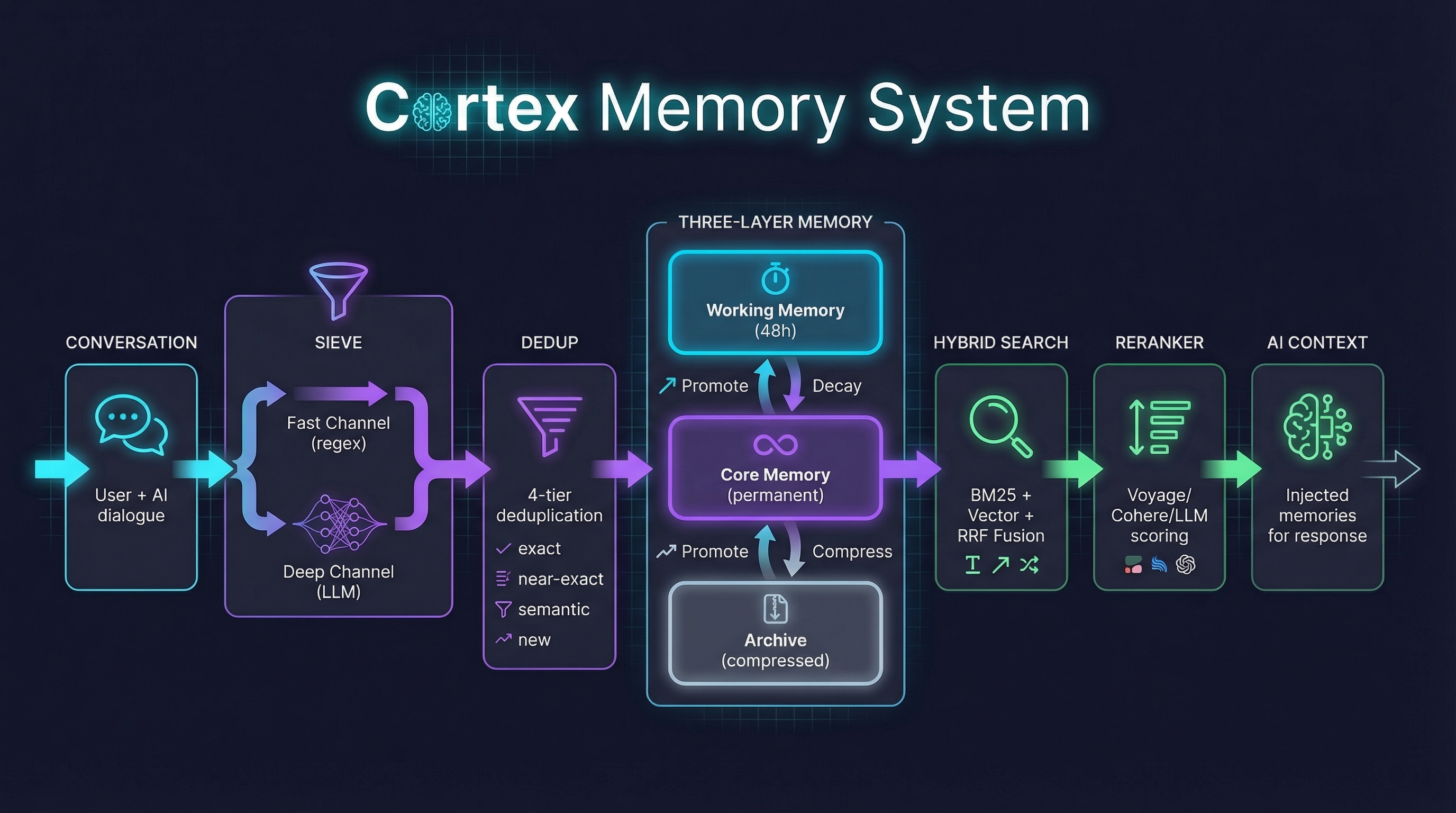
Working Memory (48h) ──promote──→ Core Memory ──decay──→ Archive
↑ ↑ │
│ read refreshes compress
│ decay counter back to Core
└──────────── nothing is ever truly lost ──────────┘
- Working → Core: Frequently accessed or high-value memories get promoted
- Core → Archive: Unused memories decay over time, get compressed
- Archive → Core: Compressed memories return when relevant again
- Time decay + read refresh + access frequency = organic memory behavior
Query → BM25 (keywords) + Vector (semantics) → RRF Fusion
→ Query Expansion (LLM variants)
→ LLM Reranker (optional)
→ Priority injection (constraints & persona first)
- Dual-channel: keyword precision + semantic understanding
- Query expansion: LLM generates search variants, multi-hit boost
- Reranker: LLM, Cohere, Voyage AI, Jina AI, or SiliconFlow re-scores for relevance
- Smart injection: constraints and persona always injected first, never truncated
Memories form connections. Cortex builds a knowledge graph automatically.
Alex ──uses──→ Rust ──related_to──→ Backend
│ │
└──works_at──→ Acme ──deploys_on──→ AWS
- Auto-extracted entity relations from every conversation
- Multi-hop reasoning: 2-hop graph traversal during recall
- Relations injected alongside memories for richer context
- Entity normalization + confidence scoring
Conversation ──→ Fast Channel (regex, 0ms) ──→ Merge ──→ 4-tier Dedup ──→ Store
──→ Deep Channel (LLM, 2-5s) ──┘ │ exact → skip
│ near-exact → replace
│ semantic → LLM judge
└ new → insert
- 20 memory categories: identity, preferences, constraints, goals, skills, relationships...
- Batch dedup: prevents "I like coffee" from becoming 50 memories
- Smart update: preference changes are updates, not new entries
- Entity relations: auto-extracted knowledge graph edges
Cortex learns from how you interact with its memories:
- Explicit feedback: Mark memories as helpful, neutral, or wrong via Dashboard or API
- Implicit signals: Memories used during recall get a usage boost
- Automatic tuning: Importance scores adjust over lifecycle cycles based on accumulated feedback
- Configure window size, min feedbacks, max delta, and signal weights in Dashboard → Settings → Self-Improvement
Every memory, searchable. Every extraction, auditable.
- Memory browser with search, filter by category/status/agent
- Search debugger — see BM25/vector/fusion scores for every query
- Extraction logs — what was extracted, why, confidence scores
- Lifecycle preview — dry-run promotion/decay before it happens
- Relation graph — interactive knowledge graph visualization (sigma.js)
- Multi-agent management with per-agent config
- One-click updates with version detection
| Integration | Setup |
|---|---|
| OpenClaw | openclaw plugins install @cortexmem/openclaw |
| Hermes Agent | Native MemoryProvider — see integrations/hermes/cortex |
| Claude Desktop | Add MCP config → restart |
| Cursor / Windsurf | Add MCP server in settings |
| Claude Code | claude mcp add cortex -- npx @cortexmem/mcp |
| Any app | REST API: /api/v1/recall + /api/v1/ingest |
Conversation ──→ Fast Channel (regex) + Deep Channel (LLM)
↓
Extracted memories (categorized into 20 types)
↓
4-tier dedup (exact → skip / near-exact → replace / semantic → LLM judge / new → insert)
↓
Store as Working (48h) or Core (permanent)
↓
Extract entity relations → Neo4j knowledge graph
User message ──→ Query Expansion (LLM generates 2-3 search variants)
↓
BM25 (keywords) + Vector (semantics) → RRF Fusion
↓
Multi-hit boost (memories found by multiple variants rank higher)
↓
LLM Reranker (optional, re-scores for relevance)
↓
Neo4j multi-hop traversal (discovers indirect associations)
↓
Priority inject → AI context
(constraints & persona first, then by relevance)
Working Memory (48h) ──promote──→ Core Memory ──decay──→ Archive ──compress──→ back to Core
↑
read refreshes decay counter
(nothing is ever truly lost)
┌─ Clients ──────────────────────────────────────────────────────────┐
│ OpenClaw (Bridge) │ Claude Desktop (MCP) │ Cursor │ REST │
└─────────────────────┴────────────────────────┴──────────┴─────────┘
│
▼
┌─ Cortex Server (:21100) ───────────────────────────────────────────┐
│ │
│ ┌─ Memory Gate ─────────┐ ┌─ Memory Sieve ──────────────────┐ │
│ │ Query Expansion │ │ Fast Channel (regex) │ │
│ │ BM25 + Vector Search │ │ Deep Channel (LLM) │ │
│ │ RRF Fusion │ │ 4-tier Dedup │ │
│ │ LLM Reranker │ │ Entity Relation Extraction │ │
│ │ Neo4j Graph Traversal │ │ Category Classification (×20) │ │
│ │ Priority Injection │ │ Smart Update Detection │ │
│ └───────────────────────┘ └─────────────────────────────────┘ │
│ │
│ ┌─ Lifecycle Engine ────┐ ┌─ Storage ───────────────────────┐ │
│ │ Promote / Decay │ │ SQLite + FTS5 (memories) │ │
│ │ Archive / Compress │ │ sqlite-vec (embeddings) │ │
│ │ Read Refresh │ │ Neo4j 5 (knowledge graph) │ │
│ │ Cron Scheduler │ │ │ │
│ └───────────────────────┘ └─────────────────────────────────┘ │
│ │
│ ┌─ Dashboard (React SPA) ──────────────────────────────────────┐ │
│ │ Memory Browser │ Search Debug │ Extraction Logs │ Graph View │ │
│ │ Lifecycle Preview │ Agent Config │ One-click Update │ │
│ └──────────────────────────────────────────────────────────────┘ │
└─────────────────────────────────────────────────────────────────────┘
git clone https://github.com/rikouu/cortex.git
cd cortex
docker compose up -d
Open http://localhost:21100 → Dashboard → Settings → pick your LLM provider, paste API key. Done.
No
.envfiles required for local use. Everything is configurable from the Dashboard.
By default, the Dashboard and API have no auth token — anyone who can reach port 21100 has full access. This is fine for localhost, but read the security section below before exposing to a network.
Without Docker
Production mode (recommended):
git clone https://github.com/rikouu/cortex.git
cd cortex
pnpm install
pnpm build # Build server + dashboard
pnpm dev # → http://localhost:21100
Development mode (for contributors):
pnpm dev # API only → http://localhost:21100# Dashboard runs separately:cd packages/dashboard && pnpm dev # → http://localhost:5173
⚠️ In dev mode, visitinghttp://localhost:21100in browser will show a 404 — that's normal. The Dashboard dev server runs on a separate port.
Requirements: Node.js ≥ 20, pnpm ≥ 8
Create a .env file in the project root (or set in docker-compose.yml → environment):
| Variable | Default | Description |
|---|---|---|
CORTEX_PORT | 21100 | Server port |
CORTEX_HOST | 127.0.0.1 | Bind address (0.0.0.0 for LAN) |
CORTEX_AUTH_TOKEN | (empty) | Auth token — protects Dashboard + API |
CORTEX_DB_PATH | cortex/brain.db | SQLite database path |
OPENAI_API_KEY | — | OpenAI API key (LLM + embedding) |
ANTHROPIC_API_KEY | — | Anthropic API key |
OLLAMA_BASE_URL | — | Ollama URL for local models |
TZ | UTC | Timezone (e.g. Asia/Tokyo) |
LOG_LEVEL | info | Log level (debug, info, warn, error) |
NEO4J_URI | — | Neo4j connection (optional) |
NEO4J_USER | — | Neo4j user |
NEO4J_PASSWORD | — | Neo4j password |
💡 LLM and embedding settings can also be configured in Dashboard → Settings, which is often easier. Env vars are mainly needed for
CORTEX_AUTH_TOKEN,CORTEX_HOST, andTZ.
When CORTEX_AUTH_TOKEN is set:
- Dashboard prompts for the token on first visit (saved in browser)
- All API calls require
Authorization: Bearer <your-token>header - MCP clients and Bridge plugins must include the token in their config
When CORTEX_AUTH_TOKEN is not set (default):
- No auth required — open access
- Fine for
localhost/ personal use ⚠️ Dangerous if the port is exposed to the internet
Where to find your token: It's whatever you set in CORTEX_AUTH_TOKEN. You choose it — there's no auto-generated token. Write it down and use the same value in all client configs.
If you're exposing Cortex beyond localhost (LAN, VPN, or internet):
- Set
CORTEX_AUTH_TOKEN— use a strong random string (32+ chars) - Use HTTPS/SSL — put a reverse proxy (Caddy, Nginx, Traefik) in front with TLS
- Restrict
CORTEX_HOST— bind to127.0.0.1or your Tailscale/VPN IP, not0.0.0.0 - Firewall rules — only allow trusted IPs to reach the port
- Keep updated — check Dashboard for version updates
# Example: strong random token
openssl rand -hex 24
# → e.g. 3a7f2b... (use this as CORTEX_AUTH_TOKEN)
⚠️ Without HTTPS, your token is sent in plaintext. Always use TLS for non-localhost deployments.
With Neo4j (knowledge graph)
Use the included overlay file:
# Set your Neo4j password in .envecho"NEO4J_PASSWORD=your-secure-password">> .env
# Start with Neo4j
docker compose -f docker-compose.yml -f docker-compose.neo4j.yml up -d
Or manually set env vars for Cortex:
NEO4J_URI=bolt://neo4j:7687
NEO4J_USER=neo4j
NEO4J_PASSWORD=your-password
💡 If you set
CORTEX_AUTH_TOKEN, include it in every client config below. Examples show both with and without auth.
openclaw plugins install @cortexmem/openclawConfigure in OpenClaw's plugin settings (Dashboard or openclaw.json):
{
"cortexUrl": "http://localhost:21100",
"authToken": "your-token-here",
"agentId": "my-agent"
}
Without auth: omit
authToken. Without custom agent: omitagentId(defaults to"openclaw").
The plugin auto-hooks into OpenClaw's lifecycle:
| Hook | When | What |
|---|---|---|
before_agent_start | Before AI responds | Recalls & injects relevant memories |
agent_end | After AI responds | Extracts & stores key information |
before_compaction | Before context compression | Emergency save before info is lost |
Plus cortex_recall and cortex_remember tools for on-demand use.
Use Cortex as a first-class Hermes memory.provider (a self-hosted alternative to
Mem0), with automatic pre-turn recall and post-turn ingestion instead of the manual
MCP path. A zero-dependency reference provider lives in
integrations/hermes/cortex:
mkdir -p "$HERMES_HOME/plugins/memory/cortex"
cp integrations/hermes/cortex/{__init__.py,plugin.yaml} "$HERMES_HOME/plugins/memory/cortex/"
# ~/.hermes/config.yamlmemory:
provider: cortexConfigure via hermes memory setup (or CORTEX_URL / CORTEX_AUTH_TOKEN /
CORTEX_AGENT_ID / CORTEX_PAIRING_CODE in ~/.hermes/.env). See the
integration README for details.
Settings → Developer → Edit Config:
{
"mcpServers": {
"cortex": {
"command": "npx",
"args": ["@cortexmem/mcp", "--server-url", "http://localhost:21100"],
"env": {
"CORTEX_AUTH_TOKEN": "your-token-here",
"CORTEX_AGENT_ID": "my-agent"
}
}
}
}
Without auth: remove the
CORTEX_AUTH_TOKENline fromenv.
Cursor
Settings → MCP → Add new global MCP server:
{
"mcpServers": {
"cortex": {
"command": "npx",
"args": ["@cortexmem/mcp"],
"env": {
"CORTEX_URL": "http://localhost:21100",
"CORTEX_AUTH_TOKEN": "your-token-here",
"CORTEX_AGENT_ID": "my-agent"
}
}
}
}
Claude Code
# Without auth
claude mcp add cortex -- npx @cortexmem/mcp --server-url http://localhost:21100
# With auth + agent ID
CORTEX_AUTH_TOKEN=your-token-here CORTEX_AGENT_ID=my-agent \
claude mcp add cortex -- npx @cortexmem/mcp --server-url http://localhost:21100
Windsurf / Cline / Others
{
"mcpServers": {
"cortex": {
"command": "npx",
"args": ["@cortexmem/mcp", "--server-url", "http://localhost:21100"],
"env": {
"CORTEX_AGENT_ID": "my-agent",
"CORTEX_AUTH_TOKEN": "your-token-here"
}
}
}
}Each agent gets its own isolated memory namespace via agent_id. Memories from one agent are invisible to others.
How it works: The agent_id is the key for isolation. Cortex automatically creates agents on first use — you don't need to pre-create them in the Dashboard. If an agent with that ID already exists, memories are added to it. Just make sure the same agent_id is used consistently across your integration.
OpenClaw Plugin — Automatic isolation. The plugin reads ctx.agentId from each agent's session, no extra config needed. Multiple agents in agents.list[] are isolated out of the box.
{
"cortexUrl": "http://localhost:21100",
"authToken": "your-token-here"
}
No
agentIdneeded in config. The plugin automatically uses the current agent's ID from OpenClaw's context. TheagentIdconfig field is only a fallback for whenctx.agentIdis unavailable.Matching IDs: If your OpenClaw agent's ID is
"xiaoai", Cortex will store memories underagent_id: "xiaoai". You can view and manage them in the Cortex Dashboard under that agent.
If you run multiple OpenClaw instances (e.g. Harry's Mac mini + Sarah's laptop) and both use the same default agent_id (like "main"), their memories would mix. A pairing_code solves this.
Set a unique CORTEX_PAIRING_CODE env var per instance:
{
"cortexUrl": "http://localhost:21100",
"pairingCode": "harry-mac-mini-2026"
}
Or via environment variable for the OpenClaw plugin:
CORTEX_PAIRING_CODE=harry-mac-mini-2026
- Requests with a pairing code only see memories tagged with that same code
- Requests without a pairing code use the original
agent_id-only behavior (backward compatible) - Each OpenClaw instance should have its own unique code
REST API with pairing_code:
curl -X POST http://localhost:21100/api/v1/recall \
-H "Content-Type: application/json" \
-d '{"query":"preferences","agent_id":"main","pairing_code":"harry-mac-mini-2026"}'
MCP (Claude Code / Cursor / etc.) — One MCP server per agent. Use --agent-id matching the agent name in Cortex:
{
"mcpServers": {
"cortex-coder": {
"command": "npx",
"args": ["@cortexmem/mcp", "--server-url", "http://localhost:21100", "--agent-id", "coder"]
},
"cortex-researcher": {
"command": "npx",
"args": ["@cortexmem/mcp", "--server-url", "http://localhost:21100", "--agent-id", "researcher"]
}
}
}
Tip: Each MCP server instance = one agent. If you only have one agent, one MCP server with
--agent-id your-agentis sufficient.
REST API — Pass agent_id in every request:
# Agent A's memories
curl -X POST http://localhost:21100/api/v1/recall \
-H "Content-Type: application/json" \
-d '{"query":"preferences","agent_id":"agent-a"}'# Agent B's memories (isolated)
curl -X POST http://localhost:21100/api/v1/recall \
-H "Content-Type: application/json" \
-d '{"query":"preferences","agent_id":"agent-b"}'
Auto-creation: If
agent-adoesn't exist in Cortex yet, it will be created automatically on the firstingestorremembercall.
# Without auth
curl -X POST http://localhost:21100/api/v1/recall \
-H "Content-Type: application/json" \
-d '{"query":"What food do I like?","agent_id":"default"}'# With auth
curl -X POST http://localhost:21100/api/v1/ingest \
-H "Content-Type: application/json" \
-H "Authorization: Bearer your-token-here" \
-d '{"user_message":"I love sushi","assistant_message":"Noted!","agent_id":"default"}'| Tool | Description |
|---|---|
cortex_recall | Search memories with priority injection |
cortex_remember | Store a specific memory |
cortex_relations | List entity relationships from memory |
cortex_forget | Remove or correct a memory |
cortex_search_debug | Debug search scoring |
cortex_stats | Memory statistics |
| Provider | Recommended Models | Notes |
|---|---|---|
| OpenAI | gpt-4o-mini, gpt-4o | Default. Best cost/quality |
| Anthropic | claude-haiku-4-5, claude-sonnet-4-6 | Highest extraction quality |
| Google Gemini | gemini-2.5-flash | Free tier on AI Studio |
| DeepSeek | deepseek-chat | Cheapest option |
| DashScope | qwen-plus, qwen-turbo | 通义千问, OpenAI-compatible |
| Ollama | qwen2.5, llama3.2 | Fully local, zero cost |
| OpenRouter | Any of 100+ models | Unified gateway |
Each extraction/lifecycle LLM can be configured with a primary provider, an optional fallback provider, retry settings, and per-provider timeout.
{
"llm": {
"extraction": {
"provider": "openai",
"model": "gpt-4o-mini",
"timeoutMs": 30000,
"retry": { "maxRetries": 2, "baseDelayMs": 200 },
"fallback": {
"provider": "openrouter",
"model": "anthropic/claude-haiku-4-5",
"timeoutMs": 30000
}
}
}
}| Provider | Recommended Models | Notes |
|---|---|---|
| OpenAI | text-embedding-3-small/large | Default. Most reliable |
| Google Gemini | gemini-embedding-2, gemini-embedding-001 | Free on AI Studio |
| Voyage AI | voyage-4-large, voyage-4-lite | High quality (shared embedding space) |
| DashScope | text-embedding-v3 | 通义千问, good for Chinese |
| Ollama | bge-m3, nomic-embed-text | Local, zero cost |
⚠️ Changing embedding models requires reindexing all vectors. Use Dashboard → Settings → Reindex Vectors.
| Provider | Recommended Models | Free Tier | Notes |
|---|---|---|---|
| LLM | (your extraction model) | — | Highest quality, ~2-3s latency |
| Cohere | rerank-v3.5 | 1000 req/mo | Established, reliable |
| Voyage AI | rerank-2.5, rerank-2.5-lite | 200M tokens | Best free tier |
| Jina AI | jina-reranker-v2-base-multilingual | 1M tokens | Best for Chinese/multilingual |
| SiliconFlow | BAAI/bge-reranker-v2-m3 | Free tier | Open-source, low latency |
💡 Dedicated rerankers are 10-50x faster than LLM reranking (~100ms vs ~2s). Configure in Dashboard → Settings → Search.
| Method | Endpoint | Description |
|---|---|---|
POST | /api/v1/recall | Search & inject memories |
POST | /api/v1/ingest | Ingest conversation |
POST | /api/v1/flush | Emergency flush |
POST | /api/v1/search | Hybrid search with debug |
CRUD | /api/v1/memories | Memory management |
POST | /api/v1/memories/:id/rollback | Rollback to previous version |
GET | /api/v1/memories/:id/chain | Version chain |
POST | /api/v1/memories/:id/feedback | Submit memory feedback |
GET | /api/v1/memories/:id/feedback | Get memory feedback |
POST | /api/v1/recall/:id/usage | Track recall usage |
GET | /api/v1/feedback/overview | Feedback overview stats |
CRUD | /api/v1/relations | Entity relations |
GET | /api/v1/relations/traverse | Multi-hop graph traversal |
GET | /api/v1/relations/path | Shortest path between entities |
GET | /api/v1/relations/stats | Graph statistics |
CRUD | /api/v1/agents | Agent management |
GET | /api/v1/agents/:id/config | Agent merged config |
GET | /api/v1/extraction-logs | Extraction audit logs |
POST | /api/v1/lifecycle/run | Trigger lifecycle |
GET | /api/v1/lifecycle/preview | Dry-run preview |
GET | /api/v1/lifecycle/log | Lifecycle event history |
GET | /api/v1/health | Health check |
GET | /api/v1/health/components | Component-level health |
POST | /api/v1/health/test | Test all connections |
GET | /api/v1/stats | Statistics |
GET/PATCH | /api/v1/config | Global config |
POST | /api/v1/import | Import memories |
POST | /api/v1/export | Export memories |
POST | /api/v1/reindex | Rebuild vector index |
| Setup | Monthly Cost |
|---|---|
| gpt-4o-mini + text-embedding-3-small | ~$0.55 |
| DeepSeek + Google Embedding | ~$0.10 |
| Ollama (fully local) | $0.00 |
Based on 50 conversations/day. Scales linearly.
MIT
Built with obsessive attention to how memory should work.