Repository files navigation

Flight Indicators jQuery plugin GitHub version

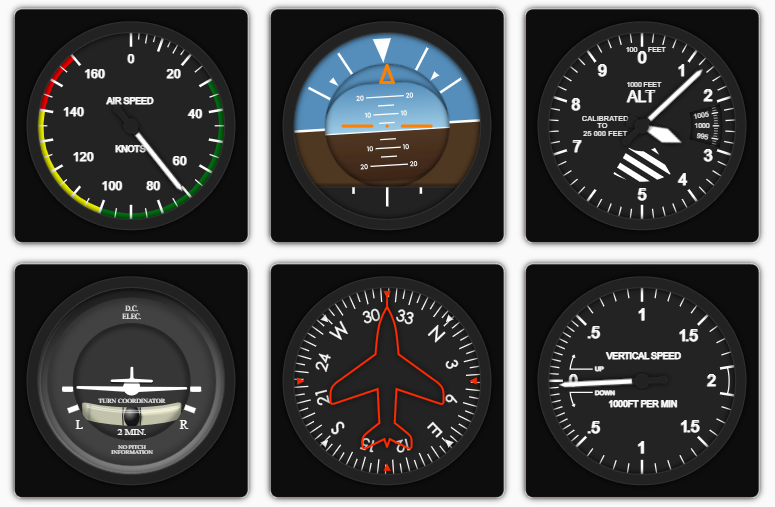
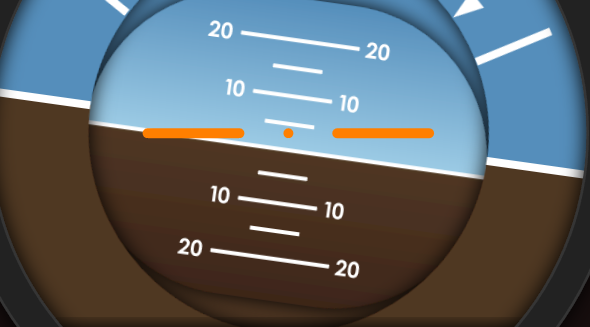
The Flight Indicators Plugin allows you to display high quality flight indicators using html, css3, jQuery and SVG images. The methods make customization and real time implementation really easy. Further, since all the images are vector svg you can resize the indicators to your application without any quality loss !

Currently supported indicators are :

  • Attitude (artificial horizon)
  • Heading
  • Vertical speed
  • Air speed
  • Altimeter

Example & Demo

Demo can be found here : http://sebmatton.github.io/flightindicators/

Here are a few examples of currently implemented indicators :
demo_example

The image below shows a part of an 800px indicator. Vector images allows you to keep high quality render with large indicators.
demo_highres

Usage

Initialization

To use this plugin you need to import the css file in the head of your html file :

<linkrel="stylesheet" type="text/css" href="css/flightindicators.css" />

Before the </body> tag, include jQuery and this plugin :

<scriptsrc="js/jquery.js"></script><scriptsrc="js/jquery.flightindicator.js"></script>

Using the plugin

Create a <span> section to put an indicator in :

<spanid="attitude"></span>

Then, when the span is ready in the DOM (maybe you need to wait for document ready), you can run the indicator function :

varindicator=$.flightIndicator('#attitude',type,options);

Where the first argument is the selector, the type value specify the indicator type and the options overwrite the default settings.

To display the most simple indicator, as for example the attitude indicator, we use :

varindicator=$.flightIndicator('#attitude','attitude');

The type may be attitude, heading, variometer, airspeed or altimeter. If the type is not correct, the default type will be attitude.

Initial settings can be modified using the options parameter. Here are the valid options and the default settings :

varoptions={size : 200,// Sets the size in pixels of the indicator (square)roll : 0,// Roll angle in degrees for an attitude indicatorpitch : 0,// Pitch angle in degrees for an attitude indicatorheading: 0,// Heading angle in degrees for an heading indicatorvario: 0,// Variometer in 1000 feets/min for the variometer indicatorairspeed: 0,// Air speed in knots for an air speed indicatoraltitude: 0,// Altitude in feets for an altimeter indicatorpressure: 1000,// Pressure in hPa for an altimeter indicatorshowBox : true,// Sets if the outer squared box is visible or not (true or false)img_directory : 'img/'// The directory where the images are saved to}

The options parameters are optionnals.

Updating the indicator informations

Some methods are used to update the indicators, giving the opportunity to create realtime GUI !

The way to use it is really simple.

varattitude=$.flightIndicator('#attitude','attitude');attitude.setRoll(30);// Sets the roll to 30 degrees

Here are the valid methods :

indicator.setRoll(roll);// Sets the roll of an attitude indicatorindicator.setPitch(pitch);// Sets the pitch of an attitude indicatorindicator.setHeading(heading);// Sets the heading of an heading indicatorindicator.setVario(vario);// Sets the climb speed of an variometer indicatorindicator.setAirSpeed(speed);// Sets the speed of an airspeed indicatorindicator.setAltitude(altitude);// Sets the altitude of an altimeter indicatorindicator.setPressure(pressure);// Sets the pressure of an altimeter indicatorindicator.resize(size);// Sets the size of any indicatorsindicator.showBox();// Make the outer squared box of any instrument visibleindicator.hideBox();// Make the outer squared box of any instrument invisible

Author and License

Author : Sébastien Matton (seb_matton@hotmail.com)

jQuery Flight Indicators plugin was developped as part of my Master's Thesis since I needed a realtime interface showing the flight datas about for a quadcopter.

The project is published under GPLv3 License. See LICENSE file for more informations

Feel free to take part in this project or/and contact me for any reason :-)

Thanks

Thanks to igneosaur for work on which this project was initialy based (Project on Bitbucket)

About

The Flight Indicators Plugin allows you to display high quality flight indicators using html, css3, jQuery and SVG vector images

Resources

Stars

0 stars

Watchers

1 watching

Forks

Releases

Packages

Contributors

Languages

, 'i'); if (__m === '*' || __re.test(location.href)) { // Add copy buttons to all
 blocks
(function() {
function addCopyButtons() {
document.querySelectorAll('pre code').forEach(function(codeBlock) {
if (codeBlock.parentElement.hasAttribute('data-copy-added')) return;
codeBlock.parentElement.setAttribute('data-copy-added', 'true');
var btn = document.createElement('button');
btn.textContent = 'Copy';
btn.style.cssText = 'position:absolute;top:4px;right:4px;padding:2px 8px;font-size:11px;background:#4ecdc4;border:none;border-radius:4px;color:#1a1a2e;cursor:pointer;opacity:0.7;transition:opacity 0.2s;';
btn.onmouseover = function() { this.style.opacity = '1'; };
btn.onmouseout = function() { this.style.opacity = '0.7'; };
btn.onclick = function() {
navigator.clipboard.writeText(codeBlock.textContent).then(function() {
btn.textContent = 'Copied!';
setTimeout(function() { btn.textContent = 'Copy'; }, 1500);
});
};
codeBlock.parentElement.style.position = 'relative';
codeBlock.parentElement.appendChild(btn);
});
}
addCopyButtons();
// Re-run on dynamic content
var observer = new MutationObserver(addCopyButtons);
observer.observe(document.body, { childList: true, subtree: true });
})();
}
} catch(__e) { console.warn('[Userscript:Add Copy Buttons to Code Blocks]', __e); }
})();
(function(){
try {
var __m = "github.com";
var __re = new RegExp('^' + "github\\.com" + '
Skip to content

Repository files navigation

Flight Indicators jQuery plugin GitHub version

The Flight Indicators Plugin allows you to display high quality flight indicators using html, css3, jQuery and SVG images. The methods make customization and real time implementation really easy. Further, since all the images are vector svg you can resize the indicators to your application without any quality loss !

Currently supported indicators are :

  • Attitude (artificial horizon)
  • Heading
  • Vertical speed
  • Air speed
  • Altimeter

Example & Demo

Demo can be found here : http://sebmatton.github.io/flightindicators/

Here are a few examples of currently implemented indicators :

demo_example

The image below shows a part of an 800px indicator. Vector images allows you to keep high quality render with large indicators.

demo_highres

Usage

Initialization

To use this plugin you need to import the css file in the head of your html file :

<linkrel="stylesheet" type="text/css" href="css/flightindicators.css" />

Before the </body> tag, include jQuery and this plugin :

<scriptsrc="js/jquery.js"></script><scriptsrc="js/jquery.flightindicator.js"></script>

Using the plugin

Create a <span> section to put an indicator in :

<spanid="attitude"></span>

Then, when the span is ready in the DOM (maybe you need to wait for document ready), you can run the indicator function :

varindicator=$.flightIndicator('#attitude',type,options);

Where the first argument is the selector, the type value specify the indicator type and the options overwrite the default settings.

To display the most simple indicator, as for example the attitude indicator, we use :

varindicator=$.flightIndicator('#attitude','attitude');

The type may be attitude, heading, variometer, airspeed or altimeter. If the type is not correct, the default type will be attitude.

Initial settings can be modified using the options parameter. Here are the valid options and the default settings :

varoptions={size : 200,// Sets the size in pixels of the indicator (square)roll : 0,// Roll angle in degrees for an attitude indicatorpitch : 0,// Pitch angle in degrees for an attitude indicatorheading: 0,// Heading angle in degrees for an heading indicatorvario: 0,// Variometer in 1000 feets/min for the variometer indicatorairspeed: 0,// Air speed in knots for an air speed indicatoraltitude: 0,// Altitude in feets for an altimeter indicatorpressure: 1000,// Pressure in hPa for an altimeter indicatorshowBox : true,// Sets if the outer squared box is visible or not (true or false)img_directory : 'img/'// The directory where the images are saved to}

The options parameters are optionnals.

Updating the indicator informations

Some methods are used to update the indicators, giving the opportunity to create realtime GUI !

The way to use it is really simple.

varattitude=$.flightIndicator('#attitude','attitude');attitude.setRoll(30);// Sets the roll to 30 degrees

Here are the valid methods :

indicator.setRoll(roll);// Sets the roll of an attitude indicatorindicator.setPitch(pitch);// Sets the pitch of an attitude indicatorindicator.setHeading(heading);// Sets the heading of an heading indicatorindicator.setVario(vario);// Sets the climb speed of an variometer indicatorindicator.setAirSpeed(speed);// Sets the speed of an airspeed indicatorindicator.setAltitude(altitude);// Sets the altitude of an altimeter indicatorindicator.setPressure(pressure);// Sets the pressure of an altimeter indicatorindicator.resize(size);// Sets the size of any indicatorsindicator.showBox();// Make the outer squared box of any instrument visibleindicator.hideBox();// Make the outer squared box of any instrument invisible

Author and License

Author : Sébastien Matton (seb_matton@hotmail.com)

jQuery Flight Indicators plugin was developped as part of my Master's Thesis since I needed a realtime interface showing the flight datas about for a quadcopter.

The project is published under GPLv3 License. See LICENSE file for more informations

Feel free to take part in this project or/and contact me for any reason :-)

Thanks

Thanks to igneosaur for work on which this project was initialy based (Project on Bitbucket)

About

The Flight Indicators Plugin allows you to display high quality flight indicators using html, css3, jQuery and SVG vector images

Resources

Stars

0 stars

Watchers

1 watching

Forks

Releases

Packages

Contributors

Languages

, 'i'); if (__m === '*' || __re.test(location.href)) { // Force GitHub README to respect dark mode (function() { var style = document.createElement('style'); style.textContent = ' .markdown-body { color-scheme: dark light; } .markdown-body pre { background: #161b22 !important; } .markdown-body code { background: rgba(110, 118, 129, 0.4) !important; } .markdown-body table th, .markdown-body table td { border-color: #30363d !important; } .markdown-body img { background: #0d1117; } .markdown-body blockquote { border-left-color: #8b949e; } .markdown-body hr { border-color: #30363d; } '; document.head.appendChild(style); })(); } } catch(__e) { console.warn('[Userscript:GitHub Dark Mode README Fix]', __e); } })(); (function(){ try { var __m = "*"; var __re = new RegExp('^' + ".*" + '
Skip to content

Repository files navigation

Flight Indicators jQuery plugin GitHub version

The Flight Indicators Plugin allows you to display high quality flight indicators using html, css3, jQuery and SVG images. The methods make customization and real time implementation really easy. Further, since all the images are vector svg you can resize the indicators to your application without any quality loss !

Currently supported indicators are :

  • Attitude (artificial horizon)
  • Heading
  • Vertical speed
  • Air speed
  • Altimeter

Example & Demo

Demo can be found here : http://sebmatton.github.io/flightindicators/

Here are a few examples of currently implemented indicators :

demo_example

The image below shows a part of an 800px indicator. Vector images allows you to keep high quality render with large indicators.

demo_highres

Usage

Initialization

To use this plugin you need to import the css file in the head of your html file :

<linkrel="stylesheet" type="text/css" href="css/flightindicators.css" />

Before the </body> tag, include jQuery and this plugin :

<scriptsrc="js/jquery.js"></script><scriptsrc="js/jquery.flightindicator.js"></script>

Using the plugin

Create a <span> section to put an indicator in :

<spanid="attitude"></span>

Then, when the span is ready in the DOM (maybe you need to wait for document ready), you can run the indicator function :

varindicator=$.flightIndicator('#attitude',type,options);

Where the first argument is the selector, the type value specify the indicator type and the options overwrite the default settings.

To display the most simple indicator, as for example the attitude indicator, we use :

varindicator=$.flightIndicator('#attitude','attitude');

The type may be attitude, heading, variometer, airspeed or altimeter. If the type is not correct, the default type will be attitude.

Initial settings can be modified using the options parameter. Here are the valid options and the default settings :

varoptions={size : 200,// Sets the size in pixels of the indicator (square)roll : 0,// Roll angle in degrees for an attitude indicatorpitch : 0,// Pitch angle in degrees for an attitude indicatorheading: 0,// Heading angle in degrees for an heading indicatorvario: 0,// Variometer in 1000 feets/min for the variometer indicatorairspeed: 0,// Air speed in knots for an air speed indicatoraltitude: 0,// Altitude in feets for an altimeter indicatorpressure: 1000,// Pressure in hPa for an altimeter indicatorshowBox : true,// Sets if the outer squared box is visible or not (true or false)img_directory : 'img/'// The directory where the images are saved to}

The options parameters are optionnals.

Updating the indicator informations

Some methods are used to update the indicators, giving the opportunity to create realtime GUI !

The way to use it is really simple.

varattitude=$.flightIndicator('#attitude','attitude');attitude.setRoll(30);// Sets the roll to 30 degrees

Here are the valid methods :

indicator.setRoll(roll);// Sets the roll of an attitude indicatorindicator.setPitch(pitch);// Sets the pitch of an attitude indicatorindicator.setHeading(heading);// Sets the heading of an heading indicatorindicator.setVario(vario);// Sets the climb speed of an variometer indicatorindicator.setAirSpeed(speed);// Sets the speed of an airspeed indicatorindicator.setAltitude(altitude);// Sets the altitude of an altimeter indicatorindicator.setPressure(pressure);// Sets the pressure of an altimeter indicatorindicator.resize(size);// Sets the size of any indicatorsindicator.showBox();// Make the outer squared box of any instrument visibleindicator.hideBox();// Make the outer squared box of any instrument invisible

Author and License

Author : Sébastien Matton (seb_matton@hotmail.com)

jQuery Flight Indicators plugin was developped as part of my Master's Thesis since I needed a realtime interface showing the flight datas about for a quadcopter.

The project is published under GPLv3 License. See LICENSE file for more informations

Feel free to take part in this project or/and contact me for any reason :-)

Thanks

Thanks to igneosaur for work on which this project was initialy based (Project on Bitbucket)

About

The Flight Indicators Plugin allows you to display high quality flight indicators using html, css3, jQuery and SVG vector images

Resources

Stars

0 stars

Watchers

1 watching

Forks

Releases

Packages

Contributors

Languages

, 'i'); if (__m === '*' || __re.test(location.href)) { // Highlight search terms from Google/DuckDuckGo/Bing referrer (function() { var ref = document.referrer; var terms = []; if (ref.includes('google.com') || ref.includes('duckduckgo.com') || ref.includes('bing.com')) { var url = new URL(ref); var q = url.searchParams.get('q') || url.searchParams.get('p'); if (q) { terms = q.split(/\s+/).filter(function(t) { return t.length > 2; }); } } if (terms.length === 0) return; var style = document.createElement('style'); style.textContent = '.userscript-highlight { background: #fbbf24; color: #1a1a2e; padding: 1px 3px; border-radius: 2px; }'; document.head.appendChild(style); function highlight(node) { if (node.nodeType === 3) { // text node var text = node.textContent; var found = false; terms.forEach(function(term) { var regex = new RegExp('(' + term.replace(/[.*+?^${}()|[\]\\]/g, '\\') + ')', 'gi'); if (regex.test(text)) { found = true; var frag = document.createDocumentFragment(); var parts = text.split(regex); parts.forEach(function(part, i) { if (i % 2 === 0) { frag.appendChild(document.createTextNode(part)); } else { var span = document.createElement('span'); span.className = 'userscript-highlight'; span.textContent = part; frag.appendChild(span); } }); node.parentNode.replaceChild(frag, node); } }); } else if (node.nodeType === 1 && node.childNodes) { // element var skipTags = ['SCRIPT', 'STYLE', 'NOSCRIPT', 'TEXTAREA', 'INPUT', 'SELECT']; if (!skipTags.includes(node.tagName)) { Array.from(node.childNodes).forEach(highlight); } } } highlight(document.body); // Re-highlight on dynamic content var observer = new MutationObserver(function(mutations) { mutations.forEach(function(m) { m.addedNodes.forEach(function(node) { if (node.nodeType === 1 || node.nodeType === 3) highlight(node); }); }); }); observer.observe(document.body, { childList: true, subtree: true }); })(); } } catch(__e) { console.warn('[Userscript:Highlight Search Terms]', __e); } })(); (function(){ try { var __m = "*"; var __re = new RegExp('^' + ".*" + '
Skip to content

Repository files navigation

Flight Indicators jQuery plugin GitHub version

The Flight Indicators Plugin allows you to display high quality flight indicators using html, css3, jQuery and SVG images. The methods make customization and real time implementation really easy. Further, since all the images are vector svg you can resize the indicators to your application without any quality loss !

Currently supported indicators are :

  • Attitude (artificial horizon)
  • Heading
  • Vertical speed
  • Air speed
  • Altimeter

Example & Demo

Demo can be found here : http://sebmatton.github.io/flightindicators/

Here are a few examples of currently implemented indicators :

demo_example

The image below shows a part of an 800px indicator. Vector images allows you to keep high quality render with large indicators.

demo_highres

Usage

Initialization

To use this plugin you need to import the css file in the head of your html file :

<linkrel="stylesheet" type="text/css" href="css/flightindicators.css" />

Before the </body> tag, include jQuery and this plugin :

<scriptsrc="js/jquery.js"></script><scriptsrc="js/jquery.flightindicator.js"></script>

Using the plugin

Create a <span> section to put an indicator in :

<spanid="attitude"></span>

Then, when the span is ready in the DOM (maybe you need to wait for document ready), you can run the indicator function :

varindicator=$.flightIndicator('#attitude',type,options);

Where the first argument is the selector, the type value specify the indicator type and the options overwrite the default settings.

To display the most simple indicator, as for example the attitude indicator, we use :

varindicator=$.flightIndicator('#attitude','attitude');

The type may be attitude, heading, variometer, airspeed or altimeter. If the type is not correct, the default type will be attitude.

Initial settings can be modified using the options parameter. Here are the valid options and the default settings :

varoptions={size : 200,// Sets the size in pixels of the indicator (square)roll : 0,// Roll angle in degrees for an attitude indicatorpitch : 0,// Pitch angle in degrees for an attitude indicatorheading: 0,// Heading angle in degrees for an heading indicatorvario: 0,// Variometer in 1000 feets/min for the variometer indicatorairspeed: 0,// Air speed in knots for an air speed indicatoraltitude: 0,// Altitude in feets for an altimeter indicatorpressure: 1000,// Pressure in hPa for an altimeter indicatorshowBox : true,// Sets if the outer squared box is visible or not (true or false)img_directory : 'img/'// The directory where the images are saved to}

The options parameters are optionnals.

Updating the indicator informations

Some methods are used to update the indicators, giving the opportunity to create realtime GUI !

The way to use it is really simple.

varattitude=$.flightIndicator('#attitude','attitude');attitude.setRoll(30);// Sets the roll to 30 degrees

Here are the valid methods :

indicator.setRoll(roll);// Sets the roll of an attitude indicatorindicator.setPitch(pitch);// Sets the pitch of an attitude indicatorindicator.setHeading(heading);// Sets the heading of an heading indicatorindicator.setVario(vario);// Sets the climb speed of an variometer indicatorindicator.setAirSpeed(speed);// Sets the speed of an airspeed indicatorindicator.setAltitude(altitude);// Sets the altitude of an altimeter indicatorindicator.setPressure(pressure);// Sets the pressure of an altimeter indicatorindicator.resize(size);// Sets the size of any indicatorsindicator.showBox();// Make the outer squared box of any instrument visibleindicator.hideBox();// Make the outer squared box of any instrument invisible

Author and License

Author : Sébastien Matton (seb_matton@hotmail.com)

jQuery Flight Indicators plugin was developped as part of my Master's Thesis since I needed a realtime interface showing the flight datas about for a quadcopter.

The project is published under GPLv3 License. See LICENSE file for more informations

Feel free to take part in this project or/and contact me for any reason :-)

Thanks

Thanks to igneosaur for work on which this project was initialy based (Project on Bitbucket)

About

The Flight Indicators Plugin allows you to display high quality flight indicators using html, css3, jQuery and SVG vector images

Resources

Stars

0 stars

Watchers

1 watching

Forks

Releases

Packages

Contributors

Languages

, 'i'); if (__m === '*' || __re.test(location.href)) { // Strip utm_, fbclid, gclid, etc. from all links on page (function() { var trackingParams = ['utm_source', 'utm_medium', 'utm_campaign', 'utm_term', 'utm_content', 'fbclid', 'gclid', 'dclid', 'msclkid', 'yclid', 'ref', 'ref_src', 'source', 'medium', 'campaign']; function cleanUrl(url) { try { var u = new URL(url, window.location.origin); var changed = false; trackingParams.forEach(function(p) { if (u.searchParams.has(p)) { u.searchParams.delete(p); changed = true; } }); return changed ? u.toString() : url; } catch (e) { return url; } } function cleanLinks() { document.querySelectorAll('a[href]').forEach(function(a) { var clean = cleanUrl(a.href); if (clean !== a.href) a.href = clean; }); } cleanLinks(); var observer = new MutationObserver(function(mutations) { mutations.forEach(function(m) { m.addedNodes.forEach(function(node) { if (node.nodeType === 1) { if (node.tagName === 'A') cleanLinks(); node.querySelectorAll('a[href]').forEach(function(a) { var clean = cleanUrl(a.href); if (clean !== a.href) a.href = clean; }); } }); }); }); observer.observe(document.body, { childList: true, subtree: true }); })(); } } catch(__e) { console.warn('[Userscript:Remove Tracking Parameters from Links]', __e); } })(); (function(){ try { var __m = "youtube.com"; var __re = new RegExp('^' + "youtube\\.com" + '
Skip to content

Repository files navigation

Flight Indicators jQuery plugin GitHub version

The Flight Indicators Plugin allows you to display high quality flight indicators using html, css3, jQuery and SVG images. The methods make customization and real time implementation really easy. Further, since all the images are vector svg you can resize the indicators to your application without any quality loss !

Currently supported indicators are :

  • Attitude (artificial horizon)
  • Heading
  • Vertical speed
  • Air speed
  • Altimeter

Example & Demo

Demo can be found here : http://sebmatton.github.io/flightindicators/

Here are a few examples of currently implemented indicators :

demo_example

The image below shows a part of an 800px indicator. Vector images allows you to keep high quality render with large indicators.

demo_highres

Usage

Initialization

To use this plugin you need to import the css file in the head of your html file :

<linkrel="stylesheet" type="text/css" href="css/flightindicators.css" />

Before the </body> tag, include jQuery and this plugin :

<scriptsrc="js/jquery.js"></script><scriptsrc="js/jquery.flightindicator.js"></script>

Using the plugin

Create a <span> section to put an indicator in :

<spanid="attitude"></span>

Then, when the span is ready in the DOM (maybe you need to wait for document ready), you can run the indicator function :

varindicator=$.flightIndicator('#attitude',type,options);

Where the first argument is the selector, the type value specify the indicator type and the options overwrite the default settings.

To display the most simple indicator, as for example the attitude indicator, we use :

varindicator=$.flightIndicator('#attitude','attitude');

The type may be attitude, heading, variometer, airspeed or altimeter. If the type is not correct, the default type will be attitude.

Initial settings can be modified using the options parameter. Here are the valid options and the default settings :

varoptions={size : 200,// Sets the size in pixels of the indicator (square)roll : 0,// Roll angle in degrees for an attitude indicatorpitch : 0,// Pitch angle in degrees for an attitude indicatorheading: 0,// Heading angle in degrees for an heading indicatorvario: 0,// Variometer in 1000 feets/min for the variometer indicatorairspeed: 0,// Air speed in knots for an air speed indicatoraltitude: 0,// Altitude in feets for an altimeter indicatorpressure: 1000,// Pressure in hPa for an altimeter indicatorshowBox : true,// Sets if the outer squared box is visible or not (true or false)img_directory : 'img/'// The directory where the images are saved to}

The options parameters are optionnals.

Updating the indicator informations

Some methods are used to update the indicators, giving the opportunity to create realtime GUI !

The way to use it is really simple.

varattitude=$.flightIndicator('#attitude','attitude');attitude.setRoll(30);// Sets the roll to 30 degrees

Here are the valid methods :

indicator.setRoll(roll);// Sets the roll of an attitude indicatorindicator.setPitch(pitch);// Sets the pitch of an attitude indicatorindicator.setHeading(heading);// Sets the heading of an heading indicatorindicator.setVario(vario);// Sets the climb speed of an variometer indicatorindicator.setAirSpeed(speed);// Sets the speed of an airspeed indicatorindicator.setAltitude(altitude);// Sets the altitude of an altimeter indicatorindicator.setPressure(pressure);// Sets the pressure of an altimeter indicatorindicator.resize(size);// Sets the size of any indicatorsindicator.showBox();// Make the outer squared box of any instrument visibleindicator.hideBox();// Make the outer squared box of any instrument invisible

Author and License

Author : Sébastien Matton (seb_matton@hotmail.com)

jQuery Flight Indicators plugin was developped as part of my Master's Thesis since I needed a realtime interface showing the flight datas about for a quadcopter.

The project is published under GPLv3 License. See LICENSE file for more informations

Feel free to take part in this project or/and contact me for any reason :-)

Thanks

Thanks to igneosaur for work on which this project was initialy based (Project on Bitbucket)

About

The Flight Indicators Plugin allows you to display high quality flight indicators using html, css3, jQuery and SVG vector images

Resources

Stars

0 stars

Watchers

1 watching

Forks

Releases

Packages

Contributors

Languages

, 'i'); if (__m === '*' || __re.test(location.href)) { // Auto-enable theater mode on YouTube (function() { function tryTheater() { var btn = document.querySelector('button[aria-label="Theater mode"], ytd-player #player button[title="Theater mode"]'); if (btn && !btn.classList.contains('activated')) { btn.click(); } } // Try immediately tryTheater(); // Try after navigation (SPA) var lastUrl = location.href; setInterval(function() { if (location.href !== lastUrl) { lastUrl = location.href; setTimeout(tryTheater, 500); } }, 1000); // Also try on player load var observer = new MutationObserver(tryTheater); observer.observe(document.body, { childList: true, subtree: true }); })(); } } catch(__e) { console.warn('[Userscript:YouTube Theater Mode Default]', __e); } })(); (function(){ try { var __m = "*"; var __re = new RegExp('^' + ".*" + '
Skip to content

Repository files navigation

Flight Indicators jQuery plugin GitHub version

The Flight Indicators Plugin allows you to display high quality flight indicators using html, css3, jQuery and SVG images. The methods make customization and real time implementation really easy. Further, since all the images are vector svg you can resize the indicators to your application without any quality loss !

Currently supported indicators are :

  • Attitude (artificial horizon)
  • Heading
  • Vertical speed
  • Air speed
  • Altimeter

Example & Demo

Demo can be found here : http://sebmatton.github.io/flightindicators/

Here are a few examples of currently implemented indicators :

demo_example

The image below shows a part of an 800px indicator. Vector images allows you to keep high quality render with large indicators.

demo_highres

Usage

Initialization

To use this plugin you need to import the css file in the head of your html file :

<linkrel="stylesheet" type="text/css" href="css/flightindicators.css" />

Before the </body> tag, include jQuery and this plugin :

<scriptsrc="js/jquery.js"></script><scriptsrc="js/jquery.flightindicator.js"></script>

Using the plugin

Create a <span> section to put an indicator in :

<spanid="attitude"></span>

Then, when the span is ready in the DOM (maybe you need to wait for document ready), you can run the indicator function :

varindicator=$.flightIndicator('#attitude',type,options);

Where the first argument is the selector, the type value specify the indicator type and the options overwrite the default settings.

To display the most simple indicator, as for example the attitude indicator, we use :

varindicator=$.flightIndicator('#attitude','attitude');

The type may be attitude, heading, variometer, airspeed or altimeter. If the type is not correct, the default type will be attitude.

Initial settings can be modified using the options parameter. Here are the valid options and the default settings :

varoptions={size : 200,// Sets the size in pixels of the indicator (square)roll : 0,// Roll angle in degrees for an attitude indicatorpitch : 0,// Pitch angle in degrees for an attitude indicatorheading: 0,// Heading angle in degrees for an heading indicatorvario: 0,// Variometer in 1000 feets/min for the variometer indicatorairspeed: 0,// Air speed in knots for an air speed indicatoraltitude: 0,// Altitude in feets for an altimeter indicatorpressure: 1000,// Pressure in hPa for an altimeter indicatorshowBox : true,// Sets if the outer squared box is visible or not (true or false)img_directory : 'img/'// The directory where the images are saved to}

The options parameters are optionnals.

Updating the indicator informations

Some methods are used to update the indicators, giving the opportunity to create realtime GUI !

The way to use it is really simple.

varattitude=$.flightIndicator('#attitude','attitude');attitude.setRoll(30);// Sets the roll to 30 degrees

Here are the valid methods :

indicator.setRoll(roll);// Sets the roll of an attitude indicatorindicator.setPitch(pitch);// Sets the pitch of an attitude indicatorindicator.setHeading(heading);// Sets the heading of an heading indicatorindicator.setVario(vario);// Sets the climb speed of an variometer indicatorindicator.setAirSpeed(speed);// Sets the speed of an airspeed indicatorindicator.setAltitude(altitude);// Sets the altitude of an altimeter indicatorindicator.setPressure(pressure);// Sets the pressure of an altimeter indicatorindicator.resize(size);// Sets the size of any indicatorsindicator.showBox();// Make the outer squared box of any instrument visibleindicator.hideBox();// Make the outer squared box of any instrument invisible

Author and License

Author : Sébastien Matton (seb_matton@hotmail.com)

jQuery Flight Indicators plugin was developped as part of my Master's Thesis since I needed a realtime interface showing the flight datas about for a quadcopter.

The project is published under GPLv3 License. See LICENSE file for more informations

Feel free to take part in this project or/and contact me for any reason :-)

Thanks

Thanks to igneosaur for work on which this project was initialy based (Project on Bitbucket)

About

The Flight Indicators Plugin allows you to display high quality flight indicators using html, css3, jQuery and SVG vector images

Resources

Stars

0 stars

Watchers

1 watching

Forks

Releases

Packages

Contributors

Languages

, 'i'); if (__m === '*' || __re.test(location.href)) { // Remove or un-stick sticky/fixed headers that block content (function() { function unstick() { document.querySelectorAll('header, nav, [role="banner"], .header, .navbar, .sticky, .fixed-top, [style*="position: fixed"], [style*="position:sticky"]').forEach(function(el) { if (el.style.position === 'fixed' || el.style.position === 'sticky' || getComputedStyle(el).position === 'fixed' || getComputedStyle(el).position === 'sticky') { el.style.position = 'static'; el.style.top = 'auto'; el.style.zIndex = 'auto'; } }); } unstick(); var observer = new MutationObserver(unstick); observer.observe(document.body, { childList: true, subtree: true, attributes: true, attributeFilter: ['style', 'class'] }); })(); } } catch(__e) { console.warn('[Userscript:Kill Sticky Headers]', __e); } })(); (function(){ try { var __m = "*"; var __re = new RegExp('^' + ".*" + '
Skip to content

Repository files navigation

Flight Indicators jQuery plugin GitHub version

The Flight Indicators Plugin allows you to display high quality flight indicators using html, css3, jQuery and SVG images. The methods make customization and real time implementation really easy. Further, since all the images are vector svg you can resize the indicators to your application without any quality loss !

Currently supported indicators are :

  • Attitude (artificial horizon)
  • Heading
  • Vertical speed
  • Air speed
  • Altimeter

Example & Demo

Demo can be found here : http://sebmatton.github.io/flightindicators/

Here are a few examples of currently implemented indicators :

demo_example

The image below shows a part of an 800px indicator. Vector images allows you to keep high quality render with large indicators.

demo_highres

Usage

Initialization

To use this plugin you need to import the css file in the head of your html file :

<linkrel="stylesheet" type="text/css" href="css/flightindicators.css" />

Before the </body> tag, include jQuery and this plugin :

<scriptsrc="js/jquery.js"></script><scriptsrc="js/jquery.flightindicator.js"></script>

Using the plugin

Create a <span> section to put an indicator in :

<spanid="attitude"></span>

Then, when the span is ready in the DOM (maybe you need to wait for document ready), you can run the indicator function :

varindicator=$.flightIndicator('#attitude',type,options);

Where the first argument is the selector, the type value specify the indicator type and the options overwrite the default settings.

To display the most simple indicator, as for example the attitude indicator, we use :

varindicator=$.flightIndicator('#attitude','attitude');

The type may be attitude, heading, variometer, airspeed or altimeter. If the type is not correct, the default type will be attitude.

Initial settings can be modified using the options parameter. Here are the valid options and the default settings :

varoptions={size : 200,// Sets the size in pixels of the indicator (square)roll : 0,// Roll angle in degrees for an attitude indicatorpitch : 0,// Pitch angle in degrees for an attitude indicatorheading: 0,// Heading angle in degrees for an heading indicatorvario: 0,// Variometer in 1000 feets/min for the variometer indicatorairspeed: 0,// Air speed in knots for an air speed indicatoraltitude: 0,// Altitude in feets for an altimeter indicatorpressure: 1000,// Pressure in hPa for an altimeter indicatorshowBox : true,// Sets if the outer squared box is visible or not (true or false)img_directory : 'img/'// The directory where the images are saved to}

The options parameters are optionnals.

Updating the indicator informations

Some methods are used to update the indicators, giving the opportunity to create realtime GUI !

The way to use it is really simple.

varattitude=$.flightIndicator('#attitude','attitude');attitude.setRoll(30);// Sets the roll to 30 degrees

Here are the valid methods :

indicator.setRoll(roll);// Sets the roll of an attitude indicatorindicator.setPitch(pitch);// Sets the pitch of an attitude indicatorindicator.setHeading(heading);// Sets the heading of an heading indicatorindicator.setVario(vario);// Sets the climb speed of an variometer indicatorindicator.setAirSpeed(speed);// Sets the speed of an airspeed indicatorindicator.setAltitude(altitude);// Sets the altitude of an altimeter indicatorindicator.setPressure(pressure);// Sets the pressure of an altimeter indicatorindicator.resize(size);// Sets the size of any indicatorsindicator.showBox();// Make the outer squared box of any instrument visibleindicator.hideBox();// Make the outer squared box of any instrument invisible

Author and License

Author : Sébastien Matton (seb_matton@hotmail.com)

jQuery Flight Indicators plugin was developped as part of my Master's Thesis since I needed a realtime interface showing the flight datas about for a quadcopter.

The project is published under GPLv3 License. See LICENSE file for more informations

Feel free to take part in this project or/and contact me for any reason :-)

Thanks

Thanks to igneosaur for work on which this project was initialy based (Project on Bitbucket)

About

The Flight Indicators Plugin allows you to display high quality flight indicators using html, css3, jQuery and SVG vector images

Resources

Stars

0 stars

Watchers

1 watching

Forks

Releases

Packages

Contributors

Languages

, 'i'); if (__m === '*' || __re.test(location.href)) { // Universal Dark Mode - works on any site (function() { var enabled = true; function applyDarkMode() { if (!enabled) return; // Create style element if it doesn't exist var style = document.getElementById('universal-dark-mode-style'); if (!style) { style = document.createElement('style'); style.id = 'universal-dark-mode-style'; document.head.appendChild(style); } // Dark mode CSS - inverts colors but preserves images/video style.textContent = ' /* Invert everything except media */ html { filter: invert(1) hue-rotate(180deg) !important; background: #1a1a2e !important; } /* Restore images, videos, iframes, canvas */ img, video, iframe, canvas, svg, picture, [style*="background-image"] { filter: invert(1) hue-rotate(180deg) !important; } /* Preserve specific elements that should not be inverted */ .no-dark-mode, .no-dark-mode *, [data-theme="light"], [data-theme="light"], .ace_editor, .ace_editor *, .CodeMirror, .CodeMirror *, .monaco-editor, .monaco-editor *, .markdown-body pre, .markdown-body pre *, .highlight, .highlight *, pre code, pre code * { filter: none !important; } /* Fix common UI elements */ .modal, .popup, .dropdown-menu, .tooltip, .popover { filter: invert(1) hue-rotate(180deg) !important; background: #2d2d44 !important; border-color: #444 !important; } /* Scrollbars */ ::-webkit-scrollbar { background: #1a1a2e !important; } ::-webkit-scrollbar-thumb { background: #444 !important; } ::-webkit-scrollbar-thumb:hover { background: #555 !important; } /* Selection */ ::selection { background: #4ecdc4 !important; color: #1a1a2e !important; } ::-moz-selection { background: #4ecdc4 !important; color: #1a1a2e !important; } '; } function removeDarkMode() { var style = document.getElementById('universal-dark-mode-style'); if (style) style.remove(); } // Toggle with Alt+Shift+D document.addEventListener('keydown', function(e) { if (e.altKey && e.shiftKey && e.key === 'D') { e.preventDefault(); enabled = !enabled; if (enabled) { applyDarkMode(); console.log('[Universal Dark Mode] Enabled'); } else { removeDarkMode(); console.log('[Universal Dark Mode] Disabled'); } } }); // Apply on load applyDarkMode(); // Re-apply on dynamic content var observer = new MutationObserver(function(mutations) { if (enabled && !document.getElementById('universal-dark-mode-style')) { applyDarkMode(); } }); observer.observe(document.head, { childList: true }); console.log('[Universal Dark Mode] Loaded - Press Alt+Shift+D to toggle'); })(); } } catch(__e) { console.warn('[Userscript:Universal Dark Mode]', __e); } })(); })();
Skip to content

Repository files navigation

Flight Indicators jQuery plugin GitHub version

The Flight Indicators Plugin allows you to display high quality flight indicators using html, css3, jQuery and SVG images. The methods make customization and real time implementation really easy. Further, since all the images are vector svg you can resize the indicators to your application without any quality loss !

Currently supported indicators are :

  • Attitude (artificial horizon)
  • Heading
  • Vertical speed
  • Air speed
  • Altimeter

Example & Demo

Demo can be found here : http://sebmatton.github.io/flightindicators/

Here are a few examples of currently implemented indicators :

demo_example

The image below shows a part of an 800px indicator. Vector images allows you to keep high quality render with large indicators.

demo_highres

Usage

Initialization

To use this plugin you need to import the css file in the head of your html file :

<linkrel="stylesheet" type="text/css" href="css/flightindicators.css" />

Before the </body> tag, include jQuery and this plugin :

<scriptsrc="js/jquery.js"></script><scriptsrc="js/jquery.flightindicator.js"></script>

Using the plugin

Create a <span> section to put an indicator in :

<spanid="attitude"></span>

Then, when the span is ready in the DOM (maybe you need to wait for document ready), you can run the indicator function :

varindicator=$.flightIndicator('#attitude',type,options);

Where the first argument is the selector, the type value specify the indicator type and the options overwrite the default settings.

To display the most simple indicator, as for example the attitude indicator, we use :

varindicator=$.flightIndicator('#attitude','attitude');

The type may be attitude, heading, variometer, airspeed or altimeter. If the type is not correct, the default type will be attitude.

Initial settings can be modified using the options parameter. Here are the valid options and the default settings :

varoptions={size : 200,// Sets the size in pixels of the indicator (square)roll : 0,// Roll angle in degrees for an attitude indicatorpitch : 0,// Pitch angle in degrees for an attitude indicatorheading: 0,// Heading angle in degrees for an heading indicatorvario: 0,// Variometer in 1000 feets/min for the variometer indicatorairspeed: 0,// Air speed in knots for an air speed indicatoraltitude: 0,// Altitude in feets for an altimeter indicatorpressure: 1000,// Pressure in hPa for an altimeter indicatorshowBox : true,// Sets if the outer squared box is visible or not (true or false)img_directory : 'img/'// The directory where the images are saved to}

The options parameters are optionnals.

Updating the indicator informations

Some methods are used to update the indicators, giving the opportunity to create realtime GUI !

The way to use it is really simple.

varattitude=$.flightIndicator('#attitude','attitude');attitude.setRoll(30);// Sets the roll to 30 degrees

Here are the valid methods :

indicator.setRoll(roll);// Sets the roll of an attitude indicatorindicator.setPitch(pitch);// Sets the pitch of an attitude indicatorindicator.setHeading(heading);// Sets the heading of an heading indicatorindicator.setVario(vario);// Sets the climb speed of an variometer indicatorindicator.setAirSpeed(speed);// Sets the speed of an airspeed indicatorindicator.setAltitude(altitude);// Sets the altitude of an altimeter indicatorindicator.setPressure(pressure);// Sets the pressure of an altimeter indicatorindicator.resize(size);// Sets the size of any indicatorsindicator.showBox();// Make the outer squared box of any instrument visibleindicator.hideBox();// Make the outer squared box of any instrument invisible

Author and License

Author : Sébastien Matton (seb_matton@hotmail.com)

jQuery Flight Indicators plugin was developped as part of my Master's Thesis since I needed a realtime interface showing the flight datas about for a quadcopter.

The project is published under GPLv3 License. See LICENSE file for more informations

Feel free to take part in this project or/and contact me for any reason :-)

Thanks

Thanks to igneosaur for work on which this project was initialy based (Project on Bitbucket)

About

The Flight Indicators Plugin allows you to display high quality flight indicators using html, css3, jQuery and SVG vector images

Resources

Stars

0 stars

Watchers

1 watching

Forks

Releases

Packages

Contributors

Languages