An elegant selection list or dropdown menu for iOS with single or multiple selections.
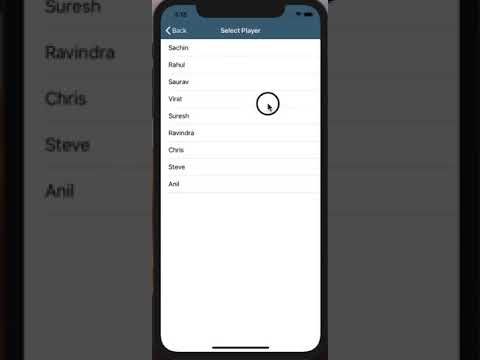
- Single and Multiple selection.
- Show menu with presentation styles like Present, Push, Popover, Formsheet, Alert, Actionsheet
- Set UITableViewCell types like Basic, Subtitle, Right Detail
- Set UITableViewCell selection style Tickmark or Checkbox
- Search Items from the list
- Works with Custom UITableViewCells
- Works with Custom model classes and structs
- Set Maximum selection limit
- Provide Empty data set text
- Provide header row as Empty, All, None or Custom Text
- Customizable design for UINavigationBar and UISearchBar
iOS 9.0+ | Xcode 8.3+ | Swift 3.0+pod'RSSelectionMenu'orpod'RSSelectionMenu','~> 6.0.4'Carthage is a decentralized dependency manager that builds your dependencies and provides you with binary frameworks.
You can install Carthage with Homebrew using the following command:
$ brew update
$ brew install carthage
To integrate RSSelectionMenu into your Xcode project using Carthage, specify it in your Cartfile:
github "rushisangani/RSSelectionMenu" ~> 6.0
Then follow below steps:
- Run
carthage updateto build the framework. - Set Framework search path in target build settings : Build Settings -> Framework Search Paths :
$(PROJECT_DIR)/Carthage/Build/iOS - Add RSSelectionMenu.framework in
Embedded Binaries. - Add RSSelectionMenu.framework in
Linked Frameworks and Libraries.
letsimpleDataArray=["Sachin","Rahul","Saurav","Virat","Suresh","Ravindra","Chris"]varsimpleSelectedArray=[String]()
// Show menu with datasource array - Default SelectionStyle = single
// Here you'll get cell configuration where you'll get array item for each index
// Cell configuration following parameters.
// 1. UITableViewCell 2. Item of type T 3. IndexPath
letselectionMenu=RSSelectionMenu(dataSource: simpleDataArray){(cell, item, indexPath)in
cell.textLabel?.text = item
}
// set default selected items when menu present on screen.
// here you'll get handler each time you select a row
// 1. Selected Item 2. Index of Selected Item 3. Selected or Deselected 4. All Selected Items
selectionMenu.setSelectedItems(items: simpleSelectedArray){[weak self](item, index, isSelected, selectedItems)in
// update your existing array with updated selected items, so when menu show menu next time, updated items will be default selected.
self?.simpleSelectedArray = selectedItems
}
// show as PresentationStyle = push
selectionMenu.show(style:.push, from:self)letselectionMenu=RSSelectionMenu(selectionStyle:.multiple, dataSource: simpleDataArray){(cell, name, indexPath)in
cell.textLabel?.text = name
// customization
// set image
cell.imageView?.image = #imageLiteral(resourceName:"profile")
cell.tintColor = #colorLiteral(red:0.2745098174, green:0.4862745106, blue:0.1411764771, alpha:1)}- Set Maximum selection limit (Optional)
selectionMenu.setSelectedItems(items: selectedDataArray, maxSelected:3){(item, selected, selectedItems)in}
// or selectionMenu.maxSelectionLimit =3selectionMenu.cellSelectionStyle =.tickmark
// or
selectionMenu.cellSelectionStyle =.checkbox// show as formSheet
selectionMenu.show(style:.formSheet, from:self)
// show as popover
selectionMenu.show(style:.popover(sourceView: sourceView, size:nil), from:self) // or specify popover size
selectionMenu.show(style:.popover(sourceView: sender, size:CGSize(width:200, height:300)), from:self)
// show as alert
selectionMenu.show(style:.alert(title:"Select", action:nil, height:nil), from:self)
// or specify alert button title
selectionMenu.show(style:.alert(title:"Select", action:"Done", height:nil), from:self)
// show as actionsheet
selectionMenu.show(style:.actionSheet(title:nil, action:"Done", height:nil), from:self)Prevent auto dismissal for single selection
selectionMenu.dismissAutomatically =falseselectionMenu.onDismiss ={[weak self] selectedItems inself?.selectedDataArray = selectedItems
// perform any operation once you get selected items
}selectionMenu.onWillAppear ={
/// do something..
}- You'll get notified via handler, when user starts typing in searchbar.
// show searchbar
selectionMenu.showSearchBar{[weak self](searchText)->([String])in
// return filtered array based on any condition
// here let's return array where name starts with specified search text
returnself?.dataArray.filter({ $0.lowercased().hasPrefix(searchText.lowercased())})??[]}letselectionMenu=RSSelectionMenu(selectionType:.single, dataSource: dataArray, cellType:.rightDetail){(cell, item, indexPath)in
// here you can set any text from object
// let's set firstname in title and lastname as right detail
letfirstName=item(separatedBy:"").first
letlastName= item.components(separatedBy:"").last
cell.textLabel?.text = firstName
cell.detailTextLabel?.text = lastName
}
selectionMenu.setSelectedItems(items: selectedDataArray){[weak self](item, selected, selectedItems)inself?.selectedDataArray = selectedItems
}
// show as default
selectionMenu.show(from:self)- Provide custom cell with xib file name and cell identifier.
letcellNibName="CustomTableViewCell"letcellIdentifier="cell"
// create menu with multi selection and custom cell
letselectionMenu=RSSelectionMenu(selectionStyle:.multiple, dataSource: customDataArray, cellType:.custom(nibName: cellNibName, cellIdentifier: cellIdentifier)){(cell, person, indexPath)in
// cast cell to your custom cell type
letcustomCell= cell as!CustomTableViewCell
// here you'll get specified model object
// set data based on your need
customCell.setData(person)}// To show first row as Empty, when dropdown as no value selected by default
// add first row as empty -> Allow empty selection
letisEmpty=(selectedDataArray.count ==0)
selectionMenu.addFirstRowAs(rowType:.empty, showSelected: isEmpty){(text, selected)in
/// do some stuff...
if selected {print("Empty Option Selected")}}// show message 'No data found'
menu.showEmptyDataLabel()
// or
menu.showEmptyDataLabel(text:"No players found")- Implement UniquePropertyDelegate protocol to model class or structure.
classPerson:NSObject,UniquePropertyDelegate{letid:IntletfirstName:StringletlastName:Stringinit(id:Int, firstName:String, lastName:String){self.id = id
self.firstName = firstName
self.lastName = lastName
}
// MARK: - UniquePropertyDelegate // Here id has the unique value for each person
func getUniquePropertyName()->String{return"id"}}
or
structEmployee:Codable,UniquePropertyDelegate{letempId:Int?letname:String?func getUniquePropertyName()->String{return"empId"}}or
selectionMenu.uniquePropertyName ="empId" or "keyname of unique value in dictionary"- Set Title, BarButton Titles, TintColor, and Title Color
// set navigation bar title and attributes
selectionMenu.setNavigationBar(title:"Select Player", attributes:[NSAttributedString.Key.foregroundColor:UIColor.white], barTintColor: #colorLiteral(red:0.1019607857, green:0.2784313858, blue:0.400000006, alpha:1), tintColor:UIColor.white)
// right barbutton title - Default is 'Done'
selectionMenu.rightBarButtonTitle ="Submit"
// left barbutton title - Default is 'Cancel'
selectionMenu.leftBarButtonTitle ="Close"- Set Placeholder, Tint Color
// show searchbar with placeholder and barTintColor
selectionMenu.showSearchBar(withPlaceHolder:"Search Player", barTintColor:UIColor.lightGray.withAlphaComponent(0.2)){[weak self](searchText)->([String])inreturnself?.dataArray.filter({ $0.lowercased().starts(with: searchText.lowercased())})??[]}See Example for more details.
RSSelectionMenu is released under the MIT license. See LICENSE for details.