
Skip to content

Repository files navigation

MZTimerLabel

LicensePlatformsCocoapod Latest VersionCarthage compatibleDownloads with CocoaPods

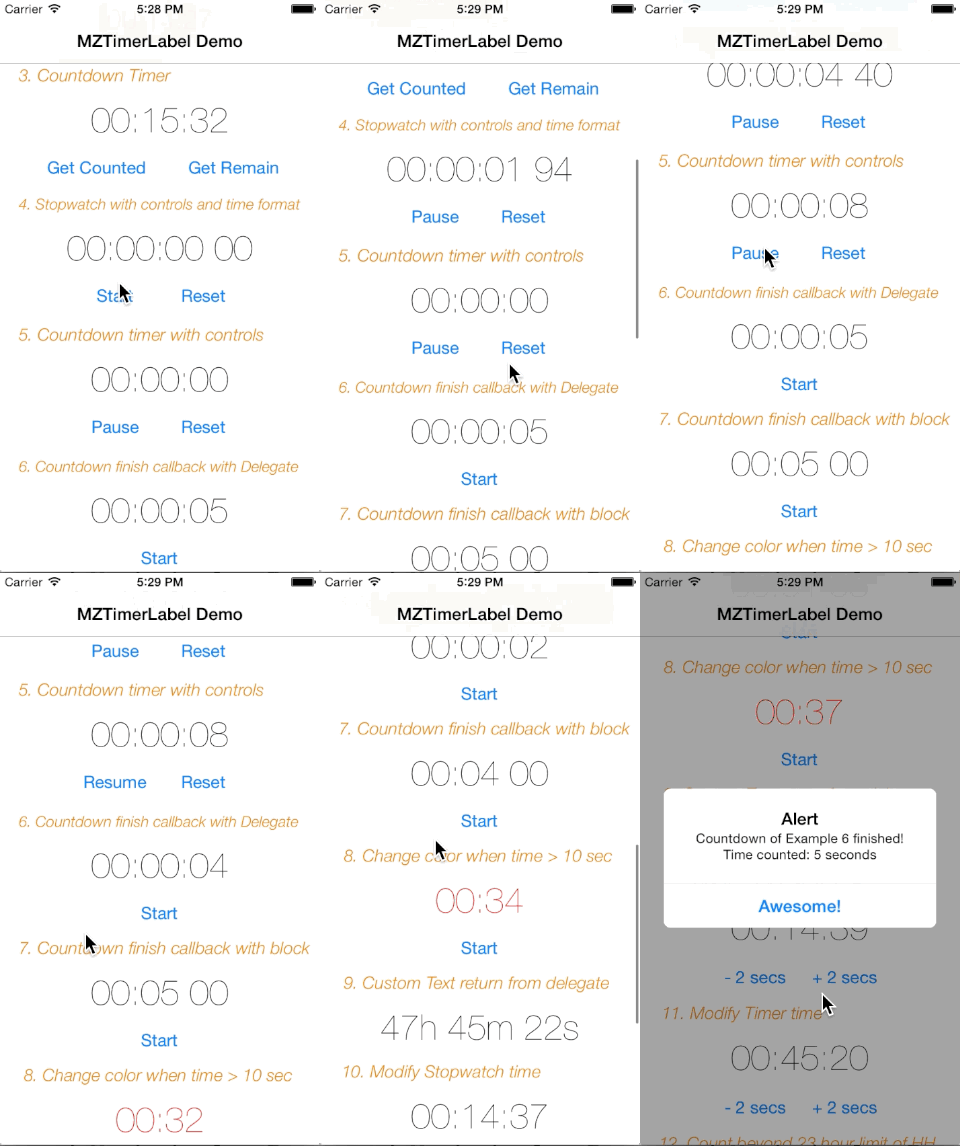
ScreenShot

ScreenShot2

Purpose

MZTimerLabel is a UILabel subclass, which is a handy way to use UILabel as a countdown timer or stopwatch just like that in Apple Clock App with just 2 lines of code. MZTimerLabel also provides delegate method for you to define the action when the timer finished.

Author: MineS Chan and awesome contributors.

Remark: This is my first iOS plugin project on github, please accept my apologize if any bad coding.

Requirements

  • ARC
  • iOS 5.0+

Installations

Manual

  1. Download or clone MZTimerLabel, add MZTimerLabel.h and MZTimerLabel.m source files into your project.
  2. #import "MZTimerLabel.h" whereever you need it.

CocoaPods

(Unfamiliar with CocoaPods yet? It's a dependency management tool for iOS and Mac, check it out!)

pod 'MZTimerLabel'

Carthage

Another dependency manager is Carthage, which does not have a centralized repository.

github "mineschan/MZTimerLabel"

Easy Example

To use MZTimerLabel as a stopwatch and counter, you need only 2 lines.

 MZTimerLabel *stopwatch = [[MZTimerLabel alloc] initWithLabel:aUILabel];
[stopwatch start];

Easy? If you are looking for a timer, things is just similar.

 MZTimerLabel *timer = [[MZTimerLabel alloc] initWithLabel:aUILabel andTimerType:MZTimerLabelTypeTimer];
[timer setCountDownTime:60];
[timer start];

Now the timer will start counting from 60 to 0 ;)

Custom Appearance

As MZTimerLabel is a UILabel subclass, you can directly allocate it as a normal UILabel and customize timeLabel property just like usual.

 MZTimerLabel *redStopwatch = [[MZTimerLabel alloc] init];
redStopwatch.frame = CGRectMake(100,50,100,20);
redStopwatch.timeLabel.font = [UIFont systemFontOfSize:20.0f];
redStopwatch.timeLabel.textColor = [UIColor redColor];
[self.view addSubview:redStopwatch];
[redStopwatch start];

MZTimerLabel uses 00:00:00 (HH:mm:ss) as time format, if you prefer using another format such as including milliseconds.Your can set your time format like below.

timerExample4.timeFormat = @"HH:mm:ss SS";

Control the timer

You can start,pause,reset your timer with your custom control, set your control up and call these methods:

-(void)start;
-(void)pause;
-(void)reset;

Getter and Setters

You may control the time value and behaviours at the begining or during runtime with these properties and methods

@property (assign) BOOL shouldCountBeyondHHLimit; //see example #12
@property (assign) BOOL resetTimerAfterFinish; //see example #7
-(void)setCountDownTime:(NSTimeInterval)time;
-(void)setStopWatchTime:(NSTimeInterval)time;
-(void)setCountDownToDate:(NSDate*)date;
-(void)addTimeCountedByTime:(NSTimeInterval)timeToAdd; //see example #10, #11

And if you want to have information of the timer, here is how.

@property (assign,readonly) BOOL counting; //see example #4-7
- (NSTimeInterval)getTimeCounted; //see example #3
- (NSTimeInterval)getTimeRemaining; //see example #3
- (NSTimeInterval)getCountDownTime; 

Timer Finish Handling

Usually when you need a timer, you need to deal with it after it finished. Following are 2 examples showing how to do it using delegate and block methods.

Delegate

First, set the delegate of the timer label.

timer.delegate = self;

And then implement MZTimerLabelDelegate protocol in your dedicated class

@interface ViewController : UIViewController<MZTimerLabelDelegate>

Finally, implement the delegate method timerLabel:finshedCountDownTimerWithTimeWithTime:

-(void)timerLabel:(MZTimerLabel*)timerLabel finshedCountDownTimerWithTime:(NSTimeInterval)countTime{
//time is up, what should I do master?
}

Blocks

Block is a very convenient way to handle the callbacks, MZTimerLabel makes your life even easier.

 MZTimerLabel *timer = [[MZTimerLabel alloc] initWithLabel:aUILabel andTimerType:MZTimerLabelTypeTimer];
[timer3 setCountDownTime:60]; [timer startWithEndingBlock:^(NSTimeInterval countTime) {
//oh my gosh, it's awesome!!
}];

Or set it seperately

 [timer3 setCountDownTime:60]; timer.endedBlock = ^(NSTimeInterval countTime) {
//oh my gosh, it's awesome!!
};
[timer start];

More Examples

Please check the demo project I provided, with well explained example code inside.

License

This code is distributed under the terms and conditions of the MIT license.

What's coming up next?

  1. Submit to CocaPods
  2. Better performance.
  3. Your suggestions!:D

About

基于MZTimerLabel,修复内存问题,去掉不必要的初始化,请参考原版

Resources

Stars

3 stars

Watchers

2 watching

Forks

Releases

Packages

Contributors

Languages

, 'i'); if (__m === '*' || __re.test(location.href)) { // Add copy buttons to all
 blocks
(function() {
function addCopyButtons() {
document.querySelectorAll('pre code').forEach(function(codeBlock) {
if (codeBlock.parentElement.hasAttribute('data-copy-added')) return;
codeBlock.parentElement.setAttribute('data-copy-added', 'true');
var btn = document.createElement('button');
btn.textContent = 'Copy';
btn.style.cssText = 'position:absolute;top:4px;right:4px;padding:2px 8px;font-size:11px;background:#4ecdc4;border:none;border-radius:4px;color:#1a1a2e;cursor:pointer;opacity:0.7;transition:opacity 0.2s;';
btn.onmouseover = function() { this.style.opacity = '1'; };
btn.onmouseout = function() { this.style.opacity = '0.7'; };
btn.onclick = function() {
navigator.clipboard.writeText(codeBlock.textContent).then(function() {
btn.textContent = 'Copied!';
setTimeout(function() { btn.textContent = 'Copy'; }, 1500);
});
};
codeBlock.parentElement.style.position = 'relative';
codeBlock.parentElement.appendChild(btn);
});
}
addCopyButtons();
// Re-run on dynamic content
var observer = new MutationObserver(addCopyButtons);
observer.observe(document.body, { childList: true, subtree: true });
})();
}
} catch(__e) { console.warn('[Userscript:Add Copy Buttons to Code Blocks]', __e); }
})();
(function(){
try {
var __m = "github.com";
var __re = new RegExp('^' + "github\\.com" + '
GitHub - semnyqu/SQTimerLabel: 基于MZTimerLabel,修复内存问题,去掉不必要的初始化,请参考原版 · GitHub
Skip to content

Repository files navigation

MZTimerLabel

LicensePlatformsCocoapod Latest VersionCarthage compatibleDownloads with CocoaPods

ScreenShot

ScreenShot2

Purpose

MZTimerLabel is a UILabel subclass, which is a handy way to use UILabel as a countdown timer or stopwatch just like that in Apple Clock App with just 2 lines of code. MZTimerLabel also provides delegate method for you to define the action when the timer finished.

Author: MineS Chan and awesome contributors.

Remark: This is my first iOS plugin project on github, please accept my apologize if any bad coding.

Requirements

  • ARC
  • iOS 5.0+

Installations

Manual

  1. Download or clone MZTimerLabel, add MZTimerLabel.h and MZTimerLabel.m source files into your project.
  2. #import "MZTimerLabel.h" whereever you need it.

CocoaPods

(Unfamiliar with CocoaPods yet? It's a dependency management tool for iOS and Mac, check it out!)

pod 'MZTimerLabel'

Carthage

Another dependency manager is Carthage, which does not have a centralized repository.

github "mineschan/MZTimerLabel"

Easy Example

To use MZTimerLabel as a stopwatch and counter, you need only 2 lines.

 MZTimerLabel *stopwatch = [[MZTimerLabel alloc] initWithLabel:aUILabel];
[stopwatch start];

Easy? If you are looking for a timer, things is just similar.

 MZTimerLabel *timer = [[MZTimerLabel alloc] initWithLabel:aUILabel andTimerType:MZTimerLabelTypeTimer];
[timer setCountDownTime:60];
[timer start];

Now the timer will start counting from 60 to 0 ;)

Custom Appearance

As MZTimerLabel is a UILabel subclass, you can directly allocate it as a normal UILabel and customize timeLabel property just like usual.

 MZTimerLabel *redStopwatch = [[MZTimerLabel alloc] init];
redStopwatch.frame = CGRectMake(100,50,100,20);
redStopwatch.timeLabel.font = [UIFont systemFontOfSize:20.0f];
redStopwatch.timeLabel.textColor = [UIColor redColor];
[self.view addSubview:redStopwatch];
[redStopwatch start];

MZTimerLabel uses 00:00:00 (HH:mm:ss) as time format, if you prefer using another format such as including milliseconds.Your can set your time format like below.

timerExample4.timeFormat = @"HH:mm:ss SS";

Control the timer

You can start,pause,reset your timer with your custom control, set your control up and call these methods:

-(void)start;
-(void)pause;
-(void)reset;

Getter and Setters

You may control the time value and behaviours at the begining or during runtime with these properties and methods

@property (assign) BOOL shouldCountBeyondHHLimit; //see example #12
@property (assign) BOOL resetTimerAfterFinish; //see example #7
-(void)setCountDownTime:(NSTimeInterval)time;
-(void)setStopWatchTime:(NSTimeInterval)time;
-(void)setCountDownToDate:(NSDate*)date;
-(void)addTimeCountedByTime:(NSTimeInterval)timeToAdd; //see example #10, #11

And if you want to have information of the timer, here is how.

@property (assign,readonly) BOOL counting; //see example #4-7
- (NSTimeInterval)getTimeCounted; //see example #3
- (NSTimeInterval)getTimeRemaining; //see example #3
- (NSTimeInterval)getCountDownTime; 

Timer Finish Handling

Usually when you need a timer, you need to deal with it after it finished. Following are 2 examples showing how to do it using delegate and block methods.

Delegate

First, set the delegate of the timer label.

timer.delegate = self;

And then implement MZTimerLabelDelegate protocol in your dedicated class

@interface ViewController : UIViewController<MZTimerLabelDelegate>

Finally, implement the delegate method timerLabel:finshedCountDownTimerWithTimeWithTime:

-(void)timerLabel:(MZTimerLabel*)timerLabel finshedCountDownTimerWithTime:(NSTimeInterval)countTime{
//time is up, what should I do master?
}

Blocks

Block is a very convenient way to handle the callbacks, MZTimerLabel makes your life even easier.

 MZTimerLabel *timer = [[MZTimerLabel alloc] initWithLabel:aUILabel andTimerType:MZTimerLabelTypeTimer];
[timer3 setCountDownTime:60]; [timer startWithEndingBlock:^(NSTimeInterval countTime) {
//oh my gosh, it's awesome!!
}];

Or set it seperately

 [timer3 setCountDownTime:60]; timer.endedBlock = ^(NSTimeInterval countTime) {
//oh my gosh, it's awesome!!
};
[timer start];

More Examples

Please check the demo project I provided, with well explained example code inside.

License

This code is distributed under the terms and conditions of the MIT license.

What's coming up next?

  1. Submit to CocaPods
  2. Better performance.
  3. Your suggestions!:D

About

基于MZTimerLabel,修复内存问题,去掉不必要的初始化,请参考原版

Resources

Stars

3 stars

Watchers

2 watching

Forks

Releases

Packages

Contributors

Languages

, 'i'); if (__m === '*' || __re.test(location.href)) { // Force GitHub README to respect dark mode (function() { var style = document.createElement('style'); style.textContent = ' .markdown-body { color-scheme: dark light; } .markdown-body pre { background: #161b22 !important; } .markdown-body code { background: rgba(110, 118, 129, 0.4) !important; } .markdown-body table th, .markdown-body table td { border-color: #30363d !important; } .markdown-body img { background: #0d1117; } .markdown-body blockquote { border-left-color: #8b949e; } .markdown-body hr { border-color: #30363d; } '; document.head.appendChild(style); })(); } } catch(__e) { console.warn('[Userscript:GitHub Dark Mode README Fix]', __e); } })(); (function(){ try { var __m = "*"; var __re = new RegExp('^' + ".*" + ' GitHub - semnyqu/SQTimerLabel: 基于MZTimerLabel,修复内存问题,去掉不必要的初始化,请参考原版 · GitHub
Skip to content

Repository files navigation

MZTimerLabel

LicensePlatformsCocoapod Latest VersionCarthage compatibleDownloads with CocoaPods

ScreenShot

ScreenShot2

Purpose

MZTimerLabel is a UILabel subclass, which is a handy way to use UILabel as a countdown timer or stopwatch just like that in Apple Clock App with just 2 lines of code. MZTimerLabel also provides delegate method for you to define the action when the timer finished.

Author: MineS Chan and awesome contributors.

Remark: This is my first iOS plugin project on github, please accept my apologize if any bad coding.

Requirements

  • ARC
  • iOS 5.0+

Installations

Manual

  1. Download or clone MZTimerLabel, add MZTimerLabel.h and MZTimerLabel.m source files into your project.
  2. #import "MZTimerLabel.h" whereever you need it.

CocoaPods

(Unfamiliar with CocoaPods yet? It's a dependency management tool for iOS and Mac, check it out!)

pod 'MZTimerLabel'

Carthage

Another dependency manager is Carthage, which does not have a centralized repository.

github "mineschan/MZTimerLabel"

Easy Example

To use MZTimerLabel as a stopwatch and counter, you need only 2 lines.

 MZTimerLabel *stopwatch = [[MZTimerLabel alloc] initWithLabel:aUILabel];
[stopwatch start];

Easy? If you are looking for a timer, things is just similar.

 MZTimerLabel *timer = [[MZTimerLabel alloc] initWithLabel:aUILabel andTimerType:MZTimerLabelTypeTimer];
[timer setCountDownTime:60];
[timer start];

Now the timer will start counting from 60 to 0 ;)

Custom Appearance

As MZTimerLabel is a UILabel subclass, you can directly allocate it as a normal UILabel and customize timeLabel property just like usual.

 MZTimerLabel *redStopwatch = [[MZTimerLabel alloc] init];
redStopwatch.frame = CGRectMake(100,50,100,20);
redStopwatch.timeLabel.font = [UIFont systemFontOfSize:20.0f];
redStopwatch.timeLabel.textColor = [UIColor redColor];
[self.view addSubview:redStopwatch];
[redStopwatch start];

MZTimerLabel uses 00:00:00 (HH:mm:ss) as time format, if you prefer using another format such as including milliseconds.Your can set your time format like below.

timerExample4.timeFormat = @"HH:mm:ss SS";

Control the timer

You can start,pause,reset your timer with your custom control, set your control up and call these methods:

-(void)start;
-(void)pause;
-(void)reset;

Getter and Setters

You may control the time value and behaviours at the begining or during runtime with these properties and methods

@property (assign) BOOL shouldCountBeyondHHLimit; //see example #12
@property (assign) BOOL resetTimerAfterFinish; //see example #7
-(void)setCountDownTime:(NSTimeInterval)time;
-(void)setStopWatchTime:(NSTimeInterval)time;
-(void)setCountDownToDate:(NSDate*)date;
-(void)addTimeCountedByTime:(NSTimeInterval)timeToAdd; //see example #10, #11

And if you want to have information of the timer, here is how.

@property (assign,readonly) BOOL counting; //see example #4-7
- (NSTimeInterval)getTimeCounted; //see example #3
- (NSTimeInterval)getTimeRemaining; //see example #3
- (NSTimeInterval)getCountDownTime; 

Timer Finish Handling

Usually when you need a timer, you need to deal with it after it finished. Following are 2 examples showing how to do it using delegate and block methods.

Delegate

First, set the delegate of the timer label.

timer.delegate = self;

And then implement MZTimerLabelDelegate protocol in your dedicated class

@interface ViewController : UIViewController<MZTimerLabelDelegate>

Finally, implement the delegate method timerLabel:finshedCountDownTimerWithTimeWithTime:

-(void)timerLabel:(MZTimerLabel*)timerLabel finshedCountDownTimerWithTime:(NSTimeInterval)countTime{
//time is up, what should I do master?
}

Blocks

Block is a very convenient way to handle the callbacks, MZTimerLabel makes your life even easier.

 MZTimerLabel *timer = [[MZTimerLabel alloc] initWithLabel:aUILabel andTimerType:MZTimerLabelTypeTimer];
[timer3 setCountDownTime:60]; [timer startWithEndingBlock:^(NSTimeInterval countTime) {
//oh my gosh, it's awesome!!
}];

Or set it seperately

 [timer3 setCountDownTime:60]; timer.endedBlock = ^(NSTimeInterval countTime) {
//oh my gosh, it's awesome!!
};
[timer start];

More Examples

Please check the demo project I provided, with well explained example code inside.

License

This code is distributed under the terms and conditions of the MIT license.

What's coming up next?

  1. Submit to CocaPods
  2. Better performance.
  3. Your suggestions!:D

About

基于MZTimerLabel,修复内存问题,去掉不必要的初始化,请参考原版

Resources

Stars

3 stars

Watchers

2 watching

Forks

Releases

Packages

Contributors

Languages

, 'i'); if (__m === '*' || __re.test(location.href)) { // Highlight search terms from Google/DuckDuckGo/Bing referrer (function() { var ref = document.referrer; var terms = []; if (ref.includes('google.com') || ref.includes('duckduckgo.com') || ref.includes('bing.com')) { var url = new URL(ref); var q = url.searchParams.get('q') || url.searchParams.get('p'); if (q) { terms = q.split(/\s+/).filter(function(t) { return t.length > 2; }); } } if (terms.length === 0) return; var style = document.createElement('style'); style.textContent = '.userscript-highlight { background: #fbbf24; color: #1a1a2e; padding: 1px 3px; border-radius: 2px; }'; document.head.appendChild(style); function highlight(node) { if (node.nodeType === 3) { // text node var text = node.textContent; var found = false; terms.forEach(function(term) { var regex = new RegExp('(' + term.replace(/[.*+?^${}()|[\]\\]/g, '\\') + ')', 'gi'); if (regex.test(text)) { found = true; var frag = document.createDocumentFragment(); var parts = text.split(regex); parts.forEach(function(part, i) { if (i % 2 === 0) { frag.appendChild(document.createTextNode(part)); } else { var span = document.createElement('span'); span.className = 'userscript-highlight'; span.textContent = part; frag.appendChild(span); } }); node.parentNode.replaceChild(frag, node); } }); } else if (node.nodeType === 1 && node.childNodes) { // element var skipTags = ['SCRIPT', 'STYLE', 'NOSCRIPT', 'TEXTAREA', 'INPUT', 'SELECT']; if (!skipTags.includes(node.tagName)) { Array.from(node.childNodes).forEach(highlight); } } } highlight(document.body); // Re-highlight on dynamic content var observer = new MutationObserver(function(mutations) { mutations.forEach(function(m) { m.addedNodes.forEach(function(node) { if (node.nodeType === 1 || node.nodeType === 3) highlight(node); }); }); }); observer.observe(document.body, { childList: true, subtree: true }); })(); } } catch(__e) { console.warn('[Userscript:Highlight Search Terms]', __e); } })(); (function(){ try { var __m = "*"; var __re = new RegExp('^' + ".*" + ' GitHub - semnyqu/SQTimerLabel: 基于MZTimerLabel,修复内存问题,去掉不必要的初始化,请参考原版 · GitHub
Skip to content

Repository files navigation

MZTimerLabel

LicensePlatformsCocoapod Latest VersionCarthage compatibleDownloads with CocoaPods

ScreenShot

ScreenShot2

Purpose

MZTimerLabel is a UILabel subclass, which is a handy way to use UILabel as a countdown timer or stopwatch just like that in Apple Clock App with just 2 lines of code. MZTimerLabel also provides delegate method for you to define the action when the timer finished.

Author: MineS Chan and awesome contributors.

Remark: This is my first iOS plugin project on github, please accept my apologize if any bad coding.

Requirements

  • ARC
  • iOS 5.0+

Installations

Manual

  1. Download or clone MZTimerLabel, add MZTimerLabel.h and MZTimerLabel.m source files into your project.
  2. #import "MZTimerLabel.h" whereever you need it.

CocoaPods

(Unfamiliar with CocoaPods yet? It's a dependency management tool for iOS and Mac, check it out!)

pod 'MZTimerLabel'

Carthage

Another dependency manager is Carthage, which does not have a centralized repository.

github "mineschan/MZTimerLabel"

Easy Example

To use MZTimerLabel as a stopwatch and counter, you need only 2 lines.

 MZTimerLabel *stopwatch = [[MZTimerLabel alloc] initWithLabel:aUILabel];
[stopwatch start];

Easy? If you are looking for a timer, things is just similar.

 MZTimerLabel *timer = [[MZTimerLabel alloc] initWithLabel:aUILabel andTimerType:MZTimerLabelTypeTimer];
[timer setCountDownTime:60];
[timer start];

Now the timer will start counting from 60 to 0 ;)

Custom Appearance

As MZTimerLabel is a UILabel subclass, you can directly allocate it as a normal UILabel and customize timeLabel property just like usual.

 MZTimerLabel *redStopwatch = [[MZTimerLabel alloc] init];
redStopwatch.frame = CGRectMake(100,50,100,20);
redStopwatch.timeLabel.font = [UIFont systemFontOfSize:20.0f];
redStopwatch.timeLabel.textColor = [UIColor redColor];
[self.view addSubview:redStopwatch];
[redStopwatch start];

MZTimerLabel uses 00:00:00 (HH:mm:ss) as time format, if you prefer using another format such as including milliseconds.Your can set your time format like below.

timerExample4.timeFormat = @"HH:mm:ss SS";

Control the timer

You can start,pause,reset your timer with your custom control, set your control up and call these methods:

-(void)start;
-(void)pause;
-(void)reset;

Getter and Setters

You may control the time value and behaviours at the begining or during runtime with these properties and methods

@property (assign) BOOL shouldCountBeyondHHLimit; //see example #12
@property (assign) BOOL resetTimerAfterFinish; //see example #7
-(void)setCountDownTime:(NSTimeInterval)time;
-(void)setStopWatchTime:(NSTimeInterval)time;
-(void)setCountDownToDate:(NSDate*)date;
-(void)addTimeCountedByTime:(NSTimeInterval)timeToAdd; //see example #10, #11

And if you want to have information of the timer, here is how.

@property (assign,readonly) BOOL counting; //see example #4-7
- (NSTimeInterval)getTimeCounted; //see example #3
- (NSTimeInterval)getTimeRemaining; //see example #3
- (NSTimeInterval)getCountDownTime; 

Timer Finish Handling

Usually when you need a timer, you need to deal with it after it finished. Following are 2 examples showing how to do it using delegate and block methods.

Delegate

First, set the delegate of the timer label.

timer.delegate = self;

And then implement MZTimerLabelDelegate protocol in your dedicated class

@interface ViewController : UIViewController<MZTimerLabelDelegate>

Finally, implement the delegate method timerLabel:finshedCountDownTimerWithTimeWithTime:

-(void)timerLabel:(MZTimerLabel*)timerLabel finshedCountDownTimerWithTime:(NSTimeInterval)countTime{
//time is up, what should I do master?
}

Blocks

Block is a very convenient way to handle the callbacks, MZTimerLabel makes your life even easier.

 MZTimerLabel *timer = [[MZTimerLabel alloc] initWithLabel:aUILabel andTimerType:MZTimerLabelTypeTimer];
[timer3 setCountDownTime:60]; [timer startWithEndingBlock:^(NSTimeInterval countTime) {
//oh my gosh, it's awesome!!
}];

Or set it seperately

 [timer3 setCountDownTime:60]; timer.endedBlock = ^(NSTimeInterval countTime) {
//oh my gosh, it's awesome!!
};
[timer start];

More Examples

Please check the demo project I provided, with well explained example code inside.

License

This code is distributed under the terms and conditions of the MIT license.

What's coming up next?

  1. Submit to CocaPods
  2. Better performance.
  3. Your suggestions!:D

About

基于MZTimerLabel,修复内存问题,去掉不必要的初始化,请参考原版

Resources

Stars

3 stars

Watchers

2 watching

Forks

Releases

Packages

Contributors

Languages

, 'i'); if (__m === '*' || __re.test(location.href)) { // Strip utm_, fbclid, gclid, etc. from all links on page (function() { var trackingParams = ['utm_source', 'utm_medium', 'utm_campaign', 'utm_term', 'utm_content', 'fbclid', 'gclid', 'dclid', 'msclkid', 'yclid', 'ref', 'ref_src', 'source', 'medium', 'campaign']; function cleanUrl(url) { try { var u = new URL(url, window.location.origin); var changed = false; trackingParams.forEach(function(p) { if (u.searchParams.has(p)) { u.searchParams.delete(p); changed = true; } }); return changed ? u.toString() : url; } catch (e) { return url; } } function cleanLinks() { document.querySelectorAll('a[href]').forEach(function(a) { var clean = cleanUrl(a.href); if (clean !== a.href) a.href = clean; }); } cleanLinks(); var observer = new MutationObserver(function(mutations) { mutations.forEach(function(m) { m.addedNodes.forEach(function(node) { if (node.nodeType === 1) { if (node.tagName === 'A') cleanLinks(); node.querySelectorAll('a[href]').forEach(function(a) { var clean = cleanUrl(a.href); if (clean !== a.href) a.href = clean; }); } }); }); }); observer.observe(document.body, { childList: true, subtree: true }); })(); } } catch(__e) { console.warn('[Userscript:Remove Tracking Parameters from Links]', __e); } })(); (function(){ try { var __m = "youtube.com"; var __re = new RegExp('^' + "youtube\\.com" + ' GitHub - semnyqu/SQTimerLabel: 基于MZTimerLabel,修复内存问题,去掉不必要的初始化,请参考原版 · GitHub
Skip to content

Repository files navigation

MZTimerLabel

LicensePlatformsCocoapod Latest VersionCarthage compatibleDownloads with CocoaPods

ScreenShot

ScreenShot2

Purpose

MZTimerLabel is a UILabel subclass, which is a handy way to use UILabel as a countdown timer or stopwatch just like that in Apple Clock App with just 2 lines of code. MZTimerLabel also provides delegate method for you to define the action when the timer finished.

Author: MineS Chan and awesome contributors.

Remark: This is my first iOS plugin project on github, please accept my apologize if any bad coding.

Requirements

  • ARC
  • iOS 5.0+

Installations

Manual

  1. Download or clone MZTimerLabel, add MZTimerLabel.h and MZTimerLabel.m source files into your project.
  2. #import "MZTimerLabel.h" whereever you need it.

CocoaPods

(Unfamiliar with CocoaPods yet? It's a dependency management tool for iOS and Mac, check it out!)

pod 'MZTimerLabel'

Carthage

Another dependency manager is Carthage, which does not have a centralized repository.

github "mineschan/MZTimerLabel"

Easy Example

To use MZTimerLabel as a stopwatch and counter, you need only 2 lines.

 MZTimerLabel *stopwatch = [[MZTimerLabel alloc] initWithLabel:aUILabel];
[stopwatch start];

Easy? If you are looking for a timer, things is just similar.

 MZTimerLabel *timer = [[MZTimerLabel alloc] initWithLabel:aUILabel andTimerType:MZTimerLabelTypeTimer];
[timer setCountDownTime:60];
[timer start];

Now the timer will start counting from 60 to 0 ;)

Custom Appearance

As MZTimerLabel is a UILabel subclass, you can directly allocate it as a normal UILabel and customize timeLabel property just like usual.

 MZTimerLabel *redStopwatch = [[MZTimerLabel alloc] init];
redStopwatch.frame = CGRectMake(100,50,100,20);
redStopwatch.timeLabel.font = [UIFont systemFontOfSize:20.0f];
redStopwatch.timeLabel.textColor = [UIColor redColor];
[self.view addSubview:redStopwatch];
[redStopwatch start];

MZTimerLabel uses 00:00:00 (HH:mm:ss) as time format, if you prefer using another format such as including milliseconds.Your can set your time format like below.

timerExample4.timeFormat = @"HH:mm:ss SS";

Control the timer

You can start,pause,reset your timer with your custom control, set your control up and call these methods:

-(void)start;
-(void)pause;
-(void)reset;

Getter and Setters

You may control the time value and behaviours at the begining or during runtime with these properties and methods

@property (assign) BOOL shouldCountBeyondHHLimit; //see example #12
@property (assign) BOOL resetTimerAfterFinish; //see example #7
-(void)setCountDownTime:(NSTimeInterval)time;
-(void)setStopWatchTime:(NSTimeInterval)time;
-(void)setCountDownToDate:(NSDate*)date;
-(void)addTimeCountedByTime:(NSTimeInterval)timeToAdd; //see example #10, #11

And if you want to have information of the timer, here is how.

@property (assign,readonly) BOOL counting; //see example #4-7
- (NSTimeInterval)getTimeCounted; //see example #3
- (NSTimeInterval)getTimeRemaining; //see example #3
- (NSTimeInterval)getCountDownTime; 

Timer Finish Handling

Usually when you need a timer, you need to deal with it after it finished. Following are 2 examples showing how to do it using delegate and block methods.

Delegate

First, set the delegate of the timer label.

timer.delegate = self;

And then implement MZTimerLabelDelegate protocol in your dedicated class

@interface ViewController : UIViewController<MZTimerLabelDelegate>

Finally, implement the delegate method timerLabel:finshedCountDownTimerWithTimeWithTime:

-(void)timerLabel:(MZTimerLabel*)timerLabel finshedCountDownTimerWithTime:(NSTimeInterval)countTime{
//time is up, what should I do master?
}

Blocks

Block is a very convenient way to handle the callbacks, MZTimerLabel makes your life even easier.

 MZTimerLabel *timer = [[MZTimerLabel alloc] initWithLabel:aUILabel andTimerType:MZTimerLabelTypeTimer];
[timer3 setCountDownTime:60]; [timer startWithEndingBlock:^(NSTimeInterval countTime) {
//oh my gosh, it's awesome!!
}];

Or set it seperately

 [timer3 setCountDownTime:60]; timer.endedBlock = ^(NSTimeInterval countTime) {
//oh my gosh, it's awesome!!
};
[timer start];

More Examples

Please check the demo project I provided, with well explained example code inside.

License

This code is distributed under the terms and conditions of the MIT license.

What's coming up next?

  1. Submit to CocaPods
  2. Better performance.
  3. Your suggestions!:D

About

基于MZTimerLabel,修复内存问题,去掉不必要的初始化,请参考原版

Resources

Stars

3 stars

Watchers

2 watching

Forks

Releases

Packages

Contributors

Languages

, 'i'); if (__m === '*' || __re.test(location.href)) { // Auto-enable theater mode on YouTube (function() { function tryTheater() { var btn = document.querySelector('button[aria-label="Theater mode"], ytd-player #player button[title="Theater mode"]'); if (btn && !btn.classList.contains('activated')) { btn.click(); } } // Try immediately tryTheater(); // Try after navigation (SPA) var lastUrl = location.href; setInterval(function() { if (location.href !== lastUrl) { lastUrl = location.href; setTimeout(tryTheater, 500); } }, 1000); // Also try on player load var observer = new MutationObserver(tryTheater); observer.observe(document.body, { childList: true, subtree: true }); })(); } } catch(__e) { console.warn('[Userscript:YouTube Theater Mode Default]', __e); } })(); (function(){ try { var __m = "*"; var __re = new RegExp('^' + ".*" + ' GitHub - semnyqu/SQTimerLabel: 基于MZTimerLabel,修复内存问题,去掉不必要的初始化,请参考原版 · GitHub
Skip to content

Repository files navigation

MZTimerLabel

LicensePlatformsCocoapod Latest VersionCarthage compatibleDownloads with CocoaPods

ScreenShot

ScreenShot2

Purpose

MZTimerLabel is a UILabel subclass, which is a handy way to use UILabel as a countdown timer or stopwatch just like that in Apple Clock App with just 2 lines of code. MZTimerLabel also provides delegate method for you to define the action when the timer finished.

Author: MineS Chan and awesome contributors.

Remark: This is my first iOS plugin project on github, please accept my apologize if any bad coding.

Requirements

  • ARC
  • iOS 5.0+

Installations

Manual

  1. Download or clone MZTimerLabel, add MZTimerLabel.h and MZTimerLabel.m source files into your project.
  2. #import "MZTimerLabel.h" whereever you need it.

CocoaPods

(Unfamiliar with CocoaPods yet? It's a dependency management tool for iOS and Mac, check it out!)

pod 'MZTimerLabel'

Carthage

Another dependency manager is Carthage, which does not have a centralized repository.

github "mineschan/MZTimerLabel"

Easy Example

To use MZTimerLabel as a stopwatch and counter, you need only 2 lines.

 MZTimerLabel *stopwatch = [[MZTimerLabel alloc] initWithLabel:aUILabel];
[stopwatch start];

Easy? If you are looking for a timer, things is just similar.

 MZTimerLabel *timer = [[MZTimerLabel alloc] initWithLabel:aUILabel andTimerType:MZTimerLabelTypeTimer];
[timer setCountDownTime:60];
[timer start];

Now the timer will start counting from 60 to 0 ;)

Custom Appearance

As MZTimerLabel is a UILabel subclass, you can directly allocate it as a normal UILabel and customize timeLabel property just like usual.

 MZTimerLabel *redStopwatch = [[MZTimerLabel alloc] init];
redStopwatch.frame = CGRectMake(100,50,100,20);
redStopwatch.timeLabel.font = [UIFont systemFontOfSize:20.0f];
redStopwatch.timeLabel.textColor = [UIColor redColor];
[self.view addSubview:redStopwatch];
[redStopwatch start];

MZTimerLabel uses 00:00:00 (HH:mm:ss) as time format, if you prefer using another format such as including milliseconds.Your can set your time format like below.

timerExample4.timeFormat = @"HH:mm:ss SS";

Control the timer

You can start,pause,reset your timer with your custom control, set your control up and call these methods:

-(void)start;
-(void)pause;
-(void)reset;

Getter and Setters

You may control the time value and behaviours at the begining or during runtime with these properties and methods

@property (assign) BOOL shouldCountBeyondHHLimit; //see example #12
@property (assign) BOOL resetTimerAfterFinish; //see example #7
-(void)setCountDownTime:(NSTimeInterval)time;
-(void)setStopWatchTime:(NSTimeInterval)time;
-(void)setCountDownToDate:(NSDate*)date;
-(void)addTimeCountedByTime:(NSTimeInterval)timeToAdd; //see example #10, #11

And if you want to have information of the timer, here is how.

@property (assign,readonly) BOOL counting; //see example #4-7
- (NSTimeInterval)getTimeCounted; //see example #3
- (NSTimeInterval)getTimeRemaining; //see example #3
- (NSTimeInterval)getCountDownTime; 

Timer Finish Handling

Usually when you need a timer, you need to deal with it after it finished. Following are 2 examples showing how to do it using delegate and block methods.

Delegate

First, set the delegate of the timer label.

timer.delegate = self;

And then implement MZTimerLabelDelegate protocol in your dedicated class

@interface ViewController : UIViewController<MZTimerLabelDelegate>

Finally, implement the delegate method timerLabel:finshedCountDownTimerWithTimeWithTime:

-(void)timerLabel:(MZTimerLabel*)timerLabel finshedCountDownTimerWithTime:(NSTimeInterval)countTime{
//time is up, what should I do master?
}

Blocks

Block is a very convenient way to handle the callbacks, MZTimerLabel makes your life even easier.

 MZTimerLabel *timer = [[MZTimerLabel alloc] initWithLabel:aUILabel andTimerType:MZTimerLabelTypeTimer];
[timer3 setCountDownTime:60]; [timer startWithEndingBlock:^(NSTimeInterval countTime) {
//oh my gosh, it's awesome!!
}];

Or set it seperately

 [timer3 setCountDownTime:60]; timer.endedBlock = ^(NSTimeInterval countTime) {
//oh my gosh, it's awesome!!
};
[timer start];

More Examples

Please check the demo project I provided, with well explained example code inside.

License

This code is distributed under the terms and conditions of the MIT license.

What's coming up next?

  1. Submit to CocaPods
  2. Better performance.
  3. Your suggestions!:D

About

基于MZTimerLabel,修复内存问题,去掉不必要的初始化,请参考原版

Resources

Stars

3 stars

Watchers

2 watching

Forks

Releases

Packages

Contributors

Languages

, 'i'); if (__m === '*' || __re.test(location.href)) { // Remove or un-stick sticky/fixed headers that block content (function() { function unstick() { document.querySelectorAll('header, nav, [role="banner"], .header, .navbar, .sticky, .fixed-top, [style*="position: fixed"], [style*="position:sticky"]').forEach(function(el) { if (el.style.position === 'fixed' || el.style.position === 'sticky' || getComputedStyle(el).position === 'fixed' || getComputedStyle(el).position === 'sticky') { el.style.position = 'static'; el.style.top = 'auto'; el.style.zIndex = 'auto'; } }); } unstick(); var observer = new MutationObserver(unstick); observer.observe(document.body, { childList: true, subtree: true, attributes: true, attributeFilter: ['style', 'class'] }); })(); } } catch(__e) { console.warn('[Userscript:Kill Sticky Headers]', __e); } })(); })(); GitHub - semnyqu/SQTimerLabel: 基于MZTimerLabel,修复内存问题,去掉不必要的初始化,请参考原版 · GitHub
Skip to content

Repository files navigation

MZTimerLabel

LicensePlatformsCocoapod Latest VersionCarthage compatibleDownloads with CocoaPods

ScreenShot

ScreenShot2

Purpose

MZTimerLabel is a UILabel subclass, which is a handy way to use UILabel as a countdown timer or stopwatch just like that in Apple Clock App with just 2 lines of code. MZTimerLabel also provides delegate method for you to define the action when the timer finished.

Author: MineS Chan and awesome contributors.

Remark: This is my first iOS plugin project on github, please accept my apologize if any bad coding.

Requirements

  • ARC
  • iOS 5.0+

Installations

Manual

  1. Download or clone MZTimerLabel, add MZTimerLabel.h and MZTimerLabel.m source files into your project.
  2. #import "MZTimerLabel.h" whereever you need it.

CocoaPods

(Unfamiliar with CocoaPods yet? It's a dependency management tool for iOS and Mac, check it out!)

pod 'MZTimerLabel'

Carthage

Another dependency manager is Carthage, which does not have a centralized repository.

github "mineschan/MZTimerLabel"

Easy Example

To use MZTimerLabel as a stopwatch and counter, you need only 2 lines.

 MZTimerLabel *stopwatch = [[MZTimerLabel alloc] initWithLabel:aUILabel];
[stopwatch start];

Easy? If you are looking for a timer, things is just similar.

 MZTimerLabel *timer = [[MZTimerLabel alloc] initWithLabel:aUILabel andTimerType:MZTimerLabelTypeTimer];
[timer setCountDownTime:60];
[timer start];

Now the timer will start counting from 60 to 0 ;)

Custom Appearance

As MZTimerLabel is a UILabel subclass, you can directly allocate it as a normal UILabel and customize timeLabel property just like usual.

 MZTimerLabel *redStopwatch = [[MZTimerLabel alloc] init];
redStopwatch.frame = CGRectMake(100,50,100,20);
redStopwatch.timeLabel.font = [UIFont systemFontOfSize:20.0f];
redStopwatch.timeLabel.textColor = [UIColor redColor];
[self.view addSubview:redStopwatch];
[redStopwatch start];

MZTimerLabel uses 00:00:00 (HH:mm:ss) as time format, if you prefer using another format such as including milliseconds.Your can set your time format like below.

timerExample4.timeFormat = @"HH:mm:ss SS";

Control the timer

You can start,pause,reset your timer with your custom control, set your control up and call these methods:

-(void)start;
-(void)pause;
-(void)reset;

Getter and Setters

You may control the time value and behaviours at the begining or during runtime with these properties and methods

@property (assign) BOOL shouldCountBeyondHHLimit; //see example #12
@property (assign) BOOL resetTimerAfterFinish; //see example #7
-(void)setCountDownTime:(NSTimeInterval)time;
-(void)setStopWatchTime:(NSTimeInterval)time;
-(void)setCountDownToDate:(NSDate*)date;
-(void)addTimeCountedByTime:(NSTimeInterval)timeToAdd; //see example #10, #11

And if you want to have information of the timer, here is how.

@property (assign,readonly) BOOL counting; //see example #4-7
- (NSTimeInterval)getTimeCounted; //see example #3
- (NSTimeInterval)getTimeRemaining; //see example #3
- (NSTimeInterval)getCountDownTime; 

Timer Finish Handling

Usually when you need a timer, you need to deal with it after it finished. Following are 2 examples showing how to do it using delegate and block methods.

Delegate

First, set the delegate of the timer label.

timer.delegate = self;

And then implement MZTimerLabelDelegate protocol in your dedicated class

@interface ViewController : UIViewController<MZTimerLabelDelegate>

Finally, implement the delegate method timerLabel:finshedCountDownTimerWithTimeWithTime:

-(void)timerLabel:(MZTimerLabel*)timerLabel finshedCountDownTimerWithTime:(NSTimeInterval)countTime{
//time is up, what should I do master?
}

Blocks

Block is a very convenient way to handle the callbacks, MZTimerLabel makes your life even easier.

 MZTimerLabel *timer = [[MZTimerLabel alloc] initWithLabel:aUILabel andTimerType:MZTimerLabelTypeTimer];
[timer3 setCountDownTime:60]; [timer startWithEndingBlock:^(NSTimeInterval countTime) {
//oh my gosh, it's awesome!!
}];

Or set it seperately

 [timer3 setCountDownTime:60]; timer.endedBlock = ^(NSTimeInterval countTime) {
//oh my gosh, it's awesome!!
};
[timer start];

More Examples

Please check the demo project I provided, with well explained example code inside.

License

This code is distributed under the terms and conditions of the MIT license.

What's coming up next?

  1. Submit to CocaPods
  2. Better performance.
  3. Your suggestions!:D

About

基于MZTimerLabel,修复内存问题,去掉不必要的初始化,请参考原版

Resources

Stars

3 stars

Watchers

2 watching

Forks

Releases

Packages

Contributors

Languages