
Block EditText is a library provide an input view present in multiple block style that common use in TAC or credit card field.
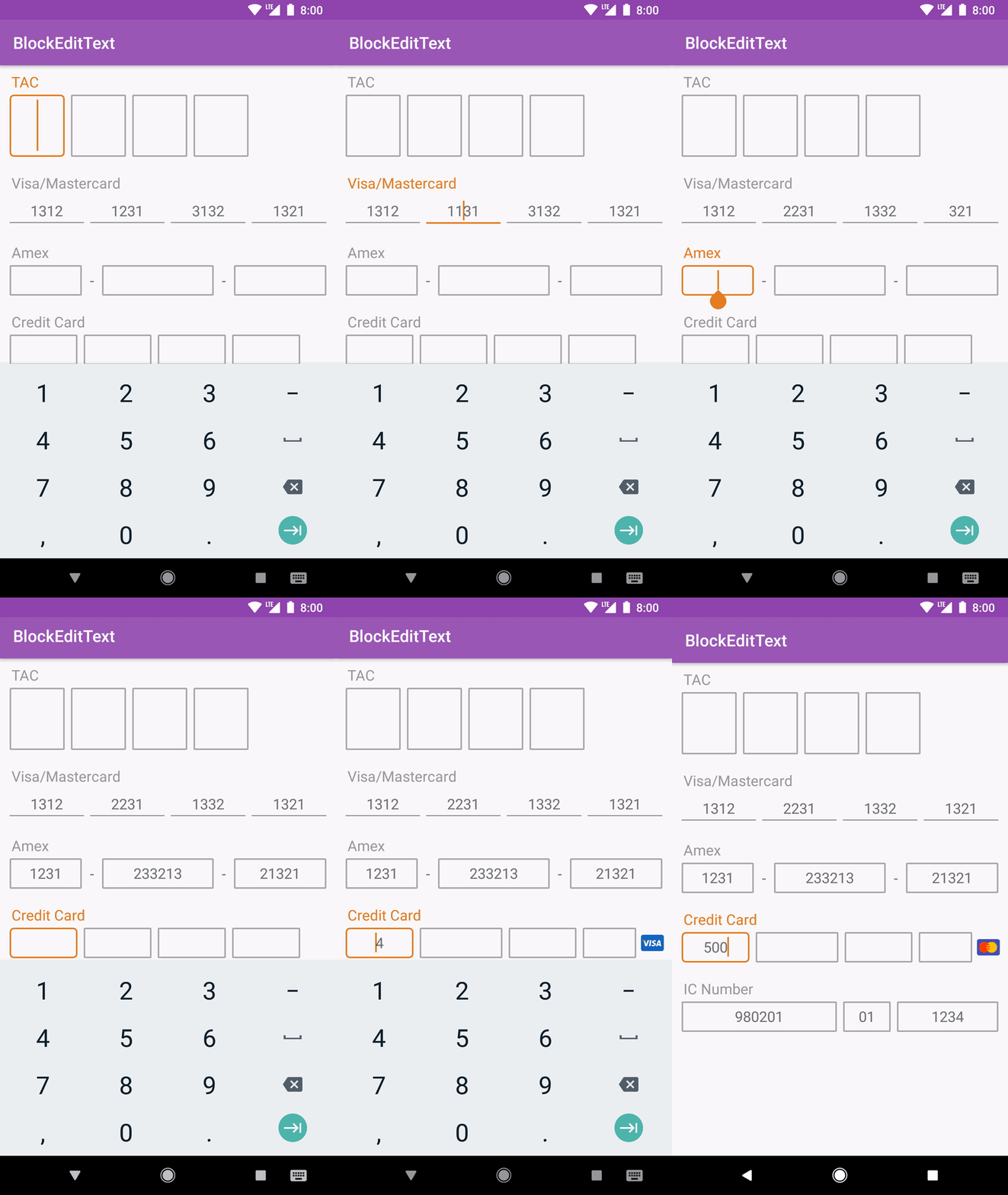
Android 14.0+ support



If you are a Maven user you can easily include the library by specifying it as a dependency:
repositories {
maven{
maven { url 'https://jitpack.io' }
}
}
dependencies {
implementation 'com.github.shiburagi:BlockEditText:v0.2'
}or, you can include it by download this project and import /blockedittext as module.
Creating the layout
<com.infideap.blockedittext.BlockEditText
android:id="@+id/blockEditText_tac"app:defaultLength="1"app:numberOfBlock="4"app:inputType="Integer"app:hintTextAppearance="@style/TextAppearance.AppCompat.Medium"app:hint="TAC"app:textSize="24sp"android:layout_width="300dp"app:editTextBackground="@drawable/selector_edittext_round_border"android:layout_height="wrap_content" />
<com.infideap.blockedittext.BlockEditText
android:id="@+id/blockEditText_visa"android:layout_width="match_parent"android:layout_height="wrap_content"app:defaultLength="4"app:hint="Visa/Mastercard"app:hintTextAppearance="@style/TextAppearance.AppCompat.Medium"app:inputType="Integer"app:numberOfBlock="4"app:text="131321323-13213-21321312" />amexEditText.setNumberOfBlock(3);
amexEditText.setDefaultLength(4);
amexEditText.setLengthAt(1,6);
amexEditText.setHint("Amex");
amexEditText.setText("1234567890");
amexEditText.getText();
amexEditText.setTextSize(16);
amexEditText.setHintTextSize(16);
amexEditText.setSeparatorTextSize(16);
amexEditText.setSeparatorCharacter('-');
amexEditText.setSeparatorPadding(8);
amexEditText.setInputType(InputType.TYPE_CLASS_NUMBER);
amexEditText.setTextAppearance(android.support.v7.appcompat.R.style.Base_TextAppearance_AppCompat_Medium);
amexEditText.setHintTextAppearance(android.support.v7.appcompat.R.style.Base_TextAppearance_AppCompat_Medium);
amexEditText.setSeparatorTextAppearance(android.support.v7.appcompat.R.style.Base_TextAppearance_AppCompat_Medium);
amexEditText.setEdiTextBackground(ContextCompat.getDrawable(this, R.drawable.selector_edittext_round_border_line));
amexEditText.setSelection(0);
amexEditText.setShiftPosition(true);
amexEditText.addCardPrefix(CardPrefix.amex(this))
amexEditText.addCardPrefix(CardPrefix.amex(amexDrawable))
amexEditText.addCardPrefix(newCardPrefix(this, R.drawable.ic_amex, "34"))
amexEditText.addCardPrefix(newCardPrefix(amexDrawable, "34"))amexEditText.setTextChangedListener(TextWatcherwatcher)
amexEditText.setOnCardPrefixListener(OnCardPrefixListenerlistener)For any enquiries, please send an email to tr32010@gmail.com.
Copyright 2018 Shiburagi
Licensed under the Apache License, Version 2.0 (the "License");
you may not use this file except in compliance with the License.
You may obtain a copy of the License at
http://www.apache.org/licenses/LICENSE-2.0
Unless required by applicable law or agreed to in writing, software
distributed under the License is distributed on an "AS IS" BASIS,
WITHOUT WARRANTIES OR CONDITIONS OF ANY KIND, either express or implied.
See the License for the specific language governing permissions and
limitations under the License.