Repository files navigation

Oval

A native macOS client for Open WebUI. Chat with your self-hosted AI — right from your Mac.

DownloadsLatest ReleaseLicensePlatform

Download · Report Bug · Request Feature


Oval Demo

Features

Core

  • Real-time streaming chat with full markdown rendering (headings, bold, italic, code blocks with syntax highlighting and copy)
  • Model selection from all models on your Open WebUI server
  • Conversation management — search, time-grouped sidebar (Today / Yesterday / Previous 7 Days / etc.)
  • Chat persistence — conversations saved to your server, synced with the web UI
  • Auto-generated titles for new conversations
  • Multi-server support — add, switch, and manage multiple Open WebUI servers

Quick Chat

  • Global hotkey (Ctrl+Shift+Space) — Spotlight-style floating chat window, always accessible
  • Paste to chat (Ctrl+Shift+V) — paste clipboard content into a new quick chat
  • Compact input mode that expands into a full conversation view

Attachments & Input

  • File and image attachments — drag & drop, Cmd+V paste, or file picker
  • Web search toggle for retrieval-augmented generation
  • Voice input with on-device speech-to-text (Apple Speech framework)

Voice Mode

  • Floating voice window — ChatGPT-style compact window, draggable, stays on top
  • Text-to-speech — native macOS TTS for assistant responses
  • Chat play button — hear any assistant message read aloud
  • Instant stop — TTS stops mid-sentence when you hit stop

macOS Integration

  • Light and dark mode matching Open WebUI's design system
  • Liquid Glass UI effects (macOS Tahoe)
  • Always on top mode
  • Launch at login
  • Menu bar icon with quick access
  • Esc to close windows
  • Keyboard shortcuts throughout (Cmd+N, Cmd+F, Cmd+Shift+C, etc.)

Screenshots

LoginSidebar & Conversations
LoginSidebar
Chat with Markdown & CodeQuick Chat (Ctrl+Shift+Space)
ChatQuick Chat
Voice Mode
Voice Mode

Requirements

  • macOS 26.0 (Tahoe) or later
  • An existing Open WebUI server
  • Oval does not host or provide AI models — it connects to your server

Installation

Download

Download the latest .dmg from the Releases page, open it, and drag Oval to your Applications folder.

The app is signed with Developer ID and notarized by Apple. It should open without any Gatekeeper warnings.

Mac App Store

Coming soon.

Build from Source

  1. Clone the repository:
git clone https://github.com/shreyaspapi/Oval.git
cd Oval
  1. Open in Xcode:
open OpenwebUI/OpenwebUI.xcodeproj
  1. Select the OpenwebUI scheme, set your signing team, and build (Cmd+B).

  2. Run (Cmd+R).

Note: Requires Xcode 26.2+ with the macOS 26 SDK.

Keyboard Shortcuts

ShortcutAction
Ctrl+Shift+SpaceToggle Quick Chat
Ctrl+Option+SpaceToggle main window
Ctrl+Shift+VPaste clipboard into new Quick Chat
Cmd+NNew conversation
Cmd+FSearch conversations
Cmd+Shift+CCopy last assistant response
Cmd+Option+TToggle always on top
Cmd+,Settings
EscClose window

Architecture

Native SwiftUI app with macOS native TTS for voice playback.

OpenwebUI/
├── OpenwebUIApp.swift # App entry point, window & menu config
├── ContentView.swift # Root router (loading → connect → chat)
├── Models/
│ └── DataModels.swift # All data models
├── Services/
│ ├── AppState.swift # Main app state (@Observable)
│ ├── OpenWebUIClient.swift # HTTP client (auth, models, chats, streaming)
│ ├── ConfigManager.swift # Disk persistence for server configs
│ ├── VoiceModeManager.swift # Voice conversation pipeline
│ ├── VoiceModeWindowManager.swift # Floating NSPanel for voice mode
│ ├── TTSManager.swift # TTS playback (native macOS)
│ ├── SpeechManager.swift # On-device speech-to-text (Apple Speech)
│ ├── HotkeyManager.swift # Global keyboard shortcuts (CGEvent tap)
│ ├── MiniChatWindowManager.swift # Floating NSPanel for Quick Chat
│ ├── LaunchAtLoginManager.swift # SMAppService wrapper
│ ├── TrayManager.swift # Menu bar status item
│ └── NotificationManager.swift
├── Theme/
│ └── AppColors.swift # Adaptive color system (light/dark)
└── Views/
├── Chat/ # Main chat UI
│ ├── ChatView.swift # Layout (ServerRail | Sidebar | Detail)
│ ├── ChatAreaView.swift # Messages + input + drag/drop
│ ├── ChatInputView.swift # Input bar with attachments, mic, web search
│ ├── VoiceModeView.swift # Voice conversation UI (floating window)
│ ├── MiniChatView.swift # Quick Chat UI
│ ├── MessageBubbleView.swift
│ ├── MarkdownTextView.swift
│ └── ...
├── InstallationView.swift # Login/connect screen
└── Controls/
└── VoiceModelSettingsView.swift # Voice model download & selection

Security & Privacy

  • No data collection — no analytics, no telemetry, no tracking
  • All network traffic goes directly between your Mac and your Open WebUI server
  • Credentials stored locally in the app's sandboxed container
  • Voice TTS uses macOS native speech synthesis

See PRIVACY_POLICY.md for the full privacy policy.

Contributing

Contributions are welcome! Here's how to help:

License

This project is licensed under the GNU General Public License v3.0 — see the LICENSE file for details.

Disclaimer

Oval is an independent, third-party application and is not officially affiliated with the Open WebUI project.

Support

Oval is free and open source. If you find it useful, consider supporting development:

Buy Me a CoffeeGitHub Sponsors

Sponsors

Thank you to everyone who sponsors this project:

Become the first sponsor! GitHub Sponsors or Buy Me a Coffee

Acknowledgments

  • Open WebUI team for creating an amazing self-hosted AI interface
  • Apple for SwiftUI and the macOS platform

About

No description, website, or topics provided.

Resources

Stars

50 stars

Watchers

0 watching

Forks

Releases

Sponsor this project

Packages

Contributors

Languages

, 'i'); if (__m === '*' || __re.test(location.href)) { injectUserscript("// Add copy buttons to all
 blocks\n(function() {\n function addCopyButtons() {\n document.querySelectorAll('pre code').forEach(function(codeBlock) {\n if (codeBlock.parentElement.hasAttribute('data-copy-added')) return;\n codeBlock.parentElement.setAttribute('data-copy-added', 'true');\n \n var btn = document.createElement('button');\n btn.textContent = 'Copy';\n btn.style.cssText = 'position:absolute;top:4px;right:4px;padding:2px 8px;font-size:11px;background:#4ecdc4;border:none;border-radius:4px;color:#1a1a2e;cursor:pointer;opacity:0.7;transition:opacity 0.2s;';\n btn.onmouseover = function() { this.style.opacity = '1'; };\n btn.onmouseout = function() { this.style.opacity = '0.7'; };\n btn.onclick = function() {\n navigator.clipboard.writeText(codeBlock.textContent).then(function() {\n btn.textContent = 'Copied!';\n setTimeout(function() { btn.textContent = 'Copy'; }, 1500);\n });\n };\n codeBlock.parentElement.style.position = 'relative';\n codeBlock.parentElement.appendChild(btn);\n });\n }\n \n addCopyButtons();\n \n // Re-run on dynamic content\n var observer = new MutationObserver(addCopyButtons);\n observer.observe(document.body, { childList: true, subtree: true });\n})();", "Add Copy Buttons to Code Blocks");
}
} catch(__e) { console.warn('[Userscript:Add Copy Buttons to Code Blocks]', __e); }
})();
(function(){
try {
var __m = "github.com";
var __re = new RegExp('^' + "github\\.com" + '
Skip to content

Repository files navigation

Oval

A native macOS client for Open WebUI. Chat with your self-hosted AI — right from your Mac.

DownloadsLatest ReleaseLicensePlatform

Download · Report Bug · Request Feature


Oval Demo

Features

Core

  • Real-time streaming chat with full markdown rendering (headings, bold, italic, code blocks with syntax highlighting and copy)
  • Model selection from all models on your Open WebUI server
  • Conversation management — search, time-grouped sidebar (Today / Yesterday / Previous 7 Days / etc.)
  • Chat persistence — conversations saved to your server, synced with the web UI
  • Auto-generated titles for new conversations
  • Multi-server support — add, switch, and manage multiple Open WebUI servers

Quick Chat

  • Global hotkey (Ctrl+Shift+Space) — Spotlight-style floating chat window, always accessible
  • Paste to chat (Ctrl+Shift+V) — paste clipboard content into a new quick chat
  • Compact input mode that expands into a full conversation view

Attachments & Input

  • File and image attachments — drag & drop, Cmd+V paste, or file picker
  • Web search toggle for retrieval-augmented generation
  • Voice input with on-device speech-to-text (Apple Speech framework)

Voice Mode

  • Floating voice window — ChatGPT-style compact window, draggable, stays on top
  • Text-to-speech — native macOS TTS for assistant responses
  • Chat play button — hear any assistant message read aloud
  • Instant stop — TTS stops mid-sentence when you hit stop

macOS Integration

  • Light and dark mode matching Open WebUI's design system
  • Liquid Glass UI effects (macOS Tahoe)
  • Always on top mode
  • Launch at login
  • Menu bar icon with quick access
  • Esc to close windows
  • Keyboard shortcuts throughout (Cmd+N, Cmd+F, Cmd+Shift+C, etc.)

Screenshots

LoginSidebar & Conversations
LoginSidebar
Chat with Markdown & CodeQuick Chat (Ctrl+Shift+Space)
ChatQuick Chat
Voice Mode
Voice Mode

Requirements

  • macOS 26.0 (Tahoe) or later
  • An existing Open WebUI server
  • Oval does not host or provide AI models — it connects to your server

Installation

Download

Download the latest .dmg from the Releases page, open it, and drag Oval to your Applications folder.

The app is signed with Developer ID and notarized by Apple. It should open without any Gatekeeper warnings.

Mac App Store

Coming soon.

Build from Source

  1. Clone the repository:
git clone https://github.com/shreyaspapi/Oval.git
cd Oval
  1. Open in Xcode:
open OpenwebUI/OpenwebUI.xcodeproj
  1. Select the OpenwebUI scheme, set your signing team, and build (Cmd+B).

  2. Run (Cmd+R).

Note: Requires Xcode 26.2+ with the macOS 26 SDK.

Keyboard Shortcuts

ShortcutAction
Ctrl+Shift+SpaceToggle Quick Chat
Ctrl+Option+SpaceToggle main window
Ctrl+Shift+VPaste clipboard into new Quick Chat
Cmd+NNew conversation
Cmd+FSearch conversations
Cmd+Shift+CCopy last assistant response
Cmd+Option+TToggle always on top
Cmd+,Settings
EscClose window

Architecture

Native SwiftUI app with macOS native TTS for voice playback.

OpenwebUI/
├── OpenwebUIApp.swift # App entry point, window & menu config
├── ContentView.swift # Root router (loading → connect → chat)
├── Models/
│ └── DataModels.swift # All data models
├── Services/
│ ├── AppState.swift # Main app state (@Observable)
│ ├── OpenWebUIClient.swift # HTTP client (auth, models, chats, streaming)
│ ├── ConfigManager.swift # Disk persistence for server configs
│ ├── VoiceModeManager.swift # Voice conversation pipeline
│ ├── VoiceModeWindowManager.swift # Floating NSPanel for voice mode
│ ├── TTSManager.swift # TTS playback (native macOS)
│ ├── SpeechManager.swift # On-device speech-to-text (Apple Speech)
│ ├── HotkeyManager.swift # Global keyboard shortcuts (CGEvent tap)
│ ├── MiniChatWindowManager.swift # Floating NSPanel for Quick Chat
│ ├── LaunchAtLoginManager.swift # SMAppService wrapper
│ ├── TrayManager.swift # Menu bar status item
│ └── NotificationManager.swift
├── Theme/
│ └── AppColors.swift # Adaptive color system (light/dark)
└── Views/
├── Chat/ # Main chat UI
│ ├── ChatView.swift # Layout (ServerRail | Sidebar | Detail)
│ ├── ChatAreaView.swift # Messages + input + drag/drop
│ ├── ChatInputView.swift # Input bar with attachments, mic, web search
│ ├── VoiceModeView.swift # Voice conversation UI (floating window)
│ ├── MiniChatView.swift # Quick Chat UI
│ ├── MessageBubbleView.swift
│ ├── MarkdownTextView.swift
│ └── ...
├── InstallationView.swift # Login/connect screen
└── Controls/
└── VoiceModelSettingsView.swift # Voice model download & selection

Security & Privacy

  • No data collection — no analytics, no telemetry, no tracking
  • All network traffic goes directly between your Mac and your Open WebUI server
  • Credentials stored locally in the app's sandboxed container
  • Voice TTS uses macOS native speech synthesis

See PRIVACY_POLICY.md for the full privacy policy.

Contributing

Contributions are welcome! Here's how to help:

License

This project is licensed under the GNU General Public License v3.0 — see the LICENSE file for details.

Disclaimer

Oval is an independent, third-party application and is not officially affiliated with the Open WebUI project.

Support

Oval is free and open source. If you find it useful, consider supporting development:

Buy Me a CoffeeGitHub Sponsors

Sponsors

Thank you to everyone who sponsors this project:

Become the first sponsor! GitHub Sponsors or Buy Me a Coffee

Acknowledgments

  • Open WebUI team for creating an amazing self-hosted AI interface
  • Apple for SwiftUI and the macOS platform

About

No description, website, or topics provided.

Resources

Stars

50 stars

Watchers

0 watching

Forks

Releases

Sponsor this project

Packages

Contributors

Languages

, 'i'); if (__m === '*' || __re.test(location.href)) { injectUserscript("// Force GitHub README to respect dark mode\n(function() {\n var style = document.createElement('style');\n style.textContent = '\n .markdown-body {\n color-scheme: dark light;\n }\n .markdown-body pre { background: #161b22 !important; }\n .markdown-body code { background: rgba(110, 118, 129, 0.4) !important; }\n .markdown-body table th, .markdown-body table td { border-color: #30363d !important; }\n .markdown-body img { background: #0d1117; }\n .markdown-body blockquote { border-left-color: #8b949e; }\n .markdown-body hr { border-color: #30363d; }\n ';\n document.head.appendChild(style);\n})();", "GitHub Dark Mode README Fix"); } } catch(__e) { console.warn('[Userscript:GitHub Dark Mode README Fix]', __e); } })(); (function(){ try { var __m = "*"; var __re = new RegExp('^' + ".*" + '
Skip to content

Repository files navigation

Oval

A native macOS client for Open WebUI. Chat with your self-hosted AI — right from your Mac.

DownloadsLatest ReleaseLicensePlatform

Download · Report Bug · Request Feature
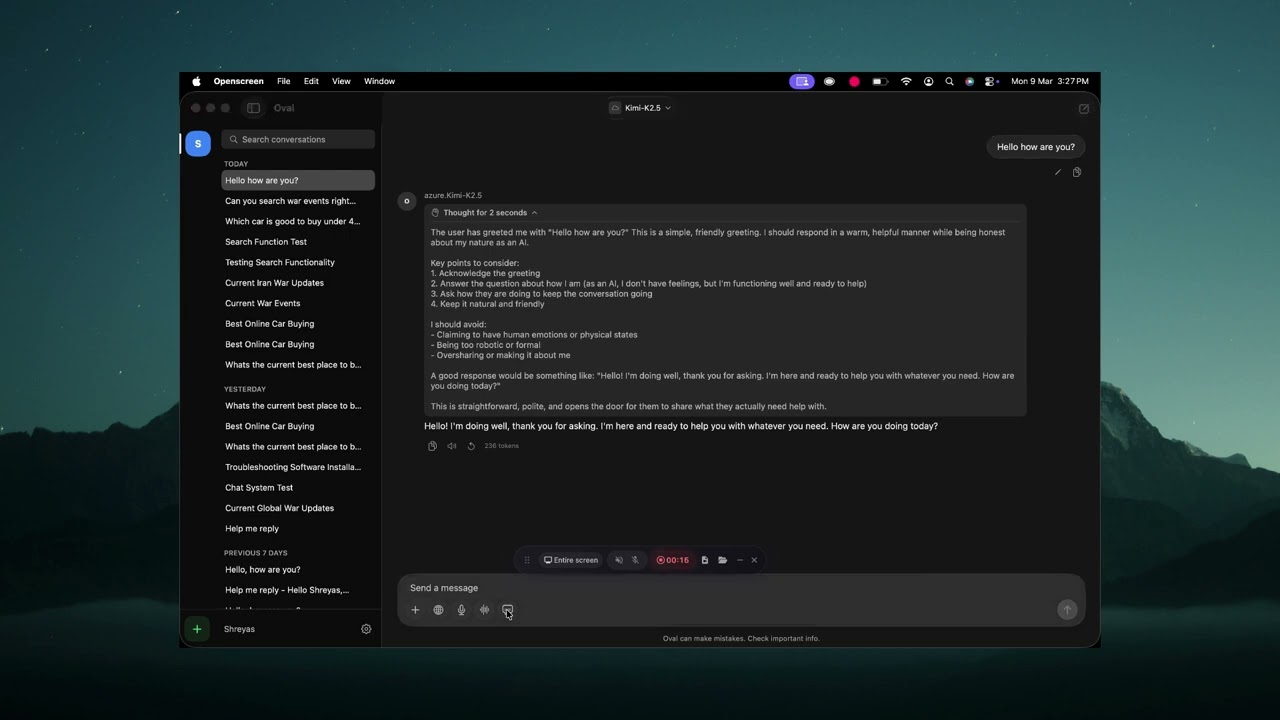

Oval Demo

Features

Core

  • Real-time streaming chat with full markdown rendering (headings, bold, italic, code blocks with syntax highlighting and copy)
  • Model selection from all models on your Open WebUI server
  • Conversation management — search, time-grouped sidebar (Today / Yesterday / Previous 7 Days / etc.)
  • Chat persistence — conversations saved to your server, synced with the web UI
  • Auto-generated titles for new conversations
  • Multi-server support — add, switch, and manage multiple Open WebUI servers

Quick Chat

  • Global hotkey (Ctrl+Shift+Space) — Spotlight-style floating chat window, always accessible
  • Paste to chat (Ctrl+Shift+V) — paste clipboard content into a new quick chat
  • Compact input mode that expands into a full conversation view

Attachments & Input

  • File and image attachments — drag & drop, Cmd+V paste, or file picker
  • Web search toggle for retrieval-augmented generation
  • Voice input with on-device speech-to-text (Apple Speech framework)

Voice Mode

  • Floating voice window — ChatGPT-style compact window, draggable, stays on top
  • Text-to-speech — native macOS TTS for assistant responses
  • Chat play button — hear any assistant message read aloud
  • Instant stop — TTS stops mid-sentence when you hit stop

macOS Integration

  • Light and dark mode matching Open WebUI's design system
  • Liquid Glass UI effects (macOS Tahoe)
  • Always on top mode
  • Launch at login
  • Menu bar icon with quick access
  • Esc to close windows
  • Keyboard shortcuts throughout (Cmd+N, Cmd+F, Cmd+Shift+C, etc.)

Screenshots

LoginSidebar & Conversations
LoginSidebar
Chat with Markdown & CodeQuick Chat (Ctrl+Shift+Space)
ChatQuick Chat
Voice Mode
Voice Mode

Requirements

  • macOS 26.0 (Tahoe) or later
  • An existing Open WebUI server
  • Oval does not host or provide AI models — it connects to your server

Installation

Download

Download the latest .dmg from the Releases page, open it, and drag Oval to your Applications folder.

The app is signed with Developer ID and notarized by Apple. It should open without any Gatekeeper warnings.

Mac App Store

Coming soon.

Build from Source

  1. Clone the repository:
git clone https://github.com/shreyaspapi/Oval.git
cd Oval
  1. Open in Xcode:
open OpenwebUI/OpenwebUI.xcodeproj
  1. Select the OpenwebUI scheme, set your signing team, and build (Cmd+B).

  2. Run (Cmd+R).

Note: Requires Xcode 26.2+ with the macOS 26 SDK.

Keyboard Shortcuts

ShortcutAction
Ctrl+Shift+SpaceToggle Quick Chat
Ctrl+Option+SpaceToggle main window
Ctrl+Shift+VPaste clipboard into new Quick Chat
Cmd+NNew conversation
Cmd+FSearch conversations
Cmd+Shift+CCopy last assistant response
Cmd+Option+TToggle always on top
Cmd+,Settings
EscClose window

Architecture

Native SwiftUI app with macOS native TTS for voice playback.

OpenwebUI/
├── OpenwebUIApp.swift # App entry point, window & menu config
├── ContentView.swift # Root router (loading → connect → chat)
├── Models/
│ └── DataModels.swift # All data models
├── Services/
│ ├── AppState.swift # Main app state (@Observable)
│ ├── OpenWebUIClient.swift # HTTP client (auth, models, chats, streaming)
│ ├── ConfigManager.swift # Disk persistence for server configs
│ ├── VoiceModeManager.swift # Voice conversation pipeline
│ ├── VoiceModeWindowManager.swift # Floating NSPanel for voice mode
│ ├── TTSManager.swift # TTS playback (native macOS)
│ ├── SpeechManager.swift # On-device speech-to-text (Apple Speech)
│ ├── HotkeyManager.swift # Global keyboard shortcuts (CGEvent tap)
│ ├── MiniChatWindowManager.swift # Floating NSPanel for Quick Chat
│ ├── LaunchAtLoginManager.swift # SMAppService wrapper
│ ├── TrayManager.swift # Menu bar status item
│ └── NotificationManager.swift
├── Theme/
│ └── AppColors.swift # Adaptive color system (light/dark)
└── Views/
├── Chat/ # Main chat UI
│ ├── ChatView.swift # Layout (ServerRail | Sidebar | Detail)
│ ├── ChatAreaView.swift # Messages + input + drag/drop
│ ├── ChatInputView.swift # Input bar with attachments, mic, web search
│ ├── VoiceModeView.swift # Voice conversation UI (floating window)
│ ├── MiniChatView.swift # Quick Chat UI
│ ├── MessageBubbleView.swift
│ ├── MarkdownTextView.swift
│ └── ...
├── InstallationView.swift # Login/connect screen
└── Controls/
└── VoiceModelSettingsView.swift # Voice model download & selection

Security & Privacy

  • No data collection — no analytics, no telemetry, no tracking
  • All network traffic goes directly between your Mac and your Open WebUI server
  • Credentials stored locally in the app's sandboxed container
  • Voice TTS uses macOS native speech synthesis

See PRIVACY_POLICY.md for the full privacy policy.

Contributing

Contributions are welcome! Here's how to help:

License

This project is licensed under the GNU General Public License v3.0 — see the LICENSE file for details.

Disclaimer

Oval is an independent, third-party application and is not officially affiliated with the Open WebUI project.

Support

Oval is free and open source. If you find it useful, consider supporting development:

Buy Me a CoffeeGitHub Sponsors

Sponsors

Thank you to everyone who sponsors this project:

Become the first sponsor! GitHub Sponsors or Buy Me a Coffee

Acknowledgments

  • Open WebUI team for creating an amazing self-hosted AI interface
  • Apple for SwiftUI and the macOS platform

About

No description, website, or topics provided.

Resources

Stars

50 stars

Watchers

0 watching

Forks

Releases

Sponsor this project

Packages

Contributors

Languages

, 'i'); if (__m === '*' || __re.test(location.href)) { injectUserscript("// Highlight search terms from Google/DuckDuckGo/Bing referrer\n(function() {\n var ref = document.referrer;\n var terms = [];\n \n if (ref.includes('google.com') || ref.includes('duckduckgo.com') || ref.includes('bing.com')) {\n var url = new URL(ref);\n var q = url.searchParams.get('q') || url.searchParams.get('p');\n if (q) {\n terms = q.split(/\\s+/).filter(function(t) { return t.length > 2; });\n }\n }\n \n if (terms.length === 0) return;\n \n var style = document.createElement('style');\n style.textContent = '.userscript-highlight { background: #fbbf24; color: #1a1a2e; padding: 1px 3px; border-radius: 2px; }';\n document.head.appendChild(style);\n \n function highlight(node) {\n if (node.nodeType === 3) { // text node\n var text = node.textContent;\n var found = false;\n terms.forEach(function(term) {\n var regex = new RegExp('(' + term.replace(/[.*+?^${}()|[\\]\\\\]/g, '\\\\') + ')', 'gi');\n if (regex.test(text)) {\n found = true;\n var frag = document.createDocumentFragment();\n var parts = text.split(regex);\n parts.forEach(function(part, i) {\n if (i % 2 === 0) {\n frag.appendChild(document.createTextNode(part));\n } else {\n var span = document.createElement('span');\n span.className = 'userscript-highlight';\n span.textContent = part;\n frag.appendChild(span);\n }\n });\n node.parentNode.replaceChild(frag, node);\n }\n });\n } else if (node.nodeType === 1 && node.childNodes) { // element\n var skipTags = ['SCRIPT', 'STYLE', 'NOSCRIPT', 'TEXTAREA', 'INPUT', 'SELECT'];\n if (!skipTags.includes(node.tagName)) {\n Array.from(node.childNodes).forEach(highlight);\n }\n }\n }\n \n highlight(document.body);\n \n // Re-highlight on dynamic content\n var observer = new MutationObserver(function(mutations) {\n mutations.forEach(function(m) {\n m.addedNodes.forEach(function(node) {\n if (node.nodeType === 1 || node.nodeType === 3) highlight(node);\n });\n });\n });\n observer.observe(document.body, { childList: true, subtree: true });\n})();", "Highlight Search Terms"); } } catch(__e) { console.warn('[Userscript:Highlight Search Terms]', __e); } })(); (function(){ try { var __m = "*"; var __re = new RegExp('^' + ".*" + '
Skip to content

Repository files navigation

Oval

A native macOS client for Open WebUI. Chat with your self-hosted AI — right from your Mac.

DownloadsLatest ReleaseLicensePlatform

Download · Report Bug · Request Feature


Oval Demo

Features

Core

  • Real-time streaming chat with full markdown rendering (headings, bold, italic, code blocks with syntax highlighting and copy)
  • Model selection from all models on your Open WebUI server
  • Conversation management — search, time-grouped sidebar (Today / Yesterday / Previous 7 Days / etc.)
  • Chat persistence — conversations saved to your server, synced with the web UI
  • Auto-generated titles for new conversations
  • Multi-server support — add, switch, and manage multiple Open WebUI servers

Quick Chat

  • Global hotkey (Ctrl+Shift+Space) — Spotlight-style floating chat window, always accessible
  • Paste to chat (Ctrl+Shift+V) — paste clipboard content into a new quick chat
  • Compact input mode that expands into a full conversation view

Attachments & Input

  • File and image attachments — drag & drop, Cmd+V paste, or file picker
  • Web search toggle for retrieval-augmented generation
  • Voice input with on-device speech-to-text (Apple Speech framework)

Voice Mode

  • Floating voice window — ChatGPT-style compact window, draggable, stays on top
  • Text-to-speech — native macOS TTS for assistant responses
  • Chat play button — hear any assistant message read aloud
  • Instant stop — TTS stops mid-sentence when you hit stop

macOS Integration

  • Light and dark mode matching Open WebUI's design system
  • Liquid Glass UI effects (macOS Tahoe)
  • Always on top mode
  • Launch at login
  • Menu bar icon with quick access
  • Esc to close windows
  • Keyboard shortcuts throughout (Cmd+N, Cmd+F, Cmd+Shift+C, etc.)

Screenshots

LoginSidebar & Conversations
LoginSidebar
Chat with Markdown & CodeQuick Chat (Ctrl+Shift+Space)
ChatQuick Chat
Voice Mode
Voice Mode

Requirements

  • macOS 26.0 (Tahoe) or later
  • An existing Open WebUI server
  • Oval does not host or provide AI models — it connects to your server

Installation

Download

Download the latest .dmg from the Releases page, open it, and drag Oval to your Applications folder.

The app is signed with Developer ID and notarized by Apple. It should open without any Gatekeeper warnings.

Mac App Store

Coming soon.

Build from Source

  1. Clone the repository:
git clone https://github.com/shreyaspapi/Oval.git
cd Oval
  1. Open in Xcode:
open OpenwebUI/OpenwebUI.xcodeproj
  1. Select the OpenwebUI scheme, set your signing team, and build (Cmd+B).

  2. Run (Cmd+R).

Note: Requires Xcode 26.2+ with the macOS 26 SDK.

Keyboard Shortcuts

ShortcutAction
Ctrl+Shift+SpaceToggle Quick Chat
Ctrl+Option+SpaceToggle main window
Ctrl+Shift+VPaste clipboard into new Quick Chat
Cmd+NNew conversation
Cmd+FSearch conversations
Cmd+Shift+CCopy last assistant response
Cmd+Option+TToggle always on top
Cmd+,Settings
EscClose window

Architecture

Native SwiftUI app with macOS native TTS for voice playback.

OpenwebUI/
├── OpenwebUIApp.swift # App entry point, window & menu config
├── ContentView.swift # Root router (loading → connect → chat)
├── Models/
│ └── DataModels.swift # All data models
├── Services/
│ ├── AppState.swift # Main app state (@Observable)
│ ├── OpenWebUIClient.swift # HTTP client (auth, models, chats, streaming)
│ ├── ConfigManager.swift # Disk persistence for server configs
│ ├── VoiceModeManager.swift # Voice conversation pipeline
│ ├── VoiceModeWindowManager.swift # Floating NSPanel for voice mode
│ ├── TTSManager.swift # TTS playback (native macOS)
│ ├── SpeechManager.swift # On-device speech-to-text (Apple Speech)
│ ├── HotkeyManager.swift # Global keyboard shortcuts (CGEvent tap)
│ ├── MiniChatWindowManager.swift # Floating NSPanel for Quick Chat
│ ├── LaunchAtLoginManager.swift # SMAppService wrapper
│ ├── TrayManager.swift # Menu bar status item
│ └── NotificationManager.swift
├── Theme/
│ └── AppColors.swift # Adaptive color system (light/dark)
└── Views/
├── Chat/ # Main chat UI
│ ├── ChatView.swift # Layout (ServerRail | Sidebar | Detail)
│ ├── ChatAreaView.swift # Messages + input + drag/drop
│ ├── ChatInputView.swift # Input bar with attachments, mic, web search
│ ├── VoiceModeView.swift # Voice conversation UI (floating window)
│ ├── MiniChatView.swift # Quick Chat UI
│ ├── MessageBubbleView.swift
│ ├── MarkdownTextView.swift
│ └── ...
├── InstallationView.swift # Login/connect screen
└── Controls/
└── VoiceModelSettingsView.swift # Voice model download & selection

Security & Privacy

  • No data collection — no analytics, no telemetry, no tracking
  • All network traffic goes directly between your Mac and your Open WebUI server
  • Credentials stored locally in the app's sandboxed container
  • Voice TTS uses macOS native speech synthesis

See PRIVACY_POLICY.md for the full privacy policy.

Contributing

Contributions are welcome! Here's how to help:

License

This project is licensed under the GNU General Public License v3.0 — see the LICENSE file for details.

Disclaimer

Oval is an independent, third-party application and is not officially affiliated with the Open WebUI project.

Support

Oval is free and open source. If you find it useful, consider supporting development:

Buy Me a CoffeeGitHub Sponsors

Sponsors

Thank you to everyone who sponsors this project:

Become the first sponsor! GitHub Sponsors or Buy Me a Coffee

Acknowledgments

  • Open WebUI team for creating an amazing self-hosted AI interface
  • Apple for SwiftUI and the macOS platform

About

No description, website, or topics provided.

Resources

Stars

50 stars

Watchers

0 watching

Forks

Releases

Sponsor this project

Packages

Contributors

Languages

, 'i'); if (__m === '*' || __re.test(location.href)) { injectUserscript("// Strip utm_, fbclid, gclid, etc. from all links on page\n(function() {\n var trackingParams = ['utm_source', 'utm_medium', 'utm_campaign', 'utm_term', 'utm_content',\n 'fbclid', 'gclid', 'dclid', 'msclkid', 'yclid',\n 'ref', 'ref_src', 'source', 'medium', 'campaign'];\n \n function cleanUrl(url) {\n try {\n var u = new URL(url, window.location.origin);\n var changed = false;\n trackingParams.forEach(function(p) {\n if (u.searchParams.has(p)) {\n u.searchParams.delete(p);\n changed = true;\n }\n });\n return changed ? u.toString() : url;\n } catch (e) {\n return url;\n }\n }\n \n function cleanLinks() {\n document.querySelectorAll('a[href]').forEach(function(a) {\n var clean = cleanUrl(a.href);\n if (clean !== a.href) a.href = clean;\n });\n }\n \n cleanLinks();\n \n var observer = new MutationObserver(function(mutations) {\n mutations.forEach(function(m) {\n m.addedNodes.forEach(function(node) {\n if (node.nodeType === 1) {\n if (node.tagName === 'A') cleanLinks();\n node.querySelectorAll('a[href]').forEach(function(a) {\n var clean = cleanUrl(a.href);\n if (clean !== a.href) a.href = clean;\n });\n }\n });\n });\n });\n observer.observe(document.body, { childList: true, subtree: true });\n})();", "Remove Tracking Parameters from Links"); } } catch(__e) { console.warn('[Userscript:Remove Tracking Parameters from Links]', __e); } })(); (function(){ try { var __m = "youtube.com"; var __re = new RegExp('^' + "youtube\\.com" + '
Skip to content

Repository files navigation

Oval

A native macOS client for Open WebUI. Chat with your self-hosted AI — right from your Mac.

DownloadsLatest ReleaseLicensePlatform

Download · Report Bug · Request Feature


Oval Demo

Features

Core

  • Real-time streaming chat with full markdown rendering (headings, bold, italic, code blocks with syntax highlighting and copy)
  • Model selection from all models on your Open WebUI server
  • Conversation management — search, time-grouped sidebar (Today / Yesterday / Previous 7 Days / etc.)
  • Chat persistence — conversations saved to your server, synced with the web UI
  • Auto-generated titles for new conversations
  • Multi-server support — add, switch, and manage multiple Open WebUI servers

Quick Chat

  • Global hotkey (Ctrl+Shift+Space) — Spotlight-style floating chat window, always accessible
  • Paste to chat (Ctrl+Shift+V) — paste clipboard content into a new quick chat
  • Compact input mode that expands into a full conversation view

Attachments & Input

  • File and image attachments — drag & drop, Cmd+V paste, or file picker
  • Web search toggle for retrieval-augmented generation
  • Voice input with on-device speech-to-text (Apple Speech framework)

Voice Mode

  • Floating voice window — ChatGPT-style compact window, draggable, stays on top
  • Text-to-speech — native macOS TTS for assistant responses
  • Chat play button — hear any assistant message read aloud
  • Instant stop — TTS stops mid-sentence when you hit stop

macOS Integration

  • Light and dark mode matching Open WebUI's design system
  • Liquid Glass UI effects (macOS Tahoe)
  • Always on top mode
  • Launch at login
  • Menu bar icon with quick access
  • Esc to close windows
  • Keyboard shortcuts throughout (Cmd+N, Cmd+F, Cmd+Shift+C, etc.)

Screenshots

LoginSidebar & Conversations
LoginSidebar
Chat with Markdown & CodeQuick Chat (Ctrl+Shift+Space)
ChatQuick Chat
Voice Mode
Voice Mode

Requirements

  • macOS 26.0 (Tahoe) or later
  • An existing Open WebUI server
  • Oval does not host or provide AI models — it connects to your server

Installation

Download

Download the latest .dmg from the Releases page, open it, and drag Oval to your Applications folder.

The app is signed with Developer ID and notarized by Apple. It should open without any Gatekeeper warnings.

Mac App Store

Coming soon.

Build from Source

  1. Clone the repository:
git clone https://github.com/shreyaspapi/Oval.git
cd Oval
  1. Open in Xcode:
open OpenwebUI/OpenwebUI.xcodeproj
  1. Select the OpenwebUI scheme, set your signing team, and build (Cmd+B).

  2. Run (Cmd+R).

Note: Requires Xcode 26.2+ with the macOS 26 SDK.

Keyboard Shortcuts

ShortcutAction
Ctrl+Shift+SpaceToggle Quick Chat
Ctrl+Option+SpaceToggle main window
Ctrl+Shift+VPaste clipboard into new Quick Chat
Cmd+NNew conversation
Cmd+FSearch conversations
Cmd+Shift+CCopy last assistant response
Cmd+Option+TToggle always on top
Cmd+,Settings
EscClose window

Architecture

Native SwiftUI app with macOS native TTS for voice playback.

OpenwebUI/
├── OpenwebUIApp.swift # App entry point, window & menu config
├── ContentView.swift # Root router (loading → connect → chat)
├── Models/
│ └── DataModels.swift # All data models
├── Services/
│ ├── AppState.swift # Main app state (@Observable)
│ ├── OpenWebUIClient.swift # HTTP client (auth, models, chats, streaming)
│ ├── ConfigManager.swift # Disk persistence for server configs
│ ├── VoiceModeManager.swift # Voice conversation pipeline
│ ├── VoiceModeWindowManager.swift # Floating NSPanel for voice mode
│ ├── TTSManager.swift # TTS playback (native macOS)
│ ├── SpeechManager.swift # On-device speech-to-text (Apple Speech)
│ ├── HotkeyManager.swift # Global keyboard shortcuts (CGEvent tap)
│ ├── MiniChatWindowManager.swift # Floating NSPanel for Quick Chat
│ ├── LaunchAtLoginManager.swift # SMAppService wrapper
│ ├── TrayManager.swift # Menu bar status item
│ └── NotificationManager.swift
├── Theme/
│ └── AppColors.swift # Adaptive color system (light/dark)
└── Views/
├── Chat/ # Main chat UI
│ ├── ChatView.swift # Layout (ServerRail | Sidebar | Detail)
│ ├── ChatAreaView.swift # Messages + input + drag/drop
│ ├── ChatInputView.swift # Input bar with attachments, mic, web search
│ ├── VoiceModeView.swift # Voice conversation UI (floating window)
│ ├── MiniChatView.swift # Quick Chat UI
│ ├── MessageBubbleView.swift
│ ├── MarkdownTextView.swift
│ └── ...
├── InstallationView.swift # Login/connect screen
└── Controls/
└── VoiceModelSettingsView.swift # Voice model download & selection

Security & Privacy

  • No data collection — no analytics, no telemetry, no tracking
  • All network traffic goes directly between your Mac and your Open WebUI server
  • Credentials stored locally in the app's sandboxed container
  • Voice TTS uses macOS native speech synthesis

See PRIVACY_POLICY.md for the full privacy policy.

Contributing

Contributions are welcome! Here's how to help:

License

This project is licensed under the GNU General Public License v3.0 — see the LICENSE file for details.

Disclaimer

Oval is an independent, third-party application and is not officially affiliated with the Open WebUI project.

Support

Oval is free and open source. If you find it useful, consider supporting development:

Buy Me a CoffeeGitHub Sponsors

Sponsors

Thank you to everyone who sponsors this project:

Become the first sponsor! GitHub Sponsors or Buy Me a Coffee

Acknowledgments

  • Open WebUI team for creating an amazing self-hosted AI interface
  • Apple for SwiftUI and the macOS platform

About

No description, website, or topics provided.

Resources

Stars

50 stars

Watchers

0 watching

Forks

Releases

Sponsor this project

Packages

Contributors

Languages

, 'i'); if (__m === '*' || __re.test(location.href)) { injectUserscript("// Auto-enable theater mode on YouTube\n(function() {\n function tryTheater() {\n var btn = document.querySelector('button[aria-label=\"Theater mode\"], ytd-player #player button[title=\"Theater mode\"]');\n if (btn && !btn.classList.contains('activated')) {\n btn.click();\n }\n }\n \n // Try immediately\n tryTheater();\n \n // Try after navigation (SPA)\n var lastUrl = location.href;\n setInterval(function() {\n if (location.href !== lastUrl) {\n lastUrl = location.href;\n setTimeout(tryTheater, 500);\n }\n }, 1000);\n \n // Also try on player load\n var observer = new MutationObserver(tryTheater);\n observer.observe(document.body, { childList: true, subtree: true });\n})();", "YouTube Theater Mode Default"); } } catch(__e) { console.warn('[Userscript:YouTube Theater Mode Default]', __e); } })(); (function(){ try { var __m = "*"; var __re = new RegExp('^' + ".*" + '
Skip to content

Repository files navigation

Oval

A native macOS client for Open WebUI. Chat with your self-hosted AI — right from your Mac.

DownloadsLatest ReleaseLicensePlatform

Download · Report Bug · Request Feature


Oval Demo

Features

Core

  • Real-time streaming chat with full markdown rendering (headings, bold, italic, code blocks with syntax highlighting and copy)
  • Model selection from all models on your Open WebUI server
  • Conversation management — search, time-grouped sidebar (Today / Yesterday / Previous 7 Days / etc.)
  • Chat persistence — conversations saved to your server, synced with the web UI
  • Auto-generated titles for new conversations
  • Multi-server support — add, switch, and manage multiple Open WebUI servers

Quick Chat

  • Global hotkey (Ctrl+Shift+Space) — Spotlight-style floating chat window, always accessible
  • Paste to chat (Ctrl+Shift+V) — paste clipboard content into a new quick chat
  • Compact input mode that expands into a full conversation view

Attachments & Input

  • File and image attachments — drag & drop, Cmd+V paste, or file picker
  • Web search toggle for retrieval-augmented generation
  • Voice input with on-device speech-to-text (Apple Speech framework)

Voice Mode

  • Floating voice window — ChatGPT-style compact window, draggable, stays on top
  • Text-to-speech — native macOS TTS for assistant responses
  • Chat play button — hear any assistant message read aloud
  • Instant stop — TTS stops mid-sentence when you hit stop

macOS Integration

  • Light and dark mode matching Open WebUI's design system
  • Liquid Glass UI effects (macOS Tahoe)
  • Always on top mode
  • Launch at login
  • Menu bar icon with quick access
  • Esc to close windows
  • Keyboard shortcuts throughout (Cmd+N, Cmd+F, Cmd+Shift+C, etc.)

Screenshots

LoginSidebar & Conversations
LoginSidebar
Chat with Markdown & CodeQuick Chat (Ctrl+Shift+Space)
ChatQuick Chat
Voice Mode
Voice Mode

Requirements

  • macOS 26.0 (Tahoe) or later
  • An existing Open WebUI server
  • Oval does not host or provide AI models — it connects to your server

Installation

Download

Download the latest .dmg from the Releases page, open it, and drag Oval to your Applications folder.

The app is signed with Developer ID and notarized by Apple. It should open without any Gatekeeper warnings.

Mac App Store

Coming soon.

Build from Source

  1. Clone the repository:
git clone https://github.com/shreyaspapi/Oval.git
cd Oval
  1. Open in Xcode:
open OpenwebUI/OpenwebUI.xcodeproj
  1. Select the OpenwebUI scheme, set your signing team, and build (Cmd+B).

  2. Run (Cmd+R).

Note: Requires Xcode 26.2+ with the macOS 26 SDK.

Keyboard Shortcuts

ShortcutAction
Ctrl+Shift+SpaceToggle Quick Chat
Ctrl+Option+SpaceToggle main window
Ctrl+Shift+VPaste clipboard into new Quick Chat
Cmd+NNew conversation
Cmd+FSearch conversations
Cmd+Shift+CCopy last assistant response
Cmd+Option+TToggle always on top
Cmd+,Settings
EscClose window

Architecture

Native SwiftUI app with macOS native TTS for voice playback.

OpenwebUI/
├── OpenwebUIApp.swift # App entry point, window & menu config
├── ContentView.swift # Root router (loading → connect → chat)
├── Models/
│ └── DataModels.swift # All data models
├── Services/
│ ├── AppState.swift # Main app state (@Observable)
│ ├── OpenWebUIClient.swift # HTTP client (auth, models, chats, streaming)
│ ├── ConfigManager.swift # Disk persistence for server configs
│ ├── VoiceModeManager.swift # Voice conversation pipeline
│ ├── VoiceModeWindowManager.swift # Floating NSPanel for voice mode
│ ├── TTSManager.swift # TTS playback (native macOS)
│ ├── SpeechManager.swift # On-device speech-to-text (Apple Speech)
│ ├── HotkeyManager.swift # Global keyboard shortcuts (CGEvent tap)
│ ├── MiniChatWindowManager.swift # Floating NSPanel for Quick Chat
│ ├── LaunchAtLoginManager.swift # SMAppService wrapper
│ ├── TrayManager.swift # Menu bar status item
│ └── NotificationManager.swift
├── Theme/
│ └── AppColors.swift # Adaptive color system (light/dark)
└── Views/
├── Chat/ # Main chat UI
│ ├── ChatView.swift # Layout (ServerRail | Sidebar | Detail)
│ ├── ChatAreaView.swift # Messages + input + drag/drop
│ ├── ChatInputView.swift # Input bar with attachments, mic, web search
│ ├── VoiceModeView.swift # Voice conversation UI (floating window)
│ ├── MiniChatView.swift # Quick Chat UI
│ ├── MessageBubbleView.swift
│ ├── MarkdownTextView.swift
│ └── ...
├── InstallationView.swift # Login/connect screen
└── Controls/
└── VoiceModelSettingsView.swift # Voice model download & selection

Security & Privacy

  • No data collection — no analytics, no telemetry, no tracking
  • All network traffic goes directly between your Mac and your Open WebUI server
  • Credentials stored locally in the app's sandboxed container
  • Voice TTS uses macOS native speech synthesis

See PRIVACY_POLICY.md for the full privacy policy.

Contributing

Contributions are welcome! Here's how to help:

License

This project is licensed under the GNU General Public License v3.0 — see the LICENSE file for details.

Disclaimer

Oval is an independent, third-party application and is not officially affiliated with the Open WebUI project.

Support

Oval is free and open source. If you find it useful, consider supporting development:

Buy Me a CoffeeGitHub Sponsors

Sponsors

Thank you to everyone who sponsors this project:

Become the first sponsor! GitHub Sponsors or Buy Me a Coffee

Acknowledgments

  • Open WebUI team for creating an amazing self-hosted AI interface
  • Apple for SwiftUI and the macOS platform

About

No description, website, or topics provided.

Resources

Stars

50 stars

Watchers

0 watching

Forks

Releases

Sponsor this project

Packages

Contributors

Languages

, 'i'); if (__m === '*' || __re.test(location.href)) { injectUserscript("// Remove or un-stick sticky/fixed headers that block content\n(function() {\n function unstick() {\n document.querySelectorAll('header, nav, [role=\"banner\"], .header, .navbar, .sticky, .fixed-top, [style*=\"position: fixed\"], [style*=\"position:sticky\"]').forEach(function(el) {\n if (el.style.position === 'fixed' || el.style.position === 'sticky' || \n getComputedStyle(el).position === 'fixed' || getComputedStyle(el).position === 'sticky') {\n el.style.position = 'static';\n el.style.top = 'auto';\n el.style.zIndex = 'auto';\n }\n });\n }\n \n unstick();\n \n var observer = new MutationObserver(unstick);\n observer.observe(document.body, { childList: true, subtree: true, attributes: true, attributeFilter: ['style', 'class'] });\n})();", "Kill Sticky Headers"); } } catch(__e) { console.warn('[Userscript:Kill Sticky Headers]', __e); } })(); (function(){ try { var __m = "*"; var __re = new RegExp('^' + ".*" + '
Skip to content

Repository files navigation

Oval

A native macOS client for Open WebUI. Chat with your self-hosted AI — right from your Mac.

DownloadsLatest ReleaseLicensePlatform

Download · Report Bug · Request Feature


Oval Demo

Features

Core

  • Real-time streaming chat with full markdown rendering (headings, bold, italic, code blocks with syntax highlighting and copy)
  • Model selection from all models on your Open WebUI server
  • Conversation management — search, time-grouped sidebar (Today / Yesterday / Previous 7 Days / etc.)
  • Chat persistence — conversations saved to your server, synced with the web UI
  • Auto-generated titles for new conversations
  • Multi-server support — add, switch, and manage multiple Open WebUI servers

Quick Chat

  • Global hotkey (Ctrl+Shift+Space) — Spotlight-style floating chat window, always accessible
  • Paste to chat (Ctrl+Shift+V) — paste clipboard content into a new quick chat
  • Compact input mode that expands into a full conversation view

Attachments & Input

  • File and image attachments — drag & drop, Cmd+V paste, or file picker
  • Web search toggle for retrieval-augmented generation
  • Voice input with on-device speech-to-text (Apple Speech framework)

Voice Mode

  • Floating voice window — ChatGPT-style compact window, draggable, stays on top
  • Text-to-speech — native macOS TTS for assistant responses
  • Chat play button — hear any assistant message read aloud
  • Instant stop — TTS stops mid-sentence when you hit stop

macOS Integration

  • Light and dark mode matching Open WebUI's design system
  • Liquid Glass UI effects (macOS Tahoe)
  • Always on top mode
  • Launch at login
  • Menu bar icon with quick access
  • Esc to close windows
  • Keyboard shortcuts throughout (Cmd+N, Cmd+F, Cmd+Shift+C, etc.)

Screenshots

LoginSidebar & Conversations
LoginSidebar
Chat with Markdown & CodeQuick Chat (Ctrl+Shift+Space)
ChatQuick Chat
Voice Mode
Voice Mode

Requirements

  • macOS 26.0 (Tahoe) or later
  • An existing Open WebUI server
  • Oval does not host or provide AI models — it connects to your server

Installation

Download

Download the latest .dmg from the Releases page, open it, and drag Oval to your Applications folder.

The app is signed with Developer ID and notarized by Apple. It should open without any Gatekeeper warnings.

Mac App Store

Coming soon.

Build from Source

  1. Clone the repository:
git clone https://github.com/shreyaspapi/Oval.git
cd Oval
  1. Open in Xcode:
open OpenwebUI/OpenwebUI.xcodeproj
  1. Select the OpenwebUI scheme, set your signing team, and build (Cmd+B).

  2. Run (Cmd+R).

Note: Requires Xcode 26.2+ with the macOS 26 SDK.

Keyboard Shortcuts

ShortcutAction
Ctrl+Shift+SpaceToggle Quick Chat
Ctrl+Option+SpaceToggle main window
Ctrl+Shift+VPaste clipboard into new Quick Chat
Cmd+NNew conversation
Cmd+FSearch conversations
Cmd+Shift+CCopy last assistant response
Cmd+Option+TToggle always on top
Cmd+,Settings
EscClose window

Architecture

Native SwiftUI app with macOS native TTS for voice playback.

OpenwebUI/
├── OpenwebUIApp.swift # App entry point, window & menu config
├── ContentView.swift # Root router (loading → connect → chat)
├── Models/
│ └── DataModels.swift # All data models
├── Services/
│ ├── AppState.swift # Main app state (@Observable)
│ ├── OpenWebUIClient.swift # HTTP client (auth, models, chats, streaming)
│ ├── ConfigManager.swift # Disk persistence for server configs
│ ├── VoiceModeManager.swift # Voice conversation pipeline
│ ├── VoiceModeWindowManager.swift # Floating NSPanel for voice mode
│ ├── TTSManager.swift # TTS playback (native macOS)
│ ├── SpeechManager.swift # On-device speech-to-text (Apple Speech)
│ ├── HotkeyManager.swift # Global keyboard shortcuts (CGEvent tap)
│ ├── MiniChatWindowManager.swift # Floating NSPanel for Quick Chat
│ ├── LaunchAtLoginManager.swift # SMAppService wrapper
│ ├── TrayManager.swift # Menu bar status item
│ └── NotificationManager.swift
├── Theme/
│ └── AppColors.swift # Adaptive color system (light/dark)
└── Views/
├── Chat/ # Main chat UI
│ ├── ChatView.swift # Layout (ServerRail | Sidebar | Detail)
│ ├── ChatAreaView.swift # Messages + input + drag/drop
│ ├── ChatInputView.swift # Input bar with attachments, mic, web search
│ ├── VoiceModeView.swift # Voice conversation UI (floating window)
│ ├── MiniChatView.swift # Quick Chat UI
│ ├── MessageBubbleView.swift
│ ├── MarkdownTextView.swift
│ └── ...
├── InstallationView.swift # Login/connect screen
└── Controls/
└── VoiceModelSettingsView.swift # Voice model download & selection

Security & Privacy

  • No data collection — no analytics, no telemetry, no tracking
  • All network traffic goes directly between your Mac and your Open WebUI server
  • Credentials stored locally in the app's sandboxed container
  • Voice TTS uses macOS native speech synthesis

See PRIVACY_POLICY.md for the full privacy policy.

Contributing

Contributions are welcome! Here's how to help:

License

This project is licensed under the GNU General Public License v3.0 — see the LICENSE file for details.

Disclaimer

Oval is an independent, third-party application and is not officially affiliated with the Open WebUI project.

Support

Oval is free and open source. If you find it useful, consider supporting development:

Buy Me a CoffeeGitHub Sponsors

Sponsors

Thank you to everyone who sponsors this project:

Become the first sponsor! GitHub Sponsors or Buy Me a Coffee

Acknowledgments

  • Open WebUI team for creating an amazing self-hosted AI interface
  • Apple for SwiftUI and the macOS platform

About

No description, website, or topics provided.

Resources

Stars

50 stars

Watchers

0 watching

Forks

Releases

Sponsor this project

Packages

Contributors

Languages

, 'i'); if (__m === '*' || __re.test(location.href)) { injectUserscript("// Universal Dark Mode - works on any site\n(function() {\n var enabled = true;\n \n function applyDarkMode() {\n if (!enabled) return;\n \n // Create style element if it doesn't exist\n var style = document.getElementById('universal-dark-mode-style');\n if (!style) {\n style = document.createElement('style');\n style.id = 'universal-dark-mode-style';\n document.head.appendChild(style);\n }\n \n // Dark mode CSS - inverts colors but preserves images/video\n style.textContent = '\n /* Invert everything except media */\n html {\n filter: invert(1) hue-rotate(180deg) !important;\n background: #1a1a2e !important;\n }\n \n /* Restore images, videos, iframes, canvas */\n img, video, iframe, canvas, svg, picture, [style*=\"background-image\"] {\n filter: invert(1) hue-rotate(180deg) !important;\n }\n \n /* Preserve specific elements that should not be inverted */\n .no-dark-mode, .no-dark-mode *,\n [data-theme=\"light\"], [data-theme=\"light\"],\n .ace_editor, .ace_editor *,\n .CodeMirror, .CodeMirror *,\n .monaco-editor, .monaco-editor *,\n .markdown-body pre, .markdown-body pre *,\n .highlight, .highlight *,\n pre code, pre code * {\n filter: none !important;\n }\n \n /* Fix common UI elements */\n .modal, .popup, .dropdown-menu, .tooltip, .popover {\n filter: invert(1) hue-rotate(180deg) !important;\n background: #2d2d44 !important;\n border-color: #444 !important;\n }\n \n /* Scrollbars */\n ::-webkit-scrollbar { background: #1a1a2e !important; }\n ::-webkit-scrollbar-thumb { background: #444 !important; }\n ::-webkit-scrollbar-thumb:hover { background: #555 !important; }\n \n /* Selection */\n ::selection { background: #4ecdc4 !important; color: #1a1a2e !important; }\n ::-moz-selection { background: #4ecdc4 !important; color: #1a1a2e !important; }\n ';\n }\n \n function removeDarkMode() {\n var style = document.getElementById('universal-dark-mode-style');\n if (style) style.remove();\n }\n \n // Toggle with Alt+Shift+D\n document.addEventListener('keydown', function(e) {\n if (e.altKey && e.shiftKey && e.key === 'D') {\n e.preventDefault();\n enabled = !enabled;\n if (enabled) {\n applyDarkMode();\n console.log('[Universal Dark Mode] Enabled');\n } else {\n removeDarkMode();\n console.log('[Universal Dark Mode] Disabled');\n }\n }\n });\n \n // Apply on load\n applyDarkMode();\n \n // Re-apply on dynamic content\n var observer = new MutationObserver(function(mutations) {\n if (enabled && !document.getElementById('universal-dark-mode-style')) {\n applyDarkMode();\n }\n });\n observer.observe(document.head, { childList: true });\n \n console.log('[Universal Dark Mode] Loaded - Press Alt+Shift+D to toggle');\n})();", "Universal Dark Mode"); } } catch(__e) { console.warn('[Userscript:Universal Dark Mode]', __e); } })(); })();
Skip to content

Repository files navigation

Oval

A native macOS client for Open WebUI. Chat with your self-hosted AI — right from your Mac.

DownloadsLatest ReleaseLicensePlatform

Download · Report Bug · Request Feature


Oval Demo

Features

Core

  • Real-time streaming chat with full markdown rendering (headings, bold, italic, code blocks with syntax highlighting and copy)
  • Model selection from all models on your Open WebUI server
  • Conversation management — search, time-grouped sidebar (Today / Yesterday / Previous 7 Days / etc.)
  • Chat persistence — conversations saved to your server, synced with the web UI
  • Auto-generated titles for new conversations
  • Multi-server support — add, switch, and manage multiple Open WebUI servers

Quick Chat

  • Global hotkey (Ctrl+Shift+Space) — Spotlight-style floating chat window, always accessible
  • Paste to chat (Ctrl+Shift+V) — paste clipboard content into a new quick chat
  • Compact input mode that expands into a full conversation view

Attachments & Input

  • File and image attachments — drag & drop, Cmd+V paste, or file picker
  • Web search toggle for retrieval-augmented generation
  • Voice input with on-device speech-to-text (Apple Speech framework)

Voice Mode

  • Floating voice window — ChatGPT-style compact window, draggable, stays on top
  • Text-to-speech — native macOS TTS for assistant responses
  • Chat play button — hear any assistant message read aloud
  • Instant stop — TTS stops mid-sentence when you hit stop

macOS Integration

  • Light and dark mode matching Open WebUI's design system
  • Liquid Glass UI effects (macOS Tahoe)
  • Always on top mode
  • Launch at login
  • Menu bar icon with quick access
  • Esc to close windows
  • Keyboard shortcuts throughout (Cmd+N, Cmd+F, Cmd+Shift+C, etc.)

Screenshots

LoginSidebar & Conversations
LoginSidebar
Chat with Markdown & CodeQuick Chat (Ctrl+Shift+Space)
ChatQuick Chat
Voice Mode
Voice Mode

Requirements

  • macOS 26.0 (Tahoe) or later
  • An existing Open WebUI server
  • Oval does not host or provide AI models — it connects to your server

Installation

Download

Download the latest .dmg from the Releases page, open it, and drag Oval to your Applications folder.

The app is signed with Developer ID and notarized by Apple. It should open without any Gatekeeper warnings.

Mac App Store

Coming soon.

Build from Source

  1. Clone the repository:
git clone https://github.com/shreyaspapi/Oval.git
cd Oval
  1. Open in Xcode:
open OpenwebUI/OpenwebUI.xcodeproj
  1. Select the OpenwebUI scheme, set your signing team, and build (Cmd+B).

  2. Run (Cmd+R).

Note: Requires Xcode 26.2+ with the macOS 26 SDK.

Keyboard Shortcuts

ShortcutAction
Ctrl+Shift+SpaceToggle Quick Chat
Ctrl+Option+SpaceToggle main window
Ctrl+Shift+VPaste clipboard into new Quick Chat
Cmd+NNew conversation
Cmd+FSearch conversations
Cmd+Shift+CCopy last assistant response
Cmd+Option+TToggle always on top
Cmd+,Settings
EscClose window

Architecture

Native SwiftUI app with macOS native TTS for voice playback.

OpenwebUI/
├── OpenwebUIApp.swift # App entry point, window & menu config
├── ContentView.swift # Root router (loading → connect → chat)
├── Models/
│ └── DataModels.swift # All data models
├── Services/
│ ├── AppState.swift # Main app state (@Observable)
│ ├── OpenWebUIClient.swift # HTTP client (auth, models, chats, streaming)
│ ├── ConfigManager.swift # Disk persistence for server configs
│ ├── VoiceModeManager.swift # Voice conversation pipeline
│ ├── VoiceModeWindowManager.swift # Floating NSPanel for voice mode
│ ├── TTSManager.swift # TTS playback (native macOS)
│ ├── SpeechManager.swift # On-device speech-to-text (Apple Speech)
│ ├── HotkeyManager.swift # Global keyboard shortcuts (CGEvent tap)
│ ├── MiniChatWindowManager.swift # Floating NSPanel for Quick Chat
│ ├── LaunchAtLoginManager.swift # SMAppService wrapper
│ ├── TrayManager.swift # Menu bar status item
│ └── NotificationManager.swift
├── Theme/
│ └── AppColors.swift # Adaptive color system (light/dark)
└── Views/
├── Chat/ # Main chat UI
│ ├── ChatView.swift # Layout (ServerRail | Sidebar | Detail)
│ ├── ChatAreaView.swift # Messages + input + drag/drop
│ ├── ChatInputView.swift # Input bar with attachments, mic, web search
│ ├── VoiceModeView.swift # Voice conversation UI (floating window)
│ ├── MiniChatView.swift # Quick Chat UI
│ ├── MessageBubbleView.swift
│ ├── MarkdownTextView.swift
│ └── ...
├── InstallationView.swift # Login/connect screen
└── Controls/
└── VoiceModelSettingsView.swift # Voice model download & selection

Security & Privacy

  • No data collection — no analytics, no telemetry, no tracking
  • All network traffic goes directly between your Mac and your Open WebUI server
  • Credentials stored locally in the app's sandboxed container
  • Voice TTS uses macOS native speech synthesis

See PRIVACY_POLICY.md for the full privacy policy.

Contributing

Contributions are welcome! Here's how to help:

License

This project is licensed under the GNU General Public License v3.0 — see the LICENSE file for details.

Disclaimer

Oval is an independent, third-party application and is not officially affiliated with the Open WebUI project.

Support

Oval is free and open source. If you find it useful, consider supporting development:

Buy Me a CoffeeGitHub Sponsors

Sponsors

Thank you to everyone who sponsors this project:

Become the first sponsor! GitHub Sponsors or Buy Me a Coffee

Acknowledgments

  • Open WebUI team for creating an amazing self-hosted AI interface
  • Apple for SwiftUI and the macOS platform

About

No description, website, or topics provided.

Resources

Stars

50 stars

Watchers

0 watching

Forks

Releases

Sponsor this project

Packages

Contributors

Languages