
JAMduino (Arduino Clock without RTC) is a simple Arduino clock project using Arduino Uno & LCD Keypad Shield, without RTC module (Real Time Clock). Watch the video below (click here) to see its action, then follow the instructions below to build your own JAMduino!
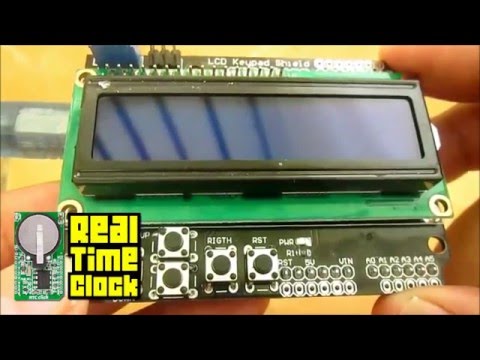

To build this project, you need the following items:
- 1 Arduino Uno board
- 1 LCD Keypad Shield
- Arduino IDE (download here)
- LCD Keypad library (I've attached its .rar on this repo)
Just plug the LCD Keypad Shield on top of Arduino Uno board.

First, extract LCD Keypad library (LCDKeypad.rar) then copy it to C:\...\Documents\Arduino\libraries.
Open Arduino IDE then copy sketch below. Make sure you have chosen the right option for Board and Port under Tools menu, then upload to your Arduino board.
#include<LiquidCrystal.h>
#include"LCDKeypad.h"
#defineDAYS0
#defineHOURS1
#defineMINUTES2
#defineSECONDS3
LCDKeypad lcd;
unsignedint days = 0;
unsignedint hours = 0;
unsignedint minutes = 0;
unsignedint seconds = 0;
unsignedint setting = 0;
voidsetup() { lcd.begin(16,2);
lcd.setCursor(4, 0);
lcd.print("JamDUINO");
lcd.setCursor(0, 1); lcd.print("tanpa modul RTC");
delay(3500);
lcd.clear();
lcd.setCursor(0,0);
lcd.print("Lintang Wisesa");
lcd.setCursor(1,1);
lcd.print("simpLINnovation");
delay(3500);
lcd.clear();
lcd.setCursor(0,0);
lcd.print(" Setting: Hari "); // "Hari" means "Day"
}
voidloop() {
incTime();
printTime();
buttonListen();
}
voidbuttonListen() {
for (int i = 0; i < 5; i++) {
int button = lcd.button();
switch (button) {
caseKEYPAD_RIGHT:
setting++;
break;
caseKEYPAD_LEFT:
setting--;
break;
caseKEYPAD_UP:
switch (setting) {
caseDAYS:
days++;
if (days == 7) days = 0;
if (days == 0)
lcd.setCursor(0,1);
lcd.print("SENIN "); // "Senin" means "Monday"if (days == 1)
lcd.setCursor(0,1);
lcd.print("SELASA"); // "Selasa" means "Tuesday"if (days == 2)
lcd.setCursor(0,1);
lcd.print("RABU "); // "Rabu" means "Wednesday"if (days == 3)
lcd.setCursor(0,1);
lcd.print("KAMIS "); // "Kamis" means "Thursday"if (days == 4)
lcd.setCursor(0,1);
lcd.print("JUMAT "); // "Jumat" means "Friday"if (days == 5)
lcd.setCursor(0,1);
lcd.print("SABTU "); // "Sabtu" means "Saturday"if (days == 6)
lcd.setCursor(0,1);
lcd.print("AHAD "); // "Ahad" means "Sunday"break;
caseHOURS:
hours++;
break;
caseMINUTES:
minutes++;
break;
caseSECONDS:
seconds++;
} break;
caseKEYPAD_DOWN:
switch (setting) {
caseDAYS:
days--;
if (days == -1) days = 6;
if (days == 0)
lcd.setCursor(0,1);
lcd.print("SENIN ");
if (days == 1)
lcd.setCursor(0,1);
lcd.print("SELASA");
if (days == 2)
lcd.setCursor(0,1);
lcd.print("RABU ");
if (days == 3)
lcd.setCursor(0,1);
lcd.print("KAMIS ");
if (days == 4)
lcd.setCursor(0,1);
lcd.print("JUMAT ");
if (days == 5)
lcd.setCursor(0,1);
lcd.print("SABTU ");
if (days == 6)
lcd.setCursor(0,1);
lcd.print("AHAD ");
break;
caseHOURS:
hours--;
if (hours == -1) hours = 23;
break;
caseMINUTES:
minutes--;
if (minutes == -1) minutes = 59;
break;
caseSECONDS:
seconds--;
if (seconds == -1) seconds = 59;
}
}
setting %= 4;
printSetting();
days %= 7;
hours %= 24;
minutes %= 60;
seconds %= 60;
printTime();
while(millis() % 200 != 0);
}
}
voidprintSetting() {
lcd.setCursor(0,0);
switch (setting) {
caseDAYS:
lcd.print("JamDUINO Hari~"); // "Hari" means "Day"break; caseHOURS:
lcd.print("JamDUINO Jam~"); // "Jam" means "Hour"break;
caseMINUTES:
lcd.print("JamDUINO Menit~"); // "Menit" means "Minute"break;
caseSECONDS:
lcd.print("JamDUINO Detik~"); // "Detik" means "Second"
}
}
voidincTime() {
seconds++;
if (seconds == 60) {
seconds = 0;
minutes++;
if (minutes == 60) {
minutes = 0;
hours++;
if (hours == 24) {
hours = 0;
days++;
if (days == 7) days = 0;
if (days == 0)
lcd.setCursor(0,1);
lcd.print("SENIN ");
if (days == 1)
lcd.setCursor(0,1);
lcd.print("SELASA");
if (days == 2)
lcd.setCursor(0,1);
lcd.print("RABU ");
if (days == 3)
lcd.setCursor(0,1);
lcd.print("KAMIS ");
if (days == 4)
lcd.setCursor(0,1);
lcd.print("JUMAT ");
if (days == 5)
lcd.setCursor(0,1);
lcd.print("SABTU ");
if (days == 6)
lcd.setCursor(0,1);
lcd.print("AHAD ");
}
}
}
}
voidprintTime() {
lcd.setCursor(6,1);
char time[17];
sprintf(time, " %02i:%02i:%02i", hours, minutes, seconds);
lcd.print(time);
}
- After uploading done, you have to set the time manually first.
- On LCD Keypad Shield, use:
- Use ⬅️ left / right ➡️ button to choose time option: HARI (days), JAM (hours), MENIT (min) & DETIK (sec).
- Use ⬆️ up / down ⬇️ button to set its time, then your clock is ready to go! Have fun!
Lintang Wisesa 💌 lintangwisesa@ymail.com
Facebook | Twitter | Google+ | Youtube | :octocat: GitHub | Hackster