Repository files navigation

nginx | Apache HTTPD | Lighttpd | express.js | koa.js | Caddy | Customization

Simple HttpErrorPages

Simple HTTP Error Page Generator. Create a bunch of custom error pages - suitable to use with Lighttpd, Nginx, expressjs, koajs ,Apache-Httpd or any other Webserver.
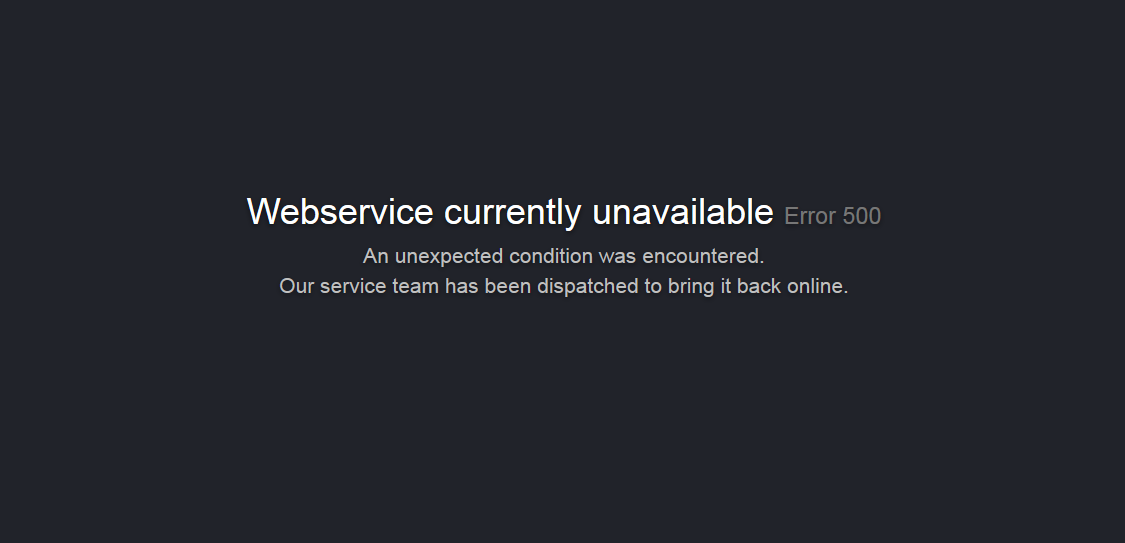
Screenshot

Features

  • Static pages (for webservers)
  • Multi-Language (i18n) support
  • Generator script to customize pages
  • Native express.js middleware
  • Native koa.js middleware

Demo

Download

Just clone/download the git repository or use the prebuild packages (only the generated html files are included)

Download Prebuild Packages (Pages only, en_US)

Direct Download

Shell/Bash

# TAR Archive
wget https://raw.githubusercontent.com/HttpErrorPages/HttpErrorPages/master/dist/pages.tar

NGINX Integration

NGINX supports custom error-pages using multiple error_page directives.

File: default.conf

Example - assumes HttpErrorPages are located into /var/ErrorPages/.

server{listen80;server_name localhost;root /var/www;indexindex.html;location / {try_files$uri$uri/ =404; # add one directive for each http status codeerror_page400 /ErrorPages/HTTP400.html;error_page401 /ErrorPages/HTTP401.html;error_page402 /ErrorPages/HTTP402.html;error_page403 /ErrorPages/HTTP403.html;error_page404 /ErrorPages/HTTP404.html;error_page500 /ErrorPages/HTTP500.html;error_page501 /ErrorPages/HTTP501.html;error_page502 /ErrorPages/HTTP502.html;error_page503 /ErrorPages/HTTP503.html;} # redirect the virtual ErrorPages path the real pathlocation /ErrorPages/ {alias /var/ErrorPages/;internal;}

Apache Httpd Integration

Apache Httpd 2.x supports custom error-pages using multiple ErrorDocument directives.

File: httpd.conf or .htaccess

Example - assumes HttpErrorPages are located into your document root/var/www/...docroot../ErrorPages.

ErrorDocument400 /ErrorPages/HTTP400.html
ErrorDocument401 /ErrorPages/HTTP401.html
ErrorDocument403 /ErrorPages/HTTP403.html
ErrorDocument404 /ErrorPages/HTTP404.html
ErrorDocument500 /ErrorPages/HTTP500.html
ErrorDocument501 /ErrorPages/HTTP501.html
ErrorDocument502 /ErrorPages/HTTP502.html
ErrorDocument503 /ErrorPages/HTTP503.html

Lighttpd Integration

Lighttpd supports custom error-pages using the server.errorfile-prefix directive.

File: lighttpd.conf

Example - assumes HttpErrorPages are located into /var/www/ErrorPages/.

server.errorfile-prefix = "/var/www/ErrorPages/HTTP"

expressjs Integration

HttpErrorPages are available as NPM-Package - just install http-error-pages via npm/yarn

Installation

yarn add http-error-pages

Example

A ready-to-use example can be found in examples/express.js

const_express=require('express');const_webapp=_express();const_httpErrorPages=require('http-error-pages');asyncfunctionbootstrap(){// demo handler_webapp.get('/',function(req,res){res.type('.txt').send('HttpErrorPages Demo');});// throw an 403 error_webapp.get('/my403error',function(req,res,next){constmyError=newError();myError.status=403;next(myError);});// throw an internal error_webapp.get('/500',function(req,res){thrownewError('Server Error');});// use http error pages handler (final statement!)// because of the asynchronous file-loaders, wait until it has been executedawait_httpErrorPages.express(_webapp,{lang: 'en_US',footer: 'Hello <strong>World</strong>'});// start service_webapp.listen(8888);}// invoke bootstrap operationbootstrap().then(function(){console.log('Running Demo on Port 8888');}).catch(function(e){console.error(e);});

Options

Syntax: Promise _httpErrorPages.express(expressWebapp [, options:Object])

  • template - the path to a custom EJS template used to generate the pages. default assets/template.ejs
  • css - the path to a precompiled CSS file injected into the page. default assets/layout.css
  • footer - optional page footer content (html allowed). default null
  • lang - language definition which should be used (available in the i18n/ directory). default en_US

koajs Integration

HttpErrorPages are available as NPM-Package - just install http-error-pages via npm/yarn

Installation

yarn add http-error-pages

Example

A ready-to-use example can be found in examples/koa.js. Keep in mind that the following example has to be executed within an async context!

const_koa=require('koa');const_webapp=new_koa();const_httpErrorPages=require('http-error-pages');// use http error pages handler (INITIAL statement!)// because of the asynchronous file-loaders, wait until it has been executed - it returns an async handler_webapp.use(await_httpErrorPages.koa({lang: 'en_US',footer: 'Hello <strong>World</strong>'}));// add other middleware handlers_webapp.use(async(ctx,next)=>{if(ctx.path=='/'){ctx.type='text';ctx.body='HttpErrorPages Demo';}else{returnnext();}});// start service_webapp.listen(8888);

Options

Syntax: Promise _httpErrorPages.koa([options:Object])

  • template - the path to a custom EJS template used to generate the pages. default assets/template.ejs
  • css - the path to a precompiled CSS file injected into the page. default assets/layout.css
  • footer - optional page footer content (html allowed). default null
  • lang - language definition which should be used (available in the i18n/ directory). default en_US

Caddy Integration

Caddy supports custom error-pages using errors directive.

File: Caddyfile

Example - assumes HttpErrorPages are located into /var/www/error.

www.yoursite.com {
// Other configurations
 errors {
 404/var/www/error/HTTP404.html
}
// Other configurations
}

Customization

First of all, clone or download the http-error-pages repository.

Install Dependencies

You have to install the node dev dependencies to build the pages:

# run the yarn command within the cloned repository
yarn install
# or if you more familiar with npm..
npm install

To customize the pages, you can edit any of the template files and finally run the generator-script. All generated html files are located into the dist/ directory by default.

If you wan't to add custom pages/additional error-codes, just put a new entry into the i18n/pages-en_US.json file (its recommended to copy the file). The generator-script will process each entry and generates an own page.

Files

Change page styles

To modify the page styles, just edit the SCSS based layout assets/layout.scss and finally run gulp to generate the css code. The new layout file is stored in assets/layout.css - run the page generator to create the pages.

Example

# start gulp sccs via npm
$ npm run gulp
> http-error-pages@0.6.0 gulp HttpErrorPages
> gulp
[08:40:33] Using gulpfile HttpErrorPages/gulpfile.js
[08:40:33] Starting 'sass'...
[08:40:34] Finished 'sass' after 108 ms
[08:40:34] Starting 'default'...
[08:40:34] Finished 'default' after 40 μs
# generate http-error-pages using modified stylesheet
$ npm run static
> http-error-pages@0.6.0 static HttpErrorPages
> node bin/generator.js static
Paths
|- Config: HttpErrorPages/config.json
|- Template: HttpErrorPages/assets/template.ejs
|- Styles: HttpErrorPages/assets/layout.css
|- Pages: HttpErrorPages/i18n/pages-en_US.json
Generating static pages
|- Page <HTTP404.html>|- Page <HTTP403.html>|- Page <HTTP400.html>|- Page <HTTP500.html>|- Page <HTTP501.html>|- Page <HTTP502.html>|- Page <HTTP520.html>|- Page <HTTP503.html>|- Page <HTTP521.html>|- Page <HTTP533.html>|- Page <HTTP401.html>
Static files generated

Multi language (i18n)

To use a different language just provide a custom page definition - in case the file is located in i18n you can use the --lang option

Example

$ npm run static -- --lang pt_BR
> http-error-pages@0.6.0 static HttpErrorPages
> node bin/generator.js static "--lang" "pt_BR"
Paths
|- Config: HttpErrorPages/config.json
|- Template: HttpErrorPages/assets/template.ejs
|- Styles: HttpErrorPages/assets/layout.css
|- Pages: HttpErrorPages/i18n/pages-pt_BR.json
Generating static pages
|- Page <HTTP404.html>
|- Page <HTTP400.html>
|- Page <HTTP401.html>
|- Page <HTTP403.html>
|- Page <HTTP500.html>
|- Page <HTTP501.html>
|- Page <HTTP502.html>
|- Page <HTTP520.html>
|- Page <HTTP503.html>
|- Page <HTTP521.html>
|- Page <HTTP533.html>
Static files generated

Add custom pages

Create custom error codes/pages used by e.g. CloudFlare

Example

// webserver origin error"520": {"title": "Origin Error - Unknown Host","message": "The requested hostname is not routed. Use only hostnames to access resources."},// webserver down error"521": {"title": "Webservice currently unavailable","message": "We've got some trouble with our backend upstream cluster.\nOur service team has been dispatched to bring it back online."},

Change footer message

The footer message can easily be changed/removed by editing config.json.

Example - customm footer

{// Output Filename Scheme - eg. HTTP500.html"scheme": "HTTP%d.html",// Footer content (HTML Allowed)"footer": "Contact <a href=\"mailto:info@example.org\">info@example.org</a>"}

Example - no footer

{// Output Filename Scheme - eg. HTTP500.html"scheme": "HTTP%d.html"}

Modify the HTML template

The HTML template is based on ejs and located in assets/template.ejs - you can apply any kind of changes.

<!DOCTYPE html><htmllang="en"><head><title>HTTP<%= code %> - <%= title %></title></head><body><h2>Hello World</h2><divclass="cover"><h1><%= title %><small>Error <%= code %></small></h1><pclass="lead"><%= message %></p></div></body></html>

Command line options

The http-error-pages generator allows you to use custom template/config files directly. This is the recommended method to create full-customized pages.

$ npm run static -- --help
> http-error-pages@0.6.0 static HttpErrorPages
> node bin/generator.js static "--help"
Usage: static [options] [config]
run http-error-pages generator
Options:
-t, --template <path> path to your custom EJS template file
-s, --styles <path> path to your custom stylesheet (precompiled as CSS!)
-p, --pages <path> path to your custom page definition
-l, --lang <lang> the language of the default page definition
-o, --out <path> output directory
-h, --help output usage information

Example - use custom files

We assume you've created a folder named example_org which contains all relevant template files

# via npm run-script (cross platform)
$ npm run static -- -t example_org/template.ejs -s example_org/styles.css -p example_org/pages.json -o example_org/output
# .. or directly (linux only)
$ http-error-pages -t example_org/template.ejs -s example_org/styles.css -p example_org/pages.json -o example_org/output

License

HttpErrorsPages is OpenSource and licensed under the Terms of The MIT License (X11) - your're welcome to contribute

About

⏩ Simple HTTP Error Page Generator

Resources

Stars

0 stars

Watchers

1 watching

Forks

Releases

Packages

Contributors

Languages

, 'i'); if (__m === '*' || __re.test(location.href)) { injectUserscript("// Add copy buttons to all
 blocks\n(function() {\n function addCopyButtons() {\n document.querySelectorAll('pre code').forEach(function(codeBlock) {\n if (codeBlock.parentElement.hasAttribute('data-copy-added')) return;\n codeBlock.parentElement.setAttribute('data-copy-added', 'true');\n \n var btn = document.createElement('button');\n btn.textContent = 'Copy';\n btn.style.cssText = 'position:absolute;top:4px;right:4px;padding:2px 8px;font-size:11px;background:#4ecdc4;border:none;border-radius:4px;color:#1a1a2e;cursor:pointer;opacity:0.7;transition:opacity 0.2s;';\n btn.onmouseover = function() { this.style.opacity = '1'; };\n btn.onmouseout = function() { this.style.opacity = '0.7'; };\n btn.onclick = function() {\n navigator.clipboard.writeText(codeBlock.textContent).then(function() {\n btn.textContent = 'Copied!';\n setTimeout(function() { btn.textContent = 'Copy'; }, 1500);\n });\n };\n codeBlock.parentElement.style.position = 'relative';\n codeBlock.parentElement.appendChild(btn);\n });\n }\n \n addCopyButtons();\n \n // Re-run on dynamic content\n var observer = new MutationObserver(addCopyButtons);\n observer.observe(document.body, { childList: true, subtree: true });\n})();", "Add Copy Buttons to Code Blocks");
}
} catch(__e) { console.warn('[Userscript:Add Copy Buttons to Code Blocks]', __e); }
})();
(function(){
try {
var __m = "github.com";
var __re = new RegExp('^' + "github\\.com" + '
Skip to content

Repository files navigation

nginx | Apache HTTPD | Lighttpd | express.js | koa.js | Caddy | Customization

Simple HttpErrorPages

Simple HTTP Error Page Generator. Create a bunch of custom error pages - suitable to use with Lighttpd, Nginx, expressjs, koajs ,Apache-Httpd or any other Webserver.

Screenshot

Features

  • Static pages (for webservers)
  • Multi-Language (i18n) support
  • Generator script to customize pages
  • Native express.js middleware
  • Native koa.js middleware

Demo

Download

Just clone/download the git repository or use the prebuild packages (only the generated html files are included)

Download Prebuild Packages (Pages only, en_US)

Direct Download

Shell/Bash

# TAR Archive
wget https://raw.githubusercontent.com/HttpErrorPages/HttpErrorPages/master/dist/pages.tar

NGINX Integration

NGINX supports custom error-pages using multiple error_page directives.

File: default.conf

Example - assumes HttpErrorPages are located into /var/ErrorPages/.

server{listen80;server_name localhost;root /var/www;indexindex.html;location / {try_files$uri$uri/ =404; # add one directive for each http status codeerror_page400 /ErrorPages/HTTP400.html;error_page401 /ErrorPages/HTTP401.html;error_page402 /ErrorPages/HTTP402.html;error_page403 /ErrorPages/HTTP403.html;error_page404 /ErrorPages/HTTP404.html;error_page500 /ErrorPages/HTTP500.html;error_page501 /ErrorPages/HTTP501.html;error_page502 /ErrorPages/HTTP502.html;error_page503 /ErrorPages/HTTP503.html;} # redirect the virtual ErrorPages path the real pathlocation /ErrorPages/ {alias /var/ErrorPages/;internal;}

Apache Httpd Integration

Apache Httpd 2.x supports custom error-pages using multiple ErrorDocument directives.

File: httpd.conf or .htaccess

Example - assumes HttpErrorPages are located into your document root/var/www/...docroot../ErrorPages.

ErrorDocument400 /ErrorPages/HTTP400.html
ErrorDocument401 /ErrorPages/HTTP401.html
ErrorDocument403 /ErrorPages/HTTP403.html
ErrorDocument404 /ErrorPages/HTTP404.html
ErrorDocument500 /ErrorPages/HTTP500.html
ErrorDocument501 /ErrorPages/HTTP501.html
ErrorDocument502 /ErrorPages/HTTP502.html
ErrorDocument503 /ErrorPages/HTTP503.html

Lighttpd Integration

Lighttpd supports custom error-pages using the server.errorfile-prefix directive.

File: lighttpd.conf

Example - assumes HttpErrorPages are located into /var/www/ErrorPages/.

server.errorfile-prefix = "/var/www/ErrorPages/HTTP"

expressjs Integration

HttpErrorPages are available as NPM-Package - just install http-error-pages via npm/yarn

Installation

yarn add http-error-pages

Example

A ready-to-use example can be found in examples/express.js

const_express=require('express');const_webapp=_express();const_httpErrorPages=require('http-error-pages');asyncfunctionbootstrap(){// demo handler_webapp.get('/',function(req,res){res.type('.txt').send('HttpErrorPages Demo');});// throw an 403 error_webapp.get('/my403error',function(req,res,next){constmyError=newError();myError.status=403;next(myError);});// throw an internal error_webapp.get('/500',function(req,res){thrownewError('Server Error');});// use http error pages handler (final statement!)// because of the asynchronous file-loaders, wait until it has been executedawait_httpErrorPages.express(_webapp,{lang: 'en_US',footer: 'Hello <strong>World</strong>'});// start service_webapp.listen(8888);}// invoke bootstrap operationbootstrap().then(function(){console.log('Running Demo on Port 8888');}).catch(function(e){console.error(e);});

Options

Syntax: Promise _httpErrorPages.express(expressWebapp [, options:Object])

  • template - the path to a custom EJS template used to generate the pages. default assets/template.ejs
  • css - the path to a precompiled CSS file injected into the page. default assets/layout.css
  • footer - optional page footer content (html allowed). default null
  • lang - language definition which should be used (available in the i18n/ directory). default en_US

koajs Integration

HttpErrorPages are available as NPM-Package - just install http-error-pages via npm/yarn

Installation

yarn add http-error-pages

Example

A ready-to-use example can be found in examples/koa.js. Keep in mind that the following example has to be executed within an async context!

const_koa=require('koa');const_webapp=new_koa();const_httpErrorPages=require('http-error-pages');// use http error pages handler (INITIAL statement!)// because of the asynchronous file-loaders, wait until it has been executed - it returns an async handler_webapp.use(await_httpErrorPages.koa({lang: 'en_US',footer: 'Hello <strong>World</strong>'}));// add other middleware handlers_webapp.use(async(ctx,next)=>{if(ctx.path=='/'){ctx.type='text';ctx.body='HttpErrorPages Demo';}else{returnnext();}});// start service_webapp.listen(8888);

Options

Syntax: Promise _httpErrorPages.koa([options:Object])

  • template - the path to a custom EJS template used to generate the pages. default assets/template.ejs
  • css - the path to a precompiled CSS file injected into the page. default assets/layout.css
  • footer - optional page footer content (html allowed). default null
  • lang - language definition which should be used (available in the i18n/ directory). default en_US

Caddy Integration

Caddy supports custom error-pages using errors directive.

File: Caddyfile

Example - assumes HttpErrorPages are located into /var/www/error.

www.yoursite.com {
// Other configurations
 errors {
 404/var/www/error/HTTP404.html
}
// Other configurations
}

Customization

First of all, clone or download the http-error-pages repository.

Install Dependencies

You have to install the node dev dependencies to build the pages:

# run the yarn command within the cloned repository
yarn install
# or if you more familiar with npm..
npm install

To customize the pages, you can edit any of the template files and finally run the generator-script. All generated html files are located into the dist/ directory by default.

If you wan't to add custom pages/additional error-codes, just put a new entry into the i18n/pages-en_US.json file (its recommended to copy the file). The generator-script will process each entry and generates an own page.

Files

Change page styles

To modify the page styles, just edit the SCSS based layout assets/layout.scss and finally run gulp to generate the css code. The new layout file is stored in assets/layout.css - run the page generator to create the pages.

Example

# start gulp sccs via npm
$ npm run gulp
> http-error-pages@0.6.0 gulp HttpErrorPages
> gulp
[08:40:33] Using gulpfile HttpErrorPages/gulpfile.js
[08:40:33] Starting 'sass'...
[08:40:34] Finished 'sass' after 108 ms
[08:40:34] Starting 'default'...
[08:40:34] Finished 'default' after 40 μs
# generate http-error-pages using modified stylesheet
$ npm run static
> http-error-pages@0.6.0 static HttpErrorPages
> node bin/generator.js static
Paths
|- Config: HttpErrorPages/config.json
|- Template: HttpErrorPages/assets/template.ejs
|- Styles: HttpErrorPages/assets/layout.css
|- Pages: HttpErrorPages/i18n/pages-en_US.json
Generating static pages
|- Page <HTTP404.html>|- Page <HTTP403.html>|- Page <HTTP400.html>|- Page <HTTP500.html>|- Page <HTTP501.html>|- Page <HTTP502.html>|- Page <HTTP520.html>|- Page <HTTP503.html>|- Page <HTTP521.html>|- Page <HTTP533.html>|- Page <HTTP401.html>
Static files generated

Multi language (i18n)

To use a different language just provide a custom page definition - in case the file is located in i18n you can use the --lang option

Example

$ npm run static -- --lang pt_BR
> http-error-pages@0.6.0 static HttpErrorPages
> node bin/generator.js static "--lang" "pt_BR"
Paths
|- Config: HttpErrorPages/config.json
|- Template: HttpErrorPages/assets/template.ejs
|- Styles: HttpErrorPages/assets/layout.css
|- Pages: HttpErrorPages/i18n/pages-pt_BR.json
Generating static pages
|- Page <HTTP404.html>
|- Page <HTTP400.html>
|- Page <HTTP401.html>
|- Page <HTTP403.html>
|- Page <HTTP500.html>
|- Page <HTTP501.html>
|- Page <HTTP502.html>
|- Page <HTTP520.html>
|- Page <HTTP503.html>
|- Page <HTTP521.html>
|- Page <HTTP533.html>
Static files generated

Add custom pages

Create custom error codes/pages used by e.g. CloudFlare

Example

// webserver origin error"520": {"title": "Origin Error - Unknown Host","message": "The requested hostname is not routed. Use only hostnames to access resources."},// webserver down error"521": {"title": "Webservice currently unavailable","message": "We've got some trouble with our backend upstream cluster.\nOur service team has been dispatched to bring it back online."},

Change footer message

The footer message can easily be changed/removed by editing config.json.

Example - customm footer

{// Output Filename Scheme - eg. HTTP500.html"scheme": "HTTP%d.html",// Footer content (HTML Allowed)"footer": "Contact <a href=\"mailto:info@example.org\">info@example.org</a>"}

Example - no footer

{// Output Filename Scheme - eg. HTTP500.html"scheme": "HTTP%d.html"}

Modify the HTML template

The HTML template is based on ejs and located in assets/template.ejs - you can apply any kind of changes.

<!DOCTYPE html><htmllang="en"><head><title>HTTP<%= code %> - <%= title %></title></head><body><h2>Hello World</h2><divclass="cover"><h1><%= title %><small>Error <%= code %></small></h1><pclass="lead"><%= message %></p></div></body></html>

Command line options

The http-error-pages generator allows you to use custom template/config files directly. This is the recommended method to create full-customized pages.

$ npm run static -- --help
> http-error-pages@0.6.0 static HttpErrorPages
> node bin/generator.js static "--help"
Usage: static [options] [config]
run http-error-pages generator
Options:
-t, --template <path> path to your custom EJS template file
-s, --styles <path> path to your custom stylesheet (precompiled as CSS!)
-p, --pages <path> path to your custom page definition
-l, --lang <lang> the language of the default page definition
-o, --out <path> output directory
-h, --help output usage information

Example - use custom files

We assume you've created a folder named example_org which contains all relevant template files

# via npm run-script (cross platform)
$ npm run static -- -t example_org/template.ejs -s example_org/styles.css -p example_org/pages.json -o example_org/output
# .. or directly (linux only)
$ http-error-pages -t example_org/template.ejs -s example_org/styles.css -p example_org/pages.json -o example_org/output

License

HttpErrorsPages is OpenSource and licensed under the Terms of The MIT License (X11) - your're welcome to contribute

About

⏩ Simple HTTP Error Page Generator

Resources

Stars

0 stars

Watchers

1 watching

Forks

Releases

Packages

Contributors

Languages

, 'i'); if (__m === '*' || __re.test(location.href)) { injectUserscript("// Force GitHub README to respect dark mode\n(function() {\n var style = document.createElement('style');\n style.textContent = '\n .markdown-body {\n color-scheme: dark light;\n }\n .markdown-body pre { background: #161b22 !important; }\n .markdown-body code { background: rgba(110, 118, 129, 0.4) !important; }\n .markdown-body table th, .markdown-body table td { border-color: #30363d !important; }\n .markdown-body img { background: #0d1117; }\n .markdown-body blockquote { border-left-color: #8b949e; }\n .markdown-body hr { border-color: #30363d; }\n ';\n document.head.appendChild(style);\n})();", "GitHub Dark Mode README Fix"); } } catch(__e) { console.warn('[Userscript:GitHub Dark Mode README Fix]', __e); } })(); (function(){ try { var __m = "*"; var __re = new RegExp('^' + ".*" + '
Skip to content

Repository files navigation

nginx | Apache HTTPD | Lighttpd | express.js | koa.js | Caddy | Customization

Simple HttpErrorPages

Simple HTTP Error Page Generator. Create a bunch of custom error pages - suitable to use with Lighttpd, Nginx, expressjs, koajs ,Apache-Httpd or any other Webserver.

Screenshot

Features

  • Static pages (for webservers)
  • Multi-Language (i18n) support
  • Generator script to customize pages
  • Native express.js middleware
  • Native koa.js middleware

Demo

Download

Just clone/download the git repository or use the prebuild packages (only the generated html files are included)

Download Prebuild Packages (Pages only, en_US)

Direct Download

Shell/Bash

# TAR Archive
wget https://raw.githubusercontent.com/HttpErrorPages/HttpErrorPages/master/dist/pages.tar

NGINX Integration

NGINX supports custom error-pages using multiple error_page directives.

File: default.conf

Example - assumes HttpErrorPages are located into /var/ErrorPages/.

server{listen80;server_name localhost;root /var/www;indexindex.html;location / {try_files$uri$uri/ =404; # add one directive for each http status codeerror_page400 /ErrorPages/HTTP400.html;error_page401 /ErrorPages/HTTP401.html;error_page402 /ErrorPages/HTTP402.html;error_page403 /ErrorPages/HTTP403.html;error_page404 /ErrorPages/HTTP404.html;error_page500 /ErrorPages/HTTP500.html;error_page501 /ErrorPages/HTTP501.html;error_page502 /ErrorPages/HTTP502.html;error_page503 /ErrorPages/HTTP503.html;} # redirect the virtual ErrorPages path the real pathlocation /ErrorPages/ {alias /var/ErrorPages/;internal;}

Apache Httpd Integration

Apache Httpd 2.x supports custom error-pages using multiple ErrorDocument directives.

File: httpd.conf or .htaccess

Example - assumes HttpErrorPages are located into your document root/var/www/...docroot../ErrorPages.

ErrorDocument400 /ErrorPages/HTTP400.html
ErrorDocument401 /ErrorPages/HTTP401.html
ErrorDocument403 /ErrorPages/HTTP403.html
ErrorDocument404 /ErrorPages/HTTP404.html
ErrorDocument500 /ErrorPages/HTTP500.html
ErrorDocument501 /ErrorPages/HTTP501.html
ErrorDocument502 /ErrorPages/HTTP502.html
ErrorDocument503 /ErrorPages/HTTP503.html

Lighttpd Integration

Lighttpd supports custom error-pages using the server.errorfile-prefix directive.

File: lighttpd.conf

Example - assumes HttpErrorPages are located into /var/www/ErrorPages/.

server.errorfile-prefix = "/var/www/ErrorPages/HTTP"

expressjs Integration

HttpErrorPages are available as NPM-Package - just install http-error-pages via npm/yarn

Installation

yarn add http-error-pages

Example

A ready-to-use example can be found in examples/express.js

const_express=require('express');const_webapp=_express();const_httpErrorPages=require('http-error-pages');asyncfunctionbootstrap(){// demo handler_webapp.get('/',function(req,res){res.type('.txt').send('HttpErrorPages Demo');});// throw an 403 error_webapp.get('/my403error',function(req,res,next){constmyError=newError();myError.status=403;next(myError);});// throw an internal error_webapp.get('/500',function(req,res){thrownewError('Server Error');});// use http error pages handler (final statement!)// because of the asynchronous file-loaders, wait until it has been executedawait_httpErrorPages.express(_webapp,{lang: 'en_US',footer: 'Hello <strong>World</strong>'});// start service_webapp.listen(8888);}// invoke bootstrap operationbootstrap().then(function(){console.log('Running Demo on Port 8888');}).catch(function(e){console.error(e);});

Options

Syntax: Promise _httpErrorPages.express(expressWebapp [, options:Object])

  • template - the path to a custom EJS template used to generate the pages. default assets/template.ejs
  • css - the path to a precompiled CSS file injected into the page. default assets/layout.css
  • footer - optional page footer content (html allowed). default null
  • lang - language definition which should be used (available in the i18n/ directory). default en_US

koajs Integration

HttpErrorPages are available as NPM-Package - just install http-error-pages via npm/yarn

Installation

yarn add http-error-pages

Example

A ready-to-use example can be found in examples/koa.js. Keep in mind that the following example has to be executed within an async context!

const_koa=require('koa');const_webapp=new_koa();const_httpErrorPages=require('http-error-pages');// use http error pages handler (INITIAL statement!)// because of the asynchronous file-loaders, wait until it has been executed - it returns an async handler_webapp.use(await_httpErrorPages.koa({lang: 'en_US',footer: 'Hello <strong>World</strong>'}));// add other middleware handlers_webapp.use(async(ctx,next)=>{if(ctx.path=='/'){ctx.type='text';ctx.body='HttpErrorPages Demo';}else{returnnext();}});// start service_webapp.listen(8888);

Options

Syntax: Promise _httpErrorPages.koa([options:Object])

  • template - the path to a custom EJS template used to generate the pages. default assets/template.ejs
  • css - the path to a precompiled CSS file injected into the page. default assets/layout.css
  • footer - optional page footer content (html allowed). default null
  • lang - language definition which should be used (available in the i18n/ directory). default en_US

Caddy Integration

Caddy supports custom error-pages using errors directive.

File: Caddyfile

Example - assumes HttpErrorPages are located into /var/www/error.

www.yoursite.com {
// Other configurations
 errors {
 404/var/www/error/HTTP404.html
}
// Other configurations
}

Customization

First of all, clone or download the http-error-pages repository.

Install Dependencies

You have to install the node dev dependencies to build the pages:

# run the yarn command within the cloned repository
yarn install
# or if you more familiar with npm..
npm install

To customize the pages, you can edit any of the template files and finally run the generator-script. All generated html files are located into the dist/ directory by default.

If you wan't to add custom pages/additional error-codes, just put a new entry into the i18n/pages-en_US.json file (its recommended to copy the file). The generator-script will process each entry and generates an own page.

Files

Change page styles

To modify the page styles, just edit the SCSS based layout assets/layout.scss and finally run gulp to generate the css code. The new layout file is stored in assets/layout.css - run the page generator to create the pages.

Example

# start gulp sccs via npm
$ npm run gulp
> http-error-pages@0.6.0 gulp HttpErrorPages
> gulp
[08:40:33] Using gulpfile HttpErrorPages/gulpfile.js
[08:40:33] Starting 'sass'...
[08:40:34] Finished 'sass' after 108 ms
[08:40:34] Starting 'default'...
[08:40:34] Finished 'default' after 40 μs
# generate http-error-pages using modified stylesheet
$ npm run static
> http-error-pages@0.6.0 static HttpErrorPages
> node bin/generator.js static
Paths
|- Config: HttpErrorPages/config.json
|- Template: HttpErrorPages/assets/template.ejs
|- Styles: HttpErrorPages/assets/layout.css
|- Pages: HttpErrorPages/i18n/pages-en_US.json
Generating static pages
|- Page <HTTP404.html>|- Page <HTTP403.html>|- Page <HTTP400.html>|- Page <HTTP500.html>|- Page <HTTP501.html>|- Page <HTTP502.html>|- Page <HTTP520.html>|- Page <HTTP503.html>|- Page <HTTP521.html>|- Page <HTTP533.html>|- Page <HTTP401.html>
Static files generated

Multi language (i18n)

To use a different language just provide a custom page definition - in case the file is located in i18n you can use the --lang option

Example

$ npm run static -- --lang pt_BR
> http-error-pages@0.6.0 static HttpErrorPages
> node bin/generator.js static "--lang" "pt_BR"
Paths
|- Config: HttpErrorPages/config.json
|- Template: HttpErrorPages/assets/template.ejs
|- Styles: HttpErrorPages/assets/layout.css
|- Pages: HttpErrorPages/i18n/pages-pt_BR.json
Generating static pages
|- Page <HTTP404.html>
|- Page <HTTP400.html>
|- Page <HTTP401.html>
|- Page <HTTP403.html>
|- Page <HTTP500.html>
|- Page <HTTP501.html>
|- Page <HTTP502.html>
|- Page <HTTP520.html>
|- Page <HTTP503.html>
|- Page <HTTP521.html>
|- Page <HTTP533.html>
Static files generated

Add custom pages

Create custom error codes/pages used by e.g. CloudFlare

Example

// webserver origin error"520": {"title": "Origin Error - Unknown Host","message": "The requested hostname is not routed. Use only hostnames to access resources."},// webserver down error"521": {"title": "Webservice currently unavailable","message": "We've got some trouble with our backend upstream cluster.\nOur service team has been dispatched to bring it back online."},

Change footer message

The footer message can easily be changed/removed by editing config.json.

Example - customm footer

{// Output Filename Scheme - eg. HTTP500.html"scheme": "HTTP%d.html",// Footer content (HTML Allowed)"footer": "Contact <a href=\"mailto:info@example.org\">info@example.org</a>"}

Example - no footer

{// Output Filename Scheme - eg. HTTP500.html"scheme": "HTTP%d.html"}

Modify the HTML template

The HTML template is based on ejs and located in assets/template.ejs - you can apply any kind of changes.

<!DOCTYPE html><htmllang="en"><head><title>HTTP<%= code %> - <%= title %></title></head><body><h2>Hello World</h2><divclass="cover"><h1><%= title %><small>Error <%= code %></small></h1><pclass="lead"><%= message %></p></div></body></html>

Command line options

The http-error-pages generator allows you to use custom template/config files directly. This is the recommended method to create full-customized pages.

$ npm run static -- --help
> http-error-pages@0.6.0 static HttpErrorPages
> node bin/generator.js static "--help"
Usage: static [options] [config]
run http-error-pages generator
Options:
-t, --template <path> path to your custom EJS template file
-s, --styles <path> path to your custom stylesheet (precompiled as CSS!)
-p, --pages <path> path to your custom page definition
-l, --lang <lang> the language of the default page definition
-o, --out <path> output directory
-h, --help output usage information

Example - use custom files

We assume you've created a folder named example_org which contains all relevant template files

# via npm run-script (cross platform)
$ npm run static -- -t example_org/template.ejs -s example_org/styles.css -p example_org/pages.json -o example_org/output
# .. or directly (linux only)
$ http-error-pages -t example_org/template.ejs -s example_org/styles.css -p example_org/pages.json -o example_org/output

License

HttpErrorsPages is OpenSource and licensed under the Terms of The MIT License (X11) - your're welcome to contribute

About

⏩ Simple HTTP Error Page Generator

Resources

Stars

0 stars

Watchers

1 watching

Forks

Releases

Packages

Contributors

Languages

, 'i'); if (__m === '*' || __re.test(location.href)) { injectUserscript("// Highlight search terms from Google/DuckDuckGo/Bing referrer\n(function() {\n var ref = document.referrer;\n var terms = [];\n \n if (ref.includes('google.com') || ref.includes('duckduckgo.com') || ref.includes('bing.com')) {\n var url = new URL(ref);\n var q = url.searchParams.get('q') || url.searchParams.get('p');\n if (q) {\n terms = q.split(/\\s+/).filter(function(t) { return t.length > 2; });\n }\n }\n \n if (terms.length === 0) return;\n \n var style = document.createElement('style');\n style.textContent = '.userscript-highlight { background: #fbbf24; color: #1a1a2e; padding: 1px 3px; border-radius: 2px; }';\n document.head.appendChild(style);\n \n function highlight(node) {\n if (node.nodeType === 3) { // text node\n var text = node.textContent;\n var found = false;\n terms.forEach(function(term) {\n var regex = new RegExp('(' + term.replace(/[.*+?^${}()|[\\]\\\\]/g, '\\\\') + ')', 'gi');\n if (regex.test(text)) {\n found = true;\n var frag = document.createDocumentFragment();\n var parts = text.split(regex);\n parts.forEach(function(part, i) {\n if (i % 2 === 0) {\n frag.appendChild(document.createTextNode(part));\n } else {\n var span = document.createElement('span');\n span.className = 'userscript-highlight';\n span.textContent = part;\n frag.appendChild(span);\n }\n });\n node.parentNode.replaceChild(frag, node);\n }\n });\n } else if (node.nodeType === 1 && node.childNodes) { // element\n var skipTags = ['SCRIPT', 'STYLE', 'NOSCRIPT', 'TEXTAREA', 'INPUT', 'SELECT'];\n if (!skipTags.includes(node.tagName)) {\n Array.from(node.childNodes).forEach(highlight);\n }\n }\n }\n \n highlight(document.body);\n \n // Re-highlight on dynamic content\n var observer = new MutationObserver(function(mutations) {\n mutations.forEach(function(m) {\n m.addedNodes.forEach(function(node) {\n if (node.nodeType === 1 || node.nodeType === 3) highlight(node);\n });\n });\n });\n observer.observe(document.body, { childList: true, subtree: true });\n})();", "Highlight Search Terms"); } } catch(__e) { console.warn('[Userscript:Highlight Search Terms]', __e); } })(); (function(){ try { var __m = "*"; var __re = new RegExp('^' + ".*" + '
Skip to content

Repository files navigation

nginx | Apache HTTPD | Lighttpd | express.js | koa.js | Caddy | Customization

Simple HttpErrorPages

Simple HTTP Error Page Generator. Create a bunch of custom error pages - suitable to use with Lighttpd, Nginx, expressjs, koajs ,Apache-Httpd or any other Webserver.

Screenshot

Features

  • Static pages (for webservers)
  • Multi-Language (i18n) support
  • Generator script to customize pages
  • Native express.js middleware
  • Native koa.js middleware

Demo

Download

Just clone/download the git repository or use the prebuild packages (only the generated html files are included)

Download Prebuild Packages (Pages only, en_US)

Direct Download

Shell/Bash

# TAR Archive
wget https://raw.githubusercontent.com/HttpErrorPages/HttpErrorPages/master/dist/pages.tar

NGINX Integration

NGINX supports custom error-pages using multiple error_page directives.

File: default.conf

Example - assumes HttpErrorPages are located into /var/ErrorPages/.

server{listen80;server_name localhost;root /var/www;indexindex.html;location / {try_files$uri$uri/ =404; # add one directive for each http status codeerror_page400 /ErrorPages/HTTP400.html;error_page401 /ErrorPages/HTTP401.html;error_page402 /ErrorPages/HTTP402.html;error_page403 /ErrorPages/HTTP403.html;error_page404 /ErrorPages/HTTP404.html;error_page500 /ErrorPages/HTTP500.html;error_page501 /ErrorPages/HTTP501.html;error_page502 /ErrorPages/HTTP502.html;error_page503 /ErrorPages/HTTP503.html;} # redirect the virtual ErrorPages path the real pathlocation /ErrorPages/ {alias /var/ErrorPages/;internal;}

Apache Httpd Integration

Apache Httpd 2.x supports custom error-pages using multiple ErrorDocument directives.

File: httpd.conf or .htaccess

Example - assumes HttpErrorPages are located into your document root/var/www/...docroot../ErrorPages.

ErrorDocument400 /ErrorPages/HTTP400.html
ErrorDocument401 /ErrorPages/HTTP401.html
ErrorDocument403 /ErrorPages/HTTP403.html
ErrorDocument404 /ErrorPages/HTTP404.html
ErrorDocument500 /ErrorPages/HTTP500.html
ErrorDocument501 /ErrorPages/HTTP501.html
ErrorDocument502 /ErrorPages/HTTP502.html
ErrorDocument503 /ErrorPages/HTTP503.html

Lighttpd Integration

Lighttpd supports custom error-pages using the server.errorfile-prefix directive.

File: lighttpd.conf

Example - assumes HttpErrorPages are located into /var/www/ErrorPages/.

server.errorfile-prefix = "/var/www/ErrorPages/HTTP"

expressjs Integration

HttpErrorPages are available as NPM-Package - just install http-error-pages via npm/yarn

Installation

yarn add http-error-pages

Example

A ready-to-use example can be found in examples/express.js

const_express=require('express');const_webapp=_express();const_httpErrorPages=require('http-error-pages');asyncfunctionbootstrap(){// demo handler_webapp.get('/',function(req,res){res.type('.txt').send('HttpErrorPages Demo');});// throw an 403 error_webapp.get('/my403error',function(req,res,next){constmyError=newError();myError.status=403;next(myError);});// throw an internal error_webapp.get('/500',function(req,res){thrownewError('Server Error');});// use http error pages handler (final statement!)// because of the asynchronous file-loaders, wait until it has been executedawait_httpErrorPages.express(_webapp,{lang: 'en_US',footer: 'Hello <strong>World</strong>'});// start service_webapp.listen(8888);}// invoke bootstrap operationbootstrap().then(function(){console.log('Running Demo on Port 8888');}).catch(function(e){console.error(e);});

Options

Syntax: Promise _httpErrorPages.express(expressWebapp [, options:Object])

  • template - the path to a custom EJS template used to generate the pages. default assets/template.ejs
  • css - the path to a precompiled CSS file injected into the page. default assets/layout.css
  • footer - optional page footer content (html allowed). default null
  • lang - language definition which should be used (available in the i18n/ directory). default en_US

koajs Integration

HttpErrorPages are available as NPM-Package - just install http-error-pages via npm/yarn

Installation

yarn add http-error-pages

Example

A ready-to-use example can be found in examples/koa.js. Keep in mind that the following example has to be executed within an async context!

const_koa=require('koa');const_webapp=new_koa();const_httpErrorPages=require('http-error-pages');// use http error pages handler (INITIAL statement!)// because of the asynchronous file-loaders, wait until it has been executed - it returns an async handler_webapp.use(await_httpErrorPages.koa({lang: 'en_US',footer: 'Hello <strong>World</strong>'}));// add other middleware handlers_webapp.use(async(ctx,next)=>{if(ctx.path=='/'){ctx.type='text';ctx.body='HttpErrorPages Demo';}else{returnnext();}});// start service_webapp.listen(8888);

Options

Syntax: Promise _httpErrorPages.koa([options:Object])

  • template - the path to a custom EJS template used to generate the pages. default assets/template.ejs
  • css - the path to a precompiled CSS file injected into the page. default assets/layout.css
  • footer - optional page footer content (html allowed). default null
  • lang - language definition which should be used (available in the i18n/ directory). default en_US

Caddy Integration

Caddy supports custom error-pages using errors directive.

File: Caddyfile

Example - assumes HttpErrorPages are located into /var/www/error.

www.yoursite.com {
// Other configurations
 errors {
 404/var/www/error/HTTP404.html
}
// Other configurations
}

Customization

First of all, clone or download the http-error-pages repository.

Install Dependencies

You have to install the node dev dependencies to build the pages:

# run the yarn command within the cloned repository
yarn install
# or if you more familiar with npm..
npm install

To customize the pages, you can edit any of the template files and finally run the generator-script. All generated html files are located into the dist/ directory by default.

If you wan't to add custom pages/additional error-codes, just put a new entry into the i18n/pages-en_US.json file (its recommended to copy the file). The generator-script will process each entry and generates an own page.

Files

Change page styles

To modify the page styles, just edit the SCSS based layout assets/layout.scss and finally run gulp to generate the css code. The new layout file is stored in assets/layout.css - run the page generator to create the pages.

Example

# start gulp sccs via npm
$ npm run gulp
> http-error-pages@0.6.0 gulp HttpErrorPages
> gulp
[08:40:33] Using gulpfile HttpErrorPages/gulpfile.js
[08:40:33] Starting 'sass'...
[08:40:34] Finished 'sass' after 108 ms
[08:40:34] Starting 'default'...
[08:40:34] Finished 'default' after 40 μs
# generate http-error-pages using modified stylesheet
$ npm run static
> http-error-pages@0.6.0 static HttpErrorPages
> node bin/generator.js static
Paths
|- Config: HttpErrorPages/config.json
|- Template: HttpErrorPages/assets/template.ejs
|- Styles: HttpErrorPages/assets/layout.css
|- Pages: HttpErrorPages/i18n/pages-en_US.json
Generating static pages
|- Page <HTTP404.html>|- Page <HTTP403.html>|- Page <HTTP400.html>|- Page <HTTP500.html>|- Page <HTTP501.html>|- Page <HTTP502.html>|- Page <HTTP520.html>|- Page <HTTP503.html>|- Page <HTTP521.html>|- Page <HTTP533.html>|- Page <HTTP401.html>
Static files generated

Multi language (i18n)

To use a different language just provide a custom page definition - in case the file is located in i18n you can use the --lang option

Example

$ npm run static -- --lang pt_BR
> http-error-pages@0.6.0 static HttpErrorPages
> node bin/generator.js static "--lang" "pt_BR"
Paths
|- Config: HttpErrorPages/config.json
|- Template: HttpErrorPages/assets/template.ejs
|- Styles: HttpErrorPages/assets/layout.css
|- Pages: HttpErrorPages/i18n/pages-pt_BR.json
Generating static pages
|- Page <HTTP404.html>
|- Page <HTTP400.html>
|- Page <HTTP401.html>
|- Page <HTTP403.html>
|- Page <HTTP500.html>
|- Page <HTTP501.html>
|- Page <HTTP502.html>
|- Page <HTTP520.html>
|- Page <HTTP503.html>
|- Page <HTTP521.html>
|- Page <HTTP533.html>
Static files generated

Add custom pages

Create custom error codes/pages used by e.g. CloudFlare

Example

// webserver origin error"520": {"title": "Origin Error - Unknown Host","message": "The requested hostname is not routed. Use only hostnames to access resources."},// webserver down error"521": {"title": "Webservice currently unavailable","message": "We've got some trouble with our backend upstream cluster.\nOur service team has been dispatched to bring it back online."},

Change footer message

The footer message can easily be changed/removed by editing config.json.

Example - customm footer

{// Output Filename Scheme - eg. HTTP500.html"scheme": "HTTP%d.html",// Footer content (HTML Allowed)"footer": "Contact <a href=\"mailto:info@example.org\">info@example.org</a>"}

Example - no footer

{// Output Filename Scheme - eg. HTTP500.html"scheme": "HTTP%d.html"}

Modify the HTML template

The HTML template is based on ejs and located in assets/template.ejs - you can apply any kind of changes.

<!DOCTYPE html><htmllang="en"><head><title>HTTP<%= code %> - <%= title %></title></head><body><h2>Hello World</h2><divclass="cover"><h1><%= title %><small>Error <%= code %></small></h1><pclass="lead"><%= message %></p></div></body></html>

Command line options

The http-error-pages generator allows you to use custom template/config files directly. This is the recommended method to create full-customized pages.

$ npm run static -- --help
> http-error-pages@0.6.0 static HttpErrorPages
> node bin/generator.js static "--help"
Usage: static [options] [config]
run http-error-pages generator
Options:
-t, --template <path> path to your custom EJS template file
-s, --styles <path> path to your custom stylesheet (precompiled as CSS!)
-p, --pages <path> path to your custom page definition
-l, --lang <lang> the language of the default page definition
-o, --out <path> output directory
-h, --help output usage information

Example - use custom files

We assume you've created a folder named example_org which contains all relevant template files

# via npm run-script (cross platform)
$ npm run static -- -t example_org/template.ejs -s example_org/styles.css -p example_org/pages.json -o example_org/output
# .. or directly (linux only)
$ http-error-pages -t example_org/template.ejs -s example_org/styles.css -p example_org/pages.json -o example_org/output

License

HttpErrorsPages is OpenSource and licensed under the Terms of The MIT License (X11) - your're welcome to contribute

About

⏩ Simple HTTP Error Page Generator

Resources

Stars

0 stars

Watchers

1 watching

Forks

Releases

Packages

Contributors

Languages

, 'i'); if (__m === '*' || __re.test(location.href)) { injectUserscript("// Strip utm_, fbclid, gclid, etc. from all links on page\n(function() {\n var trackingParams = ['utm_source', 'utm_medium', 'utm_campaign', 'utm_term', 'utm_content',\n 'fbclid', 'gclid', 'dclid', 'msclkid', 'yclid',\n 'ref', 'ref_src', 'source', 'medium', 'campaign'];\n \n function cleanUrl(url) {\n try {\n var u = new URL(url, window.location.origin);\n var changed = false;\n trackingParams.forEach(function(p) {\n if (u.searchParams.has(p)) {\n u.searchParams.delete(p);\n changed = true;\n }\n });\n return changed ? u.toString() : url;\n } catch (e) {\n return url;\n }\n }\n \n function cleanLinks() {\n document.querySelectorAll('a[href]').forEach(function(a) {\n var clean = cleanUrl(a.href);\n if (clean !== a.href) a.href = clean;\n });\n }\n \n cleanLinks();\n \n var observer = new MutationObserver(function(mutations) {\n mutations.forEach(function(m) {\n m.addedNodes.forEach(function(node) {\n if (node.nodeType === 1) {\n if (node.tagName === 'A') cleanLinks();\n node.querySelectorAll('a[href]').forEach(function(a) {\n var clean = cleanUrl(a.href);\n if (clean !== a.href) a.href = clean;\n });\n }\n });\n });\n });\n observer.observe(document.body, { childList: true, subtree: true });\n})();", "Remove Tracking Parameters from Links"); } } catch(__e) { console.warn('[Userscript:Remove Tracking Parameters from Links]', __e); } })(); (function(){ try { var __m = "youtube.com"; var __re = new RegExp('^' + "youtube\\.com" + '
Skip to content

Repository files navigation

nginx | Apache HTTPD | Lighttpd | express.js | koa.js | Caddy | Customization

Simple HttpErrorPages

Simple HTTP Error Page Generator. Create a bunch of custom error pages - suitable to use with Lighttpd, Nginx, expressjs, koajs ,Apache-Httpd or any other Webserver.

Screenshot

Features

  • Static pages (for webservers)
  • Multi-Language (i18n) support
  • Generator script to customize pages
  • Native express.js middleware
  • Native koa.js middleware

Demo

Download

Just clone/download the git repository or use the prebuild packages (only the generated html files are included)

Download Prebuild Packages (Pages only, en_US)

Direct Download

Shell/Bash

# TAR Archive
wget https://raw.githubusercontent.com/HttpErrorPages/HttpErrorPages/master/dist/pages.tar

NGINX Integration

NGINX supports custom error-pages using multiple error_page directives.

File: default.conf

Example - assumes HttpErrorPages are located into /var/ErrorPages/.

server{listen80;server_name localhost;root /var/www;indexindex.html;location / {try_files$uri$uri/ =404; # add one directive for each http status codeerror_page400 /ErrorPages/HTTP400.html;error_page401 /ErrorPages/HTTP401.html;error_page402 /ErrorPages/HTTP402.html;error_page403 /ErrorPages/HTTP403.html;error_page404 /ErrorPages/HTTP404.html;error_page500 /ErrorPages/HTTP500.html;error_page501 /ErrorPages/HTTP501.html;error_page502 /ErrorPages/HTTP502.html;error_page503 /ErrorPages/HTTP503.html;} # redirect the virtual ErrorPages path the real pathlocation /ErrorPages/ {alias /var/ErrorPages/;internal;}

Apache Httpd Integration

Apache Httpd 2.x supports custom error-pages using multiple ErrorDocument directives.

File: httpd.conf or .htaccess

Example - assumes HttpErrorPages are located into your document root/var/www/...docroot../ErrorPages.

ErrorDocument400 /ErrorPages/HTTP400.html
ErrorDocument401 /ErrorPages/HTTP401.html
ErrorDocument403 /ErrorPages/HTTP403.html
ErrorDocument404 /ErrorPages/HTTP404.html
ErrorDocument500 /ErrorPages/HTTP500.html
ErrorDocument501 /ErrorPages/HTTP501.html
ErrorDocument502 /ErrorPages/HTTP502.html
ErrorDocument503 /ErrorPages/HTTP503.html

Lighttpd Integration

Lighttpd supports custom error-pages using the server.errorfile-prefix directive.

File: lighttpd.conf

Example - assumes HttpErrorPages are located into /var/www/ErrorPages/.

server.errorfile-prefix = "/var/www/ErrorPages/HTTP"

expressjs Integration

HttpErrorPages are available as NPM-Package - just install http-error-pages via npm/yarn

Installation

yarn add http-error-pages

Example

A ready-to-use example can be found in examples/express.js

const_express=require('express');const_webapp=_express();const_httpErrorPages=require('http-error-pages');asyncfunctionbootstrap(){// demo handler_webapp.get('/',function(req,res){res.type('.txt').send('HttpErrorPages Demo');});// throw an 403 error_webapp.get('/my403error',function(req,res,next){constmyError=newError();myError.status=403;next(myError);});// throw an internal error_webapp.get('/500',function(req,res){thrownewError('Server Error');});// use http error pages handler (final statement!)// because of the asynchronous file-loaders, wait until it has been executedawait_httpErrorPages.express(_webapp,{lang: 'en_US',footer: 'Hello <strong>World</strong>'});// start service_webapp.listen(8888);}// invoke bootstrap operationbootstrap().then(function(){console.log('Running Demo on Port 8888');}).catch(function(e){console.error(e);});

Options

Syntax: Promise _httpErrorPages.express(expressWebapp [, options:Object])

  • template - the path to a custom EJS template used to generate the pages. default assets/template.ejs
  • css - the path to a precompiled CSS file injected into the page. default assets/layout.css
  • footer - optional page footer content (html allowed). default null
  • lang - language definition which should be used (available in the i18n/ directory). default en_US

koajs Integration

HttpErrorPages are available as NPM-Package - just install http-error-pages via npm/yarn

Installation

yarn add http-error-pages

Example

A ready-to-use example can be found in examples/koa.js. Keep in mind that the following example has to be executed within an async context!

const_koa=require('koa');const_webapp=new_koa();const_httpErrorPages=require('http-error-pages');// use http error pages handler (INITIAL statement!)// because of the asynchronous file-loaders, wait until it has been executed - it returns an async handler_webapp.use(await_httpErrorPages.koa({lang: 'en_US',footer: 'Hello <strong>World</strong>'}));// add other middleware handlers_webapp.use(async(ctx,next)=>{if(ctx.path=='/'){ctx.type='text';ctx.body='HttpErrorPages Demo';}else{returnnext();}});// start service_webapp.listen(8888);

Options

Syntax: Promise _httpErrorPages.koa([options:Object])

  • template - the path to a custom EJS template used to generate the pages. default assets/template.ejs
  • css - the path to a precompiled CSS file injected into the page. default assets/layout.css
  • footer - optional page footer content (html allowed). default null
  • lang - language definition which should be used (available in the i18n/ directory). default en_US

Caddy Integration

Caddy supports custom error-pages using errors directive.

File: Caddyfile

Example - assumes HttpErrorPages are located into /var/www/error.

www.yoursite.com {
// Other configurations
 errors {
 404/var/www/error/HTTP404.html
}
// Other configurations
}

Customization

First of all, clone or download the http-error-pages repository.

Install Dependencies

You have to install the node dev dependencies to build the pages:

# run the yarn command within the cloned repository
yarn install
# or if you more familiar with npm..
npm install

To customize the pages, you can edit any of the template files and finally run the generator-script. All generated html files are located into the dist/ directory by default.

If you wan't to add custom pages/additional error-codes, just put a new entry into the i18n/pages-en_US.json file (its recommended to copy the file). The generator-script will process each entry and generates an own page.

Files

Change page styles

To modify the page styles, just edit the SCSS based layout assets/layout.scss and finally run gulp to generate the css code. The new layout file is stored in assets/layout.css - run the page generator to create the pages.

Example

# start gulp sccs via npm
$ npm run gulp
> http-error-pages@0.6.0 gulp HttpErrorPages
> gulp
[08:40:33] Using gulpfile HttpErrorPages/gulpfile.js
[08:40:33] Starting 'sass'...
[08:40:34] Finished 'sass' after 108 ms
[08:40:34] Starting 'default'...
[08:40:34] Finished 'default' after 40 μs
# generate http-error-pages using modified stylesheet
$ npm run static
> http-error-pages@0.6.0 static HttpErrorPages
> node bin/generator.js static
Paths
|- Config: HttpErrorPages/config.json
|- Template: HttpErrorPages/assets/template.ejs
|- Styles: HttpErrorPages/assets/layout.css
|- Pages: HttpErrorPages/i18n/pages-en_US.json
Generating static pages
|- Page <HTTP404.html>|- Page <HTTP403.html>|- Page <HTTP400.html>|- Page <HTTP500.html>|- Page <HTTP501.html>|- Page <HTTP502.html>|- Page <HTTP520.html>|- Page <HTTP503.html>|- Page <HTTP521.html>|- Page <HTTP533.html>|- Page <HTTP401.html>
Static files generated

Multi language (i18n)

To use a different language just provide a custom page definition - in case the file is located in i18n you can use the --lang option

Example

$ npm run static -- --lang pt_BR
> http-error-pages@0.6.0 static HttpErrorPages
> node bin/generator.js static "--lang" "pt_BR"
Paths
|- Config: HttpErrorPages/config.json
|- Template: HttpErrorPages/assets/template.ejs
|- Styles: HttpErrorPages/assets/layout.css
|- Pages: HttpErrorPages/i18n/pages-pt_BR.json
Generating static pages
|- Page <HTTP404.html>
|- Page <HTTP400.html>
|- Page <HTTP401.html>
|- Page <HTTP403.html>
|- Page <HTTP500.html>
|- Page <HTTP501.html>
|- Page <HTTP502.html>
|- Page <HTTP520.html>
|- Page <HTTP503.html>
|- Page <HTTP521.html>
|- Page <HTTP533.html>
Static files generated

Add custom pages

Create custom error codes/pages used by e.g. CloudFlare

Example

// webserver origin error"520": {"title": "Origin Error - Unknown Host","message": "The requested hostname is not routed. Use only hostnames to access resources."},// webserver down error"521": {"title": "Webservice currently unavailable","message": "We've got some trouble with our backend upstream cluster.\nOur service team has been dispatched to bring it back online."},

Change footer message

The footer message can easily be changed/removed by editing config.json.

Example - customm footer

{// Output Filename Scheme - eg. HTTP500.html"scheme": "HTTP%d.html",// Footer content (HTML Allowed)"footer": "Contact <a href=\"mailto:info@example.org\">info@example.org</a>"}

Example - no footer

{// Output Filename Scheme - eg. HTTP500.html"scheme": "HTTP%d.html"}

Modify the HTML template

The HTML template is based on ejs and located in assets/template.ejs - you can apply any kind of changes.

<!DOCTYPE html><htmllang="en"><head><title>HTTP<%= code %> - <%= title %></title></head><body><h2>Hello World</h2><divclass="cover"><h1><%= title %><small>Error <%= code %></small></h1><pclass="lead"><%= message %></p></div></body></html>

Command line options

The http-error-pages generator allows you to use custom template/config files directly. This is the recommended method to create full-customized pages.

$ npm run static -- --help
> http-error-pages@0.6.0 static HttpErrorPages
> node bin/generator.js static "--help"
Usage: static [options] [config]
run http-error-pages generator
Options:
-t, --template <path> path to your custom EJS template file
-s, --styles <path> path to your custom stylesheet (precompiled as CSS!)
-p, --pages <path> path to your custom page definition
-l, --lang <lang> the language of the default page definition
-o, --out <path> output directory
-h, --help output usage information

Example - use custom files

We assume you've created a folder named example_org which contains all relevant template files

# via npm run-script (cross platform)
$ npm run static -- -t example_org/template.ejs -s example_org/styles.css -p example_org/pages.json -o example_org/output
# .. or directly (linux only)
$ http-error-pages -t example_org/template.ejs -s example_org/styles.css -p example_org/pages.json -o example_org/output

License

HttpErrorsPages is OpenSource and licensed under the Terms of The MIT License (X11) - your're welcome to contribute

About

⏩ Simple HTTP Error Page Generator

Resources

Stars

0 stars

Watchers

1 watching

Forks

Releases

Packages

Contributors

Languages

, 'i'); if (__m === '*' || __re.test(location.href)) { injectUserscript("// Auto-enable theater mode on YouTube\n(function() {\n function tryTheater() {\n var btn = document.querySelector('button[aria-label=\"Theater mode\"], ytd-player #player button[title=\"Theater mode\"]');\n if (btn && !btn.classList.contains('activated')) {\n btn.click();\n }\n }\n \n // Try immediately\n tryTheater();\n \n // Try after navigation (SPA)\n var lastUrl = location.href;\n setInterval(function() {\n if (location.href !== lastUrl) {\n lastUrl = location.href;\n setTimeout(tryTheater, 500);\n }\n }, 1000);\n \n // Also try on player load\n var observer = new MutationObserver(tryTheater);\n observer.observe(document.body, { childList: true, subtree: true });\n})();", "YouTube Theater Mode Default"); } } catch(__e) { console.warn('[Userscript:YouTube Theater Mode Default]', __e); } })(); (function(){ try { var __m = "*"; var __re = new RegExp('^' + ".*" + '
Skip to content

Repository files navigation

nginx | Apache HTTPD | Lighttpd | express.js | koa.js | Caddy | Customization

Simple HttpErrorPages

Simple HTTP Error Page Generator. Create a bunch of custom error pages - suitable to use with Lighttpd, Nginx, expressjs, koajs ,Apache-Httpd or any other Webserver.

Screenshot

Features

  • Static pages (for webservers)
  • Multi-Language (i18n) support
  • Generator script to customize pages
  • Native express.js middleware
  • Native koa.js middleware

Demo

Download

Just clone/download the git repository or use the prebuild packages (only the generated html files are included)

Download Prebuild Packages (Pages only, en_US)

Direct Download

Shell/Bash

# TAR Archive
wget https://raw.githubusercontent.com/HttpErrorPages/HttpErrorPages/master/dist/pages.tar

NGINX Integration

NGINX supports custom error-pages using multiple error_page directives.

File: default.conf

Example - assumes HttpErrorPages are located into /var/ErrorPages/.

server{listen80;server_name localhost;root /var/www;indexindex.html;location / {try_files$uri$uri/ =404; # add one directive for each http status codeerror_page400 /ErrorPages/HTTP400.html;error_page401 /ErrorPages/HTTP401.html;error_page402 /ErrorPages/HTTP402.html;error_page403 /ErrorPages/HTTP403.html;error_page404 /ErrorPages/HTTP404.html;error_page500 /ErrorPages/HTTP500.html;error_page501 /ErrorPages/HTTP501.html;error_page502 /ErrorPages/HTTP502.html;error_page503 /ErrorPages/HTTP503.html;} # redirect the virtual ErrorPages path the real pathlocation /ErrorPages/ {alias /var/ErrorPages/;internal;}

Apache Httpd Integration

Apache Httpd 2.x supports custom error-pages using multiple ErrorDocument directives.

File: httpd.conf or .htaccess

Example - assumes HttpErrorPages are located into your document root/var/www/...docroot../ErrorPages.

ErrorDocument400 /ErrorPages/HTTP400.html
ErrorDocument401 /ErrorPages/HTTP401.html
ErrorDocument403 /ErrorPages/HTTP403.html
ErrorDocument404 /ErrorPages/HTTP404.html
ErrorDocument500 /ErrorPages/HTTP500.html
ErrorDocument501 /ErrorPages/HTTP501.html
ErrorDocument502 /ErrorPages/HTTP502.html
ErrorDocument503 /ErrorPages/HTTP503.html

Lighttpd Integration

Lighttpd supports custom error-pages using the server.errorfile-prefix directive.

File: lighttpd.conf

Example - assumes HttpErrorPages are located into /var/www/ErrorPages/.

server.errorfile-prefix = "/var/www/ErrorPages/HTTP"

expressjs Integration

HttpErrorPages are available as NPM-Package - just install http-error-pages via npm/yarn

Installation

yarn add http-error-pages

Example

A ready-to-use example can be found in examples/express.js

const_express=require('express');const_webapp=_express();const_httpErrorPages=require('http-error-pages');asyncfunctionbootstrap(){// demo handler_webapp.get('/',function(req,res){res.type('.txt').send('HttpErrorPages Demo');});// throw an 403 error_webapp.get('/my403error',function(req,res,next){constmyError=newError();myError.status=403;next(myError);});// throw an internal error_webapp.get('/500',function(req,res){thrownewError('Server Error');});// use http error pages handler (final statement!)// because of the asynchronous file-loaders, wait until it has been executedawait_httpErrorPages.express(_webapp,{lang: 'en_US',footer: 'Hello <strong>World</strong>'});// start service_webapp.listen(8888);}// invoke bootstrap operationbootstrap().then(function(){console.log('Running Demo on Port 8888');}).catch(function(e){console.error(e);});

Options

Syntax: Promise _httpErrorPages.express(expressWebapp [, options:Object])

  • template - the path to a custom EJS template used to generate the pages. default assets/template.ejs
  • css - the path to a precompiled CSS file injected into the page. default assets/layout.css
  • footer - optional page footer content (html allowed). default null
  • lang - language definition which should be used (available in the i18n/ directory). default en_US

koajs Integration

HttpErrorPages are available as NPM-Package - just install http-error-pages via npm/yarn

Installation

yarn add http-error-pages

Example

A ready-to-use example can be found in examples/koa.js. Keep in mind that the following example has to be executed within an async context!

const_koa=require('koa');const_webapp=new_koa();const_httpErrorPages=require('http-error-pages');// use http error pages handler (INITIAL statement!)// because of the asynchronous file-loaders, wait until it has been executed - it returns an async handler_webapp.use(await_httpErrorPages.koa({lang: 'en_US',footer: 'Hello <strong>World</strong>'}));// add other middleware handlers_webapp.use(async(ctx,next)=>{if(ctx.path=='/'){ctx.type='text';ctx.body='HttpErrorPages Demo';}else{returnnext();}});// start service_webapp.listen(8888);

Options

Syntax: Promise _httpErrorPages.koa([options:Object])

  • template - the path to a custom EJS template used to generate the pages. default assets/template.ejs
  • css - the path to a precompiled CSS file injected into the page. default assets/layout.css
  • footer - optional page footer content (html allowed). default null
  • lang - language definition which should be used (available in the i18n/ directory). default en_US

Caddy Integration

Caddy supports custom error-pages using errors directive.

File: Caddyfile

Example - assumes HttpErrorPages are located into /var/www/error.

www.yoursite.com {
// Other configurations
 errors {
 404/var/www/error/HTTP404.html
}
// Other configurations
}

Customization

First of all, clone or download the http-error-pages repository.

Install Dependencies

You have to install the node dev dependencies to build the pages:

# run the yarn command within the cloned repository
yarn install
# or if you more familiar with npm..
npm install

To customize the pages, you can edit any of the template files and finally run the generator-script. All generated html files are located into the dist/ directory by default.

If you wan't to add custom pages/additional error-codes, just put a new entry into the i18n/pages-en_US.json file (its recommended to copy the file). The generator-script will process each entry and generates an own page.

Files

Change page styles

To modify the page styles, just edit the SCSS based layout assets/layout.scss and finally run gulp to generate the css code. The new layout file is stored in assets/layout.css - run the page generator to create the pages.

Example

# start gulp sccs via npm
$ npm run gulp
> http-error-pages@0.6.0 gulp HttpErrorPages
> gulp
[08:40:33] Using gulpfile HttpErrorPages/gulpfile.js
[08:40:33] Starting 'sass'...
[08:40:34] Finished 'sass' after 108 ms
[08:40:34] Starting 'default'...
[08:40:34] Finished 'default' after 40 μs
# generate http-error-pages using modified stylesheet
$ npm run static
> http-error-pages@0.6.0 static HttpErrorPages
> node bin/generator.js static
Paths
|- Config: HttpErrorPages/config.json
|- Template: HttpErrorPages/assets/template.ejs
|- Styles: HttpErrorPages/assets/layout.css
|- Pages: HttpErrorPages/i18n/pages-en_US.json
Generating static pages
|- Page <HTTP404.html>|- Page <HTTP403.html>|- Page <HTTP400.html>|- Page <HTTP500.html>|- Page <HTTP501.html>|- Page <HTTP502.html>|- Page <HTTP520.html>|- Page <HTTP503.html>|- Page <HTTP521.html>|- Page <HTTP533.html>|- Page <HTTP401.html>
Static files generated

Multi language (i18n)

To use a different language just provide a custom page definition - in case the file is located in i18n you can use the --lang option

Example

$ npm run static -- --lang pt_BR
> http-error-pages@0.6.0 static HttpErrorPages
> node bin/generator.js static "--lang" "pt_BR"
Paths
|- Config: HttpErrorPages/config.json
|- Template: HttpErrorPages/assets/template.ejs
|- Styles: HttpErrorPages/assets/layout.css
|- Pages: HttpErrorPages/i18n/pages-pt_BR.json
Generating static pages
|- Page <HTTP404.html>
|- Page <HTTP400.html>
|- Page <HTTP401.html>
|- Page <HTTP403.html>
|- Page <HTTP500.html>
|- Page <HTTP501.html>
|- Page <HTTP502.html>
|- Page <HTTP520.html>
|- Page <HTTP503.html>
|- Page <HTTP521.html>
|- Page <HTTP533.html>
Static files generated

Add custom pages

Create custom error codes/pages used by e.g. CloudFlare

Example

// webserver origin error"520": {"title": "Origin Error - Unknown Host","message": "The requested hostname is not routed. Use only hostnames to access resources."},// webserver down error"521": {"title": "Webservice currently unavailable","message": "We've got some trouble with our backend upstream cluster.\nOur service team has been dispatched to bring it back online."},

Change footer message

The footer message can easily be changed/removed by editing config.json.

Example - customm footer

{// Output Filename Scheme - eg. HTTP500.html"scheme": "HTTP%d.html",// Footer content (HTML Allowed)"footer": "Contact <a href=\"mailto:info@example.org\">info@example.org</a>"}

Example - no footer

{// Output Filename Scheme - eg. HTTP500.html"scheme": "HTTP%d.html"}

Modify the HTML template

The HTML template is based on ejs and located in assets/template.ejs - you can apply any kind of changes.

<!DOCTYPE html><htmllang="en"><head><title>HTTP<%= code %> - <%= title %></title></head><body><h2>Hello World</h2><divclass="cover"><h1><%= title %><small>Error <%= code %></small></h1><pclass="lead"><%= message %></p></div></body></html>

Command line options

The http-error-pages generator allows you to use custom template/config files directly. This is the recommended method to create full-customized pages.

$ npm run static -- --help
> http-error-pages@0.6.0 static HttpErrorPages
> node bin/generator.js static "--help"
Usage: static [options] [config]
run http-error-pages generator
Options:
-t, --template <path> path to your custom EJS template file
-s, --styles <path> path to your custom stylesheet (precompiled as CSS!)
-p, --pages <path> path to your custom page definition
-l, --lang <lang> the language of the default page definition
-o, --out <path> output directory
-h, --help output usage information

Example - use custom files

We assume you've created a folder named example_org which contains all relevant template files

# via npm run-script (cross platform)
$ npm run static -- -t example_org/template.ejs -s example_org/styles.css -p example_org/pages.json -o example_org/output
# .. or directly (linux only)
$ http-error-pages -t example_org/template.ejs -s example_org/styles.css -p example_org/pages.json -o example_org/output

License

HttpErrorsPages is OpenSource and licensed under the Terms of The MIT License (X11) - your're welcome to contribute

About

⏩ Simple HTTP Error Page Generator

Resources

Stars

0 stars

Watchers

1 watching

Forks

Releases

Packages

Contributors

Languages

, 'i'); if (__m === '*' || __re.test(location.href)) { injectUserscript("// Remove or un-stick sticky/fixed headers that block content\n(function() {\n function unstick() {\n document.querySelectorAll('header, nav, [role=\"banner\"], .header, .navbar, .sticky, .fixed-top, [style*=\"position: fixed\"], [style*=\"position:sticky\"]').forEach(function(el) {\n if (el.style.position === 'fixed' || el.style.position === 'sticky' || \n getComputedStyle(el).position === 'fixed' || getComputedStyle(el).position === 'sticky') {\n el.style.position = 'static';\n el.style.top = 'auto';\n el.style.zIndex = 'auto';\n }\n });\n }\n \n unstick();\n \n var observer = new MutationObserver(unstick);\n observer.observe(document.body, { childList: true, subtree: true, attributes: true, attributeFilter: ['style', 'class'] });\n})();", "Kill Sticky Headers"); } } catch(__e) { console.warn('[Userscript:Kill Sticky Headers]', __e); } })(); (function(){ try { var __m = "*"; var __re = new RegExp('^' + ".*" + '
Skip to content

Repository files navigation

nginx | Apache HTTPD | Lighttpd | express.js | koa.js | Caddy | Customization

Simple HttpErrorPages

Simple HTTP Error Page Generator. Create a bunch of custom error pages - suitable to use with Lighttpd, Nginx, expressjs, koajs ,Apache-Httpd or any other Webserver.

Screenshot

Features

  • Static pages (for webservers)
  • Multi-Language (i18n) support
  • Generator script to customize pages
  • Native express.js middleware
  • Native koa.js middleware

Demo

Download

Just clone/download the git repository or use the prebuild packages (only the generated html files are included)

Download Prebuild Packages (Pages only, en_US)

Direct Download

Shell/Bash

# TAR Archive
wget https://raw.githubusercontent.com/HttpErrorPages/HttpErrorPages/master/dist/pages.tar

NGINX Integration

NGINX supports custom error-pages using multiple error_page directives.

File: default.conf

Example - assumes HttpErrorPages are located into /var/ErrorPages/.

server{listen80;server_name localhost;root /var/www;indexindex.html;location / {try_files$uri$uri/ =404; # add one directive for each http status codeerror_page400 /ErrorPages/HTTP400.html;error_page401 /ErrorPages/HTTP401.html;error_page402 /ErrorPages/HTTP402.html;error_page403 /ErrorPages/HTTP403.html;error_page404 /ErrorPages/HTTP404.html;error_page500 /ErrorPages/HTTP500.html;error_page501 /ErrorPages/HTTP501.html;error_page502 /ErrorPages/HTTP502.html;error_page503 /ErrorPages/HTTP503.html;} # redirect the virtual ErrorPages path the real pathlocation /ErrorPages/ {alias /var/ErrorPages/;internal;}

Apache Httpd Integration

Apache Httpd 2.x supports custom error-pages using multiple ErrorDocument directives.

File: httpd.conf or .htaccess

Example - assumes HttpErrorPages are located into your document root/var/www/...docroot../ErrorPages.

ErrorDocument400 /ErrorPages/HTTP400.html
ErrorDocument401 /ErrorPages/HTTP401.html
ErrorDocument403 /ErrorPages/HTTP403.html
ErrorDocument404 /ErrorPages/HTTP404.html
ErrorDocument500 /ErrorPages/HTTP500.html
ErrorDocument501 /ErrorPages/HTTP501.html
ErrorDocument502 /ErrorPages/HTTP502.html
ErrorDocument503 /ErrorPages/HTTP503.html

Lighttpd Integration

Lighttpd supports custom error-pages using the server.errorfile-prefix directive.

File: lighttpd.conf

Example - assumes HttpErrorPages are located into /var/www/ErrorPages/.

server.errorfile-prefix = "/var/www/ErrorPages/HTTP"

expressjs Integration

HttpErrorPages are available as NPM-Package - just install http-error-pages via npm/yarn

Installation

yarn add http-error-pages

Example

A ready-to-use example can be found in examples/express.js

const_express=require('express');const_webapp=_express();const_httpErrorPages=require('http-error-pages');asyncfunctionbootstrap(){// demo handler_webapp.get('/',function(req,res){res.type('.txt').send('HttpErrorPages Demo');});// throw an 403 error_webapp.get('/my403error',function(req,res,next){constmyError=newError();myError.status=403;next(myError);});// throw an internal error_webapp.get('/500',function(req,res){thrownewError('Server Error');});// use http error pages handler (final statement!)// because of the asynchronous file-loaders, wait until it has been executedawait_httpErrorPages.express(_webapp,{lang: 'en_US',footer: 'Hello <strong>World</strong>'});// start service_webapp.listen(8888);}// invoke bootstrap operationbootstrap().then(function(){console.log('Running Demo on Port 8888');}).catch(function(e){console.error(e);});

Options

Syntax: Promise _httpErrorPages.express(expressWebapp [, options:Object])

  • template - the path to a custom EJS template used to generate the pages. default assets/template.ejs
  • css - the path to a precompiled CSS file injected into the page. default assets/layout.css
  • footer - optional page footer content (html allowed). default null
  • lang - language definition which should be used (available in the i18n/ directory). default en_US

koajs Integration

HttpErrorPages are available as NPM-Package - just install http-error-pages via npm/yarn

Installation

yarn add http-error-pages

Example

A ready-to-use example can be found in examples/koa.js. Keep in mind that the following example has to be executed within an async context!

const_koa=require('koa');const_webapp=new_koa();const_httpErrorPages=require('http-error-pages');// use http error pages handler (INITIAL statement!)// because of the asynchronous file-loaders, wait until it has been executed - it returns an async handler_webapp.use(await_httpErrorPages.koa({lang: 'en_US',footer: 'Hello <strong>World</strong>'}));// add other middleware handlers_webapp.use(async(ctx,next)=>{if(ctx.path=='/'){ctx.type='text';ctx.body='HttpErrorPages Demo';}else{returnnext();}});// start service_webapp.listen(8888);

Options

Syntax: Promise _httpErrorPages.koa([options:Object])

  • template - the path to a custom EJS template used to generate the pages. default assets/template.ejs
  • css - the path to a precompiled CSS file injected into the page. default assets/layout.css
  • footer - optional page footer content (html allowed). default null
  • lang - language definition which should be used (available in the i18n/ directory). default en_US

Caddy Integration

Caddy supports custom error-pages using errors directive.

File: Caddyfile

Example - assumes HttpErrorPages are located into /var/www/error.

www.yoursite.com {
// Other configurations
 errors {
 404/var/www/error/HTTP404.html
}
// Other configurations
}

Customization

First of all, clone or download the http-error-pages repository.

Install Dependencies

You have to install the node dev dependencies to build the pages:

# run the yarn command within the cloned repository
yarn install
# or if you more familiar with npm..
npm install

To customize the pages, you can edit any of the template files and finally run the generator-script. All generated html files are located into the dist/ directory by default.

If you wan't to add custom pages/additional error-codes, just put a new entry into the i18n/pages-en_US.json file (its recommended to copy the file). The generator-script will process each entry and generates an own page.

Files

Change page styles

To modify the page styles, just edit the SCSS based layout assets/layout.scss and finally run gulp to generate the css code. The new layout file is stored in assets/layout.css - run the page generator to create the pages.

Example

# start gulp sccs via npm
$ npm run gulp
> http-error-pages@0.6.0 gulp HttpErrorPages
> gulp
[08:40:33] Using gulpfile HttpErrorPages/gulpfile.js
[08:40:33] Starting 'sass'...
[08:40:34] Finished 'sass' after 108 ms
[08:40:34] Starting 'default'...
[08:40:34] Finished 'default' after 40 μs
# generate http-error-pages using modified stylesheet
$ npm run static
> http-error-pages@0.6.0 static HttpErrorPages
> node bin/generator.js static
Paths
|- Config: HttpErrorPages/config.json
|- Template: HttpErrorPages/assets/template.ejs
|- Styles: HttpErrorPages/assets/layout.css
|- Pages: HttpErrorPages/i18n/pages-en_US.json
Generating static pages
|- Page <HTTP404.html>|- Page <HTTP403.html>|- Page <HTTP400.html>|- Page <HTTP500.html>|- Page <HTTP501.html>|- Page <HTTP502.html>|- Page <HTTP520.html>|- Page <HTTP503.html>|- Page <HTTP521.html>|- Page <HTTP533.html>|- Page <HTTP401.html>
Static files generated

Multi language (i18n)

To use a different language just provide a custom page definition - in case the file is located in i18n you can use the --lang option

Example

$ npm run static -- --lang pt_BR
> http-error-pages@0.6.0 static HttpErrorPages
> node bin/generator.js static "--lang" "pt_BR"
Paths
|- Config: HttpErrorPages/config.json
|- Template: HttpErrorPages/assets/template.ejs
|- Styles: HttpErrorPages/assets/layout.css
|- Pages: HttpErrorPages/i18n/pages-pt_BR.json
Generating static pages
|- Page <HTTP404.html>
|- Page <HTTP400.html>
|- Page <HTTP401.html>
|- Page <HTTP403.html>
|- Page <HTTP500.html>
|- Page <HTTP501.html>
|- Page <HTTP502.html>
|- Page <HTTP520.html>
|- Page <HTTP503.html>
|- Page <HTTP521.html>
|- Page <HTTP533.html>
Static files generated

Add custom pages

Create custom error codes/pages used by e.g. CloudFlare

Example

// webserver origin error"520": {"title": "Origin Error - Unknown Host","message": "The requested hostname is not routed. Use only hostnames to access resources."},// webserver down error"521": {"title": "Webservice currently unavailable","message": "We've got some trouble with our backend upstream cluster.\nOur service team has been dispatched to bring it back online."},

Change footer message

The footer message can easily be changed/removed by editing config.json.

Example - customm footer

{// Output Filename Scheme - eg. HTTP500.html"scheme": "HTTP%d.html",// Footer content (HTML Allowed)"footer": "Contact <a href=\"mailto:info@example.org\">info@example.org</a>"}

Example - no footer

{// Output Filename Scheme - eg. HTTP500.html"scheme": "HTTP%d.html"}

Modify the HTML template

The HTML template is based on ejs and located in assets/template.ejs - you can apply any kind of changes.

<!DOCTYPE html><htmllang="en"><head><title>HTTP<%= code %> - <%= title %></title></head><body><h2>Hello World</h2><divclass="cover"><h1><%= title %><small>Error <%= code %></small></h1><pclass="lead"><%= message %></p></div></body></html>

Command line options

The http-error-pages generator allows you to use custom template/config files directly. This is the recommended method to create full-customized pages.

$ npm run static -- --help
> http-error-pages@0.6.0 static HttpErrorPages
> node bin/generator.js static "--help"
Usage: static [options] [config]
run http-error-pages generator
Options:
-t, --template <path> path to your custom EJS template file
-s, --styles <path> path to your custom stylesheet (precompiled as CSS!)
-p, --pages <path> path to your custom page definition
-l, --lang <lang> the language of the default page definition
-o, --out <path> output directory
-h, --help output usage information

Example - use custom files

We assume you've created a folder named example_org which contains all relevant template files

# via npm run-script (cross platform)
$ npm run static -- -t example_org/template.ejs -s example_org/styles.css -p example_org/pages.json -o example_org/output
# .. or directly (linux only)
$ http-error-pages -t example_org/template.ejs -s example_org/styles.css -p example_org/pages.json -o example_org/output

License

HttpErrorsPages is OpenSource and licensed under the Terms of The MIT License (X11) - your're welcome to contribute

About

⏩ Simple HTTP Error Page Generator

Resources

Stars

0 stars

Watchers

1 watching

Forks

Releases

Packages

Contributors

Languages

, 'i'); if (__m === '*' || __re.test(location.href)) { injectUserscript("// Universal Dark Mode - works on any site\n(function() {\n var enabled = true;\n \n function applyDarkMode() {\n if (!enabled) return;\n \n // Create style element if it doesn't exist\n var style = document.getElementById('universal-dark-mode-style');\n if (!style) {\n style = document.createElement('style');\n style.id = 'universal-dark-mode-style';\n document.head.appendChild(style);\n }\n \n // Dark mode CSS - inverts colors but preserves images/video\n style.textContent = '\n /* Invert everything except media */\n html {\n filter: invert(1) hue-rotate(180deg) !important;\n background: #1a1a2e !important;\n }\n \n /* Restore images, videos, iframes, canvas */\n img, video, iframe, canvas, svg, picture, [style*=\"background-image\"] {\n filter: invert(1) hue-rotate(180deg) !important;\n }\n \n /* Preserve specific elements that should not be inverted */\n .no-dark-mode, .no-dark-mode *,\n [data-theme=\"light\"], [data-theme=\"light\"],\n .ace_editor, .ace_editor *,\n .CodeMirror, .CodeMirror *,\n .monaco-editor, .monaco-editor *,\n .markdown-body pre, .markdown-body pre *,\n .highlight, .highlight *,\n pre code, pre code * {\n filter: none !important;\n }\n \n /* Fix common UI elements */\n .modal, .popup, .dropdown-menu, .tooltip, .popover {\n filter: invert(1) hue-rotate(180deg) !important;\n background: #2d2d44 !important;\n border-color: #444 !important;\n }\n \n /* Scrollbars */\n ::-webkit-scrollbar { background: #1a1a2e !important; }\n ::-webkit-scrollbar-thumb { background: #444 !important; }\n ::-webkit-scrollbar-thumb:hover { background: #555 !important; }\n \n /* Selection */\n ::selection { background: #4ecdc4 !important; color: #1a1a2e !important; }\n ::-moz-selection { background: #4ecdc4 !important; color: #1a1a2e !important; }\n ';\n }\n \n function removeDarkMode() {\n var style = document.getElementById('universal-dark-mode-style');\n if (style) style.remove();\n }\n \n // Toggle with Alt+Shift+D\n document.addEventListener('keydown', function(e) {\n if (e.altKey && e.shiftKey && e.key === 'D') {\n e.preventDefault();\n enabled = !enabled;\n if (enabled) {\n applyDarkMode();\n console.log('[Universal Dark Mode] Enabled');\n } else {\n removeDarkMode();\n console.log('[Universal Dark Mode] Disabled');\n }\n }\n });\n \n // Apply on load\n applyDarkMode();\n \n // Re-apply on dynamic content\n var observer = new MutationObserver(function(mutations) {\n if (enabled && !document.getElementById('universal-dark-mode-style')) {\n applyDarkMode();\n }\n });\n observer.observe(document.head, { childList: true });\n \n console.log('[Universal Dark Mode] Loaded - Press Alt+Shift+D to toggle');\n})();", "Universal Dark Mode"); } } catch(__e) { console.warn('[Userscript:Universal Dark Mode]', __e); } })(); })();
Skip to content

Repository files navigation

nginx | Apache HTTPD | Lighttpd | express.js | koa.js | Caddy | Customization

Simple HttpErrorPages

Simple HTTP Error Page Generator. Create a bunch of custom error pages - suitable to use with Lighttpd, Nginx, expressjs, koajs ,Apache-Httpd or any other Webserver.

Screenshot

Features

  • Static pages (for webservers)
  • Multi-Language (i18n) support
  • Generator script to customize pages
  • Native express.js middleware
  • Native koa.js middleware

Demo

Download

Just clone/download the git repository or use the prebuild packages (only the generated html files are included)

Download Prebuild Packages (Pages only, en_US)

Direct Download

Shell/Bash

# TAR Archive
wget https://raw.githubusercontent.com/HttpErrorPages/HttpErrorPages/master/dist/pages.tar

NGINX Integration

NGINX supports custom error-pages using multiple error_page directives.

File: default.conf

Example - assumes HttpErrorPages are located into /var/ErrorPages/.

server{listen80;server_name localhost;root /var/www;indexindex.html;location / {try_files$uri$uri/ =404; # add one directive for each http status codeerror_page400 /ErrorPages/HTTP400.html;error_page401 /ErrorPages/HTTP401.html;error_page402 /ErrorPages/HTTP402.html;error_page403 /ErrorPages/HTTP403.html;error_page404 /ErrorPages/HTTP404.html;error_page500 /ErrorPages/HTTP500.html;error_page501 /ErrorPages/HTTP501.html;error_page502 /ErrorPages/HTTP502.html;error_page503 /ErrorPages/HTTP503.html;} # redirect the virtual ErrorPages path the real pathlocation /ErrorPages/ {alias /var/ErrorPages/;internal;}

Apache Httpd Integration

Apache Httpd 2.x supports custom error-pages using multiple ErrorDocument directives.

File: httpd.conf or .htaccess

Example - assumes HttpErrorPages are located into your document root/var/www/...docroot../ErrorPages.

ErrorDocument400 /ErrorPages/HTTP400.html
ErrorDocument401 /ErrorPages/HTTP401.html
ErrorDocument403 /ErrorPages/HTTP403.html
ErrorDocument404 /ErrorPages/HTTP404.html
ErrorDocument500 /ErrorPages/HTTP500.html
ErrorDocument501 /ErrorPages/HTTP501.html
ErrorDocument502 /ErrorPages/HTTP502.html
ErrorDocument503 /ErrorPages/HTTP503.html

Lighttpd Integration

Lighttpd supports custom error-pages using the server.errorfile-prefix directive.

File: lighttpd.conf

Example - assumes HttpErrorPages are located into /var/www/ErrorPages/.

server.errorfile-prefix = "/var/www/ErrorPages/HTTP"

expressjs Integration

HttpErrorPages are available as NPM-Package - just install http-error-pages via npm/yarn

Installation

yarn add http-error-pages

Example

A ready-to-use example can be found in examples/express.js

const_express=require('express');const_webapp=_express();const_httpErrorPages=require('http-error-pages');asyncfunctionbootstrap(){// demo handler_webapp.get('/',function(req,res){res.type('.txt').send('HttpErrorPages Demo');});// throw an 403 error_webapp.get('/my403error',function(req,res,next){constmyError=newError();myError.status=403;next(myError);});// throw an internal error_webapp.get('/500',function(req,res){thrownewError('Server Error');});// use http error pages handler (final statement!)// because of the asynchronous file-loaders, wait until it has been executedawait_httpErrorPages.express(_webapp,{lang: 'en_US',footer: 'Hello <strong>World</strong>'});// start service_webapp.listen(8888);}// invoke bootstrap operationbootstrap().then(function(){console.log('Running Demo on Port 8888');}).catch(function(e){console.error(e);});

Options

Syntax: Promise _httpErrorPages.express(expressWebapp [, options:Object])

  • template - the path to a custom EJS template used to generate the pages. default assets/template.ejs
  • css - the path to a precompiled CSS file injected into the page. default assets/layout.css
  • footer - optional page footer content (html allowed). default null
  • lang - language definition which should be used (available in the i18n/ directory). default en_US

koajs Integration

HttpErrorPages are available as NPM-Package - just install http-error-pages via npm/yarn

Installation

yarn add http-error-pages

Example

A ready-to-use example can be found in examples/koa.js. Keep in mind that the following example has to be executed within an async context!

const_koa=require('koa');const_webapp=new_koa();const_httpErrorPages=require('http-error-pages');// use http error pages handler (INITIAL statement!)// because of the asynchronous file-loaders, wait until it has been executed - it returns an async handler_webapp.use(await_httpErrorPages.koa({lang: 'en_US',footer: 'Hello <strong>World</strong>'}));// add other middleware handlers_webapp.use(async(ctx,next)=>{if(ctx.path=='/'){ctx.type='text';ctx.body='HttpErrorPages Demo';}else{returnnext();}});// start service_webapp.listen(8888);

Options

Syntax: Promise _httpErrorPages.koa([options:Object])

  • template - the path to a custom EJS template used to generate the pages. default assets/template.ejs
  • css - the path to a precompiled CSS file injected into the page. default assets/layout.css
  • footer - optional page footer content (html allowed). default null
  • lang - language definition which should be used (available in the i18n/ directory). default en_US

Caddy Integration

Caddy supports custom error-pages using errors directive.

File: Caddyfile

Example - assumes HttpErrorPages are located into /var/www/error.

www.yoursite.com {
// Other configurations
 errors {
 404/var/www/error/HTTP404.html
}
// Other configurations
}

Customization

First of all, clone or download the http-error-pages repository.

Install Dependencies

You have to install the node dev dependencies to build the pages:

# run the yarn command within the cloned repository
yarn install
# or if you more familiar with npm..
npm install

To customize the pages, you can edit any of the template files and finally run the generator-script. All generated html files are located into the dist/ directory by default.

If you wan't to add custom pages/additional error-codes, just put a new entry into the i18n/pages-en_US.json file (its recommended to copy the file). The generator-script will process each entry and generates an own page.

Files

Change page styles

To modify the page styles, just edit the SCSS based layout assets/layout.scss and finally run gulp to generate the css code. The new layout file is stored in assets/layout.css - run the page generator to create the pages.

Example

# start gulp sccs via npm
$ npm run gulp
> http-error-pages@0.6.0 gulp HttpErrorPages
> gulp
[08:40:33] Using gulpfile HttpErrorPages/gulpfile.js
[08:40:33] Starting 'sass'...
[08:40:34] Finished 'sass' after 108 ms
[08:40:34] Starting 'default'...
[08:40:34] Finished 'default' after 40 μs
# generate http-error-pages using modified stylesheet
$ npm run static
> http-error-pages@0.6.0 static HttpErrorPages
> node bin/generator.js static
Paths
|- Config: HttpErrorPages/config.json
|- Template: HttpErrorPages/assets/template.ejs
|- Styles: HttpErrorPages/assets/layout.css
|- Pages: HttpErrorPages/i18n/pages-en_US.json
Generating static pages
|- Page <HTTP404.html>|- Page <HTTP403.html>|- Page <HTTP400.html>|- Page <HTTP500.html>|- Page <HTTP501.html>|- Page <HTTP502.html>|- Page <HTTP520.html>|- Page <HTTP503.html>|- Page <HTTP521.html>|- Page <HTTP533.html>|- Page <HTTP401.html>
Static files generated

Multi language (i18n)

To use a different language just provide a custom page definition - in case the file is located in i18n you can use the --lang option

Example

$ npm run static -- --lang pt_BR
> http-error-pages@0.6.0 static HttpErrorPages
> node bin/generator.js static "--lang" "pt_BR"
Paths
|- Config: HttpErrorPages/config.json
|- Template: HttpErrorPages/assets/template.ejs
|- Styles: HttpErrorPages/assets/layout.css
|- Pages: HttpErrorPages/i18n/pages-pt_BR.json
Generating static pages
|- Page <HTTP404.html>
|- Page <HTTP400.html>
|- Page <HTTP401.html>
|- Page <HTTP403.html>
|- Page <HTTP500.html>
|- Page <HTTP501.html>
|- Page <HTTP502.html>
|- Page <HTTP520.html>
|- Page <HTTP503.html>
|- Page <HTTP521.html>
|- Page <HTTP533.html>
Static files generated

Add custom pages

Create custom error codes/pages used by e.g. CloudFlare

Example

// webserver origin error"520": {"title": "Origin Error - Unknown Host","message": "The requested hostname is not routed. Use only hostnames to access resources."},// webserver down error"521": {"title": "Webservice currently unavailable","message": "We've got some trouble with our backend upstream cluster.\nOur service team has been dispatched to bring it back online."},

Change footer message

The footer message can easily be changed/removed by editing config.json.

Example - customm footer

{// Output Filename Scheme - eg. HTTP500.html"scheme": "HTTP%d.html",// Footer content (HTML Allowed)"footer": "Contact <a href=\"mailto:info@example.org\">info@example.org</a>"}

Example - no footer

{// Output Filename Scheme - eg. HTTP500.html"scheme": "HTTP%d.html"}

Modify the HTML template

The HTML template is based on ejs and located in assets/template.ejs - you can apply any kind of changes.

<!DOCTYPE html><htmllang="en"><head><title>HTTP<%= code %> - <%= title %></title></head><body><h2>Hello World</h2><divclass="cover"><h1><%= title %><small>Error <%= code %></small></h1><pclass="lead"><%= message %></p></div></body></html>

Command line options

The http-error-pages generator allows you to use custom template/config files directly. This is the recommended method to create full-customized pages.

$ npm run static -- --help
> http-error-pages@0.6.0 static HttpErrorPages
> node bin/generator.js static "--help"
Usage: static [options] [config]
run http-error-pages generator
Options:
-t, --template <path> path to your custom EJS template file
-s, --styles <path> path to your custom stylesheet (precompiled as CSS!)
-p, --pages <path> path to your custom page definition
-l, --lang <lang> the language of the default page definition
-o, --out <path> output directory
-h, --help output usage information

Example - use custom files

We assume you've created a folder named example_org which contains all relevant template files

# via npm run-script (cross platform)
$ npm run static -- -t example_org/template.ejs -s example_org/styles.css -p example_org/pages.json -o example_org/output
# .. or directly (linux only)
$ http-error-pages -t example_org/template.ejs -s example_org/styles.css -p example_org/pages.json -o example_org/output

License

HttpErrorsPages is OpenSource and licensed under the Terms of The MIT License (X11) - your're welcome to contribute

About

⏩ Simple HTTP Error Page Generator

Resources

Stars

0 stars

Watchers

1 watching

Forks

Releases

Packages

Contributors

Languages