一款高性能非法词(敏感词)检测组件,附带繁体简体互换,支持全角半角互换,获取拼音首字母,获取拼音字母,拼音模糊搜索等功能。
C#语言,使用StringSearchEx2.Replace过滤,在48k敏感词库上的过滤速度超过3亿字符每秒。(cpu i7 8750h)
csharp 文件夹说明:
ToolGood.Pinyin.Build: 生成词的拼音
ToolGood.Pinyin.Pretreatment: 生成拼音预处理,核对拼音,词组最小化
ToolGood.Transformation.Build: 生成简体繁体转换文档,更新时文档放在同一目录下,词库参考 https://github.com/BYVoid/OpenCC
ToolGood.Words.Contrast: 字符串搜索对比
ToolGood.Words.Test: 单元测试
ToolGood.Words: 本项目源代码
非法词(敏感词)检测类:StringSearch、StringSearchEx、StringSearchEx2、WordsSearch、WordsSearchEx、WordsSearchEx2、IllegalWordsSearch;
StringSearch、StringSearchEx、StringSearchEx2、StringSearchEx3: 搜索FindFirst方法返回结果为string类型。WordsSearch、WordsSearchEx、WordsSearchEx2、WordsSearchEx3: 搜索FindFirst方法返回结果为WordsSearchResult类型,WordsSearchResult不仅仅有关键字,还有关键字的开始位置、结束位置,关键字序号等。IllegalWordsSearch: 过滤非法词(敏感词)专用类,可设置跳字长度,默认全角转半角,忽略大小写,跳词,重复词,黑名单, 搜索FindFirst方法返回为IllegalWordsSearchResult,有关键字,对应原文,开始、位置,黑名单类型。IllegalWordsSearch、StringSearchEx、StringSearchEx2、WordsSearchEx、WordsSearchEx2使用Save、Load方法,可以加快初始化。- 共同方法有:
SetKeywords、ContainsAny、FindFirst、FindAll、Replace IllegalWordsSearch独有方法:SetSkipWords(设置跳词)、SetBlacklist(设置黑名单)。IllegalWordsSearch字段UseIgnoreCase:设置是忽略否大小写,必须在SetKeywords方法之前,注:使用Load方法则该字段无效。StringSearchEx3、WordsSearchEx3为指针版优化版,实测时发现性能浮动比较大。
strings="中国|国人|zg人";stringtest="我是中国人";StringSearchiwords=newStringSearch();iwords.SetKeywords(s.Split('|'));varb=iwords.ContainsAny(test);Assert.AreEqual(true,b);varf=iwords.FindFirst(test);Assert.AreEqual("中国",f);varall=iwords.FindAll(test);Assert.AreEqual("中国",all[0]);Assert.AreEqual("国人",all[1]);Assert.AreEqual(2,all.Count);varstr=iwords.Replace(test,'*');Assert.AreEqual("我是***",str);非法词(敏感词)检测类:StringMatch、StringMatchEx、WordsMatch、WordsMatchEx。
支持部分正则表达式类型:.(点)?(问号) [](方括号) (|)(括号与竖线)
strings=".[中美]国|国人|zg人";stringtest="我是中国人";WordsMatchwordsSearch=newWordsMatch();wordsSearch.SetKeywords(s.Split('|'));varb=wordsSearch.ContainsAny(test);Assert.AreEqual(true,b);varf=wordsSearch.FindFirst(test);Assert.AreEqual("是中国",f.Keyword);varalls=wordsSearch.FindAll(test);Assert.AreEqual("是中国",alls[0].Keyword);Assert.AreEqual(".[中美]国",alls[0].MatchKeyword);Assert.AreEqual(1,alls[0].Start);Assert.AreEqual(3,alls[0].End);Assert.AreEqual(0,alls[0].Index);//返回索引Index,默认从0开始Assert.AreEqual("国人",alls[1].Keyword);Assert.AreEqual(2,alls.Count);vart=wordsSearch.Replace(test,'*');Assert.AreEqual("我****",t);// 转成简体WordsHelper.ToSimplifiedChinese("我愛中國");WordsHelper.ToSimplifiedChinese("我愛中國",1);// 港澳繁体 转 简体WordsHelper.ToSimplifiedChinese("我愛中國",2);// 台湾正体 转 简体// 转成繁体WordsHelper.ToTraditionalChinese("我爱中国");WordsHelper.ToTraditionalChinese("我爱中国",1);// 简体 转 港澳繁体WordsHelper.ToTraditionalChinese("我爱中国",2);// 简体 转 台湾正体// 转成全角WordsHelper.ToSBC("abcABC123");// 转成半角WordsHelper.ToDBC("abcABC123");// 数字转成中文大写WordsHelper.ToChineseRMB(12345678901.12);// 中文转成数字WordsHelper.ToNumber("壹佰贰拾叁亿肆仟伍佰陆拾柒万捌仟玖佰零壹元壹角贰分");// 获取全拼WordsHelper.GetPinyin("我爱中国");//WoAiZhongGuo WordsHelper.GetPinyin("我爱中国",",");//Wo,Ai,Zhong,Guo WordsHelper.GetPinyin("我爱中国",true);//WǒÀiZhōngGuó// 获取首字母WordsHelper.GetFirstPinyin("我爱中国");//WAZG// 获取全部拼音WordsHelper.GetAllPinyin('传');//Chuan,Zhuan// 获取姓名WordsHelper.GetPinyinForName("单一一")//ShanYiYi
WordsHelper.GetPinyinForName("单一一",",")//Shan,Yi,Yi
WordsHelper.GetPinyinForName("单一一",true)//ShànYīYīToolGood.Words.Pinyin 追求更快的加载速度(目前只有C#代码)。
PinyinMatch:方法有SetKeywords、SetIndexs、Find、FindIndex。
PinyinMatch<T>:方法有SetKeywordsFunc、SetPinyinFunc、SetPinyinSplitChar、Find。
strings="北京|天津|河北|辽宁|吉林|黑龙江|山东|江苏|上海|浙江|安徽|福建|江西|广东|广西|海南|河南|湖南|湖北|山西|内蒙古|宁夏|青海|陕西|甘肃|新疆|四川|贵州|云南|重庆|西藏|香港|澳门|台湾";PinyinMatchmatch=newPinyinMatch();match.SetKeywords(s.Split('|').ToList());varall=match.Find("BJ");Assert.AreEqual("北京",all[0]);Assert.AreEqual(1,all.Count);all=match.Find("北J");Assert.AreEqual("北京",all[0]);Assert.AreEqual(1,all.Count);all=match.Find("北Ji");Assert.AreEqual("北京",all[0]);Assert.AreEqual(1,all.Count);all=match.Find("S");Assert.AreEqual("山东",all[0]);Assert.AreEqual("江苏",all[1]);varall2=match.FindIndex("BJ");Assert.AreEqual(0,all2[0]);Assert.AreEqual(1,all.Count);执行10万次性能对比,结果如下:
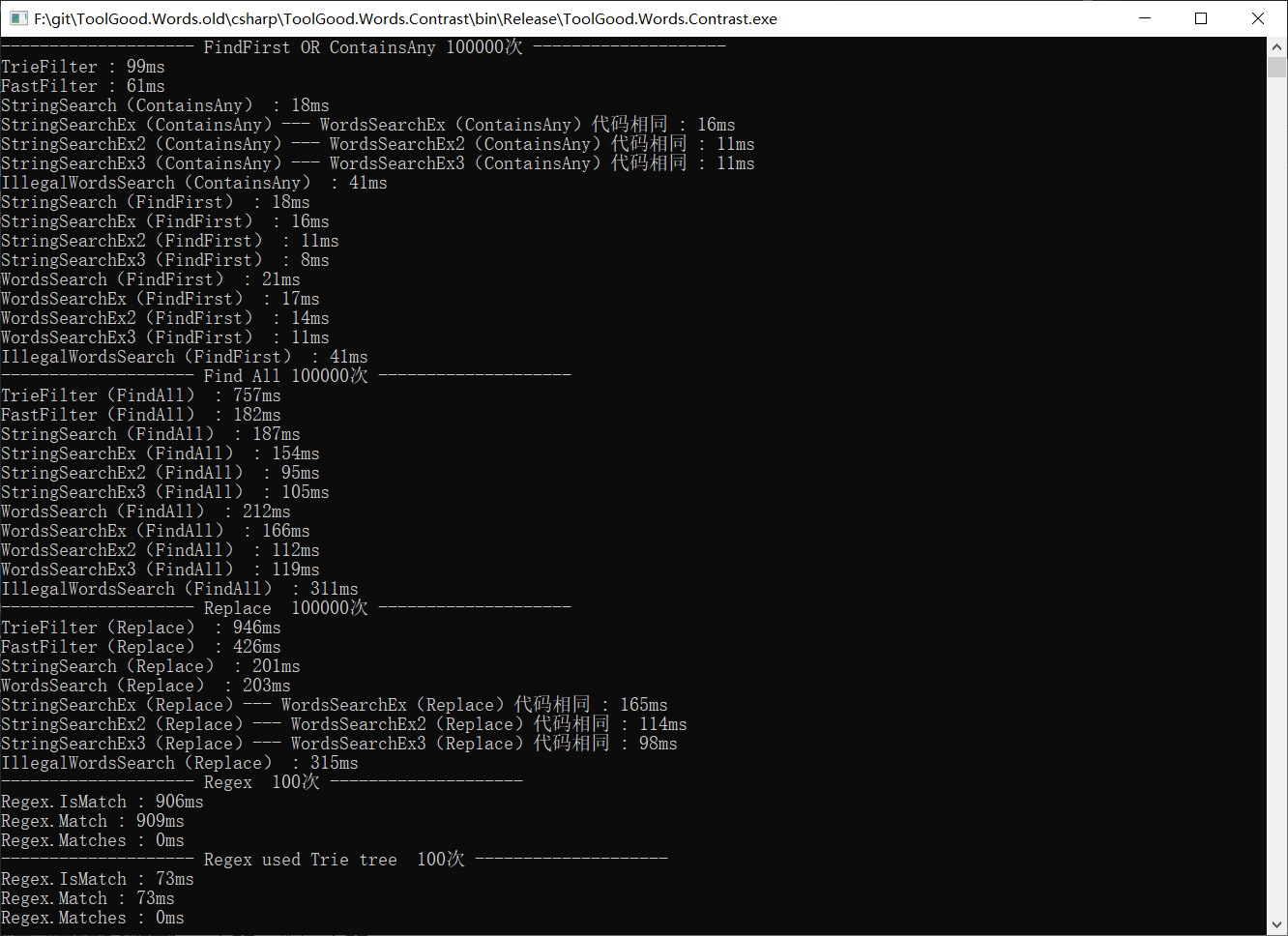


注:C#自带正则很慢,StringSearchEx2.ContainsAny是Regex.IsMatch效率的8.8万倍多,跟关键字数量有关。
Regex.Matches的运行方式跟IQueryable的类似,只返回MatchCollection,还没有计算。
在 Find All测试中, (检测出的文本中有敏感词汇,就不显示了,大家可自行调试查看)。
FastFilter只能检测出7个
StringSearch检测出14个
插曲:在细查Regex.Matches神奇3ms,我发现Regex.Matches有一个小问题,
Regex.Matches只能检测出11个
作者:wenlifan 地址:https://github.com/wenlifan/SensitiveWordFilter
《ToolGood 内容审核系统》正式发布,Windows、Linux双平台,内存占用小于100M。
开源代码:https://github.com/toolgood/ToolGood.TextFilter
SqlOnline 正式发布,SQL在线编辑器,主打数据安全,Windows、Linux双平台。
源码:https://github.com/toolgood/ToolGood.SqlOnline
敏感信息过滤研究会,Q群:128994346(已满)
本人不是老师,请不要提关于项目使用、加载等简单问题。
5、ToolGood.Words算法过滤敏感词优化原理 (收费30元,一顿KFC)
6、ToolGood.TextFilter开源代码优化详解 (收费300元) 与IllegalWordsSearch算法进行对比,阐述了ToolGood.TextFilter过滤算法优化点,如何减少内存使用量。 还有一小部分未写好,心急的人可以先买,我会持续更新。
7、正则转DFA算法(C#版、JAVA版) (收费30元,一顿KFC) ToolGood.TextFilter的一个核心算法就使用到正则转DFA。
8、JAVA版ToolGood.TextFilter
9、C#版图片鉴黄(收费30元,一顿KFC)