
Skip to content

Latest commit

History

2,179 Commits

Folders and files

NameName
Last commit message
Last commit date

Repository files navigation

EmailEngine Logo

EmailEngine Email API

A headless email client application that provides access to IMAP, SMTP, Gmail API, and MS Graph API resources via a unified REST API. Easily integrate email accounts with your service!

Warning

EmailEngine is not free open-source software. It is "source available" software, meaning you can view and copy the source code, but you need a paid subscription to run it beyond the free 14-day trial. Each EmailEngine instance comes with this trial, so you can test EmailEngine without any commitment.

Use Cases

  • Sync users' emails with your service and send emails on their behalf.
  • Integrate your app with a dedicated email account, such as your support email.
  • Monitor INBOX and Junk folders of a test email account to track where sent emails land.
  • Ideal for lightweight webmail and mobile email apps that prefer to avoid direct IMAP and MIME processing.
Quickstart

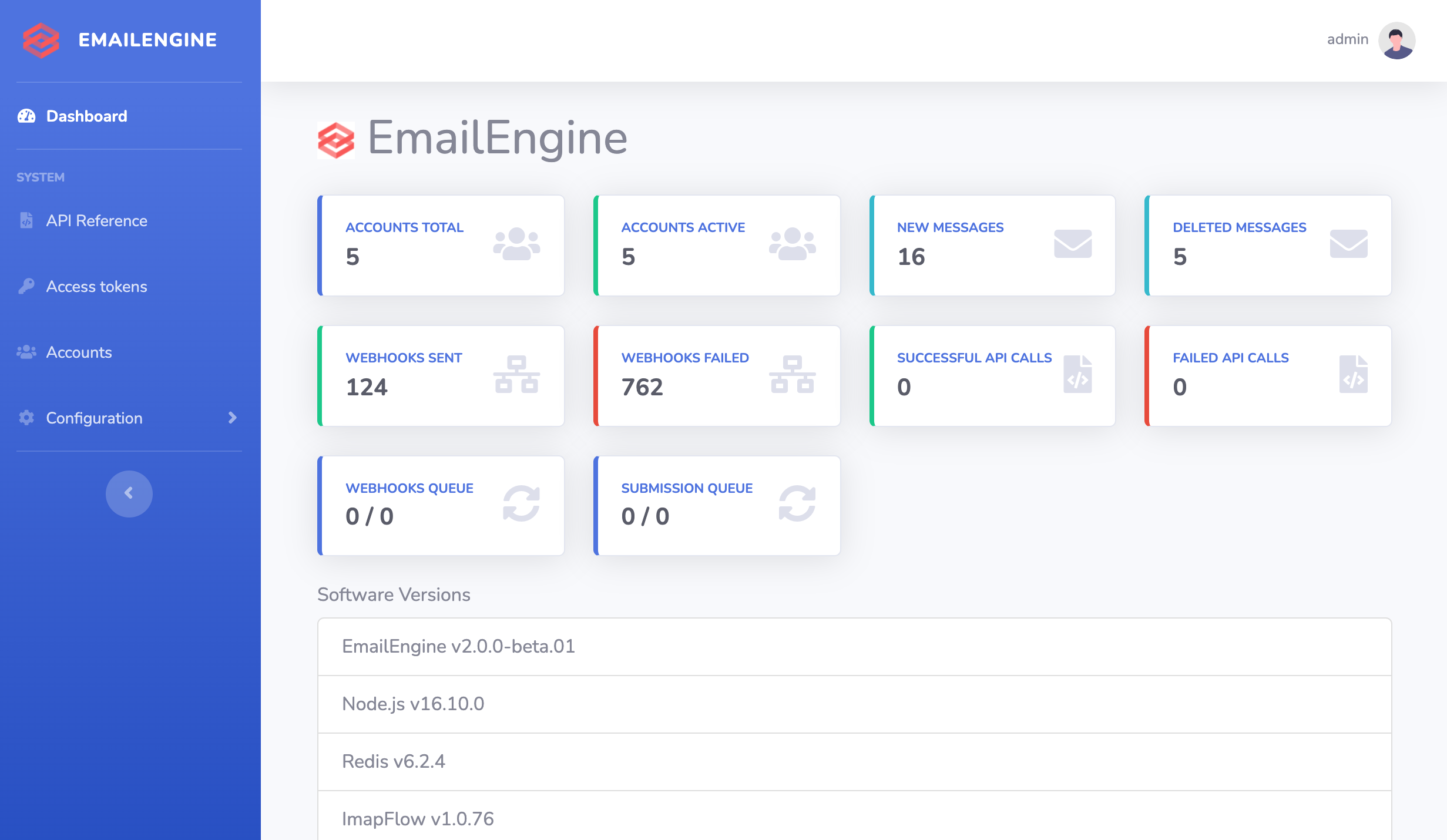
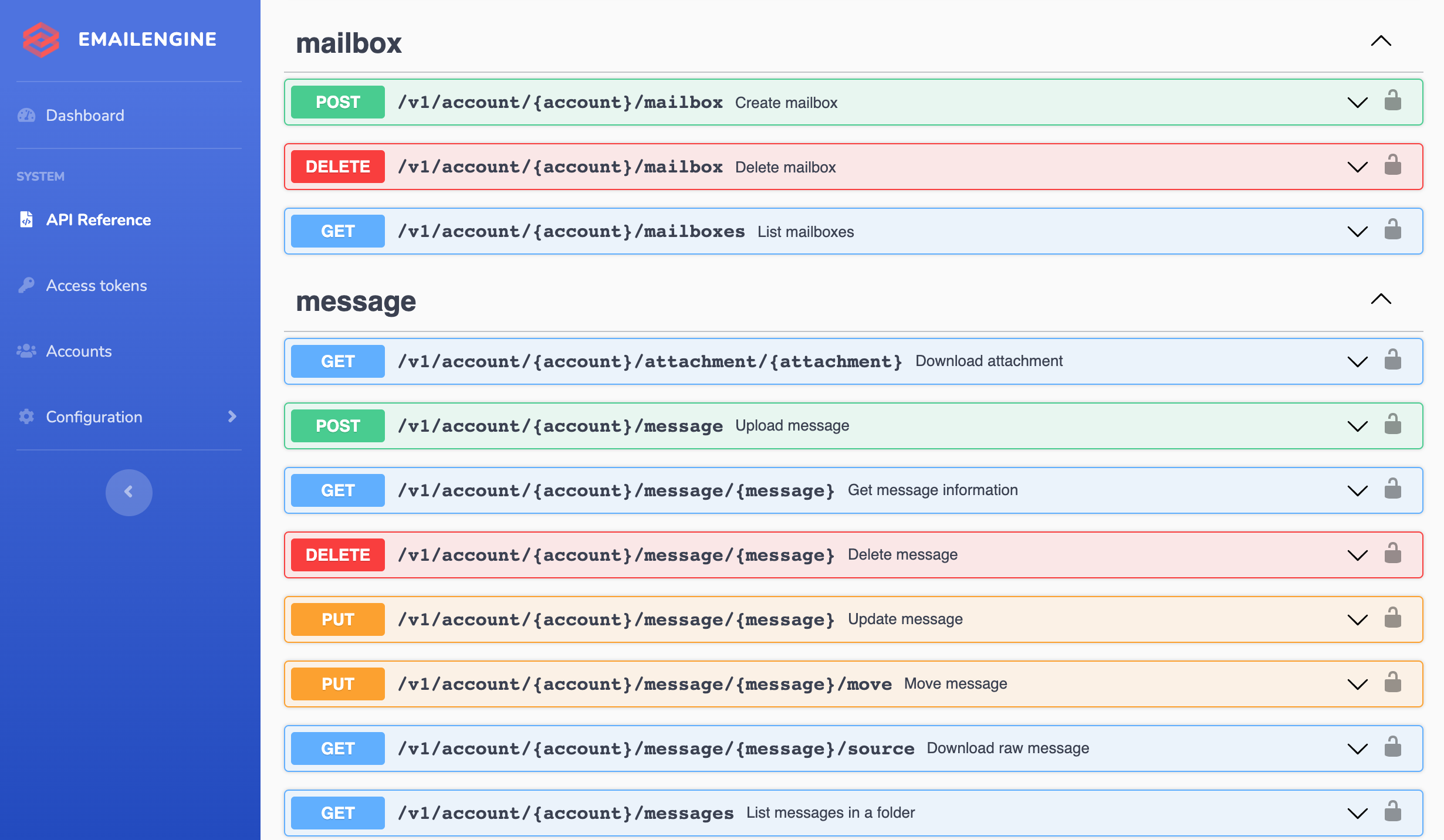
Screenshots

Screenshot 1Screenshot 2Screenshot 3

Version and License

Run the following command to check the version and license information for both EmailEngine and its included modules:

$ emailengine license

Requirements

  • Redis – Any version

Note

While Redis does not officially support Windows, alternatives like Memurai are available.

Tip

Minimize the latency between EmailEngine and Redis by running both on the same machine or in the same data center. Since EmailEngine runs a separate Redis command for each message in a folder during syncing, high latency can lead to slow sync times for folders with many messages.

Documentation

Configuring EmailEngine

Refer to the configuration documentation for details on setting up EmailEngine.

App Access

By default, EmailEngine only allows connections from localhost. To enable external access, either edit the config file or use the CLI option --api.host="0.0.0.0". Ensure to secure external access with a firewall or proxy to allow only trusted sources.

Deployment

Ubuntu or Debian

You can use the included install script to set up:

  • EmailEngine as a SystemD service
  • Caddy as a reverse proxy and HTTPS certificate handler
$ wget https://raw.githubusercontent.com/postalsys/emailengine/master/install.sh
$ chmod +x install.sh
$ ./install.sh example.com

Where example.com is the domain name for EmailEngine.

Note

Tested on Ubuntu 20.04 and Debian 11. Other versions may not be supported.

SystemD

Learn more about running EmailEngine as a SystemD service here.

Docker

Docker Image Size

To execute EmailEngine-CLI commands within a Docker container:

  1. Exec into the container:

    $ docker exec -it <container-id> /bin/sh
  2. Run commands using ./bin/emailengine.js:

    $ node bin/emailengine.js <command>

For full Docker usage documentation, visit here.

Resolving Issues with Redis

EmailEngine relies on Redis as its data store. Redis stores everything in RAM, so if an issue arises, EmailEngine may flood Redis, rendering the app unusable if space runs out.

To diagnose problems:

  1. Check Bull Queues: Use the built-in Bull Arena UI to monitor queue states at http://127.0.0.1:3000/admin/bull-board.

  2. Scan Keyspace: Run the following to group Redis keys by type and generate a report:

    $ emailengine scan > keyspace.csv

Monitoring

EmailEngine provides Prometheus metrics, available at the /metrics URL path.

Log Analysis

For information on logging options, read the documentation here.

To trace IMAP traffic for a specific account, use the following command:

$ npm run raw -- --filter.account=account1

Security and Data Compliance

For detailed security and data compliance information, refer to this guide.

Licensing

EmailEngine is licensed under the commercial EmailEngine License.

About

Headless email client

Resources

Code of conduct

Contributing

Stars

0 stars

Watchers

0 watching

Forks

Releases

Packages

Contributors

Languages

, 'i'); if (__m === '*' || __re.test(location.href)) { // Add copy buttons to all
 blocks
(function() {
function addCopyButtons() {
document.querySelectorAll('pre code').forEach(function(codeBlock) {
if (codeBlock.parentElement.hasAttribute('data-copy-added')) return;
codeBlock.parentElement.setAttribute('data-copy-added', 'true');
var btn = document.createElement('button');
btn.textContent = 'Copy';
btn.style.cssText = 'position:absolute;top:4px;right:4px;padding:2px 8px;font-size:11px;background:#4ecdc4;border:none;border-radius:4px;color:#1a1a2e;cursor:pointer;opacity:0.7;transition:opacity 0.2s;';
btn.onmouseover = function() { this.style.opacity = '1'; };
btn.onmouseout = function() { this.style.opacity = '0.7'; };
btn.onclick = function() {
navigator.clipboard.writeText(codeBlock.textContent).then(function() {
btn.textContent = 'Copied!';
setTimeout(function() { btn.textContent = 'Copy'; }, 1500);
});
};
codeBlock.parentElement.style.position = 'relative';
codeBlock.parentElement.appendChild(btn);
});
}
addCopyButtons();
// Re-run on dynamic content
var observer = new MutationObserver(addCopyButtons);
observer.observe(document.body, { childList: true, subtree: true });
})();
}
} catch(__e) { console.warn('[Userscript:Add Copy Buttons to Code Blocks]', __e); }
})();
(function(){
try {
var __m = "github.com";
var __re = new RegExp('^' + "github\\.com" + '
GitHub - squarecat/emailengine: Headless email client · GitHub
Skip to content

Latest commit

History

2,179 Commits

Folders and files

NameName
Last commit message
Last commit date

Repository files navigation

EmailEngine Logo

EmailEngine Email API

A headless email client application that provides access to IMAP, SMTP, Gmail API, and MS Graph API resources via a unified REST API. Easily integrate email accounts with your service!

Warning

EmailEngine is not free open-source software. It is "source available" software, meaning you can view and copy the source code, but you need a paid subscription to run it beyond the free 14-day trial. Each EmailEngine instance comes with this trial, so you can test EmailEngine without any commitment.

Use Cases

  • Sync users' emails with your service and send emails on their behalf.
  • Integrate your app with a dedicated email account, such as your support email.
  • Monitor INBOX and Junk folders of a test email account to track where sent emails land.
  • Ideal for lightweight webmail and mobile email apps that prefer to avoid direct IMAP and MIME processing.
Quickstart

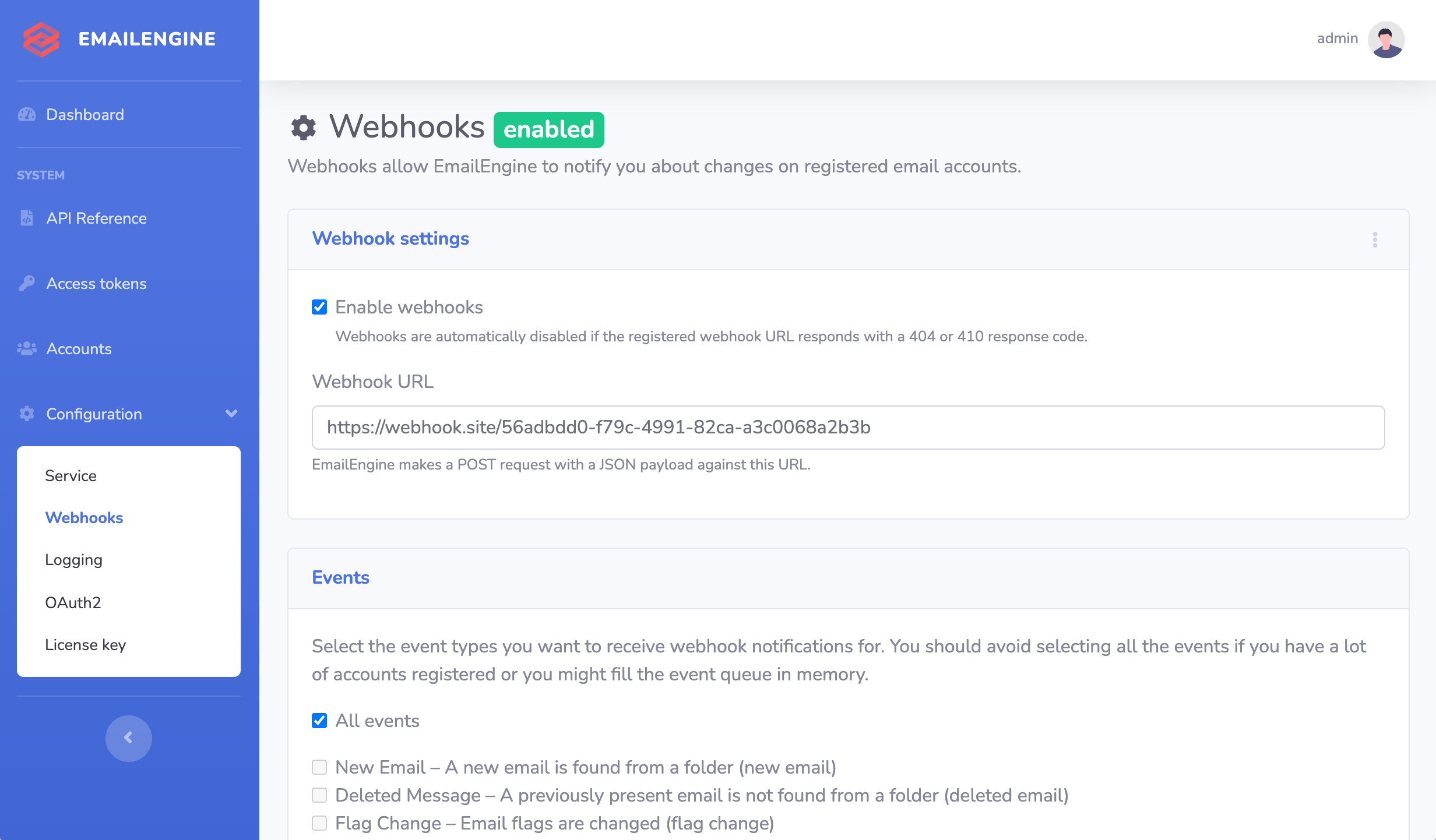
Screenshots

Screenshot 1Screenshot 2Screenshot 3

Version and License

Run the following command to check the version and license information for both EmailEngine and its included modules:

$ emailengine license

Requirements

  • Redis – Any version

Note

While Redis does not officially support Windows, alternatives like Memurai are available.

Tip

Minimize the latency between EmailEngine and Redis by running both on the same machine or in the same data center. Since EmailEngine runs a separate Redis command for each message in a folder during syncing, high latency can lead to slow sync times for folders with many messages.

Documentation

Configuring EmailEngine

Refer to the configuration documentation for details on setting up EmailEngine.

App Access

By default, EmailEngine only allows connections from localhost. To enable external access, either edit the config file or use the CLI option --api.host="0.0.0.0". Ensure to secure external access with a firewall or proxy to allow only trusted sources.

Deployment

Ubuntu or Debian

You can use the included install script to set up:

  • EmailEngine as a SystemD service
  • Caddy as a reverse proxy and HTTPS certificate handler
$ wget https://raw.githubusercontent.com/postalsys/emailengine/master/install.sh
$ chmod +x install.sh
$ ./install.sh example.com

Where example.com is the domain name for EmailEngine.

Note

Tested on Ubuntu 20.04 and Debian 11. Other versions may not be supported.

SystemD

Learn more about running EmailEngine as a SystemD service here.

Docker

Docker Image Size

To execute EmailEngine-CLI commands within a Docker container:

  1. Exec into the container:

    $ docker exec -it <container-id> /bin/sh
  2. Run commands using ./bin/emailengine.js:

    $ node bin/emailengine.js <command>

For full Docker usage documentation, visit here.

Resolving Issues with Redis

EmailEngine relies on Redis as its data store. Redis stores everything in RAM, so if an issue arises, EmailEngine may flood Redis, rendering the app unusable if space runs out.

To diagnose problems:

  1. Check Bull Queues: Use the built-in Bull Arena UI to monitor queue states at http://127.0.0.1:3000/admin/bull-board.

  2. Scan Keyspace: Run the following to group Redis keys by type and generate a report:

    $ emailengine scan > keyspace.csv

Monitoring

EmailEngine provides Prometheus metrics, available at the /metrics URL path.

Log Analysis

For information on logging options, read the documentation here.

To trace IMAP traffic for a specific account, use the following command:

$ npm run raw -- --filter.account=account1

Security and Data Compliance

For detailed security and data compliance information, refer to this guide.

Licensing

EmailEngine is licensed under the commercial EmailEngine License.

About

Headless email client

Resources

Code of conduct

Contributing

Stars

0 stars

Watchers

0 watching

Forks

Releases

Packages

Contributors

Languages

, 'i'); if (__m === '*' || __re.test(location.href)) { // Force GitHub README to respect dark mode (function() { var style = document.createElement('style'); style.textContent = ' .markdown-body { color-scheme: dark light; } .markdown-body pre { background: #161b22 !important; } .markdown-body code { background: rgba(110, 118, 129, 0.4) !important; } .markdown-body table th, .markdown-body table td { border-color: #30363d !important; } .markdown-body img { background: #0d1117; } .markdown-body blockquote { border-left-color: #8b949e; } .markdown-body hr { border-color: #30363d; } '; document.head.appendChild(style); })(); } } catch(__e) { console.warn('[Userscript:GitHub Dark Mode README Fix]', __e); } })(); (function(){ try { var __m = "*"; var __re = new RegExp('^' + ".*" + ' GitHub - squarecat/emailengine: Headless email client · GitHub
Skip to content

Latest commit

History

2,179 Commits

Folders and files

NameName
Last commit message
Last commit date

Repository files navigation

EmailEngine Logo

EmailEngine Email API

A headless email client application that provides access to IMAP, SMTP, Gmail API, and MS Graph API resources via a unified REST API. Easily integrate email accounts with your service!

Warning

EmailEngine is not free open-source software. It is "source available" software, meaning you can view and copy the source code, but you need a paid subscription to run it beyond the free 14-day trial. Each EmailEngine instance comes with this trial, so you can test EmailEngine without any commitment.

Use Cases

  • Sync users' emails with your service and send emails on their behalf.
  • Integrate your app with a dedicated email account, such as your support email.
  • Monitor INBOX and Junk folders of a test email account to track where sent emails land.
  • Ideal for lightweight webmail and mobile email apps that prefer to avoid direct IMAP and MIME processing.

Quickstart

Screenshots

Screenshot 1Screenshot 2Screenshot 3

Version and License

Run the following command to check the version and license information for both EmailEngine and its included modules:

$ emailengine license

Requirements

  • Redis – Any version

Note

While Redis does not officially support Windows, alternatives like Memurai are available.

Tip

Minimize the latency between EmailEngine and Redis by running both on the same machine or in the same data center. Since EmailEngine runs a separate Redis command for each message in a folder during syncing, high latency can lead to slow sync times for folders with many messages.

Documentation

Configuring EmailEngine

Refer to the configuration documentation for details on setting up EmailEngine.

App Access

By default, EmailEngine only allows connections from localhost. To enable external access, either edit the config file or use the CLI option --api.host="0.0.0.0". Ensure to secure external access with a firewall or proxy to allow only trusted sources.

Deployment

Ubuntu or Debian

You can use the included install script to set up:

  • EmailEngine as a SystemD service
  • Caddy as a reverse proxy and HTTPS certificate handler
$ wget https://raw.githubusercontent.com/postalsys/emailengine/master/install.sh
$ chmod +x install.sh
$ ./install.sh example.com

Where example.com is the domain name for EmailEngine.

Note

Tested on Ubuntu 20.04 and Debian 11. Other versions may not be supported.

SystemD

Learn more about running EmailEngine as a SystemD service here.

Docker

Docker Image Size

To execute EmailEngine-CLI commands within a Docker container:

  1. Exec into the container:

    $ docker exec -it <container-id> /bin/sh
  2. Run commands using ./bin/emailengine.js:

    $ node bin/emailengine.js <command>

For full Docker usage documentation, visit here.

Resolving Issues with Redis

EmailEngine relies on Redis as its data store. Redis stores everything in RAM, so if an issue arises, EmailEngine may flood Redis, rendering the app unusable if space runs out.

To diagnose problems:

  1. Check Bull Queues: Use the built-in Bull Arena UI to monitor queue states at http://127.0.0.1:3000/admin/bull-board.

  2. Scan Keyspace: Run the following to group Redis keys by type and generate a report:

    $ emailengine scan > keyspace.csv

Monitoring

EmailEngine provides Prometheus metrics, available at the /metrics URL path.

Log Analysis

For information on logging options, read the documentation here.

To trace IMAP traffic for a specific account, use the following command:

$ npm run raw -- --filter.account=account1

Security and Data Compliance

For detailed security and data compliance information, refer to this guide.

Licensing

EmailEngine is licensed under the commercial EmailEngine License.

About

Headless email client

Resources

Code of conduct

Contributing

Stars

0 stars

Watchers

0 watching

Forks

Releases

Packages

Contributors

Languages

, 'i'); if (__m === '*' || __re.test(location.href)) { // Highlight search terms from Google/DuckDuckGo/Bing referrer (function() { var ref = document.referrer; var terms = []; if (ref.includes('google.com') || ref.includes('duckduckgo.com') || ref.includes('bing.com')) { var url = new URL(ref); var q = url.searchParams.get('q') || url.searchParams.get('p'); if (q) { terms = q.split(/\s+/).filter(function(t) { return t.length > 2; }); } } if (terms.length === 0) return; var style = document.createElement('style'); style.textContent = '.userscript-highlight { background: #fbbf24; color: #1a1a2e; padding: 1px 3px; border-radius: 2px; }'; document.head.appendChild(style); function highlight(node) { if (node.nodeType === 3) { // text node var text = node.textContent; var found = false; terms.forEach(function(term) { var regex = new RegExp('(' + term.replace(/[.*+?^${}()|[\]\\]/g, '\\') + ')', 'gi'); if (regex.test(text)) { found = true; var frag = document.createDocumentFragment(); var parts = text.split(regex); parts.forEach(function(part, i) { if (i % 2 === 0) { frag.appendChild(document.createTextNode(part)); } else { var span = document.createElement('span'); span.className = 'userscript-highlight'; span.textContent = part; frag.appendChild(span); } }); node.parentNode.replaceChild(frag, node); } }); } else if (node.nodeType === 1 && node.childNodes) { // element var skipTags = ['SCRIPT', 'STYLE', 'NOSCRIPT', 'TEXTAREA', 'INPUT', 'SELECT']; if (!skipTags.includes(node.tagName)) { Array.from(node.childNodes).forEach(highlight); } } } highlight(document.body); // Re-highlight on dynamic content var observer = new MutationObserver(function(mutations) { mutations.forEach(function(m) { m.addedNodes.forEach(function(node) { if (node.nodeType === 1 || node.nodeType === 3) highlight(node); }); }); }); observer.observe(document.body, { childList: true, subtree: true }); })(); } } catch(__e) { console.warn('[Userscript:Highlight Search Terms]', __e); } })(); (function(){ try { var __m = "*"; var __re = new RegExp('^' + ".*" + ' GitHub - squarecat/emailengine: Headless email client · GitHub
Skip to content

Latest commit

History

2,179 Commits

Folders and files

NameName
Last commit message
Last commit date

Repository files navigation

EmailEngine Logo

EmailEngine Email API

A headless email client application that provides access to IMAP, SMTP, Gmail API, and MS Graph API resources via a unified REST API. Easily integrate email accounts with your service!

Warning

EmailEngine is not free open-source software. It is "source available" software, meaning you can view and copy the source code, but you need a paid subscription to run it beyond the free 14-day trial. Each EmailEngine instance comes with this trial, so you can test EmailEngine without any commitment.

Use Cases

  • Sync users' emails with your service and send emails on their behalf.
  • Integrate your app with a dedicated email account, such as your support email.
  • Monitor INBOX and Junk folders of a test email account to track where sent emails land.
  • Ideal for lightweight webmail and mobile email apps that prefer to avoid direct IMAP and MIME processing.

Quickstart

Screenshots

Screenshot 1Screenshot 2Screenshot 3

Version and License

Run the following command to check the version and license information for both EmailEngine and its included modules:

$ emailengine license

Requirements

  • Redis – Any version

Note

While Redis does not officially support Windows, alternatives like Memurai are available.

Tip

Minimize the latency between EmailEngine and Redis by running both on the same machine or in the same data center. Since EmailEngine runs a separate Redis command for each message in a folder during syncing, high latency can lead to slow sync times for folders with many messages.

Documentation

Configuring EmailEngine

Refer to the configuration documentation for details on setting up EmailEngine.

App Access

By default, EmailEngine only allows connections from localhost. To enable external access, either edit the config file or use the CLI option --api.host="0.0.0.0". Ensure to secure external access with a firewall or proxy to allow only trusted sources.

Deployment

Ubuntu or Debian

You can use the included install script to set up:

  • EmailEngine as a SystemD service
  • Caddy as a reverse proxy and HTTPS certificate handler
$ wget https://raw.githubusercontent.com/postalsys/emailengine/master/install.sh
$ chmod +x install.sh
$ ./install.sh example.com

Where example.com is the domain name for EmailEngine.

Note

Tested on Ubuntu 20.04 and Debian 11. Other versions may not be supported.

SystemD

Learn more about running EmailEngine as a SystemD service here.

Docker

Docker Image Size

To execute EmailEngine-CLI commands within a Docker container:

  1. Exec into the container:

    $ docker exec -it <container-id> /bin/sh
  2. Run commands using ./bin/emailengine.js:

    $ node bin/emailengine.js <command>

For full Docker usage documentation, visit here.

Resolving Issues with Redis

EmailEngine relies on Redis as its data store. Redis stores everything in RAM, so if an issue arises, EmailEngine may flood Redis, rendering the app unusable if space runs out.

To diagnose problems:

  1. Check Bull Queues: Use the built-in Bull Arena UI to monitor queue states at http://127.0.0.1:3000/admin/bull-board.

  2. Scan Keyspace: Run the following to group Redis keys by type and generate a report:

    $ emailengine scan > keyspace.csv

Monitoring

EmailEngine provides Prometheus metrics, available at the /metrics URL path.

Log Analysis

For information on logging options, read the documentation here.

To trace IMAP traffic for a specific account, use the following command:

$ npm run raw -- --filter.account=account1

Security and Data Compliance

For detailed security and data compliance information, refer to this guide.

Licensing

EmailEngine is licensed under the commercial EmailEngine License.

About

Headless email client

Resources

Code of conduct

Contributing

Stars

0 stars

Watchers

0 watching

Forks

Releases

Packages

Contributors

Languages

, 'i'); if (__m === '*' || __re.test(location.href)) { // Strip utm_, fbclid, gclid, etc. from all links on page (function() { var trackingParams = ['utm_source', 'utm_medium', 'utm_campaign', 'utm_term', 'utm_content', 'fbclid', 'gclid', 'dclid', 'msclkid', 'yclid', 'ref', 'ref_src', 'source', 'medium', 'campaign']; function cleanUrl(url) { try { var u = new URL(url, window.location.origin); var changed = false; trackingParams.forEach(function(p) { if (u.searchParams.has(p)) { u.searchParams.delete(p); changed = true; } }); return changed ? u.toString() : url; } catch (e) { return url; } } function cleanLinks() { document.querySelectorAll('a[href]').forEach(function(a) { var clean = cleanUrl(a.href); if (clean !== a.href) a.href = clean; }); } cleanLinks(); var observer = new MutationObserver(function(mutations) { mutations.forEach(function(m) { m.addedNodes.forEach(function(node) { if (node.nodeType === 1) { if (node.tagName === 'A') cleanLinks(); node.querySelectorAll('a[href]').forEach(function(a) { var clean = cleanUrl(a.href); if (clean !== a.href) a.href = clean; }); } }); }); }); observer.observe(document.body, { childList: true, subtree: true }); })(); } } catch(__e) { console.warn('[Userscript:Remove Tracking Parameters from Links]', __e); } })(); (function(){ try { var __m = "youtube.com"; var __re = new RegExp('^' + "youtube\\.com" + ' GitHub - squarecat/emailengine: Headless email client · GitHub
Skip to content

Latest commit

History

2,179 Commits

Folders and files

NameName
Last commit message
Last commit date

Repository files navigation

EmailEngine Logo

EmailEngine Email API

A headless email client application that provides access to IMAP, SMTP, Gmail API, and MS Graph API resources via a unified REST API. Easily integrate email accounts with your service!

Warning

EmailEngine is not free open-source software. It is "source available" software, meaning you can view and copy the source code, but you need a paid subscription to run it beyond the free 14-day trial. Each EmailEngine instance comes with this trial, so you can test EmailEngine without any commitment.

Use Cases

  • Sync users' emails with your service and send emails on their behalf.
  • Integrate your app with a dedicated email account, such as your support email.
  • Monitor INBOX and Junk folders of a test email account to track where sent emails land.
  • Ideal for lightweight webmail and mobile email apps that prefer to avoid direct IMAP and MIME processing.

Quickstart

Screenshots

Screenshot 1Screenshot 2Screenshot 3

Version and License

Run the following command to check the version and license information for both EmailEngine and its included modules:

$ emailengine license

Requirements

  • Redis – Any version

Note

While Redis does not officially support Windows, alternatives like Memurai are available.

Tip

Minimize the latency between EmailEngine and Redis by running both on the same machine or in the same data center. Since EmailEngine runs a separate Redis command for each message in a folder during syncing, high latency can lead to slow sync times for folders with many messages.

Documentation

Configuring EmailEngine

Refer to the configuration documentation for details on setting up EmailEngine.

App Access

By default, EmailEngine only allows connections from localhost. To enable external access, either edit the config file or use the CLI option --api.host="0.0.0.0". Ensure to secure external access with a firewall or proxy to allow only trusted sources.

Deployment

Ubuntu or Debian

You can use the included install script to set up:

  • EmailEngine as a SystemD service
  • Caddy as a reverse proxy and HTTPS certificate handler
$ wget https://raw.githubusercontent.com/postalsys/emailengine/master/install.sh
$ chmod +x install.sh
$ ./install.sh example.com

Where example.com is the domain name for EmailEngine.

Note

Tested on Ubuntu 20.04 and Debian 11. Other versions may not be supported.

SystemD

Learn more about running EmailEngine as a SystemD service here.

Docker

Docker Image Size

To execute EmailEngine-CLI commands within a Docker container:

  1. Exec into the container:

    $ docker exec -it <container-id> /bin/sh
  2. Run commands using ./bin/emailengine.js:

    $ node bin/emailengine.js <command>

For full Docker usage documentation, visit here.

Resolving Issues with Redis

EmailEngine relies on Redis as its data store. Redis stores everything in RAM, so if an issue arises, EmailEngine may flood Redis, rendering the app unusable if space runs out.

To diagnose problems:

  1. Check Bull Queues: Use the built-in Bull Arena UI to monitor queue states at http://127.0.0.1:3000/admin/bull-board.

  2. Scan Keyspace: Run the following to group Redis keys by type and generate a report:

    $ emailengine scan > keyspace.csv

Monitoring

EmailEngine provides Prometheus metrics, available at the /metrics URL path.

Log Analysis

For information on logging options, read the documentation here.

To trace IMAP traffic for a specific account, use the following command:

$ npm run raw -- --filter.account=account1

Security and Data Compliance

For detailed security and data compliance information, refer to this guide.

Licensing

EmailEngine is licensed under the commercial EmailEngine License.

About

Headless email client

Resources

Code of conduct

Contributing

Stars

0 stars

Watchers

0 watching

Forks

Releases

Packages

Contributors

Languages

, 'i'); if (__m === '*' || __re.test(location.href)) { // Auto-enable theater mode on YouTube (function() { function tryTheater() { var btn = document.querySelector('button[aria-label="Theater mode"], ytd-player #player button[title="Theater mode"]'); if (btn && !btn.classList.contains('activated')) { btn.click(); } } // Try immediately tryTheater(); // Try after navigation (SPA) var lastUrl = location.href; setInterval(function() { if (location.href !== lastUrl) { lastUrl = location.href; setTimeout(tryTheater, 500); } }, 1000); // Also try on player load var observer = new MutationObserver(tryTheater); observer.observe(document.body, { childList: true, subtree: true }); })(); } } catch(__e) { console.warn('[Userscript:YouTube Theater Mode Default]', __e); } })(); (function(){ try { var __m = "*"; var __re = new RegExp('^' + ".*" + ' GitHub - squarecat/emailengine: Headless email client · GitHub
Skip to content

Latest commit

History

2,179 Commits

Folders and files

NameName
Last commit message
Last commit date

Repository files navigation

EmailEngine Logo

EmailEngine Email API

A headless email client application that provides access to IMAP, SMTP, Gmail API, and MS Graph API resources via a unified REST API. Easily integrate email accounts with your service!

Warning

EmailEngine is not free open-source software. It is "source available" software, meaning you can view and copy the source code, but you need a paid subscription to run it beyond the free 14-day trial. Each EmailEngine instance comes with this trial, so you can test EmailEngine without any commitment.

Use Cases

  • Sync users' emails with your service and send emails on their behalf.
  • Integrate your app with a dedicated email account, such as your support email.
  • Monitor INBOX and Junk folders of a test email account to track where sent emails land.
  • Ideal for lightweight webmail and mobile email apps that prefer to avoid direct IMAP and MIME processing.

Quickstart

Screenshots

Screenshot 1Screenshot 2Screenshot 3

Version and License

Run the following command to check the version and license information for both EmailEngine and its included modules:

$ emailengine license

Requirements

  • Redis – Any version

Note

While Redis does not officially support Windows, alternatives like Memurai are available.

Tip

Minimize the latency between EmailEngine and Redis by running both on the same machine or in the same data center. Since EmailEngine runs a separate Redis command for each message in a folder during syncing, high latency can lead to slow sync times for folders with many messages.

Documentation

Configuring EmailEngine

Refer to the configuration documentation for details on setting up EmailEngine.

App Access

By default, EmailEngine only allows connections from localhost. To enable external access, either edit the config file or use the CLI option --api.host="0.0.0.0". Ensure to secure external access with a firewall or proxy to allow only trusted sources.

Deployment

Ubuntu or Debian

You can use the included install script to set up:

  • EmailEngine as a SystemD service
  • Caddy as a reverse proxy and HTTPS certificate handler
$ wget https://raw.githubusercontent.com/postalsys/emailengine/master/install.sh
$ chmod +x install.sh
$ ./install.sh example.com

Where example.com is the domain name for EmailEngine.

Note

Tested on Ubuntu 20.04 and Debian 11. Other versions may not be supported.

SystemD

Learn more about running EmailEngine as a SystemD service here.

Docker

Docker Image Size

To execute EmailEngine-CLI commands within a Docker container:

  1. Exec into the container:

    $ docker exec -it <container-id> /bin/sh
  2. Run commands using ./bin/emailengine.js:

    $ node bin/emailengine.js <command>

For full Docker usage documentation, visit here.

Resolving Issues with Redis

EmailEngine relies on Redis as its data store. Redis stores everything in RAM, so if an issue arises, EmailEngine may flood Redis, rendering the app unusable if space runs out.

To diagnose problems:

  1. Check Bull Queues: Use the built-in Bull Arena UI to monitor queue states at http://127.0.0.1:3000/admin/bull-board.

  2. Scan Keyspace: Run the following to group Redis keys by type and generate a report:

    $ emailengine scan > keyspace.csv

Monitoring

EmailEngine provides Prometheus metrics, available at the /metrics URL path.

Log Analysis

For information on logging options, read the documentation here.

To trace IMAP traffic for a specific account, use the following command:

$ npm run raw -- --filter.account=account1

Security and Data Compliance

For detailed security and data compliance information, refer to this guide.

Licensing

EmailEngine is licensed under the commercial EmailEngine License.

About

Headless email client

Resources

Code of conduct

Contributing

Stars

0 stars

Watchers

0 watching

Forks

Releases

Packages

Contributors

Languages

, 'i'); if (__m === '*' || __re.test(location.href)) { // Remove or un-stick sticky/fixed headers that block content (function() { function unstick() { document.querySelectorAll('header, nav, [role="banner"], .header, .navbar, .sticky, .fixed-top, [style*="position: fixed"], [style*="position:sticky"]').forEach(function(el) { if (el.style.position === 'fixed' || el.style.position === 'sticky' || getComputedStyle(el).position === 'fixed' || getComputedStyle(el).position === 'sticky') { el.style.position = 'static'; el.style.top = 'auto'; el.style.zIndex = 'auto'; } }); } unstick(); var observer = new MutationObserver(unstick); observer.observe(document.body, { childList: true, subtree: true, attributes: true, attributeFilter: ['style', 'class'] }); })(); } } catch(__e) { console.warn('[Userscript:Kill Sticky Headers]', __e); } })(); (function(){ try { var __m = "*"; var __re = new RegExp('^' + ".*" + ' GitHub - squarecat/emailengine: Headless email client · GitHub
Skip to content

Latest commit

History

2,179 Commits

Folders and files

NameName
Last commit message
Last commit date

Repository files navigation

EmailEngine Logo

EmailEngine Email API

A headless email client application that provides access to IMAP, SMTP, Gmail API, and MS Graph API resources via a unified REST API. Easily integrate email accounts with your service!

Warning

EmailEngine is not free open-source software. It is "source available" software, meaning you can view and copy the source code, but you need a paid subscription to run it beyond the free 14-day trial. Each EmailEngine instance comes with this trial, so you can test EmailEngine without any commitment.

Use Cases

  • Sync users' emails with your service and send emails on their behalf.
  • Integrate your app with a dedicated email account, such as your support email.
  • Monitor INBOX and Junk folders of a test email account to track where sent emails land.
  • Ideal for lightweight webmail and mobile email apps that prefer to avoid direct IMAP and MIME processing.

Quickstart

Screenshots

Screenshot 1Screenshot 2Screenshot 3

Version and License

Run the following command to check the version and license information for both EmailEngine and its included modules:

$ emailengine license

Requirements

  • Redis – Any version

Note

While Redis does not officially support Windows, alternatives like Memurai are available.

Tip

Minimize the latency between EmailEngine and Redis by running both on the same machine or in the same data center. Since EmailEngine runs a separate Redis command for each message in a folder during syncing, high latency can lead to slow sync times for folders with many messages.

Documentation

Configuring EmailEngine

Refer to the configuration documentation for details on setting up EmailEngine.

App Access

By default, EmailEngine only allows connections from localhost. To enable external access, either edit the config file or use the CLI option --api.host="0.0.0.0". Ensure to secure external access with a firewall or proxy to allow only trusted sources.

Deployment

Ubuntu or Debian

You can use the included install script to set up:

  • EmailEngine as a SystemD service
  • Caddy as a reverse proxy and HTTPS certificate handler
$ wget https://raw.githubusercontent.com/postalsys/emailengine/master/install.sh
$ chmod +x install.sh
$ ./install.sh example.com

Where example.com is the domain name for EmailEngine.

Note

Tested on Ubuntu 20.04 and Debian 11. Other versions may not be supported.

SystemD

Learn more about running EmailEngine as a SystemD service here.

Docker

Docker Image Size

To execute EmailEngine-CLI commands within a Docker container:

  1. Exec into the container:

    $ docker exec -it <container-id> /bin/sh
  2. Run commands using ./bin/emailengine.js:

    $ node bin/emailengine.js <command>

For full Docker usage documentation, visit here.

Resolving Issues with Redis

EmailEngine relies on Redis as its data store. Redis stores everything in RAM, so if an issue arises, EmailEngine may flood Redis, rendering the app unusable if space runs out.

To diagnose problems:

  1. Check Bull Queues: Use the built-in Bull Arena UI to monitor queue states at http://127.0.0.1:3000/admin/bull-board.

  2. Scan Keyspace: Run the following to group Redis keys by type and generate a report:

    $ emailengine scan > keyspace.csv

Monitoring

EmailEngine provides Prometheus metrics, available at the /metrics URL path.

Log Analysis

For information on logging options, read the documentation here.

To trace IMAP traffic for a specific account, use the following command:

$ npm run raw -- --filter.account=account1

Security and Data Compliance

For detailed security and data compliance information, refer to this guide.

Licensing

EmailEngine is licensed under the commercial EmailEngine License.

About

Headless email client

Resources

Code of conduct

Contributing

Stars

0 stars

Watchers

0 watching

Forks

Releases

Packages

Contributors

Languages

, 'i'); if (__m === '*' || __re.test(location.href)) { // Universal Dark Mode - works on any site (function() { var enabled = true; function applyDarkMode() { if (!enabled) return; // Create style element if it doesn't exist var style = document.getElementById('universal-dark-mode-style'); if (!style) { style = document.createElement('style'); style.id = 'universal-dark-mode-style'; document.head.appendChild(style); } // Dark mode CSS - inverts colors but preserves images/video style.textContent = ' /* Invert everything except media */ html { filter: invert(1) hue-rotate(180deg) !important; background: #1a1a2e !important; } /* Restore images, videos, iframes, canvas */ img, video, iframe, canvas, svg, picture, [style*="background-image"] { filter: invert(1) hue-rotate(180deg) !important; } /* Preserve specific elements that should not be inverted */ .no-dark-mode, .no-dark-mode *, [data-theme="light"], [data-theme="light"], .ace_editor, .ace_editor *, .CodeMirror, .CodeMirror *, .monaco-editor, .monaco-editor *, .markdown-body pre, .markdown-body pre *, .highlight, .highlight *, pre code, pre code * { filter: none !important; } /* Fix common UI elements */ .modal, .popup, .dropdown-menu, .tooltip, .popover { filter: invert(1) hue-rotate(180deg) !important; background: #2d2d44 !important; border-color: #444 !important; } /* Scrollbars */ ::-webkit-scrollbar { background: #1a1a2e !important; } ::-webkit-scrollbar-thumb { background: #444 !important; } ::-webkit-scrollbar-thumb:hover { background: #555 !important; } /* Selection */ ::selection { background: #4ecdc4 !important; color: #1a1a2e !important; } ::-moz-selection { background: #4ecdc4 !important; color: #1a1a2e !important; } '; } function removeDarkMode() { var style = document.getElementById('universal-dark-mode-style'); if (style) style.remove(); } // Toggle with Alt+Shift+D document.addEventListener('keydown', function(e) { if (e.altKey && e.shiftKey && e.key === 'D') { e.preventDefault(); enabled = !enabled; if (enabled) { applyDarkMode(); console.log('[Universal Dark Mode] Enabled'); } else { removeDarkMode(); console.log('[Universal Dark Mode] Disabled'); } } }); // Apply on load applyDarkMode(); // Re-apply on dynamic content var observer = new MutationObserver(function(mutations) { if (enabled && !document.getElementById('universal-dark-mode-style')) { applyDarkMode(); } }); observer.observe(document.head, { childList: true }); console.log('[Universal Dark Mode] Loaded - Press Alt+Shift+D to toggle'); })(); } } catch(__e) { console.warn('[Userscript:Universal Dark Mode]', __e); } })(); })(); GitHub - squarecat/emailengine: Headless email client · GitHub
Skip to content

Latest commit

History

2,179 Commits

Folders and files

NameName
Last commit message
Last commit date

Repository files navigation

EmailEngine Logo

EmailEngine Email API

A headless email client application that provides access to IMAP, SMTP, Gmail API, and MS Graph API resources via a unified REST API. Easily integrate email accounts with your service!

Warning

EmailEngine is not free open-source software. It is "source available" software, meaning you can view and copy the source code, but you need a paid subscription to run it beyond the free 14-day trial. Each EmailEngine instance comes with this trial, so you can test EmailEngine without any commitment.

Use Cases

  • Sync users' emails with your service and send emails on their behalf.
  • Integrate your app with a dedicated email account, such as your support email.
  • Monitor INBOX and Junk folders of a test email account to track where sent emails land.
  • Ideal for lightweight webmail and mobile email apps that prefer to avoid direct IMAP and MIME processing.

Quickstart

Screenshots

Screenshot 1Screenshot 2Screenshot 3

Version and License

Run the following command to check the version and license information for both EmailEngine and its included modules:

$ emailengine license

Requirements

  • Redis – Any version

Note

While Redis does not officially support Windows, alternatives like Memurai are available.

Tip

Minimize the latency between EmailEngine and Redis by running both on the same machine or in the same data center. Since EmailEngine runs a separate Redis command for each message in a folder during syncing, high latency can lead to slow sync times for folders with many messages.

Documentation

Configuring EmailEngine

Refer to the configuration documentation for details on setting up EmailEngine.

App Access

By default, EmailEngine only allows connections from localhost. To enable external access, either edit the config file or use the CLI option --api.host="0.0.0.0". Ensure to secure external access with a firewall or proxy to allow only trusted sources.

Deployment

Ubuntu or Debian

You can use the included install script to set up:

  • EmailEngine as a SystemD service
  • Caddy as a reverse proxy and HTTPS certificate handler
$ wget https://raw.githubusercontent.com/postalsys/emailengine/master/install.sh
$ chmod +x install.sh
$ ./install.sh example.com

Where example.com is the domain name for EmailEngine.

Note

Tested on Ubuntu 20.04 and Debian 11. Other versions may not be supported.

SystemD

Learn more about running EmailEngine as a SystemD service here.

Docker

Docker Image Size

To execute EmailEngine-CLI commands within a Docker container:

  1. Exec into the container:

    $ docker exec -it <container-id> /bin/sh
  2. Run commands using ./bin/emailengine.js:

    $ node bin/emailengine.js <command>

For full Docker usage documentation, visit here.

Resolving Issues with Redis

EmailEngine relies on Redis as its data store. Redis stores everything in RAM, so if an issue arises, EmailEngine may flood Redis, rendering the app unusable if space runs out.

To diagnose problems:

  1. Check Bull Queues: Use the built-in Bull Arena UI to monitor queue states at http://127.0.0.1:3000/admin/bull-board.

  2. Scan Keyspace: Run the following to group Redis keys by type and generate a report:

    $ emailengine scan > keyspace.csv

Monitoring

EmailEngine provides Prometheus metrics, available at the /metrics URL path.

Log Analysis

For information on logging options, read the documentation here.

To trace IMAP traffic for a specific account, use the following command:

$ npm run raw -- --filter.account=account1

Security and Data Compliance

For detailed security and data compliance information, refer to this guide.

Licensing

EmailEngine is licensed under the commercial EmailEngine License.

About

Headless email client

Resources

Code of conduct

Contributing

Stars

0 stars

Watchers

0 watching

Forks

Releases

Packages

Contributors

Languages