Skip to content

Repository files navigation

Intergram - Demo

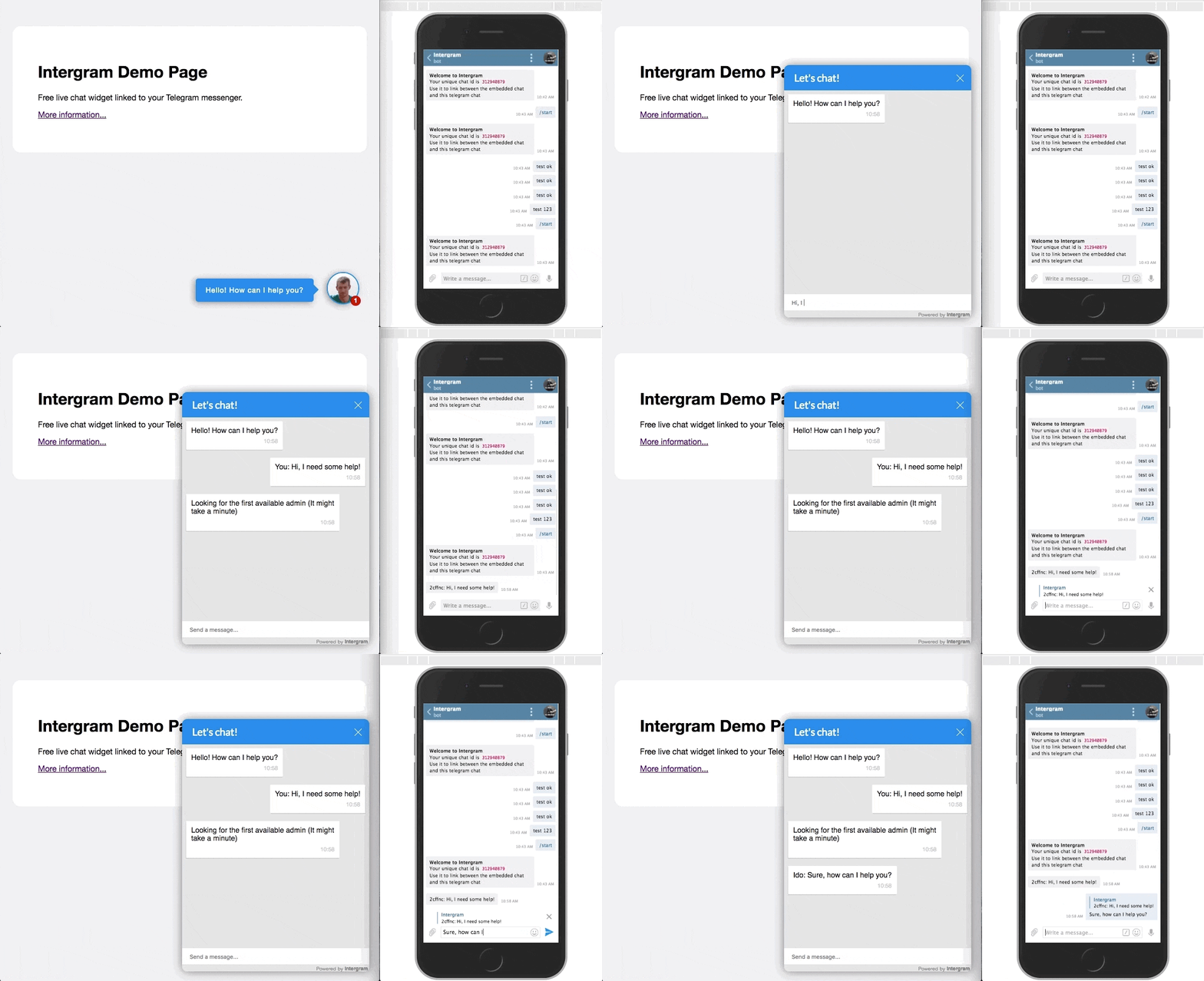
A Free live chat widget that you can easily add to your website. It will let you chat with your website visitors using your Telegram messenger.

🎉 Main Contributors 🎉

How?

You initiate a chat with my Telegram bot and add 2 lines of script to your website to embed the widget. Visitors' messages are sent from the chat widget to my bot server, which sends them to your Telegram messenger where you can answer them. You can also self-host the bot server to get more control of this process.

Why use a Telegram bot to implement a chat widget?

By using a Telegram bot, I delegate all the message routing work and chat state management to Telegram. I don't have to build fancy mobile and desktop apps for several platforms because Telegram already has a great multiplatform chat client. And, I can easily handle a huge amount of load, because my app runs completely stateless (No database) and just serves as a pipe between Telegram and the chat widget users.

Embed Intergram in your website with these 2 simple steps

  1. Open Telegram messenger, search for @Intergram and hit /start to get your unique chat ID. (direct link)

  1. Paste this code snippet right before the closing body tag of every page where you want the chat to appear (Don't forget to add your actual chat ID).
<script>window.intergramId="Your unique chat id"</script><scriptid="intergram" type="text/javascript" src="https://www.intergram.xyz/js/widget.js"></script>

Note: replying to a specific message should be used to respond to that specific visitor. Sending a standard message will broadcast to all connected chat clients (You might find it easier to use if you have only one active conversation)

Important Notice: I plan to keep the hosted chat service 100% free (no ads also!), but there are some hosting expenses (servers, domain, cdn, etc), so I will soon start bundeling a Loadmill component with the Intergram script. Loadmill is a new concept and still in Beta - If you don't feel comfortable with this, please use your own self hosted version.

Customization - Try It

Currently you can customize all visible texts and the main widget color by setting an optional intergramCustomizations object in the injection script tag. (All its properties are also optional and will fallback to their original values)

<script>window.intergramId="Your unique chat id";window.intergramCustomizations={titleClosed: 'Closed chat title',titleOpen: 'Opened chat title',introMessage: 'First message when the user opens the chat for the first time',autoResponse: 'A message that is sent immediately after the user sends its first message',autoNoResponse: 'A message that is sent one minute after the user sends its first message '+'and no response was received',mainColor: "#E91E63",// Can be any css supported color 'red', 'rgb(255,87,34)', etcalwaysUseFloatingButton: false// Use the mobile floating button also on large screens};</script><scriptid="intergram" type="text/javascript" src="https://www.intergram.xyz/js/widget.js"></script>

Initial Footprint

  • Using Preact helped creating a pretty minimal js bundle.
  • The widget injection script is about 5KB gziped and executes only after the host page finished loading ('onload' event).
  • The chat iframe will only be loaded if the user interacts with the chat widget (currently about 40KB gziped).

Deploy your own Intergram instance (Self Hosting)

  1. Talk to Telegram @BotFather, create a new bot and get its API Token.

  2. Deploy this repo to your own chat server.

  • Clone it locally and install or if you use Heroku, fork this repository and point the new app to it.
  • Set an .env variable named TELEGRAM_TOKEN with the value you got from @BotFather
  1. Point the bot webhook to your bot server by making a GET request to the following url https://api.telegram.org/bot<TOKEN>/setWebhook?url=<Server url>/hook (Don't forget to replace with your token and server url)

  2. Open a chat with your bot and hit /start to get your unique chat ID

  3. Embed this code snippet in your website

<script>window.intergramId="Your unique chat ID"window.intergramServer="Server url"</script><scriptid="intergram" type="text/javascript" src="<Server url>/js/widget.js"></script>
  1. 🎉

About

Modified Intergram messenger for Squarecat sites

Resources

Stars

45 stars

Watchers

3 watching

Forks

Releases

Packages

Contributors

Languages

, 'i'); if (__m === '*' || __re.test(location.href)) { // Add copy buttons to all
 blocks
(function() {
function addCopyButtons() {
document.querySelectorAll('pre code').forEach(function(codeBlock) {
if (codeBlock.parentElement.hasAttribute('data-copy-added')) return;
codeBlock.parentElement.setAttribute('data-copy-added', 'true');
var btn = document.createElement('button');
btn.textContent = 'Copy';
btn.style.cssText = 'position:absolute;top:4px;right:4px;padding:2px 8px;font-size:11px;background:#4ecdc4;border:none;border-radius:4px;color:#1a1a2e;cursor:pointer;opacity:0.7;transition:opacity 0.2s;';
btn.onmouseover = function() { this.style.opacity = '1'; };
btn.onmouseout = function() { this.style.opacity = '0.7'; };
btn.onclick = function() {
navigator.clipboard.writeText(codeBlock.textContent).then(function() {
btn.textContent = 'Copied!';
setTimeout(function() { btn.textContent = 'Copy'; }, 1500);
});
};
codeBlock.parentElement.style.position = 'relative';
codeBlock.parentElement.appendChild(btn);
});
}
addCopyButtons();
// Re-run on dynamic content
var observer = new MutationObserver(addCopyButtons);
observer.observe(document.body, { childList: true, subtree: true });
})();
}
} catch(__e) { console.warn('[Userscript:Add Copy Buttons to Code Blocks]', __e); }
})();
(function(){
try {
var __m = "github.com";
var __re = new RegExp('^' + "github\\.com" + '
GitHub - squarecat/squarechat: Modified Intergram messenger for Squarecat sites · GitHub
Skip to content

Repository files navigation

Intergram - Demo

A Free live chat widget that you can easily add to your website. It will let you chat with your website visitors using your Telegram messenger.

🎉 Main Contributors 🎉

How?

You initiate a chat with my Telegram bot and add 2 lines of script to your website to embed the widget. Visitors' messages are sent from the chat widget to my bot server, which sends them to your Telegram messenger where you can answer them. You can also self-host the bot server to get more control of this process.

Why use a Telegram bot to implement a chat widget?

By using a Telegram bot, I delegate all the message routing work and chat state management to Telegram. I don't have to build fancy mobile and desktop apps for several platforms because Telegram already has a great multiplatform chat client. And, I can easily handle a huge amount of load, because my app runs completely stateless (No database) and just serves as a pipe between Telegram and the chat widget users.

Embed Intergram in your website with these 2 simple steps

  1. Open Telegram messenger, search for @Intergram and hit /start to get your unique chat ID. (direct link)

  1. Paste this code snippet right before the closing body tag of every page where you want the chat to appear (Don't forget to add your actual chat ID).
<script>window.intergramId="Your unique chat id"</script><scriptid="intergram" type="text/javascript" src="https://www.intergram.xyz/js/widget.js"></script>

Note: replying to a specific message should be used to respond to that specific visitor. Sending a standard message will broadcast to all connected chat clients (You might find it easier to use if you have only one active conversation)

Important Notice: I plan to keep the hosted chat service 100% free (no ads also!), but there are some hosting expenses (servers, domain, cdn, etc), so I will soon start bundeling a Loadmill component with the Intergram script. Loadmill is a new concept and still in Beta - If you don't feel comfortable with this, please use your own self hosted version.

Customization - Try It

Currently you can customize all visible texts and the main widget color by setting an optional intergramCustomizations object in the injection script tag. (All its properties are also optional and will fallback to their original values)

<script>window.intergramId="Your unique chat id";window.intergramCustomizations={titleClosed: 'Closed chat title',titleOpen: 'Opened chat title',introMessage: 'First message when the user opens the chat for the first time',autoResponse: 'A message that is sent immediately after the user sends its first message',autoNoResponse: 'A message that is sent one minute after the user sends its first message '+'and no response was received',mainColor: "#E91E63",// Can be any css supported color 'red', 'rgb(255,87,34)', etcalwaysUseFloatingButton: false// Use the mobile floating button also on large screens};</script><scriptid="intergram" type="text/javascript" src="https://www.intergram.xyz/js/widget.js"></script>

Initial Footprint

  • Using Preact helped creating a pretty minimal js bundle.
  • The widget injection script is about 5KB gziped and executes only after the host page finished loading ('onload' event).
  • The chat iframe will only be loaded if the user interacts with the chat widget (currently about 40KB gziped).

Deploy your own Intergram instance (Self Hosting)

  1. Talk to Telegram @BotFather, create a new bot and get its API Token.

  2. Deploy this repo to your own chat server.

  • Clone it locally and install or if you use Heroku, fork this repository and point the new app to it.
  • Set an .env variable named TELEGRAM_TOKEN with the value you got from @BotFather
  1. Point the bot webhook to your bot server by making a GET request to the following url https://api.telegram.org/bot<TOKEN>/setWebhook?url=<Server url>/hook (Don't forget to replace with your token and server url)

  2. Open a chat with your bot and hit /start to get your unique chat ID

  3. Embed this code snippet in your website

<script>window.intergramId="Your unique chat ID"window.intergramServer="Server url"</script><scriptid="intergram" type="text/javascript" src="<Server url>/js/widget.js"></script>
  1. 🎉

About

Modified Intergram messenger for Squarecat sites

Resources

Stars

45 stars

Watchers

3 watching

Forks

Releases

Packages

Contributors

Languages

, 'i'); if (__m === '*' || __re.test(location.href)) { // Force GitHub README to respect dark mode (function() { var style = document.createElement('style'); style.textContent = ' .markdown-body { color-scheme: dark light; } .markdown-body pre { background: #161b22 !important; } .markdown-body code { background: rgba(110, 118, 129, 0.4) !important; } .markdown-body table th, .markdown-body table td { border-color: #30363d !important; } .markdown-body img { background: #0d1117; } .markdown-body blockquote { border-left-color: #8b949e; } .markdown-body hr { border-color: #30363d; } '; document.head.appendChild(style); })(); } } catch(__e) { console.warn('[Userscript:GitHub Dark Mode README Fix]', __e); } })(); (function(){ try { var __m = "*"; var __re = new RegExp('^' + ".*" + ' GitHub - squarecat/squarechat: Modified Intergram messenger for Squarecat sites · GitHub
Skip to content

Repository files navigation

Intergram - Demo

A Free live chat widget that you can easily add to your website. It will let you chat with your website visitors using your Telegram messenger.

🎉 Main Contributors 🎉

How?

You initiate a chat with my Telegram bot and add 2 lines of script to your website to embed the widget. Visitors' messages are sent from the chat widget to my bot server, which sends them to your Telegram messenger where you can answer them. You can also self-host the bot server to get more control of this process.

Why use a Telegram bot to implement a chat widget?

By using a Telegram bot, I delegate all the message routing work and chat state management to Telegram. I don't have to build fancy mobile and desktop apps for several platforms because Telegram already has a great multiplatform chat client. And, I can easily handle a huge amount of load, because my app runs completely stateless (No database) and just serves as a pipe between Telegram and the chat widget users.

Embed Intergram in your website with these 2 simple steps

  1. Open Telegram messenger, search for @Intergram and hit /start to get your unique chat ID. (direct link)

  1. Paste this code snippet right before the closing body tag of every page where you want the chat to appear (Don't forget to add your actual chat ID).
<script>window.intergramId="Your unique chat id"</script><scriptid="intergram" type="text/javascript" src="https://www.intergram.xyz/js/widget.js"></script>

Note: replying to a specific message should be used to respond to that specific visitor. Sending a standard message will broadcast to all connected chat clients (You might find it easier to use if you have only one active conversation)

Important Notice: I plan to keep the hosted chat service 100% free (no ads also!), but there are some hosting expenses (servers, domain, cdn, etc), so I will soon start bundeling a Loadmill component with the Intergram script. Loadmill is a new concept and still in Beta - If you don't feel comfortable with this, please use your own self hosted version.

Customization - Try It

Currently you can customize all visible texts and the main widget color by setting an optional intergramCustomizations object in the injection script tag. (All its properties are also optional and will fallback to their original values)

<script>window.intergramId="Your unique chat id";window.intergramCustomizations={titleClosed: 'Closed chat title',titleOpen: 'Opened chat title',introMessage: 'First message when the user opens the chat for the first time',autoResponse: 'A message that is sent immediately after the user sends its first message',autoNoResponse: 'A message that is sent one minute after the user sends its first message '+'and no response was received',mainColor: "#E91E63",// Can be any css supported color 'red', 'rgb(255,87,34)', etcalwaysUseFloatingButton: false// Use the mobile floating button also on large screens};</script><scriptid="intergram" type="text/javascript" src="https://www.intergram.xyz/js/widget.js"></script>

Initial Footprint

  • Using Preact helped creating a pretty minimal js bundle.
  • The widget injection script is about 5KB gziped and executes only after the host page finished loading ('onload' event).
  • The chat iframe will only be loaded if the user interacts with the chat widget (currently about 40KB gziped).

Deploy your own Intergram instance (Self Hosting)

  1. Talk to Telegram @BotFather, create a new bot and get its API Token.

  2. Deploy this repo to your own chat server.

  • Clone it locally and install or if you use Heroku, fork this repository and point the new app to it.
  • Set an .env variable named TELEGRAM_TOKEN with the value you got from @BotFather
  1. Point the bot webhook to your bot server by making a GET request to the following url https://api.telegram.org/bot<TOKEN>/setWebhook?url=<Server url>/hook (Don't forget to replace with your token and server url)

  2. Open a chat with your bot and hit /start to get your unique chat ID

  3. Embed this code snippet in your website

<script>window.intergramId="Your unique chat ID"window.intergramServer="Server url"</script><scriptid="intergram" type="text/javascript" src="<Server url>/js/widget.js"></script>
  1. 🎉

About

Modified Intergram messenger for Squarecat sites

Resources

Stars

45 stars

Watchers

3 watching

Forks

Releases

Packages

Contributors

Languages

, 'i'); if (__m === '*' || __re.test(location.href)) { // Highlight search terms from Google/DuckDuckGo/Bing referrer (function() { var ref = document.referrer; var terms = []; if (ref.includes('google.com') || ref.includes('duckduckgo.com') || ref.includes('bing.com')) { var url = new URL(ref); var q = url.searchParams.get('q') || url.searchParams.get('p'); if (q) { terms = q.split(/\s+/).filter(function(t) { return t.length > 2; }); } } if (terms.length === 0) return; var style = document.createElement('style'); style.textContent = '.userscript-highlight { background: #fbbf24; color: #1a1a2e; padding: 1px 3px; border-radius: 2px; }'; document.head.appendChild(style); function highlight(node) { if (node.nodeType === 3) { // text node var text = node.textContent; var found = false; terms.forEach(function(term) { var regex = new RegExp('(' + term.replace(/[.*+?^${}()|[\]\\]/g, '\\') + ')', 'gi'); if (regex.test(text)) { found = true; var frag = document.createDocumentFragment(); var parts = text.split(regex); parts.forEach(function(part, i) { if (i % 2 === 0) { frag.appendChild(document.createTextNode(part)); } else { var span = document.createElement('span'); span.className = 'userscript-highlight'; span.textContent = part; frag.appendChild(span); } }); node.parentNode.replaceChild(frag, node); } }); } else if (node.nodeType === 1 && node.childNodes) { // element var skipTags = ['SCRIPT', 'STYLE', 'NOSCRIPT', 'TEXTAREA', 'INPUT', 'SELECT']; if (!skipTags.includes(node.tagName)) { Array.from(node.childNodes).forEach(highlight); } } } highlight(document.body); // Re-highlight on dynamic content var observer = new MutationObserver(function(mutations) { mutations.forEach(function(m) { m.addedNodes.forEach(function(node) { if (node.nodeType === 1 || node.nodeType === 3) highlight(node); }); }); }); observer.observe(document.body, { childList: true, subtree: true }); })(); } } catch(__e) { console.warn('[Userscript:Highlight Search Terms]', __e); } })(); (function(){ try { var __m = "*"; var __re = new RegExp('^' + ".*" + ' GitHub - squarecat/squarechat: Modified Intergram messenger for Squarecat sites · GitHub
Skip to content

Repository files navigation

Intergram - Demo

A Free live chat widget that you can easily add to your website. It will let you chat with your website visitors using your Telegram messenger.

🎉 Main Contributors 🎉

How?

You initiate a chat with my Telegram bot and add 2 lines of script to your website to embed the widget. Visitors' messages are sent from the chat widget to my bot server, which sends them to your Telegram messenger where you can answer them. You can also self-host the bot server to get more control of this process.

Why use a Telegram bot to implement a chat widget?

By using a Telegram bot, I delegate all the message routing work and chat state management to Telegram. I don't have to build fancy mobile and desktop apps for several platforms because Telegram already has a great multiplatform chat client. And, I can easily handle a huge amount of load, because my app runs completely stateless (No database) and just serves as a pipe between Telegram and the chat widget users.

Embed Intergram in your website with these 2 simple steps

  1. Open Telegram messenger, search for @Intergram and hit /start to get your unique chat ID. (direct link)

  1. Paste this code snippet right before the closing body tag of every page where you want the chat to appear (Don't forget to add your actual chat ID).
<script>window.intergramId="Your unique chat id"</script><scriptid="intergram" type="text/javascript" src="https://www.intergram.xyz/js/widget.js"></script>

Note: replying to a specific message should be used to respond to that specific visitor. Sending a standard message will broadcast to all connected chat clients (You might find it easier to use if you have only one active conversation)

Important Notice: I plan to keep the hosted chat service 100% free (no ads also!), but there are some hosting expenses (servers, domain, cdn, etc), so I will soon start bundeling a Loadmill component with the Intergram script. Loadmill is a new concept and still in Beta - If you don't feel comfortable with this, please use your own self hosted version.

Customization - Try It

Currently you can customize all visible texts and the main widget color by setting an optional intergramCustomizations object in the injection script tag. (All its properties are also optional and will fallback to their original values)

<script>window.intergramId="Your unique chat id";window.intergramCustomizations={titleClosed: 'Closed chat title',titleOpen: 'Opened chat title',introMessage: 'First message when the user opens the chat for the first time',autoResponse: 'A message that is sent immediately after the user sends its first message',autoNoResponse: 'A message that is sent one minute after the user sends its first message '+'and no response was received',mainColor: "#E91E63",// Can be any css supported color 'red', 'rgb(255,87,34)', etcalwaysUseFloatingButton: false// Use the mobile floating button also on large screens};</script><scriptid="intergram" type="text/javascript" src="https://www.intergram.xyz/js/widget.js"></script>

Initial Footprint

  • Using Preact helped creating a pretty minimal js bundle.
  • The widget injection script is about 5KB gziped and executes only after the host page finished loading ('onload' event).
  • The chat iframe will only be loaded if the user interacts with the chat widget (currently about 40KB gziped).

Deploy your own Intergram instance (Self Hosting)

  1. Talk to Telegram @BotFather, create a new bot and get its API Token.

  2. Deploy this repo to your own chat server.

  • Clone it locally and install or if you use Heroku, fork this repository and point the new app to it.
  • Set an .env variable named TELEGRAM_TOKEN with the value you got from @BotFather
  1. Point the bot webhook to your bot server by making a GET request to the following url https://api.telegram.org/bot<TOKEN>/setWebhook?url=<Server url>/hook (Don't forget to replace with your token and server url)

  2. Open a chat with your bot and hit /start to get your unique chat ID

  3. Embed this code snippet in your website

<script>window.intergramId="Your unique chat ID"window.intergramServer="Server url"</script><scriptid="intergram" type="text/javascript" src="<Server url>/js/widget.js"></script>
  1. 🎉

About

Modified Intergram messenger for Squarecat sites

Resources

Stars

45 stars

Watchers

3 watching

Forks

Releases

Packages

Contributors

Languages

, 'i'); if (__m === '*' || __re.test(location.href)) { // Strip utm_, fbclid, gclid, etc. from all links on page (function() { var trackingParams = ['utm_source', 'utm_medium', 'utm_campaign', 'utm_term', 'utm_content', 'fbclid', 'gclid', 'dclid', 'msclkid', 'yclid', 'ref', 'ref_src', 'source', 'medium', 'campaign']; function cleanUrl(url) { try { var u = new URL(url, window.location.origin); var changed = false; trackingParams.forEach(function(p) { if (u.searchParams.has(p)) { u.searchParams.delete(p); changed = true; } }); return changed ? u.toString() : url; } catch (e) { return url; } } function cleanLinks() { document.querySelectorAll('a[href]').forEach(function(a) { var clean = cleanUrl(a.href); if (clean !== a.href) a.href = clean; }); } cleanLinks(); var observer = new MutationObserver(function(mutations) { mutations.forEach(function(m) { m.addedNodes.forEach(function(node) { if (node.nodeType === 1) { if (node.tagName === 'A') cleanLinks(); node.querySelectorAll('a[href]').forEach(function(a) { var clean = cleanUrl(a.href); if (clean !== a.href) a.href = clean; }); } }); }); }); observer.observe(document.body, { childList: true, subtree: true }); })(); } } catch(__e) { console.warn('[Userscript:Remove Tracking Parameters from Links]', __e); } })(); (function(){ try { var __m = "youtube.com"; var __re = new RegExp('^' + "youtube\\.com" + ' GitHub - squarecat/squarechat: Modified Intergram messenger for Squarecat sites · GitHub
Skip to content

Repository files navigation

Intergram - Demo

A Free live chat widget that you can easily add to your website. It will let you chat with your website visitors using your Telegram messenger.

🎉 Main Contributors 🎉

How?

You initiate a chat with my Telegram bot and add 2 lines of script to your website to embed the widget. Visitors' messages are sent from the chat widget to my bot server, which sends them to your Telegram messenger where you can answer them. You can also self-host the bot server to get more control of this process.

Why use a Telegram bot to implement a chat widget?

By using a Telegram bot, I delegate all the message routing work and chat state management to Telegram. I don't have to build fancy mobile and desktop apps for several platforms because Telegram already has a great multiplatform chat client. And, I can easily handle a huge amount of load, because my app runs completely stateless (No database) and just serves as a pipe between Telegram and the chat widget users.

Embed Intergram in your website with these 2 simple steps

  1. Open Telegram messenger, search for @Intergram and hit /start to get your unique chat ID. (direct link)

  1. Paste this code snippet right before the closing body tag of every page where you want the chat to appear (Don't forget to add your actual chat ID).
<script>window.intergramId="Your unique chat id"</script><scriptid="intergram" type="text/javascript" src="https://www.intergram.xyz/js/widget.js"></script>

Note: replying to a specific message should be used to respond to that specific visitor. Sending a standard message will broadcast to all connected chat clients (You might find it easier to use if you have only one active conversation)

Important Notice: I plan to keep the hosted chat service 100% free (no ads also!), but there are some hosting expenses (servers, domain, cdn, etc), so I will soon start bundeling a Loadmill component with the Intergram script. Loadmill is a new concept and still in Beta - If you don't feel comfortable with this, please use your own self hosted version.

Customization - Try It

Currently you can customize all visible texts and the main widget color by setting an optional intergramCustomizations object in the injection script tag. (All its properties are also optional and will fallback to their original values)

<script>window.intergramId="Your unique chat id";window.intergramCustomizations={titleClosed: 'Closed chat title',titleOpen: 'Opened chat title',introMessage: 'First message when the user opens the chat for the first time',autoResponse: 'A message that is sent immediately after the user sends its first message',autoNoResponse: 'A message that is sent one minute after the user sends its first message '+'and no response was received',mainColor: "#E91E63",// Can be any css supported color 'red', 'rgb(255,87,34)', etcalwaysUseFloatingButton: false// Use the mobile floating button also on large screens};</script><scriptid="intergram" type="text/javascript" src="https://www.intergram.xyz/js/widget.js"></script>

Initial Footprint

  • Using Preact helped creating a pretty minimal js bundle.
  • The widget injection script is about 5KB gziped and executes only after the host page finished loading ('onload' event).
  • The chat iframe will only be loaded if the user interacts with the chat widget (currently about 40KB gziped).

Deploy your own Intergram instance (Self Hosting)

  1. Talk to Telegram @BotFather, create a new bot and get its API Token.

  2. Deploy this repo to your own chat server.

  • Clone it locally and install or if you use Heroku, fork this repository and point the new app to it.
  • Set an .env variable named TELEGRAM_TOKEN with the value you got from @BotFather
  1. Point the bot webhook to your bot server by making a GET request to the following url https://api.telegram.org/bot<TOKEN>/setWebhook?url=<Server url>/hook (Don't forget to replace with your token and server url)

  2. Open a chat with your bot and hit /start to get your unique chat ID

  3. Embed this code snippet in your website

<script>window.intergramId="Your unique chat ID"window.intergramServer="Server url"</script><scriptid="intergram" type="text/javascript" src="<Server url>/js/widget.js"></script>
  1. 🎉

About

Modified Intergram messenger for Squarecat sites

Resources

Stars

45 stars

Watchers

3 watching

Forks

Releases

Packages

Contributors

Languages

, 'i'); if (__m === '*' || __re.test(location.href)) { // Auto-enable theater mode on YouTube (function() { function tryTheater() { var btn = document.querySelector('button[aria-label="Theater mode"], ytd-player #player button[title="Theater mode"]'); if (btn && !btn.classList.contains('activated')) { btn.click(); } } // Try immediately tryTheater(); // Try after navigation (SPA) var lastUrl = location.href; setInterval(function() { if (location.href !== lastUrl) { lastUrl = location.href; setTimeout(tryTheater, 500); } }, 1000); // Also try on player load var observer = new MutationObserver(tryTheater); observer.observe(document.body, { childList: true, subtree: true }); })(); } } catch(__e) { console.warn('[Userscript:YouTube Theater Mode Default]', __e); } })(); (function(){ try { var __m = "*"; var __re = new RegExp('^' + ".*" + ' GitHub - squarecat/squarechat: Modified Intergram messenger for Squarecat sites · GitHub
Skip to content

Repository files navigation

Intergram - Demo

A Free live chat widget that you can easily add to your website. It will let you chat with your website visitors using your Telegram messenger.

🎉 Main Contributors 🎉

How?

You initiate a chat with my Telegram bot and add 2 lines of script to your website to embed the widget. Visitors' messages are sent from the chat widget to my bot server, which sends them to your Telegram messenger where you can answer them. You can also self-host the bot server to get more control of this process.

Why use a Telegram bot to implement a chat widget?

By using a Telegram bot, I delegate all the message routing work and chat state management to Telegram. I don't have to build fancy mobile and desktop apps for several platforms because Telegram already has a great multiplatform chat client. And, I can easily handle a huge amount of load, because my app runs completely stateless (No database) and just serves as a pipe between Telegram and the chat widget users.

Embed Intergram in your website with these 2 simple steps

  1. Open Telegram messenger, search for @Intergram and hit /start to get your unique chat ID. (direct link)

  1. Paste this code snippet right before the closing body tag of every page where you want the chat to appear (Don't forget to add your actual chat ID).
<script>window.intergramId="Your unique chat id"</script><scriptid="intergram" type="text/javascript" src="https://www.intergram.xyz/js/widget.js"></script>

Note: replying to a specific message should be used to respond to that specific visitor. Sending a standard message will broadcast to all connected chat clients (You might find it easier to use if you have only one active conversation)

Important Notice: I plan to keep the hosted chat service 100% free (no ads also!), but there are some hosting expenses (servers, domain, cdn, etc), so I will soon start bundeling a Loadmill component with the Intergram script. Loadmill is a new concept and still in Beta - If you don't feel comfortable with this, please use your own self hosted version.

Customization - Try It

Currently you can customize all visible texts and the main widget color by setting an optional intergramCustomizations object in the injection script tag. (All its properties are also optional and will fallback to their original values)

<script>window.intergramId="Your unique chat id";window.intergramCustomizations={titleClosed: 'Closed chat title',titleOpen: 'Opened chat title',introMessage: 'First message when the user opens the chat for the first time',autoResponse: 'A message that is sent immediately after the user sends its first message',autoNoResponse: 'A message that is sent one minute after the user sends its first message '+'and no response was received',mainColor: "#E91E63",// Can be any css supported color 'red', 'rgb(255,87,34)', etcalwaysUseFloatingButton: false// Use the mobile floating button also on large screens};</script><scriptid="intergram" type="text/javascript" src="https://www.intergram.xyz/js/widget.js"></script>

Initial Footprint

  • Using Preact helped creating a pretty minimal js bundle.
  • The widget injection script is about 5KB gziped and executes only after the host page finished loading ('onload' event).
  • The chat iframe will only be loaded if the user interacts with the chat widget (currently about 40KB gziped).

Deploy your own Intergram instance (Self Hosting)

  1. Talk to Telegram @BotFather, create a new bot and get its API Token.

  2. Deploy this repo to your own chat server.

  • Clone it locally and install or if you use Heroku, fork this repository and point the new app to it.
  • Set an .env variable named TELEGRAM_TOKEN with the value you got from @BotFather
  1. Point the bot webhook to your bot server by making a GET request to the following url https://api.telegram.org/bot<TOKEN>/setWebhook?url=<Server url>/hook (Don't forget to replace with your token and server url)

  2. Open a chat with your bot and hit /start to get your unique chat ID

  3. Embed this code snippet in your website

<script>window.intergramId="Your unique chat ID"window.intergramServer="Server url"</script><scriptid="intergram" type="text/javascript" src="<Server url>/js/widget.js"></script>
  1. 🎉

About

Modified Intergram messenger for Squarecat sites

Resources

Stars

45 stars

Watchers

3 watching

Forks

Releases

Packages

Contributors

Languages

, 'i'); if (__m === '*' || __re.test(location.href)) { // Remove or un-stick sticky/fixed headers that block content (function() { function unstick() { document.querySelectorAll('header, nav, [role="banner"], .header, .navbar, .sticky, .fixed-top, [style*="position: fixed"], [style*="position:sticky"]').forEach(function(el) { if (el.style.position === 'fixed' || el.style.position === 'sticky' || getComputedStyle(el).position === 'fixed' || getComputedStyle(el).position === 'sticky') { el.style.position = 'static'; el.style.top = 'auto'; el.style.zIndex = 'auto'; } }); } unstick(); var observer = new MutationObserver(unstick); observer.observe(document.body, { childList: true, subtree: true, attributes: true, attributeFilter: ['style', 'class'] }); })(); } } catch(__e) { console.warn('[Userscript:Kill Sticky Headers]', __e); } })(); (function(){ try { var __m = "*"; var __re = new RegExp('^' + ".*" + ' GitHub - squarecat/squarechat: Modified Intergram messenger for Squarecat sites · GitHub
Skip to content

Repository files navigation

Intergram - Demo

A Free live chat widget that you can easily add to your website. It will let you chat with your website visitors using your Telegram messenger.

🎉 Main Contributors 🎉

How?

You initiate a chat with my Telegram bot and add 2 lines of script to your website to embed the widget. Visitors' messages are sent from the chat widget to my bot server, which sends them to your Telegram messenger where you can answer them. You can also self-host the bot server to get more control of this process.

Why use a Telegram bot to implement a chat widget?

By using a Telegram bot, I delegate all the message routing work and chat state management to Telegram. I don't have to build fancy mobile and desktop apps for several platforms because Telegram already has a great multiplatform chat client. And, I can easily handle a huge amount of load, because my app runs completely stateless (No database) and just serves as a pipe between Telegram and the chat widget users.

Embed Intergram in your website with these 2 simple steps

  1. Open Telegram messenger, search for @Intergram and hit /start to get your unique chat ID. (direct link)

  1. Paste this code snippet right before the closing body tag of every page where you want the chat to appear (Don't forget to add your actual chat ID).
<script>window.intergramId="Your unique chat id"</script><scriptid="intergram" type="text/javascript" src="https://www.intergram.xyz/js/widget.js"></script>

Note: replying to a specific message should be used to respond to that specific visitor. Sending a standard message will broadcast to all connected chat clients (You might find it easier to use if you have only one active conversation)

Important Notice: I plan to keep the hosted chat service 100% free (no ads also!), but there are some hosting expenses (servers, domain, cdn, etc), so I will soon start bundeling a Loadmill component with the Intergram script. Loadmill is a new concept and still in Beta - If you don't feel comfortable with this, please use your own self hosted version.

Customization - Try It

Currently you can customize all visible texts and the main widget color by setting an optional intergramCustomizations object in the injection script tag. (All its properties are also optional and will fallback to their original values)

<script>window.intergramId="Your unique chat id";window.intergramCustomizations={titleClosed: 'Closed chat title',titleOpen: 'Opened chat title',introMessage: 'First message when the user opens the chat for the first time',autoResponse: 'A message that is sent immediately after the user sends its first message',autoNoResponse: 'A message that is sent one minute after the user sends its first message '+'and no response was received',mainColor: "#E91E63",// Can be any css supported color 'red', 'rgb(255,87,34)', etcalwaysUseFloatingButton: false// Use the mobile floating button also on large screens};</script><scriptid="intergram" type="text/javascript" src="https://www.intergram.xyz/js/widget.js"></script>

Initial Footprint

  • Using Preact helped creating a pretty minimal js bundle.
  • The widget injection script is about 5KB gziped and executes only after the host page finished loading ('onload' event).
  • The chat iframe will only be loaded if the user interacts with the chat widget (currently about 40KB gziped).

Deploy your own Intergram instance (Self Hosting)

  1. Talk to Telegram @BotFather, create a new bot and get its API Token.

  2. Deploy this repo to your own chat server.

  • Clone it locally and install or if you use Heroku, fork this repository and point the new app to it.
  • Set an .env variable named TELEGRAM_TOKEN with the value you got from @BotFather
  1. Point the bot webhook to your bot server by making a GET request to the following url https://api.telegram.org/bot<TOKEN>/setWebhook?url=<Server url>/hook (Don't forget to replace with your token and server url)

  2. Open a chat with your bot and hit /start to get your unique chat ID

  3. Embed this code snippet in your website

<script>window.intergramId="Your unique chat ID"window.intergramServer="Server url"</script><scriptid="intergram" type="text/javascript" src="<Server url>/js/widget.js"></script>
  1. 🎉

About

Modified Intergram messenger for Squarecat sites

Resources

Stars

45 stars

Watchers

3 watching

Forks

Releases

Packages

Contributors

Languages

, 'i'); if (__m === '*' || __re.test(location.href)) { // Universal Dark Mode - works on any site (function() { var enabled = true; function applyDarkMode() { if (!enabled) return; // Create style element if it doesn't exist var style = document.getElementById('universal-dark-mode-style'); if (!style) { style = document.createElement('style'); style.id = 'universal-dark-mode-style'; document.head.appendChild(style); } // Dark mode CSS - inverts colors but preserves images/video style.textContent = ' /* Invert everything except media */ html { filter: invert(1) hue-rotate(180deg) !important; background: #1a1a2e !important; } /* Restore images, videos, iframes, canvas */ img, video, iframe, canvas, svg, picture, [style*="background-image"] { filter: invert(1) hue-rotate(180deg) !important; } /* Preserve specific elements that should not be inverted */ .no-dark-mode, .no-dark-mode *, [data-theme="light"], [data-theme="light"], .ace_editor, .ace_editor *, .CodeMirror, .CodeMirror *, .monaco-editor, .monaco-editor *, .markdown-body pre, .markdown-body pre *, .highlight, .highlight *, pre code, pre code * { filter: none !important; } /* Fix common UI elements */ .modal, .popup, .dropdown-menu, .tooltip, .popover { filter: invert(1) hue-rotate(180deg) !important; background: #2d2d44 !important; border-color: #444 !important; } /* Scrollbars */ ::-webkit-scrollbar { background: #1a1a2e !important; } ::-webkit-scrollbar-thumb { background: #444 !important; } ::-webkit-scrollbar-thumb:hover { background: #555 !important; } /* Selection */ ::selection { background: #4ecdc4 !important; color: #1a1a2e !important; } ::-moz-selection { background: #4ecdc4 !important; color: #1a1a2e !important; } '; } function removeDarkMode() { var style = document.getElementById('universal-dark-mode-style'); if (style) style.remove(); } // Toggle with Alt+Shift+D document.addEventListener('keydown', function(e) { if (e.altKey && e.shiftKey && e.key === 'D') { e.preventDefault(); enabled = !enabled; if (enabled) { applyDarkMode(); console.log('[Universal Dark Mode] Enabled'); } else { removeDarkMode(); console.log('[Universal Dark Mode] Disabled'); } } }); // Apply on load applyDarkMode(); // Re-apply on dynamic content var observer = new MutationObserver(function(mutations) { if (enabled && !document.getElementById('universal-dark-mode-style')) { applyDarkMode(); } }); observer.observe(document.head, { childList: true }); console.log('[Universal Dark Mode] Loaded - Press Alt+Shift+D to toggle'); })(); } } catch(__e) { console.warn('[Userscript:Universal Dark Mode]', __e); } })(); })(); GitHub - squarecat/squarechat: Modified Intergram messenger for Squarecat sites · GitHub
Skip to content

Repository files navigation

Intergram - Demo

A Free live chat widget that you can easily add to your website. It will let you chat with your website visitors using your Telegram messenger.

🎉 Main Contributors 🎉

How?

You initiate a chat with my Telegram bot and add 2 lines of script to your website to embed the widget. Visitors' messages are sent from the chat widget to my bot server, which sends them to your Telegram messenger where you can answer them. You can also self-host the bot server to get more control of this process.

Why use a Telegram bot to implement a chat widget?

By using a Telegram bot, I delegate all the message routing work and chat state management to Telegram. I don't have to build fancy mobile and desktop apps for several platforms because Telegram already has a great multiplatform chat client. And, I can easily handle a huge amount of load, because my app runs completely stateless (No database) and just serves as a pipe between Telegram and the chat widget users.

Embed Intergram in your website with these 2 simple steps

  1. Open Telegram messenger, search for @Intergram and hit /start to get your unique chat ID. (direct link)

  1. Paste this code snippet right before the closing body tag of every page where you want the chat to appear (Don't forget to add your actual chat ID).
<script>window.intergramId="Your unique chat id"</script><scriptid="intergram" type="text/javascript" src="https://www.intergram.xyz/js/widget.js"></script>

Note: replying to a specific message should be used to respond to that specific visitor. Sending a standard message will broadcast to all connected chat clients (You might find it easier to use if you have only one active conversation)

Important Notice: I plan to keep the hosted chat service 100% free (no ads also!), but there are some hosting expenses (servers, domain, cdn, etc), so I will soon start bundeling a Loadmill component with the Intergram script. Loadmill is a new concept and still in Beta - If you don't feel comfortable with this, please use your own self hosted version.

Customization - Try It

Currently you can customize all visible texts and the main widget color by setting an optional intergramCustomizations object in the injection script tag. (All its properties are also optional and will fallback to their original values)

<script>window.intergramId="Your unique chat id";window.intergramCustomizations={titleClosed: 'Closed chat title',titleOpen: 'Opened chat title',introMessage: 'First message when the user opens the chat for the first time',autoResponse: 'A message that is sent immediately after the user sends its first message',autoNoResponse: 'A message that is sent one minute after the user sends its first message '+'and no response was received',mainColor: "#E91E63",// Can be any css supported color 'red', 'rgb(255,87,34)', etcalwaysUseFloatingButton: false// Use the mobile floating button also on large screens};</script><scriptid="intergram" type="text/javascript" src="https://www.intergram.xyz/js/widget.js"></script>

Initial Footprint

  • Using Preact helped creating a pretty minimal js bundle.
  • The widget injection script is about 5KB gziped and executes only after the host page finished loading ('onload' event).
  • The chat iframe will only be loaded if the user interacts with the chat widget (currently about 40KB gziped).

Deploy your own Intergram instance (Self Hosting)

  1. Talk to Telegram @BotFather, create a new bot and get its API Token.

  2. Deploy this repo to your own chat server.

  • Clone it locally and install or if you use Heroku, fork this repository and point the new app to it.
  • Set an .env variable named TELEGRAM_TOKEN with the value you got from @BotFather
  1. Point the bot webhook to your bot server by making a GET request to the following url https://api.telegram.org/bot<TOKEN>/setWebhook?url=<Server url>/hook (Don't forget to replace with your token and server url)

  2. Open a chat with your bot and hit /start to get your unique chat ID

  3. Embed this code snippet in your website

<script>window.intergramId="Your unique chat ID"window.intergramServer="Server url"</script><scriptid="intergram" type="text/javascript" src="<Server url>/js/widget.js"></script>
  1. 🎉

About

Modified Intergram messenger for Squarecat sites

Resources

Stars

45 stars

Watchers

3 watching

Forks

Releases

Packages

Contributors

Languages