


You can print the code from VSCode!
https://marketplace.visualstudio.com/items?itemName=nobuhito.printcode
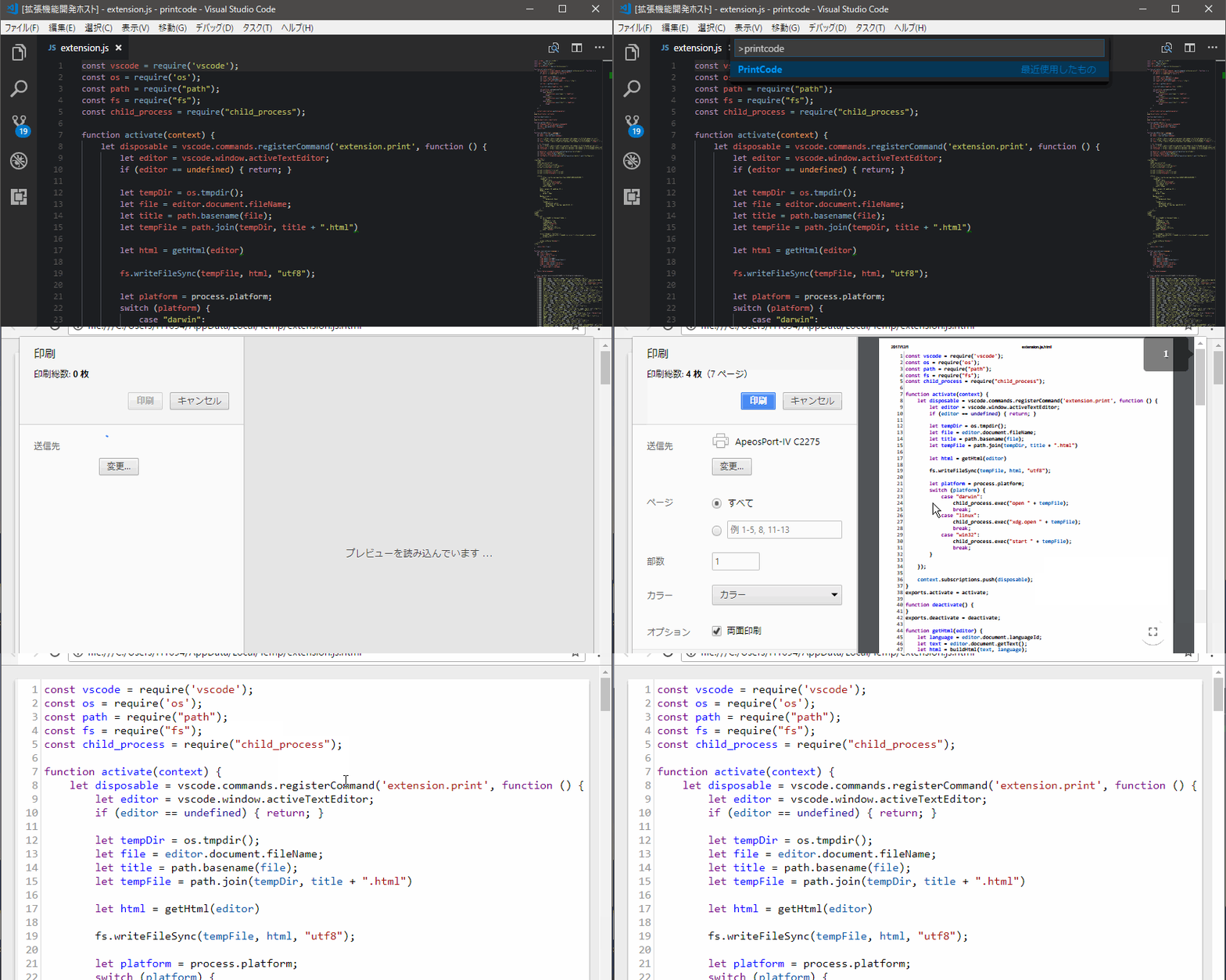
PrintCode converts the code being edited into an HTML file, displays it by browser and prints it.
- Press the
F1key - Select or type
PrintCode - The browser launches and displays the code
- A print dialog opens and you can print!!
| Key | Default | Description |
|---|---|---|
| tabSize | 2 | The number of spaces a tab is equal to |
| fontSize | 12 | Controls the font size in pixels |
| paperSize | a4 | Paper size and orientation |
| lineNumbers | on | Print line numbers |
| printFilePath | filename | Amount of file's path info in document title |
| browserPath | none | Open with your non-default browser |
| webServerPort | 4649 | Port number for local WebServer. |
| disableTelemetry | false | Dont't include Google Analytics code on page |
| autoPrint | true | Pop up print dialog automatically |
| additionalStyleSheet | none | Insert additional StyleSheet |
See Changelog.
@janilahti (#6, #7, #12)
I like osushi/お寿司 very much.