
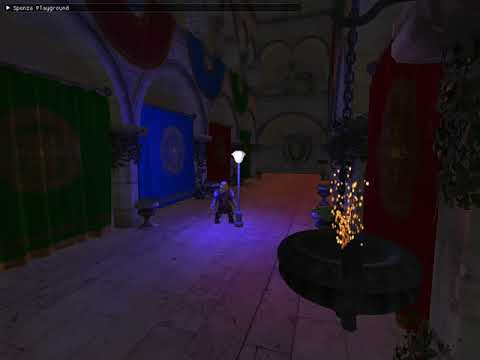

A GameEngine library for OpenGL developed for educational purposes - a hobby project that I program in my free time.
The original goal was only to create a large terrain with a kind of LOD technique. Over time, elements have been added that can be found in GameEngines. But of course there is still a lot missing to create a real game with this library. However, a scene with appealing lighting can be created in just a few steps. Models can be loaded and a beautiful water surface can be generated. To keep things as simple as possible, all game objects can be configured with Lua.
You just have to:
- Create an
Applicationand aStateclass. - Use a Lua file for the description of all the scene objects (Models, Cameras, Lights etc), which is then loaded with our
Stateclass.
There are some examples in the Sandbox:
First: Use the Conan Package Manager to install the thirdparty libraries. The project already includes a conanfile.txt.
It is important that premake is specified as a generator in this file.
#conanfile.txt# ...
[generators]
premake
For a release build:
conan install . -s build_type=ReleaseOr when need to debug:
conan install . -s build_type=DebugAfter that use Premake5 and the premake5.lua file to create the project files.
premake5 vs2019I work with Win10 and MinGW and have created two new Conan profiles.
# debug_gcc
[settings]
os=Windows
os_build=Windows
arch=x86_64
arch_build=x86_64
compiler=gcc
compiler.version=9.3
compiler.libcxx=libstdc++11
build_type=Debug
[options]
[build_requires]
[env]
# release_gcc
[settings]
os=Windows
os_build=Windows
arch=x86_64
arch_build=x86_64
compiler=gcc
compiler.version=9.3
compiler.libcxx=libstdc++11
build_type=Release
[options]
[build_requires]
[env]
CLion users can now, for example, assign the Conan profiles to the CLion profiles. The Conan plugin does the rest. Before that the generator has to be changed.
#conanfile.txt# ...
[generators]
cmake
It may be necessary to compile the packages. Do this with --build missing.
- Configuration of the scene and all entities with Lua
- Entity component system from EnTT
- Deferred rendering / Forward rendering
- Advanced Terrain rendering (Quadtree and Tessellation, 16-bit Heightmaps)
- Water rendering
- Gui rendering
- Skydome / Skybox
- Particle systems
- Instanced rendering
- Mouse picking
- Model file loading
- Animations loading
- Different camera types (Third person, First person)
- Different light types (Ambient, Point, Directional)
- Normal mapping
The project already contains a Sandbox and it is a good idea to start with it.
If you want to create it yourself, do this as follows:
We need to create a class that inherits from sg::ogl::Application. Here we call this class Sandbox.
The header SgOgl.h must be included.
// File: Sandbox.cpp
#include"SgOgl.h"classSandboxfinal : public sg::ogl::Application
{
public:Sandbox() = delete;
explicitSandbox(const std::string& t_configFileName)
: Application{ t_configFileName }
{
}
protected:voidRegisterStates() override
{
// ...
}
voidInit() override
{
// ...
}
private:
};
Next, a game state must be created. The class is named GameState and inherits from sg::ogl::state::State.
// File: GameState.h
#pragma once
#include"SgOgl.h"classGameState : publicsg::ogl::state::State
{
public:using LuaScriptUniquePtr = std::unique_ptr<sg::ogl::LuaScript>;
GameState() = delete;
explicitGameState(sg::ogl::state::StateStack* t_stateStack)
: State{ t_stateStack, "GameState" }
{
Init();
}
boolInput() override;
boolUpdate(double t_dt) override;
voidRender() override;
protected:private:
LuaScriptUniquePtr m_luaScript;
voidInit();
};
The cpp file contains nothing special so far.
// File: GameState.cpp
#include"GameState.h"boolGameState::Input()
{
returntrue;
}
boolGameState::Update(constdouble t_dt)
{
returntrue;
}
voidGameState::Render()
{
}
voidGameState::Init()
{
}
The newly created game state must be registered. This is done by the Sandbox class in the RegisterStates() function.
In addition, the game state must be pushed to the state stack. We do this in the Init() function of the Sandbox class.
The RegisterStates() and Init() functions are called later before the game loop.
// File: Sandbox.cpp
#include"SgOgl.h"
#include"GameState.h"classSandboxfinal : public sg::ogl::Application
{
public:// ...protected:voidRegisterStates() override
{
GetStateStack().RegisterState<GameState>(sg::ogl::state::GAME);
}
voidInit() override
{
GetStateStack().PushState(sg::ogl::state::GAME);
}
private:
};
The main() function of the lib calls sg::ogl::create_application() to create an sg::ogl::Application.
In our case, an instance of the Sandbox class should be created.
In the Sandbox class, the header SgOglEntryPoint.h must be included as well.
// File: Sandbox.cpp
#include"SgOgl.h"
#include"SgOglEntryPoint.h"
#include"GameState.h"classSandboxfinal : public sg::ogl::Application
{
public:// ...protected:// ...private:
};
std::unique_ptr<sg::ogl::Application> sg::ogl::create_application()
{
return std::make_unique<Sandbox>("res/config/Config.lua");
}
We can see that the constructor of the Application class or Sandbox class takes the path to a config lua-file as an argument.
The config file can look like this.
The libResFolder option contains the full path to the library's built-in assets.
-- File: Config.lualibResFolder="E:/Dev/SgOgl/SgOglLib/res"window= {
title="Sandbox",
compatibleProfile=false,
debugContext=true,
antialiasing=true,
printFrameRate=true,
glMajor=4,
glMinor=3,
fps=60.0
}
projection= {
fovDeg=70.0,
width=1024,
height=768,
near=0.1,
far=10000.0
}Here is an example:
-------------------- Create Scene --------------------scene=Scene.new(applicationContext)
------------------------------- Create and add Renderer --------------------------------- forward with skyboxSkyboxRenderer.new(4, scene)
SunRenderer.new(3, scene)
ForwardRenderer.new(2, scene)
SkeletalModelRenderer.new(1, scene)
GuiRenderer.new(0, scene)
TextRenderer.new(0, scene, "res/font/calibri.ttf")
-- deferred with skybox--[[DeferredRenderer.new(3, scene)SkyboxRenderer.new(2, scene)SunRenderer.new(1, scene)GuiRenderer.new(0, scene)]]-- forward with skydome--[[SkydomeRenderer.new(4, scene)SunRenderer.new(3, scene)ForwardRenderer.new(2, scene)SkeletalModelRenderer.new(1, scene)GuiRenderer.new(0, scene)]]-- deferred with skydome--[[DeferredRenderer.new(3, scene)SkydomeRenderer.new(2, scene)SunRenderer.new(1, scene)GuiRenderer.new(0, scene)TextRenderer.new(0, scene, "res/font/calibri.ttf")]]------------------------------ Create and add Cameras ------------------------------firstPersonCamera=FirstPersonCamera.new("first_person_camera1", applicationContext, Vec3.new(-375.0, 313.0, -417.0), -147.0, -16.0, scene)
firstPersonCamera:SetCameraVelocity(128.0)
firstPersonCamera:SetMouseSensitivity(0.025)
--print(firstPersonCamera:GetCameraVelocity())--print(firstPersonCamera:GetMouseSensitivity())thirdPersonCamera=ThirdPersonCamera.new("third_person_camera1", applicationContext, Vec3.new(1334.0, 820.0, 227.0), scene)
thirdPersonCamera:SetPlayerRotationY(45.0)
--print(thirdPersonCamera:GetPlayerRotationY())-------------------- Config Scene --------------------scene:SetCurrentCamera("first_person_camera1")
--scene:SetCurrentCamera("third_person_camera1")scene:SetAmbientIntensity(Vec3.new(0.2, 0.2, 0.2))
---------------------- Load resources ----------------------plane=modelManager:GetModel("res/primitive/plane1/plane1.obj")
sphere=modelManager:GetModel("res/primitive/sphere/sphere.obj")
dome=modelManager:GetModel("res/model/Dome/dome.obj")
lamp=modelManager:GetModel("res/model/Streetlamp/streetlamp.obj")
jade=modelManager:GetMaterialByName("jade")
gold=modelManager:GetMaterialByName("gold")
sunTextureId=textureManager:LoadTexture("res/sun/sun.png")
foodGuiId=textureManager:LoadTexture("res/gui/foodIcon.png")
healthGuiId=textureManager:LoadTexture("res/gui/healthIcon.png")
hero=modelManager:GetSkeletalModel("res/model/CastleGuard01/Idle.dae")
a= {}
a[1] ="res/skybox/sky1/sRight.png"a[2] ="res/skybox/sky1/sLeft.png"a[3] ="res/skybox/sky1/sUp.png"a[4] ="res/skybox/sky1/sDown.png"a[5] ="res/skybox/sky1/sBack.png"a[6] ="res/skybox/sky1/sFront.png"skyboxCubemapId=textureManager:GetCubemapId(a)
----------------------- Create Entities ------------------------- planeplaneEntity=ecs:CreateEntity()
ecs:AddModelComponent(planeEntity, plane, false)
ecs:AddTransformComponent(planeEntity, Vec3.new(0.0, 150.0, 0.0), Vec3.new(0.0, 0.0, 0.0), Vec3.new(5000.0, 1.0, 5000.0))
-- heroheroEntity=ecs:CreateEntity()
ecs:AddSkeletalModelComponent(heroEntity, hero, false)
ecs:AddTransformComponent(heroEntity, Vec3.new(-500.0, 150.0, -500.0), Vec3.new(0.0, 0.0, 0.0), Vec3.new(1.0, 1.0, 1.0))
-- spheresphereEntity=ecs:CreateEntity()
ecs:AddModelComponent(sphereEntity, sphere, false)
ecs:AddTransformComponent(sphereEntity, Vec3.new(0.0, 240.0, 380.0), Vec3.new(0.0, 0.0, 0.0), Vec3.new(4.0, 4.0, 4.0))
ecs:AddMaterialComponent(sphereEntity, gold)
-- skydomeskydomeEntity=ecs:CreateEntity()
ecs:AddModelComponent(skydomeEntity, dome, false)
ecs:AddTransformComponent(skydomeEntity, Vec3.new(0.0, 0.0, 0.0), Vec3.new(0.0, 0.0, 0.0), Vec3.new(5000.0, 5000.0, 5000.0))
ecs:AddSkydomeComponent(skydomeEntity, "skydome")
-- a point lightplightEntity0=ecs:CreateEntity()
ecs:AddPointLightComponent(plightEntity0,
Vec3.new(30.0, 240.0, 657.0), -- positionVec3.new(0.2, 0.2, 0.2), -- ambientIntensityVec3.new(10.0, 1.0, 1.0), -- diffuseIntensityVec3.new(1.0, 1.0, 1.0), -- specularIntensity1.0, 0.0014, 0.000007-- constant, linear, quadratic
)
ecs:AddUpdateComponent(plightEntity0, "UpdatePointLight")
-- another point lightplightEntity1=ecs:CreateEntity()
ecs:AddPointLightComponent(plightEntity1,
Vec3.new(204.0, 240.0, -319.0), -- positionVec3.new(0.2, 0.2, 0.2), -- ambientIntensityVec3.new(1.0, 1.0, 10.0), -- diffuseIntensityVec3.new(1.0, 1.0, 1.0), -- specularIntensity1.0, 0.0014, 0.000007-- constant, linear, quadratic
)
ecs:AddUpdateComponent(plightEntity1, "UpdatePointLight")
-- the sun--[[dlightEntity = ecs:CreateEntity()ecs:AddDirectionalLightComponent(dlightEntity, Vec3.new(1.0, -0.2, -0.4), -- direction Vec3.new(1.0, 0.8, 0.6), -- diffuseIntensity Vec3.new(1.0, 0.8, 0.6) -- specularIntensity)]]sunEntity=ecs:CreateEntity()
ecs:AddSunComponent(sunEntity,
Vec3.new(1.0, -0.2, -0.4), -- directionVec3.new(1.0, 0.8, 0.6), -- diffuseIntensityVec3.new(1.0, 0.8, 0.6), -- specularIntensitysunTextureId,
10.0
)
-- skyboxskyboxEntity=ecs:CreateEntity()
ecs:AddCubemapComponent(skyboxEntity, skyboxCubemapId)
-- guifoodEntity=ecs:CreateEntity()
ecs:AddGuiComponent(foodEntity, foodGuiId)
ecs:AddTransformComponent(foodEntity, Vec3.new(0.9, 0.9, 0.0), Vec3.new(0.0, 0.0, 0.0), Vec3.new(0.031, 0.031, 1.0))
-- another guihealthEntity=ecs:CreateEntity()
ecs:AddGuiComponent(healthEntity, healthGuiId)
ecs:AddTransformComponent(healthEntity, Vec3.new(0.9, 0.8, 0.0), Vec3.new(0.0, 0.0, 0.0), Vec3.new(0.031, 0.031, 1.0))
-- point light with modelplightModelEntity=ecs:CreateEntity()
ecs:AddModelComponent(plightModelEntity, lamp, false)
ecs:AddTransformComponent(plightModelEntity, Vec3.new(-1400.0, 150.0, 11.0), Vec3.new(0.0, 0.0, 0.0), Vec3.new(40.0, 40.0, 40.0))
ecs:AddPointLightComponent(plightModelEntity,
Vec3.new(-1400.0, 400.0, 11.0), -- positionVec3.new(0.2, 0.2, 0.2), -- ambientIntensityVec3.new(1.0, 1.0, 10.0), -- diffuseIntensityVec3.new(1.0, 1.0, 1.0), -- specularIntensity1.0, 0.0014, 0.000007-- constant, linear, quadratic
)
-- texttextEntity0=ecs:CreateEntity()
ecs:AddTextComponent(textEntity0, "SgOgl Test", 40.0, 750.0, 0.35, Vec3.new(0.1, 0.2, 0.2))
textEntity1=ecs:CreateEntity()
ecs:AddTextComponent(textEntity1, "Version: dev-master", 40.0, 730.0, 0.35, Vec3.new(0.1, 0.2, 0.2))
----------------- Functions -----------------val=0.0functionUpdatePointLight(entity, dt)
val=val+dtp=ecs:GetPointLightComponent(entity)
p.position.x=p.position.x+ (math.sin(val) *4.0)
end
In our GameState now a LuaScript object has to be created. The script creates a Scene object that can be reached via GetApplicationContext()->currentScene.
// File: GameState.cppboolGameState::Input()
{
if (GetApplicationContext()->currentScene)
{
GetApplicationContext()->currentScene->Input();
}
returntrue;
}
boolGameState::Update(constdouble t_dt)
{
if (GetApplicationContext()->currentScene)
{
GetApplicationContext()->currentScene->Update(t_dt);
}
returntrue;
}
voidGameState::Render()
{
if (GetApplicationContext()->currentScene)
{
GetApplicationContext()->currentScene->Render();
}
RenderImGui();
}
voidGameState::Init()
{
// ...
m_luaScript = std::make_unique<sg::ogl::LuaScript>(GetApplicationContext(), "res/scene/start.lua");
}