Uh oh!
There was an error while loading. Please reload this page.
Home
FreeRASP for Android is a lightweight and easy-to-use mobile app protection and security monitoring SDK. It is designed to combat reverse engineering, tampering, or similar attack attempts. FreeRASP covers several attack vectors and enables you to set a response to each threat.
Android version detects security issues such as:
- App installed on a rooted device
- Hooking or running the app on the emulator
- Tampering with the application
- Attaching a debugger to the application
To learn more about freeRASP features, visit our main GitHub repository.
The installation guide will lead you through the whole implementation, such as adding the SDK to the gradle, configuring it for your app, handling detected threats. It will also instruct you about required data safety policies.
You can check the expected result in the demo app. This is how final files should look like:
Set our nexus artifact repository in your project's build.gradle (or settings.gradle if you are using settings repositories):
[build.gradle (NameOfProject)]
...
repositories {
google()
mavenCentral()
maven { url "https://jitpack.io" }
maven { url "https://europe-west3-maven.pkg.dev/talsec-artifact-repository/freerasp" }
}
Make sure, that the nexus3 dependency is at the last position.
Set dependencies in your :app module's build.gradle:
[build.gradle (: app)]
...
dependencies {
// freeRASP SDK
implementation 'com.aheaditec.talsec.security:TalsecSecurity-Community:9.6.0'...- Create arbitrary subclass of
Application(), override it'sonCreate()and implement interface ofThreatListener.ThreatDetected. You can, of course, use your Application subclass if you already have one in your project.
[TalsecApplication.kt]
classTalsecApplication : Application(), ThreatListener.ThreatDetected {
overridefunonCreate() {
super.onCreate()
}
}- Add this new subclass to
AndroidManifest.xml" inside<application>tag:
[AndroidManifest.xml]
<applicationandroid:name=".TalsecApplication"
...- Setup the Configuration for your app with your values 😉.
You must get your expected signing certificate hashes in Base64 form. You can go through this manual to learn how to sign your app in more detail, including manual signing and using Google's Play app signing. Alternatively, you can use already prepared helper function Log.e(..) in the onCreate() to get a hash of the signing certificate easily. The expectedSigningCertificateHashBase64 is an array of certificate hashes, as the support of multiple certificate hashes is included (e.g. if you are using a different certificate hash for Huawei App Gallery). The Helper functions are located in the Utils.kt:
[TalsecApplication.kt]
overridefunonCreate() {
super.onCreate()
// Uncomment the following Log.e(...) to get your expectedSigningCertificateHashBase64// Copy the result from logcat and assign to expectedSigningCertificateHashBase64// Log.e("SigningCertificateHash", Utils.computeSigningCertificateHash(this))...
The value of expectedPackageName is self-explanatory.
The value of watcherMail is automatically used as the target address for your security reports. Mail has a strict form 'name@domain.com'.
You can assign just emptyArray() to supportedAlternativeStores if you publish on the Google Play Store and Huawei AppGallery, as these are already included internally. Otherwise add package names of the alternative stores. For more information, visit the Detecting Unofficial Installation wiki page.
isProd defaults to true when undefined. If you want to use the Dev version to disable checks described in the chapter below, set the parameter to false. Make sure that you have the Release version in the production (i.e. isProd set to true)!. To simplify switching between debug and release version of Talsec based on the build type, you can use BuildConfig.BUILD_TYPE.contains("Release", true) as a value for isProd.
[TalsecApplication.kt]
companionobject {
privateconstval expectedPackageName ="com.aheaditec.talsec.demoapp"// Don't use Context.getPackageName!privateval expectedSigningCertificateHashBase64 = arrayOf(
"mVr/qQLO8DKTwqlL+B1qigl9NoBnbiUs8b4c2Ewcz0k=",
"cVr/qQLO8DKTwqlL+B1qigl9NoBnbiUs8b4c2Ewcz0m="
) // Replace with your release (!) signing certificate hashesprivateconstval watcherMail ="john@example.com"// for Alerts and Reportsprivateval supportedAlternativeStores = arrayOf(
"com.sec.android.app.samsungapps"// Add other stores, such as the Samsung Galaxy Store
)
privateval isProd =true
}[TalsecApplication.kt]
overridefunonCreate() {
...
// Uncomment the following Log.e(...) to get your expectedSigningCertificateHashBase64// Copy the result from logcat and assign to expectedSigningCertificateHashBase64 and// Log.e("SigningCertificateHash", Utils.computeSigningCertificateHash(this))val config =TalsecConfig(
expectedPackageName,
expectedSigningCertificateHashBase64,
watcherMail,
supportedAlternativeStores,
isProd
)- Initiate ThreatListener and start Talsec just by adding these two lines below the created config:
[TalsecApplication.kt]
overridefunonCreate() {
...
ThreatListener(this).registerListener(this)
Talsec.start(this, config)
}The Dev version is used to not complicate the development process of the application, e.g. if you would implement killing of the application on the debugger callback. It disables some checks which won't be triggered during the development process:
- Emulator
- Debugging
- Tampering
- Unofficial store
Implement methods of ThreatListener.ThreatDetected. For example, you can kill the app, warn the user or send the event to your backend service. If you decide to kill the application from the callback, make sure that you use an appropriate way of killing it.
To learn more about these checks, visit our wiki page that provides an explanation for them.
[TalsecApplication.kt]
overridefunonRootDetected() {
TODO("Not yet implemented")
}
overridefunonDebuggerDetected() {
TODO("Not yet implemented")
}
overridefunonEmulatorDetected() {
TODO("Not yet implemented")
}
overridefunonTamperDetected() {
TODO("Not yet implemented")
}
overridefunonUntrustedInstallationSourceDetected() {
TODO("Not yet implemented")
}
overridefunonHookDetected() {
TODO("Not yet implemented")
}
overridefunonDeviceBindingDetected() {
TODO("Not yet implemented")
}
overridefunonObfuscationIssuesDetected() {
TODO("Not yet implemented")
}Optionally you can use a device state listener to get additional information about device state information like device lock and HW-backed Keystore state.
privateval deviceStateListener =object:ThreatListener.DeviceState {
overridefunonUnlockedDeviceDetected() {
// Set your reactionTODO("Not yet implemented")
}
overridefunonHardwareBackedKeystoreNotAvailableDetected() {
// Set your reactionTODO("Not yet implemented")
}
overridefunonDeveloperModeDetected() {
// Set your reactionTODO("Not yet implemented")
}
overridefunonSystemVPNDetected() {
// Set your reactionTODO("Not yet implemented")
}
}
and modify initialization of ThreatListener:
...
ThreatListener(this, deviceStateListener).registerListener(this)
Talsec.start(this, config)The easiest way to produce an incident (trigger local reaction check and create a record in security report) is to install a release build on an emulator (i.e., Android Emulator, which comes with Android Studio). Make sure, that you have set up the isProd variable to true.
The freeRASP contains public API, so the integration process is as simple as possible. Unfortunately, this public API also creates opportunities for the attacker to use publicly available information to interrupt freeRASP operations or modify your custom reaction implementation in threat callbacks. In order for freeRASP to be as effective as possible, it is highly recommended to apply obfuscation to the final package/application, making the public API more difficult to find and also partially randomized for each application so it cannot be automatically abused by generic hooking scripts.
The majority of Android projects support code shrinking and obfuscation without any additional need for setup. The owner of the project can define the set of rules that are usually automatically used when the application is built in the release mode. For more information, please visit the official documentation
- https://developer.android.com/studio/build/shrink-code
- https://www.guardsquare.com/manual/configuration/usage
You can make sure, that the obfuscation is enabled by checking the value of minifyEnabled property in your module's build.gradle file.
android {
...
buildTypes {
release {
minifyEnabled true
shrinkResources true
proguardFiles getDefaultProguardFile('proguard-android.txt'), 'proguard-rules.pro'
}
}
}See the generic info about freeRASP data collection here.
Google Play requires all app publishers to declare how they collect and handle user data for the apps they publish on Google Play. They should inform users properly of the data collected by the apps and how the data is shared and processed. Therefore, Google will reject the apps which do not comply with the policy.
Talsec recommends adding the following statements to the Privacy Policy page dedicated to your app. Also, use the text below while filling in the Google Play Safety Section for publishing.
For the purpose of Fraud prevention, user safety, and compliance, the dedicated App safety SDK needs to send the following anonymous diagnostic data off the device for detection of security issues. Thus the application collects the following data:- Category: App info and performance
- Data Type: Diagnostics
- Information about the integrity of the app and the operating system. For example, rooting, running in an emulator, hooking framework usage, etc...
- Category: Device or other identifiers
- Data Type: Device or other identifiers
- Information that relates to an individual device. For example, a device model and anonymous identifier to control that app instance executed on the original device that it was initially installed on. It is needed to combat threats like bots and API abuse.
All the data collected by the freeRASP Talsec Security SDK is considered non user sensitive. Also, there is no technical way to identify the real person by the identifiers collected by freeRASP SDK.
Please follow the recommendations and data collection specifications indicated here.
After installation, please go through this checklist to avoid potential issues or solve them quickly.
And you're done 🎉! You can open an issue if you get stuck anywhere in the guide or show your appreciation by starring this repository ⭐!
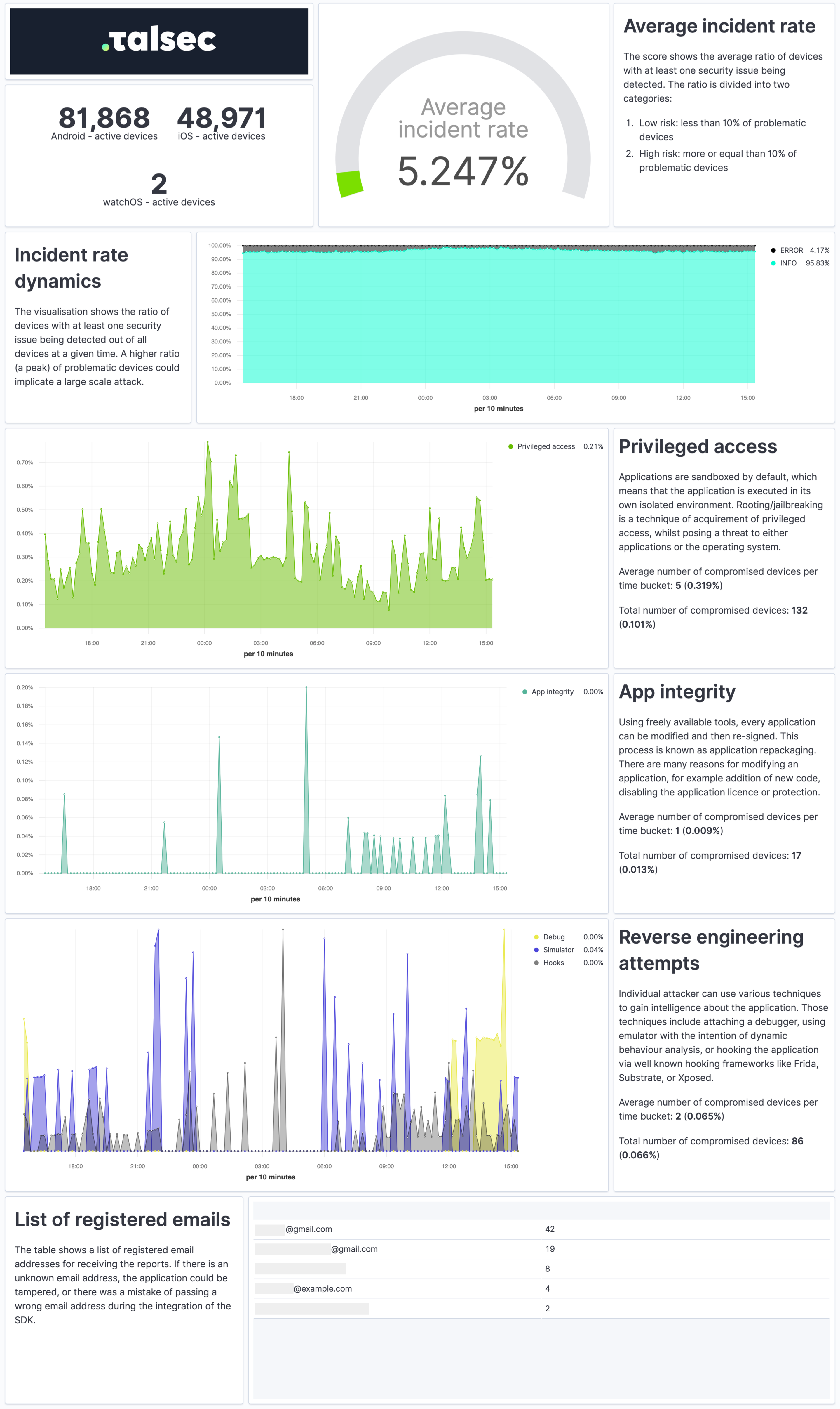
The Security Report is a weekly summary describing the application's security state and characteristics of the devices it runs on in a practical and easy-to-understand way.
The report provides a quick overview of the security incidents, their dynamics, app integrity, and reverse engineering attempts. It contains info about the security of devices, such as OS version or the ratio of devices with screen locks and biometrics. Each visualization also comes with a concise explanation.
To receive Security Reports, fill out the watcherMail field in Talsec config.
Talsec offers commercial plans on top of freeRASP (Business RASP+):
- No limits of Fair Usage Policy (100K App Downloads)
- No Data Collection from your app
- FinTech grade security, features and SLA (see more in this post)
- Protect APIs and risk scoring by AppiCrypt®
Learn more at talsec.app.
Not to overlook, the one of the most valued commercial features is AppiCrypt® - App Integrity Cryptogram.
It allows easy-to-implement API protection and App Integrity verification on the backend to prevent API abuse:
- Bruteforce attacks
- Botnets
- API abuse by App impersonation
- Session-hijacking
- DDoS
It is a unified solution that works across all mobile platforms without dependency on external web services (i.e., without extra latency, an additional point of failure, and maintenance costs).
Learn more about commercial features at talsec.app.
TIP: You can try freeRASP and then upgrade easily to an enterprise service.
freeRASP is freemium software i.e. there is a Fair Usage Policy (FUP) that impose some limitations on the free usage. See the FUP section in the table below| freeRASP | Business RASP+ | |||
|---|---|---|---|---|
| Runtime App Self Protection (RASP, app shielding) | ||||
| Advanced root/jailbreak protections (including Magisk) | basic | advanced | ||
Runtime reverse engineering controls
| basic | advanced | ||
Runtime integrity controls
| basic | advanced | ||
Device OS security status check
| yes | yes | ||
UI protection
| no | yes | ||
| Hardening suite | ||||
Security hardening suite
| no | yes | ||
| AppiCrypt® - App Integrity Cryptogram | ||||
| API protection by mobile client integrity check, online risk scoring, online fraud prevention, client App integrity check. The cryptographic proof of app & device integrity. | no | yes | ||
| Security events data collection, Auditing and Monitoring tools | ||||
| Threat events data collection from SDK | yes | configurable | ||
| AppSec regular email reporting service | yes (up to 100k devices) | yes | ||
| UI portal for Logging, Data analytics and auditing | no | yes | ||
| Support and Maintenance | ||||
| SLA | Not committed | yes | ||
| Maintenance updates | Not committed | yes | ||
| Fair usage policy | ||||
| Mentioning of the App name and logo in the marketing communications of Talsec (e.g. "Trusted by" section on the web). | over 100k downloads | no | ||
| Threat signals data collection to Talsec database for processing and product improvement | yes | no | ||
For further comparison details (and planned features), follow our discussion.
Talsec is an academic-based and community-driven mobile security company. We deliver in-App Protection and a User Safety suite for Fintechs. We aim to bridge the gaps between the user's perception of app safety and the strong security requirements of the financial industry.
Talsec offers a wide range of security solutions, such as App and API protection SDK, Penetration testing, monitoring services, and the User Safety suite. You can check out offered products at our web.
This project is provided as freemium software i.e. there is a fair usage policy that impose some limitations on the free usage. The SDK software consists of opensource and binary part which is property of Talsec. The opensource part is licensed under the MIT License - see the LICENSE file for details.