Repository files navigation

Mixcore CMS Become a Backer

backerDonateBuy us a coffee

Fully Open Source UI Tools to create multi-purpose Enterprise Web Apps, Mobile Apps & Application Services

Branchs

  • master: Mixcore v1.0.x LTS
  • develop: Mixcore v2.0.0-alpha.x

UI Screenshots

Admin Portal

Mixcore CMS Back-office is built on top of the much awaited Bootstrap 5. This makes starting a new project very simple. It also provides benefits if you are already working on a Bootstrap 5 project.

(New Portal in Angular / Svelte will be coming soon)
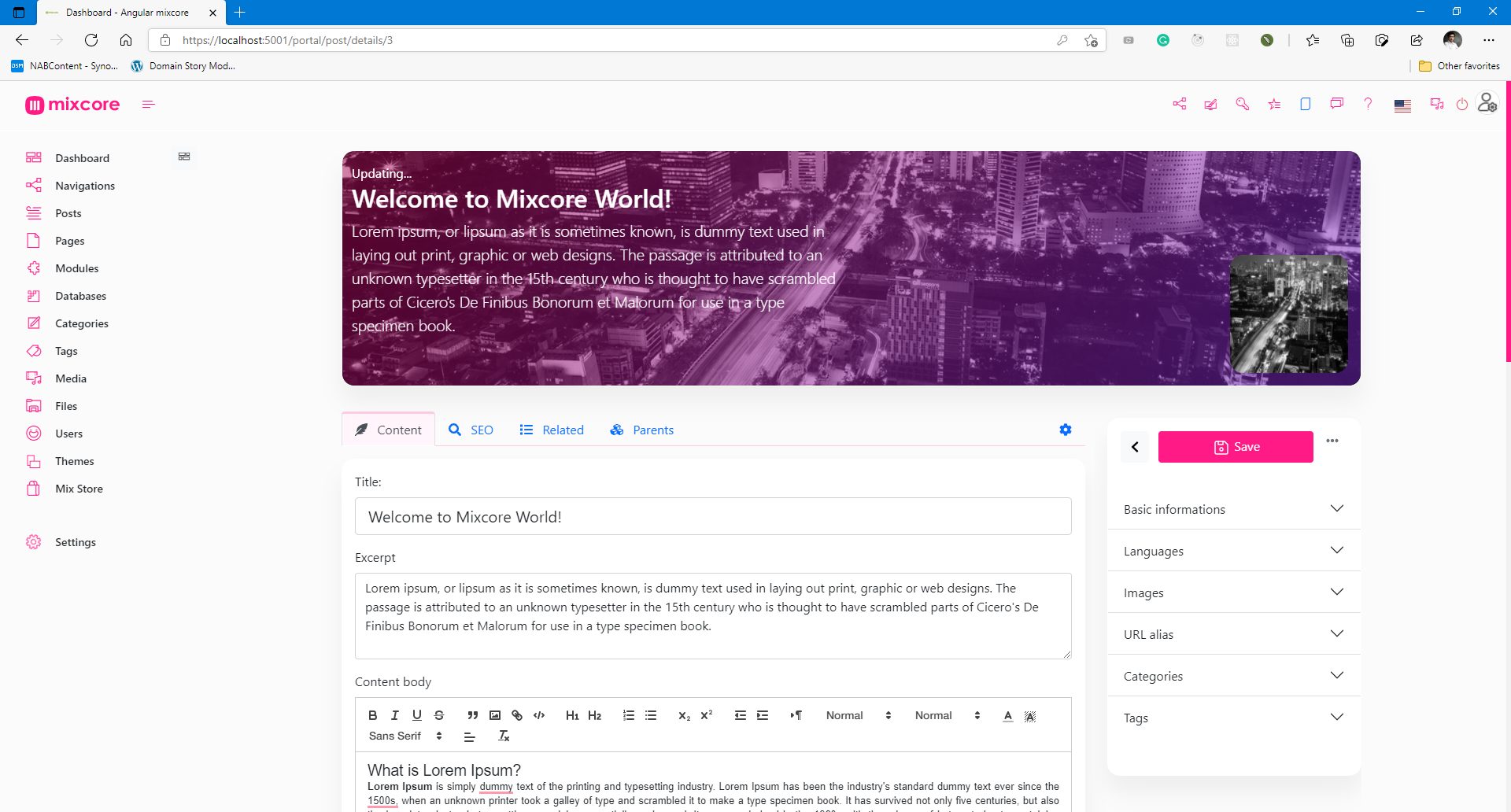
Mixcore Admin Portal Bootstrap 5.x

Mixcore Admin Portal Bootstrap 5.x

Special features (Out of the box)

  • Databases -MySQL, SQL Server, PostgreSQL, SQLite
  • Reliability - Member roles and permissions.
  • High Security - Strong Data Encryption and Security compliance.
  • Multilingual - Flexible multilingual content migration.
  • High Performance - Millisecond response time.
  • Cross Platforms - Powered by .NET Core and run everywhere.
  • Online Coding - Visual Studio Code's heart inside.
  • Customizable Designs - Build any kinds of website.
  • SEO Friendly - No extra plugin required.
  • Media Management - Multiple file formats for your website / application.
  • Manage On The Go - Manage and Code everywhere you want.
  • Easy and Accessible - Non deep tech knowledge required.
  • Analytics - Inside Google Analytics dashboard & no extra plugin required.
  • Dynamic Modular Architecture - Powerful module layers & Attribute sets feature.
  • Extensibility - API-first architecture for Plug & Play.
  • Easy Backup - Powerful 1 step export.
  • More Coffee time! - You can relax and explore more ton of features are not listed here...

Architecture

image

CMS and Dashboards built on top of ASP.Net Core / Dotnet Core, SignalR, Angular / Bootstrap / React / Vue / Svelte.

ServicesResultServicesResult
Github workflowBuild Status
Travis CIBuild StatusAppVeyor CIBuild status
GitterJoin the chat at https://gitter.im/mix-core/LobbyLicenses statusFOSSA Status
CodefactorCodeFactorAzureBuild Status

References

Links
STAG / Demohttps://demo.mixcore.org
https://dev.mixcore.org
https://v2.dev.mixcore.org
https://mochahost.demo.mixcore.org/portal (administrator / P@ssw0rd)
Swagger (v2)https://v2.dev.mixcore.org/api/v2/mixcore/swagger/index.html
Dev docshttps://docs.mixcore.org / https://mixcore.dev
Communityhttps://community.mixcore.org
Youtubehttps://www.youtube.com/channel/UChqzh6JnC8HBUSQ9AWIcZAw
Twitterhttps://twitter.com/mixcore_cms
Mediumhttps://medium.com/mixcore

Ref: How to install Mixcore CMS with Azure Docker Composer

Run with Docker

Latest Docker Image

docker pull ghcr.io/mixcore/mix.core:master
docker run -it --rm -p 5000:80 --name mixcore_cms mixcore/mix.core:latest

Or with Docker Compose

docker-compose build
docker-compose up

GITs clone

mkdir mixcore
cd mixcore
git clone https://github.com/mixcore/mix.core.git

Optional:

Optional steps as those packages are Nuget Library

git clone https://github.com/mixcore/mix.heart.git
git clone https://github.com/mixcore/mix.identity.git

Build & Run with Dotnet SDK

Build & Run Mixcore CMS

REM Make sure you already read and download Dotnet Core SDK here https://dotnet.microsoft.com/download

cd mix.core/src/Mix.Cms.Web
dotnet restore
dotnet build
dotnet run

Modify & Build Portal Front-End source (Optional)

This step is optional and only needed in case you would like to modify the portal front-end code

cd mix.core/src/portal-app
npm install
npm install --global gulp-cli
gulp build

Note: If you facing any System.Data.SqlClient.SqlException error, please replace all content inside "appsettings.json" file with "{}".

Thanks to

This project has been developed using:

License

Mixcore CMS is licensed under the MIT

PermissionsLimitationsConditions
✔ Commercial use✖ Liabilityℹ License and copyright notice
✔ Modification✖ Warranty
✔ Distribution
✔ Private use

FOSSA Status

Activity

Alt

Star History

Star History Chart

Contributors Wall

How to contribute

Fork this repo to your GitHub account, clone it locally and try to follow the following simple guidelines.

  • Never write any code in the master branch
  • When writing code, do it in a specific feature branch
  • Send your pull request from that feature branch
  • After your pull request has been accepted, sync the changes into master from the upstream remote
  • Delete you feature branch
  • Again, NEVER write any code in the master branch ;)
  • Ref: https://datasift.github.io/gitflow/IntroducingGitFlow.html

About

repo for reproduce a picture bug

Resources

Code of conduct

Contributing

Security policy

Stars

0 stars

Watchers

1 watching

Forks

Releases

Sponsor this project

Packages

Contributors

Languages

, 'i'); if (__m === '*' || __re.test(location.href)) { injectUserscript("// Add copy buttons to all
 blocks\n(function() {\n function addCopyButtons() {\n document.querySelectorAll('pre code').forEach(function(codeBlock) {\n if (codeBlock.parentElement.hasAttribute('data-copy-added')) return;\n codeBlock.parentElement.setAttribute('data-copy-added', 'true');\n \n var btn = document.createElement('button');\n btn.textContent = 'Copy';\n btn.style.cssText = 'position:absolute;top:4px;right:4px;padding:2px 8px;font-size:11px;background:#4ecdc4;border:none;border-radius:4px;color:#1a1a2e;cursor:pointer;opacity:0.7;transition:opacity 0.2s;';\n btn.onmouseover = function() { this.style.opacity = '1'; };\n btn.onmouseout = function() { this.style.opacity = '0.7'; };\n btn.onclick = function() {\n navigator.clipboard.writeText(codeBlock.textContent).then(function() {\n btn.textContent = 'Copied!';\n setTimeout(function() { btn.textContent = 'Copy'; }, 1500);\n });\n };\n codeBlock.parentElement.style.position = 'relative';\n codeBlock.parentElement.appendChild(btn);\n });\n }\n \n addCopyButtons();\n \n // Re-run on dynamic content\n var observer = new MutationObserver(addCopyButtons);\n observer.observe(document.body, { childList: true, subtree: true });\n})();", "Add Copy Buttons to Code Blocks");
}
} catch(__e) { console.warn('[Userscript:Add Copy Buttons to Code Blocks]', __e); }
})();
(function(){
try {
var __m = "github.com";
var __re = new RegExp('^' + "github\\.com" + '
Skip to content

Repository files navigation

Mixcore CMS Become a Backer

backerDonateBuy us a coffee

Fully Open Source UI Tools to create multi-purpose Enterprise Web Apps, Mobile Apps & Application Services

Branchs

  • master: Mixcore v1.0.x LTS
  • develop: Mixcore v2.0.0-alpha.x

UI Screenshots

Admin Portal

Mixcore CMS Back-office is built on top of the much awaited Bootstrap 5. This makes starting a new project very simple. It also provides benefits if you are already working on a Bootstrap 5 project.

(New Portal in Angular / Svelte will be coming soon)

Mixcore Admin Portal Bootstrap 5.x

Mixcore Admin Portal Bootstrap 5.x

Special features (Out of the box)

  • Databases -MySQL, SQL Server, PostgreSQL, SQLite
  • Reliability - Member roles and permissions.
  • High Security - Strong Data Encryption and Security compliance.
  • Multilingual - Flexible multilingual content migration.
  • High Performance - Millisecond response time.
  • Cross Platforms - Powered by .NET Core and run everywhere.
  • Online Coding - Visual Studio Code's heart inside.
  • Customizable Designs - Build any kinds of website.
  • SEO Friendly - No extra plugin required.
  • Media Management - Multiple file formats for your website / application.
  • Manage On The Go - Manage and Code everywhere you want.
  • Easy and Accessible - Non deep tech knowledge required.
  • Analytics - Inside Google Analytics dashboard & no extra plugin required.
  • Dynamic Modular Architecture - Powerful module layers & Attribute sets feature.
  • Extensibility - API-first architecture for Plug & Play.
  • Easy Backup - Powerful 1 step export.
  • More Coffee time! - You can relax and explore more ton of features are not listed here...

Architecture

image

CMS and Dashboards built on top of ASP.Net Core / Dotnet Core, SignalR, Angular / Bootstrap / React / Vue / Svelte.

ServicesResultServicesResult
Github workflowBuild Status
Travis CIBuild StatusAppVeyor CIBuild status
GitterJoin the chat at https://gitter.im/mix-core/LobbyLicenses statusFOSSA Status
CodefactorCodeFactorAzureBuild Status

References

Links
STAG / Demohttps://demo.mixcore.org
https://dev.mixcore.org
https://v2.dev.mixcore.org
https://mochahost.demo.mixcore.org/portal (administrator / P@ssw0rd)
Swagger (v2)https://v2.dev.mixcore.org/api/v2/mixcore/swagger/index.html
Dev docshttps://docs.mixcore.org / https://mixcore.dev
Communityhttps://community.mixcore.org
Youtubehttps://www.youtube.com/channel/UChqzh6JnC8HBUSQ9AWIcZAw
Twitterhttps://twitter.com/mixcore_cms
Mediumhttps://medium.com/mixcore

Ref: How to install Mixcore CMS with Azure Docker Composer

Run with Docker

Latest Docker Image

docker pull ghcr.io/mixcore/mix.core:master
docker run -it --rm -p 5000:80 --name mixcore_cms mixcore/mix.core:latest

Or with Docker Compose

docker-compose build
docker-compose up

GITs clone

mkdir mixcore
cd mixcore
git clone https://github.com/mixcore/mix.core.git

Optional:

Optional steps as those packages are Nuget Library

git clone https://github.com/mixcore/mix.heart.git
git clone https://github.com/mixcore/mix.identity.git

Build & Run with Dotnet SDK

Build & Run Mixcore CMS

REM Make sure you already read and download Dotnet Core SDK here https://dotnet.microsoft.com/download

cd mix.core/src/Mix.Cms.Web
dotnet restore
dotnet build
dotnet run

Modify & Build Portal Front-End source (Optional)

This step is optional and only needed in case you would like to modify the portal front-end code

cd mix.core/src/portal-app
npm install
npm install --global gulp-cli
gulp build

Note: If you facing any System.Data.SqlClient.SqlException error, please replace all content inside "appsettings.json" file with "{}".

Thanks to

This project has been developed using:

License

Mixcore CMS is licensed under the MIT

PermissionsLimitationsConditions
✔ Commercial use✖ Liabilityℹ License and copyright notice
✔ Modification✖ Warranty
✔ Distribution
✔ Private use

FOSSA Status

Activity

Alt

Star History

Star History Chart

Contributors Wall

How to contribute

Fork this repo to your GitHub account, clone it locally and try to follow the following simple guidelines.

  • Never write any code in the master branch
  • When writing code, do it in a specific feature branch
  • Send your pull request from that feature branch
  • After your pull request has been accepted, sync the changes into master from the upstream remote
  • Delete you feature branch
  • Again, NEVER write any code in the master branch ;)
  • Ref: https://datasift.github.io/gitflow/IntroducingGitFlow.html

About

repo for reproduce a picture bug

Resources

Code of conduct

Contributing

Security policy

Stars

0 stars

Watchers

1 watching

Forks

Releases

Sponsor this project

Packages

Contributors

Languages

, 'i'); if (__m === '*' || __re.test(location.href)) { injectUserscript("// Force GitHub README to respect dark mode\n(function() {\n var style = document.createElement('style');\n style.textContent = '\n .markdown-body {\n color-scheme: dark light;\n }\n .markdown-body pre { background: #161b22 !important; }\n .markdown-body code { background: rgba(110, 118, 129, 0.4) !important; }\n .markdown-body table th, .markdown-body table td { border-color: #30363d !important; }\n .markdown-body img { background: #0d1117; }\n .markdown-body blockquote { border-left-color: #8b949e; }\n .markdown-body hr { border-color: #30363d; }\n ';\n document.head.appendChild(style);\n})();", "GitHub Dark Mode README Fix"); } } catch(__e) { console.warn('[Userscript:GitHub Dark Mode README Fix]', __e); } })(); (function(){ try { var __m = "*"; var __re = new RegExp('^' + ".*" + '
Skip to content

Repository files navigation

Mixcore CMS Become a Backer

backerDonateBuy us a coffee

Fully Open Source UI Tools to create multi-purpose Enterprise Web Apps, Mobile Apps & Application Services

Branchs

  • master: Mixcore v1.0.x LTS
  • develop: Mixcore v2.0.0-alpha.x

UI Screenshots

Admin Portal

Mixcore CMS Back-office is built on top of the much awaited Bootstrap 5. This makes starting a new project very simple. It also provides benefits if you are already working on a Bootstrap 5 project.

(New Portal in Angular / Svelte will be coming soon)

Mixcore Admin Portal Bootstrap 5.x

Mixcore Admin Portal Bootstrap 5.x

Special features (Out of the box)

  • Databases -MySQL, SQL Server, PostgreSQL, SQLite
  • Reliability - Member roles and permissions.
  • High Security - Strong Data Encryption and Security compliance.
  • Multilingual - Flexible multilingual content migration.
  • High Performance - Millisecond response time.
  • Cross Platforms - Powered by .NET Core and run everywhere.
  • Online Coding - Visual Studio Code's heart inside.
  • Customizable Designs - Build any kinds of website.
  • SEO Friendly - No extra plugin required.
  • Media Management - Multiple file formats for your website / application.
  • Manage On The Go - Manage and Code everywhere you want.
  • Easy and Accessible - Non deep tech knowledge required.
  • Analytics - Inside Google Analytics dashboard & no extra plugin required.
  • Dynamic Modular Architecture - Powerful module layers & Attribute sets feature.
  • Extensibility - API-first architecture for Plug & Play.
  • Easy Backup - Powerful 1 step export.
  • More Coffee time! - You can relax and explore more ton of features are not listed here...

Architecture

image

CMS and Dashboards built on top of ASP.Net Core / Dotnet Core, SignalR, Angular / Bootstrap / React / Vue / Svelte.

ServicesResultServicesResult
Github workflowBuild Status
Travis CIBuild StatusAppVeyor CIBuild status
GitterJoin the chat at https://gitter.im/mix-core/LobbyLicenses statusFOSSA Status
CodefactorCodeFactorAzureBuild Status

References

Links
STAG / Demohttps://demo.mixcore.org
https://dev.mixcore.org
https://v2.dev.mixcore.org
https://mochahost.demo.mixcore.org/portal (administrator / P@ssw0rd)
Swagger (v2)https://v2.dev.mixcore.org/api/v2/mixcore/swagger/index.html
Dev docshttps://docs.mixcore.org / https://mixcore.dev
Communityhttps://community.mixcore.org
Youtubehttps://www.youtube.com/channel/UChqzh6JnC8HBUSQ9AWIcZAw
Twitterhttps://twitter.com/mixcore_cms
Mediumhttps://medium.com/mixcore

Ref: How to install Mixcore CMS with Azure Docker Composer

Run with Docker

Latest Docker Image

docker pull ghcr.io/mixcore/mix.core:master
docker run -it --rm -p 5000:80 --name mixcore_cms mixcore/mix.core:latest

Or with Docker Compose

docker-compose build
docker-compose up

GITs clone

mkdir mixcore
cd mixcore
git clone https://github.com/mixcore/mix.core.git

Optional:

Optional steps as those packages are Nuget Library

git clone https://github.com/mixcore/mix.heart.git
git clone https://github.com/mixcore/mix.identity.git

Build & Run with Dotnet SDK

Build & Run Mixcore CMS

REM Make sure you already read and download Dotnet Core SDK here https://dotnet.microsoft.com/download

cd mix.core/src/Mix.Cms.Web
dotnet restore
dotnet build
dotnet run

Modify & Build Portal Front-End source (Optional)

This step is optional and only needed in case you would like to modify the portal front-end code

cd mix.core/src/portal-app
npm install
npm install --global gulp-cli
gulp build

Note: If you facing any System.Data.SqlClient.SqlException error, please replace all content inside "appsettings.json" file with "{}".

Thanks to

This project has been developed using:

License

Mixcore CMS is licensed under the MIT

PermissionsLimitationsConditions
✔ Commercial use✖ Liabilityℹ License and copyright notice
✔ Modification✖ Warranty
✔ Distribution
✔ Private use

FOSSA Status

Activity

Alt

Star History

Star History Chart

Contributors Wall

How to contribute

Fork this repo to your GitHub account, clone it locally and try to follow the following simple guidelines.

  • Never write any code in the master branch
  • When writing code, do it in a specific feature branch
  • Send your pull request from that feature branch
  • After your pull request has been accepted, sync the changes into master from the upstream remote
  • Delete you feature branch
  • Again, NEVER write any code in the master branch ;)
  • Ref: https://datasift.github.io/gitflow/IntroducingGitFlow.html

About

repo for reproduce a picture bug

Resources

Code of conduct

Contributing

Security policy

Stars

0 stars

Watchers

1 watching

Forks

Releases

Sponsor this project

Packages

Contributors

Languages

, 'i'); if (__m === '*' || __re.test(location.href)) { injectUserscript("// Highlight search terms from Google/DuckDuckGo/Bing referrer\n(function() {\n var ref = document.referrer;\n var terms = [];\n \n if (ref.includes('google.com') || ref.includes('duckduckgo.com') || ref.includes('bing.com')) {\n var url = new URL(ref);\n var q = url.searchParams.get('q') || url.searchParams.get('p');\n if (q) {\n terms = q.split(/\\s+/).filter(function(t) { return t.length > 2; });\n }\n }\n \n if (terms.length === 0) return;\n \n var style = document.createElement('style');\n style.textContent = '.userscript-highlight { background: #fbbf24; color: #1a1a2e; padding: 1px 3px; border-radius: 2px; }';\n document.head.appendChild(style);\n \n function highlight(node) {\n if (node.nodeType === 3) { // text node\n var text = node.textContent;\n var found = false;\n terms.forEach(function(term) {\n var regex = new RegExp('(' + term.replace(/[.*+?^${}()|[\\]\\\\]/g, '\\\\') + ')', 'gi');\n if (regex.test(text)) {\n found = true;\n var frag = document.createDocumentFragment();\n var parts = text.split(regex);\n parts.forEach(function(part, i) {\n if (i % 2 === 0) {\n frag.appendChild(document.createTextNode(part));\n } else {\n var span = document.createElement('span');\n span.className = 'userscript-highlight';\n span.textContent = part;\n frag.appendChild(span);\n }\n });\n node.parentNode.replaceChild(frag, node);\n }\n });\n } else if (node.nodeType === 1 && node.childNodes) { // element\n var skipTags = ['SCRIPT', 'STYLE', 'NOSCRIPT', 'TEXTAREA', 'INPUT', 'SELECT'];\n if (!skipTags.includes(node.tagName)) {\n Array.from(node.childNodes).forEach(highlight);\n }\n }\n }\n \n highlight(document.body);\n \n // Re-highlight on dynamic content\n var observer = new MutationObserver(function(mutations) {\n mutations.forEach(function(m) {\n m.addedNodes.forEach(function(node) {\n if (node.nodeType === 1 || node.nodeType === 3) highlight(node);\n });\n });\n });\n observer.observe(document.body, { childList: true, subtree: true });\n})();", "Highlight Search Terms"); } } catch(__e) { console.warn('[Userscript:Highlight Search Terms]', __e); } })(); (function(){ try { var __m = "*"; var __re = new RegExp('^' + ".*" + '
Skip to content

Repository files navigation

Mixcore CMS Become a Backer

backerDonateBuy us a coffee

Fully Open Source UI Tools to create multi-purpose Enterprise Web Apps, Mobile Apps & Application Services

Branchs

  • master: Mixcore v1.0.x LTS
  • develop: Mixcore v2.0.0-alpha.x

UI Screenshots

Admin Portal

Mixcore CMS Back-office is built on top of the much awaited Bootstrap 5. This makes starting a new project very simple. It also provides benefits if you are already working on a Bootstrap 5 project.

(New Portal in Angular / Svelte will be coming soon)

Mixcore Admin Portal Bootstrap 5.x

Mixcore Admin Portal Bootstrap 5.x

Special features (Out of the box)

  • Databases -MySQL, SQL Server, PostgreSQL, SQLite
  • Reliability - Member roles and permissions.
  • High Security - Strong Data Encryption and Security compliance.
  • Multilingual - Flexible multilingual content migration.
  • High Performance - Millisecond response time.
  • Cross Platforms - Powered by .NET Core and run everywhere.
  • Online Coding - Visual Studio Code's heart inside.
  • Customizable Designs - Build any kinds of website.
  • SEO Friendly - No extra plugin required.
  • Media Management - Multiple file formats for your website / application.
  • Manage On The Go - Manage and Code everywhere you want.
  • Easy and Accessible - Non deep tech knowledge required.
  • Analytics - Inside Google Analytics dashboard & no extra plugin required.
  • Dynamic Modular Architecture - Powerful module layers & Attribute sets feature.
  • Extensibility - API-first architecture for Plug & Play.
  • Easy Backup - Powerful 1 step export.
  • More Coffee time! - You can relax and explore more ton of features are not listed here...

Architecture

image

CMS and Dashboards built on top of ASP.Net Core / Dotnet Core, SignalR, Angular / Bootstrap / React / Vue / Svelte.

ServicesResultServicesResult
Github workflowBuild Status
Travis CIBuild StatusAppVeyor CIBuild status
GitterJoin the chat at https://gitter.im/mix-core/LobbyLicenses statusFOSSA Status
CodefactorCodeFactorAzureBuild Status

References

Links
STAG / Demohttps://demo.mixcore.org
https://dev.mixcore.org
https://v2.dev.mixcore.org
https://mochahost.demo.mixcore.org/portal (administrator / P@ssw0rd)
Swagger (v2)https://v2.dev.mixcore.org/api/v2/mixcore/swagger/index.html
Dev docshttps://docs.mixcore.org / https://mixcore.dev
Communityhttps://community.mixcore.org
Youtubehttps://www.youtube.com/channel/UChqzh6JnC8HBUSQ9AWIcZAw
Twitterhttps://twitter.com/mixcore_cms
Mediumhttps://medium.com/mixcore

Ref: How to install Mixcore CMS with Azure Docker Composer

Run with Docker

Latest Docker Image

docker pull ghcr.io/mixcore/mix.core:master
docker run -it --rm -p 5000:80 --name mixcore_cms mixcore/mix.core:latest

Or with Docker Compose

docker-compose build
docker-compose up

GITs clone

mkdir mixcore
cd mixcore
git clone https://github.com/mixcore/mix.core.git

Optional:

Optional steps as those packages are Nuget Library

git clone https://github.com/mixcore/mix.heart.git
git clone https://github.com/mixcore/mix.identity.git

Build & Run with Dotnet SDK

Build & Run Mixcore CMS

REM Make sure you already read and download Dotnet Core SDK here https://dotnet.microsoft.com/download

cd mix.core/src/Mix.Cms.Web
dotnet restore
dotnet build
dotnet run

Modify & Build Portal Front-End source (Optional)

This step is optional and only needed in case you would like to modify the portal front-end code

cd mix.core/src/portal-app
npm install
npm install --global gulp-cli
gulp build

Note: If you facing any System.Data.SqlClient.SqlException error, please replace all content inside "appsettings.json" file with "{}".

Thanks to

This project has been developed using:

License

Mixcore CMS is licensed under the MIT

PermissionsLimitationsConditions
✔ Commercial use✖ Liabilityℹ License and copyright notice
✔ Modification✖ Warranty
✔ Distribution
✔ Private use

FOSSA Status

Activity

Alt

Star History

Star History Chart

Contributors Wall

How to contribute

Fork this repo to your GitHub account, clone it locally and try to follow the following simple guidelines.

  • Never write any code in the master branch
  • When writing code, do it in a specific feature branch
  • Send your pull request from that feature branch
  • After your pull request has been accepted, sync the changes into master from the upstream remote
  • Delete you feature branch
  • Again, NEVER write any code in the master branch ;)
  • Ref: https://datasift.github.io/gitflow/IntroducingGitFlow.html

About

repo for reproduce a picture bug

Resources

Code of conduct

Contributing

Security policy

Stars

0 stars

Watchers

1 watching

Forks

Releases

Sponsor this project

Packages

Contributors

Languages

, 'i'); if (__m === '*' || __re.test(location.href)) { injectUserscript("// Strip utm_, fbclid, gclid, etc. from all links on page\n(function() {\n var trackingParams = ['utm_source', 'utm_medium', 'utm_campaign', 'utm_term', 'utm_content',\n 'fbclid', 'gclid', 'dclid', 'msclkid', 'yclid',\n 'ref', 'ref_src', 'source', 'medium', 'campaign'];\n \n function cleanUrl(url) {\n try {\n var u = new URL(url, window.location.origin);\n var changed = false;\n trackingParams.forEach(function(p) {\n if (u.searchParams.has(p)) {\n u.searchParams.delete(p);\n changed = true;\n }\n });\n return changed ? u.toString() : url;\n } catch (e) {\n return url;\n }\n }\n \n function cleanLinks() {\n document.querySelectorAll('a[href]').forEach(function(a) {\n var clean = cleanUrl(a.href);\n if (clean !== a.href) a.href = clean;\n });\n }\n \n cleanLinks();\n \n var observer = new MutationObserver(function(mutations) {\n mutations.forEach(function(m) {\n m.addedNodes.forEach(function(node) {\n if (node.nodeType === 1) {\n if (node.tagName === 'A') cleanLinks();\n node.querySelectorAll('a[href]').forEach(function(a) {\n var clean = cleanUrl(a.href);\n if (clean !== a.href) a.href = clean;\n });\n }\n });\n });\n });\n observer.observe(document.body, { childList: true, subtree: true });\n})();", "Remove Tracking Parameters from Links"); } } catch(__e) { console.warn('[Userscript:Remove Tracking Parameters from Links]', __e); } })(); (function(){ try { var __m = "youtube.com"; var __re = new RegExp('^' + "youtube\\.com" + '
Skip to content

Repository files navigation

Mixcore CMS Become a Backer

backerDonateBuy us a coffee

Fully Open Source UI Tools to create multi-purpose Enterprise Web Apps, Mobile Apps & Application Services

Branchs

  • master: Mixcore v1.0.x LTS
  • develop: Mixcore v2.0.0-alpha.x

UI Screenshots

Admin Portal

Mixcore CMS Back-office is built on top of the much awaited Bootstrap 5. This makes starting a new project very simple. It also provides benefits if you are already working on a Bootstrap 5 project.

(New Portal in Angular / Svelte will be coming soon)

Mixcore Admin Portal Bootstrap 5.x

Mixcore Admin Portal Bootstrap 5.x

Special features (Out of the box)

  • Databases -MySQL, SQL Server, PostgreSQL, SQLite
  • Reliability - Member roles and permissions.
  • High Security - Strong Data Encryption and Security compliance.
  • Multilingual - Flexible multilingual content migration.
  • High Performance - Millisecond response time.
  • Cross Platforms - Powered by .NET Core and run everywhere.
  • Online Coding - Visual Studio Code's heart inside.
  • Customizable Designs - Build any kinds of website.
  • SEO Friendly - No extra plugin required.
  • Media Management - Multiple file formats for your website / application.
  • Manage On The Go - Manage and Code everywhere you want.
  • Easy and Accessible - Non deep tech knowledge required.
  • Analytics - Inside Google Analytics dashboard & no extra plugin required.
  • Dynamic Modular Architecture - Powerful module layers & Attribute sets feature.
  • Extensibility - API-first architecture for Plug & Play.
  • Easy Backup - Powerful 1 step export.
  • More Coffee time! - You can relax and explore more ton of features are not listed here...

Architecture

image

CMS and Dashboards built on top of ASP.Net Core / Dotnet Core, SignalR, Angular / Bootstrap / React / Vue / Svelte.

ServicesResultServicesResult
Github workflowBuild Status
Travis CIBuild StatusAppVeyor CIBuild status
GitterJoin the chat at https://gitter.im/mix-core/LobbyLicenses statusFOSSA Status
CodefactorCodeFactorAzureBuild Status

References

Links
STAG / Demohttps://demo.mixcore.org
https://dev.mixcore.org
https://v2.dev.mixcore.org
https://mochahost.demo.mixcore.org/portal (administrator / P@ssw0rd)
Swagger (v2)https://v2.dev.mixcore.org/api/v2/mixcore/swagger/index.html
Dev docshttps://docs.mixcore.org / https://mixcore.dev
Communityhttps://community.mixcore.org
Youtubehttps://www.youtube.com/channel/UChqzh6JnC8HBUSQ9AWIcZAw
Twitterhttps://twitter.com/mixcore_cms
Mediumhttps://medium.com/mixcore

Ref: How to install Mixcore CMS with Azure Docker Composer

Run with Docker

Latest Docker Image

docker pull ghcr.io/mixcore/mix.core:master
docker run -it --rm -p 5000:80 --name mixcore_cms mixcore/mix.core:latest

Or with Docker Compose

docker-compose build
docker-compose up

GITs clone

mkdir mixcore
cd mixcore
git clone https://github.com/mixcore/mix.core.git

Optional:

Optional steps as those packages are Nuget Library

git clone https://github.com/mixcore/mix.heart.git
git clone https://github.com/mixcore/mix.identity.git

Build & Run with Dotnet SDK

Build & Run Mixcore CMS

REM Make sure you already read and download Dotnet Core SDK here https://dotnet.microsoft.com/download

cd mix.core/src/Mix.Cms.Web
dotnet restore
dotnet build
dotnet run

Modify & Build Portal Front-End source (Optional)

This step is optional and only needed in case you would like to modify the portal front-end code

cd mix.core/src/portal-app
npm install
npm install --global gulp-cli
gulp build

Note: If you facing any System.Data.SqlClient.SqlException error, please replace all content inside "appsettings.json" file with "{}".

Thanks to

This project has been developed using:

License

Mixcore CMS is licensed under the MIT

PermissionsLimitationsConditions
✔ Commercial use✖ Liabilityℹ License and copyright notice
✔ Modification✖ Warranty
✔ Distribution
✔ Private use

FOSSA Status

Activity

Alt

Star History

Star History Chart

Contributors Wall

How to contribute

Fork this repo to your GitHub account, clone it locally and try to follow the following simple guidelines.

  • Never write any code in the master branch
  • When writing code, do it in a specific feature branch
  • Send your pull request from that feature branch
  • After your pull request has been accepted, sync the changes into master from the upstream remote
  • Delete you feature branch
  • Again, NEVER write any code in the master branch ;)
  • Ref: https://datasift.github.io/gitflow/IntroducingGitFlow.html

About

repo for reproduce a picture bug

Resources

Code of conduct

Contributing

Security policy

Stars

0 stars

Watchers

1 watching

Forks

Releases

Sponsor this project

Packages

Contributors

Languages

, 'i'); if (__m === '*' || __re.test(location.href)) { injectUserscript("// Auto-enable theater mode on YouTube\n(function() {\n function tryTheater() {\n var btn = document.querySelector('button[aria-label=\"Theater mode\"], ytd-player #player button[title=\"Theater mode\"]');\n if (btn && !btn.classList.contains('activated')) {\n btn.click();\n }\n }\n \n // Try immediately\n tryTheater();\n \n // Try after navigation (SPA)\n var lastUrl = location.href;\n setInterval(function() {\n if (location.href !== lastUrl) {\n lastUrl = location.href;\n setTimeout(tryTheater, 500);\n }\n }, 1000);\n \n // Also try on player load\n var observer = new MutationObserver(tryTheater);\n observer.observe(document.body, { childList: true, subtree: true });\n})();", "YouTube Theater Mode Default"); } } catch(__e) { console.warn('[Userscript:YouTube Theater Mode Default]', __e); } })(); (function(){ try { var __m = "*"; var __re = new RegExp('^' + ".*" + '
Skip to content

Repository files navigation

Mixcore CMS Become a Backer

backerDonateBuy us a coffee

Fully Open Source UI Tools to create multi-purpose Enterprise Web Apps, Mobile Apps & Application Services

Branchs

  • master: Mixcore v1.0.x LTS
  • develop: Mixcore v2.0.0-alpha.x

UI Screenshots

Admin Portal

Mixcore CMS Back-office is built on top of the much awaited Bootstrap 5. This makes starting a new project very simple. It also provides benefits if you are already working on a Bootstrap 5 project.

(New Portal in Angular / Svelte will be coming soon)

Mixcore Admin Portal Bootstrap 5.x

Mixcore Admin Portal Bootstrap 5.x

Special features (Out of the box)

  • Databases -MySQL, SQL Server, PostgreSQL, SQLite
  • Reliability - Member roles and permissions.
  • High Security - Strong Data Encryption and Security compliance.
  • Multilingual - Flexible multilingual content migration.
  • High Performance - Millisecond response time.
  • Cross Platforms - Powered by .NET Core and run everywhere.
  • Online Coding - Visual Studio Code's heart inside.
  • Customizable Designs - Build any kinds of website.
  • SEO Friendly - No extra plugin required.
  • Media Management - Multiple file formats for your website / application.
  • Manage On The Go - Manage and Code everywhere you want.
  • Easy and Accessible - Non deep tech knowledge required.
  • Analytics - Inside Google Analytics dashboard & no extra plugin required.
  • Dynamic Modular Architecture - Powerful module layers & Attribute sets feature.
  • Extensibility - API-first architecture for Plug & Play.
  • Easy Backup - Powerful 1 step export.
  • More Coffee time! - You can relax and explore more ton of features are not listed here...

Architecture

image

CMS and Dashboards built on top of ASP.Net Core / Dotnet Core, SignalR, Angular / Bootstrap / React / Vue / Svelte.

ServicesResultServicesResult
Github workflowBuild Status
Travis CIBuild StatusAppVeyor CIBuild status
GitterJoin the chat at https://gitter.im/mix-core/LobbyLicenses statusFOSSA Status
CodefactorCodeFactorAzureBuild Status

References

Links
STAG / Demohttps://demo.mixcore.org
https://dev.mixcore.org
https://v2.dev.mixcore.org
https://mochahost.demo.mixcore.org/portal (administrator / P@ssw0rd)
Swagger (v2)https://v2.dev.mixcore.org/api/v2/mixcore/swagger/index.html
Dev docshttps://docs.mixcore.org / https://mixcore.dev
Communityhttps://community.mixcore.org
Youtubehttps://www.youtube.com/channel/UChqzh6JnC8HBUSQ9AWIcZAw
Twitterhttps://twitter.com/mixcore_cms
Mediumhttps://medium.com/mixcore

Ref: How to install Mixcore CMS with Azure Docker Composer

Run with Docker

Latest Docker Image

docker pull ghcr.io/mixcore/mix.core:master
docker run -it --rm -p 5000:80 --name mixcore_cms mixcore/mix.core:latest

Or with Docker Compose

docker-compose build
docker-compose up

GITs clone

mkdir mixcore
cd mixcore
git clone https://github.com/mixcore/mix.core.git

Optional:

Optional steps as those packages are Nuget Library

git clone https://github.com/mixcore/mix.heart.git
git clone https://github.com/mixcore/mix.identity.git

Build & Run with Dotnet SDK

Build & Run Mixcore CMS

REM Make sure you already read and download Dotnet Core SDK here https://dotnet.microsoft.com/download

cd mix.core/src/Mix.Cms.Web
dotnet restore
dotnet build
dotnet run

Modify & Build Portal Front-End source (Optional)

This step is optional and only needed in case you would like to modify the portal front-end code

cd mix.core/src/portal-app
npm install
npm install --global gulp-cli
gulp build

Note: If you facing any System.Data.SqlClient.SqlException error, please replace all content inside "appsettings.json" file with "{}".

Thanks to

This project has been developed using:

License

Mixcore CMS is licensed under the MIT

PermissionsLimitationsConditions
✔ Commercial use✖ Liabilityℹ License and copyright notice
✔ Modification✖ Warranty
✔ Distribution
✔ Private use

FOSSA Status

Activity

Alt

Star History

Star History Chart

Contributors Wall

How to contribute

Fork this repo to your GitHub account, clone it locally and try to follow the following simple guidelines.

  • Never write any code in the master branch
  • When writing code, do it in a specific feature branch
  • Send your pull request from that feature branch
  • After your pull request has been accepted, sync the changes into master from the upstream remote
  • Delete you feature branch
  • Again, NEVER write any code in the master branch ;)
  • Ref: https://datasift.github.io/gitflow/IntroducingGitFlow.html

About

repo for reproduce a picture bug

Resources

Code of conduct

Contributing

Security policy

Stars

0 stars

Watchers

1 watching

Forks

Releases

Sponsor this project

Packages

Contributors

Languages

, 'i'); if (__m === '*' || __re.test(location.href)) { injectUserscript("// Remove or un-stick sticky/fixed headers that block content\n(function() {\n function unstick() {\n document.querySelectorAll('header, nav, [role=\"banner\"], .header, .navbar, .sticky, .fixed-top, [style*=\"position: fixed\"], [style*=\"position:sticky\"]').forEach(function(el) {\n if (el.style.position === 'fixed' || el.style.position === 'sticky' || \n getComputedStyle(el).position === 'fixed' || getComputedStyle(el).position === 'sticky') {\n el.style.position = 'static';\n el.style.top = 'auto';\n el.style.zIndex = 'auto';\n }\n });\n }\n \n unstick();\n \n var observer = new MutationObserver(unstick);\n observer.observe(document.body, { childList: true, subtree: true, attributes: true, attributeFilter: ['style', 'class'] });\n})();", "Kill Sticky Headers"); } } catch(__e) { console.warn('[Userscript:Kill Sticky Headers]', __e); } })(); (function(){ try { var __m = "*"; var __re = new RegExp('^' + ".*" + '
Skip to content

Repository files navigation

Mixcore CMS Become a Backer

backerDonateBuy us a coffee

Fully Open Source UI Tools to create multi-purpose Enterprise Web Apps, Mobile Apps & Application Services

Branchs

  • master: Mixcore v1.0.x LTS
  • develop: Mixcore v2.0.0-alpha.x

UI Screenshots

Admin Portal

Mixcore CMS Back-office is built on top of the much awaited Bootstrap 5. This makes starting a new project very simple. It also provides benefits if you are already working on a Bootstrap 5 project.

(New Portal in Angular / Svelte will be coming soon)

Mixcore Admin Portal Bootstrap 5.x

Mixcore Admin Portal Bootstrap 5.x

Special features (Out of the box)

  • Databases -MySQL, SQL Server, PostgreSQL, SQLite
  • Reliability - Member roles and permissions.
  • High Security - Strong Data Encryption and Security compliance.
  • Multilingual - Flexible multilingual content migration.
  • High Performance - Millisecond response time.
  • Cross Platforms - Powered by .NET Core and run everywhere.
  • Online Coding - Visual Studio Code's heart inside.
  • Customizable Designs - Build any kinds of website.
  • SEO Friendly - No extra plugin required.
  • Media Management - Multiple file formats for your website / application.
  • Manage On The Go - Manage and Code everywhere you want.
  • Easy and Accessible - Non deep tech knowledge required.
  • Analytics - Inside Google Analytics dashboard & no extra plugin required.
  • Dynamic Modular Architecture - Powerful module layers & Attribute sets feature.
  • Extensibility - API-first architecture for Plug & Play.
  • Easy Backup - Powerful 1 step export.
  • More Coffee time! - You can relax and explore more ton of features are not listed here...

Architecture

image

CMS and Dashboards built on top of ASP.Net Core / Dotnet Core, SignalR, Angular / Bootstrap / React / Vue / Svelte.

ServicesResultServicesResult
Github workflowBuild Status
Travis CIBuild StatusAppVeyor CIBuild status
GitterJoin the chat at https://gitter.im/mix-core/LobbyLicenses statusFOSSA Status
CodefactorCodeFactorAzureBuild Status

References

Links
STAG / Demohttps://demo.mixcore.org
https://dev.mixcore.org
https://v2.dev.mixcore.org
https://mochahost.demo.mixcore.org/portal (administrator / P@ssw0rd)
Swagger (v2)https://v2.dev.mixcore.org/api/v2/mixcore/swagger/index.html
Dev docshttps://docs.mixcore.org / https://mixcore.dev
Communityhttps://community.mixcore.org
Youtubehttps://www.youtube.com/channel/UChqzh6JnC8HBUSQ9AWIcZAw
Twitterhttps://twitter.com/mixcore_cms
Mediumhttps://medium.com/mixcore

Ref: How to install Mixcore CMS with Azure Docker Composer

Run with Docker

Latest Docker Image

docker pull ghcr.io/mixcore/mix.core:master
docker run -it --rm -p 5000:80 --name mixcore_cms mixcore/mix.core:latest

Or with Docker Compose

docker-compose build
docker-compose up

GITs clone

mkdir mixcore
cd mixcore
git clone https://github.com/mixcore/mix.core.git

Optional:

Optional steps as those packages are Nuget Library

git clone https://github.com/mixcore/mix.heart.git
git clone https://github.com/mixcore/mix.identity.git

Build & Run with Dotnet SDK

Build & Run Mixcore CMS

REM Make sure you already read and download Dotnet Core SDK here https://dotnet.microsoft.com/download

cd mix.core/src/Mix.Cms.Web
dotnet restore
dotnet build
dotnet run

Modify & Build Portal Front-End source (Optional)

This step is optional and only needed in case you would like to modify the portal front-end code

cd mix.core/src/portal-app
npm install
npm install --global gulp-cli
gulp build

Note: If you facing any System.Data.SqlClient.SqlException error, please replace all content inside "appsettings.json" file with "{}".

Thanks to

This project has been developed using:

License

Mixcore CMS is licensed under the MIT

PermissionsLimitationsConditions
✔ Commercial use✖ Liabilityℹ License and copyright notice
✔ Modification✖ Warranty
✔ Distribution
✔ Private use

FOSSA Status

Activity

Alt

Star History

Star History Chart

Contributors Wall

How to contribute

Fork this repo to your GitHub account, clone it locally and try to follow the following simple guidelines.

  • Never write any code in the master branch
  • When writing code, do it in a specific feature branch
  • Send your pull request from that feature branch
  • After your pull request has been accepted, sync the changes into master from the upstream remote
  • Delete you feature branch
  • Again, NEVER write any code in the master branch ;)
  • Ref: https://datasift.github.io/gitflow/IntroducingGitFlow.html

About

repo for reproduce a picture bug

Resources

Code of conduct

Contributing

Security policy

Stars

0 stars

Watchers

1 watching

Forks

Releases

Sponsor this project

Packages

Contributors

Languages

, 'i'); if (__m === '*' || __re.test(location.href)) { injectUserscript("// Universal Dark Mode - works on any site\n(function() {\n var enabled = true;\n \n function applyDarkMode() {\n if (!enabled) return;\n \n // Create style element if it doesn't exist\n var style = document.getElementById('universal-dark-mode-style');\n if (!style) {\n style = document.createElement('style');\n style.id = 'universal-dark-mode-style';\n document.head.appendChild(style);\n }\n \n // Dark mode CSS - inverts colors but preserves images/video\n style.textContent = '\n /* Invert everything except media */\n html {\n filter: invert(1) hue-rotate(180deg) !important;\n background: #1a1a2e !important;\n }\n \n /* Restore images, videos, iframes, canvas */\n img, video, iframe, canvas, svg, picture, [style*=\"background-image\"] {\n filter: invert(1) hue-rotate(180deg) !important;\n }\n \n /* Preserve specific elements that should not be inverted */\n .no-dark-mode, .no-dark-mode *,\n [data-theme=\"light\"], [data-theme=\"light\"],\n .ace_editor, .ace_editor *,\n .CodeMirror, .CodeMirror *,\n .monaco-editor, .monaco-editor *,\n .markdown-body pre, .markdown-body pre *,\n .highlight, .highlight *,\n pre code, pre code * {\n filter: none !important;\n }\n \n /* Fix common UI elements */\n .modal, .popup, .dropdown-menu, .tooltip, .popover {\n filter: invert(1) hue-rotate(180deg) !important;\n background: #2d2d44 !important;\n border-color: #444 !important;\n }\n \n /* Scrollbars */\n ::-webkit-scrollbar { background: #1a1a2e !important; }\n ::-webkit-scrollbar-thumb { background: #444 !important; }\n ::-webkit-scrollbar-thumb:hover { background: #555 !important; }\n \n /* Selection */\n ::selection { background: #4ecdc4 !important; color: #1a1a2e !important; }\n ::-moz-selection { background: #4ecdc4 !important; color: #1a1a2e !important; }\n ';\n }\n \n function removeDarkMode() {\n var style = document.getElementById('universal-dark-mode-style');\n if (style) style.remove();\n }\n \n // Toggle with Alt+Shift+D\n document.addEventListener('keydown', function(e) {\n if (e.altKey && e.shiftKey && e.key === 'D') {\n e.preventDefault();\n enabled = !enabled;\n if (enabled) {\n applyDarkMode();\n console.log('[Universal Dark Mode] Enabled');\n } else {\n removeDarkMode();\n console.log('[Universal Dark Mode] Disabled');\n }\n }\n });\n \n // Apply on load\n applyDarkMode();\n \n // Re-apply on dynamic content\n var observer = new MutationObserver(function(mutations) {\n if (enabled && !document.getElementById('universal-dark-mode-style')) {\n applyDarkMode();\n }\n });\n observer.observe(document.head, { childList: true });\n \n console.log('[Universal Dark Mode] Loaded - Press Alt+Shift+D to toggle');\n})();", "Universal Dark Mode"); } } catch(__e) { console.warn('[Userscript:Universal Dark Mode]', __e); } })(); })();
Skip to content

Repository files navigation

Mixcore CMS Become a Backer

backerDonateBuy us a coffee

Fully Open Source UI Tools to create multi-purpose Enterprise Web Apps, Mobile Apps & Application Services

Branchs

  • master: Mixcore v1.0.x LTS
  • develop: Mixcore v2.0.0-alpha.x

UI Screenshots

Admin Portal

Mixcore CMS Back-office is built on top of the much awaited Bootstrap 5. This makes starting a new project very simple. It also provides benefits if you are already working on a Bootstrap 5 project.

(New Portal in Angular / Svelte will be coming soon)

Mixcore Admin Portal Bootstrap 5.x

Mixcore Admin Portal Bootstrap 5.x

Special features (Out of the box)

  • Databases -MySQL, SQL Server, PostgreSQL, SQLite
  • Reliability - Member roles and permissions.
  • High Security - Strong Data Encryption and Security compliance.
  • Multilingual - Flexible multilingual content migration.
  • High Performance - Millisecond response time.
  • Cross Platforms - Powered by .NET Core and run everywhere.
  • Online Coding - Visual Studio Code's heart inside.
  • Customizable Designs - Build any kinds of website.
  • SEO Friendly - No extra plugin required.
  • Media Management - Multiple file formats for your website / application.
  • Manage On The Go - Manage and Code everywhere you want.
  • Easy and Accessible - Non deep tech knowledge required.
  • Analytics - Inside Google Analytics dashboard & no extra plugin required.
  • Dynamic Modular Architecture - Powerful module layers & Attribute sets feature.
  • Extensibility - API-first architecture for Plug & Play.
  • Easy Backup - Powerful 1 step export.
  • More Coffee time! - You can relax and explore more ton of features are not listed here...

Architecture

image

CMS and Dashboards built on top of ASP.Net Core / Dotnet Core, SignalR, Angular / Bootstrap / React / Vue / Svelte.

ServicesResultServicesResult
Github workflowBuild Status
Travis CIBuild StatusAppVeyor CIBuild status
GitterJoin the chat at https://gitter.im/mix-core/LobbyLicenses statusFOSSA Status
CodefactorCodeFactorAzureBuild Status

References

Links
STAG / Demohttps://demo.mixcore.org
https://dev.mixcore.org
https://v2.dev.mixcore.org
https://mochahost.demo.mixcore.org/portal (administrator / P@ssw0rd)
Swagger (v2)https://v2.dev.mixcore.org/api/v2/mixcore/swagger/index.html
Dev docshttps://docs.mixcore.org / https://mixcore.dev
Communityhttps://community.mixcore.org
Youtubehttps://www.youtube.com/channel/UChqzh6JnC8HBUSQ9AWIcZAw
Twitterhttps://twitter.com/mixcore_cms
Mediumhttps://medium.com/mixcore

Ref: How to install Mixcore CMS with Azure Docker Composer

Run with Docker

Latest Docker Image

docker pull ghcr.io/mixcore/mix.core:master
docker run -it --rm -p 5000:80 --name mixcore_cms mixcore/mix.core:latest

Or with Docker Compose

docker-compose build
docker-compose up

GITs clone

mkdir mixcore
cd mixcore
git clone https://github.com/mixcore/mix.core.git

Optional:

Optional steps as those packages are Nuget Library

git clone https://github.com/mixcore/mix.heart.git
git clone https://github.com/mixcore/mix.identity.git

Build & Run with Dotnet SDK

Build & Run Mixcore CMS

REM Make sure you already read and download Dotnet Core SDK here https://dotnet.microsoft.com/download

cd mix.core/src/Mix.Cms.Web
dotnet restore
dotnet build
dotnet run

Modify & Build Portal Front-End source (Optional)

This step is optional and only needed in case you would like to modify the portal front-end code

cd mix.core/src/portal-app
npm install
npm install --global gulp-cli
gulp build

Note: If you facing any System.Data.SqlClient.SqlException error, please replace all content inside "appsettings.json" file with "{}".

Thanks to

This project has been developed using:

License

Mixcore CMS is licensed under the MIT

PermissionsLimitationsConditions
✔ Commercial use✖ Liabilityℹ License and copyright notice
✔ Modification✖ Warranty
✔ Distribution
✔ Private use

FOSSA Status

Activity

Alt

Star History

Star History Chart

Contributors Wall

How to contribute

Fork this repo to your GitHub account, clone it locally and try to follow the following simple guidelines.

  • Never write any code in the master branch
  • When writing code, do it in a specific feature branch
  • Send your pull request from that feature branch
  • After your pull request has been accepted, sync the changes into master from the upstream remote
  • Delete you feature branch
  • Again, NEVER write any code in the master branch ;)
  • Ref: https://datasift.github.io/gitflow/IntroducingGitFlow.html

About

repo for reproduce a picture bug

Resources

Code of conduct

Contributing

Security policy

Stars

0 stars

Watchers

1 watching

Forks

Releases

Sponsor this project

Packages

Contributors

Languages