Go to the following link - thesis.cleverapps.io
Click on the AHP button, this will redirect you to the following url - thesis.cleverapps.io/ahp3/

The above page is set to hold fixed number of criteria(3), if you want to change number of criteria's you can concat number of criteria with url i.e. for 4 criteria go to thesis.cleverapps.io/ahp4/
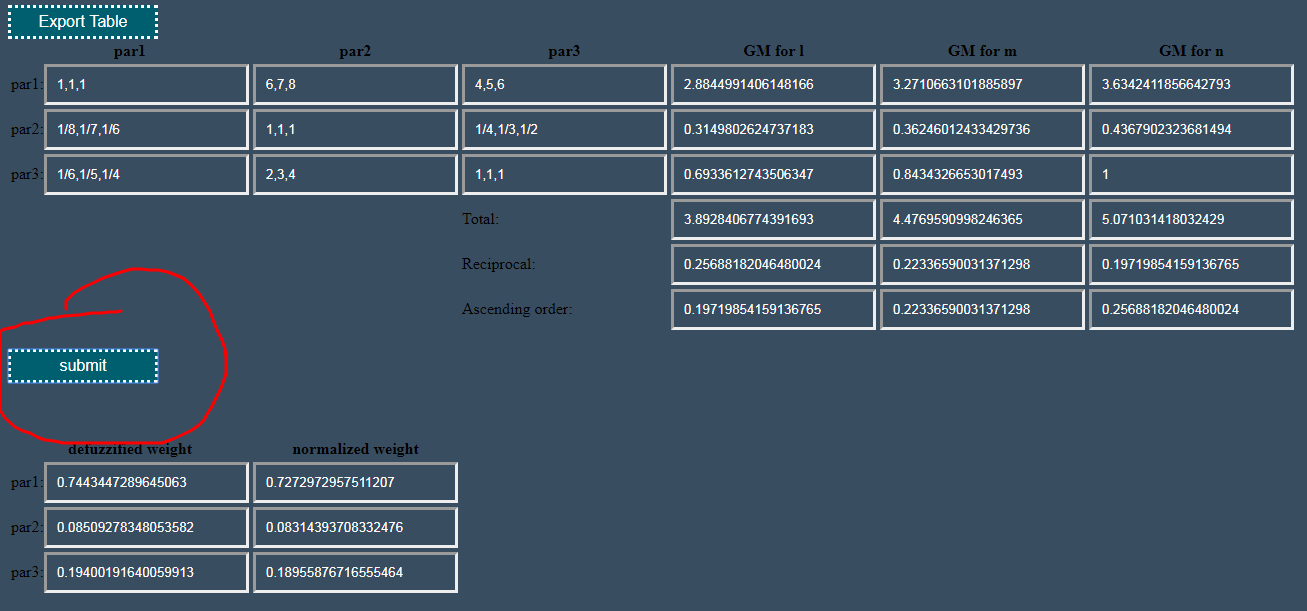
After this enter TFNs in corresponding table and hit submit , this will calculate all the values for you , now just hit download button this will save the values in a file.

So we are done with pairwise comparison of criteria , lets head towards comparison of alternatives , click on the next button on bottom right corner of page.


Now click on the "create table" button on top of page , enter number of alternatives.

click on submit and download the values , now for each criteria you do this by reloading the page , calculating values and downloading them as data in text files.
come back to the ahp page and hit on result button on bottom right corner
now click on "enter data" and enter the values you previously downloaded.


The decision maker has selected five tools as appropriate for his business. However instead of applying all the five tools simultaneously , the priority of tools has to be established. Three criteria are found to be important for the decision maker. The five tools have conflicting objectives with respect to the three criteria.
- open the link as instructed above as in - thesis.cleverapps.io/ahp3 , here we are using "ahp3" because we have 3 criteria.
- now enter the data as given in the book -

- click on submit and you will get these values -

- after this head on the "next" button , click on "create table" button and enter number of alternatives , image below -

click on submit button , download values and hit reload, since these values were for 1st criteria , we have to still do pairwise comparison for remaining 2 criteria. so hit reload and calculate for other 2 criteria.
after doing this , head on to ahp page and click result and click on "enter data" as instructed before
The data after entered will look like below -

- click on submit and you will get ranking on bottom of page.
Go to the following link - thesis.cleverapps.io
Click on the topsis button, this will redirect you to the following url - thesis.cleverapps.io/topsis/

Follow the order in which buttons are given

A panel of three experts (shown as E1, E2, E3) rated the criteria and the alternatives under each criterion. The experts were asked to rate the criteria on a linguistic variable having five values as shown in Table. This table also shows the importance weight in fuzzy terms and crisp values based on graded mean representation. Also the experts were asked to rate the alternatives on a linguistic variable having five values as shown in next Table. This table also shows the importance weight in fuzzy terms and crisp values based on graded mean representation.
- click the wt.of criteria button and enter data as given below -

- after entering data , click submit you will get result like this -

now for entering ratings, click the "rating of alternat." button and enter corresponding values for each criteria.
after that click the other two buttons and you will get the final closeness coefficient and its values in the last table.
