Cute library to implement SearchView in a Material Design Approach. Works from Android API 14 (ICS) and above.
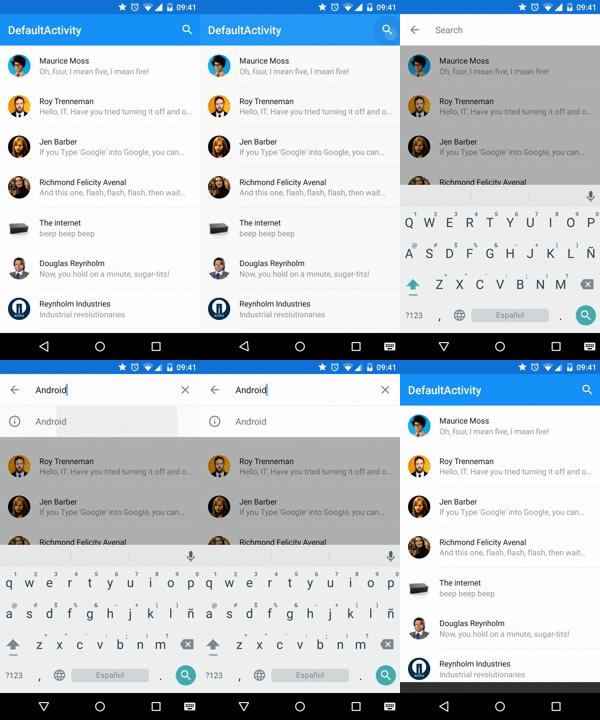
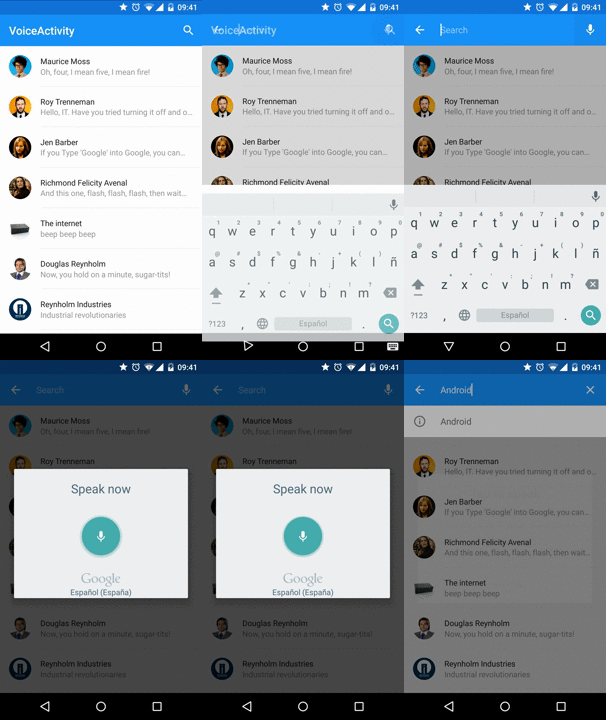

#Native version Maybe it would be useful to take a look into the new official approach http://www.materialdoc.com/search-filter/
Add the dependencies to your gradle file:
dependencies{compile'com.miguelcatalan:materialsearchview:1.4.0'}Add MaterialSearchView to your layout file along with the Toolbar(Add this block at the bottom of your layout, in order to display it over the rest of the view):
 <!— Must be last for right layering display —>
<FrameLayoutandroid:id="@+id/toolbar_container"android:layout_width="match_parent"android:layout_height="wrap_content">
<android.support.v7.widget.Toolbar
android:id="@+id/toolbar"android:layout_width="match_parent"android:layout_height="?attr/actionBarSize"android:background="@color/theme_primary" />
<com.miguelcatalan.materialsearchview.MaterialSearchView
android:id="@+id/search_view"android:layout_width="match_parent"android:layout_height="wrap_content" />
</FrameLayout>
Add the search item into the menu file:
<itemandroid:id="@+id/action_search"android:icon="@drawable/ic_action_action_search"android:orderInCategory="100"android:title="@string/abc_search_hint"app:showAsAction="always" />Add define it in the onCreateOptionsMenu:
@OverridepublicbooleanonCreateOptionsMenu(Menumenu) {
getMenuInflater().inflate(R.menu.menu_main, menu);
MenuItemitem = menu.findItem(R.id.action_search);
searchView.setMenuItem(item);
returntrue;
}
Set the listeners:
MaterialSearchViewsearchView = (MaterialSearchView) findViewById(R.id.search_view);
searchView.setOnQueryTextListener(newMaterialSearchView.OnQueryTextListener() {
@OverridepublicbooleanonQueryTextSubmit(Stringquery) {
//Do some magicreturnfalse;
}
@OverridepublicbooleanonQueryTextChange(StringnewText) {
//Do some magicreturnfalse;
}
});
searchView.setOnSearchViewListener(newMaterialSearchView.SearchViewListener() {
@OverridepublicvoidonSearchViewShown() {
//Do some magic
}
@OverridepublicvoidonSearchViewClosed() {
//Do some magic
}
});Allow/Disable it in the code:
searchView.setVoiceSearch(true); //or falseHandle the response:
@OverrideprotectedvoidonActivityResult(intrequestCode, intresultCode, Intentdata) {
if (requestCode == MaterialSearchView.REQUEST_VOICE && resultCode == RESULT_OK) {
ArrayList<String> matches = data.getStringArrayListExtra(RecognizerIntent.EXTRA_RESULTS);
if (matches != null && matches.size() > 0) {
StringsearchWrd = matches.get(0);
if (!TextUtils.isEmpty(searchWrd)) {
searchView.setQuery(searchWrd, false);
}
}
return;
}
super.onActivityResult(requestCode, resultCode, data);
}Define them in the resources as a string-array:
 <string-arrayname="query_suggestions">
<item>Android</item>
<item>iOS</item>
<item>SCALA</item>
<item>Ruby</item>
<item>JavaScript</item>
</string-array>
Add them to the object:
searchView.setSuggestions(getResources().getStringArray(R.array.query_suggestions)); <stylename="MaterialSearchViewStyle">
<!-- Background for the search bar -->
<itemname="searchBackground">@color/theme_primary</item>
<!-- Change voice icon -->
<itemname="searchVoiceIcon">@drawable/ic_action_voice_search_inverted</item>
<!-- Change clear text icon -->
<itemname="searchCloseIcon">@drawable/ic_action_navigation_close_inverted</item>
<!-- Change up icon -->
<itemname="searchBackIcon">@drawable/ic_action_navigation_arrow_back_inverted</item>
<!-- Change icon for the suggestions -->
<itemname="searchSuggestionIcon">@drawable/ic_suggestion</item>
<!-- Change background for the suggestions list view -->
<itemname="searchSuggestionBackground">@android:color/white</item>
<!-- Change text color for edit text. This will also be the color of the cursor -->
<itemname="android:textColor">@color/theme_primary_text_inverted</item>
<!-- Change hint text color for edit text -->
<itemname="android:textColorHint">@color/theme_secondary_text_inverted</item>
<!-- Hint for edit text -->
<itemname="android:hint">@string/search_hint</item>
</style>#Custom cursor Create the drawable:
 <shapexmlns:android="http://schemas.android.com/apk/res/android">
<sizeandroid:width="2dp" />
<solidandroid:color="@color/theme_primary" />
</shape>
And add it to the object:
searchView.setCursorDrawable(R.drawable.custom_cursor);It is a little bit tricky but can be achieved using this:
	<RelativeLayoutxmlns:android="http://schemas.android.com/apk/res/android"xmlns:app="http://schemas.android.com/apk/res-auto"android:id="@+id/container"android:layout_width="match_parent"android:layout_height="match_parent">
<!— Irrelevant stuff —>
<android.support.v4.view.ViewPager
android:id="@+id/viewpager"android:layout_width="match_parent"android:layout_height="match_parent"android:layout_below="@+id/appbarlayout"app:layout_behavior="@string/appbar_scrolling_view_behavior" />
<!— Must be last for right layering display —>
<android.support.design.widget.AppBarLayout
android:id="@+id/appbarlayout"android:layout_width="match_parent"android:layout_height="wrap_content"android:background="@color/search_layover_bg">
<FrameLayoutandroid:id="@+id/toolbar_container"android:layout_width="match_parent"android:layout_height="wrap_content">
<android.support.v7.widget.Toolbar
android:id="@+id/toolbar"android:layout_width="match_parent"android:layout_height="?attr/actionBarSize"android:background="@color/theme_primary" />
<com.miguelcatalan.materialsearchview.MaterialSearchView
android:id="@+id/search_view"android:layout_width="match_parent"android:layout_height="wrap_content"android:visibility="gone" />
</FrameLayout>
<android.support.design.widget.TabLayout
android:id="@+id/tabs"android:layout_width="match_parent"android:layout_height="wrap_content"android:background="@color/theme_primary"app:tabGravity="fill"app:tabMode="fixed" />
</android.support.design.widget.AppBarLayout>
</RelativeLayout>Close on backpressed:
@OverridepublicvoidonBackPressed() {
if (searchView.isSearchOpen()) {
searchView.closeSearch();
} else {
super.onBackPressed();
}
}Pull requests are more than welcome, help me and others improve this awesome library.
The code is based in the Krishnakapil original concept.
Copyright 2015 Miguel Catalan Bañuls
Licensed under the Apache License, Version 2.0 (the "License");
you may not use this file except in compliance with the License.
You may obtain a copy of the License at
http://www.apache.org/licenses/LICENSE-2.0
Unless required by applicable law or agreed to in writing, software
distributed under the License is distributed on an "AS IS" BASIS,
WITHOUT WARRANTIES OR CONDITIONS OF ANY KIND, either express or implied.
See the License for the specific language governing permissions and
limitations under the License.