
Embedded Typed Readonly In-Memory Document Database for .NET Core and Unity.
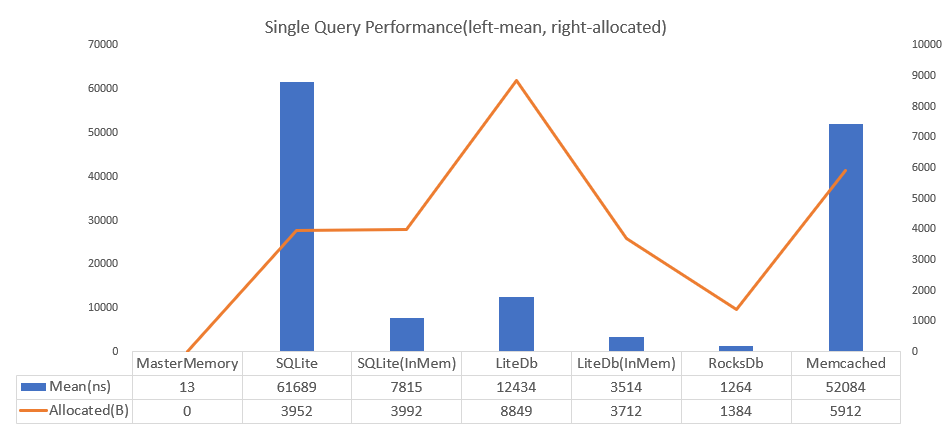
4700 times faster than SQLite and achieves zero allocation per query. Also the DB size is small. When SQLite is 3560kb then MasterMemory is only 222kb.
- Memory Efficient, Only use underlying data memory and do aggressively string interning.
- Performance, Similar as dictionary lookup.
- TypeSafe, 100% Type safe by pre code-generation.
- Fast load speed, MasterMemory save data by MessagePack for C#, a fastest C# serializer so load speed is blazing fast.
- Flexible Search, Supports multiple key, multiple result, range/closest query.
- Validator, You can define custom data validation by C#.
- Metadata, To make custom importer/exporter, get the all database metadata.
These features are suitable for master data management(write-once, read-heavy) on embedded application such as role-playing game. MasterMemory has better performance than any other database solutions. PalDB developed by LinkedIn has a similar concept(embeddable write-once key-value store), but the implementation and performance characteristics are completely different.
MasterMemory uses C# to C# code-generator. Runtime library API is the same but how to code-generate has different way between .NET Core and Unity. This sample is for .NET Core(for Unity is in below sections).
Install the core library(Runtime and Annotations).
PM> Install-Package MasterMemory
Prepare the example table definition like following.
publicenumGender{Male,Female,Unknown}// table definition marked by MemoryTableAttribute.// database-table must be serializable by MessagePack-CSsharp[MemoryTable("person"),MessagePackObject(true)]publicclassPerson{// index definition by attributes.[PrimaryKey]publicintPersonId{get;set;}// secondary index can add multiple(discriminated by index-number).[SecondaryKey(0),NonUnique][SecondaryKey(1,keyOrder:1),NonUnique]publicintAge{get;set;}[SecondaryKey(2),NonUnique][SecondaryKey(1,keyOrder:0),NonUnique]publicGenderGender{get;set;}publicstringName{get;set;}}Edit the .csproj, add MasterMemory.MSBuild.Tasks and add configuration like following.
<ItemGroup>
<PackageReferenceInclude="MasterMemory"Version="2.1.2" />
<!-- Install MSBuild Task(with PrivateAssets="All", it means to use dependency only in build time). -->
<PackageReferenceInclude="MasterMemory.MSBuild.Tasks"Version="2.1.2"PrivateAssets="All" />
</ItemGroup>
<!-- Call code generator before-build. -->
<TargetName="MasterMemoryGen"BeforeTargets="BeforeBuild">
<!-- Configuration of Code-Generator, `UsingNamespace`, `InputDirectory`, `OutputDirectory` and `AddImmutableConstructor`. -->
<MasterMemoryGeneratorUsingNamespace="$(ProjectName)"InputDirectory="$(ProjectDir)"OutputDirectory="$(ProjectDir)MasterMemory" />
</Target>
After the build, generated files(DatabaseBuilder.cs, ImmutableBuilder.cs, MasterMemoryResolver.cs, MemoryDatabase.cs and Tables/***Table.cs) in OutputDirectory.

Finally, you can regsiter and query by these files.
// to create database, use DatabaseBuilder and Append method.varbuilder=newDatabaseBuilder();builder.Append(newPerson[]{newPerson{PersonId=0,Age=13,Gender=Gender.Male,Name="Dana Terry"},newPerson{PersonId=1,Age=17,Gender=Gender.Male,Name="Kirk Obrien"},newPerson{PersonId=2,Age=31,Gender=Gender.Male,Name="Wm Banks"},newPerson{PersonId=3,Age=44,Gender=Gender.Male,Name="Karl Benson"},newPerson{PersonId=4,Age=23,Gender=Gender.Male,Name="Jared Holland"},newPerson{PersonId=5,Age=27,Gender=Gender.Female,Name="Jeanne Phelps"},newPerson{PersonId=6,Age=25,Gender=Gender.Female,Name="Willie Rose"},newPerson{PersonId=7,Age=11,Gender=Gender.Female,Name="Shari Gutierrez"},newPerson{PersonId=8,Age=63,Gender=Gender.Female,Name="Lori Wilson"},newPerson{PersonId=9,Age=34,Gender=Gender.Female,Name="Lena Ramsey"},});// build database binary(you can also use `WriteToStream` for save to file).byte[]data=builder.Build();// -----------------------// for query phase, create MemoryDatabase.// (MemoryDatabase is recommended to store in singleton container(static field/DI)).vardb=newMemoryDatabase(data);// .PersonTable.FindByPersonId is fully typed by code-generation.Personperson=db.PersonTable.FindByPersonId(10);// Multiple key is also typed(***And * **), Return value is multiple if key is marked with `NonUnique`.RangeView<Person>result=db.PersonTable.FindByGenderAndAge((Gender.Female,23));// Get nearest value(choose lower(default) or higher).RangeView<Person>age1=db.PersonTable.FindClosestByAge(31);// Get range(min-max inclusive).RangeView<Person>age2=db.PersonTable.FindRangeByAge(20,29);All table(marked by MemoryTableAttribute) and methods(created by PrimaryKeyAttribute or SecondaryKeyAttribute) are typed.

You can invoke all indexed query by IntelliSense.
Check the releases page, download MasterMemory.Unity.unitypackage(runtime) and MasterMemory.Generator.zip(cli code-generator). MasterMemory also depends on MessagePack-CSharp so you have to download MessagePack.Unity.2.*.*.unitypackage and mpc.zip from MessagePack-CSharp/releases page.
Prepare the example table definition like following.
publicenumGender{Male,Female,Unknown}// table definition marked by MemoryTableAttribute.// database-table must be serializable by MessagePack-CSsharp[MemoryTable("person"),MessagePackObject(true)]publicclassPerson{// index definition by attributes.[PrimaryKey]publicintPersonId{get;set;}// secondary index can add multiple(discriminated by index-number).[SecondaryKey(0),NonUnique][SecondaryKey(1,keyOrder:1),NonUnique]publicintAge{get;set;}[SecondaryKey(2),NonUnique][SecondaryKey(1,keyOrder:0),NonUnique]publicGenderGender{get;set;}publicstringName{get;set;}}use the MasterMemory code generator by commandline. Commandline tool support platforms are win-x64, osx-x64 and linux-x64.
Usage: MasterMemory.Generator [options...]
Options:
-i, -inputDirectory <String> Input file directory(search recursive). (Required)
-o, -outputDirectory <String> Output file directory. (Required)
-n, -usingNamespace <String> Namespace of generated files. (Required)
-p, -prefixClassName <String> Prefix of class names. (Default: )
-c, -addImmutableConstructor <Boolean> Add immutable constructor to MemoryTable class. (Default: False)
-t, -returnNullIfKeyNotFound <Boolean> Return null if key not found on unique find method. (Default: False)
MasterMemory.Generator.exe -i "C:\UnitySample" -o "C:\UnitySample\Generated" -n "UnitySample"Also you need to generated MessagePack-CSharp code generation.
Additional steps, you have to set up to use generated resolver.
publicstaticclassInitializer{[RuntimeInitializeOnLoadMethod(RuntimeInitializeLoadType.BeforeSceneLoad)]publicstaticvoidSetupMessagePackResolver(){StaticCompositeResolver.Instance.Register(new[]{MasterMemoryResolver.Instance,// set MasterMemory generated resolverGeneratedResolver.Instance,// set MessagePack generated resolverStandardResolver.Instance// set default MessagePack resolver});varoptions=MessagePackSerializerOptions.Standard.WithResolver(StaticCompositeResolver.Instance);MessagePackSerializer.DefaultOptions=options;}}The rest is the same as .NET Core version.
// to create database, use DatabaseBuilder and Append method.varbuilder=newDatabaseBuilder();builder.Append(newPerson[]{newPerson{PersonId=0,Age=13,Gender=Gender.Male,Name="Dana Terry"},newPerson{PersonId=1,Age=17,Gender=Gender.Male,Name="Kirk Obrien"},newPerson{PersonId=2,Age=31,Gender=Gender.Male,Name="Wm Banks"},newPerson{PersonId=3,Age=44,Gender=Gender.Male,Name="Karl Benson"},newPerson{PersonId=4,Age=23,Gender=Gender.Male,Name="Jared Holland"},newPerson{PersonId=5,Age=27,Gender=Gender.Female,Name="Jeanne Phelps"},newPerson{PersonId=6,Age=25,Gender=Gender.Female,Name="Willie Rose"},newPerson{PersonId=7,Age=11,Gender=Gender.Female,Name="Shari Gutierrez"},newPerson{PersonId=8,Age=63,Gender=Gender.Female,Name="Lori Wilson"},newPerson{PersonId=9,Age=34,Gender=Gender.Female,Name="Lena Ramsey"},});// build database binary(you can also use `WriteToStream` for save to file).byte[]data=builder.Build();// -----------------------// for query phase, create MemoryDatabase.// (MemoryDatabase is recommended to store in singleton container(static field/DI)).vardb=newMemoryDatabase(data);// .PersonTable.FindByPersonId is fully typed by code-generation.Personperson=db.PersonTable.FindByPersonId(10);// Multiple key is also typed(***And * **), Return value is multiple if key is marked with `NonUnique`.RangeView<Person>result=db.PersonTable.FindByGenderAndAge((Gender.Female,23));// Get nearest value(choose lower(default) or higher).RangeView<Person>age1=db.PersonTable.FindClosestByAge(31);// Get range(min-max inclusive).RangeView<Person>age2=db.PersonTable.FindRangeByAge(20,29);All table(marked by MemoryTableAttribute) and methods(created by PrimaryKeyAttribute or SecondaryKeyAttribute) are typed.
You can invoke all indexed query by IntelliSense.
Element type of datatable must be marked by [MemoryTable(tableName)], datatable is generated from marked type. string tableName is saved in database binary, you can rename class name if tableName is same.
[PrimaryKey(keyOrder = 0)], [SecondaryKey(indexNo, keyOrder)], [NonUnique] can add to public property, [PrimaryKey] must use in MemoryTable, [SecondaryKey] is option.
Both PrimaryKey and SecondaryKey can add to multiple properties, it will be generated ***And***And***.... keyOrder is order of column names, default is zero(sequential in which they appear).
[MemoryTable("sample"),MessagePackObject(true)]publicclassSample{[PrimaryKey]publicintFoo{get;set;}[PrimaryKey]publicintBar{get;set;}}db.Sample.FindByFooAndBar((intFoo,intBar))// ----[MemoryTable("sample"),MessagePackObject(true)]publicclassSample{[PrimaryKey(keyOrder:1)]publicintFoo{get;set;}[PrimaryKey(keyOrder:0)]publicintBar{get;set;}}db.Sample.FindByBarAndFoo((intBar,intFoo))Default of FindBy*** return type is single(if not found, returns null). It means key is unique by default. If mark [NonUnique] in same AttributeList, return type is RangeView<T>(if not found, return empty).
[MemoryTable("sample"),MessagePackObject(true)]publicclassSample{[PrimaryKey,NonUnique]publicintFoo{get;set;}[PrimaryKey,NonUnique]publicintBar{get;set;}}RangeView<Sample>q=db.Sample.FindByFooAndBar((intFoo,intBar))[MemoryTable("sample"),MessagePackObject(true)]publicclassSample{[PrimaryKey][SecondaryKey(0)]publicintFoo{get;set;}[SecondaryKey(0)][SecondaryKey(1)]publicintBar{get;set;}}db.Sample.FindByFoo(intFoo)
db.Sample.FindByFooAndBar((intFoo,intBar))
db.Sample.FindByBar(intBar)[StringComparisonOption] allow to configure how compare if key is string. Default is Ordinal.
[MemoryTable("sample"),MessagePackObject(true)]publicclassSample{[PrimaryKey][StringComparisonOption(StringComparison.InvariantCultureIgnoreCase)]publicstringFoo{get;set;}}If computation property exists, add [IgnoreMember] of MessagePack should mark.
[MemoryTable("person"),MessagePackObject(true)]publicclassPerson{[PrimaryKey]publicintId{get;}publicstringFirstName{get;}publicstringLastName{get;}[IgnoreMember]publicstringFullName=>FirstName+LastName;}In default, MemoryDatabase do all string data automatically interning(see: Wikipedia/String interning). If multiple same string value exists in database(ex: "goblin","goblin", "goblin", "goblin", "goblin"....), standard database creates string value per query or store multiple same values. But MasterMemory stores single string value reference, it can save much memory if data is denormalized.
Use intern or not is selected in constructor. If you want to disable automatically interning, use internString:false.
MemoryDatabase(byte[] databaseBinary, bool internString = true, MessagePack.IFormatterResolver formatterResolver = null).
MemoryDatabase has three(or four) query methods.
T|RangeView<T>FindBy***(TKey key)- bool TryFindBy***(TKey key, out T result)
T|RangeView<T>FindClosestBy***(TKey key, bool selectLower = true)RangeView<T>FindRangeBy***(TKey min, TKey max, bool ascendant = true)
If index key is unique, generates FindBy*** and TryFindBy*** methods and then FindBy*** throws KeyNotFoundException when key is not found.
By*** is generated by PrimaryKey and SecondaryKey defines.
And has some utility properties.
intCountRangeView<T>AllRangeView<T>AllReverseRangeView<T>SortBy***T[] GetRawDataUnsafe()
struct RangeView<T> : IEnumerable<T> is the view of database elements. It has following property/method.
T[int index]intCountTFirstTLastRangeView<T>ReverseIEnumerator<T>GetEnumerator()
Generated table class is defined partial class so create same namespace and class name's partial class on another file, you can add your custom method to generated table.
Table class also defined partial OnAfterConstruct method, it called after table has been constructed. You can use it to store custom data to field after all data has been constructed.
// create MonsterTable.Partial.cspublicsealedpartialclassMonsterTable{intmaxHp;
#pragma warning disable CS0649readonlyintminHp;
#pragma warning restore CS0649// called after constructedpartialvoidOnAfterConstruct(){maxHp=All.Select(x =>x.MaxHp).Max();// you can use Unsafe.AsRef to set readonly fieldUnsafe.AsRef(minHp)=All.Select(x =>x.MaxHp).Min();}// add custom method other than standard Find methodpublicIEnumerable<Monster>GetRangedMonster(intarg1){returnAll.Where....();}}If you want to add/modify data to loaded database, you can use ToImmutableBuilder method.
// Create ImmutableBuilder from original database.varbuilder=db.ToImmutableBuilder();// Add Or Replace compare with PrimaryKeybuilder.Diff(addOrReplaceData);// Remove by PrimaryKeybuilder.RemovePerson(new[]{1,10,100});// Replace all databuilder.ReplaceAll(newData);// Finally create new databaseMemoryDatabasenewDatabase=builder.Build();// If you want to save new database, you can convert to MemoryDatabase->DatabaseBuildervarnewBuilder=newDatabase.ToDatabaseBuilder();varnewBinary=newBuilder.Build();// or use WriteToStreamMemoryDatabase's reference can use as snapshot.
// 1 game per 1 instancepublicclassGameRoom{MemoryDatabasedatabase;// The reference is a snapshot of the timing of game begins.publicGameRoom(MemoryDatabasedatabase){this.database=database;}}Element data is shared in the application so ideally should be immutable. But C# only has a constructor to create immutable data, it is too difficult to create many data tables.
Code generator has AddImmutableConstructor(-c, -addImmutableConstructor) option. If enabled it, code generator modify orignal file and add immutable constructor in target type. If you define property as {get; private set;} or {get;}, it will be immutable type.
// For the versioning, MessagePackObject is recommended to use string key.[MemoryTable("person"),MessagePackObject(true)]publicclassPerson{[PrimaryKey]publicintPersonId{get;}publicintAge{get;}publicGenderGender{get;}publicstringName{get;}}// use AddImmutableConstructor="true" or -c option<MasterMemoryGeneratorUsingNamespace="$(ProjectName)"InputDirectory="$(ProjectDir)"OutputDirectory="$(ProjectDir)MasterMemory"AddImmutableConstructor="true"/>MasterMemory.Generator.exe-i "C:\UnitySample"-o "C:\UnitySample\Generated"-n "UnitySample"-c// after generated...[MemoryTable("person"),MessagePackObject(true)]
public class Person
{[PrimaryKey]publicint PersonId {get;}
public int Age {get;}
public Gender Gender {get;}
public string Name {get;}
public Person(intPersonId,intAge,GenderGender,stringName){this.PersonId=PersonId;this.Age=Age;this.Gender=Gender;this.Name= Name;}}You can validate data by MemoryDatabase.Validate method. In default, it check unique key(data duplicated) and you can define custom validate logics.
// Implements IValidatable<T> to targeted validation[MemoryTable("quest_master"),MessagePackObject(true)]publicclassQuest:IValidatable<Quest>{// If index is Unique, validate duplicate in default.[PrimaryKey]publicintId{get;}publicstringName{get;}publicintRewardId{get;}publicintCost{get;}voidIValidatable<Quest>.Validate(IValidator<Quest>validator){// get the external reference tablevaritems=validator.GetReferenceSet<Item>();// Custom if logics.if(this.RewardId>0){// RewardId must exists in Item.ItemIditems.Exists(x =>x.RewardId, x =>x.ItemId);}// Range check, Cost must be 10..20validator.Validate(x =>x.Cost>=10);validator.Validate(x =>x.Cost<=20);// In this region, only called once so enable to validate overall of tables.if(validator.CallOnce()){varquests=validator.GetTableSet();// Check unique othe than index property.quests.Where(x =>x.RewardId!=0).Unique(x =>x.RewardId);}}}[MemoryTable("item_master"),MessagePackObject(true)]publicclassItem{[PrimaryKey]publicintItemId{get;}}voidMain(){vardb=newMemoryDatabase(bin);// Get the validate result.varvalidateResult=db.Validate();if(validateResult.IsValidationFailed){// Output string format.Console.WriteLine(validateResult.FormatFailedResults());// Get the raw FaildItem[]. (.Type, .Message, .Data)// validateResult.FailedResults}}Following is list of validation methods.
// all void methods are assert function, it stores message to ValidateResult if failed.interfaceIValidator<T>{ValidatableSet<T>GetTableSet();ReferenceSet<T,TRef>GetReferenceSet<TRef>();voidValidate(Expression<Func<T,bool>>predicate);voidValidate(Func<T,bool>predicate,stringmessage);voidValidateAction(Expression<Func<bool>>predicate);voidValidateAction(Func<bool>predicate,stringmessage);voidFail(stringmessage);boolCallOnce();}classReferenceSet<TElement,TReference>{IReadOnlyList<TReference>TableData{get;}voidExists<TProperty>(Expression<Func<TElement,TProperty>>elementSelector,Expression<Func<TReference,TProperty>>referenceElementSelector);voidExists<TProperty>(Expression<Func<TElement,TProperty>>elementSelector,Expression<Func<TReference,TProperty>>referenceElementSelector,EqualityComparer<TProperty>equalityComparer);}classValidatableSet<TElement>{IReadOnlyList<TElement>TableData{get;}voidUnique<TProperty>(Expression<Func<TElement,TProperty>>selector);voidUnique<TProperty>(Expression<Func<TElement,TProperty>>selector,IEqualityComparer<TProperty>equalityComparer);voidUnique<TProperty>(Func<TElement,TProperty>selector,stringmessage);voidUnique<TProperty>(Func<TElement,TProperty>selector,IEqualityComparer<TProperty>equalityComparer,stringmessage);voidSequential(Expression<Func<TElement,SByte|Int16|Int32|...>>selector,booldistinct=false);ValidatableSet<TElement>Where(Func<TElement,bool>predicate);}You can get the table-info, properties, indexes by metadata api. It helps to make custom importer/exporter application.
varmetaDb=MemoryDatabase.GetMetaDatabase();foreach(vartableinmetaDb.GetTableInfos()){// for example, generate CSV headervarsb=newStringBuilder();foreach(varpropintable.Properties){if(sb.Length!=0)sb.Append(",");// Name can convert to LowerCamelCase or SnakeCase.sb.Append(prop.NameSnakeCase);}File.WriteAllText(table.TableName+".csv",sb.ToString(),newUTF8Encoding(false));}If creates console-app, our ConsoleAppFramework can easy to make helper applications.
Here is sample of reading and creating dynamic from csv. builder.AppendDynamic and System.Runtime.Serialization.FormatterServices.GetUninitializedObject will help it.
classProgram{staticvoidMain(string[]args){varcsv=@"monster_id,name,max_hp1,foo,1002,bar,200";varfileName="monster";varbuilder=newDatabaseBuilder();varmeta=MemoryDatabase.GetMetaDatabase();vartable=meta.GetTableInfo(fileName);vartableData=newList<object>();using(varms=newMemoryStream(Encoding.UTF8.GetBytes(csv)))using(varsr=newStreamReader(ms,Encoding.UTF8))using(varreader=newTinyCsvReader(sr)){while((reader.ReadValuesWithHeader()isDictionary<string,string>values)){// create data without call constructorvardata=System.Runtime.Serialization.FormatterServices.GetUninitializedObject(table.DataType);foreach(varpropintable.Properties){if(values.TryGetValue(prop.NameSnakeCase,outvarrawValue)){varvalue=ParseValue(prop.PropertyInfo.PropertyType,rawValue);if(prop.PropertyInfo.SetMethod==null){thrownewException("Target property does not exists set method. If you use {get;}, please change to { get; private set; }, Type:"+prop.PropertyInfo.DeclaringType+" Prop:"+prop.PropertyInfo.Name);}prop.PropertyInfo.SetValue(data,value);}else{thrownewKeyNotFoundException($"Not found \"{prop.NameSnakeCase}\" in \"{fileName}.csv\" header.");}}tableData.Add(data);}}// add dynamic collection.builder.AppendDynamic(table.DataType,tableData);varbin=builder.Build();vardatabase=newMemoryDatabase(bin);}staticobjectParseValue(Typetype,stringrawValue){if(type==typeof(string))returnrawValue;if(type.IsGenericType&&type.GetGenericTypeDefinition()==typeof(Nullable<>)){if(string.IsNullOrWhiteSpace(rawValue))returnnull;returnParseValue(type.GenericTypeArguments[0],rawValue);}if(type.IsEnum){varvalue=Enum.Parse(type,rawValue);returnvalue;}switch(Type.GetTypeCode(type)){caseTypeCode.Boolean:// True/False or 0,1if(int.TryParse(rawValue,outvarintBool)){returnConvert.ToBoolean(intBool);}returnBoolean.Parse(rawValue);caseTypeCode.Char:returnChar.Parse(rawValue);caseTypeCode.SByte:returnSByte.Parse(rawValue,CultureInfo.InvariantCulture);caseTypeCode.Byte:returnByte.Parse(rawValue,CultureInfo.InvariantCulture);caseTypeCode.Int16:returnInt16.Parse(rawValue,CultureInfo.InvariantCulture);caseTypeCode.UInt16:returnUInt16.Parse(rawValue,CultureInfo.InvariantCulture);caseTypeCode.Int32:returnInt32.Parse(rawValue,CultureInfo.InvariantCulture);caseTypeCode.UInt32:returnUInt32.Parse(rawValue,CultureInfo.InvariantCulture);caseTypeCode.Int64:returnInt64.Parse(rawValue,CultureInfo.InvariantCulture);caseTypeCode.UInt64:returnUInt64.Parse(rawValue,CultureInfo.InvariantCulture);caseTypeCode.Single:returnSingle.Parse(rawValue,CultureInfo.InvariantCulture);caseTypeCode.Double:returnDouble.Parse(rawValue,CultureInfo.InvariantCulture);caseTypeCode.Decimal:returnDecimal.Parse(rawValue,CultureInfo.InvariantCulture);caseTypeCode.DateTime:returnDateTime.Parse(rawValue,CultureInfo.InvariantCulture);default:if(type==typeof(DateTimeOffset)){returnDateTimeOffset.Parse(rawValue,CultureInfo.InvariantCulture);}elseif(type==typeof(TimeSpan)){returnTimeSpan.Parse(rawValue,CultureInfo.InvariantCulture);}elseif(type==typeof(Guid)){returnGuid.Parse(rawValue);}// or other your custom parsing.thrownewNotSupportedException();}}// Non string escape, tiny reader with header.publicclassTinyCsvReader:IDisposable{staticchar[]trim=new[]{' ','\t'};readonlyStreamReaderreader;publicIReadOnlyList<string>Header{get;privateset;}publicTinyCsvReader(StreamReaderreader){this.reader=reader;{varline=reader.ReadLine();if(line==null)thrownewInvalidOperationException("Header is null.");varindex=0;varheader=newList<string>();while(index<line.Length){vars=GetValue(line,refindex);if(s.Length==0)break;header.Add(s);}this.Header=header;}}stringGetValue(stringline,refinti){vartemp=newchar[line.Length-i];varj=0;for(;i<line.Length;i++){if(line[i]==','){i+=1;break;}temp[j++]=line[i];}returnnewstring(temp,0,j).Trim(trim);}publicstring[]ReadValues(){varline=reader.ReadLine();if(line==null)returnnull;if(string.IsNullOrWhiteSpace(line))returnnull;varvalues=newstring[Header.Count];varlineIndex=0;for(inti=0;i<values.Length;i++){vars=GetValue(line,reflineIndex);values[i]=s;}returnvalues;}publicDictionary<string,string>ReadValuesWithHeader(){varvalues=ReadValues();if(values==null)returnnull;vardict=newDictionary<string,string>();for(inti=0;i<values.Length;i++){dict.Add(Header[i],values[i]);}returndict;}publicvoidDispose(){reader.Dispose();}}}Currently MasterMemory does not support inheritance. Recommend way to create common method, use interface and extension method. But if you want to create common method with common cached field(made by OnAfterConstruct), for workaround, create abstract class and all data properties to abstract.
publicabstractclassFooAndBarBase{// all data properties to virtualpublicvirtualintProp1{get;protectedset;}publicvirtualintProp2{get;protectedset;}[IgnoreMember]publicintProp3=>Prop1+Prop2;publicIEnumerable<FooAndBarBase>CommonMethod(){thrownewNotImplementedException();}}[MemoryTable("foo_table"),MessagePackObject(true)]publicclassFooTable:FooAndBarBase{[PrimaryKey]publicoverrideintProp1{get;protectedset;}publicoverrideintProp2{get;protectedset;}}[MemoryTable("bar_table"),MessagePackObject(true)]publicclassBarTable:FooAndBarBase{[PrimaryKey]publicoverrideintProp1{get;protectedset;}publicoverrideintProp2{get;protectedset;}}MasterMemory has three kinds of code-generator. MSBuild Task, Standalone Cli Tool, .NET Core Global/Local Tools.
MSBuild Task(MasterMemory.MSBuild.Tasks) is recommended way to use in .NET Core csproj.
<MasterMemoryGeneratorUsingNamespace="string:required"InputDirectory="string:required"OutputDirectory="string:required"PrefixClassName="string:optional, default= "AddImmutableConstructor="bool:optional, default=false"ReturnNullIfKeyNotFound="bool:optional, default=false"
/>
Standalone Cli Tool(MasterMemory.Generator) is built by .NET Core 3, self-contained single executable binary. It can be used for Unity and other separated use-case.
Usage: MasterMemory.Generator [options...]
Options:
-i, -inputDirectory <String> Input file directory(search recursive). (Required)
-o, -outputDirectory <String> Output file directory. (Required)
-n, -usingNamespace <String> Namespace of generated files. (Required)
-p, -prefixClassName <String> Prefix of class names. (Default: )
-c, -addImmutableConstructor <Boolean> Add immutable constructor to MemoryTable class. (Default: False)
-t, -returnNullIfKeyNotFound <Boolean> Return null if key not found on unique find method. (Default: False)
.NET Core Global/Local Tools can install from NuGet, it is same as Standalone Cli Tool.
dotnet tool install --global MasterMemory.Generator
After install, you can call by dotnet mmgen command. This is useful to use in CI. Here is the sample of CircleCI config.
version: 2.1executors:
dotnet:
docker:
- image: mcr.microsoft.com/dotnet/core/sdk:2.2environment:
DOTNET_SKIP_FIRST_TIME_EXPERIENCE: trueNUGET_XMLDOC_MODE: skipjobs:
gen-mastermemory:
executor: dotnetsteps:
- checkout
- run: dotnet tool install --global MasterMemory.Generator
- run: dotnet mmgen -i ./ -o ./MasterMemory -n Test/* git push or store artifacts or etc...... */This library is under the MIT License.