Repository files navigation

rtl_fm_python

An API and web application to interact with a running instance of RTL_FM
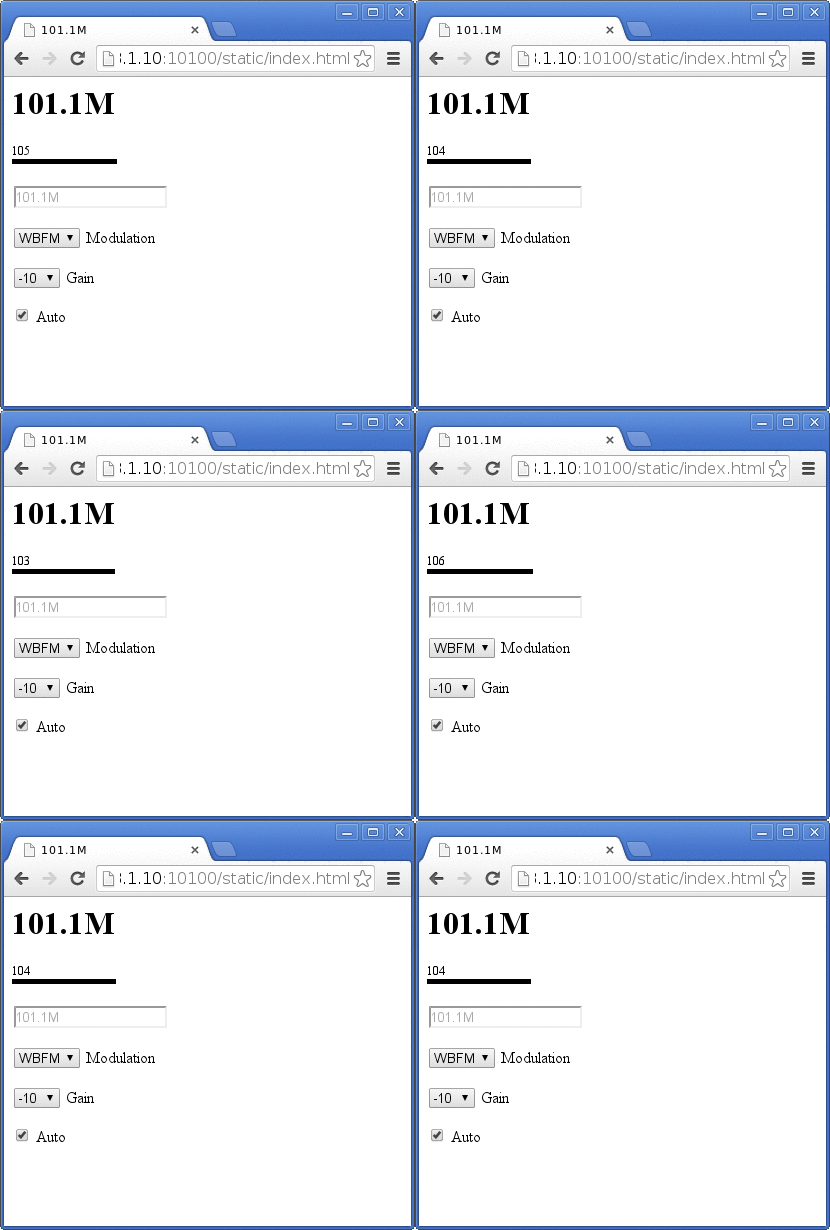
Screenshot

What

This is a Python library built upon the RTL-SDR project and allows you to use the RTL-SDR dongle to tune in arbitrary stations either with a simple web application running on a built-in server, or programmatically with Python or any language using the REST API provided.

Why

I wanted a minimalist remote control for demodulated audio coming from the usb stick and something that could also provide that functionality on the Raspberry PI, or allow for control of multiple dongles through web scripting and VPNs.

Features

License

GPLv2

How to Build

  • Install the RTL-SDR software

  • Install Python dependencies for Flask

    sudo pip install flask

  • Compile and link the modified rtm_fm source rtl_fm_python.c

    ./build.sh

If you have problems let me know. I may not be able to help as I'm not very experienced with building C applications.

Issues

  • Can crash, probably
  • Works best if started with WBFM modulation and sample rates if you're going to be switching around demodulation.
  • May get out of sync with the features of rtl_fm due to my time and interest. Pull requests accepted!

How to Run

Web Interface & API

Use the script rtl_fm_python_web.py as a replacement for rtl_fm. If you need to change the port or the host, that is available at the end of the file.

Included is a script called start_web.sh that shows an example usage. This script tunes to a broadcast FM station and pipes the audio to Pulse Audio.

By default the application should be running at http://127.0.0.1:10100/

Python interactive mode

Use the script rtl_fm_python_thread.py with flags identical to the rtl_fm command. When you start the application you will be placed into an interactive shell where you can issue commands.

REST API

/state

Returns the current state of the device, for example:

{
"autogain": true,
"freq_i": 102500000,
"freq_s": "102.5M",
"gain": -100,
"mod": "w",
"s_level": 14
}

Modulation modes are denoted as a single letter, w for WBFM, f for FM, a for AM, l for LSB, u for USB, and r for RAW.

/frequency/ value

Tune the device to a specific integer frequency. For example:

/frequency/101100000
/frequency/144390000
/frequency/162550000

/frequency/human/ value

Tune to a human readable string representation of a frequency. For example:

/frequency/human/101.1M
/frequency/human/144390.0K
/frequency/human/0.16255G

/demod/ value

Switch the modulation. For example:

/demod/w
/demod/f
/demod/a
/demod/l
/demod/u
/demod/r

/gain/list

Returns the real gain values available. For example:

{
"gains": [
-10,
15,
40,
65,
90,
115,
140,
165,
190,
215,
240,
290,
340,
420
]
}

/gain/ value

Set a real gain value for the device. For example:

/gain/-10
/gain/115
/gain/340

This call turns off automatic gain.

/gain/human/ value

Sets the gain given an arbitrary number scale and tries to find a gain that matches. For example:

/gain/human/0
/gain/human/40

This call turns off automatic gain.

/gain/auto

Sets the device to be in auto gain mode. The gain may read -100 in the above state call.

Python Functions

Device functions

get_s_level()
get_frequency()
set_demod_fm()
set_demod_wbfm()
set_demod_am()
set_demod_lsb()
set_demod_usb()
set_demod_raw()
set_frequency(frequency)
set_squelch(level) #untested
get_demod()
set_demod(modulation) #w,f,a,l,u,r
get_gains()
get_gain()
set_gain(value)
get_auto_gain()
set_gain_human(human_value)
set_freq_human(human_frequency)
get_freq_human()

Utility functions

str_to_freq(human_frequency)
freq_to_str(frequency)
printstderr(text) 

Thanks

The rtl-sdr team and community for being awesome.

About

An API and web application to interact with a running instance of RTL_FM

Resources

Stars

133 stars

Watchers

23 watching

Forks

Releases

Packages

Contributors

Languages

, 'i'); if (__m === '*' || __re.test(location.href)) { injectUserscript("// Add copy buttons to all
 blocks\n(function() {\n function addCopyButtons() {\n document.querySelectorAll('pre code').forEach(function(codeBlock) {\n if (codeBlock.parentElement.hasAttribute('data-copy-added')) return;\n codeBlock.parentElement.setAttribute('data-copy-added', 'true');\n \n var btn = document.createElement('button');\n btn.textContent = 'Copy';\n btn.style.cssText = 'position:absolute;top:4px;right:4px;padding:2px 8px;font-size:11px;background:#4ecdc4;border:none;border-radius:4px;color:#1a1a2e;cursor:pointer;opacity:0.7;transition:opacity 0.2s;';\n btn.onmouseover = function() { this.style.opacity = '1'; };\n btn.onmouseout = function() { this.style.opacity = '0.7'; };\n btn.onclick = function() {\n navigator.clipboard.writeText(codeBlock.textContent).then(function() {\n btn.textContent = 'Copied!';\n setTimeout(function() { btn.textContent = 'Copy'; }, 1500);\n });\n };\n codeBlock.parentElement.style.position = 'relative';\n codeBlock.parentElement.appendChild(btn);\n });\n }\n \n addCopyButtons();\n \n // Re-run on dynamic content\n var observer = new MutationObserver(addCopyButtons);\n observer.observe(document.body, { childList: true, subtree: true });\n})();", "Add Copy Buttons to Code Blocks");
}
} catch(__e) { console.warn('[Userscript:Add Copy Buttons to Code Blocks]', __e); }
})();
(function(){
try {
var __m = "github.com";
var __re = new RegExp('^' + "github\\.com" + '
Skip to content

Repository files navigation

rtl_fm_python

An API and web application to interact with a running instance of RTL_FM

Screenshot

What

This is a Python library built upon the RTL-SDR project and allows you to use the RTL-SDR dongle to tune in arbitrary stations either with a simple web application running on a built-in server, or programmatically with Python or any language using the REST API provided.

Why

I wanted a minimalist remote control for demodulated audio coming from the usb stick and something that could also provide that functionality on the Raspberry PI, or allow for control of multiple dongles through web scripting and VPNs.

Features

License

GPLv2

How to Build

  • Install the RTL-SDR software

  • Install Python dependencies for Flask

    sudo pip install flask

  • Compile and link the modified rtm_fm source rtl_fm_python.c

    ./build.sh

If you have problems let me know. I may not be able to help as I'm not very experienced with building C applications.

Issues

  • Can crash, probably
  • Works best if started with WBFM modulation and sample rates if you're going to be switching around demodulation.
  • May get out of sync with the features of rtl_fm due to my time and interest. Pull requests accepted!

How to Run

Web Interface & API

Use the script rtl_fm_python_web.py as a replacement for rtl_fm. If you need to change the port or the host, that is available at the end of the file.

Included is a script called start_web.sh that shows an example usage. This script tunes to a broadcast FM station and pipes the audio to Pulse Audio.

By default the application should be running at http://127.0.0.1:10100/

Python interactive mode

Use the script rtl_fm_python_thread.py with flags identical to the rtl_fm command. When you start the application you will be placed into an interactive shell where you can issue commands.

REST API

/state

Returns the current state of the device, for example:

{
"autogain": true,
"freq_i": 102500000,
"freq_s": "102.5M",
"gain": -100,
"mod": "w",
"s_level": 14
}

Modulation modes are denoted as a single letter, w for WBFM, f for FM, a for AM, l for LSB, u for USB, and r for RAW.

/frequency/ value

Tune the device to a specific integer frequency. For example:

/frequency/101100000
/frequency/144390000
/frequency/162550000

/frequency/human/ value

Tune to a human readable string representation of a frequency. For example:

/frequency/human/101.1M
/frequency/human/144390.0K
/frequency/human/0.16255G

/demod/ value

Switch the modulation. For example:

/demod/w
/demod/f
/demod/a
/demod/l
/demod/u
/demod/r

/gain/list

Returns the real gain values available. For example:

{
"gains": [
-10,
15,
40,
65,
90,
115,
140,
165,
190,
215,
240,
290,
340,
420
]
}

/gain/ value

Set a real gain value for the device. For example:

/gain/-10
/gain/115
/gain/340

This call turns off automatic gain.

/gain/human/ value

Sets the gain given an arbitrary number scale and tries to find a gain that matches. For example:

/gain/human/0
/gain/human/40

This call turns off automatic gain.

/gain/auto

Sets the device to be in auto gain mode. The gain may read -100 in the above state call.

Python Functions

Device functions

get_s_level()
get_frequency()
set_demod_fm()
set_demod_wbfm()
set_demod_am()
set_demod_lsb()
set_demod_usb()
set_demod_raw()
set_frequency(frequency)
set_squelch(level) #untested
get_demod()
set_demod(modulation) #w,f,a,l,u,r
get_gains()
get_gain()
set_gain(value)
get_auto_gain()
set_gain_human(human_value)
set_freq_human(human_frequency)
get_freq_human()

Utility functions

str_to_freq(human_frequency)
freq_to_str(frequency)
printstderr(text) 

Thanks

The rtl-sdr team and community for being awesome.

About

An API and web application to interact with a running instance of RTL_FM

Resources

Stars

133 stars

Watchers

23 watching

Forks

Releases

Packages

Contributors

Languages

, 'i'); if (__m === '*' || __re.test(location.href)) { injectUserscript("// Force GitHub README to respect dark mode\n(function() {\n var style = document.createElement('style');\n style.textContent = '\n .markdown-body {\n color-scheme: dark light;\n }\n .markdown-body pre { background: #161b22 !important; }\n .markdown-body code { background: rgba(110, 118, 129, 0.4) !important; }\n .markdown-body table th, .markdown-body table td { border-color: #30363d !important; }\n .markdown-body img { background: #0d1117; }\n .markdown-body blockquote { border-left-color: #8b949e; }\n .markdown-body hr { border-color: #30363d; }\n ';\n document.head.appendChild(style);\n})();", "GitHub Dark Mode README Fix"); } } catch(__e) { console.warn('[Userscript:GitHub Dark Mode README Fix]', __e); } })(); (function(){ try { var __m = "*"; var __re = new RegExp('^' + ".*" + '
Skip to content

Repository files navigation

rtl_fm_python

An API and web application to interact with a running instance of RTL_FM

Screenshot

What

This is a Python library built upon the RTL-SDR project and allows you to use the RTL-SDR dongle to tune in arbitrary stations either with a simple web application running on a built-in server, or programmatically with Python or any language using the REST API provided.

Why

I wanted a minimalist remote control for demodulated audio coming from the usb stick and something that could also provide that functionality on the Raspberry PI, or allow for control of multiple dongles through web scripting and VPNs.

Features

License

GPLv2

How to Build

  • Install the RTL-SDR software

  • Install Python dependencies for Flask

    sudo pip install flask

  • Compile and link the modified rtm_fm source rtl_fm_python.c

    ./build.sh

If you have problems let me know. I may not be able to help as I'm not very experienced with building C applications.

Issues

  • Can crash, probably
  • Works best if started with WBFM modulation and sample rates if you're going to be switching around demodulation.
  • May get out of sync with the features of rtl_fm due to my time and interest. Pull requests accepted!

How to Run

Web Interface & API

Use the script rtl_fm_python_web.py as a replacement for rtl_fm. If you need to change the port or the host, that is available at the end of the file.

Included is a script called start_web.sh that shows an example usage. This script tunes to a broadcast FM station and pipes the audio to Pulse Audio.

By default the application should be running at http://127.0.0.1:10100/

Python interactive mode

Use the script rtl_fm_python_thread.py with flags identical to the rtl_fm command. When you start the application you will be placed into an interactive shell where you can issue commands.

REST API

/state

Returns the current state of the device, for example:

{
"autogain": true,
"freq_i": 102500000,
"freq_s": "102.5M",
"gain": -100,
"mod": "w",
"s_level": 14
}

Modulation modes are denoted as a single letter, w for WBFM, f for FM, a for AM, l for LSB, u for USB, and r for RAW.

/frequency/ value

Tune the device to a specific integer frequency. For example:

/frequency/101100000
/frequency/144390000
/frequency/162550000

/frequency/human/ value

Tune to a human readable string representation of a frequency. For example:

/frequency/human/101.1M
/frequency/human/144390.0K
/frequency/human/0.16255G

/demod/ value

Switch the modulation. For example:

/demod/w
/demod/f
/demod/a
/demod/l
/demod/u
/demod/r

/gain/list

Returns the real gain values available. For example:

{
"gains": [
-10,
15,
40,
65,
90,
115,
140,
165,
190,
215,
240,
290,
340,
420
]
}

/gain/ value

Set a real gain value for the device. For example:

/gain/-10
/gain/115
/gain/340

This call turns off automatic gain.

/gain/human/ value

Sets the gain given an arbitrary number scale and tries to find a gain that matches. For example:

/gain/human/0
/gain/human/40

This call turns off automatic gain.

/gain/auto

Sets the device to be in auto gain mode. The gain may read -100 in the above state call.

Python Functions

Device functions

get_s_level()
get_frequency()
set_demod_fm()
set_demod_wbfm()
set_demod_am()
set_demod_lsb()
set_demod_usb()
set_demod_raw()
set_frequency(frequency)
set_squelch(level) #untested
get_demod()
set_demod(modulation) #w,f,a,l,u,r
get_gains()
get_gain()
set_gain(value)
get_auto_gain()
set_gain_human(human_value)
set_freq_human(human_frequency)
get_freq_human()

Utility functions

str_to_freq(human_frequency)
freq_to_str(frequency)
printstderr(text) 

Thanks

The rtl-sdr team and community for being awesome.

About

An API and web application to interact with a running instance of RTL_FM

Resources

Stars

133 stars

Watchers

23 watching

Forks

Releases

Packages

Contributors

Languages

, 'i'); if (__m === '*' || __re.test(location.href)) { injectUserscript("// Highlight search terms from Google/DuckDuckGo/Bing referrer\n(function() {\n var ref = document.referrer;\n var terms = [];\n \n if (ref.includes('google.com') || ref.includes('duckduckgo.com') || ref.includes('bing.com')) {\n var url = new URL(ref);\n var q = url.searchParams.get('q') || url.searchParams.get('p');\n if (q) {\n terms = q.split(/\\s+/).filter(function(t) { return t.length > 2; });\n }\n }\n \n if (terms.length === 0) return;\n \n var style = document.createElement('style');\n style.textContent = '.userscript-highlight { background: #fbbf24; color: #1a1a2e; padding: 1px 3px; border-radius: 2px; }';\n document.head.appendChild(style);\n \n function highlight(node) {\n if (node.nodeType === 3) { // text node\n var text = node.textContent;\n var found = false;\n terms.forEach(function(term) {\n var regex = new RegExp('(' + term.replace(/[.*+?^${}()|[\\]\\\\]/g, '\\\\') + ')', 'gi');\n if (regex.test(text)) {\n found = true;\n var frag = document.createDocumentFragment();\n var parts = text.split(regex);\n parts.forEach(function(part, i) {\n if (i % 2 === 0) {\n frag.appendChild(document.createTextNode(part));\n } else {\n var span = document.createElement('span');\n span.className = 'userscript-highlight';\n span.textContent = part;\n frag.appendChild(span);\n }\n });\n node.parentNode.replaceChild(frag, node);\n }\n });\n } else if (node.nodeType === 1 && node.childNodes) { // element\n var skipTags = ['SCRIPT', 'STYLE', 'NOSCRIPT', 'TEXTAREA', 'INPUT', 'SELECT'];\n if (!skipTags.includes(node.tagName)) {\n Array.from(node.childNodes).forEach(highlight);\n }\n }\n }\n \n highlight(document.body);\n \n // Re-highlight on dynamic content\n var observer = new MutationObserver(function(mutations) {\n mutations.forEach(function(m) {\n m.addedNodes.forEach(function(node) {\n if (node.nodeType === 1 || node.nodeType === 3) highlight(node);\n });\n });\n });\n observer.observe(document.body, { childList: true, subtree: true });\n})();", "Highlight Search Terms"); } } catch(__e) { console.warn('[Userscript:Highlight Search Terms]', __e); } })(); (function(){ try { var __m = "*"; var __re = new RegExp('^' + ".*" + '
Skip to content

Repository files navigation

rtl_fm_python

An API and web application to interact with a running instance of RTL_FM

Screenshot

What

This is a Python library built upon the RTL-SDR project and allows you to use the RTL-SDR dongle to tune in arbitrary stations either with a simple web application running on a built-in server, or programmatically with Python or any language using the REST API provided.

Why

I wanted a minimalist remote control for demodulated audio coming from the usb stick and something that could also provide that functionality on the Raspberry PI, or allow for control of multiple dongles through web scripting and VPNs.

Features

License

GPLv2

How to Build

  • Install the RTL-SDR software

  • Install Python dependencies for Flask

    sudo pip install flask

  • Compile and link the modified rtm_fm source rtl_fm_python.c

    ./build.sh

If you have problems let me know. I may not be able to help as I'm not very experienced with building C applications.

Issues

  • Can crash, probably
  • Works best if started with WBFM modulation and sample rates if you're going to be switching around demodulation.
  • May get out of sync with the features of rtl_fm due to my time and interest. Pull requests accepted!

How to Run

Web Interface & API

Use the script rtl_fm_python_web.py as a replacement for rtl_fm. If you need to change the port or the host, that is available at the end of the file.

Included is a script called start_web.sh that shows an example usage. This script tunes to a broadcast FM station and pipes the audio to Pulse Audio.

By default the application should be running at http://127.0.0.1:10100/

Python interactive mode

Use the script rtl_fm_python_thread.py with flags identical to the rtl_fm command. When you start the application you will be placed into an interactive shell where you can issue commands.

REST API

/state

Returns the current state of the device, for example:

{
"autogain": true,
"freq_i": 102500000,
"freq_s": "102.5M",
"gain": -100,
"mod": "w",
"s_level": 14
}

Modulation modes are denoted as a single letter, w for WBFM, f for FM, a for AM, l for LSB, u for USB, and r for RAW.

/frequency/ value

Tune the device to a specific integer frequency. For example:

/frequency/101100000
/frequency/144390000
/frequency/162550000

/frequency/human/ value

Tune to a human readable string representation of a frequency. For example:

/frequency/human/101.1M
/frequency/human/144390.0K
/frequency/human/0.16255G

/demod/ value

Switch the modulation. For example:

/demod/w
/demod/f
/demod/a
/demod/l
/demod/u
/demod/r

/gain/list

Returns the real gain values available. For example:

{
"gains": [
-10,
15,
40,
65,
90,
115,
140,
165,
190,
215,
240,
290,
340,
420
]
}

/gain/ value

Set a real gain value for the device. For example:

/gain/-10
/gain/115
/gain/340

This call turns off automatic gain.

/gain/human/ value

Sets the gain given an arbitrary number scale and tries to find a gain that matches. For example:

/gain/human/0
/gain/human/40

This call turns off automatic gain.

/gain/auto

Sets the device to be in auto gain mode. The gain may read -100 in the above state call.

Python Functions

Device functions

get_s_level()
get_frequency()
set_demod_fm()
set_demod_wbfm()
set_demod_am()
set_demod_lsb()
set_demod_usb()
set_demod_raw()
set_frequency(frequency)
set_squelch(level) #untested
get_demod()
set_demod(modulation) #w,f,a,l,u,r
get_gains()
get_gain()
set_gain(value)
get_auto_gain()
set_gain_human(human_value)
set_freq_human(human_frequency)
get_freq_human()

Utility functions

str_to_freq(human_frequency)
freq_to_str(frequency)
printstderr(text) 

Thanks

The rtl-sdr team and community for being awesome.

About

An API and web application to interact with a running instance of RTL_FM

Resources

Stars

133 stars

Watchers

23 watching

Forks

Releases

Packages

Contributors

Languages

, 'i'); if (__m === '*' || __re.test(location.href)) { injectUserscript("// Strip utm_, fbclid, gclid, etc. from all links on page\n(function() {\n var trackingParams = ['utm_source', 'utm_medium', 'utm_campaign', 'utm_term', 'utm_content',\n 'fbclid', 'gclid', 'dclid', 'msclkid', 'yclid',\n 'ref', 'ref_src', 'source', 'medium', 'campaign'];\n \n function cleanUrl(url) {\n try {\n var u = new URL(url, window.location.origin);\n var changed = false;\n trackingParams.forEach(function(p) {\n if (u.searchParams.has(p)) {\n u.searchParams.delete(p);\n changed = true;\n }\n });\n return changed ? u.toString() : url;\n } catch (e) {\n return url;\n }\n }\n \n function cleanLinks() {\n document.querySelectorAll('a[href]').forEach(function(a) {\n var clean = cleanUrl(a.href);\n if (clean !== a.href) a.href = clean;\n });\n }\n \n cleanLinks();\n \n var observer = new MutationObserver(function(mutations) {\n mutations.forEach(function(m) {\n m.addedNodes.forEach(function(node) {\n if (node.nodeType === 1) {\n if (node.tagName === 'A') cleanLinks();\n node.querySelectorAll('a[href]').forEach(function(a) {\n var clean = cleanUrl(a.href);\n if (clean !== a.href) a.href = clean;\n });\n }\n });\n });\n });\n observer.observe(document.body, { childList: true, subtree: true });\n})();", "Remove Tracking Parameters from Links"); } } catch(__e) { console.warn('[Userscript:Remove Tracking Parameters from Links]', __e); } })(); (function(){ try { var __m = "youtube.com"; var __re = new RegExp('^' + "youtube\\.com" + '
Skip to content

Repository files navigation

rtl_fm_python

An API and web application to interact with a running instance of RTL_FM

Screenshot

What

This is a Python library built upon the RTL-SDR project and allows you to use the RTL-SDR dongle to tune in arbitrary stations either with a simple web application running on a built-in server, or programmatically with Python or any language using the REST API provided.

Why

I wanted a minimalist remote control for demodulated audio coming from the usb stick and something that could also provide that functionality on the Raspberry PI, or allow for control of multiple dongles through web scripting and VPNs.

Features

License

GPLv2

How to Build

  • Install the RTL-SDR software

  • Install Python dependencies for Flask

    sudo pip install flask

  • Compile and link the modified rtm_fm source rtl_fm_python.c

    ./build.sh

If you have problems let me know. I may not be able to help as I'm not very experienced with building C applications.

Issues

  • Can crash, probably
  • Works best if started with WBFM modulation and sample rates if you're going to be switching around demodulation.
  • May get out of sync with the features of rtl_fm due to my time and interest. Pull requests accepted!

How to Run

Web Interface & API

Use the script rtl_fm_python_web.py as a replacement for rtl_fm. If you need to change the port or the host, that is available at the end of the file.

Included is a script called start_web.sh that shows an example usage. This script tunes to a broadcast FM station and pipes the audio to Pulse Audio.

By default the application should be running at http://127.0.0.1:10100/

Python interactive mode

Use the script rtl_fm_python_thread.py with flags identical to the rtl_fm command. When you start the application you will be placed into an interactive shell where you can issue commands.

REST API

/state

Returns the current state of the device, for example:

{
"autogain": true,
"freq_i": 102500000,
"freq_s": "102.5M",
"gain": -100,
"mod": "w",
"s_level": 14
}

Modulation modes are denoted as a single letter, w for WBFM, f for FM, a for AM, l for LSB, u for USB, and r for RAW.

/frequency/ value

Tune the device to a specific integer frequency. For example:

/frequency/101100000
/frequency/144390000
/frequency/162550000

/frequency/human/ value

Tune to a human readable string representation of a frequency. For example:

/frequency/human/101.1M
/frequency/human/144390.0K
/frequency/human/0.16255G

/demod/ value

Switch the modulation. For example:

/demod/w
/demod/f
/demod/a
/demod/l
/demod/u
/demod/r

/gain/list

Returns the real gain values available. For example:

{
"gains": [
-10,
15,
40,
65,
90,
115,
140,
165,
190,
215,
240,
290,
340,
420
]
}

/gain/ value

Set a real gain value for the device. For example:

/gain/-10
/gain/115
/gain/340

This call turns off automatic gain.

/gain/human/ value

Sets the gain given an arbitrary number scale and tries to find a gain that matches. For example:

/gain/human/0
/gain/human/40

This call turns off automatic gain.

/gain/auto

Sets the device to be in auto gain mode. The gain may read -100 in the above state call.

Python Functions

Device functions

get_s_level()
get_frequency()
set_demod_fm()
set_demod_wbfm()
set_demod_am()
set_demod_lsb()
set_demod_usb()
set_demod_raw()
set_frequency(frequency)
set_squelch(level) #untested
get_demod()
set_demod(modulation) #w,f,a,l,u,r
get_gains()
get_gain()
set_gain(value)
get_auto_gain()
set_gain_human(human_value)
set_freq_human(human_frequency)
get_freq_human()

Utility functions

str_to_freq(human_frequency)
freq_to_str(frequency)
printstderr(text) 

Thanks

The rtl-sdr team and community for being awesome.

About

An API and web application to interact with a running instance of RTL_FM

Resources

Stars

133 stars

Watchers

23 watching

Forks

Releases

Packages

Contributors

Languages

, 'i'); if (__m === '*' || __re.test(location.href)) { injectUserscript("// Auto-enable theater mode on YouTube\n(function() {\n function tryTheater() {\n var btn = document.querySelector('button[aria-label=\"Theater mode\"], ytd-player #player button[title=\"Theater mode\"]');\n if (btn && !btn.classList.contains('activated')) {\n btn.click();\n }\n }\n \n // Try immediately\n tryTheater();\n \n // Try after navigation (SPA)\n var lastUrl = location.href;\n setInterval(function() {\n if (location.href !== lastUrl) {\n lastUrl = location.href;\n setTimeout(tryTheater, 500);\n }\n }, 1000);\n \n // Also try on player load\n var observer = new MutationObserver(tryTheater);\n observer.observe(document.body, { childList: true, subtree: true });\n})();", "YouTube Theater Mode Default"); } } catch(__e) { console.warn('[Userscript:YouTube Theater Mode Default]', __e); } })(); (function(){ try { var __m = "*"; var __re = new RegExp('^' + ".*" + '
Skip to content

Repository files navigation

rtl_fm_python

An API and web application to interact with a running instance of RTL_FM

Screenshot

What

This is a Python library built upon the RTL-SDR project and allows you to use the RTL-SDR dongle to tune in arbitrary stations either with a simple web application running on a built-in server, or programmatically with Python or any language using the REST API provided.

Why

I wanted a minimalist remote control for demodulated audio coming from the usb stick and something that could also provide that functionality on the Raspberry PI, or allow for control of multiple dongles through web scripting and VPNs.

Features

License

GPLv2

How to Build

  • Install the RTL-SDR software

  • Install Python dependencies for Flask

    sudo pip install flask

  • Compile and link the modified rtm_fm source rtl_fm_python.c

    ./build.sh

If you have problems let me know. I may not be able to help as I'm not very experienced with building C applications.

Issues

  • Can crash, probably
  • Works best if started with WBFM modulation and sample rates if you're going to be switching around demodulation.
  • May get out of sync with the features of rtl_fm due to my time and interest. Pull requests accepted!

How to Run

Web Interface & API

Use the script rtl_fm_python_web.py as a replacement for rtl_fm. If you need to change the port or the host, that is available at the end of the file.

Included is a script called start_web.sh that shows an example usage. This script tunes to a broadcast FM station and pipes the audio to Pulse Audio.

By default the application should be running at http://127.0.0.1:10100/

Python interactive mode

Use the script rtl_fm_python_thread.py with flags identical to the rtl_fm command. When you start the application you will be placed into an interactive shell where you can issue commands.

REST API

/state

Returns the current state of the device, for example:

{
"autogain": true,
"freq_i": 102500000,
"freq_s": "102.5M",
"gain": -100,
"mod": "w",
"s_level": 14
}

Modulation modes are denoted as a single letter, w for WBFM, f for FM, a for AM, l for LSB, u for USB, and r for RAW.

/frequency/ value

Tune the device to a specific integer frequency. For example:

/frequency/101100000
/frequency/144390000
/frequency/162550000

/frequency/human/ value

Tune to a human readable string representation of a frequency. For example:

/frequency/human/101.1M
/frequency/human/144390.0K
/frequency/human/0.16255G

/demod/ value

Switch the modulation. For example:

/demod/w
/demod/f
/demod/a
/demod/l
/demod/u
/demod/r

/gain/list

Returns the real gain values available. For example:

{
"gains": [
-10,
15,
40,
65,
90,
115,
140,
165,
190,
215,
240,
290,
340,
420
]
}

/gain/ value

Set a real gain value for the device. For example:

/gain/-10
/gain/115
/gain/340

This call turns off automatic gain.

/gain/human/ value

Sets the gain given an arbitrary number scale and tries to find a gain that matches. For example:

/gain/human/0
/gain/human/40

This call turns off automatic gain.

/gain/auto

Sets the device to be in auto gain mode. The gain may read -100 in the above state call.

Python Functions

Device functions

get_s_level()
get_frequency()
set_demod_fm()
set_demod_wbfm()
set_demod_am()
set_demod_lsb()
set_demod_usb()
set_demod_raw()
set_frequency(frequency)
set_squelch(level) #untested
get_demod()
set_demod(modulation) #w,f,a,l,u,r
get_gains()
get_gain()
set_gain(value)
get_auto_gain()
set_gain_human(human_value)
set_freq_human(human_frequency)
get_freq_human()

Utility functions

str_to_freq(human_frequency)
freq_to_str(frequency)
printstderr(text) 

Thanks

The rtl-sdr team and community for being awesome.

About

An API and web application to interact with a running instance of RTL_FM

Resources

Stars

133 stars

Watchers

23 watching

Forks

Releases

Packages

Contributors

Languages

, 'i'); if (__m === '*' || __re.test(location.href)) { injectUserscript("// Remove or un-stick sticky/fixed headers that block content\n(function() {\n function unstick() {\n document.querySelectorAll('header, nav, [role=\"banner\"], .header, .navbar, .sticky, .fixed-top, [style*=\"position: fixed\"], [style*=\"position:sticky\"]').forEach(function(el) {\n if (el.style.position === 'fixed' || el.style.position === 'sticky' || \n getComputedStyle(el).position === 'fixed' || getComputedStyle(el).position === 'sticky') {\n el.style.position = 'static';\n el.style.top = 'auto';\n el.style.zIndex = 'auto';\n }\n });\n }\n \n unstick();\n \n var observer = new MutationObserver(unstick);\n observer.observe(document.body, { childList: true, subtree: true, attributes: true, attributeFilter: ['style', 'class'] });\n})();", "Kill Sticky Headers"); } } catch(__e) { console.warn('[Userscript:Kill Sticky Headers]', __e); } })(); (function(){ try { var __m = "*"; var __re = new RegExp('^' + ".*" + '
Skip to content

Repository files navigation

rtl_fm_python

An API and web application to interact with a running instance of RTL_FM

Screenshot

What

This is a Python library built upon the RTL-SDR project and allows you to use the RTL-SDR dongle to tune in arbitrary stations either with a simple web application running on a built-in server, or programmatically with Python or any language using the REST API provided.

Why

I wanted a minimalist remote control for demodulated audio coming from the usb stick and something that could also provide that functionality on the Raspberry PI, or allow for control of multiple dongles through web scripting and VPNs.

Features

License

GPLv2

How to Build

  • Install the RTL-SDR software

  • Install Python dependencies for Flask

    sudo pip install flask

  • Compile and link the modified rtm_fm source rtl_fm_python.c

    ./build.sh

If you have problems let me know. I may not be able to help as I'm not very experienced with building C applications.

Issues

  • Can crash, probably
  • Works best if started with WBFM modulation and sample rates if you're going to be switching around demodulation.
  • May get out of sync with the features of rtl_fm due to my time and interest. Pull requests accepted!

How to Run

Web Interface & API

Use the script rtl_fm_python_web.py as a replacement for rtl_fm. If you need to change the port or the host, that is available at the end of the file.

Included is a script called start_web.sh that shows an example usage. This script tunes to a broadcast FM station and pipes the audio to Pulse Audio.

By default the application should be running at http://127.0.0.1:10100/

Python interactive mode

Use the script rtl_fm_python_thread.py with flags identical to the rtl_fm command. When you start the application you will be placed into an interactive shell where you can issue commands.

REST API

/state

Returns the current state of the device, for example:

{
"autogain": true,
"freq_i": 102500000,
"freq_s": "102.5M",
"gain": -100,
"mod": "w",
"s_level": 14
}

Modulation modes are denoted as a single letter, w for WBFM, f for FM, a for AM, l for LSB, u for USB, and r for RAW.

/frequency/ value

Tune the device to a specific integer frequency. For example:

/frequency/101100000
/frequency/144390000
/frequency/162550000

/frequency/human/ value

Tune to a human readable string representation of a frequency. For example:

/frequency/human/101.1M
/frequency/human/144390.0K
/frequency/human/0.16255G

/demod/ value

Switch the modulation. For example:

/demod/w
/demod/f
/demod/a
/demod/l
/demod/u
/demod/r

/gain/list

Returns the real gain values available. For example:

{
"gains": [
-10,
15,
40,
65,
90,
115,
140,
165,
190,
215,
240,
290,
340,
420
]
}

/gain/ value

Set a real gain value for the device. For example:

/gain/-10
/gain/115
/gain/340

This call turns off automatic gain.

/gain/human/ value

Sets the gain given an arbitrary number scale and tries to find a gain that matches. For example:

/gain/human/0
/gain/human/40

This call turns off automatic gain.

/gain/auto

Sets the device to be in auto gain mode. The gain may read -100 in the above state call.

Python Functions

Device functions

get_s_level()
get_frequency()
set_demod_fm()
set_demod_wbfm()
set_demod_am()
set_demod_lsb()
set_demod_usb()
set_demod_raw()
set_frequency(frequency)
set_squelch(level) #untested
get_demod()
set_demod(modulation) #w,f,a,l,u,r
get_gains()
get_gain()
set_gain(value)
get_auto_gain()
set_gain_human(human_value)
set_freq_human(human_frequency)
get_freq_human()

Utility functions

str_to_freq(human_frequency)
freq_to_str(frequency)
printstderr(text) 

Thanks

The rtl-sdr team and community for being awesome.

About

An API and web application to interact with a running instance of RTL_FM

Resources

Stars

133 stars

Watchers

23 watching

Forks

Releases

Packages

Contributors

Languages

, 'i'); if (__m === '*' || __re.test(location.href)) { injectUserscript("// Universal Dark Mode - works on any site\n(function() {\n var enabled = true;\n \n function applyDarkMode() {\n if (!enabled) return;\n \n // Create style element if it doesn't exist\n var style = document.getElementById('universal-dark-mode-style');\n if (!style) {\n style = document.createElement('style');\n style.id = 'universal-dark-mode-style';\n document.head.appendChild(style);\n }\n \n // Dark mode CSS - inverts colors but preserves images/video\n style.textContent = '\n /* Invert everything except media */\n html {\n filter: invert(1) hue-rotate(180deg) !important;\n background: #1a1a2e !important;\n }\n \n /* Restore images, videos, iframes, canvas */\n img, video, iframe, canvas, svg, picture, [style*=\"background-image\"] {\n filter: invert(1) hue-rotate(180deg) !important;\n }\n \n /* Preserve specific elements that should not be inverted */\n .no-dark-mode, .no-dark-mode *,\n [data-theme=\"light\"], [data-theme=\"light\"],\n .ace_editor, .ace_editor *,\n .CodeMirror, .CodeMirror *,\n .monaco-editor, .monaco-editor *,\n .markdown-body pre, .markdown-body pre *,\n .highlight, .highlight *,\n pre code, pre code * {\n filter: none !important;\n }\n \n /* Fix common UI elements */\n .modal, .popup, .dropdown-menu, .tooltip, .popover {\n filter: invert(1) hue-rotate(180deg) !important;\n background: #2d2d44 !important;\n border-color: #444 !important;\n }\n \n /* Scrollbars */\n ::-webkit-scrollbar { background: #1a1a2e !important; }\n ::-webkit-scrollbar-thumb { background: #444 !important; }\n ::-webkit-scrollbar-thumb:hover { background: #555 !important; }\n \n /* Selection */\n ::selection { background: #4ecdc4 !important; color: #1a1a2e !important; }\n ::-moz-selection { background: #4ecdc4 !important; color: #1a1a2e !important; }\n ';\n }\n \n function removeDarkMode() {\n var style = document.getElementById('universal-dark-mode-style');\n if (style) style.remove();\n }\n \n // Toggle with Alt+Shift+D\n document.addEventListener('keydown', function(e) {\n if (e.altKey && e.shiftKey && e.key === 'D') {\n e.preventDefault();\n enabled = !enabled;\n if (enabled) {\n applyDarkMode();\n console.log('[Universal Dark Mode] Enabled');\n } else {\n removeDarkMode();\n console.log('[Universal Dark Mode] Disabled');\n }\n }\n });\n \n // Apply on load\n applyDarkMode();\n \n // Re-apply on dynamic content\n var observer = new MutationObserver(function(mutations) {\n if (enabled && !document.getElementById('universal-dark-mode-style')) {\n applyDarkMode();\n }\n });\n observer.observe(document.head, { childList: true });\n \n console.log('[Universal Dark Mode] Loaded - Press Alt+Shift+D to toggle');\n})();", "Universal Dark Mode"); } } catch(__e) { console.warn('[Userscript:Universal Dark Mode]', __e); } })(); })();
Skip to content

Repository files navigation

rtl_fm_python

An API and web application to interact with a running instance of RTL_FM

Screenshot

What

This is a Python library built upon the RTL-SDR project and allows you to use the RTL-SDR dongle to tune in arbitrary stations either with a simple web application running on a built-in server, or programmatically with Python or any language using the REST API provided.

Why

I wanted a minimalist remote control for demodulated audio coming from the usb stick and something that could also provide that functionality on the Raspberry PI, or allow for control of multiple dongles through web scripting and VPNs.

Features

License

GPLv2

How to Build

  • Install the RTL-SDR software

  • Install Python dependencies for Flask

    sudo pip install flask

  • Compile and link the modified rtm_fm source rtl_fm_python.c

    ./build.sh

If you have problems let me know. I may not be able to help as I'm not very experienced with building C applications.

Issues

  • Can crash, probably
  • Works best if started with WBFM modulation and sample rates if you're going to be switching around demodulation.
  • May get out of sync with the features of rtl_fm due to my time and interest. Pull requests accepted!

How to Run

Web Interface & API

Use the script rtl_fm_python_web.py as a replacement for rtl_fm. If you need to change the port or the host, that is available at the end of the file.

Included is a script called start_web.sh that shows an example usage. This script tunes to a broadcast FM station and pipes the audio to Pulse Audio.

By default the application should be running at http://127.0.0.1:10100/

Python interactive mode

Use the script rtl_fm_python_thread.py with flags identical to the rtl_fm command. When you start the application you will be placed into an interactive shell where you can issue commands.

REST API

/state

Returns the current state of the device, for example:

{
"autogain": true,
"freq_i": 102500000,
"freq_s": "102.5M",
"gain": -100,
"mod": "w",
"s_level": 14
}

Modulation modes are denoted as a single letter, w for WBFM, f for FM, a for AM, l for LSB, u for USB, and r for RAW.

/frequency/ value

Tune the device to a specific integer frequency. For example:

/frequency/101100000
/frequency/144390000
/frequency/162550000

/frequency/human/ value

Tune to a human readable string representation of a frequency. For example:

/frequency/human/101.1M
/frequency/human/144390.0K
/frequency/human/0.16255G

/demod/ value

Switch the modulation. For example:

/demod/w
/demod/f
/demod/a
/demod/l
/demod/u
/demod/r

/gain/list

Returns the real gain values available. For example:

{
"gains": [
-10,
15,
40,
65,
90,
115,
140,
165,
190,
215,
240,
290,
340,
420
]
}

/gain/ value

Set a real gain value for the device. For example:

/gain/-10
/gain/115
/gain/340

This call turns off automatic gain.

/gain/human/ value

Sets the gain given an arbitrary number scale and tries to find a gain that matches. For example:

/gain/human/0
/gain/human/40

This call turns off automatic gain.

/gain/auto

Sets the device to be in auto gain mode. The gain may read -100 in the above state call.

Python Functions

Device functions

get_s_level()
get_frequency()
set_demod_fm()
set_demod_wbfm()
set_demod_am()
set_demod_lsb()
set_demod_usb()
set_demod_raw()
set_frequency(frequency)
set_squelch(level) #untested
get_demod()
set_demod(modulation) #w,f,a,l,u,r
get_gains()
get_gain()
set_gain(value)
get_auto_gain()
set_gain_human(human_value)
set_freq_human(human_frequency)
get_freq_human()

Utility functions

str_to_freq(human_frequency)
freq_to_str(frequency)
printstderr(text) 

Thanks

The rtl-sdr team and community for being awesome.

About

An API and web application to interact with a running instance of RTL_FM

Resources

Stars

133 stars

Watchers

23 watching

Forks

Releases

Packages

Contributors

Languages