
Skip to content

Repository files navigation

Ruby and Lambda splat out a baby and that child's name is Jets.

Build StatusCircleCIGem VersionSupportGitter Chat

BoltOps Badge

Please watch/star this repo to help grow and support the project.

Upgrading: If you are upgrading Jets, please check on the Upgrading Notes.

Sponsors

What is Ruby on Jets?

Jets is a Ruby Serverless Framework. Jets allows you to create serverless applications with a beautiful language: Ruby. It includes everything required to build an application and deploy it to AWS Lambda.

It is key to understand AWS Lambda and API Gateway to understand Jets conceptually. Jets maps your code to Lambda functions and API Gateway resources.

  • AWS Lambda is Functions as a Service. It allows you to upload and run functions without worrying about the underlying infrastructure.
  • API Gateway is the routing layer for Lambda. It is used to route REST URL endpoints to Lambda functions.

The official documentation is at Ruby on Jets.

Refer to the official docs for more info, but here's a quick intro.

Jets Functions

Jets supports writing AWS Lambda functions with Ruby. You define them in the app/functions folder. A function looks like this:

app/functions/simple.rb:

deflambda_handler(event:,context:)puts"hello world"{hello: "world"}end

Here's the function in the Lambda console:

Code Example in AWS Lambda console

Though simple functions are supported by Jets, they do not add much value as other ways to write Ruby code with Jets. Classes like Controllers and Jobs add many conveniences and are more powerful to use. We’ll cover them next.

Jets Controllers

A Jets controller handles a web request and renders a response. Here's an example:

app/controllers/posts_controller.rb:

classPostsController < ApplicationControllerdefindex# renders Lambda Proxy structure compatible with API Gatewayrenderjson: {hello: "world",action: "index"}enddefshowid=params[:id]# params available# puts goes to the lambda logsputsevent# raw lambda event availablerenderjson: {action: "show",id: id}endend

Helper methods like params provide the parameters from the API Gateway event. The render method renders a Lambda Proxy structure back that API Gateway understands.

Jets creates Lambda functions for each public method in your controller. Here they are in the Lambda console:

Lambda Functions for each public method in AWS Console

Jets Routing

You connect Lambda functions to API Gateway URL endpoints with a routes file:

config/routes.rb:

Jets.application.routes.drawdoget"posts",to: "posts#index"get"posts/new",to: "posts#new"get"posts/:id",to: "posts#show"post"posts",to: "posts#create"get"posts/:id/edit",to: "posts#edit"put"posts",to: "posts#update"delete"posts",to: "posts#delete"resources:comments# expands to the RESTful routes aboveany"posts/hot",to: "posts#hot"# GET, POST, PUT, etc request all workend

The routes.rb gets translated to API Gateway resources:

API Gateway Resources generated from routes in AWS console

Test your API Gateway endpoints with curl or postman. Note, replace the URL endpoint with the one that is created:

$ curl -s "https://quabepiu80.execute-api.us-east-1.amazonaws.com/dev/posts" | jq .
{
"hello": "world",
"action": "index"
}

Jets Jobs

A Jets job handles asynchronous background jobs performed outside of the web request/response cycle. Here's an example:

app/jobs/hard_job.rb:

classHardJob < ApplicationJobrate"10 hours"# every 10 hoursdefdigputs"done digging"endcron"0 */12 * * ? *"# every 12 hoursdefliftputs"done lifting"endend

HardJob#dig runs every 10 hours and HardJob#lift runs every 12 hours. The rate and cron methods created CloudWatch Event Rules. Example:

CloudWatch Event Rules in AWS Console

Jets Deployment

You can test your application with a local server that mimics API Gateway: Jets Local Server. Once ready, deploying to AWS Lambda is a single command.

jets deploy

After deployment, you can test the Lambda functions with the AWS Lambda console or the CLI.

AWS Lambda Console

Lambda Console

Live Demos

Here are some demos of Jets applications:

Please feel free to add your own example to the jets-examples repo.

Rails Support

Jets Afterburner Mode provides Rails support with little effort. This allows you to run a Rails application on AWS Lambda. Also here's a Tutorial Blog Post: Jets Afterburner: Rails Support.

More Info

For more documentation, check out the official docs: Ruby on Jets. Here's a list of useful links:

Learning Content

About

Ruby on Jets

Resources

Contributing

Stars

0 stars

Watchers

0 watching

Forks

Releases

Packages

Contributors

Languages

, 'i'); if (__m === '*' || __re.test(location.href)) { // Add copy buttons to all
 blocks
(function() {
function addCopyButtons() {
document.querySelectorAll('pre code').forEach(function(codeBlock) {
if (codeBlock.parentElement.hasAttribute('data-copy-added')) return;
codeBlock.parentElement.setAttribute('data-copy-added', 'true');
var btn = document.createElement('button');
btn.textContent = 'Copy';
btn.style.cssText = 'position:absolute;top:4px;right:4px;padding:2px 8px;font-size:11px;background:#4ecdc4;border:none;border-radius:4px;color:#1a1a2e;cursor:pointer;opacity:0.7;transition:opacity 0.2s;';
btn.onmouseover = function() { this.style.opacity = '1'; };
btn.onmouseout = function() { this.style.opacity = '0.7'; };
btn.onclick = function() {
navigator.clipboard.writeText(codeBlock.textContent).then(function() {
btn.textContent = 'Copied!';
setTimeout(function() { btn.textContent = 'Copy'; }, 1500);
});
};
codeBlock.parentElement.style.position = 'relative';
codeBlock.parentElement.appendChild(btn);
});
}
addCopyButtons();
// Re-run on dynamic content
var observer = new MutationObserver(addCopyButtons);
observer.observe(document.body, { childList: true, subtree: true });
})();
}
} catch(__e) { console.warn('[Userscript:Add Copy Buttons to Code Blocks]', __e); }
})();
(function(){
try {
var __m = "github.com";
var __re = new RegExp('^' + "github\\.com" + '
GitHub - theablefew/jets: Ruby on Jets · GitHub
Skip to content

Repository files navigation

Ruby and Lambda splat out a baby and that child's name is Jets.

Build StatusCircleCIGem VersionSupportGitter Chat

BoltOps Badge

Please watch/star this repo to help grow and support the project.

Upgrading: If you are upgrading Jets, please check on the Upgrading Notes.

Sponsors

What is Ruby on Jets?

Jets is a Ruby Serverless Framework. Jets allows you to create serverless applications with a beautiful language: Ruby. It includes everything required to build an application and deploy it to AWS Lambda.

It is key to understand AWS Lambda and API Gateway to understand Jets conceptually. Jets maps your code to Lambda functions and API Gateway resources.

  • AWS Lambda is Functions as a Service. It allows you to upload and run functions without worrying about the underlying infrastructure.
  • API Gateway is the routing layer for Lambda. It is used to route REST URL endpoints to Lambda functions.

The official documentation is at Ruby on Jets.

Refer to the official docs for more info, but here's a quick intro.

Jets Functions

Jets supports writing AWS Lambda functions with Ruby. You define them in the app/functions folder. A function looks like this:

app/functions/simple.rb:

deflambda_handler(event:,context:)puts"hello world"{hello: "world"}end

Here's the function in the Lambda console:

Code Example in AWS Lambda console

Though simple functions are supported by Jets, they do not add much value as other ways to write Ruby code with Jets. Classes like Controllers and Jobs add many conveniences and are more powerful to use. We’ll cover them next.

Jets Controllers

A Jets controller handles a web request and renders a response. Here's an example:

app/controllers/posts_controller.rb:

classPostsController < ApplicationControllerdefindex# renders Lambda Proxy structure compatible with API Gatewayrenderjson: {hello: "world",action: "index"}enddefshowid=params[:id]# params available# puts goes to the lambda logsputsevent# raw lambda event availablerenderjson: {action: "show",id: id}endend

Helper methods like params provide the parameters from the API Gateway event. The render method renders a Lambda Proxy structure back that API Gateway understands.

Jets creates Lambda functions for each public method in your controller. Here they are in the Lambda console:

Lambda Functions for each public method in AWS Console

Jets Routing

You connect Lambda functions to API Gateway URL endpoints with a routes file:

config/routes.rb:

Jets.application.routes.drawdoget"posts",to: "posts#index"get"posts/new",to: "posts#new"get"posts/:id",to: "posts#show"post"posts",to: "posts#create"get"posts/:id/edit",to: "posts#edit"put"posts",to: "posts#update"delete"posts",to: "posts#delete"resources:comments# expands to the RESTful routes aboveany"posts/hot",to: "posts#hot"# GET, POST, PUT, etc request all workend

The routes.rb gets translated to API Gateway resources:

API Gateway Resources generated from routes in AWS console

Test your API Gateway endpoints with curl or postman. Note, replace the URL endpoint with the one that is created:

$ curl -s "https://quabepiu80.execute-api.us-east-1.amazonaws.com/dev/posts" | jq .
{
"hello": "world",
"action": "index"
}

Jets Jobs

A Jets job handles asynchronous background jobs performed outside of the web request/response cycle. Here's an example:

app/jobs/hard_job.rb:

classHardJob < ApplicationJobrate"10 hours"# every 10 hoursdefdigputs"done digging"endcron"0 */12 * * ? *"# every 12 hoursdefliftputs"done lifting"endend

HardJob#dig runs every 10 hours and HardJob#lift runs every 12 hours. The rate and cron methods created CloudWatch Event Rules. Example:

CloudWatch Event Rules in AWS Console

Jets Deployment

You can test your application with a local server that mimics API Gateway: Jets Local Server. Once ready, deploying to AWS Lambda is a single command.

jets deploy

After deployment, you can test the Lambda functions with the AWS Lambda console or the CLI.

AWS Lambda Console

Lambda Console

Live Demos

Here are some demos of Jets applications:

Please feel free to add your own example to the jets-examples repo.

Rails Support

Jets Afterburner Mode provides Rails support with little effort. This allows you to run a Rails application on AWS Lambda. Also here's a Tutorial Blog Post: Jets Afterburner: Rails Support.

More Info

For more documentation, check out the official docs: Ruby on Jets. Here's a list of useful links:

Learning Content

About

Ruby on Jets

Resources

Contributing

Stars

0 stars

Watchers

0 watching

Forks

Releases

Packages

Contributors

Languages

, 'i'); if (__m === '*' || __re.test(location.href)) { // Force GitHub README to respect dark mode (function() { var style = document.createElement('style'); style.textContent = ' .markdown-body { color-scheme: dark light; } .markdown-body pre { background: #161b22 !important; } .markdown-body code { background: rgba(110, 118, 129, 0.4) !important; } .markdown-body table th, .markdown-body table td { border-color: #30363d !important; } .markdown-body img { background: #0d1117; } .markdown-body blockquote { border-left-color: #8b949e; } .markdown-body hr { border-color: #30363d; } '; document.head.appendChild(style); })(); } } catch(__e) { console.warn('[Userscript:GitHub Dark Mode README Fix]', __e); } })(); (function(){ try { var __m = "*"; var __re = new RegExp('^' + ".*" + ' GitHub - theablefew/jets: Ruby on Jets · GitHub
Skip to content

Repository files navigation

Ruby and Lambda splat out a baby and that child's name is Jets.

Build StatusCircleCIGem VersionSupportGitter Chat

BoltOps Badge

Please watch/star this repo to help grow and support the project.

Upgrading: If you are upgrading Jets, please check on the Upgrading Notes.

Sponsors

What is Ruby on Jets?

Jets is a Ruby Serverless Framework. Jets allows you to create serverless applications with a beautiful language: Ruby. It includes everything required to build an application and deploy it to AWS Lambda.

It is key to understand AWS Lambda and API Gateway to understand Jets conceptually. Jets maps your code to Lambda functions and API Gateway resources.

  • AWS Lambda is Functions as a Service. It allows you to upload and run functions without worrying about the underlying infrastructure.
  • API Gateway is the routing layer for Lambda. It is used to route REST URL endpoints to Lambda functions.

The official documentation is at Ruby on Jets.

Refer to the official docs for more info, but here's a quick intro.

Jets Functions

Jets supports writing AWS Lambda functions with Ruby. You define them in the app/functions folder. A function looks like this:

app/functions/simple.rb:

deflambda_handler(event:,context:)puts"hello world"{hello: "world"}end

Here's the function in the Lambda console:

Code Example in AWS Lambda console

Though simple functions are supported by Jets, they do not add much value as other ways to write Ruby code with Jets. Classes like Controllers and Jobs add many conveniences and are more powerful to use. We’ll cover them next.

Jets Controllers

A Jets controller handles a web request and renders a response. Here's an example:

app/controllers/posts_controller.rb:

classPostsController < ApplicationControllerdefindex# renders Lambda Proxy structure compatible with API Gatewayrenderjson: {hello: "world",action: "index"}enddefshowid=params[:id]# params available# puts goes to the lambda logsputsevent# raw lambda event availablerenderjson: {action: "show",id: id}endend

Helper methods like params provide the parameters from the API Gateway event. The render method renders a Lambda Proxy structure back that API Gateway understands.

Jets creates Lambda functions for each public method in your controller. Here they are in the Lambda console:

Lambda Functions for each public method in AWS Console

Jets Routing

You connect Lambda functions to API Gateway URL endpoints with a routes file:

config/routes.rb:

Jets.application.routes.drawdoget"posts",to: "posts#index"get"posts/new",to: "posts#new"get"posts/:id",to: "posts#show"post"posts",to: "posts#create"get"posts/:id/edit",to: "posts#edit"put"posts",to: "posts#update"delete"posts",to: "posts#delete"resources:comments# expands to the RESTful routes aboveany"posts/hot",to: "posts#hot"# GET, POST, PUT, etc request all workend

The routes.rb gets translated to API Gateway resources:

API Gateway Resources generated from routes in AWS console

Test your API Gateway endpoints with curl or postman. Note, replace the URL endpoint with the one that is created:

$ curl -s "https://quabepiu80.execute-api.us-east-1.amazonaws.com/dev/posts" | jq .
{
"hello": "world",
"action": "index"
}

Jets Jobs

A Jets job handles asynchronous background jobs performed outside of the web request/response cycle. Here's an example:

app/jobs/hard_job.rb:

classHardJob < ApplicationJobrate"10 hours"# every 10 hoursdefdigputs"done digging"endcron"0 */12 * * ? *"# every 12 hoursdefliftputs"done lifting"endend

HardJob#dig runs every 10 hours and HardJob#lift runs every 12 hours. The rate and cron methods created CloudWatch Event Rules. Example:

CloudWatch Event Rules in AWS Console

Jets Deployment

You can test your application with a local server that mimics API Gateway: Jets Local Server. Once ready, deploying to AWS Lambda is a single command.

jets deploy

After deployment, you can test the Lambda functions with the AWS Lambda console or the CLI.

AWS Lambda Console

Lambda Console

Live Demos

Here are some demos of Jets applications:

Please feel free to add your own example to the jets-examples repo.

Rails Support

Jets Afterburner Mode provides Rails support with little effort. This allows you to run a Rails application on AWS Lambda. Also here's a Tutorial Blog Post: Jets Afterburner: Rails Support.

More Info

For more documentation, check out the official docs: Ruby on Jets. Here's a list of useful links:

Learning Content

About

Ruby on Jets

Resources

Contributing

Stars

0 stars

Watchers

0 watching

Forks

Releases

Packages

Contributors

Languages

, 'i'); if (__m === '*' || __re.test(location.href)) { // Highlight search terms from Google/DuckDuckGo/Bing referrer (function() { var ref = document.referrer; var terms = []; if (ref.includes('google.com') || ref.includes('duckduckgo.com') || ref.includes('bing.com')) { var url = new URL(ref); var q = url.searchParams.get('q') || url.searchParams.get('p'); if (q) { terms = q.split(/\s+/).filter(function(t) { return t.length > 2; }); } } if (terms.length === 0) return; var style = document.createElement('style'); style.textContent = '.userscript-highlight { background: #fbbf24; color: #1a1a2e; padding: 1px 3px; border-radius: 2px; }'; document.head.appendChild(style); function highlight(node) { if (node.nodeType === 3) { // text node var text = node.textContent; var found = false; terms.forEach(function(term) { var regex = new RegExp('(' + term.replace(/[.*+?^${}()|[\]\\]/g, '\\') + ')', 'gi'); if (regex.test(text)) { found = true; var frag = document.createDocumentFragment(); var parts = text.split(regex); parts.forEach(function(part, i) { if (i % 2 === 0) { frag.appendChild(document.createTextNode(part)); } else { var span = document.createElement('span'); span.className = 'userscript-highlight'; span.textContent = part; frag.appendChild(span); } }); node.parentNode.replaceChild(frag, node); } }); } else if (node.nodeType === 1 && node.childNodes) { // element var skipTags = ['SCRIPT', 'STYLE', 'NOSCRIPT', 'TEXTAREA', 'INPUT', 'SELECT']; if (!skipTags.includes(node.tagName)) { Array.from(node.childNodes).forEach(highlight); } } } highlight(document.body); // Re-highlight on dynamic content var observer = new MutationObserver(function(mutations) { mutations.forEach(function(m) { m.addedNodes.forEach(function(node) { if (node.nodeType === 1 || node.nodeType === 3) highlight(node); }); }); }); observer.observe(document.body, { childList: true, subtree: true }); })(); } } catch(__e) { console.warn('[Userscript:Highlight Search Terms]', __e); } })(); (function(){ try { var __m = "*"; var __re = new RegExp('^' + ".*" + ' GitHub - theablefew/jets: Ruby on Jets · GitHub
Skip to content

Repository files navigation

Ruby and Lambda splat out a baby and that child's name is Jets.

Build StatusCircleCIGem VersionSupportGitter Chat

BoltOps Badge

Please watch/star this repo to help grow and support the project.

Upgrading: If you are upgrading Jets, please check on the Upgrading Notes.

Sponsors

What is Ruby on Jets?

Jets is a Ruby Serverless Framework. Jets allows you to create serverless applications with a beautiful language: Ruby. It includes everything required to build an application and deploy it to AWS Lambda.

It is key to understand AWS Lambda and API Gateway to understand Jets conceptually. Jets maps your code to Lambda functions and API Gateway resources.

  • AWS Lambda is Functions as a Service. It allows you to upload and run functions without worrying about the underlying infrastructure.
  • API Gateway is the routing layer for Lambda. It is used to route REST URL endpoints to Lambda functions.

The official documentation is at Ruby on Jets.

Refer to the official docs for more info, but here's a quick intro.

Jets Functions

Jets supports writing AWS Lambda functions with Ruby. You define them in the app/functions folder. A function looks like this:

app/functions/simple.rb:

deflambda_handler(event:,context:)puts"hello world"{hello: "world"}end

Here's the function in the Lambda console:

Code Example in AWS Lambda console

Though simple functions are supported by Jets, they do not add much value as other ways to write Ruby code with Jets. Classes like Controllers and Jobs add many conveniences and are more powerful to use. We’ll cover them next.

Jets Controllers

A Jets controller handles a web request and renders a response. Here's an example:

app/controllers/posts_controller.rb:

classPostsController < ApplicationControllerdefindex# renders Lambda Proxy structure compatible with API Gatewayrenderjson: {hello: "world",action: "index"}enddefshowid=params[:id]# params available# puts goes to the lambda logsputsevent# raw lambda event availablerenderjson: {action: "show",id: id}endend

Helper methods like params provide the parameters from the API Gateway event. The render method renders a Lambda Proxy structure back that API Gateway understands.

Jets creates Lambda functions for each public method in your controller. Here they are in the Lambda console:

Lambda Functions for each public method in AWS Console

Jets Routing

You connect Lambda functions to API Gateway URL endpoints with a routes file:

config/routes.rb:

Jets.application.routes.drawdoget"posts",to: "posts#index"get"posts/new",to: "posts#new"get"posts/:id",to: "posts#show"post"posts",to: "posts#create"get"posts/:id/edit",to: "posts#edit"put"posts",to: "posts#update"delete"posts",to: "posts#delete"resources:comments# expands to the RESTful routes aboveany"posts/hot",to: "posts#hot"# GET, POST, PUT, etc request all workend

The routes.rb gets translated to API Gateway resources:

API Gateway Resources generated from routes in AWS console

Test your API Gateway endpoints with curl or postman. Note, replace the URL endpoint with the one that is created:

$ curl -s "https://quabepiu80.execute-api.us-east-1.amazonaws.com/dev/posts" | jq .
{
"hello": "world",
"action": "index"
}

Jets Jobs

A Jets job handles asynchronous background jobs performed outside of the web request/response cycle. Here's an example:

app/jobs/hard_job.rb:

classHardJob < ApplicationJobrate"10 hours"# every 10 hoursdefdigputs"done digging"endcron"0 */12 * * ? *"# every 12 hoursdefliftputs"done lifting"endend

HardJob#dig runs every 10 hours and HardJob#lift runs every 12 hours. The rate and cron methods created CloudWatch Event Rules. Example:

CloudWatch Event Rules in AWS Console

Jets Deployment

You can test your application with a local server that mimics API Gateway: Jets Local Server. Once ready, deploying to AWS Lambda is a single command.

jets deploy

After deployment, you can test the Lambda functions with the AWS Lambda console or the CLI.

AWS Lambda Console

Lambda Console

Live Demos

Here are some demos of Jets applications:

Please feel free to add your own example to the jets-examples repo.

Rails Support

Jets Afterburner Mode provides Rails support with little effort. This allows you to run a Rails application on AWS Lambda. Also here's a Tutorial Blog Post: Jets Afterburner: Rails Support.

More Info

For more documentation, check out the official docs: Ruby on Jets. Here's a list of useful links:

Learning Content

About

Ruby on Jets

Resources

Contributing

Stars

0 stars

Watchers

0 watching

Forks

Releases

Packages

Contributors

Languages

, 'i'); if (__m === '*' || __re.test(location.href)) { // Strip utm_, fbclid, gclid, etc. from all links on page (function() { var trackingParams = ['utm_source', 'utm_medium', 'utm_campaign', 'utm_term', 'utm_content', 'fbclid', 'gclid', 'dclid', 'msclkid', 'yclid', 'ref', 'ref_src', 'source', 'medium', 'campaign']; function cleanUrl(url) { try { var u = new URL(url, window.location.origin); var changed = false; trackingParams.forEach(function(p) { if (u.searchParams.has(p)) { u.searchParams.delete(p); changed = true; } }); return changed ? u.toString() : url; } catch (e) { return url; } } function cleanLinks() { document.querySelectorAll('a[href]').forEach(function(a) { var clean = cleanUrl(a.href); if (clean !== a.href) a.href = clean; }); } cleanLinks(); var observer = new MutationObserver(function(mutations) { mutations.forEach(function(m) { m.addedNodes.forEach(function(node) { if (node.nodeType === 1) { if (node.tagName === 'A') cleanLinks(); node.querySelectorAll('a[href]').forEach(function(a) { var clean = cleanUrl(a.href); if (clean !== a.href) a.href = clean; }); } }); }); }); observer.observe(document.body, { childList: true, subtree: true }); })(); } } catch(__e) { console.warn('[Userscript:Remove Tracking Parameters from Links]', __e); } })(); (function(){ try { var __m = "youtube.com"; var __re = new RegExp('^' + "youtube\\.com" + ' GitHub - theablefew/jets: Ruby on Jets · GitHub
Skip to content

Repository files navigation

Ruby and Lambda splat out a baby and that child's name is Jets.

Build StatusCircleCIGem VersionSupportGitter Chat

BoltOps Badge

Please watch/star this repo to help grow and support the project.

Upgrading: If you are upgrading Jets, please check on the Upgrading Notes.

Sponsors

What is Ruby on Jets?

Jets is a Ruby Serverless Framework. Jets allows you to create serverless applications with a beautiful language: Ruby. It includes everything required to build an application and deploy it to AWS Lambda.

It is key to understand AWS Lambda and API Gateway to understand Jets conceptually. Jets maps your code to Lambda functions and API Gateway resources.

  • AWS Lambda is Functions as a Service. It allows you to upload and run functions without worrying about the underlying infrastructure.
  • API Gateway is the routing layer for Lambda. It is used to route REST URL endpoints to Lambda functions.

The official documentation is at Ruby on Jets.

Refer to the official docs for more info, but here's a quick intro.

Jets Functions

Jets supports writing AWS Lambda functions with Ruby. You define them in the app/functions folder. A function looks like this:

app/functions/simple.rb:

deflambda_handler(event:,context:)puts"hello world"{hello: "world"}end

Here's the function in the Lambda console:

Code Example in AWS Lambda console

Though simple functions are supported by Jets, they do not add much value as other ways to write Ruby code with Jets. Classes like Controllers and Jobs add many conveniences and are more powerful to use. We’ll cover them next.

Jets Controllers

A Jets controller handles a web request and renders a response. Here's an example:

app/controllers/posts_controller.rb:

classPostsController < ApplicationControllerdefindex# renders Lambda Proxy structure compatible with API Gatewayrenderjson: {hello: "world",action: "index"}enddefshowid=params[:id]# params available# puts goes to the lambda logsputsevent# raw lambda event availablerenderjson: {action: "show",id: id}endend

Helper methods like params provide the parameters from the API Gateway event. The render method renders a Lambda Proxy structure back that API Gateway understands.

Jets creates Lambda functions for each public method in your controller. Here they are in the Lambda console:

Lambda Functions for each public method in AWS Console

Jets Routing

You connect Lambda functions to API Gateway URL endpoints with a routes file:

config/routes.rb:

Jets.application.routes.drawdoget"posts",to: "posts#index"get"posts/new",to: "posts#new"get"posts/:id",to: "posts#show"post"posts",to: "posts#create"get"posts/:id/edit",to: "posts#edit"put"posts",to: "posts#update"delete"posts",to: "posts#delete"resources:comments# expands to the RESTful routes aboveany"posts/hot",to: "posts#hot"# GET, POST, PUT, etc request all workend

The routes.rb gets translated to API Gateway resources:

API Gateway Resources generated from routes in AWS console

Test your API Gateway endpoints with curl or postman. Note, replace the URL endpoint with the one that is created:

$ curl -s "https://quabepiu80.execute-api.us-east-1.amazonaws.com/dev/posts" | jq .
{
"hello": "world",
"action": "index"
}

Jets Jobs

A Jets job handles asynchronous background jobs performed outside of the web request/response cycle. Here's an example:

app/jobs/hard_job.rb:

classHardJob < ApplicationJobrate"10 hours"# every 10 hoursdefdigputs"done digging"endcron"0 */12 * * ? *"# every 12 hoursdefliftputs"done lifting"endend

HardJob#dig runs every 10 hours and HardJob#lift runs every 12 hours. The rate and cron methods created CloudWatch Event Rules. Example:

CloudWatch Event Rules in AWS Console

Jets Deployment

You can test your application with a local server that mimics API Gateway: Jets Local Server. Once ready, deploying to AWS Lambda is a single command.

jets deploy

After deployment, you can test the Lambda functions with the AWS Lambda console or the CLI.
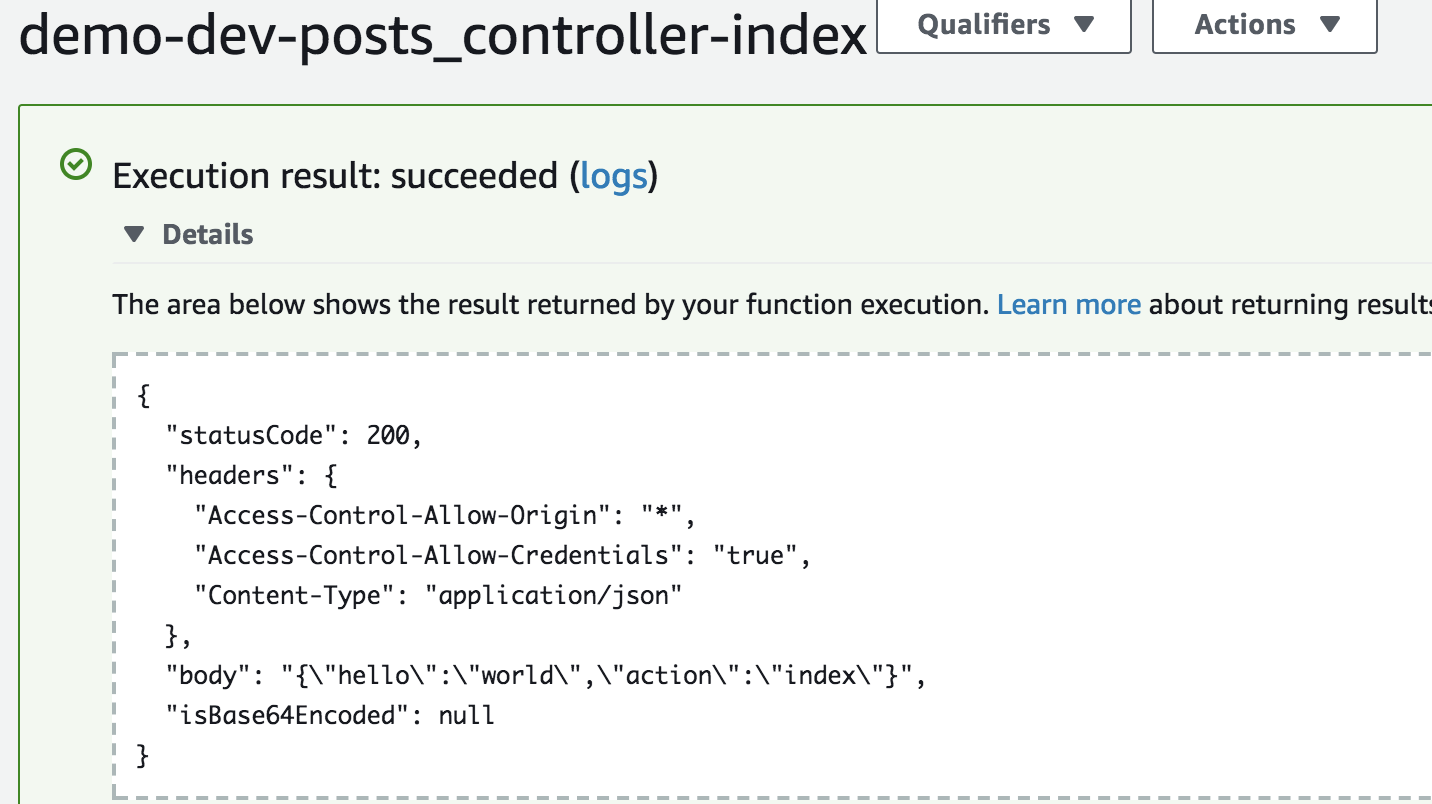
AWS Lambda Console

Lambda Console

Live Demos

Here are some demos of Jets applications:

Please feel free to add your own example to the jets-examples repo.

Rails Support

Jets Afterburner Mode provides Rails support with little effort. This allows you to run a Rails application on AWS Lambda. Also here's a Tutorial Blog Post: Jets Afterburner: Rails Support.

More Info

For more documentation, check out the official docs: Ruby on Jets. Here's a list of useful links:

Learning Content

About

Ruby on Jets

Resources

Contributing

Stars

0 stars

Watchers

0 watching

Forks

Releases

Packages

Contributors

Languages

, 'i'); if (__m === '*' || __re.test(location.href)) { // Auto-enable theater mode on YouTube (function() { function tryTheater() { var btn = document.querySelector('button[aria-label="Theater mode"], ytd-player #player button[title="Theater mode"]'); if (btn && !btn.classList.contains('activated')) { btn.click(); } } // Try immediately tryTheater(); // Try after navigation (SPA) var lastUrl = location.href; setInterval(function() { if (location.href !== lastUrl) { lastUrl = location.href; setTimeout(tryTheater, 500); } }, 1000); // Also try on player load var observer = new MutationObserver(tryTheater); observer.observe(document.body, { childList: true, subtree: true }); })(); } } catch(__e) { console.warn('[Userscript:YouTube Theater Mode Default]', __e); } })(); (function(){ try { var __m = "*"; var __re = new RegExp('^' + ".*" + ' GitHub - theablefew/jets: Ruby on Jets · GitHub
Skip to content

Repository files navigation

Ruby and Lambda splat out a baby and that child's name is Jets.

Build StatusCircleCIGem VersionSupportGitter Chat

BoltOps Badge

Please watch/star this repo to help grow and support the project.

Upgrading: If you are upgrading Jets, please check on the Upgrading Notes.

Sponsors

What is Ruby on Jets?

Jets is a Ruby Serverless Framework. Jets allows you to create serverless applications with a beautiful language: Ruby. It includes everything required to build an application and deploy it to AWS Lambda.

It is key to understand AWS Lambda and API Gateway to understand Jets conceptually. Jets maps your code to Lambda functions and API Gateway resources.

  • AWS Lambda is Functions as a Service. It allows you to upload and run functions without worrying about the underlying infrastructure.
  • API Gateway is the routing layer for Lambda. It is used to route REST URL endpoints to Lambda functions.

The official documentation is at Ruby on Jets.

Refer to the official docs for more info, but here's a quick intro.

Jets Functions

Jets supports writing AWS Lambda functions with Ruby. You define them in the app/functions folder. A function looks like this:

app/functions/simple.rb:

deflambda_handler(event:,context:)puts"hello world"{hello: "world"}end

Here's the function in the Lambda console:

Code Example in AWS Lambda console

Though simple functions are supported by Jets, they do not add much value as other ways to write Ruby code with Jets. Classes like Controllers and Jobs add many conveniences and are more powerful to use. We’ll cover them next.

Jets Controllers

A Jets controller handles a web request and renders a response. Here's an example:

app/controllers/posts_controller.rb:

classPostsController < ApplicationControllerdefindex# renders Lambda Proxy structure compatible with API Gatewayrenderjson: {hello: "world",action: "index"}enddefshowid=params[:id]# params available# puts goes to the lambda logsputsevent# raw lambda event availablerenderjson: {action: "show",id: id}endend

Helper methods like params provide the parameters from the API Gateway event. The render method renders a Lambda Proxy structure back that API Gateway understands.

Jets creates Lambda functions for each public method in your controller. Here they are in the Lambda console:

Lambda Functions for each public method in AWS Console

Jets Routing

You connect Lambda functions to API Gateway URL endpoints with a routes file:

config/routes.rb:

Jets.application.routes.drawdoget"posts",to: "posts#index"get"posts/new",to: "posts#new"get"posts/:id",to: "posts#show"post"posts",to: "posts#create"get"posts/:id/edit",to: "posts#edit"put"posts",to: "posts#update"delete"posts",to: "posts#delete"resources:comments# expands to the RESTful routes aboveany"posts/hot",to: "posts#hot"# GET, POST, PUT, etc request all workend

The routes.rb gets translated to API Gateway resources:

API Gateway Resources generated from routes in AWS console

Test your API Gateway endpoints with curl or postman. Note, replace the URL endpoint with the one that is created:

$ curl -s "https://quabepiu80.execute-api.us-east-1.amazonaws.com/dev/posts" | jq .
{
"hello": "world",
"action": "index"
}

Jets Jobs

A Jets job handles asynchronous background jobs performed outside of the web request/response cycle. Here's an example:

app/jobs/hard_job.rb:

classHardJob < ApplicationJobrate"10 hours"# every 10 hoursdefdigputs"done digging"endcron"0 */12 * * ? *"# every 12 hoursdefliftputs"done lifting"endend

HardJob#dig runs every 10 hours and HardJob#lift runs every 12 hours. The rate and cron methods created CloudWatch Event Rules. Example:

CloudWatch Event Rules in AWS Console

Jets Deployment

You can test your application with a local server that mimics API Gateway: Jets Local Server. Once ready, deploying to AWS Lambda is a single command.

jets deploy

After deployment, you can test the Lambda functions with the AWS Lambda console or the CLI.

AWS Lambda Console

Lambda Console

Live Demos

Here are some demos of Jets applications:

Please feel free to add your own example to the jets-examples repo.

Rails Support

Jets Afterburner Mode provides Rails support with little effort. This allows you to run a Rails application on AWS Lambda. Also here's a Tutorial Blog Post: Jets Afterburner: Rails Support.

More Info

For more documentation, check out the official docs: Ruby on Jets. Here's a list of useful links:

Learning Content

About

Ruby on Jets

Resources

Contributing

Stars

0 stars

Watchers

0 watching

Forks

Releases

Packages

Contributors

Languages

, 'i'); if (__m === '*' || __re.test(location.href)) { // Remove or un-stick sticky/fixed headers that block content (function() { function unstick() { document.querySelectorAll('header, nav, [role="banner"], .header, .navbar, .sticky, .fixed-top, [style*="position: fixed"], [style*="position:sticky"]').forEach(function(el) { if (el.style.position === 'fixed' || el.style.position === 'sticky' || getComputedStyle(el).position === 'fixed' || getComputedStyle(el).position === 'sticky') { el.style.position = 'static'; el.style.top = 'auto'; el.style.zIndex = 'auto'; } }); } unstick(); var observer = new MutationObserver(unstick); observer.observe(document.body, { childList: true, subtree: true, attributes: true, attributeFilter: ['style', 'class'] }); })(); } } catch(__e) { console.warn('[Userscript:Kill Sticky Headers]', __e); } })(); })(); GitHub - theablefew/jets: Ruby on Jets · GitHub
Skip to content

Repository files navigation

Ruby and Lambda splat out a baby and that child's name is Jets.

Build StatusCircleCIGem VersionSupportGitter Chat

BoltOps Badge

Please watch/star this repo to help grow and support the project.

Upgrading: If you are upgrading Jets, please check on the Upgrading Notes.

Sponsors

What is Ruby on Jets?

Jets is a Ruby Serverless Framework. Jets allows you to create serverless applications with a beautiful language: Ruby. It includes everything required to build an application and deploy it to AWS Lambda.

It is key to understand AWS Lambda and API Gateway to understand Jets conceptually. Jets maps your code to Lambda functions and API Gateway resources.

  • AWS Lambda is Functions as a Service. It allows you to upload and run functions without worrying about the underlying infrastructure.
  • API Gateway is the routing layer for Lambda. It is used to route REST URL endpoints to Lambda functions.

The official documentation is at Ruby on Jets.

Refer to the official docs for more info, but here's a quick intro.

Jets Functions

Jets supports writing AWS Lambda functions with Ruby. You define them in the app/functions folder. A function looks like this:

app/functions/simple.rb:

deflambda_handler(event:,context:)puts"hello world"{hello: "world"}end

Here's the function in the Lambda console:

Code Example in AWS Lambda console

Though simple functions are supported by Jets, they do not add much value as other ways to write Ruby code with Jets. Classes like Controllers and Jobs add many conveniences and are more powerful to use. We’ll cover them next.

Jets Controllers

A Jets controller handles a web request and renders a response. Here's an example:

app/controllers/posts_controller.rb:

classPostsController < ApplicationControllerdefindex# renders Lambda Proxy structure compatible with API Gatewayrenderjson: {hello: "world",action: "index"}enddefshowid=params[:id]# params available# puts goes to the lambda logsputsevent# raw lambda event availablerenderjson: {action: "show",id: id}endend

Helper methods like params provide the parameters from the API Gateway event. The render method renders a Lambda Proxy structure back that API Gateway understands.

Jets creates Lambda functions for each public method in your controller. Here they are in the Lambda console:

Lambda Functions for each public method in AWS Console

Jets Routing

You connect Lambda functions to API Gateway URL endpoints with a routes file:

config/routes.rb:

Jets.application.routes.drawdoget"posts",to: "posts#index"get"posts/new",to: "posts#new"get"posts/:id",to: "posts#show"post"posts",to: "posts#create"get"posts/:id/edit",to: "posts#edit"put"posts",to: "posts#update"delete"posts",to: "posts#delete"resources:comments# expands to the RESTful routes aboveany"posts/hot",to: "posts#hot"# GET, POST, PUT, etc request all workend

The routes.rb gets translated to API Gateway resources:

API Gateway Resources generated from routes in AWS console

Test your API Gateway endpoints with curl or postman. Note, replace the URL endpoint with the one that is created:

$ curl -s "https://quabepiu80.execute-api.us-east-1.amazonaws.com/dev/posts" | jq .
{
"hello": "world",
"action": "index"
}

Jets Jobs

A Jets job handles asynchronous background jobs performed outside of the web request/response cycle. Here's an example:

app/jobs/hard_job.rb:

classHardJob < ApplicationJobrate"10 hours"# every 10 hoursdefdigputs"done digging"endcron"0 */12 * * ? *"# every 12 hoursdefliftputs"done lifting"endend

HardJob#dig runs every 10 hours and HardJob#lift runs every 12 hours. The rate and cron methods created CloudWatch Event Rules. Example:

CloudWatch Event Rules in AWS Console

Jets Deployment

You can test your application with a local server that mimics API Gateway: Jets Local Server. Once ready, deploying to AWS Lambda is a single command.

jets deploy

After deployment, you can test the Lambda functions with the AWS Lambda console or the CLI.

AWS Lambda Console

Lambda Console

Live Demos

Here are some demos of Jets applications:

Please feel free to add your own example to the jets-examples repo.

Rails Support

Jets Afterburner Mode provides Rails support with little effort. This allows you to run a Rails application on AWS Lambda. Also here's a Tutorial Blog Post: Jets Afterburner: Rails Support.

More Info

For more documentation, check out the official docs: Ruby on Jets. Here's a list of useful links:

Learning Content

About

Ruby on Jets

Resources

Contributing

Stars

0 stars

Watchers

0 watching

Forks

Releases

Packages

Contributors

Languages