





Undistracted in-app notification in Swift, with added buttons and input box.
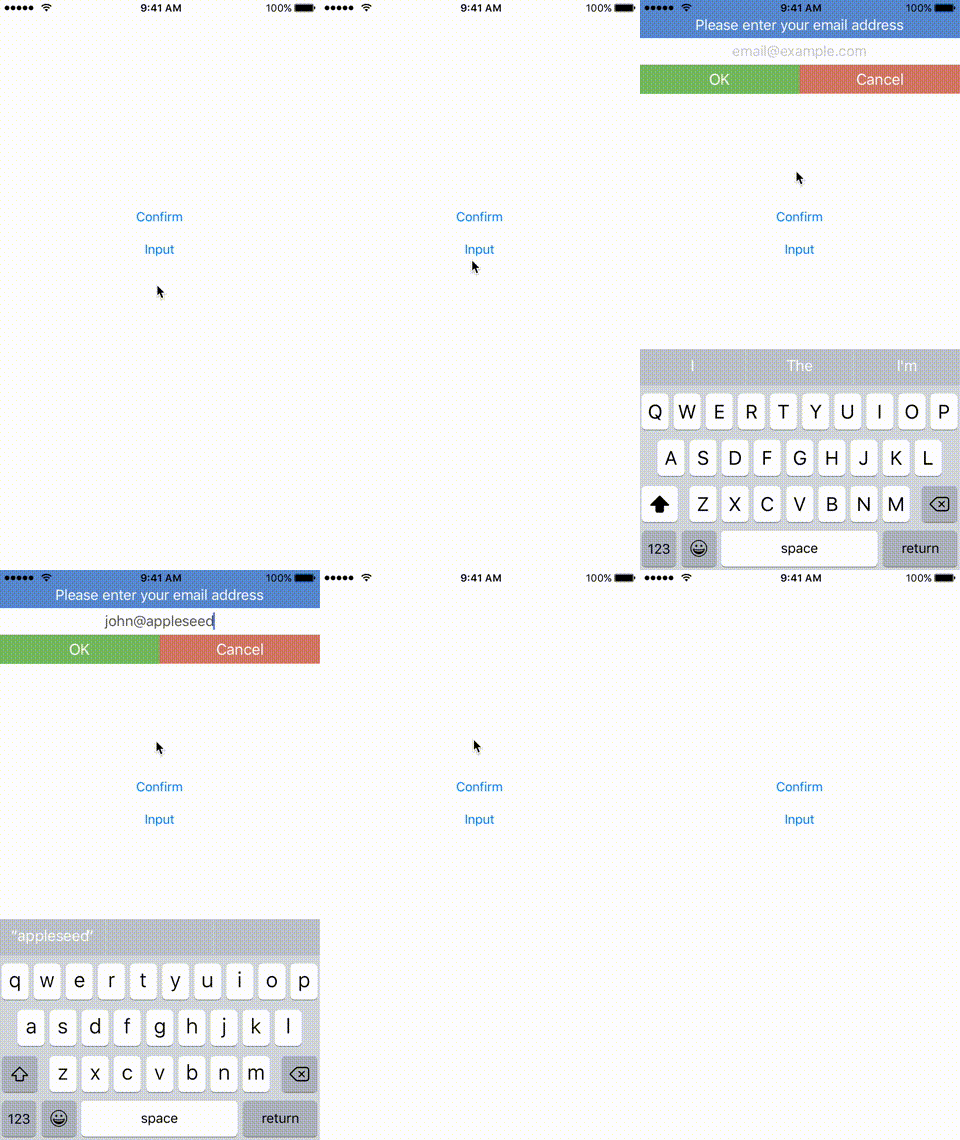
To integrate Notie into your Xcode project using CocoaPods, specify it in your Podfile:
source'https://github.com/CocoaPods/Specs.git'platform:ios,'9.0'use_frameworks!pod'Notie'Then, run the following command:
$ pod installAnd add import Notie to the top of the files using Notie.
Carthage is a decentralized dependency manager that builds your dependencies and provides you with binary frameworks.
You can install Carthage with Homebrew using the following command:
$ brew update
$ brew install carthage
To integrate Notie into your Xcode project using Carthage, specify it in your Cartfile:
github "thii/Notie"
Run carthage to build the framework and drag the built Notie.framework into your Xcode project.
Show a notification with Confirm style
letnotie=Notie(view:self.view, message:"Are you sure you want to do that?", style:.Confirm)
notie.leftButtonAction ={
// Add your left button action here
notie.dismiss()}
notie.rightButtonAction ={
// Add your right button action here
notie.dismiss()}
notie.show()
Or, if you want just a standard notification
letnotie=Notie(view:self.view, message:"This is a notification!", style:.Confirm)
notie.buttonCount =Notie.buttons.standard
notie.leftButtonAction ={
notie.dismiss()}
notie.show()The following parameters can be modified to customize the appearance of the notification.
style: The style of the notification..Confirmstyle includes message view and two confirm buttons..Inputstyle adds an extra input text field. Default to.Confirm.leftButtonAction: A block to call when the user taps on the left button.rightButtonAction: A block to call when the user taps on the right button.leftButtonTitle: The title of the left button. Default toOK.rightButtonTitle: The title of the left button. Default toCancel.placeholder: The placeholder of the input text field. Default tonil.animationDuration: How long the slide down animation should last.messageBackgroundColor: The background color of the message view.messageTextColor: The text color of the message view. Default to white color.inputFieldBackgroundColor: The background color of the input text field. Default to white color.inputFieldTextColor: The text color of the input text field. Default to dark gray.leftButtonBackgroundColor: The background color of the left button.leftButtonTextColor: The text color of the left button. Default to white color.rightButtonBackgroundColor: The background color of the right button.rightButtonTextColor: The text color of the right button. Default to white color.buttonCount: The button configuration, defaults toNotie.buttonCount.standard(two buttons). When the value is set toNotie.buttonCount.single, the action defaults to the left button.keyboardType: The UIKeyboardType to use
getText()returns a String value of the text when using a.Inputstyle
iOS 9 or greater.
Notie is released under the MIT license. See LICENSE for details.