An e-paper calendar, weather, and smart home family dashboard
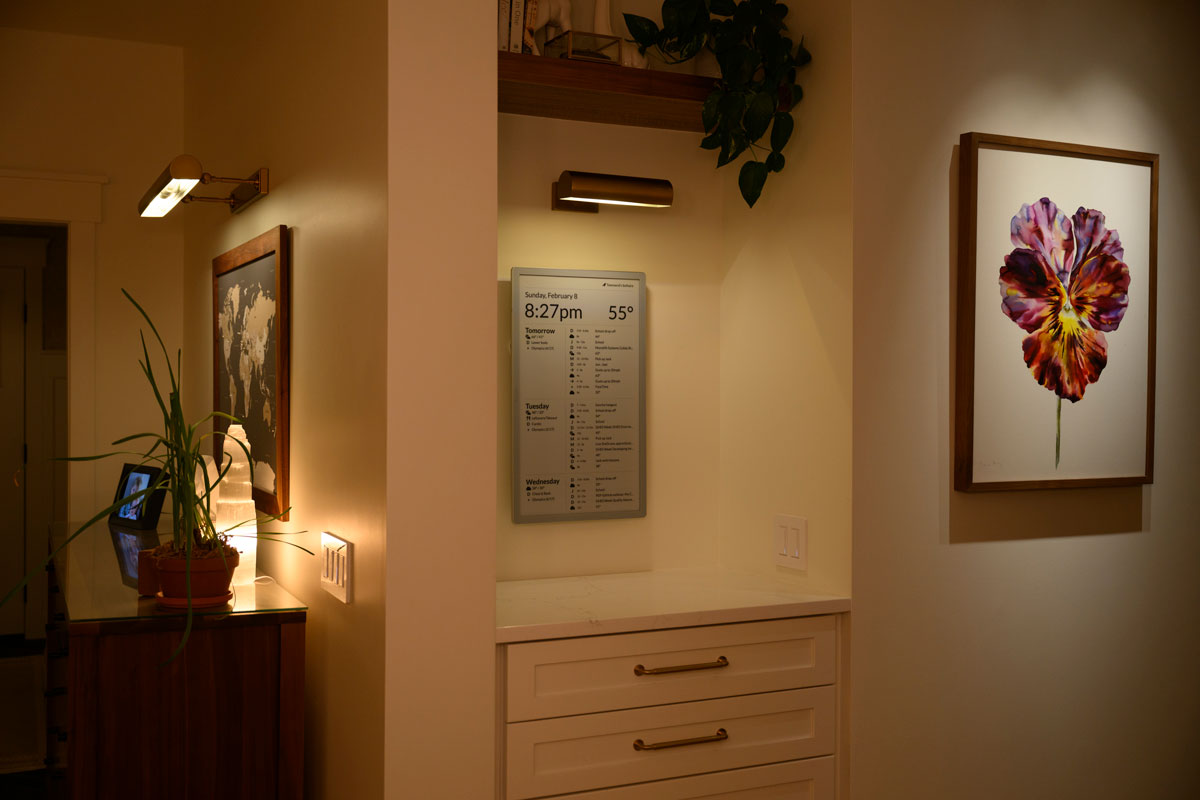
- Visionect Place & Play 13 / Joan 13 Pro - designed for 10m update interval
- Boox Mira Pro 25.3" - Real-time updates via WebSocket
- Boox Mira 13.3" - Real-time updates via WebSocket
- TRMNL (OG)
- TRMNL (X)
- reTerminal E1001 7.5"
- reTerminal E1003 10.3"
- In Home Assistant, go to Settings → Add-ons → Add-on Store
- Click the three-dot menu (⋮) → Repositories
- Add this repository URL:
https://github.com/timeframe/ha-addon - Find Timeframe in the add-on store and click Install
- Click Start
- Access the app at port 8099 (e.g.
http://homeassistant.local:8099)
Timeframe can also run as a regular Docker container, independent of the Home Assistant add-on system. All configuration comes from environment variables, and it can point at any reachable Home Assistant instance — local or remote.
You'll need a Home Assistant long-lived access token: in HA, open your profile → Security → Long-Lived Access Tokens → Create Token.
A ready-to-edit docker-compose.yml is included. Set TIMEFRAME_HOME_ASSISTANT_URL and TIMEFRAME_HOME_ASSISTANT_TOKEN, then:
docker compose up -d --build
Open the dashboard at http://localhost:8099.
docker build -t timeframe .
docker run -d \
--name timeframe \
-p 8099:8099 \
-v timeframe-data:/data \
-e TIMEFRAME_HOME_ASSISTANT_URL="http://192.168.1.50:8123" \
-e TIMEFRAME_HOME_ASSISTANT_TOKEN="your_long_lived_access_token" \
timeframe
| Variable | Default | Description |
|---|---|---|
TIMEFRAME_HOME_ASSISTANT_URL | http://homeassistant.local:8123 | Base URL of your Home Assistant instance. Use any reachable address, e.g. http://192.168.1.50:8123. |
TIMEFRAME_HOME_ASSISTANT_TOKEN | (required) | Home Assistant long-lived access token. Required when running standalone. |
TIMEFRAME_TEMPERATURE_UNIT | F | F or C. |
TIMEFRAME_SPEED_UNIT | mph | mph or kph. |
TIMEFRAME_PRECIPITATION_UNIT | in | in, mm, or cm. |
SECRET_KEY_BASE | (auto-generated) | Secret used to encrypt sessions and stored data. If unset, a random key is generated and persisted to the /data volume on first run. |
PORT | 8099 | Port the web interface listens on inside the container. |
Keep the /data volume across restarts — it holds the bundled Postgres database and the generated secret key.
When installed as a Home Assistant add-on, Timeframe instead authenticates automatically via the Supervisor and reads unit options from the add-on configuration UI, so no environment variables are required in that mode.
The following entities can be created in Home Assistant to customize behavior. Icon names are from Material Design Icons (without the mdi- prefix).
| Entity ID | Default behavior | Description |
|---|---|---|
sensor.timeframe_top_right_* | None | Displays items in the top-right corner. State format: icon,label(optional),rotation(optional) (e.g. door-open,Front Door). Labels containing underscores are automatically humanized. Return multiple items for a single sensor by using newlines. Rotation is a degree value for the icon (e.g. for wind direction). |
sensor.timeframe_top_left_* | None | Displays items in the top-left corner. State format: icon,label(optional),rotation(optional) |
sensor.timeframe_weather_status_* | None | Displays weather status items. State format: icon,label(optional),rotation(optional) |
sensor.timeframe_daily_event_* | None | Adds all-day events to the timeline. State format: icon,label(optional). Return multiple events by using newlines. |
sensor.timeframe_media_player_entity_id | Uses the first media_player.* entity | Set the state to a specific media player entity ID (e.g. media_player.living_room) to control which player's now-playing info is shown. |
sensor.timeframe_weather_entity_id | Uses the first weather.* entity | Set the state to a specific weather entity ID (e.g. weather.home) to control which weather entity provides forecasts. |
sensor.timeframe_weather_feels_like_entity_id | Uses apparent_temperature from the weather entity | Set the state to a specific sensor entity ID to override the feels-like temperature display. |
Here are some example template sensors:
{%ifis_state('input_boolean.check_mailbox', 'on') %}
mailbox,Check mail
{%endif%}{%ifnotis_state('sensor.solaredge_grid_power', 'unknown') %}{%setexcluded_entity_ids = [
'sensor.solaredge_current_power'
] %}{%setentities_list = states
| selectattr('state', 'in', ['unavailable'])
| selectattr('last_changed', 'lt', now() - timedelta(minutes=15))
| map(attribute='entity_id')
| reject('in', excluded_entity_ids)
| list%}{%setdata = namespace(dnamelist=[]) %}{%forentity_idinentities_list%}{%setdevice_name = device_attr(entity_id, 'name_by_user') | string%}{%ifnot (device_name == "None") %}{%setdata.dnamelist = data.dnamelist + [ device_name ] %}{%endif%}{%endfor%}{%setdevices = data.dnamelist | unique%}{%- foritemindevices%}
alert,{{item}}
{%- endfor%}{%endif%}{%forstateinstates.sensor
|selectattr('attributes.device_class', '==', 'battery')
|selectattr('entity_id', 'search', 'battery_level') -%}{%ifstates(state.entity_id) |int(100) <= 10 %}
battery-alert-variant-outline,{{ state.attributes.friendly_name |replace(' Battery Level', ' ') }}({{ states(state.entity_id) }}%)
{%endif%}{%- endfor -%}{%setvacuum_error = states('sensor.qrevo_curv_2_flow_vacuum_error') %}{%setfilter_time = states('sensor.qrevo_curv_2_flow_filter_time_left') %}{%setsensor_time = states('sensor.qrevo_curv_2_flow_sensor_time_left') %}{%setside_brush_time = states('sensor.qrevo_curv_2_flow_side_brush_time_left') %}{%setmain_brush_time = states('sensor.qrevo_curv_2_flow_main_brush_time_left') %}{%setdock_error = states('sensor.qrevo_curv_2_flow_dock_dock_error') %}{%ifvacuum_errornotin ["none", "ok", "unknown", "unavailable"] %}
robot,{{ vacuum_error }}
{%endif%}{%ifis_number(filter_time) andfilter_time | float < 10 %}
robot,Clean air filter
{%endif%}{%ifis_number(sensor_time) andsensor_time | float < 10 %}
robot,Clean sensors
{%endif%}{%ifis_number(side_brush_time) andside_brush_time | float < 10 %}
robot,Replace side brushes
{%endif%}{%ifis_number(main_brush_time) andmain_brush_time | float < 10 %}
robot,Replace main brush
{%endif%}{%ifis_state('sensor.qrevo_curv_2_flow_status', 'idle') oris_state('sensor.qrevo_curv_2_flow_status', 'charger_disconnected') %}
robot,Return to charger
{%endif%}{%ifdock_errornotin ["ok", "unknown", "unavailable"] %}
robot,{{ dock_error }}
{%endif%}{%forsensorin ['binary_sensor.deck_door_sensor_opening','binary_sensor.alley_gate_door_sensor_opening','binary_sensor.west_gate_door_sensor_opening','binary_sensor.mudroom_door_sensor_opening','binary_sensor.utility_door_sensor_opening','binary_sensor.balcony_door_sensor_opening'] %}{%ifis_state(sensor, 'on') %}
door-open,{{ sensor|replace('binary_sensor.', '')|replace('_door_sensor_opening', '')|capitalize|replace('_', ' ') }}
{%endif%}{%endfor%}{%ifis_state('input_boolean.laundry_washer_needs_changed', 'on') %}{%setelapsed = as_timestamp(now()) - as_timestamp(states.input_boolean.laundry_washer_needs_changed.last_changed) %}{%settotal_minutes = ((elapsed + 150) // 300 * 5) | int%}{%setdays = total_minutes // 1440 %}{%sethours = total_minutes % 1440 // 60 %}{%setminutes = total_minutes % 60 %}
washing-machine,Washer{%iftotal_minutes > 0 %} ({%ifdays%}{{ days }}d{%endif%}{%ifhours%}{{ hours }}h{%endif%}{%ifminutes%}{{ minutes }}m{%endif%}){%endif%}{%endif%}{%setdoors = [
('Front', 'binary_sensor.front_door_sensor_opening', 'input_boolean.front_door_locked'),
('Patio', 'binary_sensor.patio_door_sensor_opening', 'input_boolean.patio_door_locked'),
('Alley', 'binary_sensor.alley_door_sensor_opening', 'input_boolean.alley_door_locked')
] %}{%forname, door, lockindoors%}{%ifis_state(door, 'on') andis_state(lock, 'on') %}
lock-alert,{{ name }}
{%elifis_state(door, 'on') %}
door-open,{{ name }}
{%elifis_state(lock, 'off') %}
lock-open-variant,{{ name }}
{%endif%}{%endfor%}{%ifis_state('binary_sensor.utility_chest_freezer_door_opening', 'on') %}
door-open,Chest freezer
{%endif%}{%ifis_state('binary_sensor.esphome_mailbox_mailbox_door', 'on') %}
door-open,Mailbox
{%endif%}{%ifis_state('cover.ratgdov25i_4b0f97_door', 'open') %}
garage-open,Single
{%endif%}{%ifis_state('cover.ratgdov25i_4b0f8a_door', 'open') %}
garage-open-variant,Double
{%endif%}{%ifis_state('sensor.solaredge_grid_power', 'unknown') %}
battery,Backup {{ states('sensor.solaredge_storage_level') }}%
{%endif%}{%setpower = states('sensor.kitchen_dishwasher_switched_outlet_power') %}{%ifis_number(power) andpower | float < 2 andnow().hour > 19 %}
dishwasher,Run the dishwasher!
{%endif%}{%ifnotis_state('select.main_heat_source', 'heat pump only') %}
heat,Main HVAC {{ states("select.main_heat_source") }}
{%endif%}{%ifnotis_state('select.upstairs_heat_source', 'heat pump only') %}
heat,Upstairs HVAC {{ states("select.upstairs_heat_source") }}
{%endif%}{%setuv = states('sensor.weather_station_uv_index') | float(-1) %}{%ifuv > 3 %}
weather-sunny-alert,{{ uv | int }}
{%endif%}{%ifstates('sensor.weather_station_wind_gust') | int > 10 %}
arrow-up,{{states('sensor.weather_station_wind_gust') | int}},{{states('sensor.weather_station_wind_direction_average') | int - 45 }}
{%endif%}bird,{{ states('sensor.least_recently_seen_bird') }}{%setcounter = states.sensor.blitzortung_lightning_counter%}{%setdistance = states('sensor.blitzortung_lightning_distance') %}{%ifint(counter.state, 0) > 0 andnow() - counter.last_changed < timedelta(minutes=15) %}
flash-alert,{{ distance | int }}mi
{%endif%}{%settoday = now().date() %}{%setfirst = strptime("2020-01-01", "%Y-%m-%d").date() %}{%setfirst_before_anniversary = today.month < first.monthor (today.month == first.monthandtoday.day < first.day) %}{%setfirst_years = today.year - first.year - (1 iffirst_before_anniversaryelse 0) %}{%setfirst_anniversary = first.replace(year=first.year + first_years) %}{%setfirst_months = (today.year - first_anniversary.year) * 12 + today.month - first_anniversary.month - (1 iftoday.day < first_anniversary.dayelse 0) %}{%setfirst_month_index = first_anniversary.month - 1 + first_months%}{%setfirst_cursor = strptime("%04d-%02d-%02d" | format(first_anniversary.year + first_month_index // 12, first_month_index % 12 + 1, first.day), "%Y-%m-%d").date() %}{%setfirst_days = (today - first_cursor).days%}
numeric-1-circle,{%iffirst_years%}{{ first_years }}y{%endif%}{%iffirst_months%}{{ first_months }}m{%endif%}{%iffirst_days >= 7 %}{{ first_days // 7 }}w{%endif%}{%iffirst_days % 7 %}{{ first_days % 7 }}d{%endif%}{%ifnotfirst_yearsandnotfirst_monthsandnotfirst_days%}0d{%endif%}{%setsecond = strptime("2022-01-01", "%Y-%m-%d").date() %}{%setsecond_before_anniversary = today.month < second.monthor (today.month == second.monthandtoday.day < second.day) %}{%setsecond_years = today.year - second.year - (1 ifsecond_before_anniversaryelse 0) %}{%setsecond_anniversary = second.replace(year=second.year + second_years) %}{%setsecond_months = (today.year - second_anniversary.year) * 12 + today.month - second_anniversary.month - (1 iftoday.day < second_anniversary.dayelse 0) %}{%setsecond_month_index = second_anniversary.month - 1 + second_months%}{%setsecond_cursor = strptime("%04d-%02d-%02d" | format(second_anniversary.year + second_month_index // 12, second_month_index % 12 + 1, second.day), "%Y-%m-%d").date() %}{%setsecond_days = (today - second_cursor).days%}
numeric-2-circle,{%ifsecond_years%}{{ second_years }}y{%endif%}{%ifsecond_months%}{{ second_months }}m{%endif%}{%ifsecond_days >= 7 %}{{ second_days // 7 }}w{%endif%}{%ifsecond_days % 7 %}{{ second_days % 7 }}d{%endif%}{%ifnotsecond_yearsandnotsecond_monthsandnotsecond_days%}0d{%endif%}sensor.weather_station_feels_likemedia_player.sonos_amp_2{%settemp = states('sensor.weather_station_feels_like') | int%}{%setaqi = states('sensor.airnow_air_quality_index') | int%}{%setnow = now().time() %}{%setstart = strptime('06:00', '%H:%M').time() %}{%setend = strptime('20:00', '%H:%M').time() %}{%ifaqi < 70 andtemp > 63 andtemp < 71 andstart <= now < end%}
window-open
{%endif%}{%ifnotis_state('input_text.solofolio_status', 'ok') %}
web-cancel, SoloFolio unhealthy
{%endif%}{%ifnotis_state('input_text.timeframe_status', 'ok') %}
web-cancel, Timeframe unhealthy
{%endif%}{%ifstates('input_number.solofolio_unread_support_messages') | int > 0 %}
email-outline, SoloFolio message
{%endif%}{%ifis_state('input_boolean.laundry_dryer_needs_changed', 'on') %}{%setelapsed = as_timestamp(now()) - as_timestamp(states.input_boolean.laundry_dryer_needs_changed.last_changed) %}{%settotal_minutes = ((elapsed + 150) // 300 * 5) | int%}{%setdays = total_minutes // 1440 %}{%sethours = total_minutes % 1440 // 60 %}{%setminutes = total_minutes % 60 %}
tumble-dryer,Dryer{%iftotal_minutes > 0 %} ({%ifdays%}{{ days }}d{%endif%}{%ifhours%}{{ hours }}h{%endif%}{%ifminutes%}{{ minutes }}m{%endif%}){%endif%}{%endif%}{%ifis_state('binary_sensor.dog_bowl_water_detected', 'off') %}
paw,Water low
{%endif%}{%ifis_state('device_tracker.garage_rav4_beacon', 'home') andis_state('sensor.garage_ev_charger_west_status', 'not_connected') %}
charging-station,RAV4 unplugged
{%endif%}{%ifis_state('input_boolean.bring_in_groceries', 'on') %}
basket,Bring in groceries
{%endif%}{%settoner = states('sensor.away_room_printer_black_toner_remaining') %}{%ifis_number(toner) andtoner | float < 25 %}
print,Printer ink low
{%endif%}{%settemperature = states('sensor.hawksley_nas_temperature') %}{%ifis_number(temperature) andtemperature | float < 1 %}
alert,NAS Offline
{%endif%}{%ifnotis_state('binary_sensor.8_8_8_8', 'on') %}
alert,Offline
{%endif%}{%ifis_state('sensor.joelhawksley_audio_state', 'input') %}
video,Meeting
{%elifis_state('sensor.joelhawksley_audio_state', 'output') %}
headphones,Listening
{%endif%}{%ifis_state('binary_sensor.away_room_door_sensor_opening', 'off') andnow().hour > 19 %}
door-closed,Open Door for robot
{%endif%}{%setaqi = states('sensor.honeysuckle_air_quality_aqi_us_aqi') | int%}{%ifaqi > 100 %}
face-mask-outline,{{ aqi }}
{%elifaqi > 50 %}
air-filter,{{ aqi }}
{%endif%}{%setuv = states('sensor.weather_station_uv_index') %}{%setsolar_kw = states('sensor.solaredge_solar_power') %}{%ifis_number(uv) andis_number(solar_kw) anduv | float >= 4 andsolar_kw | float < 0.5 %}
solar-power,UV >4 but low solar output!
{%endif%}You can customize how an individual calendar event renders by adding one or more tokens to its description. Tokens are usually placed on their own line and are stripped from any text shown on the display. Icon names come from Material Design Icons (without the mdi- prefix).
| Token | Description |
|---|---|
timeframe-omit | Hides this event from the display. |
timeframe-icon:NAME | Sets the event's icon, e.g. timeframe-icon:soccer. An mdi- prefix is accepted and ignored. |
timeframe-title:TEXT | Overrides the displayed title without changing the real event title. |
timeframe-only:TOKENS | Shows the event only on the listed devices. TOKENS is a comma-separated list of device names or ids, e.g. timeframe-only:Kitchen, 12. |
timeframe-banner (or #banner) | Shows the event as a full-width banner while it is active (see below). |
timeframe-countdown:N | Adds an all-day "(in Xd)" reminder on each of the N days leading up to the event (never on/after the event day). N is a positive number (up to 999). Honored by the hosted Timeframe app. |
A recurring event whose title ends with a four-digit year in parentheses, e.g. Ada (1990), renders that year as an elapsed count (Ada (35)) — this is how birthdays and anniversaries show an age.
To display a full-width banner at the bottom of the screen, include timeframe-banner or #banner in a calendar event's description. The banner appears while the event is active (between its start and end times).
- The event title becomes the banner heading.
- The rest of the description (after removing the tag) becomes the banner body. Basic HTML formatting (
<b>,<i>,<u>,<s>) is supported; plain-text newlines are converted to line breaks.
Example: Create a calendar event titled "School Closed Today" with the description:
#banner
Due to inclement weather, <b>all schools</b> will be closed today. Stay safe!
Create config/timeframe.yml from config/timeframe.yml.example with your settings.
| Variable | Description |
|---|---|
VISIONECT_SERVER | Experimental. Set to "true" to start the Visionect TCP protocol server alongside Puma. Required for Visionect Place & Play / Joan 13 Pro devices. |
bundle installbin/rails s- Visit http://localhost:3000
bin/rails test
This project is licensed under the PolyForm Noncommercial License 1.0.0 — see LICENSE.md for details.