Dynamic Style Sheets for dynamic projects


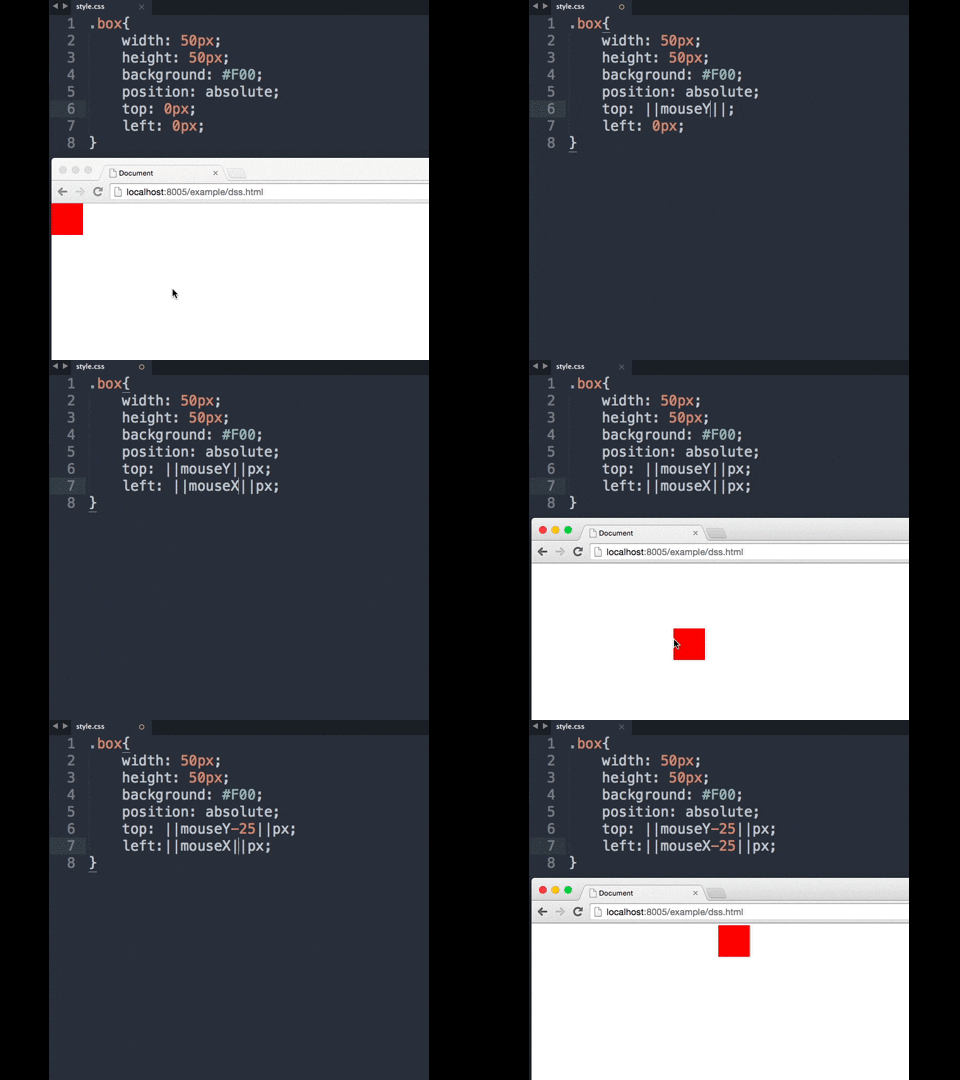
Dynamic Style Sheets gives you the ability to dynamically set values to your css properties on the go. No more inline binding.
An DSS example
First things first ...
bower install dss;<!--load the dss--><scriptsrc="dss.js"></script>then ...
<!--link your cssNOTE : use the **dynamic-stylesheet** rel attribute so I can put poison in your css.--><linkrel="dynamic-stylesheet" href="style.css">or
<!--NOTE : use the **dynamic-stylesheet** type attribute so I can put poison in your css.--><styletype="dynamic-stylesheet">
...
</style>.box{
width:50px;
height:50px;
background: ||companyColor:red||;
position: absolute;
top: ||mouseY-25||px;
left: ||mouseX-25||px;
}The mouseY and mouseX identifiers will automatically receive the mouse position on the screen, every time it changes.
The companyColor identifier must be set over javascript, but until you do, it will receive the default value red.
dss.setProperty('companyColor','#1616FF')dss.setProperty
dss.setProperty('companyColor','#1616FF')dss.setDynamicProperty
//will generate mouseX and mouseY property everytime document fires mousemovedss.setDynamicProperty('mouse',function(){return{context : document,event : 'mousemove',getter : function(e){return{x : e.pageX,y : e.pageY,};}};});Automatically receives the x position of the cursor.
Automatically receives the y position of the cursor.
Automatically receives the x position of the window scroll.
Automatically receives the y position of the window scroll.
Automatically receives the window width.
Automatically receives the window height.
0.0.4 Alpha
npm install && grunt