




Flutter Pinput is a package that provides an easy-to-use and customizable Pin code input field. It offers several features such as animated decoration switching, form validation, SMS autofill, custom cursor, copying from clipboard, and more. It also provides beautiful examples that you can choose from.
If you are using Flutter version <3.7.0 you have to use Pinput version 2.2.21
- Animated Decoration Switching
- Form validation
- SMS Autofill on iOS
- SMS Autofill on Android
- Standard Cursor
- Custom Cursor
- Cursor Animation
- Copy From Clipboard
- Ready For Custom Keyboard
- Standard Paste option
- Obscuring Character
- Obscuring Widget
- Haptic Feedback
- Close Keyboard After Completion
- Beautiful Examples
PRs Welcome
Discord Channel
Examples app on Github has multiple templates to choose from
Don't forget to give it a star ⭐
| Live Demo | Rounded With Shadows | Rounded With Cursor |
|---|---|---|
 | 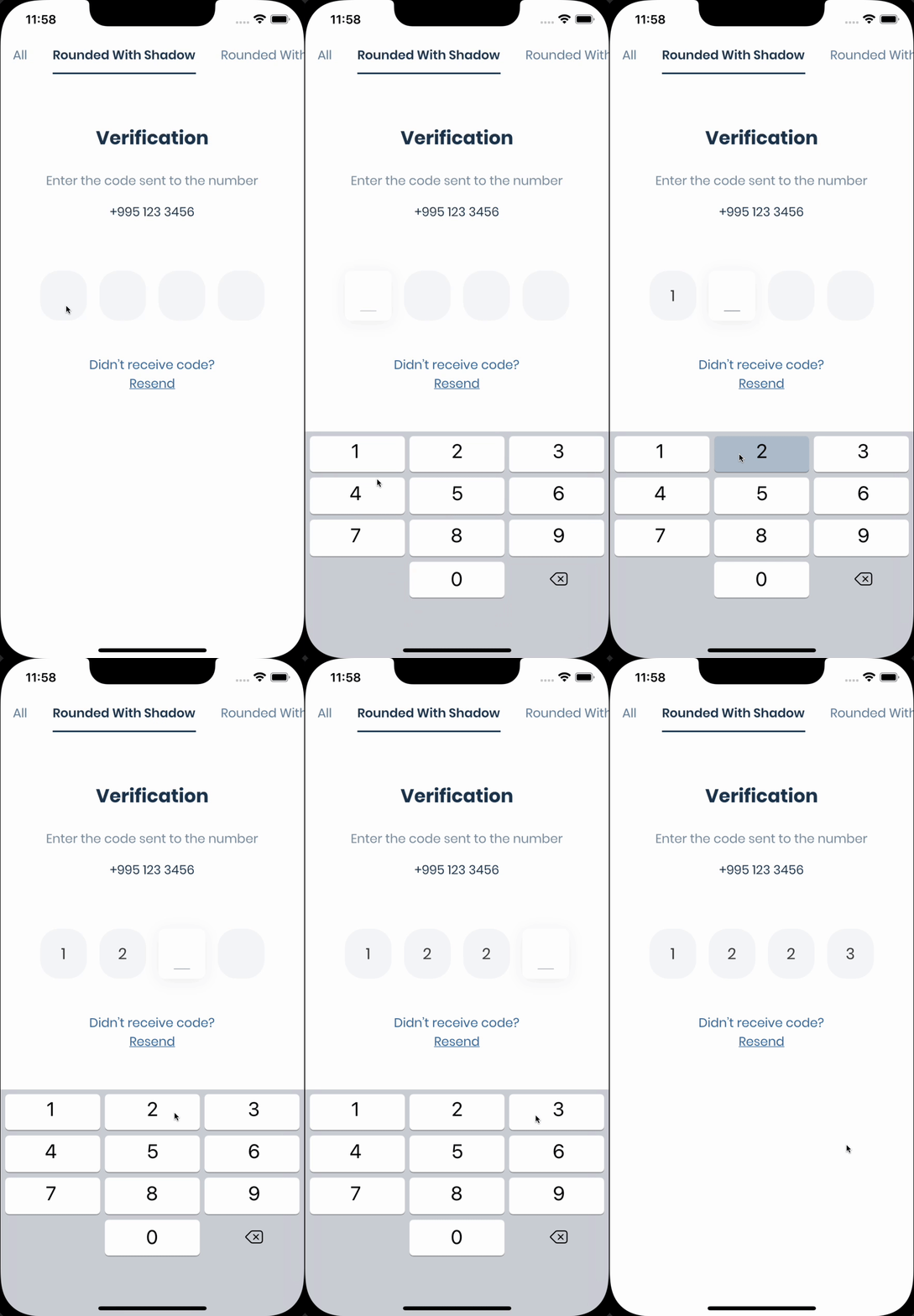 | 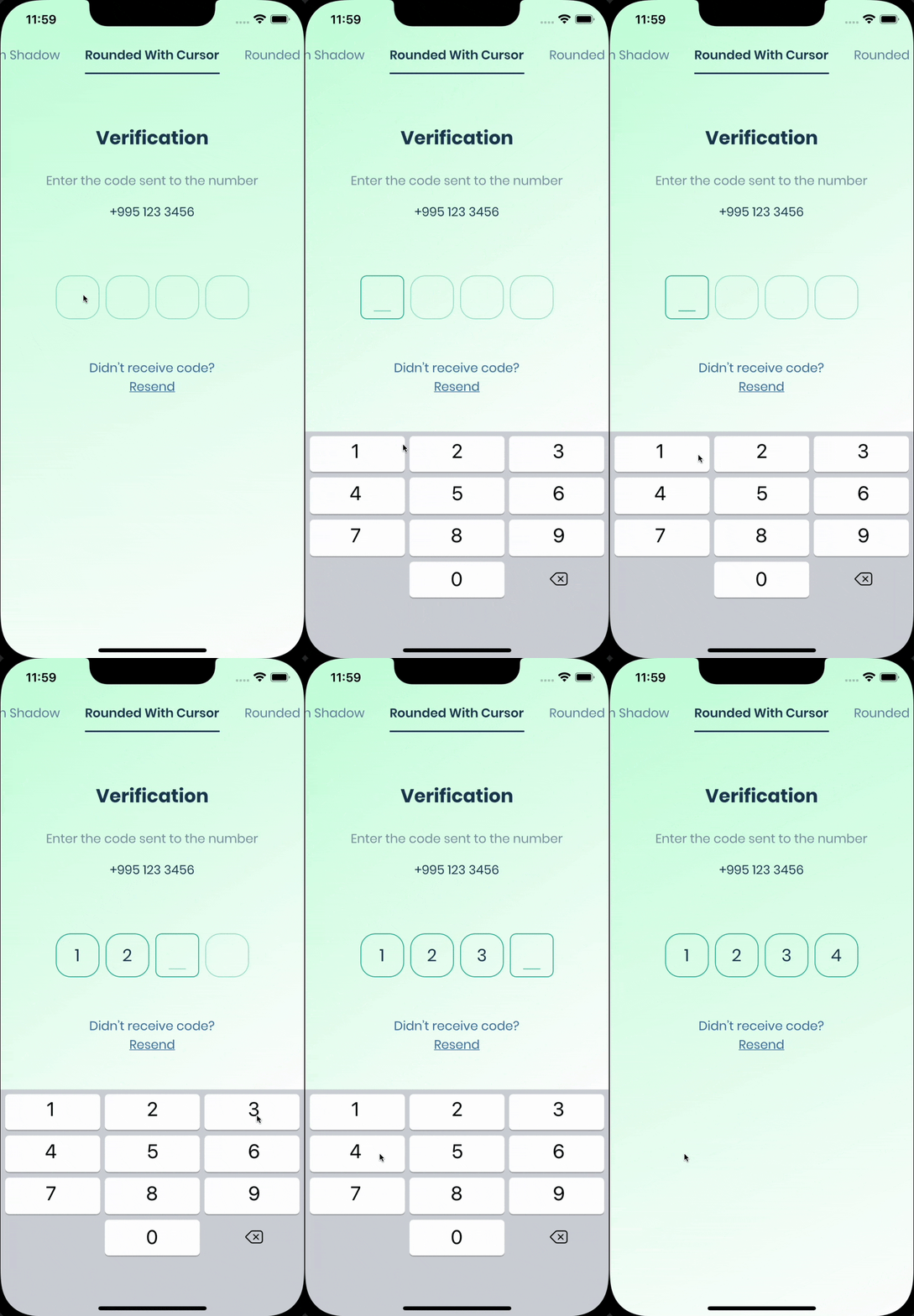 |
| Rounded Filled | With Bottom Cursor | Filled |
|---|---|---|
 | 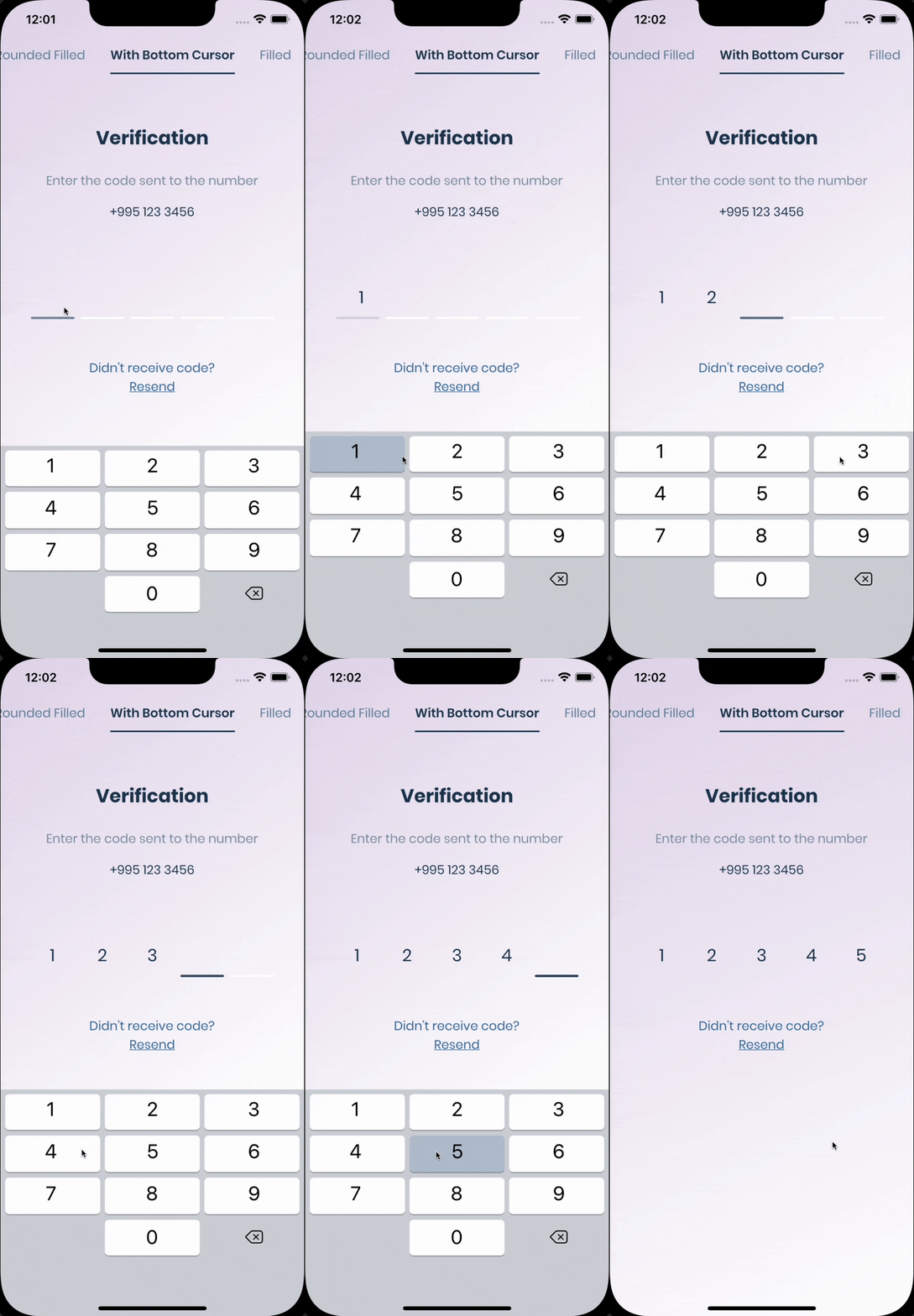 | 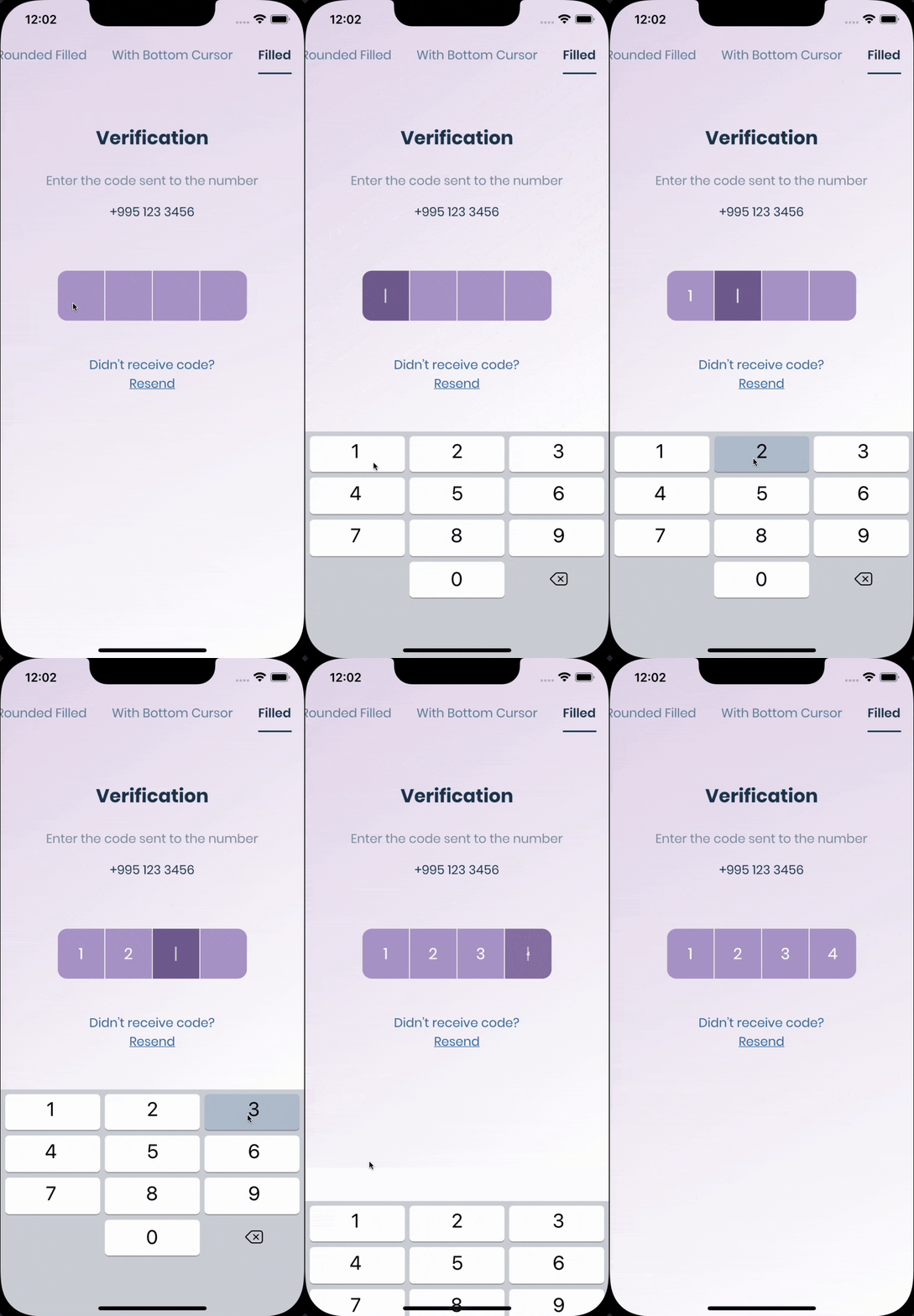 |
The pin has 6 states defaultfocused, submitted, following, disabled, error, you can customize each state by specifying theme parameter.
Pin smoothly animates from one state to another automatically.
PinTheme Class
| Property | Default/Type |
|---|---|
| width | 56.0 |
| height | 60.0 |
| textStyle | TextStyle() |
| margin | EdgeInsetsGeometry |
| padding | EdgeInsetsGeometry |
| constraints | BoxConstraints |
You can use standard Pinput like so
WidgetbuildPinPut() {
returnPinput(
onCompleted: (pin) =>print(pin),
);
}
If you want to customize it, create defaultPinTheme first.
final defaultPinTheme =PinTheme(
width:56,
height:56,
textStyle:TextStyle(fontSize:20, color:Color.fromRGBO(30, 60, 87, 1), fontWeight:FontWeight.w600),
decoration:BoxDecoration(
border:Border.all(color:Color.fromRGBO(234, 239, 243, 1)),
borderRadius:BorderRadius.circular(20),
),
);
if you want all pins to be the same don't pass other theme parameters,
If not, create focusedPinTheme, submittedPinTheme, followingPinTheme, errorPinTheme from defaultPinTheme
final focusedPinTheme = defaultPinTheme.copyDecorationWith(
border:Border.all(color:Color.fromRGBO(114, 178, 238, 1)),
borderRadius:BorderRadius.circular(8),
);
final submittedPinTheme = defaultPinTheme.copyWith(
decoration: defaultPinTheme.decoration.copyWith(
color:Color.fromRGBO(234, 239, 243, 1),
),
);
Put everything together
final defaultPinTheme =PinTheme(
width:56,
height:56,
textStyle:TextStyle(fontSize:20, color:Color.fromRGBO(30, 60, 87, 1), fontWeight:FontWeight.w600),
decoration:BoxDecoration(
border:Border.all(color:Color.fromRGBO(234, 239, 243, 1)),
borderRadius:BorderRadius.circular(20),
),
);
final focusedPinTheme = defaultPinTheme.copyDecorationWith(
border:Border.all(color:Color.fromRGBO(114, 178, 238, 1)),
borderRadius:BorderRadius.circular(8),
);
final submittedPinTheme = defaultPinTheme.copyWith(
decoration: defaultPinTheme.decoration.copyWith(
color:Color.fromRGBO(234, 239, 243, 1),
),
);
returnPinput(
defaultPinTheme: defaultPinTheme,
focusedPinTheme: focusedPinTheme,
submittedPinTheme: submittedPinTheme,
validator: (s) {
return s =='2222'?null:'Pin is incorrect';
},
pinputAutovalidateMode:PinputAutovalidateMode.onSubmit,
showCursor:true,
onCompleted: (pin) =>print(pin),
);Works out of the box, by tapping the code on top of the keyboard
If you are using firebase_auth you have to set androidSmsAutofillMethod to AndroidSmsAutofillMethod.none and set controller's value in verificationCompleted callback, here is an example code:
Pinput(
androidSmsAutofillMethod:AndroidSmsAutofillMethod.none,
controller: pinController,
);
And set pinController's value in verificationCompleted callback:
awaitFirebaseAuth.instance.verifyPhoneNumber(
verificationCompleted: (PhoneAuthCredential credential) {
pinController.setText(credential.smsCode);
},
verificationFailed: (FirebaseAuthException e) {},
codeSent: (String verificationId, int? resendToken) {},
codeAutoRetrievalTimeout: (String verificationId) {},
);
If you aren't using firebase_auth, you have two options, SMS Retriever API and SMS User Consent API,
SmartAuth is a wrapper package for Flutter for these APIs and it is behind the autofill support of Pinput
To use Retriever API you need The App signature, Pinput calculates the hash for you and prints it in the console Sms code will be automatically applied, without user interaction.
Note that The App Signature might be different for debug and release mode
returnPinput(
androidSmsAutofillMethod:AndroidSmsAutofillMethod.smsRetrieverApi,
);
Example of printed signature
Pinput: App Signature for SMS Retriever API Is: kg+TZ3A5qzS
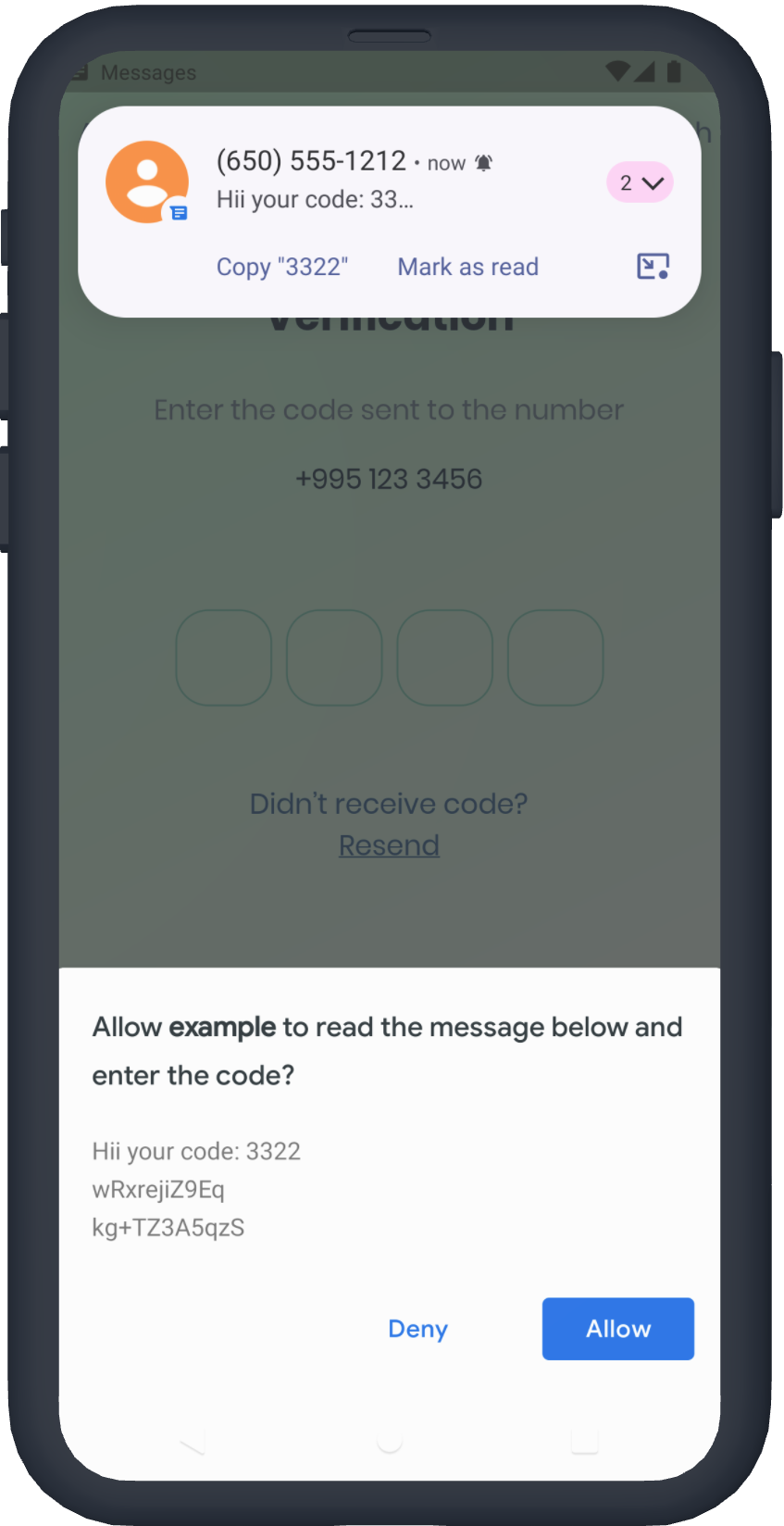
You don't need the App signature, the user will be prompted to confirm reading the message
returnPinput(
androidSmsAutofillMethod:AndroidSmsAutofillMethod.smsUserConsentApi,
);
If autofill support doesn't fit your needs, you can use SmartAuth to implement autofill, Also, you can suggest a phone number by showing native Android dialog.
No need to add SmartAuth dependency, it is already added
See Example app for more templates
/// Create Controller final pinController =TextEditingController(); /// Set text programmatically pinController.setText('1222'); /// Append typed character, useful if you are using custom keyboard pinController.append('1', 4); /// Delete last character pinController.delete(); /// Don't call setText, append, delete in build method, this is just illustration. returnPinput( controller: pinController, ); /// Create FocusNode final pinputFocusNode =FocusNode(); /// Focus pinput pinputFocusNode.requestFocus(); /// UnFocus pinput pinputFocusNode.unfocus(); /// Don't call requestFocus, unfocus in build method, this is just illustration. returnPinput( focusNode: pinputFocusNode, ); /// Create keyfinal formKey =GlobalKey<FormState>();
/// Validate manually/// Don't call validate in build method, this is just illustration.formKey.currentState!.validate();
returnForm(
key: formKey,
child:Pinput(
// Without Validator// If true error state will be applied no matter what validator returns
forceErrorState:true,
// Text will be displayed under the Pinput
errorText:'Error',
/// ------------ /// With Validator /// Auto validate after user tap on keyboard done button, or completes Pinput pinputAutovalidateMode:PinputAutovalidateMode.onSubmit,
validator: (pin) {
if (pin =='2224') returnnull;
/// Text will be displayed under the Pinputreturn'Pin is incorrect';
},
),
);- Make sure you are using real device, not simulator
- Temporary replace Pinput with TextField, and check if autofill works. If, not it's probably a problem with SMS you are getting, autofill doesn't work with most of the languages
- If you are using non stable version of Flutter that might be cause because something might be broken inside the Framework
Set androidSmsAutofillMethod to AndroidSmsAutofillMethod.none and set controller's value in verificationCompleted callback, here is an example code:
Pinput(
androidSmsAutofillMethod:AndroidSmsAutofillMethod.none,
controller: pinController,
);
awaitFirebaseAuth.instance.verifyPhoneNumber(
verificationCompleted: (PhoneAuthCredential credential) {
pinController.setText(credential.smsCode);
},
verificationFailed: (FirebaseAuthException e) {},
codeSent: (String verificationId, int? resendToken) {},
codeAutoRetrievalTimeout: (String verificationId) {},
);constPinput({
this.length =PinputConstants._defaultLength,
this.defaultPinTheme,
this.focusedPinTheme,
this.submittedPinTheme,
this.followingPinTheme,
this.disabledPinTheme,
this.errorPinTheme,
this.onChanged,
this.onCompleted,
this.onSubmitted,
this.onTap,
this.onLongPress,
this.controller,
this.focusNode,
this.preFilledWidget,
this.separatorBuilder,
this.smsCodeMatcher =PinputConstants.defaultSmsCodeMatcher,
this.senderPhoneNumber,
this.androidSmsAutofillMethod =AndroidSmsAutofillMethod.none,
this.listenForMultipleSmsOnAndroid =false,
this.mainAxisAlignment =MainAxisAlignment.center,
this.crossAxisAlignment =CrossAxisAlignment.start,
this.pinContentAlignment =Alignment.center,
this.animationCurve =Curves.easeIn,
this.animationDuration =PinputConstants._animationDuration,
this.pinAnimationType =PinAnimationType.scale,
this.enabled =true,
this.readOnly =false,
this.useNativeKeyboard =true,
this.toolbarEnabled =true,
this.autofocus =false,
this.obscureText =false,
this.showCursor =true,
this.isCursorAnimationEnabled =true,
this.enableIMEPersonalizedLearning =false,
this.enableSuggestions =true,
this.hapticFeedbackType =HapticFeedbackType.disabled,
this.closeKeyboardWhenCompleted =true,
this.keyboardType =TextInputType.number,
this.textCapitalization =TextCapitalization.none,
this.slideTransitionBeginOffset,
this.cursor,
this.keyboardAppearance,
this.inputFormatters =const [],
this.textInputAction,
this.autofillHints,
this.obscuringCharacter ='•',
this.obscuringWidget,
this.selectionControls,
this.restorationId,
this.onClipboardFound,
this.onAppPrivateCommand,
this.mouseCursor,
this.forceErrorState =false,
this.errorText,
this.validator,
this.errorBuilder,
this.errorTextStyle,
this.pinputAutovalidateMode =PinputAutovalidateMode.onSubmit,
this.scrollPadding =constEdgeInsets.all(20),
this.contextMenuBuilder = _defaultContextMenuBuilder,
this.onTapOutside,
Key? key,
}) :assert(obscuringCharacter.length ==1),
assert(length >0),
assert(
textInputAction !=TextInputAction.newline,
'Pinput is not multiline',
),
super(key: key);
/// Theme of the pin in default statefinalPinTheme? defaultPinTheme;
/// Theme of the pin in focused statefinalPinTheme? focusedPinTheme;
/// Theme of the pin in submitted statefinalPinTheme? submittedPinTheme;
/// Theme of the pin in following statefinalPinTheme? followingPinTheme;
/// Theme of the pin in disabled statefinalPinTheme? disabledPinTheme;
/// Theme of the pin in error statefinalPinTheme? errorPinTheme;
/// If true keyboard will be closedfinalbool closeKeyboardWhenCompleted;
/// Displayed fields count. PIN code length.finalint length;
/// By default Android autofill is Disabled, you cane enable it by using any of options listed below////// First option is [AndroidSmsAutofillMethod.smsRetrieverApi] it automatically reads sms without user interaction/// More about Sms Retriever API https://developers.google.com/identity/sms-retriever/overview?hl=en////// Second option requires user interaction to confirm reading a SMS, See readme for more details/// [AndroidSmsAutofillMethod.smsUserConsentApi]/// More about SMS User Consent API https://developers.google.com/identity/sms-retriever/user-consent/overviewfinalAndroidSmsAutofillMethod androidSmsAutofillMethod;
/// If true [androidSmsAutofillMethod] is not [AndroidSmsAutofillMethod.none]/// Pinput will listen multiple sms codes, helpful if user request another sms codefinalbool listenForMultipleSmsOnAndroid;
/// Used to extract code from SMS for Android Autofill if [androidSmsAutofillMethod] is enabled/// By default it is [PinputConstants.defaultSmsCodeMatcher]finalString smsCodeMatcher;
/// Fires when user completes pin inputfinalValueChanged<String>? onCompleted;
/// Called every time input value changes.finalValueChanged<String>? onChanged;
/// See [EditableText.onSubmitted]finalValueChanged<String>? onSubmitted;
/// Called when user clicks on PinPutfinalVoidCallback? onTap;
/// Triggered when a pointer has remained in contact with the Pinput at the/// same location for a long period of time.finalVoidCallback? onLongPress;
/// Used to get, modify PinPut value and more./// Don't forget to dispose controller/// ``` dart/// @override/// void dispose() {/// controller.dispose();/// super.dispose();/// }/// ```finalTextEditingController? controller;
/// Defines the keyboard focus for this/// To give the keyboard focus to this widget, provide a [focusNode] and then/// use the current [FocusScope] to request the focus:/// Don't forget to dispose focusNode/// ``` dart/// @override/// void dispose() {/// focusNode.dispose();/// super.dispose();/// }/// ```finalFocusNode? focusNode;
/// Widget that is displayed before field submitted.finalWidget? preFilledWidget;
/// Builds a Pinput separatorfinalJustIndexedWidgetBuilder? separatorBuilder;
/// Defines how [Pinput] fields are being placed inside [Row]finalMainAxisAlignment mainAxisAlignment;
/// Defines how [Pinput] and ([errorText] or [errorBuilder]) are being placed inside [Column]finalCrossAxisAlignment crossAxisAlignment;
/// Defines how each [Pinput] field are being placed within the containerfinalAlignmentGeometry pinContentAlignment;
/// curve of every [Pinput] AnimationfinalCurve animationCurve;
/// Duration of every [Pinput] AnimationfinalDuration animationDuration;
/// Animation Type of each [Pinput] field/// options:/// none, scale, fade, slide, rotationfinalPinAnimationType pinAnimationType;
/// Begin Offset of ever [Pinput] field when [pinAnimationType] is slidefinalOffset? slideTransitionBeginOffset;
/// Defines [Pinput] statefinalbool enabled;
/// See [EditableText.readOnly]finalbool readOnly;
/// See [EditableText.autofocus]finalbool autofocus;
/// Whether to use Native keyboard or custom one/// when flag is set to false [Pinput] wont be focusable anymore/// so you should set value of [Pinput]'s [TextEditingController] programmaticallyfinalbool useNativeKeyboard;
/// If true, paste button will appear on longPress eventfinalbool toolbarEnabled;
/// Whether show cursor or not/// Default cursor '|' or [cursor]finalbool showCursor;
finalbool isCursorAnimationEnabled;
/// Whether to enable that the IME update personalized data such as typing history and user dictionary data.//// This flag only affects Android. On iOS, there is no equivalent flag.//// Defaults to false. Cannot be null.finalbool enableIMEPersonalizedLearning;
/// If [showCursor] true the focused field will show passed WidgetfinalWidget? cursor;
/// The appearance of the keyboard./// This setting is only honored on iOS devices./// If unset, defaults to [ThemeData.brightness].finalBrightness? keyboardAppearance;
/// See [EditableText.inputFormatters]finalList<TextInputFormatter> inputFormatters;
/// See [EditableText.keyboardType]finalTextInputType keyboardType;
/// Provide any symbol to obscure each [Pinput] pin/// Recommended ●finalString obscuringCharacter;
/// IF [obscureText] is true typed text will be replaced with passed WidgetfinalWidget? obscuringWidget;
/// Whether hide typed pin or notfinalbool obscureText;
/// See [EditableText.textCapitalization]finalTextCapitalization textCapitalization;
/// The type of action button to use for the keyboard.////// Defaults to [TextInputAction.newline] if [keyboardType] is/// [TextInputType.multiline] and [TextInputAction.done] otherwise.finalTextInputAction? textInputAction;
/// See [EditableText.autofillHints]finalIterable<String>? autofillHints;
/// See [EditableText.enableSuggestions]finalbool enableSuggestions;
/// See [EditableText.selectionControls]finalTextSelectionControls? selectionControls;
/// See [TextField.restorationId]finalString? restorationId;
/// Fires when clipboard has text of Pinput's lengthfinalValueChanged<String>? onClipboardFound;
/// Use haptic feedback everytime user types on keyboard/// See more details in [HapticFeedback]finalHapticFeedbackType hapticFeedbackType;
/// See [EditableText.onAppPrivateCommand]finalAppPrivateCommandCallback? onAppPrivateCommand;
/// See [EditableText.mouseCursor]finalMouseCursor? mouseCursor;
/// If true [errorPinTheme] will be applied and [errorText] will be displayed under the Pinputfinalbool forceErrorState;
/// Text displayed under the Pinput if Pinput is invalidfinalString? errorText;
/// Style of error textfinalTextStyle? errorTextStyle;
/// If [Pinput] has error and [errorBuilder] is passed it will be rendered under the PinputfinalPinputErrorBuilder? errorBuilder;
/// Return null if pin is valid or any String otherwisefinalFormFieldValidator<String>? validator;
/// Return null if pin is valid or any String otherwisefinalPinputAutovalidateMode pinputAutovalidateMode;
/// When this widget receives focus and is not completely visible (for example scrolled partially/// off the screen or overlapped by the keyboard)/// then it will attempt to make itself visible by scrolling a surrounding [Scrollable], if one is present./// This value controls how far from the edges of a [Scrollable] the TextField will be positioned after the scroll.finalEdgeInsets scrollPadding;
/// Optional parameter for Android SMS User Consent API.finalString? senderPhoneNumber;
/// {@macro flutter.widgets.EditableText.contextMenuBuilder}////// If not provided, will build a default menu based on the platform.////// See also:////// * [AdaptiveTextSelectionToolbar], which is built by default.finalEditableTextContextMenuBuilder? contextMenuBuilder;
/// A callback to be invoked when a tap is detected outside of this [TapRegion]/// The [PointerDownEvent] passed to the function is the event that caused the/// notification. If this region is part of a group/// then it's possible that the event may be outside of this immediate region,/// although it will be within the region of one of the group members./// This is useful if you want to unfocus the [Pinput] when user taps outside of itfinalTapRegionCallback? onTapOutside;