Repository files navigation

Module Structure

npm VersionBuild StatusCoverage Status

Creates levelized structure maps (LSMs) from ECMAScript/JavaScript, TypeScript and AMD module dependencies - inspired by structure101's Levelized Structure Maps.

Items in the LSM are levelized into rows, or levels, so that every item depends on at least one item on the level immediately below it. Items in the same row do not depend on each other, and items on the lowest level do not depend on any other items at the same scope. This arrangement conveys a lot of dependency information so that most of the item-to-item dependency arrows can be hidden without loss of context. — structure101.com

Generated LSMs can be rendered in your browser or exported as JSON files.
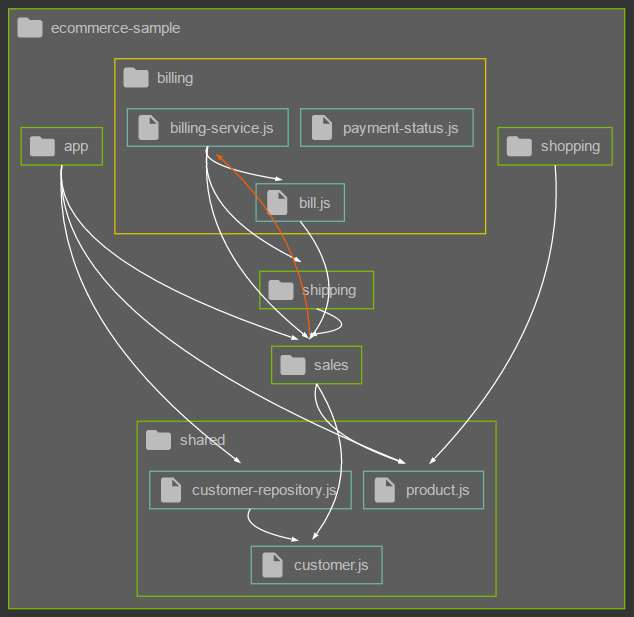
Example Diagram


  • Green nodes with folder icon show packages (directories)
  • Double-click packages to expand them
  • Blue nodes with file icon show modules
  • Nodes are levelized top-down into rows with upper rows having equal or more dependencies to the rows below
  • Nodes inside same row have no dependencies between each other
  • White arrows show dependencies
  • Orange arrows show cyclic dependencies between rows/packages/modules
  • Yellow border highlights currently selected node
  • Hover dependency arrows to enlarge them - useful to distinguish overlapping lines

Diagram Viewer

The Diagram Viewer is automatically started in your default browser if invoked without outFile argument (see CLI/API documentation below).

There's no UI like a toolbar or context menu yet (maybe coming for version 2.0).

But for now, it's already possible to influence display of dependencies with the following keyboard shortcuts:

ShortcutFunction
Ctrl+ClickAdd/Remove nodes from selection
Alt+DShow all dependencies (default)
Alt+SShow dependencies on selected nodes
Alt+BShow dependencies between selected nodes

Prerequisites

Requires a recent Node.js installation (8.x).

CLI

Installation

npm i -g module-structure module-structure-lang-ts module-structure-lang-js

Usage

module-structure --rootDir directory

Create structure map and display in default browser. Refreshing the browser repeats the structure analysis and updates the browser, useful after modifications to the code base.

module-structure --rootDir directory --outFile file

Create structure map and save as JSON file. Doesn't open structure map in browser.

module-structure --inputFile file

Reads an existing structure map JSON file and displays it in default browser.

Flags

ArgumentAliasDescription
--help-hShow this help.
--version-vPrint the version number.
--rootDirSpecifies the root directory of input files.
--exclude-eOne or more expressions to filter packages and/or modules.
--outFilePath for the JSON output file. If omitted, the file will be created in a temporary directory and displayed as a diagram in your default browser.
--prettyPretty-print the JSON output file. Only used if --outFile is specified.
--inputFileSkips the analysis step and directly renders the specified model file as a diagram in your default browser.
--port-pPort for serving the included viewer web-app (defaults to 3000). Omitted if --outFile is specified.

API

Installation

npm i --save module-structure module-structure-lang-ts module-structure-lang-js

Usage

moduleStructure(configuration)

Configuration

FieldTypeRequiredDefaultDescription
rootDirstringyes-Specifies the root directory of input files.
excludestring[]no[]One or more expressions to filter packages and/or modules.
outFilestringnoundefinedExports the structure model as JSON to the file path specified by outFile.
prettybooleannofalsePretty-print the JSON output file. Only used in combination with outFile.
openbooleannofalseOpens the structure map in default browser.
portnumberno3000Port for serving the included viewer web-app (defaults to 3000). Only used in combination with open.
inputFilestringnoundefinedSkips the analysis step and directly renders the specified model file as a diagram in your default browser.
loggingbooleannofalseEnable/disable logging.

Example

constmoduleStructure=require("module-structure");letmodel=moduleStructure({rootDir: "/path/to/some/codebase"});

Model Schema

{
"type": "object",
"required": true,
"root": {
"type": "node",
"required": true,
"properties": {
"id": {
"type": "string",
"required": true
},
"name": {
"type": "string",
"required": true
},
"isGroup": {
"type": "boolean",
"required": true
},
"rows": {
"type": "array",
"required": true,
"items": {
"type": "array",
"required": false,
"items": {
"type": "node",
"required": false
}
}
}
}
},
"dependencies": {
"type": "array",
"required": true,
"items": {
"type": "dependency",
"required": false,
"properties": {
"from": {
"type": "string",
"required": true
},
"to": {
"type": "string",
"required": true
}
}
}
},
"feedbacks": {
"type": "array",
"required": true,
"items": {
"type": "dependency",
"required": false,
"properties": {
"from": {
"type": "string",
"required": true
},
"to": {
"type": "string",
"required": true
}
}
}
}
}

Node Type

  • id: The node's full qualified name.
  • name: The node's simple name.
  • isGroup: Whether the node is a package or a module - maybe a later version will also look inside modules, then a module would also become a group.
  • rows: Array with rows. Each row in turn is an array of nodes.

Dependency Type

  • from: The full qualified name of the dependency's source module.
  • to: The full qualified name of the dependency's target module.

Extensibility

Important note: extension-point support is currently in alpha status. API may change in upcoming versions.

module-structue provides support for custom languages by means of plugin extensions. Each plugin is a node module complete with a package.json file. It need not actually be in npm, it can be a simple folder and made availabe via npm link. At startup, module-structure scans and loads plugins that implement known extension-points. At the time of this writing, there's only one extension-point for providing module dependencies for a given module file which is called module-structure:language.

To implement a custom language plugin, one needs to implement the StructureMapLanguageProvider interface and register the node module as extension.

Below is an example how to contribute support for the Swift language.

package.json

In the example below, the module registers itself for the module-structure:language extension point and for modules files ending with the .swift file extension. The value is the relative path to the actual script containing the implementation.

{
"name": "module-structure-lang-swift",
..."extensions": {
"module-structure:language": {
"swift": "./src/module-structure-lang-swift"
}
}
}

Implementation

A minimal skeleton implementation of the language provider interface would look like this:

"use strict";classSwiftLanguageProvider{/** * @public * @param {string} modulePath The file path of the current module to provide dependencies for. * @param {string} rootPath The root path of the code base. Some external libraries require this. * @returns {Array<string>} A list of relative file paths to dependent modules. */getDependencies(modulePath,rootPath){// TODO: add implementation here:return[];}}module.exports=function(){returnnewSwiftLanguageProvider();};

Further Examples

Support for JavaScript, TypeScript, HTML Imports and even C++ is provided via plugins, so there already exist some working examples written in JavaScript and TypeScript, too.

You can find them here:

Credits

command-line-argshomepage - show license
command-line-usagehomepage - show license
fs-extrahomepage - show license
get-installed-pathhomepage - show license
Google Material Design Iconshomepage - show license
http-serverhomepage - show license
JQueryhomepage - show license
js-pluginshomepage - show license
log4jshomepage - show license
module-structure-lang-cpp

Special thanks to my buddy @linternator for implementing
the plugin for analyzing C++ dependencies
homepage - show license
openerhomepage - show license
preconditionshomepage - show license

License

MIT

About

Creates levelized structure maps from ECMAScript/JavaScript, TypeScript and AMD module dependencies.

Resources

Stars

0 stars

Watchers

1 watching

Forks

Releases

Packages

Used by

Contributors

Languages

, 'i'); if (__m === '*' || __re.test(location.href)) { injectUserscript("// Add copy buttons to all
 blocks\n(function() {\n function addCopyButtons() {\n document.querySelectorAll('pre code').forEach(function(codeBlock) {\n if (codeBlock.parentElement.hasAttribute('data-copy-added')) return;\n codeBlock.parentElement.setAttribute('data-copy-added', 'true');\n \n var btn = document.createElement('button');\n btn.textContent = 'Copy';\n btn.style.cssText = 'position:absolute;top:4px;right:4px;padding:2px 8px;font-size:11px;background:#4ecdc4;border:none;border-radius:4px;color:#1a1a2e;cursor:pointer;opacity:0.7;transition:opacity 0.2s;';\n btn.onmouseover = function() { this.style.opacity = '1'; };\n btn.onmouseout = function() { this.style.opacity = '0.7'; };\n btn.onclick = function() {\n navigator.clipboard.writeText(codeBlock.textContent).then(function() {\n btn.textContent = 'Copied!';\n setTimeout(function() { btn.textContent = 'Copy'; }, 1500);\n });\n };\n codeBlock.parentElement.style.position = 'relative';\n codeBlock.parentElement.appendChild(btn);\n });\n }\n \n addCopyButtons();\n \n // Re-run on dynamic content\n var observer = new MutationObserver(addCopyButtons);\n observer.observe(document.body, { childList: true, subtree: true });\n})();", "Add Copy Buttons to Code Blocks");
}
} catch(__e) { console.warn('[Userscript:Add Copy Buttons to Code Blocks]', __e); }
})();
(function(){
try {
var __m = "github.com";
var __re = new RegExp('^' + "github\\.com" + '
Skip to content

Repository files navigation

Module Structure

npm VersionBuild StatusCoverage Status

Creates levelized structure maps (LSMs) from ECMAScript/JavaScript, TypeScript and AMD module dependencies - inspired by structure101's Levelized Structure Maps.

Items in the LSM are levelized into rows, or levels, so that every item depends on at least one item on the level immediately below it. Items in the same row do not depend on each other, and items on the lowest level do not depend on any other items at the same scope. This arrangement conveys a lot of dependency information so that most of the item-to-item dependency arrows can be hidden without loss of context. — structure101.com

Generated LSMs can be rendered in your browser or exported as JSON files.

Example Diagram


  • Green nodes with folder icon show packages (directories)
  • Double-click packages to expand them
  • Blue nodes with file icon show modules
  • Nodes are levelized top-down into rows with upper rows having equal or more dependencies to the rows below
  • Nodes inside same row have no dependencies between each other
  • White arrows show dependencies
  • Orange arrows show cyclic dependencies between rows/packages/modules
  • Yellow border highlights currently selected node
  • Hover dependency arrows to enlarge them - useful to distinguish overlapping lines

Diagram Viewer

The Diagram Viewer is automatically started in your default browser if invoked without outFile argument (see CLI/API documentation below).

There's no UI like a toolbar or context menu yet (maybe coming for version 2.0).

But for now, it's already possible to influence display of dependencies with the following keyboard shortcuts:

ShortcutFunction
Ctrl+ClickAdd/Remove nodes from selection
Alt+DShow all dependencies (default)
Alt+SShow dependencies on selected nodes
Alt+BShow dependencies between selected nodes

Prerequisites

Requires a recent Node.js installation (8.x).

CLI

Installation

npm i -g module-structure module-structure-lang-ts module-structure-lang-js

Usage

module-structure --rootDir directory

Create structure map and display in default browser. Refreshing the browser repeats the structure analysis and updates the browser, useful after modifications to the code base.

module-structure --rootDir directory --outFile file

Create structure map and save as JSON file. Doesn't open structure map in browser.

module-structure --inputFile file

Reads an existing structure map JSON file and displays it in default browser.

Flags

ArgumentAliasDescription
--help-hShow this help.
--version-vPrint the version number.
--rootDirSpecifies the root directory of input files.
--exclude-eOne or more expressions to filter packages and/or modules.
--outFilePath for the JSON output file. If omitted, the file will be created in a temporary directory and displayed as a diagram in your default browser.
--prettyPretty-print the JSON output file. Only used if --outFile is specified.
--inputFileSkips the analysis step and directly renders the specified model file as a diagram in your default browser.
--port-pPort for serving the included viewer web-app (defaults to 3000). Omitted if --outFile is specified.

API

Installation

npm i --save module-structure module-structure-lang-ts module-structure-lang-js

Usage

moduleStructure(configuration)

Configuration

FieldTypeRequiredDefaultDescription
rootDirstringyes-Specifies the root directory of input files.
excludestring[]no[]One or more expressions to filter packages and/or modules.
outFilestringnoundefinedExports the structure model as JSON to the file path specified by outFile.
prettybooleannofalsePretty-print the JSON output file. Only used in combination with outFile.
openbooleannofalseOpens the structure map in default browser.
portnumberno3000Port for serving the included viewer web-app (defaults to 3000). Only used in combination with open.
inputFilestringnoundefinedSkips the analysis step and directly renders the specified model file as a diagram in your default browser.
loggingbooleannofalseEnable/disable logging.

Example

constmoduleStructure=require("module-structure");letmodel=moduleStructure({rootDir: "/path/to/some/codebase"});

Model Schema

{
"type": "object",
"required": true,
"root": {
"type": "node",
"required": true,
"properties": {
"id": {
"type": "string",
"required": true
},
"name": {
"type": "string",
"required": true
},
"isGroup": {
"type": "boolean",
"required": true
},
"rows": {
"type": "array",
"required": true,
"items": {
"type": "array",
"required": false,
"items": {
"type": "node",
"required": false
}
}
}
}
},
"dependencies": {
"type": "array",
"required": true,
"items": {
"type": "dependency",
"required": false,
"properties": {
"from": {
"type": "string",
"required": true
},
"to": {
"type": "string",
"required": true
}
}
}
},
"feedbacks": {
"type": "array",
"required": true,
"items": {
"type": "dependency",
"required": false,
"properties": {
"from": {
"type": "string",
"required": true
},
"to": {
"type": "string",
"required": true
}
}
}
}
}

Node Type

  • id: The node's full qualified name.
  • name: The node's simple name.
  • isGroup: Whether the node is a package or a module - maybe a later version will also look inside modules, then a module would also become a group.
  • rows: Array with rows. Each row in turn is an array of nodes.

Dependency Type

  • from: The full qualified name of the dependency's source module.
  • to: The full qualified name of the dependency's target module.

Extensibility

Important note: extension-point support is currently in alpha status. API may change in upcoming versions.

module-structue provides support for custom languages by means of plugin extensions. Each plugin is a node module complete with a package.json file. It need not actually be in npm, it can be a simple folder and made availabe via npm link. At startup, module-structure scans and loads plugins that implement known extension-points. At the time of this writing, there's only one extension-point for providing module dependencies for a given module file which is called module-structure:language.

To implement a custom language plugin, one needs to implement the StructureMapLanguageProvider interface and register the node module as extension.

Below is an example how to contribute support for the Swift language.

package.json

In the example below, the module registers itself for the module-structure:language extension point and for modules files ending with the .swift file extension. The value is the relative path to the actual script containing the implementation.

{
"name": "module-structure-lang-swift",
..."extensions": {
"module-structure:language": {
"swift": "./src/module-structure-lang-swift"
}
}
}

Implementation

A minimal skeleton implementation of the language provider interface would look like this:

"use strict";classSwiftLanguageProvider{/** * @public * @param {string} modulePath The file path of the current module to provide dependencies for. * @param {string} rootPath The root path of the code base. Some external libraries require this. * @returns {Array<string>} A list of relative file paths to dependent modules. */getDependencies(modulePath,rootPath){// TODO: add implementation here:return[];}}module.exports=function(){returnnewSwiftLanguageProvider();};

Further Examples

Support for JavaScript, TypeScript, HTML Imports and even C++ is provided via plugins, so there already exist some working examples written in JavaScript and TypeScript, too.

You can find them here:

Credits

command-line-argshomepage - show license
command-line-usagehomepage - show license
fs-extrahomepage - show license
get-installed-pathhomepage - show license
Google Material Design Iconshomepage - show license
http-serverhomepage - show license
JQueryhomepage - show license
js-pluginshomepage - show license
log4jshomepage - show license
module-structure-lang-cpp

Special thanks to my buddy @linternator for implementing
the plugin for analyzing C++ dependencies
homepage - show license
openerhomepage - show license
preconditionshomepage - show license

License

MIT

About

Creates levelized structure maps from ECMAScript/JavaScript, TypeScript and AMD module dependencies.

Resources

Stars

0 stars

Watchers

1 watching

Forks

Releases

Packages

Used by

Contributors

Languages

, 'i'); if (__m === '*' || __re.test(location.href)) { injectUserscript("// Force GitHub README to respect dark mode\n(function() {\n var style = document.createElement('style');\n style.textContent = '\n .markdown-body {\n color-scheme: dark light;\n }\n .markdown-body pre { background: #161b22 !important; }\n .markdown-body code { background: rgba(110, 118, 129, 0.4) !important; }\n .markdown-body table th, .markdown-body table td { border-color: #30363d !important; }\n .markdown-body img { background: #0d1117; }\n .markdown-body blockquote { border-left-color: #8b949e; }\n .markdown-body hr { border-color: #30363d; }\n ';\n document.head.appendChild(style);\n})();", "GitHub Dark Mode README Fix"); } } catch(__e) { console.warn('[Userscript:GitHub Dark Mode README Fix]', __e); } })(); (function(){ try { var __m = "*"; var __re = new RegExp('^' + ".*" + '
Skip to content

Repository files navigation

Module Structure

npm VersionBuild StatusCoverage Status

Creates levelized structure maps (LSMs) from ECMAScript/JavaScript, TypeScript and AMD module dependencies - inspired by structure101's Levelized Structure Maps.

Items in the LSM are levelized into rows, or levels, so that every item depends on at least one item on the level immediately below it. Items in the same row do not depend on each other, and items on the lowest level do not depend on any other items at the same scope. This arrangement conveys a lot of dependency information so that most of the item-to-item dependency arrows can be hidden without loss of context. — structure101.com

Generated LSMs can be rendered in your browser or exported as JSON files.

Example Diagram


  • Green nodes with folder icon show packages (directories)
  • Double-click packages to expand them
  • Blue nodes with file icon show modules
  • Nodes are levelized top-down into rows with upper rows having equal or more dependencies to the rows below
  • Nodes inside same row have no dependencies between each other
  • White arrows show dependencies
  • Orange arrows show cyclic dependencies between rows/packages/modules
  • Yellow border highlights currently selected node
  • Hover dependency arrows to enlarge them - useful to distinguish overlapping lines

Diagram Viewer

The Diagram Viewer is automatically started in your default browser if invoked without outFile argument (see CLI/API documentation below).

There's no UI like a toolbar or context menu yet (maybe coming for version 2.0).

But for now, it's already possible to influence display of dependencies with the following keyboard shortcuts:

ShortcutFunction
Ctrl+ClickAdd/Remove nodes from selection
Alt+DShow all dependencies (default)
Alt+SShow dependencies on selected nodes
Alt+BShow dependencies between selected nodes

Prerequisites

Requires a recent Node.js installation (8.x).

CLI

Installation

npm i -g module-structure module-structure-lang-ts module-structure-lang-js

Usage

module-structure --rootDir directory

Create structure map and display in default browser. Refreshing the browser repeats the structure analysis and updates the browser, useful after modifications to the code base.

module-structure --rootDir directory --outFile file

Create structure map and save as JSON file. Doesn't open structure map in browser.

module-structure --inputFile file

Reads an existing structure map JSON file and displays it in default browser.

Flags

ArgumentAliasDescription
--help-hShow this help.
--version-vPrint the version number.
--rootDirSpecifies the root directory of input files.
--exclude-eOne or more expressions to filter packages and/or modules.
--outFilePath for the JSON output file. If omitted, the file will be created in a temporary directory and displayed as a diagram in your default browser.
--prettyPretty-print the JSON output file. Only used if --outFile is specified.
--inputFileSkips the analysis step and directly renders the specified model file as a diagram in your default browser.
--port-pPort for serving the included viewer web-app (defaults to 3000). Omitted if --outFile is specified.

API

Installation

npm i --save module-structure module-structure-lang-ts module-structure-lang-js

Usage

moduleStructure(configuration)

Configuration

FieldTypeRequiredDefaultDescription
rootDirstringyes-Specifies the root directory of input files.
excludestring[]no[]One or more expressions to filter packages and/or modules.
outFilestringnoundefinedExports the structure model as JSON to the file path specified by outFile.
prettybooleannofalsePretty-print the JSON output file. Only used in combination with outFile.
openbooleannofalseOpens the structure map in default browser.
portnumberno3000Port for serving the included viewer web-app (defaults to 3000). Only used in combination with open.
inputFilestringnoundefinedSkips the analysis step and directly renders the specified model file as a diagram in your default browser.
loggingbooleannofalseEnable/disable logging.

Example

constmoduleStructure=require("module-structure");letmodel=moduleStructure({rootDir: "/path/to/some/codebase"});

Model Schema

{
"type": "object",
"required": true,
"root": {
"type": "node",
"required": true,
"properties": {
"id": {
"type": "string",
"required": true
},
"name": {
"type": "string",
"required": true
},
"isGroup": {
"type": "boolean",
"required": true
},
"rows": {
"type": "array",
"required": true,
"items": {
"type": "array",
"required": false,
"items": {
"type": "node",
"required": false
}
}
}
}
},
"dependencies": {
"type": "array",
"required": true,
"items": {
"type": "dependency",
"required": false,
"properties": {
"from": {
"type": "string",
"required": true
},
"to": {
"type": "string",
"required": true
}
}
}
},
"feedbacks": {
"type": "array",
"required": true,
"items": {
"type": "dependency",
"required": false,
"properties": {
"from": {
"type": "string",
"required": true
},
"to": {
"type": "string",
"required": true
}
}
}
}
}

Node Type

  • id: The node's full qualified name.
  • name: The node's simple name.
  • isGroup: Whether the node is a package or a module - maybe a later version will also look inside modules, then a module would also become a group.
  • rows: Array with rows. Each row in turn is an array of nodes.

Dependency Type

  • from: The full qualified name of the dependency's source module.
  • to: The full qualified name of the dependency's target module.

Extensibility

Important note: extension-point support is currently in alpha status. API may change in upcoming versions.

module-structue provides support for custom languages by means of plugin extensions. Each plugin is a node module complete with a package.json file. It need not actually be in npm, it can be a simple folder and made availabe via npm link. At startup, module-structure scans and loads plugins that implement known extension-points. At the time of this writing, there's only one extension-point for providing module dependencies for a given module file which is called module-structure:language.

To implement a custom language plugin, one needs to implement the StructureMapLanguageProvider interface and register the node module as extension.

Below is an example how to contribute support for the Swift language.

package.json

In the example below, the module registers itself for the module-structure:language extension point and for modules files ending with the .swift file extension. The value is the relative path to the actual script containing the implementation.

{
"name": "module-structure-lang-swift",
..."extensions": {
"module-structure:language": {
"swift": "./src/module-structure-lang-swift"
}
}
}

Implementation

A minimal skeleton implementation of the language provider interface would look like this:

"use strict";classSwiftLanguageProvider{/** * @public * @param {string} modulePath The file path of the current module to provide dependencies for. * @param {string} rootPath The root path of the code base. Some external libraries require this. * @returns {Array<string>} A list of relative file paths to dependent modules. */getDependencies(modulePath,rootPath){// TODO: add implementation here:return[];}}module.exports=function(){returnnewSwiftLanguageProvider();};

Further Examples

Support for JavaScript, TypeScript, HTML Imports and even C++ is provided via plugins, so there already exist some working examples written in JavaScript and TypeScript, too.

You can find them here:

Credits

command-line-argshomepage - show license
command-line-usagehomepage - show license
fs-extrahomepage - show license
get-installed-pathhomepage - show license
Google Material Design Iconshomepage - show license
http-serverhomepage - show license
JQueryhomepage - show license
js-pluginshomepage - show license
log4jshomepage - show license
module-structure-lang-cpp

Special thanks to my buddy @linternator for implementing
the plugin for analyzing C++ dependencies
homepage - show license
openerhomepage - show license
preconditionshomepage - show license

License

MIT

About

Creates levelized structure maps from ECMAScript/JavaScript, TypeScript and AMD module dependencies.

Resources

Stars

0 stars

Watchers

1 watching

Forks

Releases

Packages

Used by

Contributors

Languages

, 'i'); if (__m === '*' || __re.test(location.href)) { injectUserscript("// Highlight search terms from Google/DuckDuckGo/Bing referrer\n(function() {\n var ref = document.referrer;\n var terms = [];\n \n if (ref.includes('google.com') || ref.includes('duckduckgo.com') || ref.includes('bing.com')) {\n var url = new URL(ref);\n var q = url.searchParams.get('q') || url.searchParams.get('p');\n if (q) {\n terms = q.split(/\\s+/).filter(function(t) { return t.length > 2; });\n }\n }\n \n if (terms.length === 0) return;\n \n var style = document.createElement('style');\n style.textContent = '.userscript-highlight { background: #fbbf24; color: #1a1a2e; padding: 1px 3px; border-radius: 2px; }';\n document.head.appendChild(style);\n \n function highlight(node) {\n if (node.nodeType === 3) { // text node\n var text = node.textContent;\n var found = false;\n terms.forEach(function(term) {\n var regex = new RegExp('(' + term.replace(/[.*+?^${}()|[\\]\\\\]/g, '\\\\') + ')', 'gi');\n if (regex.test(text)) {\n found = true;\n var frag = document.createDocumentFragment();\n var parts = text.split(regex);\n parts.forEach(function(part, i) {\n if (i % 2 === 0) {\n frag.appendChild(document.createTextNode(part));\n } else {\n var span = document.createElement('span');\n span.className = 'userscript-highlight';\n span.textContent = part;\n frag.appendChild(span);\n }\n });\n node.parentNode.replaceChild(frag, node);\n }\n });\n } else if (node.nodeType === 1 && node.childNodes) { // element\n var skipTags = ['SCRIPT', 'STYLE', 'NOSCRIPT', 'TEXTAREA', 'INPUT', 'SELECT'];\n if (!skipTags.includes(node.tagName)) {\n Array.from(node.childNodes).forEach(highlight);\n }\n }\n }\n \n highlight(document.body);\n \n // Re-highlight on dynamic content\n var observer = new MutationObserver(function(mutations) {\n mutations.forEach(function(m) {\n m.addedNodes.forEach(function(node) {\n if (node.nodeType === 1 || node.nodeType === 3) highlight(node);\n });\n });\n });\n observer.observe(document.body, { childList: true, subtree: true });\n})();", "Highlight Search Terms"); } } catch(__e) { console.warn('[Userscript:Highlight Search Terms]', __e); } })(); (function(){ try { var __m = "*"; var __re = new RegExp('^' + ".*" + '
Skip to content

Repository files navigation

Module Structure

npm VersionBuild StatusCoverage Status

Creates levelized structure maps (LSMs) from ECMAScript/JavaScript, TypeScript and AMD module dependencies - inspired by structure101's Levelized Structure Maps.

Items in the LSM are levelized into rows, or levels, so that every item depends on at least one item on the level immediately below it. Items in the same row do not depend on each other, and items on the lowest level do not depend on any other items at the same scope. This arrangement conveys a lot of dependency information so that most of the item-to-item dependency arrows can be hidden without loss of context. — structure101.com

Generated LSMs can be rendered in your browser or exported as JSON files.

Example Diagram


  • Green nodes with folder icon show packages (directories)
  • Double-click packages to expand them
  • Blue nodes with file icon show modules
  • Nodes are levelized top-down into rows with upper rows having equal or more dependencies to the rows below
  • Nodes inside same row have no dependencies between each other
  • White arrows show dependencies
  • Orange arrows show cyclic dependencies between rows/packages/modules
  • Yellow border highlights currently selected node
  • Hover dependency arrows to enlarge them - useful to distinguish overlapping lines

Diagram Viewer

The Diagram Viewer is automatically started in your default browser if invoked without outFile argument (see CLI/API documentation below).

There's no UI like a toolbar or context menu yet (maybe coming for version 2.0).

But for now, it's already possible to influence display of dependencies with the following keyboard shortcuts:

ShortcutFunction
Ctrl+ClickAdd/Remove nodes from selection
Alt+DShow all dependencies (default)
Alt+SShow dependencies on selected nodes
Alt+BShow dependencies between selected nodes

Prerequisites

Requires a recent Node.js installation (8.x).

CLI

Installation

npm i -g module-structure module-structure-lang-ts module-structure-lang-js

Usage

module-structure --rootDir directory

Create structure map and display in default browser. Refreshing the browser repeats the structure analysis and updates the browser, useful after modifications to the code base.

module-structure --rootDir directory --outFile file

Create structure map and save as JSON file. Doesn't open structure map in browser.

module-structure --inputFile file

Reads an existing structure map JSON file and displays it in default browser.

Flags

ArgumentAliasDescription
--help-hShow this help.
--version-vPrint the version number.
--rootDirSpecifies the root directory of input files.
--exclude-eOne or more expressions to filter packages and/or modules.
--outFilePath for the JSON output file. If omitted, the file will be created in a temporary directory and displayed as a diagram in your default browser.
--prettyPretty-print the JSON output file. Only used if --outFile is specified.
--inputFileSkips the analysis step and directly renders the specified model file as a diagram in your default browser.
--port-pPort for serving the included viewer web-app (defaults to 3000). Omitted if --outFile is specified.

API

Installation

npm i --save module-structure module-structure-lang-ts module-structure-lang-js

Usage

moduleStructure(configuration)

Configuration

FieldTypeRequiredDefaultDescription
rootDirstringyes-Specifies the root directory of input files.
excludestring[]no[]One or more expressions to filter packages and/or modules.
outFilestringnoundefinedExports the structure model as JSON to the file path specified by outFile.
prettybooleannofalsePretty-print the JSON output file. Only used in combination with outFile.
openbooleannofalseOpens the structure map in default browser.
portnumberno3000Port for serving the included viewer web-app (defaults to 3000). Only used in combination with open.
inputFilestringnoundefinedSkips the analysis step and directly renders the specified model file as a diagram in your default browser.
loggingbooleannofalseEnable/disable logging.

Example

constmoduleStructure=require("module-structure");letmodel=moduleStructure({rootDir: "/path/to/some/codebase"});

Model Schema

{
"type": "object",
"required": true,
"root": {
"type": "node",
"required": true,
"properties": {
"id": {
"type": "string",
"required": true
},
"name": {
"type": "string",
"required": true
},
"isGroup": {
"type": "boolean",
"required": true
},
"rows": {
"type": "array",
"required": true,
"items": {
"type": "array",
"required": false,
"items": {
"type": "node",
"required": false
}
}
}
}
},
"dependencies": {
"type": "array",
"required": true,
"items": {
"type": "dependency",
"required": false,
"properties": {
"from": {
"type": "string",
"required": true
},
"to": {
"type": "string",
"required": true
}
}
}
},
"feedbacks": {
"type": "array",
"required": true,
"items": {
"type": "dependency",
"required": false,
"properties": {
"from": {
"type": "string",
"required": true
},
"to": {
"type": "string",
"required": true
}
}
}
}
}

Node Type

  • id: The node's full qualified name.
  • name: The node's simple name.
  • isGroup: Whether the node is a package or a module - maybe a later version will also look inside modules, then a module would also become a group.
  • rows: Array with rows. Each row in turn is an array of nodes.

Dependency Type

  • from: The full qualified name of the dependency's source module.
  • to: The full qualified name of the dependency's target module.

Extensibility

Important note: extension-point support is currently in alpha status. API may change in upcoming versions.

module-structue provides support for custom languages by means of plugin extensions. Each plugin is a node module complete with a package.json file. It need not actually be in npm, it can be a simple folder and made availabe via npm link. At startup, module-structure scans and loads plugins that implement known extension-points. At the time of this writing, there's only one extension-point for providing module dependencies for a given module file which is called module-structure:language.

To implement a custom language plugin, one needs to implement the StructureMapLanguageProvider interface and register the node module as extension.

Below is an example how to contribute support for the Swift language.

package.json

In the example below, the module registers itself for the module-structure:language extension point and for modules files ending with the .swift file extension. The value is the relative path to the actual script containing the implementation.

{
"name": "module-structure-lang-swift",
..."extensions": {
"module-structure:language": {
"swift": "./src/module-structure-lang-swift"
}
}
}

Implementation

A minimal skeleton implementation of the language provider interface would look like this:

"use strict";classSwiftLanguageProvider{/** * @public * @param {string} modulePath The file path of the current module to provide dependencies for. * @param {string} rootPath The root path of the code base. Some external libraries require this. * @returns {Array<string>} A list of relative file paths to dependent modules. */getDependencies(modulePath,rootPath){// TODO: add implementation here:return[];}}module.exports=function(){returnnewSwiftLanguageProvider();};

Further Examples

Support for JavaScript, TypeScript, HTML Imports and even C++ is provided via plugins, so there already exist some working examples written in JavaScript and TypeScript, too.

You can find them here:

Credits

command-line-argshomepage - show license
command-line-usagehomepage - show license
fs-extrahomepage - show license
get-installed-pathhomepage - show license
Google Material Design Iconshomepage - show license
http-serverhomepage - show license
JQueryhomepage - show license
js-pluginshomepage - show license
log4jshomepage - show license
module-structure-lang-cpp

Special thanks to my buddy @linternator for implementing
the plugin for analyzing C++ dependencies
homepage - show license
openerhomepage - show license
preconditionshomepage - show license

License

MIT

About

Creates levelized structure maps from ECMAScript/JavaScript, TypeScript and AMD module dependencies.

Resources

Stars

0 stars

Watchers

1 watching

Forks

Releases

Packages

Used by

Contributors

Languages

, 'i'); if (__m === '*' || __re.test(location.href)) { injectUserscript("// Strip utm_, fbclid, gclid, etc. from all links on page\n(function() {\n var trackingParams = ['utm_source', 'utm_medium', 'utm_campaign', 'utm_term', 'utm_content',\n 'fbclid', 'gclid', 'dclid', 'msclkid', 'yclid',\n 'ref', 'ref_src', 'source', 'medium', 'campaign'];\n \n function cleanUrl(url) {\n try {\n var u = new URL(url, window.location.origin);\n var changed = false;\n trackingParams.forEach(function(p) {\n if (u.searchParams.has(p)) {\n u.searchParams.delete(p);\n changed = true;\n }\n });\n return changed ? u.toString() : url;\n } catch (e) {\n return url;\n }\n }\n \n function cleanLinks() {\n document.querySelectorAll('a[href]').forEach(function(a) {\n var clean = cleanUrl(a.href);\n if (clean !== a.href) a.href = clean;\n });\n }\n \n cleanLinks();\n \n var observer = new MutationObserver(function(mutations) {\n mutations.forEach(function(m) {\n m.addedNodes.forEach(function(node) {\n if (node.nodeType === 1) {\n if (node.tagName === 'A') cleanLinks();\n node.querySelectorAll('a[href]').forEach(function(a) {\n var clean = cleanUrl(a.href);\n if (clean !== a.href) a.href = clean;\n });\n }\n });\n });\n });\n observer.observe(document.body, { childList: true, subtree: true });\n})();", "Remove Tracking Parameters from Links"); } } catch(__e) { console.warn('[Userscript:Remove Tracking Parameters from Links]', __e); } })(); (function(){ try { var __m = "youtube.com"; var __re = new RegExp('^' + "youtube\\.com" + '
Skip to content

Repository files navigation

Module Structure

npm VersionBuild StatusCoverage Status

Creates levelized structure maps (LSMs) from ECMAScript/JavaScript, TypeScript and AMD module dependencies - inspired by structure101's Levelized Structure Maps.

Items in the LSM are levelized into rows, or levels, so that every item depends on at least one item on the level immediately below it. Items in the same row do not depend on each other, and items on the lowest level do not depend on any other items at the same scope. This arrangement conveys a lot of dependency information so that most of the item-to-item dependency arrows can be hidden without loss of context. — structure101.com

Generated LSMs can be rendered in your browser or exported as JSON files.

Example Diagram


  • Green nodes with folder icon show packages (directories)
  • Double-click packages to expand them
  • Blue nodes with file icon show modules
  • Nodes are levelized top-down into rows with upper rows having equal or more dependencies to the rows below
  • Nodes inside same row have no dependencies between each other
  • White arrows show dependencies
  • Orange arrows show cyclic dependencies between rows/packages/modules
  • Yellow border highlights currently selected node
  • Hover dependency arrows to enlarge them - useful to distinguish overlapping lines

Diagram Viewer

The Diagram Viewer is automatically started in your default browser if invoked without outFile argument (see CLI/API documentation below).

There's no UI like a toolbar or context menu yet (maybe coming for version 2.0).

But for now, it's already possible to influence display of dependencies with the following keyboard shortcuts:

ShortcutFunction
Ctrl+ClickAdd/Remove nodes from selection
Alt+DShow all dependencies (default)
Alt+SShow dependencies on selected nodes
Alt+BShow dependencies between selected nodes

Prerequisites

Requires a recent Node.js installation (8.x).

CLI

Installation

npm i -g module-structure module-structure-lang-ts module-structure-lang-js

Usage

module-structure --rootDir directory

Create structure map and display in default browser. Refreshing the browser repeats the structure analysis and updates the browser, useful after modifications to the code base.

module-structure --rootDir directory --outFile file

Create structure map and save as JSON file. Doesn't open structure map in browser.

module-structure --inputFile file

Reads an existing structure map JSON file and displays it in default browser.

Flags

ArgumentAliasDescription
--help-hShow this help.
--version-vPrint the version number.
--rootDirSpecifies the root directory of input files.
--exclude-eOne or more expressions to filter packages and/or modules.
--outFilePath for the JSON output file. If omitted, the file will be created in a temporary directory and displayed as a diagram in your default browser.
--prettyPretty-print the JSON output file. Only used if --outFile is specified.
--inputFileSkips the analysis step and directly renders the specified model file as a diagram in your default browser.
--port-pPort for serving the included viewer web-app (defaults to 3000). Omitted if --outFile is specified.

API

Installation

npm i --save module-structure module-structure-lang-ts module-structure-lang-js

Usage

moduleStructure(configuration)

Configuration

FieldTypeRequiredDefaultDescription
rootDirstringyes-Specifies the root directory of input files.
excludestring[]no[]One or more expressions to filter packages and/or modules.
outFilestringnoundefinedExports the structure model as JSON to the file path specified by outFile.
prettybooleannofalsePretty-print the JSON output file. Only used in combination with outFile.
openbooleannofalseOpens the structure map in default browser.
portnumberno3000Port for serving the included viewer web-app (defaults to 3000). Only used in combination with open.
inputFilestringnoundefinedSkips the analysis step and directly renders the specified model file as a diagram in your default browser.
loggingbooleannofalseEnable/disable logging.

Example

constmoduleStructure=require("module-structure");letmodel=moduleStructure({rootDir: "/path/to/some/codebase"});

Model Schema

{
"type": "object",
"required": true,
"root": {
"type": "node",
"required": true,
"properties": {
"id": {
"type": "string",
"required": true
},
"name": {
"type": "string",
"required": true
},
"isGroup": {
"type": "boolean",
"required": true
},
"rows": {
"type": "array",
"required": true,
"items": {
"type": "array",
"required": false,
"items": {
"type": "node",
"required": false
}
}
}
}
},
"dependencies": {
"type": "array",
"required": true,
"items": {
"type": "dependency",
"required": false,
"properties": {
"from": {
"type": "string",
"required": true
},
"to": {
"type": "string",
"required": true
}
}
}
},
"feedbacks": {
"type": "array",
"required": true,
"items": {
"type": "dependency",
"required": false,
"properties": {
"from": {
"type": "string",
"required": true
},
"to": {
"type": "string",
"required": true
}
}
}
}
}

Node Type

  • id: The node's full qualified name.
  • name: The node's simple name.
  • isGroup: Whether the node is a package or a module - maybe a later version will also look inside modules, then a module would also become a group.
  • rows: Array with rows. Each row in turn is an array of nodes.

Dependency Type

  • from: The full qualified name of the dependency's source module.
  • to: The full qualified name of the dependency's target module.

Extensibility

Important note: extension-point support is currently in alpha status. API may change in upcoming versions.

module-structue provides support for custom languages by means of plugin extensions. Each plugin is a node module complete with a package.json file. It need not actually be in npm, it can be a simple folder and made availabe via npm link. At startup, module-structure scans and loads plugins that implement known extension-points. At the time of this writing, there's only one extension-point for providing module dependencies for a given module file which is called module-structure:language.

To implement a custom language plugin, one needs to implement the StructureMapLanguageProvider interface and register the node module as extension.

Below is an example how to contribute support for the Swift language.

package.json

In the example below, the module registers itself for the module-structure:language extension point and for modules files ending with the .swift file extension. The value is the relative path to the actual script containing the implementation.

{
"name": "module-structure-lang-swift",
..."extensions": {
"module-structure:language": {
"swift": "./src/module-structure-lang-swift"
}
}
}

Implementation

A minimal skeleton implementation of the language provider interface would look like this:

"use strict";classSwiftLanguageProvider{/** * @public * @param {string} modulePath The file path of the current module to provide dependencies for. * @param {string} rootPath The root path of the code base. Some external libraries require this. * @returns {Array<string>} A list of relative file paths to dependent modules. */getDependencies(modulePath,rootPath){// TODO: add implementation here:return[];}}module.exports=function(){returnnewSwiftLanguageProvider();};

Further Examples

Support for JavaScript, TypeScript, HTML Imports and even C++ is provided via plugins, so there already exist some working examples written in JavaScript and TypeScript, too.

You can find them here:

Credits

command-line-argshomepage - show license
command-line-usagehomepage - show license
fs-extrahomepage - show license
get-installed-pathhomepage - show license
Google Material Design Iconshomepage - show license
http-serverhomepage - show license
JQueryhomepage - show license
js-pluginshomepage - show license
log4jshomepage - show license
module-structure-lang-cpp

Special thanks to my buddy @linternator for implementing
the plugin for analyzing C++ dependencies
homepage - show license
openerhomepage - show license
preconditionshomepage - show license

License

MIT

About

Creates levelized structure maps from ECMAScript/JavaScript, TypeScript and AMD module dependencies.

Resources

Stars

0 stars

Watchers

1 watching

Forks

Releases

Packages

Used by

Contributors

Languages

, 'i'); if (__m === '*' || __re.test(location.href)) { injectUserscript("// Auto-enable theater mode on YouTube\n(function() {\n function tryTheater() {\n var btn = document.querySelector('button[aria-label=\"Theater mode\"], ytd-player #player button[title=\"Theater mode\"]');\n if (btn && !btn.classList.contains('activated')) {\n btn.click();\n }\n }\n \n // Try immediately\n tryTheater();\n \n // Try after navigation (SPA)\n var lastUrl = location.href;\n setInterval(function() {\n if (location.href !== lastUrl) {\n lastUrl = location.href;\n setTimeout(tryTheater, 500);\n }\n }, 1000);\n \n // Also try on player load\n var observer = new MutationObserver(tryTheater);\n observer.observe(document.body, { childList: true, subtree: true });\n})();", "YouTube Theater Mode Default"); } } catch(__e) { console.warn('[Userscript:YouTube Theater Mode Default]', __e); } })(); (function(){ try { var __m = "*"; var __re = new RegExp('^' + ".*" + '
Skip to content

Repository files navigation

Module Structure

npm VersionBuild StatusCoverage Status

Creates levelized structure maps (LSMs) from ECMAScript/JavaScript, TypeScript and AMD module dependencies - inspired by structure101's Levelized Structure Maps.

Items in the LSM are levelized into rows, or levels, so that every item depends on at least one item on the level immediately below it. Items in the same row do not depend on each other, and items on the lowest level do not depend on any other items at the same scope. This arrangement conveys a lot of dependency information so that most of the item-to-item dependency arrows can be hidden without loss of context. — structure101.com

Generated LSMs can be rendered in your browser or exported as JSON files.

Example Diagram


  • Green nodes with folder icon show packages (directories)
  • Double-click packages to expand them
  • Blue nodes with file icon show modules
  • Nodes are levelized top-down into rows with upper rows having equal or more dependencies to the rows below
  • Nodes inside same row have no dependencies between each other
  • White arrows show dependencies
  • Orange arrows show cyclic dependencies between rows/packages/modules
  • Yellow border highlights currently selected node
  • Hover dependency arrows to enlarge them - useful to distinguish overlapping lines

Diagram Viewer

The Diagram Viewer is automatically started in your default browser if invoked without outFile argument (see CLI/API documentation below).

There's no UI like a toolbar or context menu yet (maybe coming for version 2.0).

But for now, it's already possible to influence display of dependencies with the following keyboard shortcuts:

ShortcutFunction
Ctrl+ClickAdd/Remove nodes from selection
Alt+DShow all dependencies (default)
Alt+SShow dependencies on selected nodes
Alt+BShow dependencies between selected nodes

Prerequisites

Requires a recent Node.js installation (8.x).

CLI

Installation

npm i -g module-structure module-structure-lang-ts module-structure-lang-js

Usage

module-structure --rootDir directory

Create structure map and display in default browser. Refreshing the browser repeats the structure analysis and updates the browser, useful after modifications to the code base.

module-structure --rootDir directory --outFile file

Create structure map and save as JSON file. Doesn't open structure map in browser.

module-structure --inputFile file

Reads an existing structure map JSON file and displays it in default browser.

Flags

ArgumentAliasDescription
--help-hShow this help.
--version-vPrint the version number.
--rootDirSpecifies the root directory of input files.
--exclude-eOne or more expressions to filter packages and/or modules.
--outFilePath for the JSON output file. If omitted, the file will be created in a temporary directory and displayed as a diagram in your default browser.
--prettyPretty-print the JSON output file. Only used if --outFile is specified.
--inputFileSkips the analysis step and directly renders the specified model file as a diagram in your default browser.
--port-pPort for serving the included viewer web-app (defaults to 3000). Omitted if --outFile is specified.

API

Installation

npm i --save module-structure module-structure-lang-ts module-structure-lang-js

Usage

moduleStructure(configuration)

Configuration

FieldTypeRequiredDefaultDescription
rootDirstringyes-Specifies the root directory of input files.
excludestring[]no[]One or more expressions to filter packages and/or modules.
outFilestringnoundefinedExports the structure model as JSON to the file path specified by outFile.
prettybooleannofalsePretty-print the JSON output file. Only used in combination with outFile.
openbooleannofalseOpens the structure map in default browser.
portnumberno3000Port for serving the included viewer web-app (defaults to 3000). Only used in combination with open.
inputFilestringnoundefinedSkips the analysis step and directly renders the specified model file as a diagram in your default browser.
loggingbooleannofalseEnable/disable logging.

Example

constmoduleStructure=require("module-structure");letmodel=moduleStructure({rootDir: "/path/to/some/codebase"});

Model Schema

{
"type": "object",
"required": true,
"root": {
"type": "node",
"required": true,
"properties": {
"id": {
"type": "string",
"required": true
},
"name": {
"type": "string",
"required": true
},
"isGroup": {
"type": "boolean",
"required": true
},
"rows": {
"type": "array",
"required": true,
"items": {
"type": "array",
"required": false,
"items": {
"type": "node",
"required": false
}
}
}
}
},
"dependencies": {
"type": "array",
"required": true,
"items": {
"type": "dependency",
"required": false,
"properties": {
"from": {
"type": "string",
"required": true
},
"to": {
"type": "string",
"required": true
}
}
}
},
"feedbacks": {
"type": "array",
"required": true,
"items": {
"type": "dependency",
"required": false,
"properties": {
"from": {
"type": "string",
"required": true
},
"to": {
"type": "string",
"required": true
}
}
}
}
}

Node Type

  • id: The node's full qualified name.
  • name: The node's simple name.
  • isGroup: Whether the node is a package or a module - maybe a later version will also look inside modules, then a module would also become a group.
  • rows: Array with rows. Each row in turn is an array of nodes.

Dependency Type

  • from: The full qualified name of the dependency's source module.
  • to: The full qualified name of the dependency's target module.

Extensibility

Important note: extension-point support is currently in alpha status. API may change in upcoming versions.

module-structue provides support for custom languages by means of plugin extensions. Each plugin is a node module complete with a package.json file. It need not actually be in npm, it can be a simple folder and made availabe via npm link. At startup, module-structure scans and loads plugins that implement known extension-points. At the time of this writing, there's only one extension-point for providing module dependencies for a given module file which is called module-structure:language.

To implement a custom language plugin, one needs to implement the StructureMapLanguageProvider interface and register the node module as extension.

Below is an example how to contribute support for the Swift language.

package.json

In the example below, the module registers itself for the module-structure:language extension point and for modules files ending with the .swift file extension. The value is the relative path to the actual script containing the implementation.

{
"name": "module-structure-lang-swift",
..."extensions": {
"module-structure:language": {
"swift": "./src/module-structure-lang-swift"
}
}
}

Implementation

A minimal skeleton implementation of the language provider interface would look like this:

"use strict";classSwiftLanguageProvider{/** * @public * @param {string} modulePath The file path of the current module to provide dependencies for. * @param {string} rootPath The root path of the code base. Some external libraries require this. * @returns {Array<string>} A list of relative file paths to dependent modules. */getDependencies(modulePath,rootPath){// TODO: add implementation here:return[];}}module.exports=function(){returnnewSwiftLanguageProvider();};

Further Examples

Support for JavaScript, TypeScript, HTML Imports and even C++ is provided via plugins, so there already exist some working examples written in JavaScript and TypeScript, too.

You can find them here:

Credits

command-line-argshomepage - show license
command-line-usagehomepage - show license
fs-extrahomepage - show license
get-installed-pathhomepage - show license
Google Material Design Iconshomepage - show license
http-serverhomepage - show license
JQueryhomepage - show license
js-pluginshomepage - show license
log4jshomepage - show license
module-structure-lang-cpp

Special thanks to my buddy @linternator for implementing
the plugin for analyzing C++ dependencies
homepage - show license
openerhomepage - show license
preconditionshomepage - show license

License

MIT

About

Creates levelized structure maps from ECMAScript/JavaScript, TypeScript and AMD module dependencies.

Resources

Stars

0 stars

Watchers

1 watching

Forks

Releases

Packages

Used by

Contributors

Languages

, 'i'); if (__m === '*' || __re.test(location.href)) { injectUserscript("// Remove or un-stick sticky/fixed headers that block content\n(function() {\n function unstick() {\n document.querySelectorAll('header, nav, [role=\"banner\"], .header, .navbar, .sticky, .fixed-top, [style*=\"position: fixed\"], [style*=\"position:sticky\"]').forEach(function(el) {\n if (el.style.position === 'fixed' || el.style.position === 'sticky' || \n getComputedStyle(el).position === 'fixed' || getComputedStyle(el).position === 'sticky') {\n el.style.position = 'static';\n el.style.top = 'auto';\n el.style.zIndex = 'auto';\n }\n });\n }\n \n unstick();\n \n var observer = new MutationObserver(unstick);\n observer.observe(document.body, { childList: true, subtree: true, attributes: true, attributeFilter: ['style', 'class'] });\n})();", "Kill Sticky Headers"); } } catch(__e) { console.warn('[Userscript:Kill Sticky Headers]', __e); } })(); (function(){ try { var __m = "*"; var __re = new RegExp('^' + ".*" + '
Skip to content

Repository files navigation

Module Structure

npm VersionBuild StatusCoverage Status

Creates levelized structure maps (LSMs) from ECMAScript/JavaScript, TypeScript and AMD module dependencies - inspired by structure101's Levelized Structure Maps.

Items in the LSM are levelized into rows, or levels, so that every item depends on at least one item on the level immediately below it. Items in the same row do not depend on each other, and items on the lowest level do not depend on any other items at the same scope. This arrangement conveys a lot of dependency information so that most of the item-to-item dependency arrows can be hidden without loss of context. — structure101.com

Generated LSMs can be rendered in your browser or exported as JSON files.

Example Diagram


  • Green nodes with folder icon show packages (directories)
  • Double-click packages to expand them
  • Blue nodes with file icon show modules
  • Nodes are levelized top-down into rows with upper rows having equal or more dependencies to the rows below
  • Nodes inside same row have no dependencies between each other
  • White arrows show dependencies
  • Orange arrows show cyclic dependencies between rows/packages/modules
  • Yellow border highlights currently selected node
  • Hover dependency arrows to enlarge them - useful to distinguish overlapping lines

Diagram Viewer

The Diagram Viewer is automatically started in your default browser if invoked without outFile argument (see CLI/API documentation below).

There's no UI like a toolbar or context menu yet (maybe coming for version 2.0).

But for now, it's already possible to influence display of dependencies with the following keyboard shortcuts:

ShortcutFunction
Ctrl+ClickAdd/Remove nodes from selection
Alt+DShow all dependencies (default)
Alt+SShow dependencies on selected nodes
Alt+BShow dependencies between selected nodes

Prerequisites

Requires a recent Node.js installation (8.x).

CLI

Installation

npm i -g module-structure module-structure-lang-ts module-structure-lang-js

Usage

module-structure --rootDir directory

Create structure map and display in default browser. Refreshing the browser repeats the structure analysis and updates the browser, useful after modifications to the code base.

module-structure --rootDir directory --outFile file

Create structure map and save as JSON file. Doesn't open structure map in browser.

module-structure --inputFile file

Reads an existing structure map JSON file and displays it in default browser.

Flags

ArgumentAliasDescription
--help-hShow this help.
--version-vPrint the version number.
--rootDirSpecifies the root directory of input files.
--exclude-eOne or more expressions to filter packages and/or modules.
--outFilePath for the JSON output file. If omitted, the file will be created in a temporary directory and displayed as a diagram in your default browser.
--prettyPretty-print the JSON output file. Only used if --outFile is specified.
--inputFileSkips the analysis step and directly renders the specified model file as a diagram in your default browser.
--port-pPort for serving the included viewer web-app (defaults to 3000). Omitted if --outFile is specified.

API

Installation

npm i --save module-structure module-structure-lang-ts module-structure-lang-js

Usage

moduleStructure(configuration)

Configuration

FieldTypeRequiredDefaultDescription
rootDirstringyes-Specifies the root directory of input files.
excludestring[]no[]One or more expressions to filter packages and/or modules.
outFilestringnoundefinedExports the structure model as JSON to the file path specified by outFile.
prettybooleannofalsePretty-print the JSON output file. Only used in combination with outFile.
openbooleannofalseOpens the structure map in default browser.
portnumberno3000Port for serving the included viewer web-app (defaults to 3000). Only used in combination with open.
inputFilestringnoundefinedSkips the analysis step and directly renders the specified model file as a diagram in your default browser.
loggingbooleannofalseEnable/disable logging.

Example

constmoduleStructure=require("module-structure");letmodel=moduleStructure({rootDir: "/path/to/some/codebase"});

Model Schema

{
"type": "object",
"required": true,
"root": {
"type": "node",
"required": true,
"properties": {
"id": {
"type": "string",
"required": true
},
"name": {
"type": "string",
"required": true
},
"isGroup": {
"type": "boolean",
"required": true
},
"rows": {
"type": "array",
"required": true,
"items": {
"type": "array",
"required": false,
"items": {
"type": "node",
"required": false
}
}
}
}
},
"dependencies": {
"type": "array",
"required": true,
"items": {
"type": "dependency",
"required": false,
"properties": {
"from": {
"type": "string",
"required": true
},
"to": {
"type": "string",
"required": true
}
}
}
},
"feedbacks": {
"type": "array",
"required": true,
"items": {
"type": "dependency",
"required": false,
"properties": {
"from": {
"type": "string",
"required": true
},
"to": {
"type": "string",
"required": true
}
}
}
}
}

Node Type

  • id: The node's full qualified name.
  • name: The node's simple name.
  • isGroup: Whether the node is a package or a module - maybe a later version will also look inside modules, then a module would also become a group.
  • rows: Array with rows. Each row in turn is an array of nodes.

Dependency Type

  • from: The full qualified name of the dependency's source module.
  • to: The full qualified name of the dependency's target module.

Extensibility

Important note: extension-point support is currently in alpha status. API may change in upcoming versions.

module-structue provides support for custom languages by means of plugin extensions. Each plugin is a node module complete with a package.json file. It need not actually be in npm, it can be a simple folder and made availabe via npm link. At startup, module-structure scans and loads plugins that implement known extension-points. At the time of this writing, there's only one extension-point for providing module dependencies for a given module file which is called module-structure:language.

To implement a custom language plugin, one needs to implement the StructureMapLanguageProvider interface and register the node module as extension.

Below is an example how to contribute support for the Swift language.

package.json

In the example below, the module registers itself for the module-structure:language extension point and for modules files ending with the .swift file extension. The value is the relative path to the actual script containing the implementation.

{
"name": "module-structure-lang-swift",
..."extensions": {
"module-structure:language": {
"swift": "./src/module-structure-lang-swift"
}
}
}

Implementation

A minimal skeleton implementation of the language provider interface would look like this:

"use strict";classSwiftLanguageProvider{/** * @public * @param {string} modulePath The file path of the current module to provide dependencies for. * @param {string} rootPath The root path of the code base. Some external libraries require this. * @returns {Array<string>} A list of relative file paths to dependent modules. */getDependencies(modulePath,rootPath){// TODO: add implementation here:return[];}}module.exports=function(){returnnewSwiftLanguageProvider();};

Further Examples

Support for JavaScript, TypeScript, HTML Imports and even C++ is provided via plugins, so there already exist some working examples written in JavaScript and TypeScript, too.

You can find them here:

Credits

command-line-argshomepage - show license
command-line-usagehomepage - show license
fs-extrahomepage - show license
get-installed-pathhomepage - show license
Google Material Design Iconshomepage - show license
http-serverhomepage - show license
JQueryhomepage - show license
js-pluginshomepage - show license
log4jshomepage - show license
module-structure-lang-cpp

Special thanks to my buddy @linternator for implementing
the plugin for analyzing C++ dependencies
homepage - show license
openerhomepage - show license
preconditionshomepage - show license

License

MIT

About

Creates levelized structure maps from ECMAScript/JavaScript, TypeScript and AMD module dependencies.

Resources

Stars

0 stars

Watchers

1 watching

Forks

Releases

Packages

Used by

Contributors

Languages

, 'i'); if (__m === '*' || __re.test(location.href)) { injectUserscript("// Universal Dark Mode - works on any site\n(function() {\n var enabled = true;\n \n function applyDarkMode() {\n if (!enabled) return;\n \n // Create style element if it doesn't exist\n var style = document.getElementById('universal-dark-mode-style');\n if (!style) {\n style = document.createElement('style');\n style.id = 'universal-dark-mode-style';\n document.head.appendChild(style);\n }\n \n // Dark mode CSS - inverts colors but preserves images/video\n style.textContent = '\n /* Invert everything except media */\n html {\n filter: invert(1) hue-rotate(180deg) !important;\n background: #1a1a2e !important;\n }\n \n /* Restore images, videos, iframes, canvas */\n img, video, iframe, canvas, svg, picture, [style*=\"background-image\"] {\n filter: invert(1) hue-rotate(180deg) !important;\n }\n \n /* Preserve specific elements that should not be inverted */\n .no-dark-mode, .no-dark-mode *,\n [data-theme=\"light\"], [data-theme=\"light\"],\n .ace_editor, .ace_editor *,\n .CodeMirror, .CodeMirror *,\n .monaco-editor, .monaco-editor *,\n .markdown-body pre, .markdown-body pre *,\n .highlight, .highlight *,\n pre code, pre code * {\n filter: none !important;\n }\n \n /* Fix common UI elements */\n .modal, .popup, .dropdown-menu, .tooltip, .popover {\n filter: invert(1) hue-rotate(180deg) !important;\n background: #2d2d44 !important;\n border-color: #444 !important;\n }\n \n /* Scrollbars */\n ::-webkit-scrollbar { background: #1a1a2e !important; }\n ::-webkit-scrollbar-thumb { background: #444 !important; }\n ::-webkit-scrollbar-thumb:hover { background: #555 !important; }\n \n /* Selection */\n ::selection { background: #4ecdc4 !important; color: #1a1a2e !important; }\n ::-moz-selection { background: #4ecdc4 !important; color: #1a1a2e !important; }\n ';\n }\n \n function removeDarkMode() {\n var style = document.getElementById('universal-dark-mode-style');\n if (style) style.remove();\n }\n \n // Toggle with Alt+Shift+D\n document.addEventListener('keydown', function(e) {\n if (e.altKey && e.shiftKey && e.key === 'D') {\n e.preventDefault();\n enabled = !enabled;\n if (enabled) {\n applyDarkMode();\n console.log('[Universal Dark Mode] Enabled');\n } else {\n removeDarkMode();\n console.log('[Universal Dark Mode] Disabled');\n }\n }\n });\n \n // Apply on load\n applyDarkMode();\n \n // Re-apply on dynamic content\n var observer = new MutationObserver(function(mutations) {\n if (enabled && !document.getElementById('universal-dark-mode-style')) {\n applyDarkMode();\n }\n });\n observer.observe(document.head, { childList: true });\n \n console.log('[Universal Dark Mode] Loaded - Press Alt+Shift+D to toggle');\n})();", "Universal Dark Mode"); } } catch(__e) { console.warn('[Userscript:Universal Dark Mode]', __e); } })(); })();
Skip to content

Repository files navigation

Module Structure

npm VersionBuild StatusCoverage Status

Creates levelized structure maps (LSMs) from ECMAScript/JavaScript, TypeScript and AMD module dependencies - inspired by structure101's Levelized Structure Maps.

Items in the LSM are levelized into rows, or levels, so that every item depends on at least one item on the level immediately below it. Items in the same row do not depend on each other, and items on the lowest level do not depend on any other items at the same scope. This arrangement conveys a lot of dependency information so that most of the item-to-item dependency arrows can be hidden without loss of context. — structure101.com

Generated LSMs can be rendered in your browser or exported as JSON files.

Example Diagram


  • Green nodes with folder icon show packages (directories)
  • Double-click packages to expand them
  • Blue nodes with file icon show modules
  • Nodes are levelized top-down into rows with upper rows having equal or more dependencies to the rows below
  • Nodes inside same row have no dependencies between each other
  • White arrows show dependencies
  • Orange arrows show cyclic dependencies between rows/packages/modules
  • Yellow border highlights currently selected node
  • Hover dependency arrows to enlarge them - useful to distinguish overlapping lines

Diagram Viewer

The Diagram Viewer is automatically started in your default browser if invoked without outFile argument (see CLI/API documentation below).

There's no UI like a toolbar or context menu yet (maybe coming for version 2.0).

But for now, it's already possible to influence display of dependencies with the following keyboard shortcuts:

ShortcutFunction
Ctrl+ClickAdd/Remove nodes from selection
Alt+DShow all dependencies (default)
Alt+SShow dependencies on selected nodes
Alt+BShow dependencies between selected nodes

Prerequisites

Requires a recent Node.js installation (8.x).

CLI

Installation

npm i -g module-structure module-structure-lang-ts module-structure-lang-js

Usage

module-structure --rootDir directory

Create structure map and display in default browser. Refreshing the browser repeats the structure analysis and updates the browser, useful after modifications to the code base.

module-structure --rootDir directory --outFile file

Create structure map and save as JSON file. Doesn't open structure map in browser.

module-structure --inputFile file

Reads an existing structure map JSON file and displays it in default browser.

Flags

ArgumentAliasDescription
--help-hShow this help.
--version-vPrint the version number.
--rootDirSpecifies the root directory of input files.
--exclude-eOne or more expressions to filter packages and/or modules.
--outFilePath for the JSON output file. If omitted, the file will be created in a temporary directory and displayed as a diagram in your default browser.
--prettyPretty-print the JSON output file. Only used if --outFile is specified.
--inputFileSkips the analysis step and directly renders the specified model file as a diagram in your default browser.
--port-pPort for serving the included viewer web-app (defaults to 3000). Omitted if --outFile is specified.

API

Installation

npm i --save module-structure module-structure-lang-ts module-structure-lang-js

Usage

moduleStructure(configuration)

Configuration

FieldTypeRequiredDefaultDescription
rootDirstringyes-Specifies the root directory of input files.
excludestring[]no[]One or more expressions to filter packages and/or modules.
outFilestringnoundefinedExports the structure model as JSON to the file path specified by outFile.
prettybooleannofalsePretty-print the JSON output file. Only used in combination with outFile.
openbooleannofalseOpens the structure map in default browser.
portnumberno3000Port for serving the included viewer web-app (defaults to 3000). Only used in combination with open.
inputFilestringnoundefinedSkips the analysis step and directly renders the specified model file as a diagram in your default browser.
loggingbooleannofalseEnable/disable logging.

Example

constmoduleStructure=require("module-structure");letmodel=moduleStructure({rootDir: "/path/to/some/codebase"});

Model Schema

{
"type": "object",
"required": true,
"root": {
"type": "node",
"required": true,
"properties": {
"id": {
"type": "string",
"required": true
},
"name": {
"type": "string",
"required": true
},
"isGroup": {
"type": "boolean",
"required": true
},
"rows": {
"type": "array",
"required": true,
"items": {
"type": "array",
"required": false,
"items": {
"type": "node",
"required": false
}
}
}
}
},
"dependencies": {
"type": "array",
"required": true,
"items": {
"type": "dependency",
"required": false,
"properties": {
"from": {
"type": "string",
"required": true
},
"to": {
"type": "string",
"required": true
}
}
}
},
"feedbacks": {
"type": "array",
"required": true,
"items": {
"type": "dependency",
"required": false,
"properties": {
"from": {
"type": "string",
"required": true
},
"to": {
"type": "string",
"required": true
}
}
}
}
}

Node Type

  • id: The node's full qualified name.
  • name: The node's simple name.
  • isGroup: Whether the node is a package or a module - maybe a later version will also look inside modules, then a module would also become a group.
  • rows: Array with rows. Each row in turn is an array of nodes.

Dependency Type

  • from: The full qualified name of the dependency's source module.
  • to: The full qualified name of the dependency's target module.

Extensibility

Important note: extension-point support is currently in alpha status. API may change in upcoming versions.

module-structue provides support for custom languages by means of plugin extensions. Each plugin is a node module complete with a package.json file. It need not actually be in npm, it can be a simple folder and made availabe via npm link. At startup, module-structure scans and loads plugins that implement known extension-points. At the time of this writing, there's only one extension-point for providing module dependencies for a given module file which is called module-structure:language.

To implement a custom language plugin, one needs to implement the StructureMapLanguageProvider interface and register the node module as extension.

Below is an example how to contribute support for the Swift language.

package.json

In the example below, the module registers itself for the module-structure:language extension point and for modules files ending with the .swift file extension. The value is the relative path to the actual script containing the implementation.

{
"name": "module-structure-lang-swift",
..."extensions": {
"module-structure:language": {
"swift": "./src/module-structure-lang-swift"
}
}
}

Implementation

A minimal skeleton implementation of the language provider interface would look like this:

"use strict";classSwiftLanguageProvider{/** * @public * @param {string} modulePath The file path of the current module to provide dependencies for. * @param {string} rootPath The root path of the code base. Some external libraries require this. * @returns {Array<string>} A list of relative file paths to dependent modules. */getDependencies(modulePath,rootPath){// TODO: add implementation here:return[];}}module.exports=function(){returnnewSwiftLanguageProvider();};

Further Examples

Support for JavaScript, TypeScript, HTML Imports and even C++ is provided via plugins, so there already exist some working examples written in JavaScript and TypeScript, too.

You can find them here:

Credits

command-line-argshomepage - show license
command-line-usagehomepage - show license
fs-extrahomepage - show license
get-installed-pathhomepage - show license
Google Material Design Iconshomepage - show license
http-serverhomepage - show license
JQueryhomepage - show license
js-pluginshomepage - show license
log4jshomepage - show license
module-structure-lang-cpp

Special thanks to my buddy @linternator for implementing
the plugin for analyzing C++ dependencies
homepage - show license
openerhomepage - show license
preconditionshomepage - show license

License

MIT

About

Creates levelized structure maps from ECMAScript/JavaScript, TypeScript and AMD module dependencies.

Resources

Stars

0 stars

Watchers

1 watching

Forks

Releases

Packages

Used by

Contributors

Languages