





The Universal Robots SDK enables seamless integration with Universal Robots for automation, data exchange, and remote control. Ideal for industrial automation, research, and advanced robotics applications.
🔗 More Information:https://underautomation.com/universal-robots
🔗 Also available for 🟨 LabVIEW & 🐍 Python & 🧊 Unity
👁️ Watch to be notified of latest updates !
✔️ Full RTDE Support – Read & write at up to 500Hz
✔️ Send URScript Commands – Control robots in real-time
✔️ Dashboard Server + REST API – Manage power, programs, and states
✔️ Secure Connections – SSH & SFTP support
✔️ Forward & Inverse kinematics
✔️ Multi-Platform – Works on Windows, Linux, and macOS
✔️ Commercial License – Deploy with no royalties
📹 Watch Introduction Video
Universal.Robots.communication.SDK.mp4
Explore the Universal Robots SDK with fully functional example applications and precompiled binaries for various platforms. See Github releases
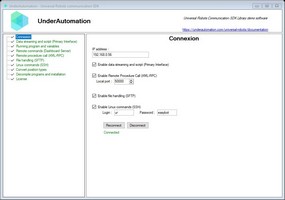
A Windows Forms application demonstrating all the features of the library.
📌 Download:📥 UnderAutomation.UniversalRobots.Showcase.Forms.exe
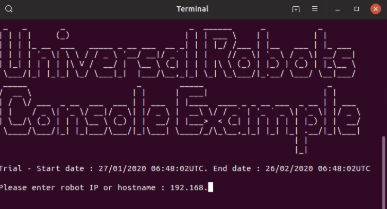
Precompiled console applications showcasing compilation for multiple operating systems.
📌 Downloads:
| OS | Architecture | Download |
|---|---|---|
| 🐧 Linux | ARM | 📥 Download |
| 🐧 Linux | x64 | 📥 Download |
| 🍏 macOS | ARM64 | 📥 Download |
| 🍏 macOS | x64 | 📥 Download |
| 🖥 Windows | x64 | 📥 Download |
| 🖥 Windows | x86 | 📥 Download |
Communicate with your robot at 500Hz, read live data, and control its behavior.
varrobot=newUR();varparam=newConnectParameters("192.168.0.1");// Enable RTDEparam.Rtde.Enable=true;// Exchange data at 500Hzparam.Rtde.Frequency=500;// Select data you want to write in robot controllerparam.Rtde.InputSetup.Add(RtdeInputData.StandardAnalogOutput0);param.Rtde.InputSetup.Add(RtdeInputData.InputIntRegisters,0);// Select data you want the robot to sendparam.Rtde.OutputSetup.Add(RtdeOutputData.ActualTcpPose);param.Rtde.OutputSetup.Add(RtdeOutputData.ToolOutputVoltage);param.Rtde.OutputSetup.Add(RtdeOutputData.OutputDoubleRegisters,10);// Connect to robotrobot.Connect(param);// Be notified at 500Hz when data is receivedrobot.Rtde.OutputDataReceived+=Rtde_OutputDataReceived;// Write input values in robotvarinputValues=newRtdeInputValues();inputValues.StandardAnalogOutput0=0.2;inputValues.InputIntRegisters.X0=12;robot.Rtde.WriteInputs(inputValues);Send URScript commands and monitor robot state at 10Hz.
// Send scriptrobot.PrimaryInterface.Script.Send("movej([-1.5,-1.5,-2,-0.5,1.8,0], a=1.4, v=1.05)");// Get datadoublex=robot.PrimaryInterface.CartesianInfo.TCPOffsetX;doubleshoulderSpeed=robot.PrimaryInterface.JointData.Shoulder.ActualSpeed;// Read program variablesGlobalVariablemyVar=robot.PrimaryInterface.GlobalVariables.GetByName("myVar");GlobalVariable[]variables=robot.PrimaryInterface.GlobalVariables.GetAll();Manage power, brakes, program execution, and more.
// For cobots with Polyscoperobot.Dashboard.PowerOn();robot.Dashboard.ReleaseBrake();robot.Dashboard.LoadProgram("prg1.urp");robot.Dashboard.Play();// For robots with Polyscope Xrobot.Rest.PowerOn();robot.Rest.ReleaseBrake();robot.Rest.LoadProgram("prg1.urp");robot.Rest.Play();Calculates joint positions corresponding to a cartesian position and vice versa. Uses a purely algebraic and optimized algorithm.
// Get default DH parameters for UR3e robot model²IUrDhParametersdhParameters=KinematicsUtils.GetDhParametersFromModel(RobotModelsExtended.UR3e);// Calculate forward kinematics for given joint angles in radiansKinematicsResultfkResult=KinematicsUtils.ForwardKinematics(newdouble[]{0,-1.57,1.57,0,0,0},dhParameters);// Calculate inverse kinematics for given cartesian posevarmatrix=vectorPose.FromRotationVectorTo4x4Matrix();double[][]ikSolutions=KinematicsUtils.InverseKinematics(matrix,dhParameters);Enable remote function calls from your robot program.
rpc :=rpc_factory("xmlrpc","http://192.168.0.10:50000")answer :=rpc.GetPose(100)// Answer sent to the robotrobot.XmlRpc.XmlRpcServerRequest+=(o,request)=>{if(request.MethodName=="GetPose")request.Answer=newPose(request.Arguments[0],200,100,0,0,0);};Allow robots to send and receive custom data via sockets.
robot.SocketCommunication.SocketWrite("Hello, Robot!");robot.SocketCommunication.SocketRequest+=(sender,e)=>Console.WriteLine(e.Message);Upload, download, and manage files securely on your robot.
robot.Sftp.UploadFile(content,"/home/ur/ursim/programs/my-program.urp");robot.Sftp.Delete("/home/ur/ursim/programs/old-program.urp");Execute shell commands remotely.
robot.Ssh.RunCommand("echo 'Hello' > /home/ur/Desktop/NewFile.txt");Choose the installation method that works best for you:
| Method | NuGet (Recommended) | Direct Download |
|---|---|---|
| How to Install | Install via NuGet. See on Nuget | Download and reference the DLL manually |
dotnet add package UnderAutomation.UniversalRobots | 📥 Download ZIP |
usingUnderAutomation.UniversalRobots;varrobot=newUR();robot.Connect(newConnectParameters("192.168.0.1"));✅ Supported Robots: UR3, UR5, UR10, UR16, UR18, UR20, UR30, UR8L, CB-Series, e-Series, Polyscope, Polyscope X
✅ Operating Systems: Windows, Linux, macOS
✅ .NET Versions: .NET Framework (≥3.5), .NET Standard, .NET Core, .NET 5/6/8/9
We welcome contributions! Feel free to:
- Report issues via GitHub Issues
- Submit pull requests with improvements
- Share feedback & feature requests
🔗 Learn more: UnderAutomation Licensing
If you have any questions or need support:
- 📖 Check the Docs: Documentation
- 📩 Contact Us: Support