Multiple scripts that are useful but don't deserve their own repository.
This is often a repository where I work on small ideas until they're big enough to deserve their own repo and README. This README may still lag behind the code, but it now covers the scripts that currently live at the root of this repository.
Annotated git tags in this repository are used as historical audit markers. While the project is still pre-1.0, tags follow semantic-version ordering: minor releases mark root-level script additions, removals, or fundamental workflow changes, while patch releases are reserved for follow-up maintenance or documentation-only milestones when they are tagged at all.
Because sometimes I want to see what packages are installed or available quickly.
Use -i to have it auto-sub in [installed] to the fzf search string. It also
shows package metadata and, when the package is installed, the file list from
dpkg -L.
aptlist-preview.sh remains as a small compatibility shim, but the preview logic
now lives directly in aptlist.
Interactive helper for searching a local book collection from the terminal. Superceded by books_browse.
Used along with Podfox to create a daily briefing without involving Google or Amazon or Apple. The post detailing this is at ideatrash.
Uses fzf or rofi to choose an image from configured stickerpacks, then puts
it onto the clipboard for pasting. By default it builds its list from
uncommented entries under [StickerPacks] in clipimg config, with each pack
defined as Name:/full/path/to/pack.
The script will look for config in the current working directory or in the same
directory as the script, using .clipimg.env, clipimg.ini, or .clipimg.ini.
If you still want old icon or clipart directories included, point stickerpack
entries at those directories in the env file instead of using separate sections.
You can pass sticker-pack names on the command line to limit the picker to those
packs only, for example clipimg.sh blob or clipimg.sh blob blob2. If you do
not name any packs, it includes every uncommented sticker pack from the config.
If you pass --sticker one or more times, that replaces the env-defined pack
set entirely for that run. Each --sticker argument can name a configured pack
or point directly at an arbitrary directory, for example
clipimg.sh --sticker blob --sticker /path/to/stickers.
Sticker selections are shown as PackName:filename, such as Blob2:angry mad,
and only supported image files are presented. Terminal previews currently prefer
chafa in symbols mode with animation disabled, and fall back to timg in
quarter-block mode; --chafa and --timg let you choose which previewer to
prefer. Pass --kitty to request Kitty graphics previews when running inside a
Kitty terminal; otherwise, or when running inside tmux, the script silently
falls back to the normal preview mode. Use --create-cache to build an
optional .clipimg.cache file next to the script; when that cache exists,
normal runs reuse it instead of rescanning the configured stickerpack
directories live. Cache builds are safe to run from cron: --create-cache
prefers config files next to the script, writes the cache atomically through a
temporary file, and does not depend on dragon being present in the cron
environment.
For output, the script will use any available combination of dragon, xclip,
and copyq. In normal mode, copyq receives both the image payload and the
file path in slot 1. With --path-only, the script skips dragon and sends
only the selected full file path as text to xclip and copyq. With
--no-dragon, it still copies the image normally but suppresses the drag target
window. For launcher environments with a reduced PATH, clipimg.sh explicitly checks
${HOME}/.local/bin/dragon before falling back to PATH lookup.
Scans a directory of .vcf and .vcard files for likely geometric placeholder
avatars, exports the suspected hits into ./output, and writes a TSV manifest
that ties each exported review image back to its source card.
During scan mode it standardizes embedded PHOTO blocks into an explicit
binary form, prints a running [current/total] progress counter, skips cards
already marked as generated by the repository's avatar helpers, and avoids the
expensive placeholder checks for images larger than 128x128 unless you raise
or lower VCF_PLACEHOLDER_FAST_SKIP_DIMENSION.
Look at the images that it outputs, and delete the ones that are TO KEEP. The only ones left should be the ones that you want to have removed.
After manual review, run clean_identicons_vcards.sh --clean to remove the
embedded PHOTO block only from cards whose exported review image still exists
in ./output and whose current embedded photo still matches the recorded hash.
Converts ODT and RTF files into Markdown and moves the original files into an archive directory. It is intended to make importing documents into Obsidian less annoying.
See this post on my blog for a full description of how to use this script.
Small helper for generating a deterministic avatar from a seed using DiceBear.
It prefers the online DiceBear API, randomly using either the clay or
critters style for new cached avatars, can fall back to a local dicebear
CLI, and then copies the resulting avatar into the clipboard and CopyQ for easy
reuse.
Run dicebear_helper_generate_avatar.sh --help for the current usage summary.
Set DICEBEAR_AVATAR_DIR if you want the cached PNGs written somewhere other
than the default cache directory, and set DICEBEAR_NO_CLIPBOARD=1 if you want
to skip clipboard and CopyQ updates.
Scans a directory of .vcf files, skips cards that already have a PHOTO,
tries Libravatar first and then Gravatar for any non-placeholder email
addresses on the card, and only falls back to the DiceBear helper above
if no email-based avatar is available.
It marks inserted avatars with X-DICEBEAR-GENERATED:TRUE and an
X-DICEBEAR-SOURCE: value of dicebear, libravatar, or gravatar so they
can be identified and removed later. Pass a contacts directory explicitly, or
let it scan the current working directory. --help shows the current options.
Reverses the marked-avatar workflow for vCards. It looks for the avatar marker
fields, removes them, and strips the embedded PHOTO block from those cards
only. Use --source with dicebear, libravatar, gravatar, or all to
limit what gets removed. Pass a contacts directory explicitly, or let it scan
the current working directory. --help shows the current options.
There are a lot of ways to get content into Obsidian, but sometimes I want to pull an image or file and drag-and-drop it into Element, Discord, whatever. However, that reveals the Obsidian URI to some or all applications, not the filename, making the operation fail. This is a workaround.
This uses Dragon to provide the drag and drop target.
Usage: call drag-out-of-obsidian.sh from the Shell Commands plugin, then drag
whatever from Obsidian to the target. It will process the provided Obsidian URL,
provide the file name to a second instance of Dragon after making sure it is
escaped to deal with spaces, and then give you a target to drop on your other
application.
The root of my vaults are symlinked into ${HOME}/vault, for example:
/vault/Brain/vault/DnD5e/vault/Writing
That allows for consistent rewriting even though they live in very different parts of my file structure. You will want to replace the escaped vault root with the equally escaped directory that you moved or symlinked all your vaults to.
sed 's|obsidian:\/\/open?vault=|\/path\/to\/vault\/|g' | sed -e 's/%2F/\//g' -e 's/%20/ /g'
Use the Shell Commands plugin to invoke it, and optionally the Commander plugin to add an icon to the ribbon or similar.
You may need to add the $PATH variables to Shell Commands, depending on where
you have the Dragon binary located.
Examples: I can drag to Thunar, not Discord, but this script fixes it.

I can't drag to upload to imgur, but this script fixes it.

Provides a way to copy filenames with complex characters to an older filesystem, such as NTFS. It can copy or move files, preserve part of the directory layout, and transliterate path segments so the target filesystem has an easier time with them.
Small clipboard utility for forcing the current selection or provided content into the clipboard when the normal copy path is being obnoxious.
Bulk cleanup helper for Markdown and text files. It fixes old tag markers that were written without the expected spacing.
A simple script using zenity and pkexec to allow for interactive mounting of
ISO files with a GUI interface.
Uses fd, fzf, and keepassxc-cli to provide a quick and easy way to retrieve passwords from the command line. By default it copies the password to the clipboard. If you don't want to type your password or select your database location every time, you can set them as environment variables.
See this post for details.
Small gate in front of task-spooler for jobs that should only start when the
machine is relatively quiet. It polls the 1-minute load average from
/proc/loadavg, waits until that value is at or below the built-in threshold
of 2.0, and then submits the command to tsp with the label you provided.
Only one waiting lowload.sh process is allowed per label at a time. If a
second caller uses the same label while the first is still waiting, it exits
with code 99 instead of queuing a duplicate waiter. The script currently
checks load every 20 seconds, requires tsp to be installed, and fails
explicitly if it cannot read the current load average.
Run lowload.sh --help for the current usage summary and exit codes.
Interactive front-end for mu mail searches. It prompts for the query and then
helps normalize the common subject:, from:, to:, body:, and similar field
patterns before running the search.
Takes downloaded audiobooks from OpenAudible and copies or links them into the directory structure that Audiobookshelf expects.
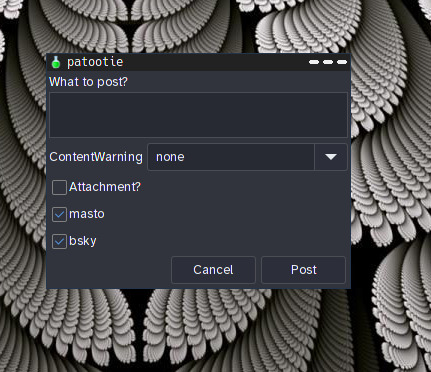
Because sometimes you want a GUI and the speed of a command line, and just want to say something stupid on Mastodon or Bluesky without firing up a browser or Sengi or grabbing your phone.
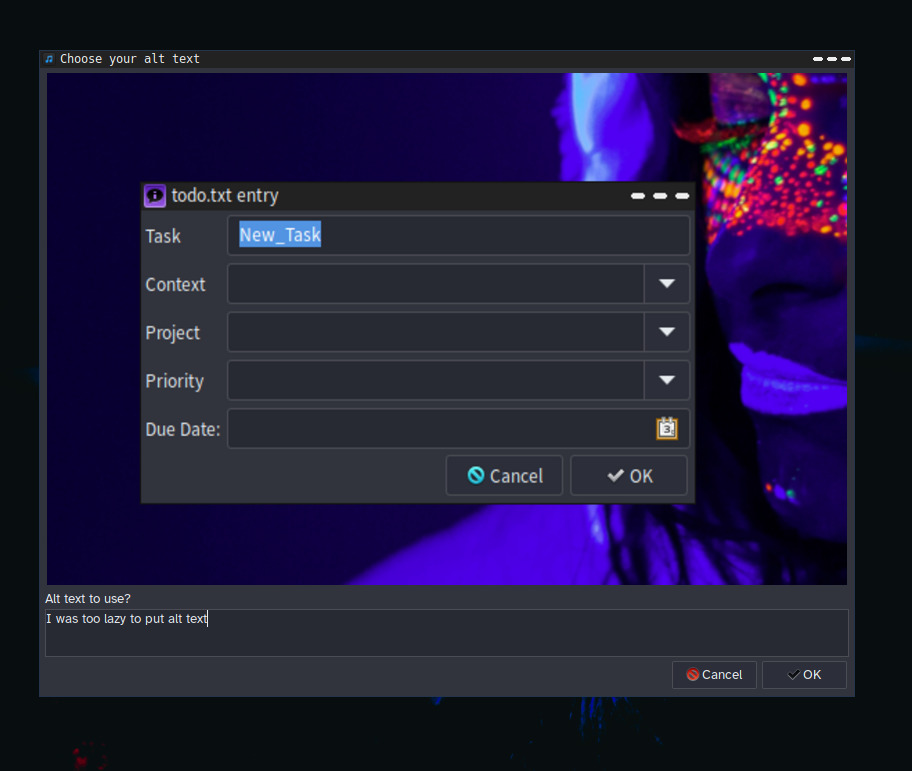
Uses YAD, toot, and bsky-sh-cli to provide a GUI for sending a quick post with possible image attachments, content warnings, and alt text. It includes an interactive image selector and displays the image while you are presented with a dialogue box to enter alt text.
Because bsky-sh-cli tends to log out of the session, create a short script
somewhere in $PATH called loginbsky. Mine, for example, looks something like
this:
#!/usr/bin/bashexport BSKYSHCLI_SELFHOSTED_DOMAIN=sky.example.com
bsky login --handle example_username --password example_password
PATH=$PATH:/home/USER/.local/bsky_sh_cli/bin
export PATH
You could also put any other bsky-sh-cli environment variables you like in
there, and it should be called immediately before posting.
You must set up both toot and bsky-sh-cli independently to use this script.
Patootie uses the environment variable TOOTACCT to specify the tooting account;
otherwise it uses whichever one is currently active in toot.
You may specify the full path to an image file as the first and only command-line variable to pre-load the image attachment portion of the script.
Wrapper around a handful of PDF extraction and conversion tools. It can extract embedded images, rasterize pages, turn the PDF into HTML and text-oriented formats, and build comic-book style archives from generated page images.
YAD-based helper for feeding files into Pinry from the command line. It can read existing EXIF tags and comments, prompt for board, tags, and description, and record which files have already been uploaded.
Looks up the current EXP TV schedule block, builds the corresponding media URL,
and opens it in mpv with the correct current seek offset.
Very simple PS1 helper functions to show when a git directory needs work and to shorten the home path shown in the prompt.
Does exactly what it says on the tin. $1 is the string to search and $2 is
the path to the icon file.
A transparent wrapper for surfraw that utilizes fzf.
https://terminalizer.com/view/4d1fd3b34309
While these aren't exactly speedy or optimized, they do what I want. They
show me the top CPU-using commands. That is, they lump all vivaldi-bin or
firefox-bin processes together before doing the calculation and sort, so I can
see what commands are eating up everything.
A small note: processes from bash, python, and java are not excluded, but the command they're running is what is counted. So for example, these three commands:
/usr/bin/python /usr/share/kupfer/kupfer.py --no-splash/usr/bin/python /usr/bin/autokey-gtk/usr/bin/python /usr/bin/dstat -c -C 0,1,total -d -s -n -y -r
are not lumped together, but are treated as separate commands.
Same basic idea as topcpu.sh, but for memory usage instead of CPU usage. It
groups usage by command so you can see what is actually consuming memory overall.
Script for moving and manipulating video streams easily. It can help choose real
and fake cameras, use fzf to pick devices and files, and supports fake
background or replacement-stream workflows. See this post
Processes MP4, MKV, and AVI files in the current directory with ffmpeg
loudness normalization so their playback volume is more consistent.
Dynamically creates a list of VirtualBox VMs and allows you to run them as an Openbox pipe menu.
Uses yad to present a simple GUI for adding tasks.
It now supports both legacy todo.txt file usage and todoman multi-list setups.
See yad-todo.png for what it might look like.
If the program is not running in legacy mode, ensure that it is getting the
todo.txt file passed to it. In todoman mode it will use your configured task
lists instead.
A wrapper for youtube-dl to make downloading or playing things easier and more
automated. It can take a URL directly, pull one from the clipboard, or prompt
through zenity, and supports video download, audio download, or playback.


The code in this repository has been to some degree written or altered by an AI tool with human supervision. This may include one or more of the following: LOTS of the documentation, locating and working around bugs, and commit messages and tags.