


This is not an official Fitbit CLI
Deprecation notice: Fitbit is deprecating the legacy Fitbit Web API in favor of the Google Health API. Legacy Fitbit Web API endpoints are expected to be decommissioned in September 2026, and new integrations should use Google Health API instead.
This CLI currently uses the legacy Fitbit Web API. There are no plans to migrate this project to the Google Health API. Until the Fitbit Web API is decommissioned, this project will be maintained in maintenance mode only and may be archived soon.
Access your Fitbit data directly from your terminal 💻. View 💤 sleep logs, ❤️ heart rate, 🏋️♂️ activity levels, 🩸 SpO2, and more, all presented in a simple, easy-to-read table format!
AI agent-friendly 🤖 — since v1.6.0, use
--jsonfor minimized, token-efficient JSON output or--raw-jsonfor the full Fitbit API response. No spinners, pure JSON.


Only
GETAPIs are supported!
- Install the Fitbit CLI
python -m pip install fitbit-cli- See Help
fitbit-cli -h
usage: fitbit-cli [-h] [-i] [-j] [-r] [-s [DATE[,DATE]|RELATIVE]] [-o [DATE[,DATE]|RELATIVE]] [-e [DATE[,DATE]|RELATIVE]] [-a [DATE[,DATE]|RELATIVE]]
[-b [DATE[,DATE]|RELATIVE]] [-H [DATE[,DATE]|RELATIVE]] [-B [DATE[,DATE]|RELATIVE]]
[-t [DATE[,DATE]|RELATIVE]] [-u] [-d] [-v]
Fitbit CLI -- Access your Fitbit data at your terminal.
options:
-h, --help show this help message and exit
-i, --init-auth Initialize Fitbit iterative authentication setup
-j, --json Output table data as JSON.
-r, --raw-json Output raw JSON from the Fitbit API.
-v, --version Show fitbit-cli version
APIs:
Specify a date, date range (YYYY-MM-DD[,YYYY-MM-DD]), or relative date.
Relative dates: yesterday, last-week, last-month, last-N-days/weeks/months (e.g., last-2-days).
If not provided, defaults to today's date. -s, --sleep [DATE[,DATE]|RELATIVE] Show Sleep Log by Date Range. -o, --spo2 [DATE[,DATE]|RELATIVE] Show SpO2 Summary by Interval. -e, --heart [DATE[,DATE]|RELATIVE] Show Heart Rate Time Series by Date Range. -a, --active-zone [DATE[,DATE]|RELATIVE] Show AZM Time Series by Interval. -b, --breathing-rate [DATE[,DATE]|RELATIVE] Show Breathing Rate Summary by Interval. -H, --hrv [DATE[,DATE]|RELATIVE] Show HRV Summary by Interval. -B, --body [DATE[,DATE]|RELATIVE] Show Body Time Series for Weight, BMI, and Body Fat. -t, --activities [DATE[,DATE]|RELATIVE] Show Daily Activity Summary. -u, --user-profile Show Profile. -d, --devices Show Devices.
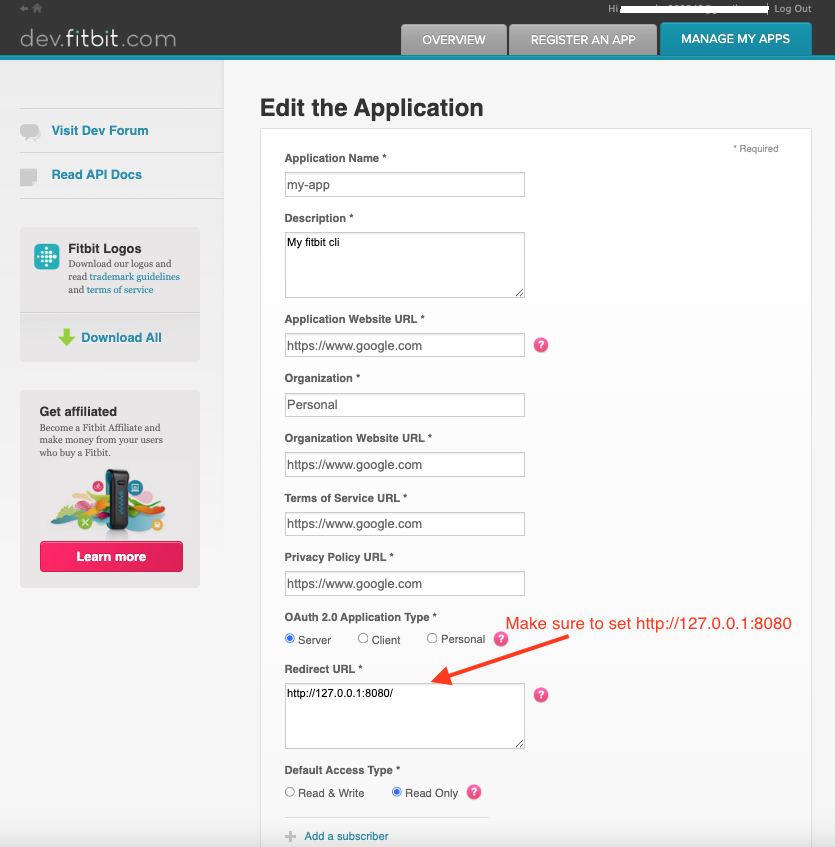
Register Fitbit App
- Go to https://dev.fitbit.com/apps
- Click on "REGISTER AN APP" tab
- Follow below example and register an app

Run the following command to set up interactive authentication and store the Fitbit token locally
fitbit-cli --init-auth
Start using it 😎

fitbit-cli -s
Sleep Data Summary 😴
┏━━━━━━━━━━━━┳━━━━━━━━━━━━━━┳━━━━━━━━━━━━━━━━┳━━━━━━━━━━━━━━┳━━━━━━━━━━━━━━┳━━━━━━━━━━━━━━━┳━━━━━━━━━━━━━━━━┓
┃ Date 📆 ┃ Deep Sleep 🛏 ┃ Light Sleep 💤 ┃ REM Sleep 🌙 ┃ Wake Time ⏰ ┃ Efficiency 💯 ┃ Time in Bed 🕐 ┃
┡━━━━━━━━━━━━╇━━━━━━━━━━━━━━╇━━━━━━━━━━━━━━━━╇━━━━━━━━━━━━━━╇━━━━━━━━━━━━━━╇━━━━━━━━━━━━━━━╇━━━━━━━━━━━━━━━━┩
│ 2025-05-03 │ 129 min │ 271 min │ 140 min │ 66 min │ 57% │ 10.1 hr │
└────────────┴──────────────┴────────────────┴──────────────┴──────────────┴───────────────┴────────────────┘
NOTE: The token is valid for only 8 hours, fitbit-cli automatically refreshes the token when it expires.
git clone git@github.com:veerendra2/fitbit-cli.git
cd fitbit-cli
python -m venv venv
source venv/bin/activate
python -m pip install -e .
deactivate