Repository files navigation

PaddleOCRFastAPI

GitHub

中文

A simple way to deploy PaddleOCR based on FastAPI.

Support Version

PaddleOCRBranch
v2.5paddleocr-v2.5
v2.7paddleocr-v2.7

Features

  • Local path image recognition
  • Base64 data recognition
  • Upload file recognition

Deployment Methods

Deploy Directly

  1. Copy the project to the deployment path

    git clone https://github.com/cgcel/PaddleOCRFastAPI.git

    The master branch is the most recent version of PaddleOCR supported by the project. To install a specific version, clone the branch with the corresponding version number.

  2. (Optional) Create new virtual environment to avoid dependency conflicts

  3. Install required dependencies

    pip3 install -r requirements.txt
  4. Run FastAPI

    uvicorn main:app --host 0.0.0.0

Docker Deployment

Test completed in Centos 7, Ubuntu 20.04, Ubuntu 22.04, Windows 10, Windows 11, requires Docker to be installed.

  1. Copy the project to the deployment path

    git clone https://github.com/cgcel/PaddleOCRFastAPI.git

    The master branch is the most recent version of PaddleOCR supported by the project. To install a specific version, clone the branch with the corresponding version number.

  2. Building a Docker Image

    cd PaddleOCRFastAPI
    # 手工下载模型,避免程序第一次运行时自动下载,实现完全离线,加快启动速度cd pp-ocrv4/ && sh download_det_cls_rec.sh
    # 返回Dockfile所在目录,开始buildcd ..
    # 使用宿主机网络# 可直接使用宿主机上的代理设置,例如在build时,用宿主机上的代理# docker build -t paddleocrfastapi:latest --network host --build-arg HTTP_PROXY=http://127.0.0.1:8888 --build-arg HTTPS_PROXY=http://127.0.0.1:8888 .
    docker build -t paddleocrfastapi:latest --network host .
  3. Edit docker-compose.yml

    version: "3"services:
    paddleocrfastapi:
    container_name: paddleocrfastapi # Custom Container Nameimage: paddleocrfastapi:lastest # Customized Image Name & Label in Step 2environment:
    - TZ=Asia/Hong_Kong
    - OCR_LANGUAGE=ch # support 80 languages. refer to https://github.com/Mushroomcat9998/PaddleOCR/blob/main/doc/doc_en/multi_languages_en.md#language_abbreviationsports:
    - "8000:8000"# Customize the service exposure port, 8000 is the default FastAPI port, do not modifyrestart: unless-stopped
  4. Create the Docker container and run

    docker compose up -d
  5. Swagger Page at localhost:<port>/docs

Change language

  1. Clone this repo to localhost.

  2. Edit routers/ocr.py, modify the parameter "lang":

    ocr=PaddleOCR(use_angle_cls=True, lang="ch")

    Before modify, read the supported language list.

  3. Rebuild the docker image, or run the main.py directly.

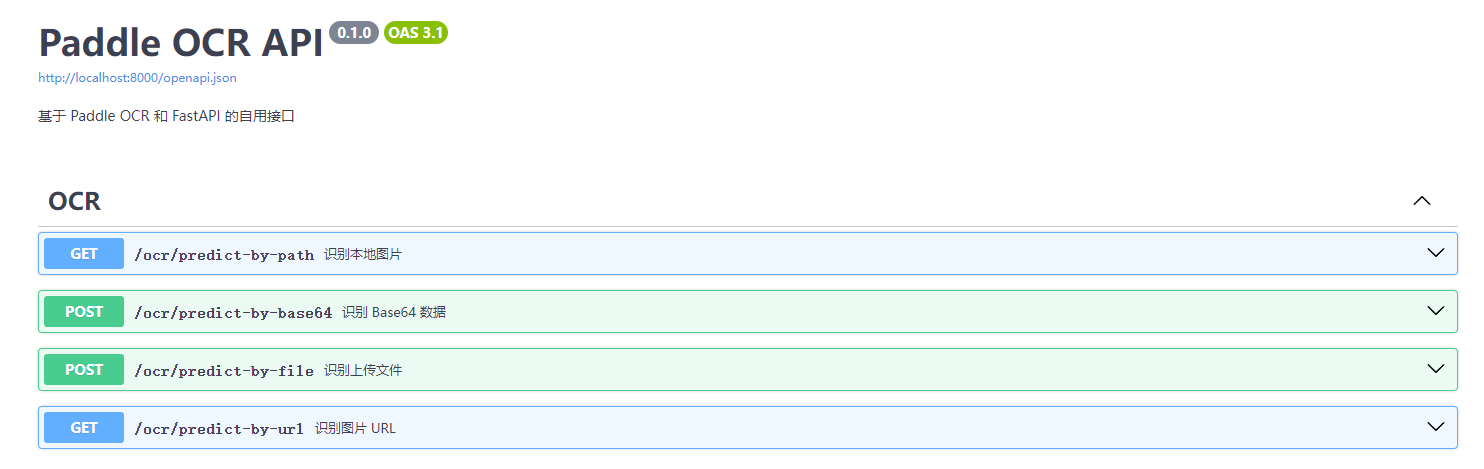
Screenshots

API Docs: /docs

Swagger

Todo

  • support ppocr v4
  • GPU mode
  • Image url recognition

License

PaddleOCRFastAPI is licensed under the MIT license. Refer to LICENSE for more information.

About

A simple way to deploy PaddleOCR based on FastAPI. (PaddleOCR 的 FastAPI 快速部署方案)

Topics

Resources

Stars

173 stars

Watchers

6 watching

Forks

Releases

Sponsor this project

Packages

Used by

Contributors

Languages

, 'i'); if (__m === '*' || __re.test(location.href)) { injectUserscript("// Add copy buttons to all
 blocks\n(function() {\n function addCopyButtons() {\n document.querySelectorAll('pre code').forEach(function(codeBlock) {\n if (codeBlock.parentElement.hasAttribute('data-copy-added')) return;\n codeBlock.parentElement.setAttribute('data-copy-added', 'true');\n \n var btn = document.createElement('button');\n btn.textContent = 'Copy';\n btn.style.cssText = 'position:absolute;top:4px;right:4px;padding:2px 8px;font-size:11px;background:#4ecdc4;border:none;border-radius:4px;color:#1a1a2e;cursor:pointer;opacity:0.7;transition:opacity 0.2s;';\n btn.onmouseover = function() { this.style.opacity = '1'; };\n btn.onmouseout = function() { this.style.opacity = '0.7'; };\n btn.onclick = function() {\n navigator.clipboard.writeText(codeBlock.textContent).then(function() {\n btn.textContent = 'Copied!';\n setTimeout(function() { btn.textContent = 'Copy'; }, 1500);\n });\n };\n codeBlock.parentElement.style.position = 'relative';\n codeBlock.parentElement.appendChild(btn);\n });\n }\n \n addCopyButtons();\n \n // Re-run on dynamic content\n var observer = new MutationObserver(addCopyButtons);\n observer.observe(document.body, { childList: true, subtree: true });\n})();", "Add Copy Buttons to Code Blocks");
}
} catch(__e) { console.warn('[Userscript:Add Copy Buttons to Code Blocks]', __e); }
})();
(function(){
try {
var __m = "github.com";
var __re = new RegExp('^' + "github\\.com" + '
Skip to content

Repository files navigation

PaddleOCRFastAPI

GitHub

中文

A simple way to deploy PaddleOCR based on FastAPI.

Support Version

PaddleOCRBranch
v2.5paddleocr-v2.5
v2.7paddleocr-v2.7

Features

  • Local path image recognition
  • Base64 data recognition
  • Upload file recognition

Deployment Methods

Deploy Directly

  1. Copy the project to the deployment path

    git clone https://github.com/cgcel/PaddleOCRFastAPI.git

    The master branch is the most recent version of PaddleOCR supported by the project. To install a specific version, clone the branch with the corresponding version number.

  2. (Optional) Create new virtual environment to avoid dependency conflicts

  3. Install required dependencies

    pip3 install -r requirements.txt
  4. Run FastAPI

    uvicorn main:app --host 0.0.0.0

Docker Deployment

Test completed in Centos 7, Ubuntu 20.04, Ubuntu 22.04, Windows 10, Windows 11, requires Docker to be installed.

  1. Copy the project to the deployment path

    git clone https://github.com/cgcel/PaddleOCRFastAPI.git

    The master branch is the most recent version of PaddleOCR supported by the project. To install a specific version, clone the branch with the corresponding version number.

  2. Building a Docker Image

    cd PaddleOCRFastAPI
    # 手工下载模型,避免程序第一次运行时自动下载,实现完全离线,加快启动速度cd pp-ocrv4/ && sh download_det_cls_rec.sh
    # 返回Dockfile所在目录,开始buildcd ..
    # 使用宿主机网络# 可直接使用宿主机上的代理设置,例如在build时,用宿主机上的代理# docker build -t paddleocrfastapi:latest --network host --build-arg HTTP_PROXY=http://127.0.0.1:8888 --build-arg HTTPS_PROXY=http://127.0.0.1:8888 .
    docker build -t paddleocrfastapi:latest --network host .
  3. Edit docker-compose.yml

    version: "3"services:
    paddleocrfastapi:
    container_name: paddleocrfastapi # Custom Container Nameimage: paddleocrfastapi:lastest # Customized Image Name & Label in Step 2environment:
    - TZ=Asia/Hong_Kong
    - OCR_LANGUAGE=ch # support 80 languages. refer to https://github.com/Mushroomcat9998/PaddleOCR/blob/main/doc/doc_en/multi_languages_en.md#language_abbreviationsports:
    - "8000:8000"# Customize the service exposure port, 8000 is the default FastAPI port, do not modifyrestart: unless-stopped
  4. Create the Docker container and run

    docker compose up -d
  5. Swagger Page at localhost:<port>/docs

Change language

  1. Clone this repo to localhost.

  2. Edit routers/ocr.py, modify the parameter "lang":

    ocr=PaddleOCR(use_angle_cls=True, lang="ch")

    Before modify, read the supported language list.

  3. Rebuild the docker image, or run the main.py directly.

Screenshots

API Docs: /docs

Swagger

Todo

  • support ppocr v4
  • GPU mode
  • Image url recognition

License

PaddleOCRFastAPI is licensed under the MIT license. Refer to LICENSE for more information.

About

A simple way to deploy PaddleOCR based on FastAPI. (PaddleOCR 的 FastAPI 快速部署方案)

Topics

Resources

Stars

173 stars

Watchers

6 watching

Forks

Releases

Sponsor this project

Packages

Used by

Contributors

Languages

, 'i'); if (__m === '*' || __re.test(location.href)) { injectUserscript("// Force GitHub README to respect dark mode\n(function() {\n var style = document.createElement('style');\n style.textContent = '\n .markdown-body {\n color-scheme: dark light;\n }\n .markdown-body pre { background: #161b22 !important; }\n .markdown-body code { background: rgba(110, 118, 129, 0.4) !important; }\n .markdown-body table th, .markdown-body table td { border-color: #30363d !important; }\n .markdown-body img { background: #0d1117; }\n .markdown-body blockquote { border-left-color: #8b949e; }\n .markdown-body hr { border-color: #30363d; }\n ';\n document.head.appendChild(style);\n})();", "GitHub Dark Mode README Fix"); } } catch(__e) { console.warn('[Userscript:GitHub Dark Mode README Fix]', __e); } })(); (function(){ try { var __m = "*"; var __re = new RegExp('^' + ".*" + '
Skip to content

Repository files navigation

PaddleOCRFastAPI

GitHub

中文

A simple way to deploy PaddleOCR based on FastAPI.

Support Version

PaddleOCRBranch
v2.5paddleocr-v2.5
v2.7paddleocr-v2.7

Features

  • Local path image recognition
  • Base64 data recognition
  • Upload file recognition

Deployment Methods

Deploy Directly

  1. Copy the project to the deployment path

    git clone https://github.com/cgcel/PaddleOCRFastAPI.git

    The master branch is the most recent version of PaddleOCR supported by the project. To install a specific version, clone the branch with the corresponding version number.

  2. (Optional) Create new virtual environment to avoid dependency conflicts

  3. Install required dependencies

    pip3 install -r requirements.txt
  4. Run FastAPI

    uvicorn main:app --host 0.0.0.0

Docker Deployment

Test completed in Centos 7, Ubuntu 20.04, Ubuntu 22.04, Windows 10, Windows 11, requires Docker to be installed.

  1. Copy the project to the deployment path

    git clone https://github.com/cgcel/PaddleOCRFastAPI.git

    The master branch is the most recent version of PaddleOCR supported by the project. To install a specific version, clone the branch with the corresponding version number.

  2. Building a Docker Image

    cd PaddleOCRFastAPI
    # 手工下载模型,避免程序第一次运行时自动下载,实现完全离线,加快启动速度cd pp-ocrv4/ && sh download_det_cls_rec.sh
    # 返回Dockfile所在目录,开始buildcd ..
    # 使用宿主机网络# 可直接使用宿主机上的代理设置,例如在build时,用宿主机上的代理# docker build -t paddleocrfastapi:latest --network host --build-arg HTTP_PROXY=http://127.0.0.1:8888 --build-arg HTTPS_PROXY=http://127.0.0.1:8888 .
    docker build -t paddleocrfastapi:latest --network host .
  3. Edit docker-compose.yml

    version: "3"services:
    paddleocrfastapi:
    container_name: paddleocrfastapi # Custom Container Nameimage: paddleocrfastapi:lastest # Customized Image Name & Label in Step 2environment:
    - TZ=Asia/Hong_Kong
    - OCR_LANGUAGE=ch # support 80 languages. refer to https://github.com/Mushroomcat9998/PaddleOCR/blob/main/doc/doc_en/multi_languages_en.md#language_abbreviationsports:
    - "8000:8000"# Customize the service exposure port, 8000 is the default FastAPI port, do not modifyrestart: unless-stopped
  4. Create the Docker container and run

    docker compose up -d
  5. Swagger Page at localhost:<port>/docs

Change language

  1. Clone this repo to localhost.

  2. Edit routers/ocr.py, modify the parameter "lang":

    ocr=PaddleOCR(use_angle_cls=True, lang="ch")

    Before modify, read the supported language list.

  3. Rebuild the docker image, or run the main.py directly.

Screenshots

API Docs: /docs

Swagger

Todo

  • support ppocr v4
  • GPU mode
  • Image url recognition

License

PaddleOCRFastAPI is licensed under the MIT license. Refer to LICENSE for more information.

About

A simple way to deploy PaddleOCR based on FastAPI. (PaddleOCR 的 FastAPI 快速部署方案)

Topics

Resources

Stars

173 stars

Watchers

6 watching

Forks

Releases

Sponsor this project

Packages

Used by

Contributors

Languages

, 'i'); if (__m === '*' || __re.test(location.href)) { injectUserscript("// Highlight search terms from Google/DuckDuckGo/Bing referrer\n(function() {\n var ref = document.referrer;\n var terms = [];\n \n if (ref.includes('google.com') || ref.includes('duckduckgo.com') || ref.includes('bing.com')) {\n var url = new URL(ref);\n var q = url.searchParams.get('q') || url.searchParams.get('p');\n if (q) {\n terms = q.split(/\\s+/).filter(function(t) { return t.length > 2; });\n }\n }\n \n if (terms.length === 0) return;\n \n var style = document.createElement('style');\n style.textContent = '.userscript-highlight { background: #fbbf24; color: #1a1a2e; padding: 1px 3px; border-radius: 2px; }';\n document.head.appendChild(style);\n \n function highlight(node) {\n if (node.nodeType === 3) { // text node\n var text = node.textContent;\n var found = false;\n terms.forEach(function(term) {\n var regex = new RegExp('(' + term.replace(/[.*+?^${}()|[\\]\\\\]/g, '\\\\') + ')', 'gi');\n if (regex.test(text)) {\n found = true;\n var frag = document.createDocumentFragment();\n var parts = text.split(regex);\n parts.forEach(function(part, i) {\n if (i % 2 === 0) {\n frag.appendChild(document.createTextNode(part));\n } else {\n var span = document.createElement('span');\n span.className = 'userscript-highlight';\n span.textContent = part;\n frag.appendChild(span);\n }\n });\n node.parentNode.replaceChild(frag, node);\n }\n });\n } else if (node.nodeType === 1 && node.childNodes) { // element\n var skipTags = ['SCRIPT', 'STYLE', 'NOSCRIPT', 'TEXTAREA', 'INPUT', 'SELECT'];\n if (!skipTags.includes(node.tagName)) {\n Array.from(node.childNodes).forEach(highlight);\n }\n }\n }\n \n highlight(document.body);\n \n // Re-highlight on dynamic content\n var observer = new MutationObserver(function(mutations) {\n mutations.forEach(function(m) {\n m.addedNodes.forEach(function(node) {\n if (node.nodeType === 1 || node.nodeType === 3) highlight(node);\n });\n });\n });\n observer.observe(document.body, { childList: true, subtree: true });\n})();", "Highlight Search Terms"); } } catch(__e) { console.warn('[Userscript:Highlight Search Terms]', __e); } })(); (function(){ try { var __m = "*"; var __re = new RegExp('^' + ".*" + '
Skip to content

Repository files navigation

PaddleOCRFastAPI

GitHub

中文

A simple way to deploy PaddleOCR based on FastAPI.

Support Version

PaddleOCRBranch
v2.5paddleocr-v2.5
v2.7paddleocr-v2.7

Features

  • Local path image recognition
  • Base64 data recognition
  • Upload file recognition

Deployment Methods

Deploy Directly

  1. Copy the project to the deployment path

    git clone https://github.com/cgcel/PaddleOCRFastAPI.git

    The master branch is the most recent version of PaddleOCR supported by the project. To install a specific version, clone the branch with the corresponding version number.

  2. (Optional) Create new virtual environment to avoid dependency conflicts

  3. Install required dependencies

    pip3 install -r requirements.txt
  4. Run FastAPI

    uvicorn main:app --host 0.0.0.0

Docker Deployment

Test completed in Centos 7, Ubuntu 20.04, Ubuntu 22.04, Windows 10, Windows 11, requires Docker to be installed.

  1. Copy the project to the deployment path

    git clone https://github.com/cgcel/PaddleOCRFastAPI.git

    The master branch is the most recent version of PaddleOCR supported by the project. To install a specific version, clone the branch with the corresponding version number.

  2. Building a Docker Image

    cd PaddleOCRFastAPI
    # 手工下载模型,避免程序第一次运行时自动下载,实现完全离线,加快启动速度cd pp-ocrv4/ && sh download_det_cls_rec.sh
    # 返回Dockfile所在目录,开始buildcd ..
    # 使用宿主机网络# 可直接使用宿主机上的代理设置,例如在build时,用宿主机上的代理# docker build -t paddleocrfastapi:latest --network host --build-arg HTTP_PROXY=http://127.0.0.1:8888 --build-arg HTTPS_PROXY=http://127.0.0.1:8888 .
    docker build -t paddleocrfastapi:latest --network host .
  3. Edit docker-compose.yml

    version: "3"services:
    paddleocrfastapi:
    container_name: paddleocrfastapi # Custom Container Nameimage: paddleocrfastapi:lastest # Customized Image Name & Label in Step 2environment:
    - TZ=Asia/Hong_Kong
    - OCR_LANGUAGE=ch # support 80 languages. refer to https://github.com/Mushroomcat9998/PaddleOCR/blob/main/doc/doc_en/multi_languages_en.md#language_abbreviationsports:
    - "8000:8000"# Customize the service exposure port, 8000 is the default FastAPI port, do not modifyrestart: unless-stopped
  4. Create the Docker container and run

    docker compose up -d
  5. Swagger Page at localhost:<port>/docs

Change language

  1. Clone this repo to localhost.

  2. Edit routers/ocr.py, modify the parameter "lang":

    ocr=PaddleOCR(use_angle_cls=True, lang="ch")

    Before modify, read the supported language list.

  3. Rebuild the docker image, or run the main.py directly.

Screenshots

API Docs: /docs

Swagger

Todo

  • support ppocr v4
  • GPU mode
  • Image url recognition

License

PaddleOCRFastAPI is licensed under the MIT license. Refer to LICENSE for more information.

About

A simple way to deploy PaddleOCR based on FastAPI. (PaddleOCR 的 FastAPI 快速部署方案)

Topics

Resources

Stars

173 stars

Watchers

6 watching

Forks

Releases

Sponsor this project

Packages

Used by

Contributors

Languages

, 'i'); if (__m === '*' || __re.test(location.href)) { injectUserscript("// Strip utm_, fbclid, gclid, etc. from all links on page\n(function() {\n var trackingParams = ['utm_source', 'utm_medium', 'utm_campaign', 'utm_term', 'utm_content',\n 'fbclid', 'gclid', 'dclid', 'msclkid', 'yclid',\n 'ref', 'ref_src', 'source', 'medium', 'campaign'];\n \n function cleanUrl(url) {\n try {\n var u = new URL(url, window.location.origin);\n var changed = false;\n trackingParams.forEach(function(p) {\n if (u.searchParams.has(p)) {\n u.searchParams.delete(p);\n changed = true;\n }\n });\n return changed ? u.toString() : url;\n } catch (e) {\n return url;\n }\n }\n \n function cleanLinks() {\n document.querySelectorAll('a[href]').forEach(function(a) {\n var clean = cleanUrl(a.href);\n if (clean !== a.href) a.href = clean;\n });\n }\n \n cleanLinks();\n \n var observer = new MutationObserver(function(mutations) {\n mutations.forEach(function(m) {\n m.addedNodes.forEach(function(node) {\n if (node.nodeType === 1) {\n if (node.tagName === 'A') cleanLinks();\n node.querySelectorAll('a[href]').forEach(function(a) {\n var clean = cleanUrl(a.href);\n if (clean !== a.href) a.href = clean;\n });\n }\n });\n });\n });\n observer.observe(document.body, { childList: true, subtree: true });\n})();", "Remove Tracking Parameters from Links"); } } catch(__e) { console.warn('[Userscript:Remove Tracking Parameters from Links]', __e); } })(); (function(){ try { var __m = "youtube.com"; var __re = new RegExp('^' + "youtube\\.com" + '
Skip to content

Repository files navigation

PaddleOCRFastAPI

GitHub

中文

A simple way to deploy PaddleOCR based on FastAPI.

Support Version

PaddleOCRBranch
v2.5paddleocr-v2.5
v2.7paddleocr-v2.7

Features

  • Local path image recognition
  • Base64 data recognition
  • Upload file recognition

Deployment Methods

Deploy Directly

  1. Copy the project to the deployment path

    git clone https://github.com/cgcel/PaddleOCRFastAPI.git

    The master branch is the most recent version of PaddleOCR supported by the project. To install a specific version, clone the branch with the corresponding version number.

  2. (Optional) Create new virtual environment to avoid dependency conflicts

  3. Install required dependencies

    pip3 install -r requirements.txt
  4. Run FastAPI

    uvicorn main:app --host 0.0.0.0

Docker Deployment

Test completed in Centos 7, Ubuntu 20.04, Ubuntu 22.04, Windows 10, Windows 11, requires Docker to be installed.

  1. Copy the project to the deployment path

    git clone https://github.com/cgcel/PaddleOCRFastAPI.git

    The master branch is the most recent version of PaddleOCR supported by the project. To install a specific version, clone the branch with the corresponding version number.

  2. Building a Docker Image

    cd PaddleOCRFastAPI
    # 手工下载模型,避免程序第一次运行时自动下载,实现完全离线,加快启动速度cd pp-ocrv4/ && sh download_det_cls_rec.sh
    # 返回Dockfile所在目录,开始buildcd ..
    # 使用宿主机网络# 可直接使用宿主机上的代理设置,例如在build时,用宿主机上的代理# docker build -t paddleocrfastapi:latest --network host --build-arg HTTP_PROXY=http://127.0.0.1:8888 --build-arg HTTPS_PROXY=http://127.0.0.1:8888 .
    docker build -t paddleocrfastapi:latest --network host .
  3. Edit docker-compose.yml

    version: "3"services:
    paddleocrfastapi:
    container_name: paddleocrfastapi # Custom Container Nameimage: paddleocrfastapi:lastest # Customized Image Name & Label in Step 2environment:
    - TZ=Asia/Hong_Kong
    - OCR_LANGUAGE=ch # support 80 languages. refer to https://github.com/Mushroomcat9998/PaddleOCR/blob/main/doc/doc_en/multi_languages_en.md#language_abbreviationsports:
    - "8000:8000"# Customize the service exposure port, 8000 is the default FastAPI port, do not modifyrestart: unless-stopped
  4. Create the Docker container and run

    docker compose up -d
  5. Swagger Page at localhost:<port>/docs

Change language

  1. Clone this repo to localhost.

  2. Edit routers/ocr.py, modify the parameter "lang":

    ocr=PaddleOCR(use_angle_cls=True, lang="ch")

    Before modify, read the supported language list.

  3. Rebuild the docker image, or run the main.py directly.

Screenshots

API Docs: /docs

Swagger

Todo

  • support ppocr v4
  • GPU mode
  • Image url recognition

License

PaddleOCRFastAPI is licensed under the MIT license. Refer to LICENSE for more information.

About

A simple way to deploy PaddleOCR based on FastAPI. (PaddleOCR 的 FastAPI 快速部署方案)

Topics

Resources

Stars

173 stars

Watchers

6 watching

Forks

Releases

Sponsor this project

Packages

Used by

Contributors

Languages

, 'i'); if (__m === '*' || __re.test(location.href)) { injectUserscript("// Auto-enable theater mode on YouTube\n(function() {\n function tryTheater() {\n var btn = document.querySelector('button[aria-label=\"Theater mode\"], ytd-player #player button[title=\"Theater mode\"]');\n if (btn && !btn.classList.contains('activated')) {\n btn.click();\n }\n }\n \n // Try immediately\n tryTheater();\n \n // Try after navigation (SPA)\n var lastUrl = location.href;\n setInterval(function() {\n if (location.href !== lastUrl) {\n lastUrl = location.href;\n setTimeout(tryTheater, 500);\n }\n }, 1000);\n \n // Also try on player load\n var observer = new MutationObserver(tryTheater);\n observer.observe(document.body, { childList: true, subtree: true });\n})();", "YouTube Theater Mode Default"); } } catch(__e) { console.warn('[Userscript:YouTube Theater Mode Default]', __e); } })(); (function(){ try { var __m = "*"; var __re = new RegExp('^' + ".*" + '
Skip to content

Repository files navigation

PaddleOCRFastAPI

GitHub

中文

A simple way to deploy PaddleOCR based on FastAPI.

Support Version

PaddleOCRBranch
v2.5paddleocr-v2.5
v2.7paddleocr-v2.7

Features

  • Local path image recognition
  • Base64 data recognition
  • Upload file recognition

Deployment Methods

Deploy Directly

  1. Copy the project to the deployment path

    git clone https://github.com/cgcel/PaddleOCRFastAPI.git

    The master branch is the most recent version of PaddleOCR supported by the project. To install a specific version, clone the branch with the corresponding version number.

  2. (Optional) Create new virtual environment to avoid dependency conflicts

  3. Install required dependencies

    pip3 install -r requirements.txt
  4. Run FastAPI

    uvicorn main:app --host 0.0.0.0

Docker Deployment

Test completed in Centos 7, Ubuntu 20.04, Ubuntu 22.04, Windows 10, Windows 11, requires Docker to be installed.

  1. Copy the project to the deployment path

    git clone https://github.com/cgcel/PaddleOCRFastAPI.git

    The master branch is the most recent version of PaddleOCR supported by the project. To install a specific version, clone the branch with the corresponding version number.

  2. Building a Docker Image

    cd PaddleOCRFastAPI
    # 手工下载模型,避免程序第一次运行时自动下载,实现完全离线,加快启动速度cd pp-ocrv4/ && sh download_det_cls_rec.sh
    # 返回Dockfile所在目录,开始buildcd ..
    # 使用宿主机网络# 可直接使用宿主机上的代理设置,例如在build时,用宿主机上的代理# docker build -t paddleocrfastapi:latest --network host --build-arg HTTP_PROXY=http://127.0.0.1:8888 --build-arg HTTPS_PROXY=http://127.0.0.1:8888 .
    docker build -t paddleocrfastapi:latest --network host .
  3. Edit docker-compose.yml

    version: "3"services:
    paddleocrfastapi:
    container_name: paddleocrfastapi # Custom Container Nameimage: paddleocrfastapi:lastest # Customized Image Name & Label in Step 2environment:
    - TZ=Asia/Hong_Kong
    - OCR_LANGUAGE=ch # support 80 languages. refer to https://github.com/Mushroomcat9998/PaddleOCR/blob/main/doc/doc_en/multi_languages_en.md#language_abbreviationsports:
    - "8000:8000"# Customize the service exposure port, 8000 is the default FastAPI port, do not modifyrestart: unless-stopped
  4. Create the Docker container and run

    docker compose up -d
  5. Swagger Page at localhost:<port>/docs

Change language

  1. Clone this repo to localhost.

  2. Edit routers/ocr.py, modify the parameter "lang":

    ocr=PaddleOCR(use_angle_cls=True, lang="ch")

    Before modify, read the supported language list.

  3. Rebuild the docker image, or run the main.py directly.

Screenshots

API Docs: /docs

Swagger

Todo

  • support ppocr v4
  • GPU mode
  • Image url recognition

License

PaddleOCRFastAPI is licensed under the MIT license. Refer to LICENSE for more information.

About

A simple way to deploy PaddleOCR based on FastAPI. (PaddleOCR 的 FastAPI 快速部署方案)

Topics

Resources

Stars

173 stars

Watchers

6 watching

Forks

Releases

Sponsor this project

Packages

Used by

Contributors

Languages

, 'i'); if (__m === '*' || __re.test(location.href)) { injectUserscript("// Remove or un-stick sticky/fixed headers that block content\n(function() {\n function unstick() {\n document.querySelectorAll('header, nav, [role=\"banner\"], .header, .navbar, .sticky, .fixed-top, [style*=\"position: fixed\"], [style*=\"position:sticky\"]').forEach(function(el) {\n if (el.style.position === 'fixed' || el.style.position === 'sticky' || \n getComputedStyle(el).position === 'fixed' || getComputedStyle(el).position === 'sticky') {\n el.style.position = 'static';\n el.style.top = 'auto';\n el.style.zIndex = 'auto';\n }\n });\n }\n \n unstick();\n \n var observer = new MutationObserver(unstick);\n observer.observe(document.body, { childList: true, subtree: true, attributes: true, attributeFilter: ['style', 'class'] });\n})();", "Kill Sticky Headers"); } } catch(__e) { console.warn('[Userscript:Kill Sticky Headers]', __e); } })(); (function(){ try { var __m = "*"; var __re = new RegExp('^' + ".*" + '
Skip to content

Repository files navigation

PaddleOCRFastAPI

GitHub

中文

A simple way to deploy PaddleOCR based on FastAPI.

Support Version

PaddleOCRBranch
v2.5paddleocr-v2.5
v2.7paddleocr-v2.7

Features

  • Local path image recognition
  • Base64 data recognition
  • Upload file recognition

Deployment Methods

Deploy Directly

  1. Copy the project to the deployment path

    git clone https://github.com/cgcel/PaddleOCRFastAPI.git

    The master branch is the most recent version of PaddleOCR supported by the project. To install a specific version, clone the branch with the corresponding version number.

  2. (Optional) Create new virtual environment to avoid dependency conflicts

  3. Install required dependencies

    pip3 install -r requirements.txt
  4. Run FastAPI

    uvicorn main:app --host 0.0.0.0

Docker Deployment

Test completed in Centos 7, Ubuntu 20.04, Ubuntu 22.04, Windows 10, Windows 11, requires Docker to be installed.

  1. Copy the project to the deployment path

    git clone https://github.com/cgcel/PaddleOCRFastAPI.git

    The master branch is the most recent version of PaddleOCR supported by the project. To install a specific version, clone the branch with the corresponding version number.

  2. Building a Docker Image

    cd PaddleOCRFastAPI
    # 手工下载模型,避免程序第一次运行时自动下载,实现完全离线,加快启动速度cd pp-ocrv4/ && sh download_det_cls_rec.sh
    # 返回Dockfile所在目录,开始buildcd ..
    # 使用宿主机网络# 可直接使用宿主机上的代理设置,例如在build时,用宿主机上的代理# docker build -t paddleocrfastapi:latest --network host --build-arg HTTP_PROXY=http://127.0.0.1:8888 --build-arg HTTPS_PROXY=http://127.0.0.1:8888 .
    docker build -t paddleocrfastapi:latest --network host .
  3. Edit docker-compose.yml

    version: "3"services:
    paddleocrfastapi:
    container_name: paddleocrfastapi # Custom Container Nameimage: paddleocrfastapi:lastest # Customized Image Name & Label in Step 2environment:
    - TZ=Asia/Hong_Kong
    - OCR_LANGUAGE=ch # support 80 languages. refer to https://github.com/Mushroomcat9998/PaddleOCR/blob/main/doc/doc_en/multi_languages_en.md#language_abbreviationsports:
    - "8000:8000"# Customize the service exposure port, 8000 is the default FastAPI port, do not modifyrestart: unless-stopped
  4. Create the Docker container and run

    docker compose up -d
  5. Swagger Page at localhost:<port>/docs

Change language

  1. Clone this repo to localhost.

  2. Edit routers/ocr.py, modify the parameter "lang":

    ocr=PaddleOCR(use_angle_cls=True, lang="ch")

    Before modify, read the supported language list.

  3. Rebuild the docker image, or run the main.py directly.

Screenshots

API Docs: /docs

Swagger

Todo

  • support ppocr v4
  • GPU mode
  • Image url recognition

License

PaddleOCRFastAPI is licensed under the MIT license. Refer to LICENSE for more information.

About

A simple way to deploy PaddleOCR based on FastAPI. (PaddleOCR 的 FastAPI 快速部署方案)

Topics

Resources

Stars

173 stars

Watchers

6 watching

Forks

Releases

Sponsor this project

Packages

Used by

Contributors

Languages

, 'i'); if (__m === '*' || __re.test(location.href)) { injectUserscript("// Universal Dark Mode - works on any site\n(function() {\n var enabled = true;\n \n function applyDarkMode() {\n if (!enabled) return;\n \n // Create style element if it doesn't exist\n var style = document.getElementById('universal-dark-mode-style');\n if (!style) {\n style = document.createElement('style');\n style.id = 'universal-dark-mode-style';\n document.head.appendChild(style);\n }\n \n // Dark mode CSS - inverts colors but preserves images/video\n style.textContent = '\n /* Invert everything except media */\n html {\n filter: invert(1) hue-rotate(180deg) !important;\n background: #1a1a2e !important;\n }\n \n /* Restore images, videos, iframes, canvas */\n img, video, iframe, canvas, svg, picture, [style*=\"background-image\"] {\n filter: invert(1) hue-rotate(180deg) !important;\n }\n \n /* Preserve specific elements that should not be inverted */\n .no-dark-mode, .no-dark-mode *,\n [data-theme=\"light\"], [data-theme=\"light\"],\n .ace_editor, .ace_editor *,\n .CodeMirror, .CodeMirror *,\n .monaco-editor, .monaco-editor *,\n .markdown-body pre, .markdown-body pre *,\n .highlight, .highlight *,\n pre code, pre code * {\n filter: none !important;\n }\n \n /* Fix common UI elements */\n .modal, .popup, .dropdown-menu, .tooltip, .popover {\n filter: invert(1) hue-rotate(180deg) !important;\n background: #2d2d44 !important;\n border-color: #444 !important;\n }\n \n /* Scrollbars */\n ::-webkit-scrollbar { background: #1a1a2e !important; }\n ::-webkit-scrollbar-thumb { background: #444 !important; }\n ::-webkit-scrollbar-thumb:hover { background: #555 !important; }\n \n /* Selection */\n ::selection { background: #4ecdc4 !important; color: #1a1a2e !important; }\n ::-moz-selection { background: #4ecdc4 !important; color: #1a1a2e !important; }\n ';\n }\n \n function removeDarkMode() {\n var style = document.getElementById('universal-dark-mode-style');\n if (style) style.remove();\n }\n \n // Toggle with Alt+Shift+D\n document.addEventListener('keydown', function(e) {\n if (e.altKey && e.shiftKey && e.key === 'D') {\n e.preventDefault();\n enabled = !enabled;\n if (enabled) {\n applyDarkMode();\n console.log('[Universal Dark Mode] Enabled');\n } else {\n removeDarkMode();\n console.log('[Universal Dark Mode] Disabled');\n }\n }\n });\n \n // Apply on load\n applyDarkMode();\n \n // Re-apply on dynamic content\n var observer = new MutationObserver(function(mutations) {\n if (enabled && !document.getElementById('universal-dark-mode-style')) {\n applyDarkMode();\n }\n });\n observer.observe(document.head, { childList: true });\n \n console.log('[Universal Dark Mode] Loaded - Press Alt+Shift+D to toggle');\n})();", "Universal Dark Mode"); } } catch(__e) { console.warn('[Userscript:Universal Dark Mode]', __e); } })(); })();
Skip to content

Repository files navigation

PaddleOCRFastAPI

GitHub

中文

A simple way to deploy PaddleOCR based on FastAPI.

Support Version

PaddleOCRBranch
v2.5paddleocr-v2.5
v2.7paddleocr-v2.7

Features

  • Local path image recognition
  • Base64 data recognition
  • Upload file recognition

Deployment Methods

Deploy Directly

  1. Copy the project to the deployment path

    git clone https://github.com/cgcel/PaddleOCRFastAPI.git

    The master branch is the most recent version of PaddleOCR supported by the project. To install a specific version, clone the branch with the corresponding version number.

  2. (Optional) Create new virtual environment to avoid dependency conflicts

  3. Install required dependencies

    pip3 install -r requirements.txt
  4. Run FastAPI

    uvicorn main:app --host 0.0.0.0

Docker Deployment

Test completed in Centos 7, Ubuntu 20.04, Ubuntu 22.04, Windows 10, Windows 11, requires Docker to be installed.

  1. Copy the project to the deployment path

    git clone https://github.com/cgcel/PaddleOCRFastAPI.git

    The master branch is the most recent version of PaddleOCR supported by the project. To install a specific version, clone the branch with the corresponding version number.

  2. Building a Docker Image

    cd PaddleOCRFastAPI
    # 手工下载模型,避免程序第一次运行时自动下载,实现完全离线,加快启动速度cd pp-ocrv4/ && sh download_det_cls_rec.sh
    # 返回Dockfile所在目录,开始buildcd ..
    # 使用宿主机网络# 可直接使用宿主机上的代理设置,例如在build时,用宿主机上的代理# docker build -t paddleocrfastapi:latest --network host --build-arg HTTP_PROXY=http://127.0.0.1:8888 --build-arg HTTPS_PROXY=http://127.0.0.1:8888 .
    docker build -t paddleocrfastapi:latest --network host .
  3. Edit docker-compose.yml

    version: "3"services:
    paddleocrfastapi:
    container_name: paddleocrfastapi # Custom Container Nameimage: paddleocrfastapi:lastest # Customized Image Name & Label in Step 2environment:
    - TZ=Asia/Hong_Kong
    - OCR_LANGUAGE=ch # support 80 languages. refer to https://github.com/Mushroomcat9998/PaddleOCR/blob/main/doc/doc_en/multi_languages_en.md#language_abbreviationsports:
    - "8000:8000"# Customize the service exposure port, 8000 is the default FastAPI port, do not modifyrestart: unless-stopped
  4. Create the Docker container and run

    docker compose up -d
  5. Swagger Page at localhost:<port>/docs

Change language

  1. Clone this repo to localhost.

  2. Edit routers/ocr.py, modify the parameter "lang":

    ocr=PaddleOCR(use_angle_cls=True, lang="ch")

    Before modify, read the supported language list.

  3. Rebuild the docker image, or run the main.py directly.

Screenshots

API Docs: /docs

Swagger

Todo

  • support ppocr v4
  • GPU mode
  • Image url recognition

License

PaddleOCRFastAPI is licensed under the MIT license. Refer to LICENSE for more information.

About

A simple way to deploy PaddleOCR based on FastAPI. (PaddleOCR 的 FastAPI 快速部署方案)

Topics

Resources

Stars

173 stars

Watchers

6 watching

Forks

Releases

Sponsor this project

Packages

Used by

Contributors

Languages