
CSharpMath is a C# port of the wonderful iosMath LaTeX engine.
The icon is a product of this library.
| Current release |     |
|---|---|
| Current prerelease |     |













Xamarin.Forms (CSharpMath.Forms) support via SkiaSharp (CSharpMath.SkiaSharp) was added in v0.1.
Avalonia (CSharpMath.Avalonia) support was also added in v0.4.
For Windows platforms, use https://github.com/ForNeVeR/wpf-math.
For Unity3D, use https://assetstore.unity.com/packages/tools/gui/texdraw-51426. (paid: USD$50)
The above projects are independent of CSharpMath.
To get started, do something like this:
varpainter=CSharpMath.SkiaSharp.MathPainter();painter.LaTeX=@"\frac\sqrt23";paiinter.Draw(someCanvas);This is used by CSharpMath.Forms below.
<ContentPagexmlns="http://xamarin.com/schemas/2014/forms"xmlns:math="clr-namespace:CSharpMath.Forms;assembly=CSharpMath.Forms"x:Class="Namespace.Class">
<math:MathViewx:Name="View"HorizontalOptions="FillAndExpand"VerticalOptions="FillAndExpand">
\frac\sqrt23
</math:MathView>
</ContentPage>
or:
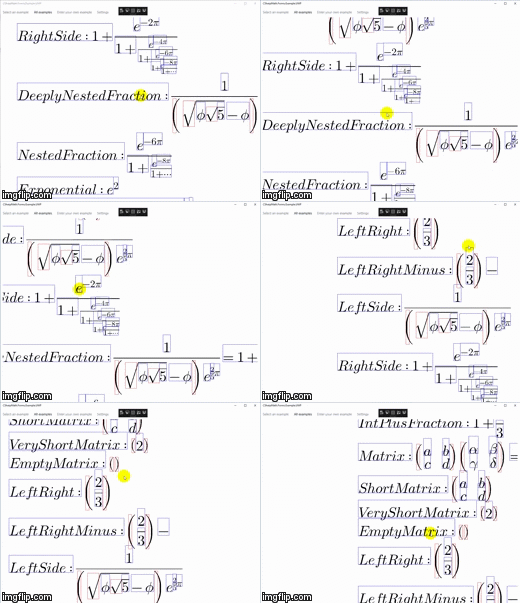
varview=newCSharpMath.Forms.MathView();view.HorizontalOptions=view.VerticalOptions=LayoutOptions.FillAndExpand;view.LaTeX=@"\frac\sqrt23";someLayout.Children.Add(view);| Android | Windows UWP |
|---|---|
 |   |
<UserControlxmlns="https://github.com/avaloniaui"xmlns:math="clr-namespace:CSharpMath.Avalonia;assembly=CSharpMath.Avalonia"x:Class="Namespace.Class">
<math:MathViewLaTeX="x + 2 \sqrt{x} + 1 = (\sqrt x+1)^2" />
</UserControl>
or:
varview=newCSharpMath.Avalonia.MathView();view.LaTeX=@"\frac\sqrt23";somePanel.Children.Add(view);
For Xamarin.Forms, you can make use of CSharpMath.Forms.MathButton to make a clickable math button. It wraps a MathView inside and will use its properties to draw math on the button.
<ContentPagexmlns="http://xamarin.com/schemas/2014/forms"xmlns:math="clr-namespace:CSharpMath.Forms;assembly=CSharpMath.Forms"x:Class="Namespace.Class">
<math:MathButtonx:Name="MathButton">
<math:MathViewx:Name="MathView">
\frac\sqrt23
</math:MathView>
</math:MathButton>
</ContentPage>
For Avalonia, Avalonia.Controls.Button already supports arbitrary content. Use it instead.
<UserControlxmlns="https://github.com/avaloniaui"xmlns:math="clr-namespace:CSharpMath.Avalonia;assembly=CSharpMath.Avalonia"x:Class="Namespace.Class">
<Buttonx:Name="MathButton">
<math:MathViewx:Name="MathView">
\frac\sqrt23
</math:MathView>
</Button>
</UserControl>CSharpMath also provides a TextView exactly for this purpose. You can use $, \( and \) to delimit inline math and $$, \[ and \] to delimit display math.
There is also a TextButton for the Xamarin.Forms equivalent of MathButton.
Xamarin.Forms:
<ContentPagexmlns="http://xamarin.com/schemas/2014/forms"xmlns:math="clr-namespace:CSharpMath.Forms;assembly=CSharpMath.Forms"x:Class="Namespace.Class">
<math:TextViewLaTeX="Text text text text text \( \frac{\sqrt a}{b} \) text text text text text" />
</ContentPage>
Avalonia:
<UserControlxmlns="https://github.com/avaloniaui"xmlns:math="clr-namespace:CSharpMath.Avalonia;assembly=CSharpMath.Avalonia"x:Class="Namespace.Class">
<math:TextViewLaTeX="Text text text text text \( \frac{\sqrt a}{b} \) text text text text text" />
</UserControl>| Xamarin.Forms | Avalonia |
|---|---|
 |  |
Warning: There are still some rough edges on image rendering to be resolved, such as this and this. However, it is already usable for the majority of cases.


For SkiaSharp:
usingCSharpMath.SkiaSharp;varpainter=newMathPainter{LaTeX=@"\frac23"};// or TextPainterusingvarpng=painter.DrawAsStream();// or painter.DrawAsStream(format: SkiaSharp.SKEncodedImageFormat.Jpeg) for JPEG// or painter.DrawAsStream(format: SkiaSharp.SKEncodedImageFormat.Gif) for GIF// or painter.DrawAsStream(format: SkiaSharp.SKEncodedImageFormat.Bmp) for BMP// or... you get it.For Xamarin.Forms:
usingCSharpMath.SkiaSharp;varpainter=someMathView.Painter;// or someTextView.Painterusingvarpng=painter.DrawAsStream();// or painter.DrawAsStream(format: SkiaSharp.SKEncodedImageFormat.Jpeg) for JPEG// or painter.DrawAsStream(format: SkiaSharp.SKEncodedImageFormat.Gif) for GIF// or painter.DrawAsStream(format: SkiaSharp.SKEncodedImageFormat.Bmp) for BMP// or... you get it.For Avalonia:
usingCSharpMath.Avalonia;varpainter=someMathView.Painter;// or someTextView.Painter// Due to limitations of the Avalonia API, you can only render as PNG to a target streampainter.DrawAsPng(someStream); |  |  |
|---|---|---|
 |  |  |
 |  |  |
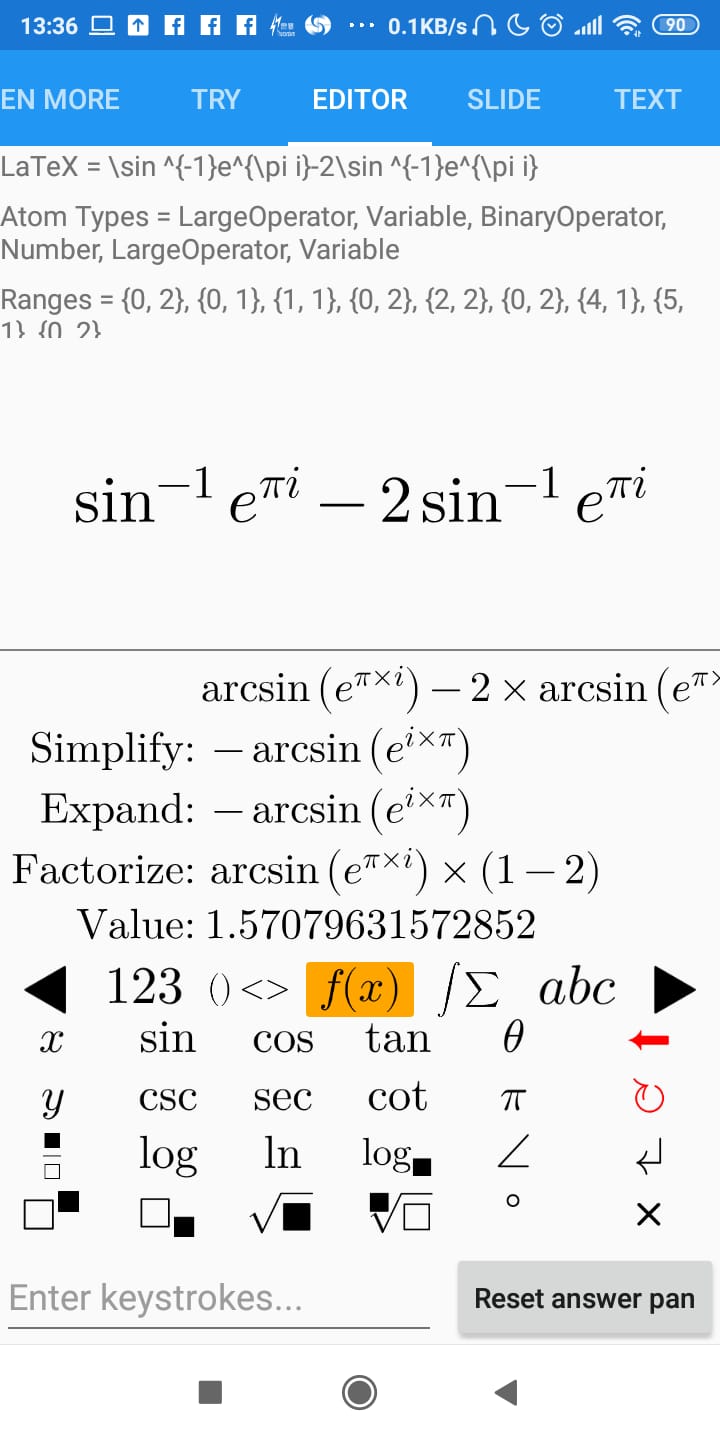
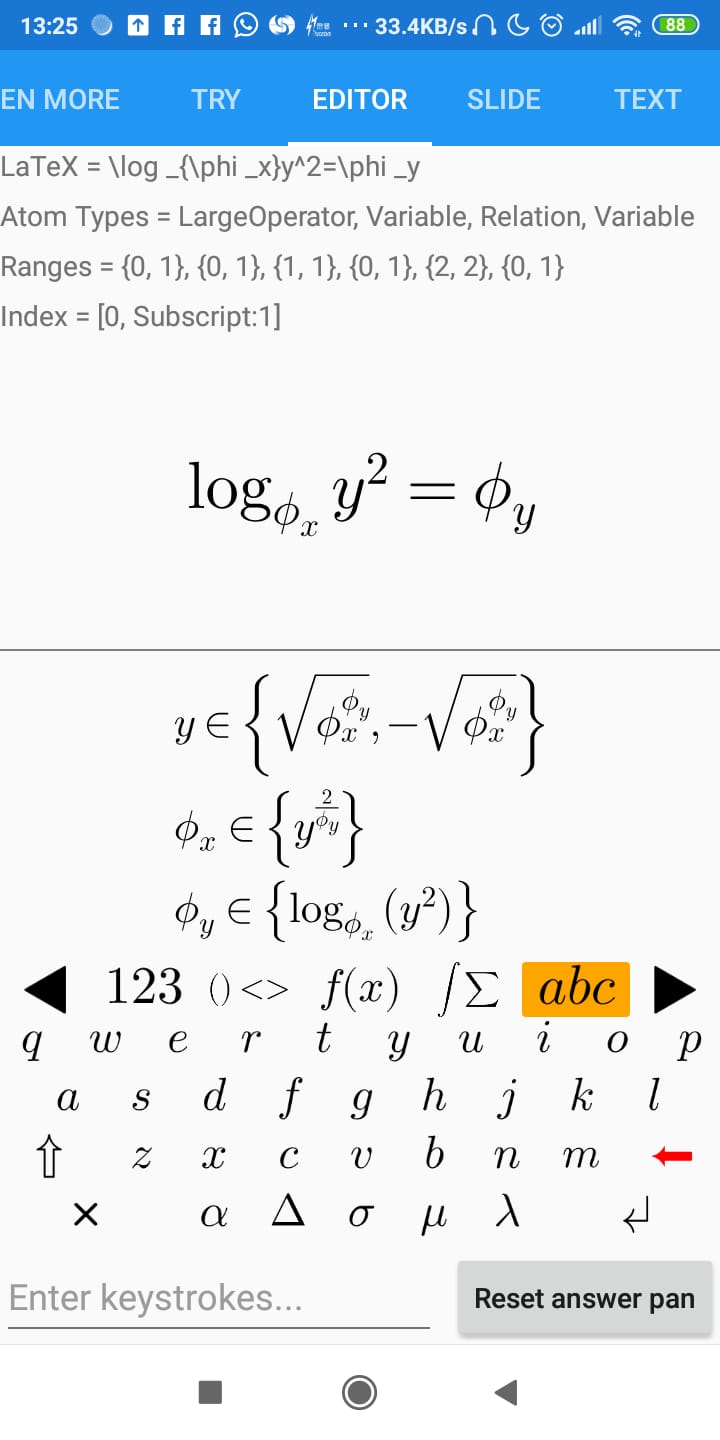
Yes! You can use a CSharpMath.Rendering.FrontEnd.MathKeyboard to process key presses and generate a CSharpMath.Atom.MathList or a LaTeX string. You can then call CSharpMath.Evaluation.Evaluate to get a CSharpMath.Evaluation.MathItem, which can be a CSharpMath.Evaluation.MathItem.Entity containing an AngouriMath.Entity that you can simplify, a CSharpMath.Evaluation.Comma containing a comma-delimited collection of CSharpMath.Evaluation.MathItem, or a CSharpMath.Evaluation.MathItem.SetNode containing an AngouriMath.Core.SetNode. For all uses of an AngouriMath.Entity or an AngouriMath.Core.SetNode, check out https://github.com/asc-community/AngouriMath.
NOTE: CSharpMath.Evaluation is not released yet. It will be part of the 0.5.0 update.
varkeyboard=newCSharpMath.Rendering.FrontEnd.MathKeyboard();keyboard.KeyPress(CSharpMath.Editor.MathKeyboardInput.Sine,CSharpMath.Editor.MathKeyboardInput.SmallTheta);var(math,error)=CSharpMath.Evaluation.Evaluate(keyboard.MathList);if(error!=null){/*Handle invalid input by displaying error which is a string*/}elseswitch(math){caseCSharpMath.Evaluation.MathItem.Entity{Content:varentity}:// entity is an AngouriMath.EntityvarsimplifiedEntity=entity.Simplify();break;caseCSharpMath.Evaluation.MathItem.Commacomma:// comma is a System.Collections.Generic.IEnumerable<CSharpMath.Evaluation.MathItem>break;caseCSharpMath.Evaluation.MathItem.Set{Content:varset}:// set is an AngouriMath.Core.Setbreak;}or more conveniently:
varkeyboard=newCSharpMath.Rendering.FrontEnd.MathKeyboard();keyboard.KeyPress(CSharpMath.Editor.MathKeyboardInput.Sine,CSharpMath.Editor.MathKeyboardInput.SmallTheta);// Displays errors as red text, also automatically chooses between// simplifying an expression and solving an equation depending on the presence of an equals signvarresultLaTeX=CSharpMath.Evaluation.Interpret(keyboard.MathList);| Analyzing an expression | Solving an equation |
|---|---|
 |  |
For those who wish to be even more updated than prereleases, you can opt in to the nightly feed which is updated whenever the master branch has a new commit.
- Log in to GitHub
- Generate a new token (a 40-digit hexadecimal number) in https://github.com/settings/tokens/new with the
read:packagesscope - Create a new file called
NuGet.Configornuget.configin the same folder as your solution with content
<?xml version="1.0" encoding="utf-8"?>
<configuration>
<packageSources>
<addkey="CSharpMathNightly"value="https://nuget.pkg.github.com/verybadcat/index.json" />
</packageSources>
<packageSourceCredentials>
<CSharpMathNightly>
<addkey="Username"value="USERNAME" />
<addkey="ClearTextPassword"value="TOKEN" />
</CSharpMathNightly>
</packageSourceCredentials>
</configuration>- Replace
USERNAMEin the above file with your GitHub username andTOKENwith your generated token. - Open a package webpage in https://github.com/verybadcat/CSharpMath/packages
- Insert the following into your
.csproj:
<ItemGroup>
<PackageReferenceInclude="PACKAGE"Version="VERSION" />
</ItemGroup>- Replace
PACKAGEin the above file by the package name in the webpage, e.g.CSharpMath.SkiaSharp, andVERSIONby the version in the webpage, e.g.0.4.2-ci-9db8a6dec29202804764fab9d6f7f19e43c3c083. The 40-digit hexadecimal number at the end of the version is the Git commit that was the package was built on. CI versions for a version are older than that version, aka chronologically0.4.2-ci-xxx→0.4.2→0.4.3-ci-xxx→0.5.0→0.5.1-ci-xxx.
Unfortunately, non-NuGet.org feeds do not support .snupkgs, so you will have to download all the packages yourself.
- Go to https://github.com/verybadcat/CSharpMath/actions?query=workflow%3ABuild
- Open the latest build
- Download artifacts
- Extract the files to a folder
- Add the folder as a local NuGet feed to Visual Studio according to https://docs.microsoft.com/en-gb/nuget/consume-packages/install-use-packages-visual-studio#package-sources
There are a few ways to extend this to more platforms: (Hopefully, you would not need to touch the core typesetting engine. If you do, we would consider that a bug.)
As CSharpMath.Rendering provides font lookup through the Typography library, you would only need to write adapter classes to connect this library to your chosen graphics library.
You would have to implement ICanvas and feed it into the Draw method of MathPainter.
This path would require the most effort to implement, but allows you to plug in any font library and graphics library.
You would have to define your own TypesettingContext and write an implementation of IGraphicsContext.
The TypesettingContext in turn has several components, including choosing a font.
You can extend this library to other SkiaSharp-supported platforms by feeding the SKCanvas given in the OnPaintSurface override of a SkiaSharp view into the Draw method of MathPainter.
We need more contributors! Maybe you can contribute something to this repository. Whether they are bug reports, feature proposals or pull requests, you are welcome to send them to us. We are sure that we will take a look at them!
Here is an idea list if you cannot think of anything right now:
- A new example for the Example projects (please open pull requests straight away)
- A new LaTeX command (please link documentation of it)
- A new front end (please describe what it is and why should it be supported)
- A new math syntax (please describe what it is and why should it be supported)
CSharpMath is licensed by the MIT license.
| Dependency | Used by | License |
|---|---|---|
| Typography project | CSharpMath.Rendering | MIT |
| AngouriMath project | CSharpMath.Evaluation | MIT |
| Latin Modern Math font | CSharpMath.Rendering | GUST Font License |
| Cyrillic Modern font | CSharpMath.Rendering | SIL Open Font License |
| AMS Capital Blackboard Bold font (extracted by @Happypig375 from the amsfonts package) | CSharpMath.Rendering | SIL Open Font License |
| ComicNeue font | CSharpMath.Rendering.Tests, CSharpMath.Xaml.Tests | SIL Open Font License |
Thanks for reading.