Light-weight EventKit wrapper.



Shift is a light-weight concurrency wrapper for EventKit:
- Concurrency ready with
async/await. (tag:0.7.0) - Tranditional,
Resultcompletion handler if preferred (tag:0.6.0) - Thread-safe.
- SwiftUI supported.
Shift is currently being used by Clendar app.
- iOS 15.0 for async/await, tag
0.7.0 - iOS 14.0 and below for Result-based, tag <
0.6.0 - Swift version 5.5
- Xcode 13.1
This component is built using Swift Package Manager, it is pretty straight forward to use:
- In Xcode (11+), open your project and navigate to File > Swift Packages > Add Package Dependency...
- Paste the repository URL (https://github.com/vinhnx/Shift) and click Next.
- For Rules, select Version, in here, you can choose either:
- Async/await => tag
0.7.0 - Result-based completion handler => tag
0.6.0
- Click Finish to resolve package into your Xcode project.
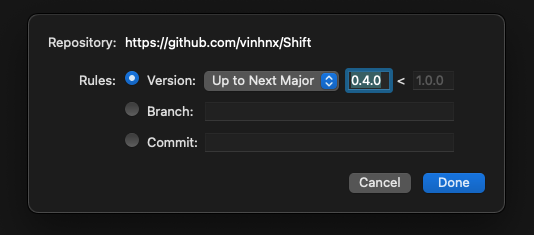
Concurrency support is now ready, in tag 0.7.0
In order to use old Result-based completion hanlders, please use tag 0.6.0.
First thing first:
- Add Calendar usage description to your app's Info.plist to request for user's Calendars access.
<key>NSCalendarsUsageDescription</key>
<string>"$(PRODUCT_NAME) needs your permission to create events"</string>
- (Optional) configure own calendar name to request access to, preferrable in
AppDelegate'sdidFinishLaunchingWithOptions(Swift) orApp'sinit()(SwiftUI):
Swift AppDelegate:
import UIKit
@UIApplicationMainclassAppDelegate:UIResponder,UIApplicationDelegate{func application(_ application:UIApplication, didFinishLaunchingWithOptions launchOptions:[UIApplication.LaunchOptionsKey:Any]?)->Bool{
// Override point for customization after application launch.
Shift.configureWithAppName("MyApp")returntrue}}
in SwiftUI App, first import Shift, then configure your app's name to differntiate the name of your app's calendar in system's EventKit.
import SwiftUI
import Shift
@mainstructMyApp:App{init(){Shift.configureWithAppName("MyApp")}varbody:someScene{WindowGroup{ContentView()}}}Since async functions can only be called on concurrency context, if you call async function inside synchornouse context, Xcode will throws an error:

So, there are two ways to awaiting for concurrency result, base on context:
- Inside
asyncfunction
func doSomethingAsync()async{
// ... other works
letevents=try?awaitShift.shared.fetchEvents(for:Date())
// ... other works
}- Inside
Taskclosure:
func regularFunction(){
// ... other works
Task{letevents=try?awaitShift.shared.fetchEvents(for:Date())
// then...
}
// ... other works
}
Either is fine, base on caller's context.
You can read more about Task here https://developer.apple.com/documentation/swift/task.
In SwiftUI views, you can call async functions inside View' .task modifier:
import EventKit
import SwiftUI
import Shift
structContentView:View{@StateObjectvareventKitWrapper=Shift.shared
@StateprivatevarselectedEvent:EKEvent?varbody:someView{LazyVStack(alignment:.leading, spacing:10){ForEach(eventKitWrapper.events, id: \.self){ event inText(event: event)}}.padding().task{ // wrap async call inside .task modifier
try?await eventKitWrapper.fetchEventsForToday()}}}
You can read more about SwiftUI's
.taskmodifier here https://developer.apple.com/documentation/swiftui/view/task(priority:_:).
Fetch list of events for a particular date:
inside regular async function:
func fetchEvents()async{do{letevents=tryawaitShift.shared.fetchEvents(for:Date()) // await for events fetching
}catch{print(error) // handle error
}}
or standalone:
Task{letevents=try?awaitShift.shared.fetchEvents(for:Date()) // await for events fetching
}
Result-based completion handlers (old pattern, but still doable if you preferred this to async/await)
Shift.shared.fetchEvents(for:Date()){ result inswitch result {caselet.success(events):print(events) // got events
caselet.failure(error):print(error) // handle error
}}Shift.shared.fetchEventsRangeUntilEndOfDay(from:Date()){ result inswitch result {caselet.success(events):print(events) // got events
caselet.failure(error):print(error) // handle error
}}Create Event:
inside regular async function:
func myAsyncFunction()async{try?awaitShift.shared.createEvent("Be happy!", startDate: startTime, endDate: endTime)}or standalone:
Task{try?awaitShift.shared.createEvent("Be happy!", startDate: startTime, endDate: endTime)}Shift.shared.createEvent("Be happy!", startDate: startTime, endDate: endTime){ result inswitch result {caselet.success(event):print(event) // created event
caselet.failure(error):print(error) // handle error
}}Delete event:
inside regular async function:
func myAsyncFunction()async{try?awaitShift.shared.deleteEvent(identifier: eventID)}or standalone:
Task{try?awaitShift.shared.deleteEvent(identifier: eventID)}Shift.shared.deleteEvent(identifier: eventID){ result inswitch result {caselet.success:print("done!") // deleted event
caselet.failure(error):print(error) // handle error
}}Shift is conformed ObservableObject with an @Publishedevents property, so it's straight-forward to use in SwiftUI binding mechanism.
import EventKit
import SwiftUI
import Shift
structContentView:View{@StateObjectvareventKitWrapper=Shift.shared
@StateprivatevarselectedEvent:EKEvent?varbody:someView{LazyVStack(alignment:.leading, spacing:10){ForEach(eventKitWrapper.events, id: \.self){ event inText(event: event)}}.padding().onAppear{
eventKitWrapper.fetchEventsForToday()}}}import EventKit
import SwiftUI
import Shift
structContentView:View{@StateObjectvareventKitWrapper=Shift.shared
@StateprivatevarselectedEvent:EKEvent?varbody:someView{LazyVStack(alignment:.leading, spacing:10){ForEach(eventKitWrapper.events, id: \.self){ event inText(event: event)}}.padding().task{try?await eventKitWrapper.fetchEventsForToday()}}}- Clendar - Clendar - universal calendar app. Written in SwiftUI. Available on App Store. MIT License.
Feel free to open an issue or contact me on Twitter for discussions, news & announcements & other projects. 🚀
I hope you like it! :)