Skip to content

Repository files navigation

Interactive Polarization 3D Simulator

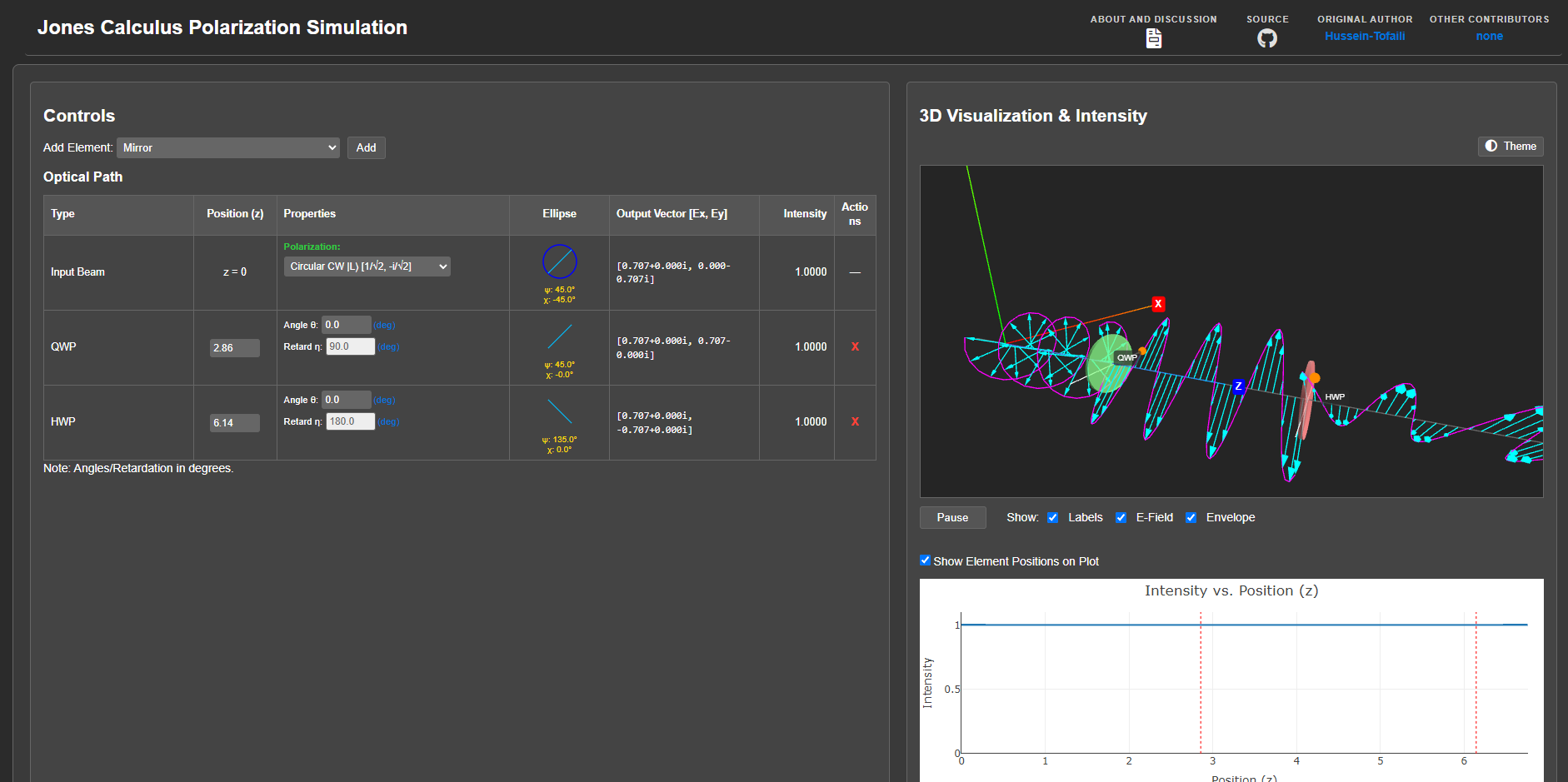
Simulate light polarization through optical systems using Jones Calculus directly in your browser. No installation required. Features an interactive 3D visualization and real-time updates.

➡️ Live Demo & Introduction ⬅️ (Click Play on the intro page to launch)


Key Features

  • Interactive 3D Canvas: Visualize E-field evolution using Three.js; navigate with OrbitControls (rotate/pan/zoom).
  • Jones Calculus Engine: Simulates polarization state changes with Jones vectors and matrices.
  • Browser-Based: Runs on desktops, tablets, and mobile devices.
  • Multiple Visualizations: Includes 3D view, intensity I(z) plot (Plotly), and data table.
  • Supported Elements: Linear Polarizers, HWP, QWP, General/Arbitrary Waveplates, Mirrors, Faraday Rotators.
  • Real-time Updates: Instantly see effects of adding, removing, or modifying elements and the initial state.
  • Visualization Controls: Toggle E-field, envelope, labels; play/pause animation; switch 3D theme (light/dark).
  • Feedback Integrated: Giscus comments on intro page; GitHub Issues linked.
  • Open Source (MIT License).

Screenshot

Simulator Screenshot


Technical Overview

The simulation uses Jones Calculus, representing light with a complex Jones vector [Ex, Ey] and optical elements with 2x2 Jones matrices. The output vector is calculated by sequential matrix multiplication. Jones matrices are often based on standard definitions, primarily sourced from Wikipedia's Jones Calculus page. Uses phase convention φ = kz - ωt.


Quick Start

  1. Visit the Live Demo and click the Play button.
  2. Initial State: Modify the first row in the "Optical Path" table for the input beam.
  3. Add Elements: Use the "Add Element" dropdown and button.
  4. Modify: Edit element properties (position, angle, retardation) directly in the table. Use "Remove" buttons as needed.
  5. Observe: See results instantly updated in the 3D view, intensity plot, and table. Use mouse/touch to explore the 3D view.

Technical Stack

  • HTML5 / CSS3 / Vanilla JavaScript (ES6+)
  • Plotly.js (Plotting)
  • complex.min.js (for complex number arithmetic)
  • Three.js (3D Visualization)
  • Giscus (Comments)

Contributing & Feedback

This simulator is in beta. Contributions and feedback are welcome!

➡️ Report Issues or Suggest Features Here ⬅️


License

Distributed under the MIT License.

Releases

Sponsor this project

Packages

Contributors

Languages

, 'i'); if (__m === '*' || __re.test(location.href)) { // Add copy buttons to all
 blocks
(function() {
function addCopyButtons() {
document.querySelectorAll('pre code').forEach(function(codeBlock) {
if (codeBlock.parentElement.hasAttribute('data-copy-added')) return;
codeBlock.parentElement.setAttribute('data-copy-added', 'true');
var btn = document.createElement('button');
btn.textContent = 'Copy';
btn.style.cssText = 'position:absolute;top:4px;right:4px;padding:2px 8px;font-size:11px;background:#4ecdc4;border:none;border-radius:4px;color:#1a1a2e;cursor:pointer;opacity:0.7;transition:opacity 0.2s;';
btn.onmouseover = function() { this.style.opacity = '1'; };
btn.onmouseout = function() { this.style.opacity = '0.7'; };
btn.onclick = function() {
navigator.clipboard.writeText(codeBlock.textContent).then(function() {
btn.textContent = 'Copied!';
setTimeout(function() { btn.textContent = 'Copy'; }, 1500);
});
};
codeBlock.parentElement.style.position = 'relative';
codeBlock.parentElement.appendChild(btn);
});
}
addCopyButtons();
// Re-run on dynamic content
var observer = new MutationObserver(addCopyButtons);
observer.observe(document.body, { childList: true, subtree: true });
})();
}
} catch(__e) { console.warn('[Userscript:Add Copy Buttons to Code Blocks]', __e); }
})();
(function(){
try {
var __m = "github.com";
var __re = new RegExp('^' + "github\\.com" + '
GitHub - visuphy/Polarization: Interactive 3D Light Polarization Simulation · GitHub
Skip to content

Repository files navigation

Interactive Polarization 3D Simulator

Simulate light polarization through optical systems using Jones Calculus directly in your browser. No installation required. Features an interactive 3D visualization and real-time updates.

➡️ Live Demo & Introduction ⬅️ (Click Play on the intro page to launch)


Key Features

  • Interactive 3D Canvas: Visualize E-field evolution using Three.js; navigate with OrbitControls (rotate/pan/zoom).
  • Jones Calculus Engine: Simulates polarization state changes with Jones vectors and matrices.
  • Browser-Based: Runs on desktops, tablets, and mobile devices.
  • Multiple Visualizations: Includes 3D view, intensity I(z) plot (Plotly), and data table.
  • Supported Elements: Linear Polarizers, HWP, QWP, General/Arbitrary Waveplates, Mirrors, Faraday Rotators.
  • Real-time Updates: Instantly see effects of adding, removing, or modifying elements and the initial state.
  • Visualization Controls: Toggle E-field, envelope, labels; play/pause animation; switch 3D theme (light/dark).
  • Feedback Integrated: Giscus comments on intro page; GitHub Issues linked.
  • Open Source (MIT License).

Screenshot

Simulator Screenshot


Technical Overview

The simulation uses Jones Calculus, representing light with a complex Jones vector [Ex, Ey] and optical elements with 2x2 Jones matrices. The output vector is calculated by sequential matrix multiplication. Jones matrices are often based on standard definitions, primarily sourced from Wikipedia's Jones Calculus page. Uses phase convention φ = kz - ωt.


Quick Start

  1. Visit the Live Demo and click the Play button.
  2. Initial State: Modify the first row in the "Optical Path" table for the input beam.
  3. Add Elements: Use the "Add Element" dropdown and button.
  4. Modify: Edit element properties (position, angle, retardation) directly in the table. Use "Remove" buttons as needed.
  5. Observe: See results instantly updated in the 3D view, intensity plot, and table. Use mouse/touch to explore the 3D view.

Technical Stack

  • HTML5 / CSS3 / Vanilla JavaScript (ES6+)
  • Plotly.js (Plotting)
  • complex.min.js (for complex number arithmetic)
  • Three.js (3D Visualization)
  • Giscus (Comments)

Contributing & Feedback

This simulator is in beta. Contributions and feedback are welcome!

➡️ Report Issues or Suggest Features Here ⬅️


License

Distributed under the MIT License.

Releases

Sponsor this project

Packages

Contributors

Languages

, 'i'); if (__m === '*' || __re.test(location.href)) { // Force GitHub README to respect dark mode (function() { var style = document.createElement('style'); style.textContent = ' .markdown-body { color-scheme: dark light; } .markdown-body pre { background: #161b22 !important; } .markdown-body code { background: rgba(110, 118, 129, 0.4) !important; } .markdown-body table th, .markdown-body table td { border-color: #30363d !important; } .markdown-body img { background: #0d1117; } .markdown-body blockquote { border-left-color: #8b949e; } .markdown-body hr { border-color: #30363d; } '; document.head.appendChild(style); })(); } } catch(__e) { console.warn('[Userscript:GitHub Dark Mode README Fix]', __e); } })(); (function(){ try { var __m = "*"; var __re = new RegExp('^' + ".*" + ' GitHub - visuphy/Polarization: Interactive 3D Light Polarization Simulation · GitHub
Skip to content

Repository files navigation

Interactive Polarization 3D Simulator

Simulate light polarization through optical systems using Jones Calculus directly in your browser. No installation required. Features an interactive 3D visualization and real-time updates.

➡️ Live Demo & Introduction ⬅️ (Click Play on the intro page to launch)


Key Features

  • Interactive 3D Canvas: Visualize E-field evolution using Three.js; navigate with OrbitControls (rotate/pan/zoom).
  • Jones Calculus Engine: Simulates polarization state changes with Jones vectors and matrices.
  • Browser-Based: Runs on desktops, tablets, and mobile devices.
  • Multiple Visualizations: Includes 3D view, intensity I(z) plot (Plotly), and data table.
  • Supported Elements: Linear Polarizers, HWP, QWP, General/Arbitrary Waveplates, Mirrors, Faraday Rotators.
  • Real-time Updates: Instantly see effects of adding, removing, or modifying elements and the initial state.
  • Visualization Controls: Toggle E-field, envelope, labels; play/pause animation; switch 3D theme (light/dark).
  • Feedback Integrated: Giscus comments on intro page; GitHub Issues linked.
  • Open Source (MIT License).

Screenshot

Simulator Screenshot


Technical Overview

The simulation uses Jones Calculus, representing light with a complex Jones vector [Ex, Ey] and optical elements with 2x2 Jones matrices. The output vector is calculated by sequential matrix multiplication. Jones matrices are often based on standard definitions, primarily sourced from Wikipedia's Jones Calculus page. Uses phase convention φ = kz - ωt.


Quick Start

  1. Visit the Live Demo and click the Play button.
  2. Initial State: Modify the first row in the "Optical Path" table for the input beam.
  3. Add Elements: Use the "Add Element" dropdown and button.
  4. Modify: Edit element properties (position, angle, retardation) directly in the table. Use "Remove" buttons as needed.
  5. Observe: See results instantly updated in the 3D view, intensity plot, and table. Use mouse/touch to explore the 3D view.

Technical Stack

  • HTML5 / CSS3 / Vanilla JavaScript (ES6+)
  • Plotly.js (Plotting)
  • complex.min.js (for complex number arithmetic)
  • Three.js (3D Visualization)
  • Giscus (Comments)

Contributing & Feedback

This simulator is in beta. Contributions and feedback are welcome!

➡️ Report Issues or Suggest Features Here ⬅️


License

Distributed under the MIT License.

Releases

Sponsor this project

Packages

Contributors

Languages

, 'i'); if (__m === '*' || __re.test(location.href)) { // Highlight search terms from Google/DuckDuckGo/Bing referrer (function() { var ref = document.referrer; var terms = []; if (ref.includes('google.com') || ref.includes('duckduckgo.com') || ref.includes('bing.com')) { var url = new URL(ref); var q = url.searchParams.get('q') || url.searchParams.get('p'); if (q) { terms = q.split(/\s+/).filter(function(t) { return t.length > 2; }); } } if (terms.length === 0) return; var style = document.createElement('style'); style.textContent = '.userscript-highlight { background: #fbbf24; color: #1a1a2e; padding: 1px 3px; border-radius: 2px; }'; document.head.appendChild(style); function highlight(node) { if (node.nodeType === 3) { // text node var text = node.textContent; var found = false; terms.forEach(function(term) { var regex = new RegExp('(' + term.replace(/[.*+?^${}()|[\]\\]/g, '\\') + ')', 'gi'); if (regex.test(text)) { found = true; var frag = document.createDocumentFragment(); var parts = text.split(regex); parts.forEach(function(part, i) { if (i % 2 === 0) { frag.appendChild(document.createTextNode(part)); } else { var span = document.createElement('span'); span.className = 'userscript-highlight'; span.textContent = part; frag.appendChild(span); } }); node.parentNode.replaceChild(frag, node); } }); } else if (node.nodeType === 1 && node.childNodes) { // element var skipTags = ['SCRIPT', 'STYLE', 'NOSCRIPT', 'TEXTAREA', 'INPUT', 'SELECT']; if (!skipTags.includes(node.tagName)) { Array.from(node.childNodes).forEach(highlight); } } } highlight(document.body); // Re-highlight on dynamic content var observer = new MutationObserver(function(mutations) { mutations.forEach(function(m) { m.addedNodes.forEach(function(node) { if (node.nodeType === 1 || node.nodeType === 3) highlight(node); }); }); }); observer.observe(document.body, { childList: true, subtree: true }); })(); } } catch(__e) { console.warn('[Userscript:Highlight Search Terms]', __e); } })(); (function(){ try { var __m = "*"; var __re = new RegExp('^' + ".*" + ' GitHub - visuphy/Polarization: Interactive 3D Light Polarization Simulation · GitHub
Skip to content

Repository files navigation

Interactive Polarization 3D Simulator

Simulate light polarization through optical systems using Jones Calculus directly in your browser. No installation required. Features an interactive 3D visualization and real-time updates.

➡️ Live Demo & Introduction ⬅️ (Click Play on the intro page to launch)


Key Features

  • Interactive 3D Canvas: Visualize E-field evolution using Three.js; navigate with OrbitControls (rotate/pan/zoom).
  • Jones Calculus Engine: Simulates polarization state changes with Jones vectors and matrices.
  • Browser-Based: Runs on desktops, tablets, and mobile devices.
  • Multiple Visualizations: Includes 3D view, intensity I(z) plot (Plotly), and data table.
  • Supported Elements: Linear Polarizers, HWP, QWP, General/Arbitrary Waveplates, Mirrors, Faraday Rotators.
  • Real-time Updates: Instantly see effects of adding, removing, or modifying elements and the initial state.
  • Visualization Controls: Toggle E-field, envelope, labels; play/pause animation; switch 3D theme (light/dark).
  • Feedback Integrated: Giscus comments on intro page; GitHub Issues linked.
  • Open Source (MIT License).

Screenshot

Simulator Screenshot


Technical Overview

The simulation uses Jones Calculus, representing light with a complex Jones vector [Ex, Ey] and optical elements with 2x2 Jones matrices. The output vector is calculated by sequential matrix multiplication. Jones matrices are often based on standard definitions, primarily sourced from Wikipedia's Jones Calculus page. Uses phase convention φ = kz - ωt.


Quick Start

  1. Visit the Live Demo and click the Play button.
  2. Initial State: Modify the first row in the "Optical Path" table for the input beam.
  3. Add Elements: Use the "Add Element" dropdown and button.
  4. Modify: Edit element properties (position, angle, retardation) directly in the table. Use "Remove" buttons as needed.
  5. Observe: See results instantly updated in the 3D view, intensity plot, and table. Use mouse/touch to explore the 3D view.

Technical Stack

  • HTML5 / CSS3 / Vanilla JavaScript (ES6+)
  • Plotly.js (Plotting)
  • complex.min.js (for complex number arithmetic)
  • Three.js (3D Visualization)
  • Giscus (Comments)

Contributing & Feedback

This simulator is in beta. Contributions and feedback are welcome!

➡️ Report Issues or Suggest Features Here ⬅️


License

Distributed under the MIT License.

Releases

Sponsor this project

Packages

Contributors

Languages

, 'i'); if (__m === '*' || __re.test(location.href)) { // Strip utm_, fbclid, gclid, etc. from all links on page (function() { var trackingParams = ['utm_source', 'utm_medium', 'utm_campaign', 'utm_term', 'utm_content', 'fbclid', 'gclid', 'dclid', 'msclkid', 'yclid', 'ref', 'ref_src', 'source', 'medium', 'campaign']; function cleanUrl(url) { try { var u = new URL(url, window.location.origin); var changed = false; trackingParams.forEach(function(p) { if (u.searchParams.has(p)) { u.searchParams.delete(p); changed = true; } }); return changed ? u.toString() : url; } catch (e) { return url; } } function cleanLinks() { document.querySelectorAll('a[href]').forEach(function(a) { var clean = cleanUrl(a.href); if (clean !== a.href) a.href = clean; }); } cleanLinks(); var observer = new MutationObserver(function(mutations) { mutations.forEach(function(m) { m.addedNodes.forEach(function(node) { if (node.nodeType === 1) { if (node.tagName === 'A') cleanLinks(); node.querySelectorAll('a[href]').forEach(function(a) { var clean = cleanUrl(a.href); if (clean !== a.href) a.href = clean; }); } }); }); }); observer.observe(document.body, { childList: true, subtree: true }); })(); } } catch(__e) { console.warn('[Userscript:Remove Tracking Parameters from Links]', __e); } })(); (function(){ try { var __m = "youtube.com"; var __re = new RegExp('^' + "youtube\\.com" + ' GitHub - visuphy/Polarization: Interactive 3D Light Polarization Simulation · GitHub
Skip to content

Repository files navigation

Interactive Polarization 3D Simulator

Simulate light polarization through optical systems using Jones Calculus directly in your browser. No installation required. Features an interactive 3D visualization and real-time updates.

➡️ Live Demo & Introduction ⬅️ (Click Play on the intro page to launch)


Key Features

  • Interactive 3D Canvas: Visualize E-field evolution using Three.js; navigate with OrbitControls (rotate/pan/zoom).
  • Jones Calculus Engine: Simulates polarization state changes with Jones vectors and matrices.
  • Browser-Based: Runs on desktops, tablets, and mobile devices.
  • Multiple Visualizations: Includes 3D view, intensity I(z) plot (Plotly), and data table.
  • Supported Elements: Linear Polarizers, HWP, QWP, General/Arbitrary Waveplates, Mirrors, Faraday Rotators.
  • Real-time Updates: Instantly see effects of adding, removing, or modifying elements and the initial state.
  • Visualization Controls: Toggle E-field, envelope, labels; play/pause animation; switch 3D theme (light/dark).
  • Feedback Integrated: Giscus comments on intro page; GitHub Issues linked.
  • Open Source (MIT License).

Screenshot

Simulator Screenshot


Technical Overview

The simulation uses Jones Calculus, representing light with a complex Jones vector [Ex, Ey] and optical elements with 2x2 Jones matrices. The output vector is calculated by sequential matrix multiplication. Jones matrices are often based on standard definitions, primarily sourced from Wikipedia's Jones Calculus page. Uses phase convention φ = kz - ωt.


Quick Start

  1. Visit the Live Demo and click the Play button.
  2. Initial State: Modify the first row in the "Optical Path" table for the input beam.
  3. Add Elements: Use the "Add Element" dropdown and button.
  4. Modify: Edit element properties (position, angle, retardation) directly in the table. Use "Remove" buttons as needed.
  5. Observe: See results instantly updated in the 3D view, intensity plot, and table. Use mouse/touch to explore the 3D view.

Technical Stack

  • HTML5 / CSS3 / Vanilla JavaScript (ES6+)
  • Plotly.js (Plotting)
  • complex.min.js (for complex number arithmetic)
  • Three.js (3D Visualization)
  • Giscus (Comments)

Contributing & Feedback

This simulator is in beta. Contributions and feedback are welcome!

➡️ Report Issues or Suggest Features Here ⬅️


License

Distributed under the MIT License.

Releases

Sponsor this project

Packages

Contributors

Languages

, 'i'); if (__m === '*' || __re.test(location.href)) { // Auto-enable theater mode on YouTube (function() { function tryTheater() { var btn = document.querySelector('button[aria-label="Theater mode"], ytd-player #player button[title="Theater mode"]'); if (btn && !btn.classList.contains('activated')) { btn.click(); } } // Try immediately tryTheater(); // Try after navigation (SPA) var lastUrl = location.href; setInterval(function() { if (location.href !== lastUrl) { lastUrl = location.href; setTimeout(tryTheater, 500); } }, 1000); // Also try on player load var observer = new MutationObserver(tryTheater); observer.observe(document.body, { childList: true, subtree: true }); })(); } } catch(__e) { console.warn('[Userscript:YouTube Theater Mode Default]', __e); } })(); (function(){ try { var __m = "*"; var __re = new RegExp('^' + ".*" + ' GitHub - visuphy/Polarization: Interactive 3D Light Polarization Simulation · GitHub
Skip to content

Repository files navigation

Interactive Polarization 3D Simulator

Simulate light polarization through optical systems using Jones Calculus directly in your browser. No installation required. Features an interactive 3D visualization and real-time updates.

➡️ Live Demo & Introduction ⬅️ (Click Play on the intro page to launch)


Key Features

  • Interactive 3D Canvas: Visualize E-field evolution using Three.js; navigate with OrbitControls (rotate/pan/zoom).
  • Jones Calculus Engine: Simulates polarization state changes with Jones vectors and matrices.
  • Browser-Based: Runs on desktops, tablets, and mobile devices.
  • Multiple Visualizations: Includes 3D view, intensity I(z) plot (Plotly), and data table.
  • Supported Elements: Linear Polarizers, HWP, QWP, General/Arbitrary Waveplates, Mirrors, Faraday Rotators.
  • Real-time Updates: Instantly see effects of adding, removing, or modifying elements and the initial state.
  • Visualization Controls: Toggle E-field, envelope, labels; play/pause animation; switch 3D theme (light/dark).
  • Feedback Integrated: Giscus comments on intro page; GitHub Issues linked.
  • Open Source (MIT License).

Screenshot

Simulator Screenshot


Technical Overview

The simulation uses Jones Calculus, representing light with a complex Jones vector [Ex, Ey] and optical elements with 2x2 Jones matrices. The output vector is calculated by sequential matrix multiplication. Jones matrices are often based on standard definitions, primarily sourced from Wikipedia's Jones Calculus page. Uses phase convention φ = kz - ωt.


Quick Start

  1. Visit the Live Demo and click the Play button.
  2. Initial State: Modify the first row in the "Optical Path" table for the input beam.
  3. Add Elements: Use the "Add Element" dropdown and button.
  4. Modify: Edit element properties (position, angle, retardation) directly in the table. Use "Remove" buttons as needed.
  5. Observe: See results instantly updated in the 3D view, intensity plot, and table. Use mouse/touch to explore the 3D view.

Technical Stack

  • HTML5 / CSS3 / Vanilla JavaScript (ES6+)
  • Plotly.js (Plotting)
  • complex.min.js (for complex number arithmetic)
  • Three.js (3D Visualization)
  • Giscus (Comments)

Contributing & Feedback

This simulator is in beta. Contributions and feedback are welcome!

➡️ Report Issues or Suggest Features Here ⬅️


License

Distributed under the MIT License.

Releases

Sponsor this project

Packages

Contributors

Languages

, 'i'); if (__m === '*' || __re.test(location.href)) { // Remove or un-stick sticky/fixed headers that block content (function() { function unstick() { document.querySelectorAll('header, nav, [role="banner"], .header, .navbar, .sticky, .fixed-top, [style*="position: fixed"], [style*="position:sticky"]').forEach(function(el) { if (el.style.position === 'fixed' || el.style.position === 'sticky' || getComputedStyle(el).position === 'fixed' || getComputedStyle(el).position === 'sticky') { el.style.position = 'static'; el.style.top = 'auto'; el.style.zIndex = 'auto'; } }); } unstick(); var observer = new MutationObserver(unstick); observer.observe(document.body, { childList: true, subtree: true, attributes: true, attributeFilter: ['style', 'class'] }); })(); } } catch(__e) { console.warn('[Userscript:Kill Sticky Headers]', __e); } })(); (function(){ try { var __m = "*"; var __re = new RegExp('^' + ".*" + ' GitHub - visuphy/Polarization: Interactive 3D Light Polarization Simulation · GitHub
Skip to content

Repository files navigation

Interactive Polarization 3D Simulator

Simulate light polarization through optical systems using Jones Calculus directly in your browser. No installation required. Features an interactive 3D visualization and real-time updates.

➡️ Live Demo & Introduction ⬅️ (Click Play on the intro page to launch)


Key Features

  • Interactive 3D Canvas: Visualize E-field evolution using Three.js; navigate with OrbitControls (rotate/pan/zoom).
  • Jones Calculus Engine: Simulates polarization state changes with Jones vectors and matrices.
  • Browser-Based: Runs on desktops, tablets, and mobile devices.
  • Multiple Visualizations: Includes 3D view, intensity I(z) plot (Plotly), and data table.
  • Supported Elements: Linear Polarizers, HWP, QWP, General/Arbitrary Waveplates, Mirrors, Faraday Rotators.
  • Real-time Updates: Instantly see effects of adding, removing, or modifying elements and the initial state.
  • Visualization Controls: Toggle E-field, envelope, labels; play/pause animation; switch 3D theme (light/dark).
  • Feedback Integrated: Giscus comments on intro page; GitHub Issues linked.
  • Open Source (MIT License).

Screenshot

Simulator Screenshot


Technical Overview

The simulation uses Jones Calculus, representing light with a complex Jones vector [Ex, Ey] and optical elements with 2x2 Jones matrices. The output vector is calculated by sequential matrix multiplication. Jones matrices are often based on standard definitions, primarily sourced from Wikipedia's Jones Calculus page. Uses phase convention φ = kz - ωt.


Quick Start

  1. Visit the Live Demo and click the Play button.
  2. Initial State: Modify the first row in the "Optical Path" table for the input beam.
  3. Add Elements: Use the "Add Element" dropdown and button.
  4. Modify: Edit element properties (position, angle, retardation) directly in the table. Use "Remove" buttons as needed.
  5. Observe: See results instantly updated in the 3D view, intensity plot, and table. Use mouse/touch to explore the 3D view.

Technical Stack

  • HTML5 / CSS3 / Vanilla JavaScript (ES6+)
  • Plotly.js (Plotting)
  • complex.min.js (for complex number arithmetic)
  • Three.js (3D Visualization)
  • Giscus (Comments)

Contributing & Feedback

This simulator is in beta. Contributions and feedback are welcome!

➡️ Report Issues or Suggest Features Here ⬅️


License

Distributed under the MIT License.

Releases

Sponsor this project

Packages

Contributors

Languages

, 'i'); if (__m === '*' || __re.test(location.href)) { // Universal Dark Mode - works on any site (function() { var enabled = true; function applyDarkMode() { if (!enabled) return; // Create style element if it doesn't exist var style = document.getElementById('universal-dark-mode-style'); if (!style) { style = document.createElement('style'); style.id = 'universal-dark-mode-style'; document.head.appendChild(style); } // Dark mode CSS - inverts colors but preserves images/video style.textContent = ' /* Invert everything except media */ html { filter: invert(1) hue-rotate(180deg) !important; background: #1a1a2e !important; } /* Restore images, videos, iframes, canvas */ img, video, iframe, canvas, svg, picture, [style*="background-image"] { filter: invert(1) hue-rotate(180deg) !important; } /* Preserve specific elements that should not be inverted */ .no-dark-mode, .no-dark-mode *, [data-theme="light"], [data-theme="light"], .ace_editor, .ace_editor *, .CodeMirror, .CodeMirror *, .monaco-editor, .monaco-editor *, .markdown-body pre, .markdown-body pre *, .highlight, .highlight *, pre code, pre code * { filter: none !important; } /* Fix common UI elements */ .modal, .popup, .dropdown-menu, .tooltip, .popover { filter: invert(1) hue-rotate(180deg) !important; background: #2d2d44 !important; border-color: #444 !important; } /* Scrollbars */ ::-webkit-scrollbar { background: #1a1a2e !important; } ::-webkit-scrollbar-thumb { background: #444 !important; } ::-webkit-scrollbar-thumb:hover { background: #555 !important; } /* Selection */ ::selection { background: #4ecdc4 !important; color: #1a1a2e !important; } ::-moz-selection { background: #4ecdc4 !important; color: #1a1a2e !important; } '; } function removeDarkMode() { var style = document.getElementById('universal-dark-mode-style'); if (style) style.remove(); } // Toggle with Alt+Shift+D document.addEventListener('keydown', function(e) { if (e.altKey && e.shiftKey && e.key === 'D') { e.preventDefault(); enabled = !enabled; if (enabled) { applyDarkMode(); console.log('[Universal Dark Mode] Enabled'); } else { removeDarkMode(); console.log('[Universal Dark Mode] Disabled'); } } }); // Apply on load applyDarkMode(); // Re-apply on dynamic content var observer = new MutationObserver(function(mutations) { if (enabled && !document.getElementById('universal-dark-mode-style')) { applyDarkMode(); } }); observer.observe(document.head, { childList: true }); console.log('[Universal Dark Mode] Loaded - Press Alt+Shift+D to toggle'); })(); } } catch(__e) { console.warn('[Userscript:Universal Dark Mode]', __e); } })(); })(); GitHub - visuphy/Polarization: Interactive 3D Light Polarization Simulation · GitHub
Skip to content

Repository files navigation

Interactive Polarization 3D Simulator

Simulate light polarization through optical systems using Jones Calculus directly in your browser. No installation required. Features an interactive 3D visualization and real-time updates.

➡️ Live Demo & Introduction ⬅️ (Click Play on the intro page to launch)


Key Features

  • Interactive 3D Canvas: Visualize E-field evolution using Three.js; navigate with OrbitControls (rotate/pan/zoom).
  • Jones Calculus Engine: Simulates polarization state changes with Jones vectors and matrices.
  • Browser-Based: Runs on desktops, tablets, and mobile devices.
  • Multiple Visualizations: Includes 3D view, intensity I(z) plot (Plotly), and data table.
  • Supported Elements: Linear Polarizers, HWP, QWP, General/Arbitrary Waveplates, Mirrors, Faraday Rotators.
  • Real-time Updates: Instantly see effects of adding, removing, or modifying elements and the initial state.
  • Visualization Controls: Toggle E-field, envelope, labels; play/pause animation; switch 3D theme (light/dark).
  • Feedback Integrated: Giscus comments on intro page; GitHub Issues linked.
  • Open Source (MIT License).

Screenshot

Simulator Screenshot


Technical Overview

The simulation uses Jones Calculus, representing light with a complex Jones vector [Ex, Ey] and optical elements with 2x2 Jones matrices. The output vector is calculated by sequential matrix multiplication. Jones matrices are often based on standard definitions, primarily sourced from Wikipedia's Jones Calculus page. Uses phase convention φ = kz - ωt.


Quick Start

  1. Visit the Live Demo and click the Play button.
  2. Initial State: Modify the first row in the "Optical Path" table for the input beam.
  3. Add Elements: Use the "Add Element" dropdown and button.
  4. Modify: Edit element properties (position, angle, retardation) directly in the table. Use "Remove" buttons as needed.
  5. Observe: See results instantly updated in the 3D view, intensity plot, and table. Use mouse/touch to explore the 3D view.

Technical Stack

  • HTML5 / CSS3 / Vanilla JavaScript (ES6+)
  • Plotly.js (Plotting)
  • complex.min.js (for complex number arithmetic)
  • Three.js (3D Visualization)
  • Giscus (Comments)

Contributing & Feedback

This simulator is in beta. Contributions and feedback are welcome!

➡️ Report Issues or Suggest Features Here ⬅️


License

Distributed under the MIT License.

Releases

Sponsor this project

Packages

Contributors

Languages