Improved colored diff
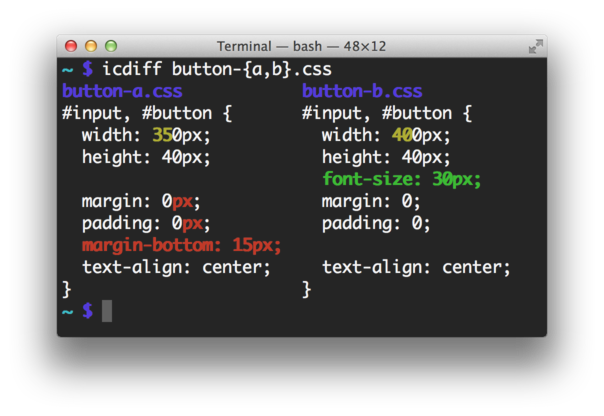
Download the latesticdiff binary and put it on your PATH.
Install with pip from PyPI
pip install icdiff
Alternatively, install with pip from github:
pip install git+https://github.com/jeffkaufman/icdiff.git
It can be also installed using Nix
nix-env -i icdiff
icdiff [options] left_file right_fileShow differences between files in a two column view.
 --version show program's version number and exit
-h, --help show this help message and exit
--cols=COLS specify the width of the screen. Autodetection is Unix
only
--encoding=ENCODING specify the file encoding; defaults to utf8
--head=HEAD consider only the first N lines of each file
-H, --highlight color by changing the background color instead of the
foreground color. Very fast, ugly, displays all
changes
-L LABELS, --label=LABELS
override file labels with arbitrary tags. Use twice,
one for each file
-N, --line-numbers generate output with line numbers
--no-bold use non-bold colors; recommended for solarized
--no-headers don't label the left and right sides with their file
names
--output-encoding=OUTPUT_ENCODING
specify the output encoding; defaults to utf8
-r, --recursive recursively compare subdirectories
--show-all-spaces color all non-matching whitespace including that which
is not needed for drawing the eye to changes. Slow,
ugly, displays all changes
--tabsize=TABSIZE tab stop spacing
-u, --patch generate patch. This is always true, and only exists
for compatibility
-U NUM, --unified=NUM, --numlines=NUM
how many lines of context to print; can't be combined
with --whole-file
-W, --whole-file show the whole file instead of just changed lines and
context
--strip-trailing-cr strip any trailing carriage return at the end of an
input line
--color-map=COLOR_MAP
choose which colors are used for which items. Default
is --color-map='add:green_bold,change:yellow_bold,desc
ription:blue,meta:magenta,separator:blue,subtract:red_
bold'. You don't have to override all of them:
'--color-map=separator:white,description:cyan
To see what it looks like, try:
git difftool --extcmd icdiffTo install this as a tool you can use with Git, copy
git-icdiff into your PATH and run:
git icdiffYou can configure git-icdiff in Git's config:
git config --global icdiff.options '--highlight --line-numbers'
To try it out, run:
svn diff --diff-cmd icdiffAdd the following to your ~/.hgrc:
[extensions]
extdiff=
[extdiff]
cmd.icdiff=icdiff
opts.icdiff=--recursive --line-numbers
Or check more in-depth setup instructions.
Create a virtualenv and install the dev dependencies. This is not needed for normal usage.
virtualenv venv
source venv/bin/activate
pip install -r requirements-dev.txt./test.sh python2
./test.sh python3This file is derived from difflib.HtmlDiff which is under the license.
I release my changes here under the same license. This is GPL compatible.