

Use W&B to build better models faster. Track and visualize all the pieces of your machine learning pipeline, from datasets to production machine learning models. Get started with W&B today, sign up for a free account!
Save everything you need to compare and reproduce models — architecture, hyperparameters, weights, model predictions, GPU usage, git commits, and even datasets — in 5 minutes. W&B is free for personal use and academic projects, and it's easy to get started.
Check out our libraries of example scripts and example colabs or read on for code snippets and more!
If you have any questions, please don't hesitate to ask in our Discourse forum.
Install wandb library and login:
pip install wandb
wandb login
Flexible integration for any Python script:
importwandb# 1. Start a W&B runwandb.init(project='gpt3')
# 2. Save model inputs and hyperparametersconfig=wandb.configconfig.learning_rate=0.01# Model training code here ...# 3. Log metrics over time to visualize performanceforiinrange (10):
wandb.log({"loss": loss})If you have any questions, please don't hesitate to ask in our Discourse forum.

Set wandb.config once at the beginning of your script to save your hyperparameters, input settings (like dataset name or model type), and any other independent variables for your experiments. This is useful for analyzing your experiments and reproducing your work in the future. Setting configs also allows you to visualize the relationships between features of your model architecture or data pipeline and the model performance (as seen in the screenshot above).
wandb.init()
wandb.config.epochs=4wandb.config.batch_size=32wandb.config.learning_rate=0.001wandb.config.architecture="resnet"Use your favorite framework with W&B. W&B integrations make it fast and easy to set up experiment tracking and data versioning inside existing projects. For more information on how to integrate W&B with the framework of your choice, see the Integrations chapter in the W&B Developer Guide.
🔥 PyTorch
Call .watch and pass in your PyTorch model to automatically log gradients and store the network topology. Next, use .log to track other metrics. The following example demonstrates an example of how to do this:
importwandb# 1. Start a new runrun=wandb.init(project="gpt4")
# 2. Save model inputs and hyperparametersconfig=run.configconfig.dropout=0.01# 3. Log gradients and model parametersrun.watch(model)
forbatch_idx, (data, target) inenumerate(train_loader):
...
ifbatch_idx%args.log_interval==0:
# 4. Log metrics to visualize performancerun.log({"loss": loss})- Run an example Google Colab Notebook.
- Read the Developer Guide for technical details on how to integrate PyTorch with W&B.
- Explore W&B Reports.
🌊 TensorFlow/Keras
Use W&B Callbacks to automatically save metrics to W&B when you call `model.fit` during training.The following code example demonstrates how your script might look like when you integrate W&B with Keras:
# This script needs these libraries to be installed:# tensorflow, numpyimportwandbfromwandb.kerasimportWandbMetricsLogger, WandbModelCheckpointimportrandomimportnumpyasnpimporttensorflowastf# Start a run, tracking hyperparametersrun=wandb.init(
# set the wandb project where this run will be loggedproject="my-awesome-project",
# track hyperparameters and run metadata with wandb.configconfig={
"layer_1": 512,
"activation_1": "relu",
"dropout": random.uniform(0.01, 0.80),
"layer_2": 10,
"activation_2": "softmax",
"optimizer": "sgd",
"loss": "sparse_categorical_crossentropy",
"metric": "accuracy",
"epoch": 8,
"batch_size": 256,
},
)
# [optional] use wandb.config as your configconfig=run.config# get the datamnist=tf.keras.datasets.mnist
(x_train, y_train), (x_test, y_test) =mnist.load_data()
x_train, x_test=x_train/255.0, x_test/255.0x_train, y_train=x_train[::5], y_train[::5]
x_test, y_test=x_test[::20], y_test[::20]
labels= [str(digit) fordigitinrange(np.max(y_train) +1)]
# build a modelmodel=tf.keras.models.Sequential(
[
tf.keras.layers.Flatten(input_shape=(28, 28)),
tf.keras.layers.Dense(config.layer_1, activation=config.activation_1),
tf.keras.layers.Dropout(config.dropout),
tf.keras.layers.Dense(config.layer_2, activation=config.activation_2),
]
)
# compile the modelmodel.compile(optimizer=config.optimizer, loss=config.loss, metrics=[config.metric])
# WandbMetricsLogger will log train and validation metrics to wandb# WandbModelCheckpoint will upload model checkpoints to wandbhistory=model.fit(
x=x_train,
y=y_train,
epochs=config.epoch,
batch_size=config.batch_size,
validation_data=(x_test, y_test),
callbacks=[
WandbMetricsLogger(log_freq=5),
WandbModelCheckpoint("models"),
],
)
# [optional] finish the wandb run, necessary in notebooksrun.finish()
Get started integrating your Keras model with W&B today:
- Run an example Google Colab Notebook
- Read the Developer Guide for technical details on how to integrate Keras with W&B.
- Explore W&B Reports.
🤗 Huggingface Transformers
Pass wandb to the report_to argument when you run a script using a HuggingFace Trainer. W&B will automatically log losses,
evaluation metrics, model topology, and gradients.
Note: The environment you run your script in must have wandb installed.
The following example demonstrates how to integrate W&B with Hugging Face:
# This script needs these libraries to be installed:# numpy, transformers, datasetsimportwandbimportosimportnumpyasnpfromdatasetsimportload_datasetfromtransformersimportTrainingArguments, TrainerfromtransformersimportAutoTokenizer, AutoModelForSequenceClassificationdeftokenize_function(examples):
returntokenizer(examples["text"], padding="max_length", truncation=True)
defcompute_metrics(eval_pred):
logits, labels=eval_predpredictions=np.argmax(logits, axis=-1)
return {"accuracy": np.mean(predictions==labels)}
# download prepare the datadataset=load_dataset("yelp_review_full")
tokenizer=AutoTokenizer.from_pretrained("distilbert-base-uncased")
small_train_dataset=dataset["train"].shuffle(seed=42).select(range(1000))
small_eval_dataset=dataset["test"].shuffle(seed=42).select(range(300))
small_train_dataset=small_train_dataset.map(tokenize_function, batched=True)
small_eval_dataset=small_eval_dataset.map(tokenize_function, batched=True)
# download the modelmodel=AutoModelForSequenceClassification.from_pretrained(
"distilbert-base-uncased", num_labels=5
)
# set the wandb project where this run will be loggedos.environ["WANDB_PROJECT"] ="my-awesome-project"# save your trained model checkpoint to wandbos.environ["WANDB_LOG_MODEL"] ="true"# turn off watch to log fasteros.environ["WANDB_WATCH"] ="false"# pass "wandb" to the `report_to` parameter to turn on wandb loggingtraining_args=TrainingArguments(
output_dir="models",
report_to="wandb",
logging_steps=5,
per_device_train_batch_size=32,
per_device_eval_batch_size=32,
evaluation_strategy="steps",
eval_steps=20,
max_steps=100,
save_steps=100,
)
# define the trainer and start trainingtrainer=Trainer(
model=model,
args=training_args,
train_dataset=small_train_dataset,
eval_dataset=small_eval_dataset,
compute_metrics=compute_metrics,
)
trainer.train()
# [optional] finish the wandb run, necessary in notebookswandb.finish()- Run an example Google Colab Notebook.
- Read the Developer Guide for technical details on how to integrate Hugging Face with W&B.
⚡️ PyTorch Lightning
Build scalable, structured, high-performance PyTorch models with Lightning and log them with W&B.
# This script needs these libraries to be installed:# torch, torchvision, pytorch_lightningimportwandbimportosfromtorchimportoptim, nn, utilsfromtorchvision.datasetsimportMNISTfromtorchvision.transformsimportToTensorimportpytorch_lightningasplfrompytorch_lightning.loggersimportWandbLoggerclassLitAutoEncoder(pl.LightningModule):
def__init__(self, lr=1e-3, inp_size=28, optimizer="Adam"):
super().__init__()
self.encoder=nn.Sequential(
nn.Linear(inp_size*inp_size, 64), nn.ReLU(), nn.Linear(64, 3)
)
self.decoder=nn.Sequential(
nn.Linear(3, 64), nn.ReLU(), nn.Linear(64, inp_size*inp_size)
)
self.lr=lr# save hyperparameters to self.hparamsm auto-logged by wandbself.save_hyperparameters()
deftraining_step(self, batch, batch_idx):
x, y=batchx=x.view(x.size(0), -1)
z=self.encoder(x)
x_hat=self.decoder(z)
loss=nn.functional.mse_loss(x_hat, x)
# log metrics to wandbself.log("train_loss", loss)
returnlossdefconfigure_optimizers(self):
optimizer=optim.Adam(self.parameters(), lr=self.lr)
returnoptimizer# init the autoencoderautoencoder=LitAutoEncoder(lr=1e-3, inp_size=28)
# setup databatch_size=32dataset=MNIST(os.getcwd(), download=True, transform=ToTensor())
train_loader=utils.data.DataLoader(dataset, shuffle=True)
# initialise the wandb logger and name your wandb projectwandb_logger=WandbLogger(project="my-awesome-project")
# add your batch size to the wandb configwandb_logger.experiment.config["batch_size"] =batch_size# pass wandb_logger to the Trainertrainer=pl.Trainer(limit_train_batches=750, max_epochs=5, logger=wandb_logger)
# train the modeltrainer.fit(model=autoencoder, train_dataloaders=train_loader)
# [optional] finish the wandb run, necessary in notebookswandb.finish()- Run an example Google Colab Notebook.
- Read the Developer Guide for technical details on how to integrate PyTorch Lightning with W&B.
💨 XGBoost
Use W&B Callbacks to automatically save metrics to W&B when you call `model.fit` during training.The following code example demonstrates how your script might look like when you integrate W&B with XGBoost:
# This script needs these libraries to be installed:# numpy, xgboostimportwandbfromwandb.xgboostimportWandbCallbackimportnumpyasnpimportxgboostasxgb# setup parameters for xgboostparam= {
"objective": "multi:softmax",
"eta": 0.1,
"max_depth": 6,
"nthread": 4,
"num_class": 6,
}
# start a new wandb run to track this scriptrun=wandb.init(
# set the wandb project where this run will be loggedproject="my-awesome-project",
# track hyperparameters and run metadataconfig=param,
)
# download data from wandb Artifacts and prep datarun.use_artifact("wandb/intro/dermatology_data:v0", type="dataset").download(".")
data=np.loadtxt(
"./dermatology.data",
delimiter=",",
converters={33: lambdax: int(x=="?"), 34: lambdax: int(x) -1},
)
sz=data.shapetrain=data[: int(sz[0] *0.7), :]
test=data[int(sz[0] *0.7) :, :]
train_X=train[:, :33]
train_Y=train[:, 34]
test_X=test[:, :33]
test_Y=test[:, 34]
xg_train=xgb.DMatrix(train_X, label=train_Y)
xg_test=xgb.DMatrix(test_X, label=test_Y)
watchlist= [(xg_train, "train"), (xg_test, "test")]
# add another config to the wandb runnum_round=5run.config["num_round"] =5run.config["data_shape"] =sz# pass WandbCallback to the booster to log its configs and metricsbst=xgb.train(
param, xg_train, num_round, evals=watchlist, callbacks=[WandbCallback()]
)
# get predictionpred=bst.predict(xg_test)
error_rate=np.sum(pred!=test_Y) /test_Y.shape[0]
# log your test metric to wandbrun.summary["Error Rate"] =error_rate# [optional] finish the wandb run, necessary in notebooksrun.finish()- Run an example Google Colab Notebook.
- Read the Developer Guide for technical details on how to integrate XGBoost with W&B.
🧮 Sci-Kit Learn
Use wandb to visualize and compare your scikit-learn models' performance:# This script needs these libraries to be installed:# numpy, sklearnimportwandbfromwandb.sklearnimportplot_precision_recall, plot_feature_importancesfromwandb.sklearnimportplot_class_proportions, plot_learning_curve, plot_rocimportnumpyasnpfromsklearnimportdatasetsfromsklearn.ensembleimportRandomForestClassifierfromsklearn.model_selectionimporttrain_test_split# load and process datawbcd=datasets.load_breast_cancer()
feature_names=wbcd.feature_nameslabels=wbcd.target_namestest_size=0.2X_train, X_test, y_train, y_test=train_test_split(
wbcd.data, wbcd.target, test_size=test_size
)
# train modelmodel=RandomForestClassifier()
model.fit(X_train, y_train)
model_params=model.get_params()
# get predictionsy_pred=model.predict(X_test)
y_probas=model.predict_proba(X_test)
importances=model.feature_importances_indices=np.argsort(importances)[::-1]
# start a new wandb run and add your model hyperparametersrun=wandb.init(project="my-awesome-project", config=model_params)
# Add additional configs to wandbrun.config.update(
{
"test_size": test_size,
"train_len": len(X_train),
"test_len": len(X_test),
}
)
# log additional visualisations to wandbplot_class_proportions(y_train, y_test, labels)
plot_learning_curve(model, X_train, y_train)
plot_roc(y_test, y_probas, labels)
plot_precision_recall(y_test, y_probas, labels)
plot_feature_importances(model)
# [optional] finish the wandb run, necessary in notebooksrun.finish()- Run an example Google Colab Notebook.
- Read the Developer Guide for technical details on how to integrate Scikit-Learn with W&B.
Use Weights & Biases Sweeps to automate hyperparameter optimization and explore the space of possible models.
- Quick to setup: With just a few lines of code you can run W&B sweeps.
- Transparent: We cite all the algorithms we're using, and our code is open source.
- Powerful: Our sweeps are completely customizable and configurable. You can launch a sweep across dozens of machines, and it's just as easy as starting a sweep on your laptop.
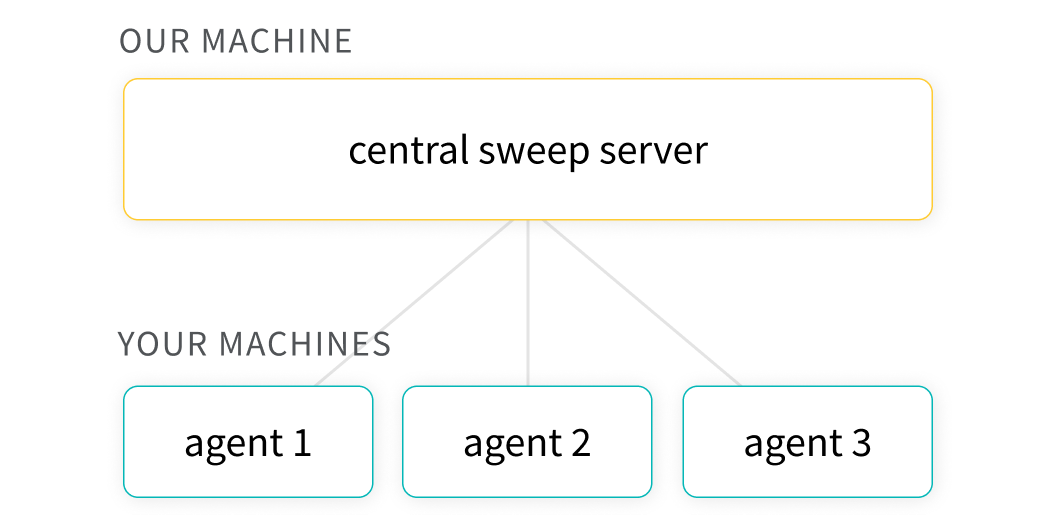
- Explore: Efficiently sample the space of hyperparameter combinations to discover promising regions and build an intuition about your model.
- Optimize: Use sweeps to find a set of hyperparameters with optimal performance.
- K-fold cross validation:Here's a brief code example of k-fold cross validation with W&B Sweeps.
The hyperparameter importance plot surfaces which hyperparameters were the best predictors of, and highly correlated to desirable values for your metrics.

Parallel coordinates plots map hyperparameter values to model metrics. They're useful for honing in on combinations of hyperparameters that led to the best model performance.

Reports let you organize visualizations, describe your findings, and share updates with collaborators.
- Notes: Add a graph with a quick note to yourself.
- Collaboration: Share findings with your colleagues.
- Work log: Track what you've tried and plan next steps.
Explore reports in The Gallery → | Read the Docs
Once you have experiments in W&B, you can visualize and document results in Reports with just a few clicks. Here's a quick demo video.

Git and GitHub make code version control easy, but they're not optimized for tracking the other parts of the ML pipeline: datasets, models, and other large binary files.
W&B's Artifacts are. With just a few extra lines of code, you can start tracking you and your team's outputs, all directly linked to run.
Try Artifacts in a Colab with a video tutorial

- Pipeline Management: Track and visualize the inputs and outputs of your runs as a graph
- Don't Repeat Yourself™: Prevent the duplication of compute effort
- Sharing Data in Teams: Collaborate on models and datasets without all the headaches

Learn about Artifacts here → | Read the Docs
Group, sort, filter, generate calculated columns, and create charts from tabular data.
Spend more time deriving insights, and less time building charts manually.
# log my table
wandb.log({"table": my_dataframe})
