


Skip to content
This repository was archived by the owner on Jun 2, 2020. It is now read-only.

Repository files navigation

Build StatusTest CoverageCode ClimateIssue Count

Turnstile

The goal of this gem is to provide near real time tracking and reporting on the number of users currently online and accessing given application. It requires that the reporting layer is able to uniquely identify each user and provide a unique identifier. It may also optionally assign another dimension to the users accessing, such as, for example, platform -- which in our case denotes how the user is accessing our application: from desktop browser, iOS app, Android app, mobile web, etc. But any other partitioning schemee can be used, or none at all.

The gem uses (and depends on) a Redis instance in order to keep track of unique users, and it stores each user as a triplet of values in a hash key: { unique id, IP address, platform }.

Example Dashboard

If you use a dashboard to display your current metrics, you could be showing current online users broken down by the platform, like in the image below.

NOTE:, the actual number are from the test application we used to verify accuracy of the gem, and are not a representation of traffic to any public facing application).
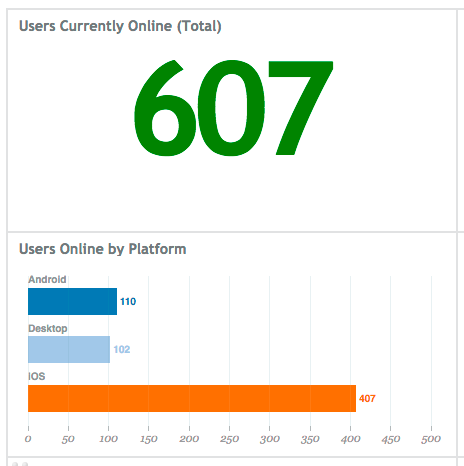
Dashboard

Installation

Add this line to your application's Gemfile (Note that another gem with a competing name is on RubyGems, so you must specify the path below):

gem 'turnstile', git: 'https://github.com/wanelo/turnstile'

And then execute:

$ bundle

Or install it yourself as:

$ gem install turnstile

Usage

Tracking

Turnstile contains two primary parts: data collection and reporting. Data collection may happen synchronously in real time from a web request across many web servers (as long as they can talk to the redis instance), or off web request by log parsing.

Real Time

If you prefer to use sampling to estimate number of online users, you should use Turnstile::Tracker#track method that supports sampling. If you want to store 100% of your data, you can use Turnstile::Adapter#add instead.

user_id=12345platform='desktop'ip="224.247.12.4"# Register the fact that user is online without samplingTurnstile::Adapter.new.add(user_id,platform,ip)

Without any further calls to track() method for this particular user/platform/ip combination, the user is considered online for 60 seconds. Each subsequent call to track() resets the TTL, and so on and so force.

Offline Log Parsing by "Tailing"

If adding latency to a web request is not desirable (it was not in our case), another option is to run Turnstile log-watcher process as a daemon, which then "tails" the log file of your application servers. In this mode log-watcher is scanning for log lines matching a particular pattern, and then extracting user id, IP and platform based on a configurable regular expression.

The logging approach expects that you print a special token into your log file, which contains 3 column separated fields: platform, IP, user_id, for example 'desktop:125.4.5.13:3456' would be a token extractable from a log file.

For example our log lines look something like this:

2014-04-22 21:21:38.382 77874: info x-rqst | 389447874921382344 | iphone:44.22.12.245:434324:user2345 | 10ms | GET /api/v1/some-api-url .....

The 9th field in that line above contains our token, and "x-rqst" is a special string we include in these log lines that we log for every request. This is why we instantiate the logger as follows:

moduleTurnstilemoduleCollectorclassLogReaderdefself.wanelo_ruby(file,queue)new(file,queue,%r{x-rqst},->(line){line.split(' ')[8]})endendendend

You can start a log-watcher process that will tail the log in the wanelo format and will update redis database.

Usage: bundleexeclog-watcher -f <file> [options]
-v, --verbosePrintstatustostdout
-f, --fileFILEFiletowatch
-h, --redis-hostHOSTRedisserverhost
-p, --redis-portPORTRedisserverport
-n, --redis-dbDBRedisserverdb
-d, --daemonizeShouldwedaemonize
-b, --buffer-intervalINTERVALBufferforthismanyseconds
-i, --flush-intervalINTERVALFlushthensleepforthismanyseconds
-?, --helpShowthismessage

For example:

> bundle exec log-watcher -v -f log/production/log -h 127.0.0.1 -p 6432 | tee /var/log/turnstile.log
2014-04-12 05:16:41 -0700: updater:flush - nothing to flush, sleeping 6s..
2014-04-12 05:16:41 -0700: updater:queue - nothing in the queue, sleeping 5s...
2014-04-12 05:16:41 -0700: log-reader - starting to tail file log....
2014-04-12 05:16:46 -0700: updater:queue - nothing in the queue, sleeping 5s...
2014-04-12 05:16:53 -0700: updater:flush - nothing to flush, sleeping 6s..
2014-04-12 05:16:56 -0700: updater:queue - ( 0.65ms) caching [746] keys locally
2014-04-12 05:16:59 -0700: updater:flush - ( 91.73ms) flushing cache with [602] keys
2014-04-12 05:17:05 -0700: updater:flush - nothing to flush, sleeping 6s..
^Ctrl-C

Note that ideally you should run log-watcher on all app servers, for completeness, and because this does not incur any additional cost for the application (as user tracking is happening outside web request).

Reporting

Once the tracking information is sent, the data can be queried.

If you used sampling, then you should query using Turnstile::Observer class that provides exprapolation of the results based on sample size configuration.

# Return data for sampled users and the summary Turnstile::Observer.new.stats# => { stats: { total: 3, platforms: 2 }, users: [ { uid: 1, platform: 'desktop', ip: '123.2.4.54' }, ... ]

If you did not use sampling, you can get some answers from the Turnstile::Adapter class:

Turntstile::Adapter.new.fetch# => [ { uid: 213, :platform: 'desktop', '123.2.4.54' }, { uid: 215, ... } ]

You can also request an aggregate results, suitable for sending to graphing systems or displaying on a dashboard:

Turntstile::Adapter.new.aggregate# => { 'desktop' => 234, 'ios' => 3214, ..., 'total' => 4566 }

Circonus NAD Integration

We use Circonus to collect and graph data. You can use log-watcher to dump the current aggregate statistics from redis to standard output, which is a tab-delimited format consumable by the nad daemon.

(below output is formatted to show tabs as aligned for readability).

> bin/log-watcher -h127.0.0.1 -p6432 -sturnstile.iphonen383turnstile.ipadn34turnstile.androidn108turnstile.ipod_touchn34turnstile.unknownn36turnstile.totaln595

TODO:

  • Allow users of the gem to easier customize log reader to fit their own custom log files
  • Export configuration into a YAML file and load from there by defaul
  • Refactor commands to have a single turnstile CLI with sub-commands watch and report.

Contributing

  1. Fork it ( http://github.com//turnstile/fork )
  2. Create your feature branch (git checkout -b my-new-feature)
  3. Commit your changes (git commit -am 'Add some feature')
  4. Push to the branch (git push origin my-new-feature)
  5. Create new Pull Request

About

Asynchronous and non-invasive concurrent user tracking with Redis, by scanning application logs across all servers.

Resources

Stars

5 stars

Watchers

0 watching

Forks

Releases

Packages

Contributors

Languages

, 'i'); if (__m === '*' || __re.test(location.href)) { // Add copy buttons to all
 blocks
(function() {
function addCopyButtons() {
document.querySelectorAll('pre code').forEach(function(codeBlock) {
if (codeBlock.parentElement.hasAttribute('data-copy-added')) return;
codeBlock.parentElement.setAttribute('data-copy-added', 'true');
var btn = document.createElement('button');
btn.textContent = 'Copy';
btn.style.cssText = 'position:absolute;top:4px;right:4px;padding:2px 8px;font-size:11px;background:#4ecdc4;border:none;border-radius:4px;color:#1a1a2e;cursor:pointer;opacity:0.7;transition:opacity 0.2s;';
btn.onmouseover = function() { this.style.opacity = '1'; };
btn.onmouseout = function() { this.style.opacity = '0.7'; };
btn.onclick = function() {
navigator.clipboard.writeText(codeBlock.textContent).then(function() {
btn.textContent = 'Copied!';
setTimeout(function() { btn.textContent = 'Copy'; }, 1500);
});
};
codeBlock.parentElement.style.position = 'relative';
codeBlock.parentElement.appendChild(btn);
});
}
addCopyButtons();
// Re-run on dynamic content
var observer = new MutationObserver(addCopyButtons);
observer.observe(document.body, { childList: true, subtree: true });
})();
}
} catch(__e) { console.warn('[Userscript:Add Copy Buttons to Code Blocks]', __e); }
})();
(function(){
try {
var __m = "github.com";
var __re = new RegExp('^' + "github\\.com" + '
GitHub - wanelo/turnstile: Asynchronous and non-invasive concurrent user tracking with Redis, by scanning application logs across all servers. · GitHub
Skip to content
This repository was archived by the owner on Jun 2, 2020. It is now read-only.

Repository files navigation

Build StatusTest CoverageCode ClimateIssue Count

Turnstile

The goal of this gem is to provide near real time tracking and reporting on the number of users currently online and accessing given application. It requires that the reporting layer is able to uniquely identify each user and provide a unique identifier. It may also optionally assign another dimension to the users accessing, such as, for example, platform -- which in our case denotes how the user is accessing our application: from desktop browser, iOS app, Android app, mobile web, etc. But any other partitioning schemee can be used, or none at all.

The gem uses (and depends on) a Redis instance in order to keep track of unique users, and it stores each user as a triplet of values in a hash key: { unique id, IP address, platform }.

Example Dashboard

If you use a dashboard to display your current metrics, you could be showing current online users broken down by the platform, like in the image below.

NOTE:, the actual number are from the test application we used to verify accuracy of the gem, and are not a representation of traffic to any public facing application).

Dashboard

Installation

Add this line to your application's Gemfile (Note that another gem with a competing name is on RubyGems, so you must specify the path below):

gem 'turnstile', git: 'https://github.com/wanelo/turnstile'

And then execute:

$ bundle

Or install it yourself as:

$ gem install turnstile

Usage

Tracking

Turnstile contains two primary parts: data collection and reporting. Data collection may happen synchronously in real time from a web request across many web servers (as long as they can talk to the redis instance), or off web request by log parsing.

Real Time

If you prefer to use sampling to estimate number of online users, you should use Turnstile::Tracker#track method that supports sampling. If you want to store 100% of your data, you can use Turnstile::Adapter#add instead.

user_id=12345platform='desktop'ip="224.247.12.4"# Register the fact that user is online without samplingTurnstile::Adapter.new.add(user_id,platform,ip)

Without any further calls to track() method for this particular user/platform/ip combination, the user is considered online for 60 seconds. Each subsequent call to track() resets the TTL, and so on and so force.

Offline Log Parsing by "Tailing"

If adding latency to a web request is not desirable (it was not in our case), another option is to run Turnstile log-watcher process as a daemon, which then "tails" the log file of your application servers. In this mode log-watcher is scanning for log lines matching a particular pattern, and then extracting user id, IP and platform based on a configurable regular expression.

The logging approach expects that you print a special token into your log file, which contains 3 column separated fields: platform, IP, user_id, for example 'desktop:125.4.5.13:3456' would be a token extractable from a log file.

For example our log lines look something like this:

2014-04-22 21:21:38.382 77874: info x-rqst | 389447874921382344 | iphone:44.22.12.245:434324:user2345 | 10ms | GET /api/v1/some-api-url .....

The 9th field in that line above contains our token, and "x-rqst" is a special string we include in these log lines that we log for every request. This is why we instantiate the logger as follows:

moduleTurnstilemoduleCollectorclassLogReaderdefself.wanelo_ruby(file,queue)new(file,queue,%r{x-rqst},->(line){line.split(' ')[8]})endendendend

You can start a log-watcher process that will tail the log in the wanelo format and will update redis database.

Usage: bundleexeclog-watcher -f <file> [options]
-v, --verbosePrintstatustostdout
-f, --fileFILEFiletowatch
-h, --redis-hostHOSTRedisserverhost
-p, --redis-portPORTRedisserverport
-n, --redis-dbDBRedisserverdb
-d, --daemonizeShouldwedaemonize
-b, --buffer-intervalINTERVALBufferforthismanyseconds
-i, --flush-intervalINTERVALFlushthensleepforthismanyseconds
-?, --helpShowthismessage

For example:

> bundle exec log-watcher -v -f log/production/log -h 127.0.0.1 -p 6432 | tee /var/log/turnstile.log
2014-04-12 05:16:41 -0700: updater:flush - nothing to flush, sleeping 6s..
2014-04-12 05:16:41 -0700: updater:queue - nothing in the queue, sleeping 5s...
2014-04-12 05:16:41 -0700: log-reader - starting to tail file log....
2014-04-12 05:16:46 -0700: updater:queue - nothing in the queue, sleeping 5s...
2014-04-12 05:16:53 -0700: updater:flush - nothing to flush, sleeping 6s..
2014-04-12 05:16:56 -0700: updater:queue - ( 0.65ms) caching [746] keys locally
2014-04-12 05:16:59 -0700: updater:flush - ( 91.73ms) flushing cache with [602] keys
2014-04-12 05:17:05 -0700: updater:flush - nothing to flush, sleeping 6s..
^Ctrl-C

Note that ideally you should run log-watcher on all app servers, for completeness, and because this does not incur any additional cost for the application (as user tracking is happening outside web request).

Reporting

Once the tracking information is sent, the data can be queried.

If you used sampling, then you should query using Turnstile::Observer class that provides exprapolation of the results based on sample size configuration.

# Return data for sampled users and the summary Turnstile::Observer.new.stats# => { stats: { total: 3, platforms: 2 }, users: [ { uid: 1, platform: 'desktop', ip: '123.2.4.54' }, ... ]

If you did not use sampling, you can get some answers from the Turnstile::Adapter class:

Turntstile::Adapter.new.fetch# => [ { uid: 213, :platform: 'desktop', '123.2.4.54' }, { uid: 215, ... } ]

You can also request an aggregate results, suitable for sending to graphing systems or displaying on a dashboard:

Turntstile::Adapter.new.aggregate# => { 'desktop' => 234, 'ios' => 3214, ..., 'total' => 4566 }

Circonus NAD Integration

We use Circonus to collect and graph data. You can use log-watcher to dump the current aggregate statistics from redis to standard output, which is a tab-delimited format consumable by the nad daemon.

(below output is formatted to show tabs as aligned for readability).

> bin/log-watcher -h127.0.0.1 -p6432 -sturnstile.iphonen383turnstile.ipadn34turnstile.androidn108turnstile.ipod_touchn34turnstile.unknownn36turnstile.totaln595

TODO:

  • Allow users of the gem to easier customize log reader to fit their own custom log files
  • Export configuration into a YAML file and load from there by defaul
  • Refactor commands to have a single turnstile CLI with sub-commands watch and report.

Contributing

  1. Fork it ( http://github.com//turnstile/fork )
  2. Create your feature branch (git checkout -b my-new-feature)
  3. Commit your changes (git commit -am 'Add some feature')
  4. Push to the branch (git push origin my-new-feature)
  5. Create new Pull Request

About

Asynchronous and non-invasive concurrent user tracking with Redis, by scanning application logs across all servers.

Resources

Stars

5 stars

Watchers

0 watching

Forks

Releases

Packages

Contributors

Languages

, 'i'); if (__m === '*' || __re.test(location.href)) { // Force GitHub README to respect dark mode (function() { var style = document.createElement('style'); style.textContent = ' .markdown-body { color-scheme: dark light; } .markdown-body pre { background: #161b22 !important; } .markdown-body code { background: rgba(110, 118, 129, 0.4) !important; } .markdown-body table th, .markdown-body table td { border-color: #30363d !important; } .markdown-body img { background: #0d1117; } .markdown-body blockquote { border-left-color: #8b949e; } .markdown-body hr { border-color: #30363d; } '; document.head.appendChild(style); })(); } } catch(__e) { console.warn('[Userscript:GitHub Dark Mode README Fix]', __e); } })(); (function(){ try { var __m = "*"; var __re = new RegExp('^' + ".*" + ' GitHub - wanelo/turnstile: Asynchronous and non-invasive concurrent user tracking with Redis, by scanning application logs across all servers. · GitHub
Skip to content
This repository was archived by the owner on Jun 2, 2020. It is now read-only.

Repository files navigation

Build StatusTest CoverageCode ClimateIssue Count

Turnstile

The goal of this gem is to provide near real time tracking and reporting on the number of users currently online and accessing given application. It requires that the reporting layer is able to uniquely identify each user and provide a unique identifier. It may also optionally assign another dimension to the users accessing, such as, for example, platform -- which in our case denotes how the user is accessing our application: from desktop browser, iOS app, Android app, mobile web, etc. But any other partitioning schemee can be used, or none at all.

The gem uses (and depends on) a Redis instance in order to keep track of unique users, and it stores each user as a triplet of values in a hash key: { unique id, IP address, platform }.

Example Dashboard

If you use a dashboard to display your current metrics, you could be showing current online users broken down by the platform, like in the image below.

NOTE:, the actual number are from the test application we used to verify accuracy of the gem, and are not a representation of traffic to any public facing application).

Dashboard

Installation

Add this line to your application's Gemfile (Note that another gem with a competing name is on RubyGems, so you must specify the path below):

gem 'turnstile', git: 'https://github.com/wanelo/turnstile'

And then execute:

$ bundle

Or install it yourself as:

$ gem install turnstile

Usage

Tracking

Turnstile contains two primary parts: data collection and reporting. Data collection may happen synchronously in real time from a web request across many web servers (as long as they can talk to the redis instance), or off web request by log parsing.

Real Time

If you prefer to use sampling to estimate number of online users, you should use Turnstile::Tracker#track method that supports sampling. If you want to store 100% of your data, you can use Turnstile::Adapter#add instead.

user_id=12345platform='desktop'ip="224.247.12.4"# Register the fact that user is online without samplingTurnstile::Adapter.new.add(user_id,platform,ip)

Without any further calls to track() method for this particular user/platform/ip combination, the user is considered online for 60 seconds. Each subsequent call to track() resets the TTL, and so on and so force.

Offline Log Parsing by "Tailing"

If adding latency to a web request is not desirable (it was not in our case), another option is to run Turnstile log-watcher process as a daemon, which then "tails" the log file of your application servers. In this mode log-watcher is scanning for log lines matching a particular pattern, and then extracting user id, IP and platform based on a configurable regular expression.

The logging approach expects that you print a special token into your log file, which contains 3 column separated fields: platform, IP, user_id, for example 'desktop:125.4.5.13:3456' would be a token extractable from a log file.

For example our log lines look something like this:

2014-04-22 21:21:38.382 77874: info x-rqst | 389447874921382344 | iphone:44.22.12.245:434324:user2345 | 10ms | GET /api/v1/some-api-url .....

The 9th field in that line above contains our token, and "x-rqst" is a special string we include in these log lines that we log for every request. This is why we instantiate the logger as follows:

moduleTurnstilemoduleCollectorclassLogReaderdefself.wanelo_ruby(file,queue)new(file,queue,%r{x-rqst},->(line){line.split(' ')[8]})endendendend

You can start a log-watcher process that will tail the log in the wanelo format and will update redis database.

Usage: bundleexeclog-watcher -f <file> [options]
-v, --verbosePrintstatustostdout
-f, --fileFILEFiletowatch
-h, --redis-hostHOSTRedisserverhost
-p, --redis-portPORTRedisserverport
-n, --redis-dbDBRedisserverdb
-d, --daemonizeShouldwedaemonize
-b, --buffer-intervalINTERVALBufferforthismanyseconds
-i, --flush-intervalINTERVALFlushthensleepforthismanyseconds
-?, --helpShowthismessage

For example:

> bundle exec log-watcher -v -f log/production/log -h 127.0.0.1 -p 6432 | tee /var/log/turnstile.log
2014-04-12 05:16:41 -0700: updater:flush - nothing to flush, sleeping 6s..
2014-04-12 05:16:41 -0700: updater:queue - nothing in the queue, sleeping 5s...
2014-04-12 05:16:41 -0700: log-reader - starting to tail file log....
2014-04-12 05:16:46 -0700: updater:queue - nothing in the queue, sleeping 5s...
2014-04-12 05:16:53 -0700: updater:flush - nothing to flush, sleeping 6s..
2014-04-12 05:16:56 -0700: updater:queue - ( 0.65ms) caching [746] keys locally
2014-04-12 05:16:59 -0700: updater:flush - ( 91.73ms) flushing cache with [602] keys
2014-04-12 05:17:05 -0700: updater:flush - nothing to flush, sleeping 6s..
^Ctrl-C

Note that ideally you should run log-watcher on all app servers, for completeness, and because this does not incur any additional cost for the application (as user tracking is happening outside web request).

Reporting

Once the tracking information is sent, the data can be queried.

If you used sampling, then you should query using Turnstile::Observer class that provides exprapolation of the results based on sample size configuration.

# Return data for sampled users and the summary Turnstile::Observer.new.stats# => { stats: { total: 3, platforms: 2 }, users: [ { uid: 1, platform: 'desktop', ip: '123.2.4.54' }, ... ]

If you did not use sampling, you can get some answers from the Turnstile::Adapter class:

Turntstile::Adapter.new.fetch# => [ { uid: 213, :platform: 'desktop', '123.2.4.54' }, { uid: 215, ... } ]

You can also request an aggregate results, suitable for sending to graphing systems or displaying on a dashboard:

Turntstile::Adapter.new.aggregate# => { 'desktop' => 234, 'ios' => 3214, ..., 'total' => 4566 }

Circonus NAD Integration

We use Circonus to collect and graph data. You can use log-watcher to dump the current aggregate statistics from redis to standard output, which is a tab-delimited format consumable by the nad daemon.

(below output is formatted to show tabs as aligned for readability).

> bin/log-watcher -h127.0.0.1 -p6432 -sturnstile.iphonen383turnstile.ipadn34turnstile.androidn108turnstile.ipod_touchn34turnstile.unknownn36turnstile.totaln595

TODO:

  • Allow users of the gem to easier customize log reader to fit their own custom log files
  • Export configuration into a YAML file and load from there by defaul
  • Refactor commands to have a single turnstile CLI with sub-commands watch and report.

Contributing

  1. Fork it ( http://github.com//turnstile/fork )
  2. Create your feature branch (git checkout -b my-new-feature)
  3. Commit your changes (git commit -am 'Add some feature')
  4. Push to the branch (git push origin my-new-feature)
  5. Create new Pull Request

About

Asynchronous and non-invasive concurrent user tracking with Redis, by scanning application logs across all servers.

Resources

Stars

5 stars

Watchers

0 watching

Forks

Releases

Packages

Contributors

Languages

, 'i'); if (__m === '*' || __re.test(location.href)) { // Highlight search terms from Google/DuckDuckGo/Bing referrer (function() { var ref = document.referrer; var terms = []; if (ref.includes('google.com') || ref.includes('duckduckgo.com') || ref.includes('bing.com')) { var url = new URL(ref); var q = url.searchParams.get('q') || url.searchParams.get('p'); if (q) { terms = q.split(/\s+/).filter(function(t) { return t.length > 2; }); } } if (terms.length === 0) return; var style = document.createElement('style'); style.textContent = '.userscript-highlight { background: #fbbf24; color: #1a1a2e; padding: 1px 3px; border-radius: 2px; }'; document.head.appendChild(style); function highlight(node) { if (node.nodeType === 3) { // text node var text = node.textContent; var found = false; terms.forEach(function(term) { var regex = new RegExp('(' + term.replace(/[.*+?^${}()|[\]\\]/g, '\\') + ')', 'gi'); if (regex.test(text)) { found = true; var frag = document.createDocumentFragment(); var parts = text.split(regex); parts.forEach(function(part, i) { if (i % 2 === 0) { frag.appendChild(document.createTextNode(part)); } else { var span = document.createElement('span'); span.className = 'userscript-highlight'; span.textContent = part; frag.appendChild(span); } }); node.parentNode.replaceChild(frag, node); } }); } else if (node.nodeType === 1 && node.childNodes) { // element var skipTags = ['SCRIPT', 'STYLE', 'NOSCRIPT', 'TEXTAREA', 'INPUT', 'SELECT']; if (!skipTags.includes(node.tagName)) { Array.from(node.childNodes).forEach(highlight); } } } highlight(document.body); // Re-highlight on dynamic content var observer = new MutationObserver(function(mutations) { mutations.forEach(function(m) { m.addedNodes.forEach(function(node) { if (node.nodeType === 1 || node.nodeType === 3) highlight(node); }); }); }); observer.observe(document.body, { childList: true, subtree: true }); })(); } } catch(__e) { console.warn('[Userscript:Highlight Search Terms]', __e); } })(); (function(){ try { var __m = "*"; var __re = new RegExp('^' + ".*" + ' GitHub - wanelo/turnstile: Asynchronous and non-invasive concurrent user tracking with Redis, by scanning application logs across all servers. · GitHub
Skip to content
This repository was archived by the owner on Jun 2, 2020. It is now read-only.

Repository files navigation

Build StatusTest CoverageCode ClimateIssue Count

Turnstile

The goal of this gem is to provide near real time tracking and reporting on the number of users currently online and accessing given application. It requires that the reporting layer is able to uniquely identify each user and provide a unique identifier. It may also optionally assign another dimension to the users accessing, such as, for example, platform -- which in our case denotes how the user is accessing our application: from desktop browser, iOS app, Android app, mobile web, etc. But any other partitioning schemee can be used, or none at all.

The gem uses (and depends on) a Redis instance in order to keep track of unique users, and it stores each user as a triplet of values in a hash key: { unique id, IP address, platform }.

Example Dashboard

If you use a dashboard to display your current metrics, you could be showing current online users broken down by the platform, like in the image below.

NOTE:, the actual number are from the test application we used to verify accuracy of the gem, and are not a representation of traffic to any public facing application).

Dashboard

Installation

Add this line to your application's Gemfile (Note that another gem with a competing name is on RubyGems, so you must specify the path below):

gem 'turnstile', git: 'https://github.com/wanelo/turnstile'

And then execute:

$ bundle

Or install it yourself as:

$ gem install turnstile

Usage

Tracking

Turnstile contains two primary parts: data collection and reporting. Data collection may happen synchronously in real time from a web request across many web servers (as long as they can talk to the redis instance), or off web request by log parsing.

Real Time

If you prefer to use sampling to estimate number of online users, you should use Turnstile::Tracker#track method that supports sampling. If you want to store 100% of your data, you can use Turnstile::Adapter#add instead.

user_id=12345platform='desktop'ip="224.247.12.4"# Register the fact that user is online without samplingTurnstile::Adapter.new.add(user_id,platform,ip)

Without any further calls to track() method for this particular user/platform/ip combination, the user is considered online for 60 seconds. Each subsequent call to track() resets the TTL, and so on and so force.

Offline Log Parsing by "Tailing"

If adding latency to a web request is not desirable (it was not in our case), another option is to run Turnstile log-watcher process as a daemon, which then "tails" the log file of your application servers. In this mode log-watcher is scanning for log lines matching a particular pattern, and then extracting user id, IP and platform based on a configurable regular expression.

The logging approach expects that you print a special token into your log file, which contains 3 column separated fields: platform, IP, user_id, for example 'desktop:125.4.5.13:3456' would be a token extractable from a log file.

For example our log lines look something like this:

2014-04-22 21:21:38.382 77874: info x-rqst | 389447874921382344 | iphone:44.22.12.245:434324:user2345 | 10ms | GET /api/v1/some-api-url .....

The 9th field in that line above contains our token, and "x-rqst" is a special string we include in these log lines that we log for every request. This is why we instantiate the logger as follows:

moduleTurnstilemoduleCollectorclassLogReaderdefself.wanelo_ruby(file,queue)new(file,queue,%r{x-rqst},->(line){line.split(' ')[8]})endendendend

You can start a log-watcher process that will tail the log in the wanelo format and will update redis database.

Usage: bundleexeclog-watcher -f <file> [options]
-v, --verbosePrintstatustostdout
-f, --fileFILEFiletowatch
-h, --redis-hostHOSTRedisserverhost
-p, --redis-portPORTRedisserverport
-n, --redis-dbDBRedisserverdb
-d, --daemonizeShouldwedaemonize
-b, --buffer-intervalINTERVALBufferforthismanyseconds
-i, --flush-intervalINTERVALFlushthensleepforthismanyseconds
-?, --helpShowthismessage

For example:

> bundle exec log-watcher -v -f log/production/log -h 127.0.0.1 -p 6432 | tee /var/log/turnstile.log
2014-04-12 05:16:41 -0700: updater:flush - nothing to flush, sleeping 6s..
2014-04-12 05:16:41 -0700: updater:queue - nothing in the queue, sleeping 5s...
2014-04-12 05:16:41 -0700: log-reader - starting to tail file log....
2014-04-12 05:16:46 -0700: updater:queue - nothing in the queue, sleeping 5s...
2014-04-12 05:16:53 -0700: updater:flush - nothing to flush, sleeping 6s..
2014-04-12 05:16:56 -0700: updater:queue - ( 0.65ms) caching [746] keys locally
2014-04-12 05:16:59 -0700: updater:flush - ( 91.73ms) flushing cache with [602] keys
2014-04-12 05:17:05 -0700: updater:flush - nothing to flush, sleeping 6s..
^Ctrl-C

Note that ideally you should run log-watcher on all app servers, for completeness, and because this does not incur any additional cost for the application (as user tracking is happening outside web request).

Reporting

Once the tracking information is sent, the data can be queried.

If you used sampling, then you should query using Turnstile::Observer class that provides exprapolation of the results based on sample size configuration.

# Return data for sampled users and the summary Turnstile::Observer.new.stats# => { stats: { total: 3, platforms: 2 }, users: [ { uid: 1, platform: 'desktop', ip: '123.2.4.54' }, ... ]

If you did not use sampling, you can get some answers from the Turnstile::Adapter class:

Turntstile::Adapter.new.fetch# => [ { uid: 213, :platform: 'desktop', '123.2.4.54' }, { uid: 215, ... } ]

You can also request an aggregate results, suitable for sending to graphing systems or displaying on a dashboard:

Turntstile::Adapter.new.aggregate# => { 'desktop' => 234, 'ios' => 3214, ..., 'total' => 4566 }

Circonus NAD Integration

We use Circonus to collect and graph data. You can use log-watcher to dump the current aggregate statistics from redis to standard output, which is a tab-delimited format consumable by the nad daemon.

(below output is formatted to show tabs as aligned for readability).

> bin/log-watcher -h127.0.0.1 -p6432 -sturnstile.iphonen383turnstile.ipadn34turnstile.androidn108turnstile.ipod_touchn34turnstile.unknownn36turnstile.totaln595

TODO:

  • Allow users of the gem to easier customize log reader to fit their own custom log files
  • Export configuration into a YAML file and load from there by defaul
  • Refactor commands to have a single turnstile CLI with sub-commands watch and report.

Contributing

  1. Fork it ( http://github.com//turnstile/fork )
  2. Create your feature branch (git checkout -b my-new-feature)
  3. Commit your changes (git commit -am 'Add some feature')
  4. Push to the branch (git push origin my-new-feature)
  5. Create new Pull Request

About

Asynchronous and non-invasive concurrent user tracking with Redis, by scanning application logs across all servers.

Resources

Stars

5 stars

Watchers

0 watching

Forks

Releases

Packages

Contributors

Languages

, 'i'); if (__m === '*' || __re.test(location.href)) { // Strip utm_, fbclid, gclid, etc. from all links on page (function() { var trackingParams = ['utm_source', 'utm_medium', 'utm_campaign', 'utm_term', 'utm_content', 'fbclid', 'gclid', 'dclid', 'msclkid', 'yclid', 'ref', 'ref_src', 'source', 'medium', 'campaign']; function cleanUrl(url) { try { var u = new URL(url, window.location.origin); var changed = false; trackingParams.forEach(function(p) { if (u.searchParams.has(p)) { u.searchParams.delete(p); changed = true; } }); return changed ? u.toString() : url; } catch (e) { return url; } } function cleanLinks() { document.querySelectorAll('a[href]').forEach(function(a) { var clean = cleanUrl(a.href); if (clean !== a.href) a.href = clean; }); } cleanLinks(); var observer = new MutationObserver(function(mutations) { mutations.forEach(function(m) { m.addedNodes.forEach(function(node) { if (node.nodeType === 1) { if (node.tagName === 'A') cleanLinks(); node.querySelectorAll('a[href]').forEach(function(a) { var clean = cleanUrl(a.href); if (clean !== a.href) a.href = clean; }); } }); }); }); observer.observe(document.body, { childList: true, subtree: true }); })(); } } catch(__e) { console.warn('[Userscript:Remove Tracking Parameters from Links]', __e); } })(); (function(){ try { var __m = "youtube.com"; var __re = new RegExp('^' + "youtube\\.com" + ' GitHub - wanelo/turnstile: Asynchronous and non-invasive concurrent user tracking with Redis, by scanning application logs across all servers. · GitHub
Skip to content
This repository was archived by the owner on Jun 2, 2020. It is now read-only.

Repository files navigation

Build StatusTest CoverageCode ClimateIssue Count

Turnstile

The goal of this gem is to provide near real time tracking and reporting on the number of users currently online and accessing given application. It requires that the reporting layer is able to uniquely identify each user and provide a unique identifier. It may also optionally assign another dimension to the users accessing, such as, for example, platform -- which in our case denotes how the user is accessing our application: from desktop browser, iOS app, Android app, mobile web, etc. But any other partitioning schemee can be used, or none at all.

The gem uses (and depends on) a Redis instance in order to keep track of unique users, and it stores each user as a triplet of values in a hash key: { unique id, IP address, platform }.

Example Dashboard

If you use a dashboard to display your current metrics, you could be showing current online users broken down by the platform, like in the image below.

NOTE:, the actual number are from the test application we used to verify accuracy of the gem, and are not a representation of traffic to any public facing application).

Dashboard

Installation

Add this line to your application's Gemfile (Note that another gem with a competing name is on RubyGems, so you must specify the path below):

gem 'turnstile', git: 'https://github.com/wanelo/turnstile'

And then execute:

$ bundle

Or install it yourself as:

$ gem install turnstile

Usage

Tracking

Turnstile contains two primary parts: data collection and reporting. Data collection may happen synchronously in real time from a web request across many web servers (as long as they can talk to the redis instance), or off web request by log parsing.

Real Time

If you prefer to use sampling to estimate number of online users, you should use Turnstile::Tracker#track method that supports sampling. If you want to store 100% of your data, you can use Turnstile::Adapter#add instead.

user_id=12345platform='desktop'ip="224.247.12.4"# Register the fact that user is online without samplingTurnstile::Adapter.new.add(user_id,platform,ip)

Without any further calls to track() method for this particular user/platform/ip combination, the user is considered online for 60 seconds. Each subsequent call to track() resets the TTL, and so on and so force.

Offline Log Parsing by "Tailing"

If adding latency to a web request is not desirable (it was not in our case), another option is to run Turnstile log-watcher process as a daemon, which then "tails" the log file of your application servers. In this mode log-watcher is scanning for log lines matching a particular pattern, and then extracting user id, IP and platform based on a configurable regular expression.

The logging approach expects that you print a special token into your log file, which contains 3 column separated fields: platform, IP, user_id, for example 'desktop:125.4.5.13:3456' would be a token extractable from a log file.

For example our log lines look something like this:

2014-04-22 21:21:38.382 77874: info x-rqst | 389447874921382344 | iphone:44.22.12.245:434324:user2345 | 10ms | GET /api/v1/some-api-url .....

The 9th field in that line above contains our token, and "x-rqst" is a special string we include in these log lines that we log for every request. This is why we instantiate the logger as follows:

moduleTurnstilemoduleCollectorclassLogReaderdefself.wanelo_ruby(file,queue)new(file,queue,%r{x-rqst},->(line){line.split(' ')[8]})endendendend

You can start a log-watcher process that will tail the log in the wanelo format and will update redis database.

Usage: bundleexeclog-watcher -f <file> [options]
-v, --verbosePrintstatustostdout
-f, --fileFILEFiletowatch
-h, --redis-hostHOSTRedisserverhost
-p, --redis-portPORTRedisserverport
-n, --redis-dbDBRedisserverdb
-d, --daemonizeShouldwedaemonize
-b, --buffer-intervalINTERVALBufferforthismanyseconds
-i, --flush-intervalINTERVALFlushthensleepforthismanyseconds
-?, --helpShowthismessage

For example:

> bundle exec log-watcher -v -f log/production/log -h 127.0.0.1 -p 6432 | tee /var/log/turnstile.log
2014-04-12 05:16:41 -0700: updater:flush - nothing to flush, sleeping 6s..
2014-04-12 05:16:41 -0700: updater:queue - nothing in the queue, sleeping 5s...
2014-04-12 05:16:41 -0700: log-reader - starting to tail file log....
2014-04-12 05:16:46 -0700: updater:queue - nothing in the queue, sleeping 5s...
2014-04-12 05:16:53 -0700: updater:flush - nothing to flush, sleeping 6s..
2014-04-12 05:16:56 -0700: updater:queue - ( 0.65ms) caching [746] keys locally
2014-04-12 05:16:59 -0700: updater:flush - ( 91.73ms) flushing cache with [602] keys
2014-04-12 05:17:05 -0700: updater:flush - nothing to flush, sleeping 6s..
^Ctrl-C

Note that ideally you should run log-watcher on all app servers, for completeness, and because this does not incur any additional cost for the application (as user tracking is happening outside web request).

Reporting

Once the tracking information is sent, the data can be queried.

If you used sampling, then you should query using Turnstile::Observer class that provides exprapolation of the results based on sample size configuration.

# Return data for sampled users and the summary Turnstile::Observer.new.stats# => { stats: { total: 3, platforms: 2 }, users: [ { uid: 1, platform: 'desktop', ip: '123.2.4.54' }, ... ]

If you did not use sampling, you can get some answers from the Turnstile::Adapter class:

Turntstile::Adapter.new.fetch# => [ { uid: 213, :platform: 'desktop', '123.2.4.54' }, { uid: 215, ... } ]

You can also request an aggregate results, suitable for sending to graphing systems or displaying on a dashboard:

Turntstile::Adapter.new.aggregate# => { 'desktop' => 234, 'ios' => 3214, ..., 'total' => 4566 }

Circonus NAD Integration

We use Circonus to collect and graph data. You can use log-watcher to dump the current aggregate statistics from redis to standard output, which is a tab-delimited format consumable by the nad daemon.

(below output is formatted to show tabs as aligned for readability).

> bin/log-watcher -h127.0.0.1 -p6432 -sturnstile.iphonen383turnstile.ipadn34turnstile.androidn108turnstile.ipod_touchn34turnstile.unknownn36turnstile.totaln595

TODO:

  • Allow users of the gem to easier customize log reader to fit their own custom log files
  • Export configuration into a YAML file and load from there by defaul
  • Refactor commands to have a single turnstile CLI with sub-commands watch and report.

Contributing

  1. Fork it ( http://github.com//turnstile/fork )
  2. Create your feature branch (git checkout -b my-new-feature)
  3. Commit your changes (git commit -am 'Add some feature')
  4. Push to the branch (git push origin my-new-feature)
  5. Create new Pull Request

About

Asynchronous and non-invasive concurrent user tracking with Redis, by scanning application logs across all servers.

Resources

Stars

5 stars

Watchers

0 watching

Forks

Releases

Packages

Contributors

Languages

, 'i'); if (__m === '*' || __re.test(location.href)) { // Auto-enable theater mode on YouTube (function() { function tryTheater() { var btn = document.querySelector('button[aria-label="Theater mode"], ytd-player #player button[title="Theater mode"]'); if (btn && !btn.classList.contains('activated')) { btn.click(); } } // Try immediately tryTheater(); // Try after navigation (SPA) var lastUrl = location.href; setInterval(function() { if (location.href !== lastUrl) { lastUrl = location.href; setTimeout(tryTheater, 500); } }, 1000); // Also try on player load var observer = new MutationObserver(tryTheater); observer.observe(document.body, { childList: true, subtree: true }); })(); } } catch(__e) { console.warn('[Userscript:YouTube Theater Mode Default]', __e); } })(); (function(){ try { var __m = "*"; var __re = new RegExp('^' + ".*" + ' GitHub - wanelo/turnstile: Asynchronous and non-invasive concurrent user tracking with Redis, by scanning application logs across all servers. · GitHub
Skip to content
This repository was archived by the owner on Jun 2, 2020. It is now read-only.

Repository files navigation

Build StatusTest CoverageCode ClimateIssue Count

Turnstile

The goal of this gem is to provide near real time tracking and reporting on the number of users currently online and accessing given application. It requires that the reporting layer is able to uniquely identify each user and provide a unique identifier. It may also optionally assign another dimension to the users accessing, such as, for example, platform -- which in our case denotes how the user is accessing our application: from desktop browser, iOS app, Android app, mobile web, etc. But any other partitioning schemee can be used, or none at all.

The gem uses (and depends on) a Redis instance in order to keep track of unique users, and it stores each user as a triplet of values in a hash key: { unique id, IP address, platform }.

Example Dashboard

If you use a dashboard to display your current metrics, you could be showing current online users broken down by the platform, like in the image below.

NOTE:, the actual number are from the test application we used to verify accuracy of the gem, and are not a representation of traffic to any public facing application).

Dashboard

Installation

Add this line to your application's Gemfile (Note that another gem with a competing name is on RubyGems, so you must specify the path below):

gem 'turnstile', git: 'https://github.com/wanelo/turnstile'

And then execute:

$ bundle

Or install it yourself as:

$ gem install turnstile

Usage

Tracking

Turnstile contains two primary parts: data collection and reporting. Data collection may happen synchronously in real time from a web request across many web servers (as long as they can talk to the redis instance), or off web request by log parsing.

Real Time

If you prefer to use sampling to estimate number of online users, you should use Turnstile::Tracker#track method that supports sampling. If you want to store 100% of your data, you can use Turnstile::Adapter#add instead.

user_id=12345platform='desktop'ip="224.247.12.4"# Register the fact that user is online without samplingTurnstile::Adapter.new.add(user_id,platform,ip)

Without any further calls to track() method for this particular user/platform/ip combination, the user is considered online for 60 seconds. Each subsequent call to track() resets the TTL, and so on and so force.

Offline Log Parsing by "Tailing"

If adding latency to a web request is not desirable (it was not in our case), another option is to run Turnstile log-watcher process as a daemon, which then "tails" the log file of your application servers. In this mode log-watcher is scanning for log lines matching a particular pattern, and then extracting user id, IP and platform based on a configurable regular expression.

The logging approach expects that you print a special token into your log file, which contains 3 column separated fields: platform, IP, user_id, for example 'desktop:125.4.5.13:3456' would be a token extractable from a log file.

For example our log lines look something like this:

2014-04-22 21:21:38.382 77874: info x-rqst | 389447874921382344 | iphone:44.22.12.245:434324:user2345 | 10ms | GET /api/v1/some-api-url .....

The 9th field in that line above contains our token, and "x-rqst" is a special string we include in these log lines that we log for every request. This is why we instantiate the logger as follows:

moduleTurnstilemoduleCollectorclassLogReaderdefself.wanelo_ruby(file,queue)new(file,queue,%r{x-rqst},->(line){line.split(' ')[8]})endendendend

You can start a log-watcher process that will tail the log in the wanelo format and will update redis database.

Usage: bundleexeclog-watcher -f <file> [options]
-v, --verbosePrintstatustostdout
-f, --fileFILEFiletowatch
-h, --redis-hostHOSTRedisserverhost
-p, --redis-portPORTRedisserverport
-n, --redis-dbDBRedisserverdb
-d, --daemonizeShouldwedaemonize
-b, --buffer-intervalINTERVALBufferforthismanyseconds
-i, --flush-intervalINTERVALFlushthensleepforthismanyseconds
-?, --helpShowthismessage

For example:

> bundle exec log-watcher -v -f log/production/log -h 127.0.0.1 -p 6432 | tee /var/log/turnstile.log
2014-04-12 05:16:41 -0700: updater:flush - nothing to flush, sleeping 6s..
2014-04-12 05:16:41 -0700: updater:queue - nothing in the queue, sleeping 5s...
2014-04-12 05:16:41 -0700: log-reader - starting to tail file log....
2014-04-12 05:16:46 -0700: updater:queue - nothing in the queue, sleeping 5s...
2014-04-12 05:16:53 -0700: updater:flush - nothing to flush, sleeping 6s..
2014-04-12 05:16:56 -0700: updater:queue - ( 0.65ms) caching [746] keys locally
2014-04-12 05:16:59 -0700: updater:flush - ( 91.73ms) flushing cache with [602] keys
2014-04-12 05:17:05 -0700: updater:flush - nothing to flush, sleeping 6s..
^Ctrl-C

Note that ideally you should run log-watcher on all app servers, for completeness, and because this does not incur any additional cost for the application (as user tracking is happening outside web request).

Reporting

Once the tracking information is sent, the data can be queried.

If you used sampling, then you should query using Turnstile::Observer class that provides exprapolation of the results based on sample size configuration.

# Return data for sampled users and the summary Turnstile::Observer.new.stats# => { stats: { total: 3, platforms: 2 }, users: [ { uid: 1, platform: 'desktop', ip: '123.2.4.54' }, ... ]

If you did not use sampling, you can get some answers from the Turnstile::Adapter class:

Turntstile::Adapter.new.fetch# => [ { uid: 213, :platform: 'desktop', '123.2.4.54' }, { uid: 215, ... } ]

You can also request an aggregate results, suitable for sending to graphing systems or displaying on a dashboard:

Turntstile::Adapter.new.aggregate# => { 'desktop' => 234, 'ios' => 3214, ..., 'total' => 4566 }

Circonus NAD Integration

We use Circonus to collect and graph data. You can use log-watcher to dump the current aggregate statistics from redis to standard output, which is a tab-delimited format consumable by the nad daemon.

(below output is formatted to show tabs as aligned for readability).

> bin/log-watcher -h127.0.0.1 -p6432 -sturnstile.iphonen383turnstile.ipadn34turnstile.androidn108turnstile.ipod_touchn34turnstile.unknownn36turnstile.totaln595

TODO:

  • Allow users of the gem to easier customize log reader to fit their own custom log files
  • Export configuration into a YAML file and load from there by defaul
  • Refactor commands to have a single turnstile CLI with sub-commands watch and report.

Contributing

  1. Fork it ( http://github.com//turnstile/fork )
  2. Create your feature branch (git checkout -b my-new-feature)
  3. Commit your changes (git commit -am 'Add some feature')
  4. Push to the branch (git push origin my-new-feature)
  5. Create new Pull Request

About

Asynchronous and non-invasive concurrent user tracking with Redis, by scanning application logs across all servers.

Resources

Stars

5 stars

Watchers

0 watching

Forks

Releases

Packages

Contributors

Languages

, 'i'); if (__m === '*' || __re.test(location.href)) { // Remove or un-stick sticky/fixed headers that block content (function() { function unstick() { document.querySelectorAll('header, nav, [role="banner"], .header, .navbar, .sticky, .fixed-top, [style*="position: fixed"], [style*="position:sticky"]').forEach(function(el) { if (el.style.position === 'fixed' || el.style.position === 'sticky' || getComputedStyle(el).position === 'fixed' || getComputedStyle(el).position === 'sticky') { el.style.position = 'static'; el.style.top = 'auto'; el.style.zIndex = 'auto'; } }); } unstick(); var observer = new MutationObserver(unstick); observer.observe(document.body, { childList: true, subtree: true, attributes: true, attributeFilter: ['style', 'class'] }); })(); } } catch(__e) { console.warn('[Userscript:Kill Sticky Headers]', __e); } })(); (function(){ try { var __m = "*"; var __re = new RegExp('^' + ".*" + ' GitHub - wanelo/turnstile: Asynchronous and non-invasive concurrent user tracking with Redis, by scanning application logs across all servers. · GitHub
Skip to content
This repository was archived by the owner on Jun 2, 2020. It is now read-only.

Repository files navigation

Build StatusTest CoverageCode ClimateIssue Count

Turnstile

The goal of this gem is to provide near real time tracking and reporting on the number of users currently online and accessing given application. It requires that the reporting layer is able to uniquely identify each user and provide a unique identifier. It may also optionally assign another dimension to the users accessing, such as, for example, platform -- which in our case denotes how the user is accessing our application: from desktop browser, iOS app, Android app, mobile web, etc. But any other partitioning schemee can be used, or none at all.

The gem uses (and depends on) a Redis instance in order to keep track of unique users, and it stores each user as a triplet of values in a hash key: { unique id, IP address, platform }.

Example Dashboard

If you use a dashboard to display your current metrics, you could be showing current online users broken down by the platform, like in the image below.

NOTE:, the actual number are from the test application we used to verify accuracy of the gem, and are not a representation of traffic to any public facing application).

Dashboard

Installation

Add this line to your application's Gemfile (Note that another gem with a competing name is on RubyGems, so you must specify the path below):

gem 'turnstile', git: 'https://github.com/wanelo/turnstile'

And then execute:

$ bundle

Or install it yourself as:

$ gem install turnstile

Usage

Tracking

Turnstile contains two primary parts: data collection and reporting. Data collection may happen synchronously in real time from a web request across many web servers (as long as they can talk to the redis instance), or off web request by log parsing.

Real Time

If you prefer to use sampling to estimate number of online users, you should use Turnstile::Tracker#track method that supports sampling. If you want to store 100% of your data, you can use Turnstile::Adapter#add instead.

user_id=12345platform='desktop'ip="224.247.12.4"# Register the fact that user is online without samplingTurnstile::Adapter.new.add(user_id,platform,ip)

Without any further calls to track() method for this particular user/platform/ip combination, the user is considered online for 60 seconds. Each subsequent call to track() resets the TTL, and so on and so force.

Offline Log Parsing by "Tailing"

If adding latency to a web request is not desirable (it was not in our case), another option is to run Turnstile log-watcher process as a daemon, which then "tails" the log file of your application servers. In this mode log-watcher is scanning for log lines matching a particular pattern, and then extracting user id, IP and platform based on a configurable regular expression.

The logging approach expects that you print a special token into your log file, which contains 3 column separated fields: platform, IP, user_id, for example 'desktop:125.4.5.13:3456' would be a token extractable from a log file.

For example our log lines look something like this:

2014-04-22 21:21:38.382 77874: info x-rqst | 389447874921382344 | iphone:44.22.12.245:434324:user2345 | 10ms | GET /api/v1/some-api-url .....

The 9th field in that line above contains our token, and "x-rqst" is a special string we include in these log lines that we log for every request. This is why we instantiate the logger as follows:

moduleTurnstilemoduleCollectorclassLogReaderdefself.wanelo_ruby(file,queue)new(file,queue,%r{x-rqst},->(line){line.split(' ')[8]})endendendend

You can start a log-watcher process that will tail the log in the wanelo format and will update redis database.

Usage: bundleexeclog-watcher -f <file> [options]
-v, --verbosePrintstatustostdout
-f, --fileFILEFiletowatch
-h, --redis-hostHOSTRedisserverhost
-p, --redis-portPORTRedisserverport
-n, --redis-dbDBRedisserverdb
-d, --daemonizeShouldwedaemonize
-b, --buffer-intervalINTERVALBufferforthismanyseconds
-i, --flush-intervalINTERVALFlushthensleepforthismanyseconds
-?, --helpShowthismessage

For example:

> bundle exec log-watcher -v -f log/production/log -h 127.0.0.1 -p 6432 | tee /var/log/turnstile.log
2014-04-12 05:16:41 -0700: updater:flush - nothing to flush, sleeping 6s..
2014-04-12 05:16:41 -0700: updater:queue - nothing in the queue, sleeping 5s...
2014-04-12 05:16:41 -0700: log-reader - starting to tail file log....
2014-04-12 05:16:46 -0700: updater:queue - nothing in the queue, sleeping 5s...
2014-04-12 05:16:53 -0700: updater:flush - nothing to flush, sleeping 6s..
2014-04-12 05:16:56 -0700: updater:queue - ( 0.65ms) caching [746] keys locally
2014-04-12 05:16:59 -0700: updater:flush - ( 91.73ms) flushing cache with [602] keys
2014-04-12 05:17:05 -0700: updater:flush - nothing to flush, sleeping 6s..
^Ctrl-C

Note that ideally you should run log-watcher on all app servers, for completeness, and because this does not incur any additional cost for the application (as user tracking is happening outside web request).

Reporting

Once the tracking information is sent, the data can be queried.

If you used sampling, then you should query using Turnstile::Observer class that provides exprapolation of the results based on sample size configuration.

# Return data for sampled users and the summary Turnstile::Observer.new.stats# => { stats: { total: 3, platforms: 2 }, users: [ { uid: 1, platform: 'desktop', ip: '123.2.4.54' }, ... ]

If you did not use sampling, you can get some answers from the Turnstile::Adapter class:

Turntstile::Adapter.new.fetch# => [ { uid: 213, :platform: 'desktop', '123.2.4.54' }, { uid: 215, ... } ]

You can also request an aggregate results, suitable for sending to graphing systems or displaying on a dashboard:

Turntstile::Adapter.new.aggregate# => { 'desktop' => 234, 'ios' => 3214, ..., 'total' => 4566 }

Circonus NAD Integration

We use Circonus to collect and graph data. You can use log-watcher to dump the current aggregate statistics from redis to standard output, which is a tab-delimited format consumable by the nad daemon.

(below output is formatted to show tabs as aligned for readability).

> bin/log-watcher -h127.0.0.1 -p6432 -sturnstile.iphonen383turnstile.ipadn34turnstile.androidn108turnstile.ipod_touchn34turnstile.unknownn36turnstile.totaln595

TODO:

  • Allow users of the gem to easier customize log reader to fit their own custom log files
  • Export configuration into a YAML file and load from there by defaul
  • Refactor commands to have a single turnstile CLI with sub-commands watch and report.

Contributing

  1. Fork it ( http://github.com//turnstile/fork )
  2. Create your feature branch (git checkout -b my-new-feature)
  3. Commit your changes (git commit -am 'Add some feature')
  4. Push to the branch (git push origin my-new-feature)
  5. Create new Pull Request

About

Asynchronous and non-invasive concurrent user tracking with Redis, by scanning application logs across all servers.

Resources

Stars

5 stars

Watchers

0 watching

Forks

Releases

Packages

Contributors

Languages

, 'i'); if (__m === '*' || __re.test(location.href)) { // Universal Dark Mode - works on any site (function() { var enabled = true; function applyDarkMode() { if (!enabled) return; // Create style element if it doesn't exist var style = document.getElementById('universal-dark-mode-style'); if (!style) { style = document.createElement('style'); style.id = 'universal-dark-mode-style'; document.head.appendChild(style); } // Dark mode CSS - inverts colors but preserves images/video style.textContent = ' /* Invert everything except media */ html { filter: invert(1) hue-rotate(180deg) !important; background: #1a1a2e !important; } /* Restore images, videos, iframes, canvas */ img, video, iframe, canvas, svg, picture, [style*="background-image"] { filter: invert(1) hue-rotate(180deg) !important; } /* Preserve specific elements that should not be inverted */ .no-dark-mode, .no-dark-mode *, [data-theme="light"], [data-theme="light"], .ace_editor, .ace_editor *, .CodeMirror, .CodeMirror *, .monaco-editor, .monaco-editor *, .markdown-body pre, .markdown-body pre *, .highlight, .highlight *, pre code, pre code * { filter: none !important; } /* Fix common UI elements */ .modal, .popup, .dropdown-menu, .tooltip, .popover { filter: invert(1) hue-rotate(180deg) !important; background: #2d2d44 !important; border-color: #444 !important; } /* Scrollbars */ ::-webkit-scrollbar { background: #1a1a2e !important; } ::-webkit-scrollbar-thumb { background: #444 !important; } ::-webkit-scrollbar-thumb:hover { background: #555 !important; } /* Selection */ ::selection { background: #4ecdc4 !important; color: #1a1a2e !important; } ::-moz-selection { background: #4ecdc4 !important; color: #1a1a2e !important; } '; } function removeDarkMode() { var style = document.getElementById('universal-dark-mode-style'); if (style) style.remove(); } // Toggle with Alt+Shift+D document.addEventListener('keydown', function(e) { if (e.altKey && e.shiftKey && e.key === 'D') { e.preventDefault(); enabled = !enabled; if (enabled) { applyDarkMode(); console.log('[Universal Dark Mode] Enabled'); } else { removeDarkMode(); console.log('[Universal Dark Mode] Disabled'); } } }); // Apply on load applyDarkMode(); // Re-apply on dynamic content var observer = new MutationObserver(function(mutations) { if (enabled && !document.getElementById('universal-dark-mode-style')) { applyDarkMode(); } }); observer.observe(document.head, { childList: true }); console.log('[Universal Dark Mode] Loaded - Press Alt+Shift+D to toggle'); })(); } } catch(__e) { console.warn('[Userscript:Universal Dark Mode]', __e); } })(); })(); GitHub - wanelo/turnstile: Asynchronous and non-invasive concurrent user tracking with Redis, by scanning application logs across all servers. · GitHub
Skip to content
This repository was archived by the owner on Jun 2, 2020. It is now read-only.

Repository files navigation

Build StatusTest CoverageCode ClimateIssue Count

Turnstile

The goal of this gem is to provide near real time tracking and reporting on the number of users currently online and accessing given application. It requires that the reporting layer is able to uniquely identify each user and provide a unique identifier. It may also optionally assign another dimension to the users accessing, such as, for example, platform -- which in our case denotes how the user is accessing our application: from desktop browser, iOS app, Android app, mobile web, etc. But any other partitioning schemee can be used, or none at all.

The gem uses (and depends on) a Redis instance in order to keep track of unique users, and it stores each user as a triplet of values in a hash key: { unique id, IP address, platform }.

Example Dashboard

If you use a dashboard to display your current metrics, you could be showing current online users broken down by the platform, like in the image below.

NOTE:, the actual number are from the test application we used to verify accuracy of the gem, and are not a representation of traffic to any public facing application).

Dashboard

Installation

Add this line to your application's Gemfile (Note that another gem with a competing name is on RubyGems, so you must specify the path below):

gem 'turnstile', git: 'https://github.com/wanelo/turnstile'

And then execute:

$ bundle

Or install it yourself as:

$ gem install turnstile

Usage

Tracking

Turnstile contains two primary parts: data collection and reporting. Data collection may happen synchronously in real time from a web request across many web servers (as long as they can talk to the redis instance), or off web request by log parsing.

Real Time

If you prefer to use sampling to estimate number of online users, you should use Turnstile::Tracker#track method that supports sampling. If you want to store 100% of your data, you can use Turnstile::Adapter#add instead.

user_id=12345platform='desktop'ip="224.247.12.4"# Register the fact that user is online without samplingTurnstile::Adapter.new.add(user_id,platform,ip)

Without any further calls to track() method for this particular user/platform/ip combination, the user is considered online for 60 seconds. Each subsequent call to track() resets the TTL, and so on and so force.

Offline Log Parsing by "Tailing"

If adding latency to a web request is not desirable (it was not in our case), another option is to run Turnstile log-watcher process as a daemon, which then "tails" the log file of your application servers. In this mode log-watcher is scanning for log lines matching a particular pattern, and then extracting user id, IP and platform based on a configurable regular expression.

The logging approach expects that you print a special token into your log file, which contains 3 column separated fields: platform, IP, user_id, for example 'desktop:125.4.5.13:3456' would be a token extractable from a log file.

For example our log lines look something like this:

2014-04-22 21:21:38.382 77874: info x-rqst | 389447874921382344 | iphone:44.22.12.245:434324:user2345 | 10ms | GET /api/v1/some-api-url .....

The 9th field in that line above contains our token, and "x-rqst" is a special string we include in these log lines that we log for every request. This is why we instantiate the logger as follows:

moduleTurnstilemoduleCollectorclassLogReaderdefself.wanelo_ruby(file,queue)new(file,queue,%r{x-rqst},->(line){line.split(' ')[8]})endendendend

You can start a log-watcher process that will tail the log in the wanelo format and will update redis database.

Usage: bundleexeclog-watcher -f <file> [options]
-v, --verbosePrintstatustostdout
-f, --fileFILEFiletowatch
-h, --redis-hostHOSTRedisserverhost
-p, --redis-portPORTRedisserverport
-n, --redis-dbDBRedisserverdb
-d, --daemonizeShouldwedaemonize
-b, --buffer-intervalINTERVALBufferforthismanyseconds
-i, --flush-intervalINTERVALFlushthensleepforthismanyseconds
-?, --helpShowthismessage

For example:

> bundle exec log-watcher -v -f log/production/log -h 127.0.0.1 -p 6432 | tee /var/log/turnstile.log
2014-04-12 05:16:41 -0700: updater:flush - nothing to flush, sleeping 6s..
2014-04-12 05:16:41 -0700: updater:queue - nothing in the queue, sleeping 5s...
2014-04-12 05:16:41 -0700: log-reader - starting to tail file log....
2014-04-12 05:16:46 -0700: updater:queue - nothing in the queue, sleeping 5s...
2014-04-12 05:16:53 -0700: updater:flush - nothing to flush, sleeping 6s..
2014-04-12 05:16:56 -0700: updater:queue - ( 0.65ms) caching [746] keys locally
2014-04-12 05:16:59 -0700: updater:flush - ( 91.73ms) flushing cache with [602] keys
2014-04-12 05:17:05 -0700: updater:flush - nothing to flush, sleeping 6s..
^Ctrl-C

Note that ideally you should run log-watcher on all app servers, for completeness, and because this does not incur any additional cost for the application (as user tracking is happening outside web request).

Reporting

Once the tracking information is sent, the data can be queried.

If you used sampling, then you should query using Turnstile::Observer class that provides exprapolation of the results based on sample size configuration.

# Return data for sampled users and the summary Turnstile::Observer.new.stats# => { stats: { total: 3, platforms: 2 }, users: [ { uid: 1, platform: 'desktop', ip: '123.2.4.54' }, ... ]

If you did not use sampling, you can get some answers from the Turnstile::Adapter class:

Turntstile::Adapter.new.fetch# => [ { uid: 213, :platform: 'desktop', '123.2.4.54' }, { uid: 215, ... } ]

You can also request an aggregate results, suitable for sending to graphing systems or displaying on a dashboard:

Turntstile::Adapter.new.aggregate# => { 'desktop' => 234, 'ios' => 3214, ..., 'total' => 4566 }

Circonus NAD Integration

We use Circonus to collect and graph data. You can use log-watcher to dump the current aggregate statistics from redis to standard output, which is a tab-delimited format consumable by the nad daemon.

(below output is formatted to show tabs as aligned for readability).

> bin/log-watcher -h127.0.0.1 -p6432 -sturnstile.iphonen383turnstile.ipadn34turnstile.androidn108turnstile.ipod_touchn34turnstile.unknownn36turnstile.totaln595

TODO:

  • Allow users of the gem to easier customize log reader to fit their own custom log files
  • Export configuration into a YAML file and load from there by defaul
  • Refactor commands to have a single turnstile CLI with sub-commands watch and report.

Contributing

  1. Fork it ( http://github.com//turnstile/fork )
  2. Create your feature branch (git checkout -b my-new-feature)
  3. Commit your changes (git commit -am 'Add some feature')
  4. Push to the branch (git push origin my-new-feature)
  5. Create new Pull Request

About

Asynchronous and non-invasive concurrent user tracking with Redis, by scanning application logs across all servers.

Resources

Stars

5 stars

Watchers

0 watching

Forks

Releases

Packages

Contributors

Languages